
how_to_playbook
Robots.txt for AI Bots: Which to Block and Which to Allow
September 29, 2026 · 13 min read · Murali Sid
Robots.txt for AI bots: which crawlers to block and which to allow. Blocking the wrong one hides you from buyers asking ChatGPT. A practical playbook.
Introduction
There is a bot that only visits your website when a real person has just asked a question about you. It is called ChatGPT-User. Anthropic has one too, called Claude-User. A lot of teams block it by accident, while trying to do something else entirely. Most robots.txt best practices guides will not tell you this. They treat every AI bot as one thing.
Key takeaways:
- Training, search, and user fetch are different bot jobs
- You can block training and still keep discovery
- Live user fetches are requests for one real user
- Good robots.txt rules target jobs, not companies
Picture the common setup. A small team opens Cloudflare or a CDN panel, sees a switch that sounds safe, and clicks "block AI bots".
That feels clean. It is not clean. It is one label covering several AI bot user-agents that do different jobs, and a blunt Disallow: / can block the exact bots that help a buyer find or read your product pages.
By the middle of this piece, you will be able to open your own robots.txt, read the bot names in it, and say what each one does. Then you can write rules that block the jobs you do not want and keep the ones you do.
The Three Faces of AI Bots
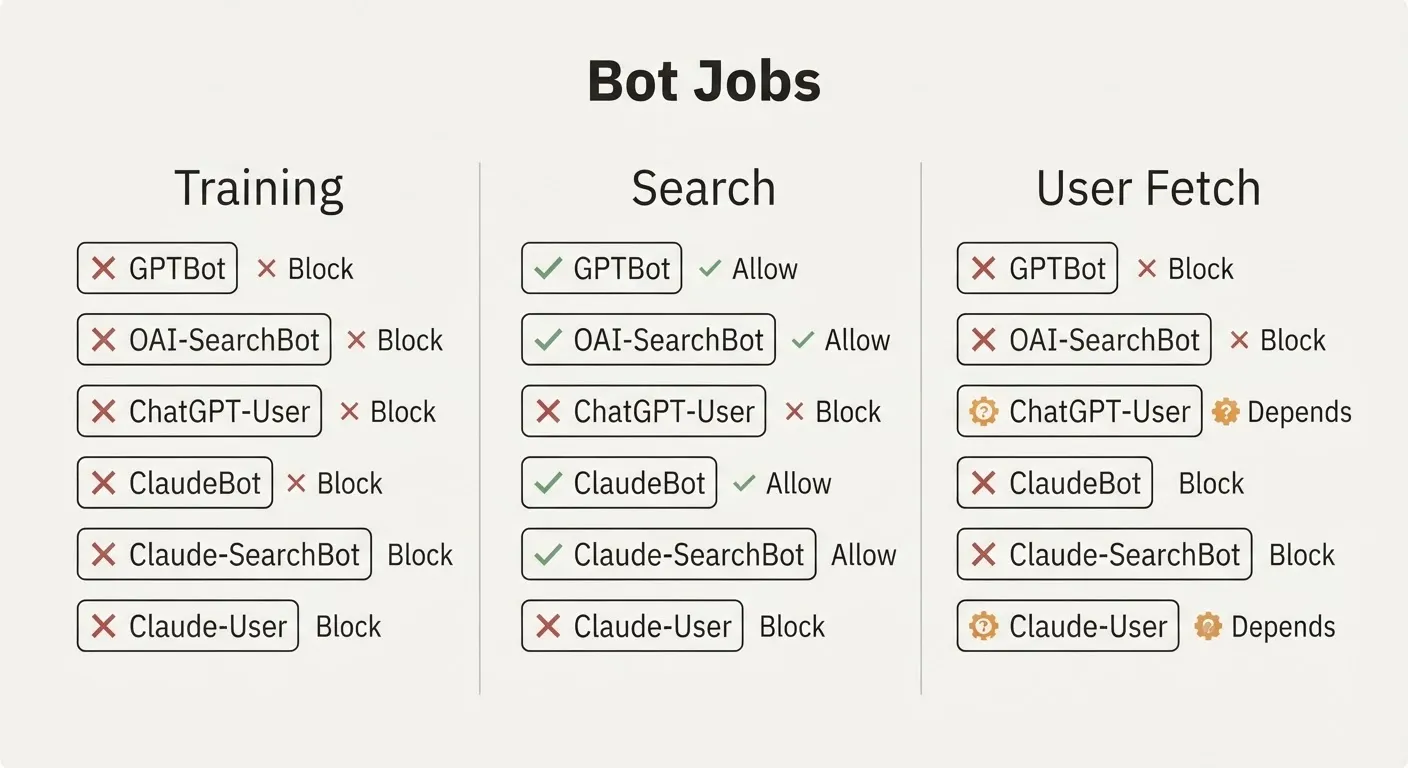
 So if one switch is the wrong model, what is the right one? Split bots by job.
The useful categories are simple:
- Training bots collect pages for model training
- Search bots build or refresh an AI search index
- User fetch bots retrieve one page for one live question
- Each category needs its own rule in
robots.txt
That split matters because your policy choice is usually about one job, not all three. Many teams want out of training but still want to be found and quoted correctly.
Here are the actual names. OpenAI sends GPTBot for model training, OAI-SearchBot to build the index behind ChatGPT search, and ChatGPT-User when a person has asked ChatGPT to go and read a page. Anthropic sends ClaudeBot for training, Claude-SearchBot for search indexing, and Claude-User when someone asks Claude a question and it goes to fetch your page to answer it.
That is six separate user-agent strings. Each one reads your rules on its own, so blocking one does nothing to the others. The Anthropic split is set out in Search Engine Land and Search Engine Journal. The OpenAI split is covered here.
The mistake is not technical. It is conceptual. Teams treat anything with "AI" in the name as the same crawler, and then write the wrong rule.
When Blocking Is the Right Answer
 Once you split bots by job, blocking becomes easier to defend. Sometimes the right answer really is no.
That is especially true for publishers:
- Ad-funded article pages can create crawl cost without paid visits back
- Heavy crawl traffic may hit infrastructure with little upside
- Training access may help a model more than the publisher
- Publisher logic can be valid for that business model
But that logic does not transfer automatically to a software product site. A docs page, pricing page, or feature page usually exists to be found, read, and compared.
Publishers behave accordingly. In one June 2026 sample of news sites with a readable robots.txt, 14 of 17 blocked at least one AI crawler. That is 82.4 percent. The server cost is real too. A Cloudflare and ETH Zurich study found over 90 percent of the pages large crawlers request are unique content rather than repeat requests, so caching does not reduce what the crawl costs you.
So yes, block when the business model supports it. Just do not copy publisher rules onto a software site without asking what you are protecting and what you are giving up.
Robots.txt Best Practices Start With One Browser Tab
 That leads to the practical step. Open your
 robots.txt in a browser tab and read it like a config file, not like policy copy.
Start with the lines that matter most:
- Find every
User-agententry first - Ignore company assumptions based on brand names
- Map each agent to training, search, or user fetch
- Check every
Disallow: /against the job you are stopping - Treat this as settings work, not a long audit program
Here is the midpoint skill this article promises: if you can label the bot by job, you can decide the rule. If you cannot label it, do not block it yet.
For a two-to-ten person software team, that is the only sustainable method. Nobody owns marketing, but somebody can still read six lines of config and make a correct call in ten minutes.
The useful move is not to manage AI traffic. It is to read the names, work out the jobs, and set the rules once.
There is a second place to look, and most people miss it. A rule at your CDN overrides the file and does not show up in it. So check Cloudflare, or whatever else sits in front of your site, separately.
If you find no AI rules at all, that is a finding too. In one Q3 2026 crawl, 84.2 percent of sites had no AI crawler policy of their own. Whatever applies to them came from a host, a CDN or a plugin default. Nobody on the team chose it.
Write The Rule Against The Job
 Now for the part most articles skip. The trade-off between blocking training and keeping AI search visibility is false.
Write rules against jobs, not companies:
- Block training bots if you do not want model training
- Allow search bots if discovery still matters
- Allow user fetch bots if answer accuracy matters
- Split GPT and Claude by training, search, and user fetch
A practical starting pattern looks like this:
User-agent: GPTBot
Disallow: /

User-agent: OAI-SearchBot
Allow: /

User-agent: ChatGPT-User
Allow: /

User-agent: ClaudeBot
Disallow: /

User-agent: Claude-SearchBot
Allow: /

User-agent: Claude-User
Allow: /
This is the core method. You can block GPTBot and keep OAI-SearchBot. You can block ClaudeBot and keep Claude-SearchBot plus Claude-User.
That is why "block AI bots" is the wrong control. It hides the job split that your business actually cares about.
How do I allow AI bots but block scrapers?
You do it by defining allowed and blocked by job. Allow search and live user fetch if you want discovery and accurate answers, and block training crawlers if you do not want your pages used for model training.
Do not call live user fetches scraping. A request from Claude-User or ChatGPT-User is usually one page being fetched because a real person asked about you right now. Blocking that does not improve security by itself. It just means the answer may be assembled without your page.
Anthropic documents the consequence plainly. Block Claude-User and it cannot fetch your pages in response to user queries. Block Claude-SearchBot and your content is not indexed for Claude's search results. Those are two different losses, and you get to choose them separately.
One caveat worth knowing. ChatGPT-User requests are triggered by a person, so robots.txt rules may not apply to them in the same way. A rule at your CDN still can. Editing the file is not the whole picture.
Why This Is Worth Doing This Fortnight
 Once you have the right model, the timing question gets simpler too. This is not a forever audit. It is a settings task with a few revisit triggers.
Use this review rhythm:
- Check once now and set rules properly
- Check after host changes or CDN moves
- Check after vendor defaults change
- Do not build a monitoring ritual for a five-minute config task
This is where newer platform categories help. When a vendor separates Search, Agent, and Training by job, the control gets closer to the decision you actually need to make.
Here is why the timing matters. The argument that started the whole blocking wave was a ratio. How many pages a bot takes for every visitor it sends back. That ratio has moved a long way in a short time. Third parties reading Cloudflare Radar put Anthropic near 4,580 pages per referral in June 2026, and 1,782 in the trailing 28 days to 1 August 2026. OpenAI went from 848 to 233 over the same stretch. Google sat near 5 to 1 throughout. The stated reason is not that the bots crawl less. It is that the platforms started sending traffic back.
A ratio moves. A block does not. It sits at whatever it was set to on the day somebody read a worrying article.
The controls are moving too. Cloudflare announced on 1 July 2026 that it now sorts AI crawlers into three declared use cases, Search, Agent and Training, and that "the defaults will be enforced by the most restrictive applicable rules". The same post notes that "multi-purpose crawlers such as Googlebot, Applebot, and BingBot will be blocked by customers who have selected to block Training".
Be careful with how that change is being reported. On 15 September 2026 the new defaults apply to new domains onboarding to Cloudflare, and on pages that display ads Training and Agent are blocked by default while Search stays allowed. Existing customers can opt out in Security settings before then. It is not true that every site gets blocked on the 15th. It is simply a good reason to go and look at a setting nobody owns.
Matthew Prince, Cloudflare's chief executive, put the reasoning this way in a press release dated 1 July 2026: "Now that the majority of traffic on the Internet is non-human, we must go further and act faster so that a sustainable ecosystem can emerge."
The point is not to optimise for bots. The point is to stop freezing a bad rule in place while the platforms and the buyers move around it.
Test the New Configuration
After you change the file, do not trust the rule until you test it. A robots.txt line is only real when fetch behavior matches your intent.
Run a simple check:
- Request allowed pages and confirm they return normally
- Watch server logs for allowed and blocked agents
- Confirm search bots still reach public pages
- Confirm user fetch bots can retrieve the exact asked-for page
- Look for silent 403s on live user fetches
This last point is easy to miss. If a live user fetch gets blocked, nothing dramatic happens on your site. You just never see your page included in the answer the buyer received.
This is not hypothetical. There are reports of AI-training blocks returning HTTP 403 to Googlebot and Bingbot when they try to fetch a sitemap, and of the sitemap becoming reachable again as soon as the training block is switched off. Nothing on your site tells you this is happening. You have to go and look.
What is the difference between AI training and AI search bots?
Training bots collect content to improve a model over time. AI search bots index or refresh pages so users can find them in an AI search product.
Those are different jobs with different business consequences. Training is a policy choice. Search is a discovery channel. When you block both with one rule, you are making two decisions at once without meaning to.
Your Rule for the Next Edit
 You started with a false choice. "Block AI bots" sounds safe, but it collapses three jobs into one label and pushes small teams into the wrong setting. The better rule is the one you can explain out loud while looking at your own
 robots.txt: decide on training, decide on search, decide on live user fetch, and write each rule against that job.
Key takeaways:
- Block training if you do not want model training on your pages
- Keep search open if you want AI discovery
- Keep user fetch open if you want accurate live answers
- Recheck only on triggers, not on a fixed calendar
Open your robots.txt today and label every AI-related user-agent by job. If you see a blanket AI block, replace it with specific lines for training, search, and user fetch.
If your site sells ad impressions on article pages, blocking some crawlers may still be right. If you run a software product site, do not inherit publisher logic without thinking about it. Not every bot touching your site is doing the same job.
One last rule, and it is the one to keep. Never write a rule against a company. Write it against a job. Companies keep adding bots, and a rule aimed at a company name silently absorbs every new one they ship, including the next one that would have brought you a customer. A rule aimed at a job stays true.
Your next edit should be boring. Six lines, clear intent, no vague dashboard toggle.
Or there is another way, and Scout7 runs the whole loop from one command.
Frequently asked questions
Should I block all AI bots in robots.txt?
Usually no. This article argues that training, search, and live user fetch are different jobs, so one blanket block often shuts out useful access. For a software site, blocking training while allowing search and user fetch is often the more accurate policy.
Which bots should a small software team usually allow?
If discovery and accurate answers matter, allow search bots and user fetch bots. In the examples here, that means bots like OAI-SearchBot, ChatGPT-User, Claude-SearchBot, and Claude-User. If you do not want model training, block the training bots separately.
Is robots.txt the only place I need to check?
No. The article warns that a CDN or host-level rule can override what your robots.txt file says and may not appear in the file at all. That is why you should check Cloudflare or any other layer sitting in front of your site.
How do I know whether my new rules work?
Test after you change them. Request allowed pages, watch server logs for allowed and blocked agents, and confirm search bots and live user fetch bots can still reach public pages. Silent 403s are the failure mode to watch for because they can block access without any obvious on-site error.
References
- Cloudflare, "Your site, your rules: new AI traffic options for all customers", 1 July 2026
- Cloudflare press release, "Your Content, Your Rules", 1 July 2026, including the Matthew Prince quote
- Search Engine Land, "Anthropic clarifies how Claude bots crawl sites and how to block them"
- Search Engine Journal, "Anthropic's Claude Bots Make Robots.txt Decisions More Granular"
- Search Engine Journal, report that Cloudflare AI bot blocking prevents Googlebot from indexing sites
- GeoScout, "OAI-SearchBot, GPTBot, and robots.txt: How to Control AI Access to Your Site"
- Technology Checker, robots.txt analysis across Cloudflare's network
- US Tech Automations, "Do News Sites Block AI Crawlers?"
- Nobori, "Crawl-to-Refer Ratio 2026", reading Cloudflare Radar
- SEOmator, "GEO Data Report 2026: Which AI Crawlers Take the Most and Give the Least?"