



How much to spend on marketing as an ecommerce brand
Set your first ecommerce marketing budget from what one order leaves you: a fixed monthly amount from savings you can afford to lose, free product for small creators first, a daily log, a Sunday cost-per-order check, and a capped first ad test once three conditions are true.
ByDinesh BypillaReviewed byMurali SidLast checked 18 min read
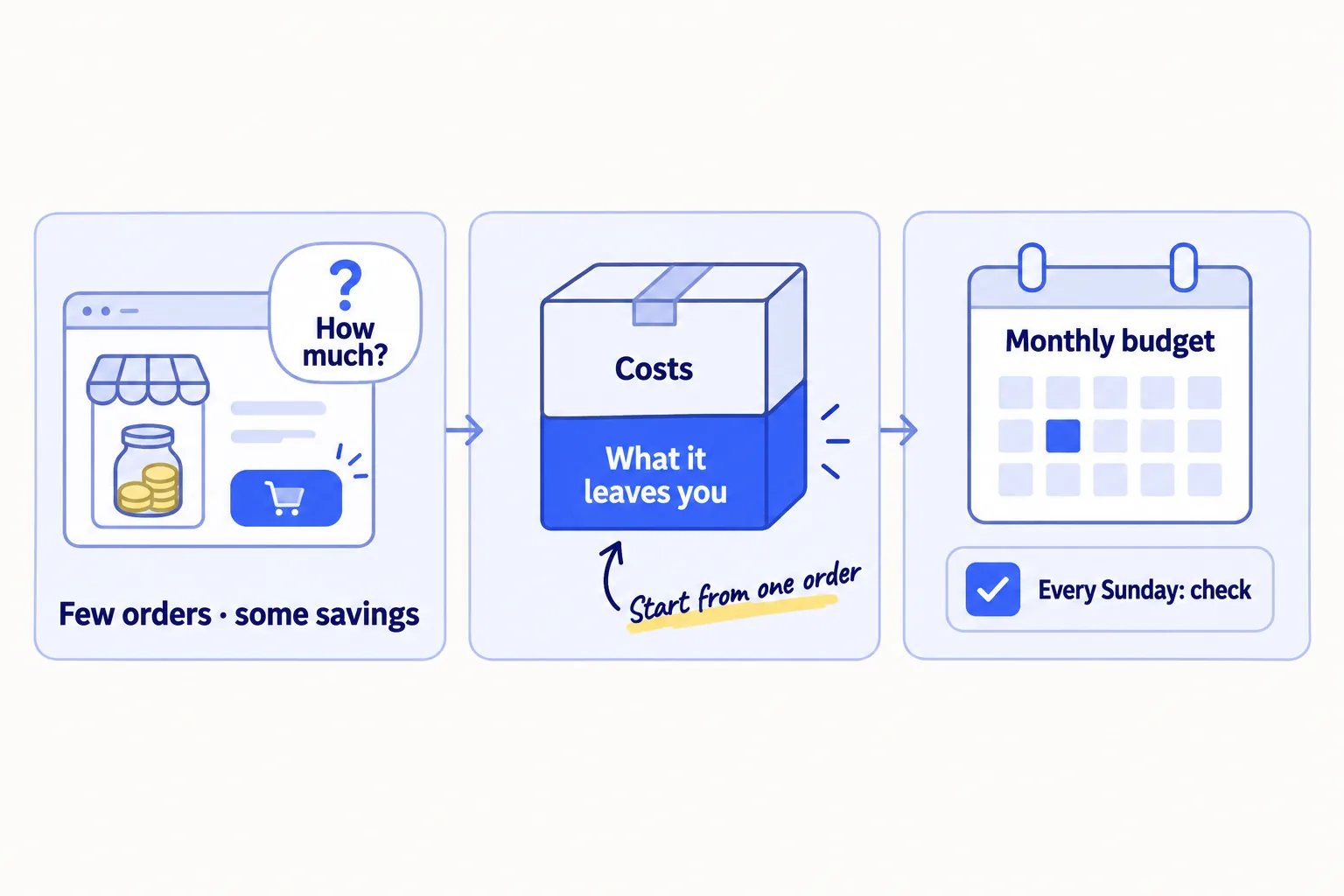
Your store is live, the first orders came from people you know, and you are not sure how much money to put into marketing. Most answers to how much to spend on marketing as an ecommerce brand say "7 to 20% of revenue", which is almost nothing when you barely have revenue. So founders guess, put $150 into ads, get one sale, and do not know whether to spend more or stop.
Do these three things
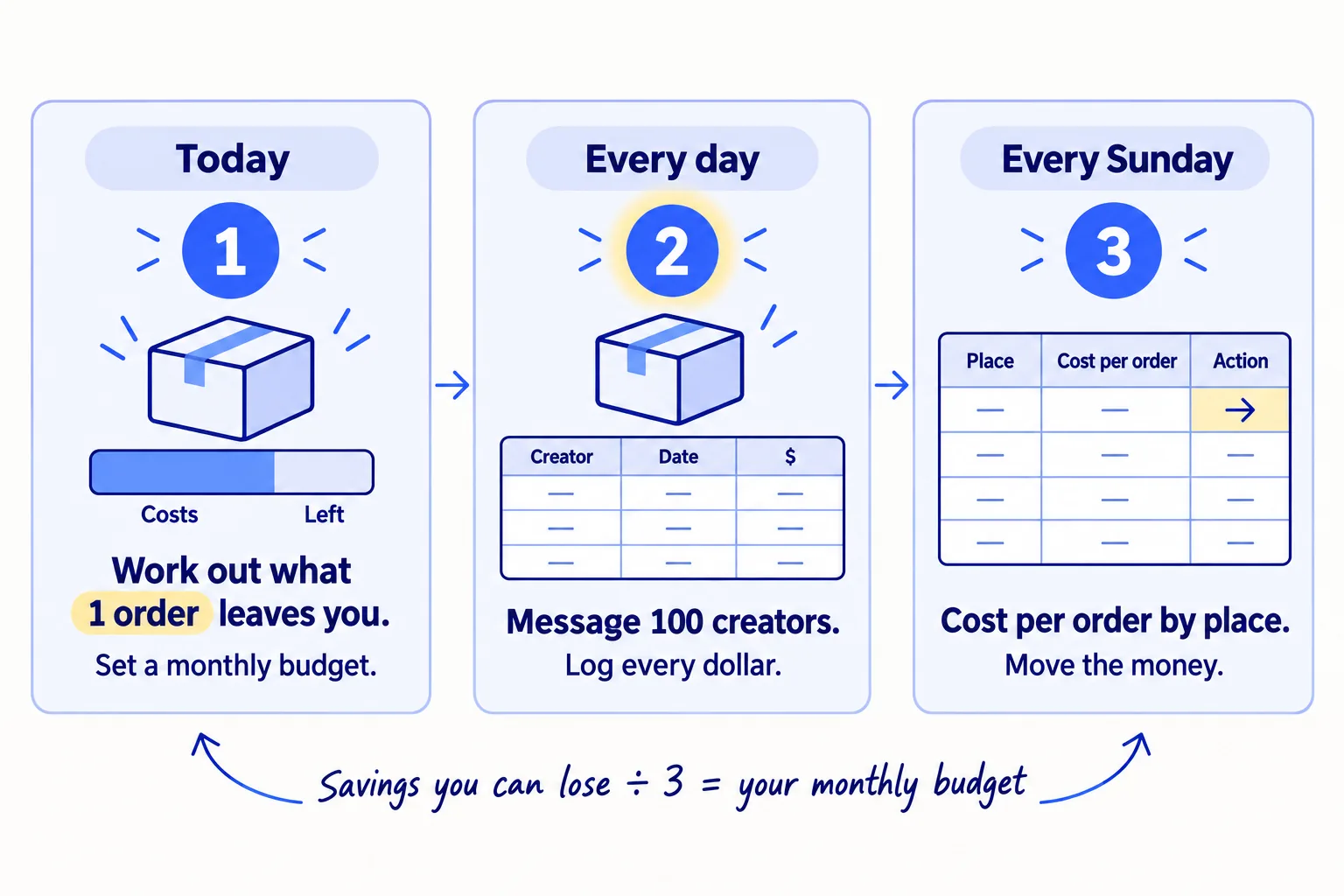
About 1 hour today, 15 minutes a day, and 30 minutes every Sunday. Judge creators after 30 packages and an ad after it spends 3 times your break-even cost per order, not after one week.
Show the three actions in fullHide the full list
- Today: work out what one order leaves yousoon after product, packing, shipping and fees. That is the most you can pay to get one order. Then set a monthly budget: the cash you can afford to lose in 3 months, divided by 3.
- Every day: message 100 small creatorssoon and send free product to at least 1 who says yes, put the ad share of your budget aside, and log every dollar you spend and where every order came fromsoon.
- Every Sunday: divide each place's spend by its orders. Give next week's money to the cheapest place, and start paid adssoon only when three things are true.
Get help doing these
ChatGPT or Claude reads this guide and works through it with you.
1. Work out what one order leaves you and the most you can pay to get one
Take the price of your usual order and subtract every cost that comes with it: the product, the packing, the shipping you pay, the payment fee and any import duty. What is left is the most you can spend on marketing to get one order and not lose money. This is your break-even cost per order, and every other step uses it.
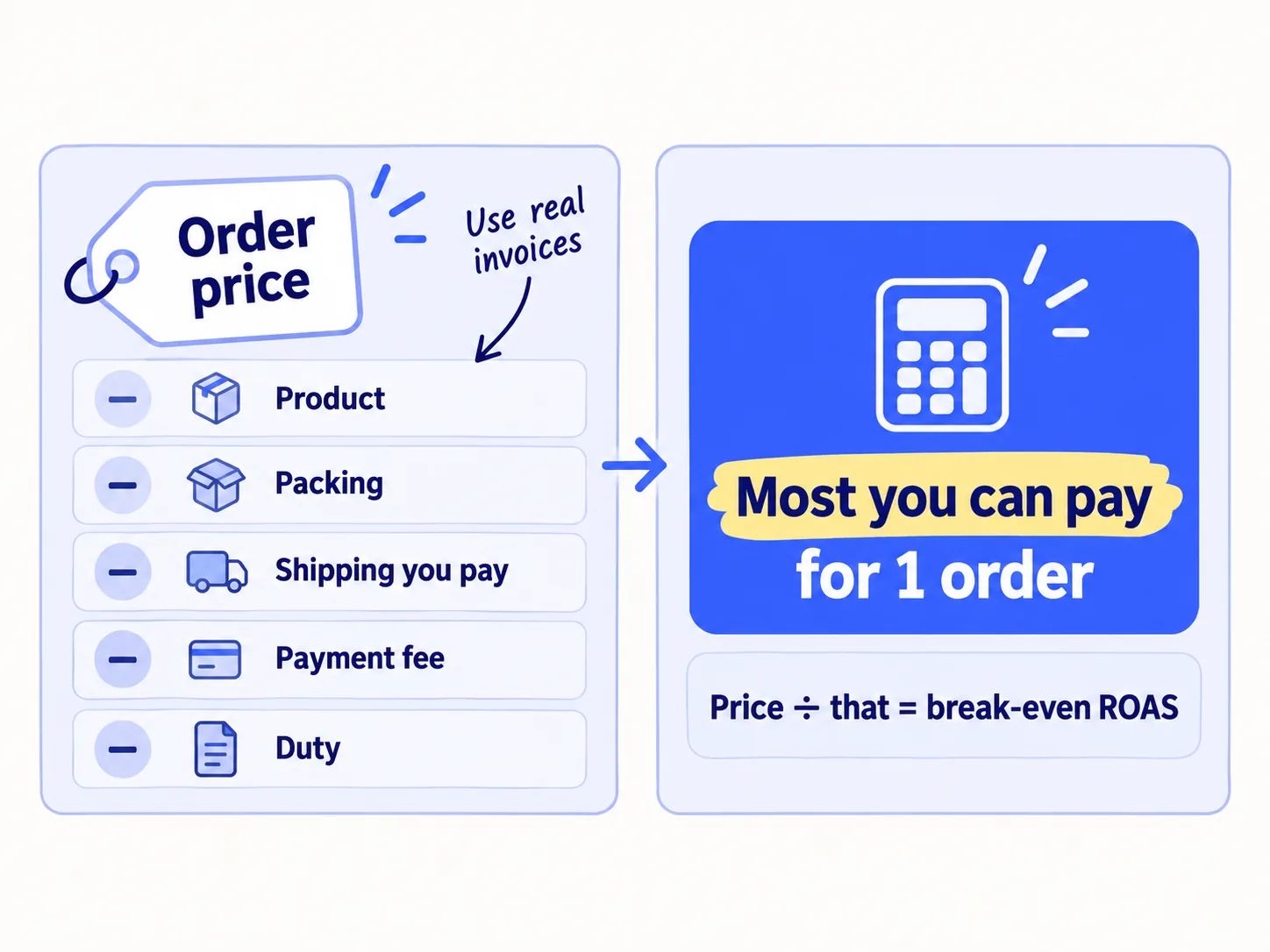
Use your usual order, not your cheapest product. If most people buy a bundle, use the bundle. Take each cost from a real invoice, not a guess:
Usual order price: $[price]Minus product cost (what you paid the maker, per unit sold): $[X]
Minus packing (box, filler, insert): $[X]
Minus shipping you pay (if shipping is free to the buyer, all of it): $[X]
Minus payment fee (Shopify Payments, US, Basic plan: 2.9% of the price + $0.30): $[X]
Minus import duty per order, if you import: $[X]
Minus returns and samples (5% of the price is a fair start): $[X]= What one order leaves you: $[left]
This is your break-even cost per order: the most you can pay to get one order.Break-even ROAS = $[price] ÷ $[left]
What you pay to get one order is your customer acquisition costsoon, or CAC. Keep it at or under this number.
ROAS, return on ad spend, is the sales an ad brings divided by what the ad cost. Your break-even ROAS is the lowest ROAS at which ads do not lose you money. Anything under it loses money on every order, even when the ad dashboard looks good.
If you import, check duty now. Since 29 August 2025, goods of $800 or less shipped into the US no longer come in duty-free, from any country. A June 2026 rule keeps that in place. If your costs are from before then, your order leaves you less than you think.
If you sell on Amazon or TikTok Shop: take the fees from your payout report instead of 2.9% + 30¢, and include the marketplace's own fees per order.
Give the template and your invoices to ChatGPT or Claudesoon and ask it to build the sheet with the formulas. Check each number it uses against the invoice.
- Tool: Google Sheets, your supplier invoices and your Shopify payouts.
- Time: 30 minutes.
- You will have: three numbers written down: what one order leaves you, your break-even cost per order (the same number) and your break-even ROAS.
- It worked if: every line has a real number from an invoice or a payout, and none says "about".
- Common mistake: counting only the product cost. That is gross margin, and it makes ads look far cheaper than they are. Shipping, packing and fees often take more than the product.
If what one order leaves you is under $15, fix the price or the order size before you spend on marketing: price your product again, or raise your average ordersoon with a bundle.
See it done: What one Ferns & Rinse order leaves
Ferns & Rinse is a made-up plant-based haircare brand with its own Shopify store. It sells one shampoo and one conditioner at $28 each, or both for $49.
Store live for 2 months. About 400 visits a month and 9 orders, most from friends and family. $150 of Meta ads brought 1 sale. Most orders are the $49 pair.
One $49 order
| Line | Amount |
|---|---|
| Price of the pair | $49.00 |
| Product (both bottles, delivered to them) | −$12.00 |
| Box and insert | −$1.20 |
| Shipping label (free to the buyer over $45) | −$8.90 |
| Payment fee (2.9% + $0.30) | −$1.72 |
| Returns and samples (5% of the price) | −$2.45 |
| What one order leaves | $22.73 |
| Break-even ROAS ($49 ÷ $22.73) | 2.2 |
Why it works: The founders now know the most they can pay for an order, and that their $150 of ads cost about 6.6 times that for one sale.
2. Set your monthly marketing budget from your savings, not from a percentage of sales
Decide how much cash you can afford to lose over the next 3 months without touching the money for stock, rent or your next production run. Divide it by 3. That is your monthly marketing budget, and it stays the same for 3 months.
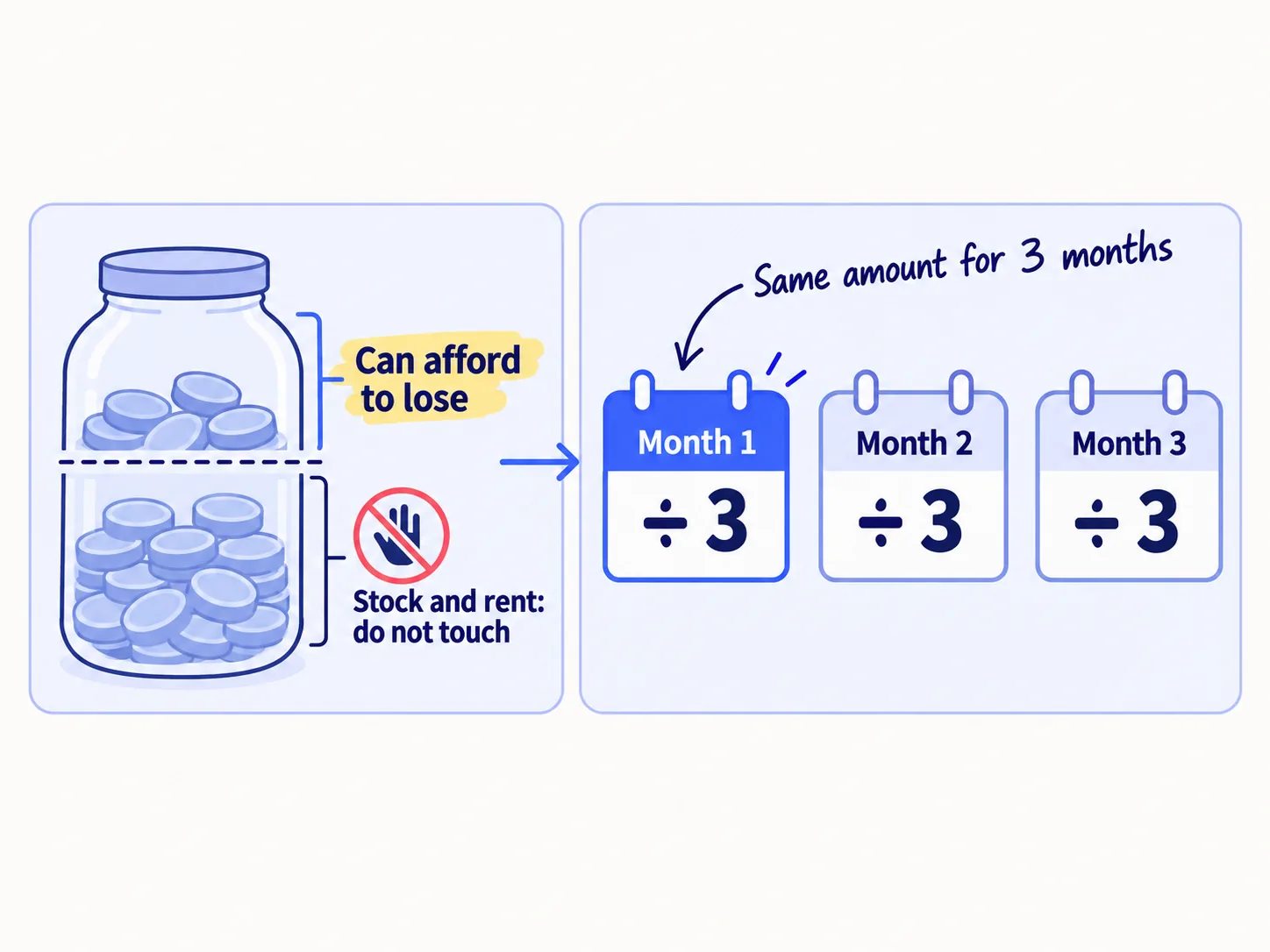
A percentage of sales does not work yet. Most budget advice says 7 to 20% of revenue. That rule comes from companies that already sell: Gartner's 2026 survey found marketing budgets average 7.8% of revenue, but most of the companies asked make over $1 billion a year. If your store sells $500 a month, 10% is $50. That pays for about two creator packages.
So in the first months, the budget is savings you spend on purpose. You expect to lose most of it. What you are buying is reviewssoon, videos from real buyerssoon and your first orders from people who do not know you. Those make every later dollar work harder.
Use these rules to pick the number:
- Never use money you need for stock. A store that sells out and cannot restock loses the orders marketing brought.
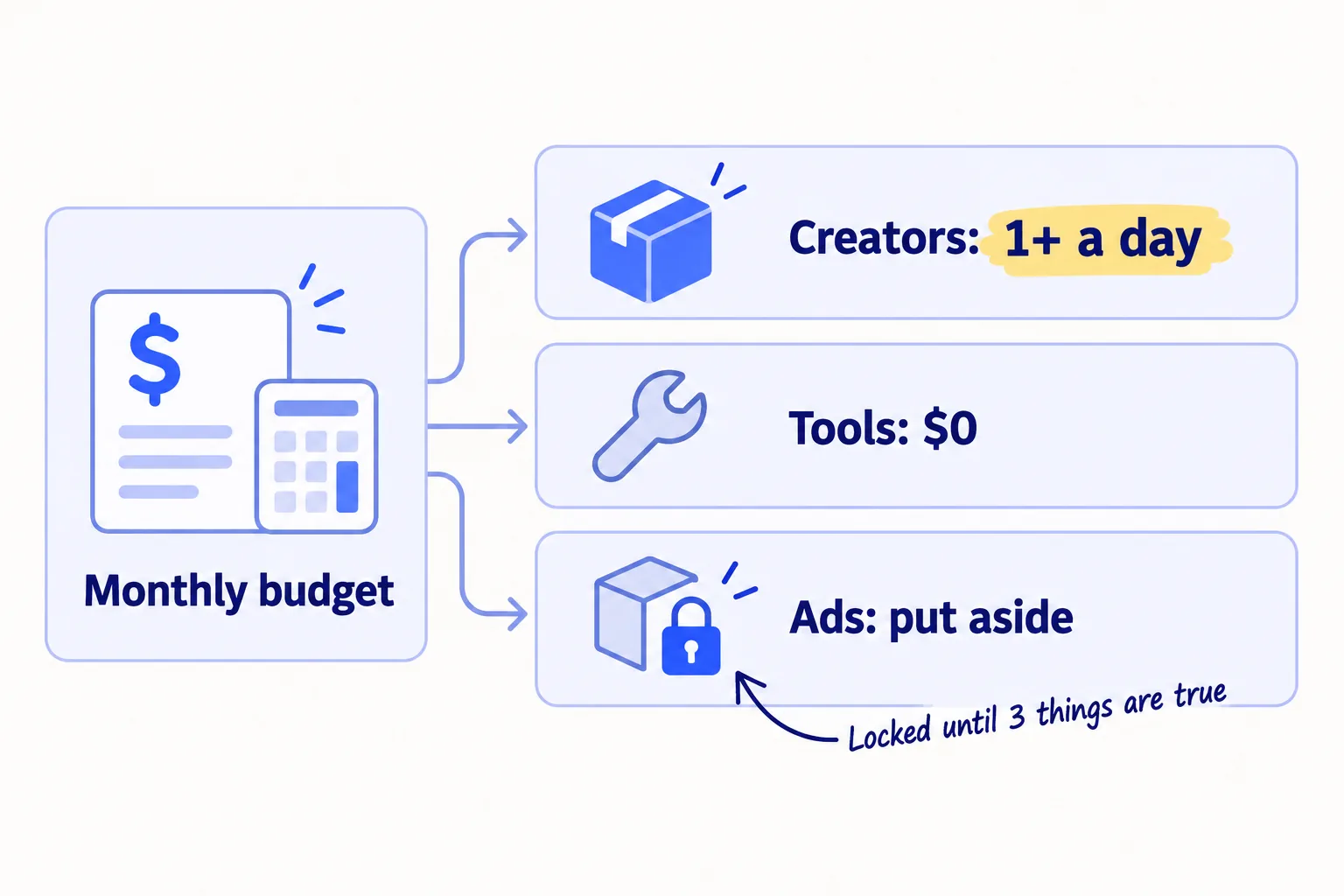
- Under $300 a month: spend it all on free product for creators and postage. Put nothing aside for ads.
- $300 or more a month: keep at least $200 a month aside for ads, and spend the rest on creators.
- Your time is part of the budget. The free work in how to market a D2C brand (a product page strangers trustsoon, reviews, short videossoon, free Google listings and AI chatssoon) costs hours, not dollars. Do it first. Fit it into your week before you add money.
Switch to a budget based on sales only once most orders come from people who do not know you, for 3 months in a row. Then the budget is simple: the orders you want next month, times your break-even cost per order.
- Tool: your bank balance and the sheet from step 1.
- Time: 20 minutes.
- You will have: one monthly dollar figure, written at the top of the sheet, with the date it ends (3 months from today).
- It worked if: you could lose all of it and still pay for your next stock order.
- Common mistake: spending a random amount each week, or raising the budget after one good day. Keep it fixed for 3 months so you can compare weeks.
See it done: Ferns & Rinse's monthly budget
Budget: $3,000 they can lose over 3 months ÷ 3 = $1,000 a month
| Line | Per month |
|---|---|
| Creator packages: about 36 a month (8 a week) at $22 each (the pair, boxed and shipped) | $800 |
| Tools (Google Sheets, Judge.me free plan, Shopify discount codes) | $0 |
| Put aside for ads, not spent yet | $200 |
| Total | $1,000 |
Why it works: The number comes from savings they can lose, and each line is a dollar figure they can check every Sunday.
3. Spend it on free product for creators first, and put the ad money aside
Put the first money into free product for small creators who already post about your kind of product, at least 1 package a day. Messages cost nothing, so send 100 a day and ship to the ones who say yes, up to what the budget pays for. Move the ad share to a separate place on the day the budget starts, and do not spend it until step 6 says so.
Free product is the cheapest way a new store can get strangers to see it and bring its first sales from people you do not know. One small creator costs you one package: the product, packing and postage. Compare that with what your first ads cost per order, if you ran any. A creator's video can also be reused on your product page. Find creatorssoon with 1,000 to 20,000 followers who posted about a product like yours in the last 30 days, and send each one the message from step 4 of how to market a D2C brand. AI drafts each message in about a minute from the creator's last video; you add the one line about what they posted.
Work out your count:
Cost of one package: product $[X] + packing $[X] + postage $[X] = $[package]Creator share of the budget: $[monthly budget] − $[ad share] − $[tools] = $[creator money]Packages a month: $[creator money] ÷ $[package] = [N]
Packages a day: [N] ÷ 30 = [at least 1]
If the count is under 1 a day, cut the tool line to $0 first. Then send a smaller size or a single product instead of a bundle. Keep the pace at 1 a day or more: 30 packages a month is the least that shows you whether creators work.
Give each creator their own discount codesoon so you can see which orders they bring. If you sell on TikTok Shopsoon, creators ask for free samples through its affiliate programsoon; count each sample as a package.
Keep free tools first. You need no paid app to run this: Google Sheets for the log, Judge.me's free plansoon for reviews, Shopify's free abandoned checkout email to win back cartssoon, and Google's free product listingssoon. Pay for a tool only when a free one stops you doing a step.
- Tool: Google Sheets, Instagram and TikTok search, and Shopify discount codes.
- Time: 20 minutes to split the budget, then about 1 hour a day for 100 creator messages (AI drafts each in about a minute; you add one line) and 10 minutes to pack and send.
- You will have: a split with a dollar figure on every line, the ad share moved aside, and your first package sent today.
- It worked if: the lines add up to your budget, and the creator line pays for at least 30 packages a month.
- Common mistake: spending the ad share on a $5-a-day ad "to see what happens". That buys clicks from strangers who land on a store with no reviews. Keep it for step 6.
4. Log every dollar and where every order came from, every day
Every day, write down each dollar you spent on marketing and each new order, with where the order came from. Without the source, the Sunday review in step 5 is a guess.
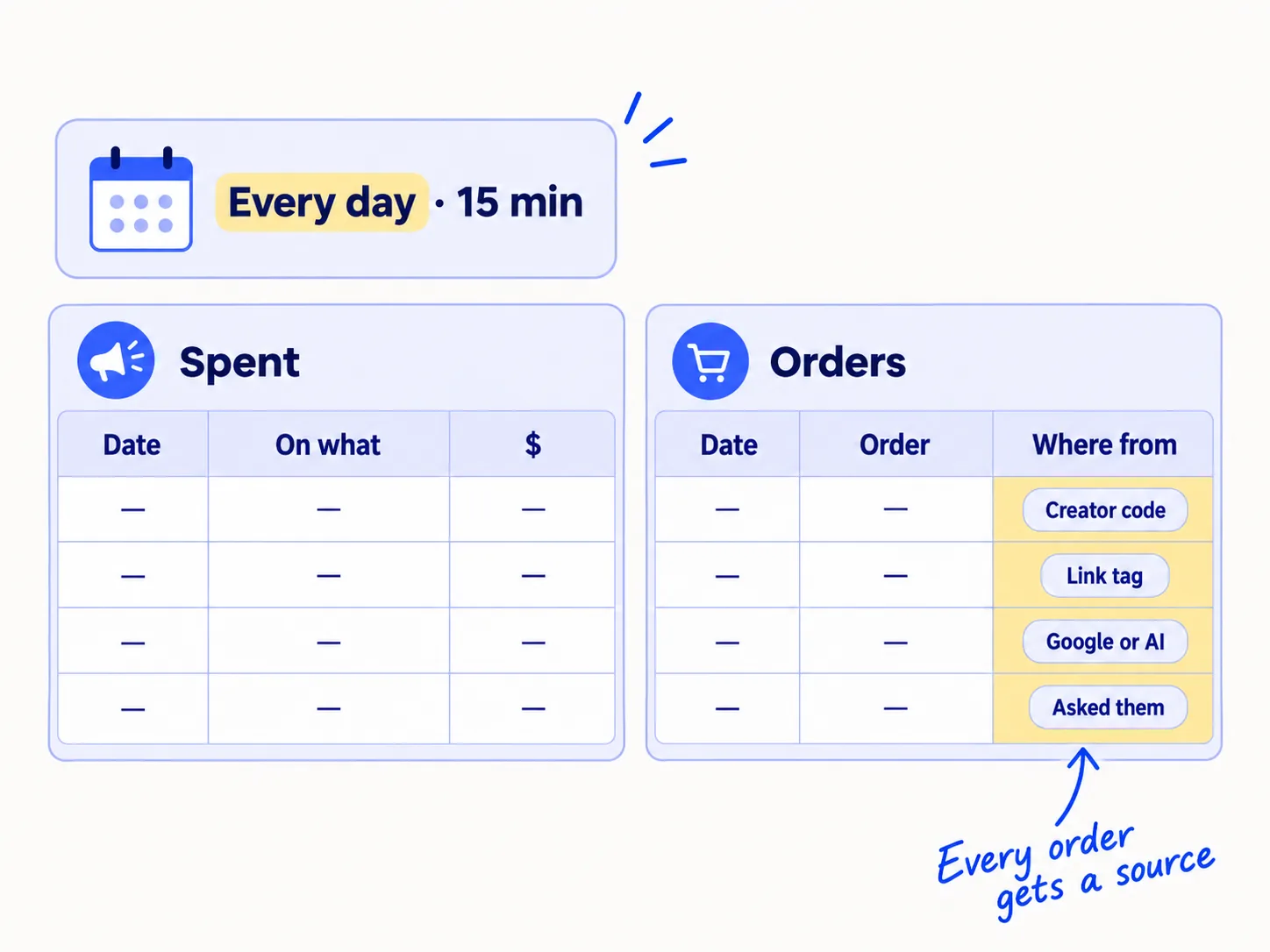
Get the source for each order in this order:
- A creator code used at checkout.
- A tagged link. Add UTM parameters to every link you post or pay for, then read Shopify's Sessions by referrer report.
- Ask the buyer. Add "Where did you hear about us?" to your thank-you email or post-purchase page. This is self-reported attribution, and at a few orders a day it is often the most accurate source you have.
Count orders in Shopify, not in the ad platform. Ad platforms can count the same order more than once, or count an order that would have come anyway. Founders often say "Meta says 4x ROAS, but the bank account says otherwise". Your Shopify orders and your bank balance are the numbers that pay the bills.
Spent: Date | On what (creator package, ad, tool, other) | $ | Which creator or adOrders: Date | Order number | $ | Where from (creator code / tagged link / Google or AI / asked them / people you know)
- Tool: Google Sheets and your Shopify admin.
- Time: 15 minutes a day.
- You will have: one row for every dollar spent and every order, with a source.
- It worked if: at the end of each day, every new order has a source, and the money column matches your bank and card statements.
- Common mistake: leaving orders from friends and family in with the rest. Mark them "people you know" and leave them out of cost per order. They would have bought anyway.
5. Every Sunday, compare each place's cost per order with your number
Every Sunday, divide what each place has cost so far by the orders it brought from people who do not know you. That is its cost per order. Give next week's money to the cheapest place, and judge each place by volume, not by the week.
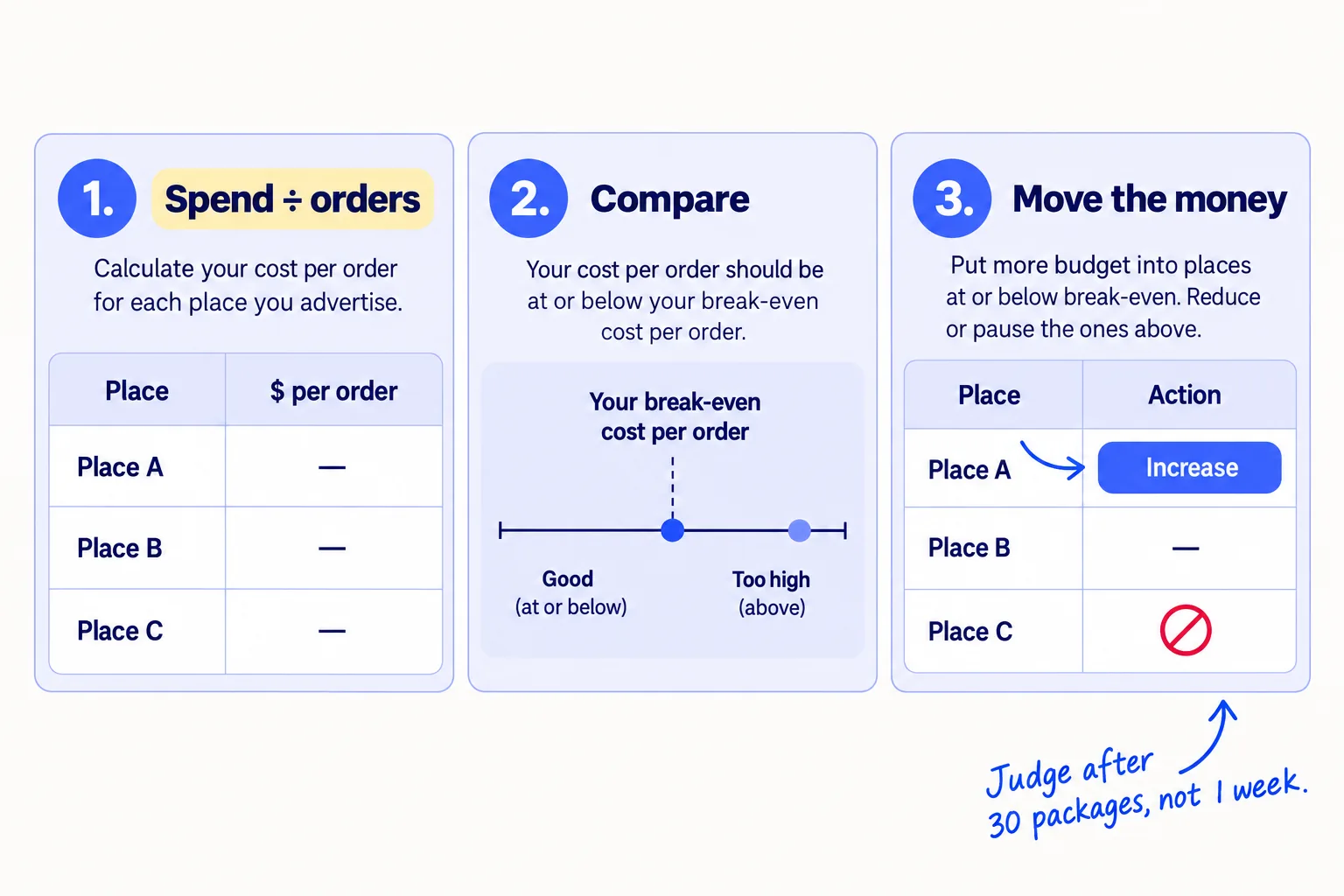
Use these rules. Each one waits for enough tries, because 5 packages or 2 days of ads tell you nothing.
- Creators, after 30 packages: if fewer than 3 creators posted, change who you pick, not the product. If they posted but no one used a code, look at your product pagesoon before you send more.
- Any place with a cost per order: give next week's money to the cheapest one. In the first 3 months, creator orders will usually cost more than your break-even cost. That is expected while you buy reviews and videos, and it is why the money is capped.
- All marketing together, at the end of month 3: divide all marketing spend by all orders from strangers. If it is more than 3 times your break-even cost per order, stop spending savings on marketing. Fix why people are not buying first: the product page, the price or who it is for.
- Also check the whole store once a month: total sales divided by total marketing spend. Some stores call this MER (marketing efficiency ratio). If it is under your break-even ROAS, marketing costs more than it earns, whatever any one platform says.
Once a month, put these numbers into a monthly marketing reviewsoon. When orders come back from the same people, repeat purchasessoon raise what a buyer is worth over time, their lifetime value. Until you have 60 days of reorders to count, use only the first order. When one place clearly brings the cheapest orders, choose the next channel to add.
- Tool: Google Sheets.
- Time: 30 minutes each Sunday.
- You will have: each place's cost per order, and next week's split written down.
- It worked if: you can name the cheapest place per order, and the budget lines for next week still add up to your monthly figure.
- Common mistake: cutting creators after one quiet week, or moving all the money to ads after one good creator post. Judge by count: 30 packages, or 3 times your break-even cost per order in ad spend.
See it done: Ferns & Rinse's review after 4 weeks
Weeks 1 to 4
| Place | Spent | Orders from strangers | Cost per order |
|---|---|---|---|
| Creator packages (20 sent at $22) | $440 | 4 | $110 |
| Short videos | $0 | 1 | $0 |
| Google or AI | $0 | 1 | $0 |
| All places | $440 | 6 | $73 |
The decision: $73 per order is about 3.2 times their $22.73 break-even cost. The 3-times line is checked at month 3, and orders from strangers rose from 0 in week 1 to 3 in week 4, so they keep going. Creators are the only paid place that brings orders, so they move to 8 packages a week, as in their budget. The $200 a month for ads stays aside.
Why it works: They compare places by cost per order, and they know which costs are expected to be high while they collect reviews and videos.
6. Turn on ads only when three things are true, and cap the first test
Start paid ads only when you have at least 10 reviews, at least 1 order for every 100 visits from people who do not know you, and one video, yours or a creator's, that people shared or commented on without being paid. Then run one 14-day test capped at 10 times your break-even cost per order, paid for by the money you put aside, with a stop rule in dollars.
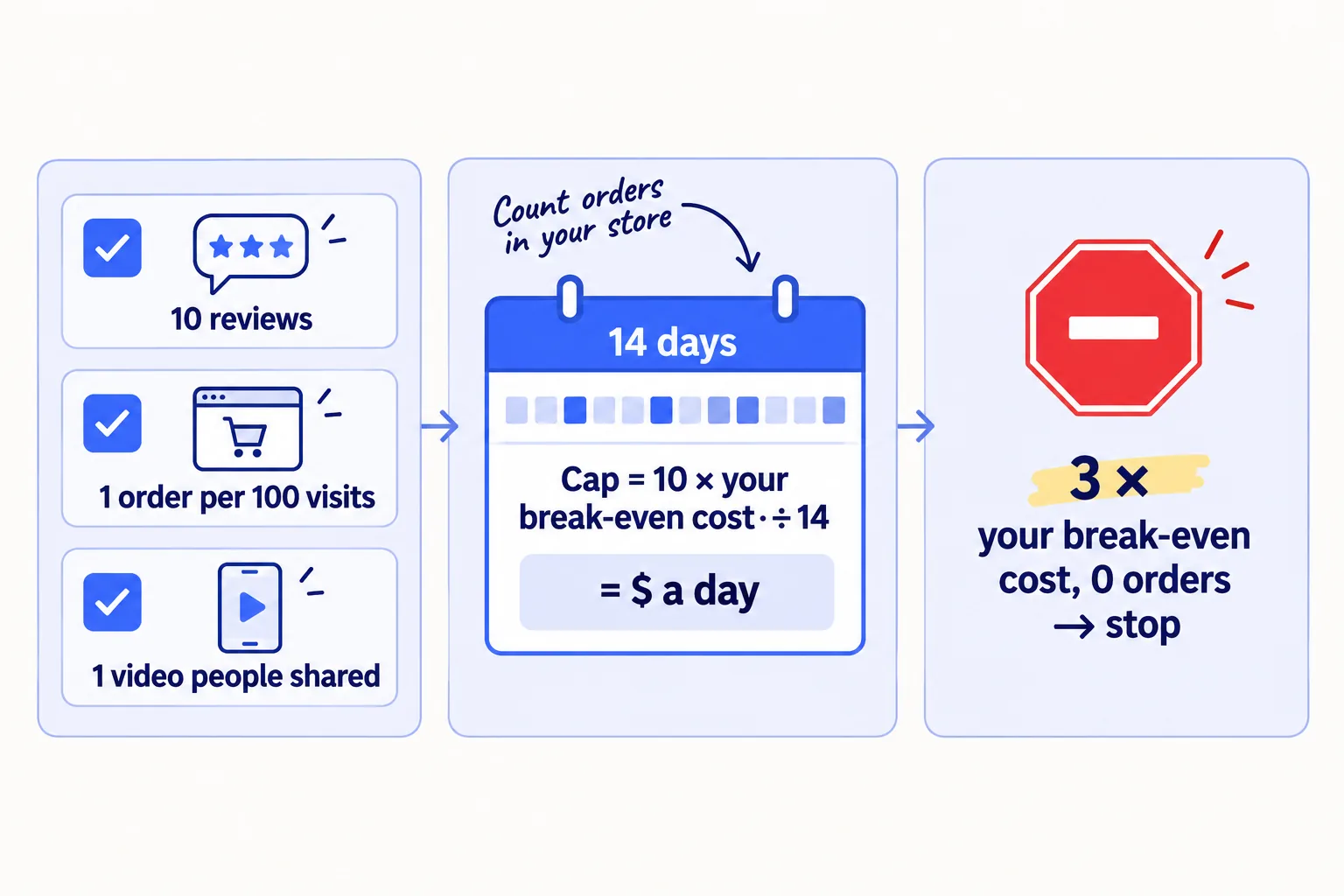
These are the same three conditions as in how to market a D2C brand. Before they are true, ads send strangers to a page and a message nobody has tested.
The arithmetic shows why small tests fail. Meta's ad system needs about 50 optimisation events a week in one ad set to finish its learning phase; with fewer, Meta marks the ad set "Learning limited". If a purchase costs you your break-even cost per order, 50 purchases a week at $23 is $1,150 a week. A new store cannot fund that, so a small budget will run in "Learning limited". Meta says that status is not a penalty. It does mean you judge the test on your own log, not on Meta's forecast.
Set up the test like this:
- 1
Set the cap and the daily budget
Test cap = 10 × your break-even cost per order, and never more than the money you put aside. Daily budget = the cap ÷ 14. Run it for 14 days, and stop it yourself on day 14. Do not add money in the middle.
- 2
Start with what already worked
Use the video people shared as the ad creativesoon. Build it as in Meta ads for a Shopify storesoon, and test a few versionssoon of the first 2 seconds, not new products. Choose purchases as the goal, not traffic. Tag the ad's link with UTM parameters.
- 3
Set the stop rule in dollars
Stop any ad that has spent 3 times your break-even cost per order with no order in Shopify. Keep any ad whose cost per order, counted in Shopify, is at or under your break-even cost.
At the end of the 14 days, compare the ads' cost per order with your creators' in the Sunday sheet. If ads came in at or under your break-even cost, move more of next month's budget to ads, one step at a time. If not, stop, put the money back into creators, and read why ads get clicks but no salessoon. For a wider view of how much to spend on adssoon, and Google Shopping or Performance Maxsoon, use the same break-even cost. Leave retargeting adssoon for later: at a few hundred visits a month, there are very few people to show them to.
If you sell on Amazon: the same stop rule applies to Amazon adssoon. Use what one order leaves you after Amazon's fees as your break-even cost.
- Tool: Meta Ads Manager, conversion trackingsoon on your store, UTM links and your sheet.
- Time: 2 hours to set up, then 10 minutes a day in the log.
- You will have: a 14-day test with a clear answer: ads at or under your break-even cost per order, or not.
- It worked if: every ad order in the log is an order you can see in Shopify, and the test stopped at its cap, not above it.
- Common mistake: raising the budget because Meta shows a good ROAS. Check it against your Shopify orders and your break-even ROAS first.
See it done: Ferns & Rinse's first ad test, planned
When all three conditions are true
| Line | Amount |
|---|---|
| Money put aside (2 months × $200) | $400 |
| Test cap (10 × $22.73), under the $400 put aside | $227 |
| Daily budget ($227 ÷ 14) | about $16 |
| Stop any ad at (3 × $22.73) with no order | $68 |
| Keep an ad if its cost per order is at or under | $22.73 |
Why it works: Every number comes from their own order and their own savings, so they know when to stop before they start.
Where Scout7 helps
Scout7 speeds up step 6, in the Scout7 app. It does not set your budget or keep your log.
Step 6. Scout7 drafts ad campaigns with the audience, estimated reach and a daily budget, for Google, Meta, LinkedIn and Reddit. You set the objective and the number you are willing to spend: use the daily budget from step 6. Once a campaign runs, Scout7 reports spend, impressions, clicks and click-through rate, and every 12 hours proposes actions: which creative to stop, which campaign to cut, and where more budget would earn more. You approve or reject each one. Nothing launches and no money is spent without your approval. Campaigns run in the Scout7 app, not from a chat with an AI assistant.
Your ecommerce marketing budget checklist for the next 3 months
0 of 11 done
Work through this list with an AI assistant
It drafts the work and keeps track of what is done.
Frequently asked questions
- What percentage of revenue should an ecommerce store spend on marketing?
Most budget guides say 7 to 20% of revenue. That fits a store whose orders already come from strangers. Before that, a percentage of almost nothing is not a budget. Spend a fixed amount from savings you can afford to lose over 3 months, and judge it by cost per order. Switch to a sales-based budget: the orders you want times your break-even cost per ordersoon.
- How much should I spend on Facebook ads per day as a new store?
Nothing until you have 10 reviews, 1 order per 100 visits from strangers, and one video people shared. Then cap a 14-day Meta testsoon at 10 times your break-even cost per order, and divide the cap by 14 for the daily budget. Stop any ad that spends 3 times your break-even cost with no sale.
- Is $500 enough to start marketing a Shopify store?
Yes, if you spend it on free product for small creators and do the free work yourself: the product page, reviews, short videos and Google's free listings. At about $22 a package, $500 sends 22 creators your product. It is not enough for a useful ad test at the start. Keep ad money for when the three conditions in step 6 are true.
- What is a good ROAS for a new store?
Any ROAS above your break-even ROASsoon: your order price divided by what one order leaves you after costs. If your order leaves you half its price, you need at least 2. A ROAS of 3 loses money for a store whose break-even is 4. Check the orders in Shopify, not only the ad platform's number.
- Should I pay an agency or a freelancer to run my marketing now?
Not in the first 3 months. A monthly fee can use your whole budget before one creator package goes out. Do the creator work and the free steps yourself, with AI drafting the messages. Once ads pay back at your break-even cost, decide who to hiresoon and how to check an agencysoon.
Sources
- 1.Shopify Payments rates in the United States by card type — Shopify Help Center, checked 26 September 2026
- 2.About learning limited — Meta Business Help Centre, checked 26 September 2026
- 3.Gartner 2026 CMO Spend Survey — Gartner, 11 May 2026
- 4.Suspension of duty-free de minimis treatment — U.S. Customs and Border Protection, updated 18 August 2025
- 5.Indefinite suspension of the de minimis exemption — Federal Register, 24 June 2026
- 6.Marketing efficiency ratio: how to calculate and improve MER — Shopify, 2026, checked 26 September 2026
- 7.Break-even ROAS: how to calculate the ROAS floor your margin demands — Stackmatix, checked 26 September 2026
- 8.Are ads getting too expensive for smaller Shopify stores? — Shopify Community, checked 26 September 2026
- 9.Meta says 4x ROAS, but the bank account says otherwise — r/ecommerce, 2026
Next article to read
How to price a productD2CYour break-even cost per order depends on your price; this checks the price leaves room for marketing.Read it nextRelated guides
- How to calculate break-even ROASD2CComing soon
- How to market a D2C brandD2CMarket your D2C brand when your first orders came from friends: an 8-week routine for your product page, first reviews, free product for small creators, short videos, free Google and ChatGPT listings, and a Friday count that tells you when to turn ads back on.
- How to run Meta ads for a Shopify storeD2CComing soon
- How to choose marketing channels for an ecommerce brandD2CChoose marketing channels for your ecommerce brand: check whether shoppers already search for what you sell, test 3 channels at full volume for 4 weeks, and keep what brings orders from strangers.
Guides that link here
Cite this page
Dinesh Bypilla (2026). How much to spend on marketing as an ecommerce brand. Scout7 Academy. https://scout7.ai/academy/marketing-plan/how-much-to-spend-on-marketing-as-an-ecommerce-brand
Written by Dinesh Bypilla, Agentic systems engineer at Scout7. Reviewed by Murali Sid. Last checked 26 September 2026.
Quote any part of this guide with a link back to this page. © 2026 Scout7.
Markdown version of this page: https://scout7.ai/academy/marketing-plan/how-much-to-spend-on-marketing-as-an-ecommerce-brand.md