



How to market a D2C brand
Market your D2C brand when your first orders came from friends: an 8-week routine for your product page, first reviews, free product for small creators, short videos, free Google and ChatGPT listings, and a Friday count that tells you when to turn ads back on.
ByDinesh BypillaReviewed byMurali SidLast checked 16 min read
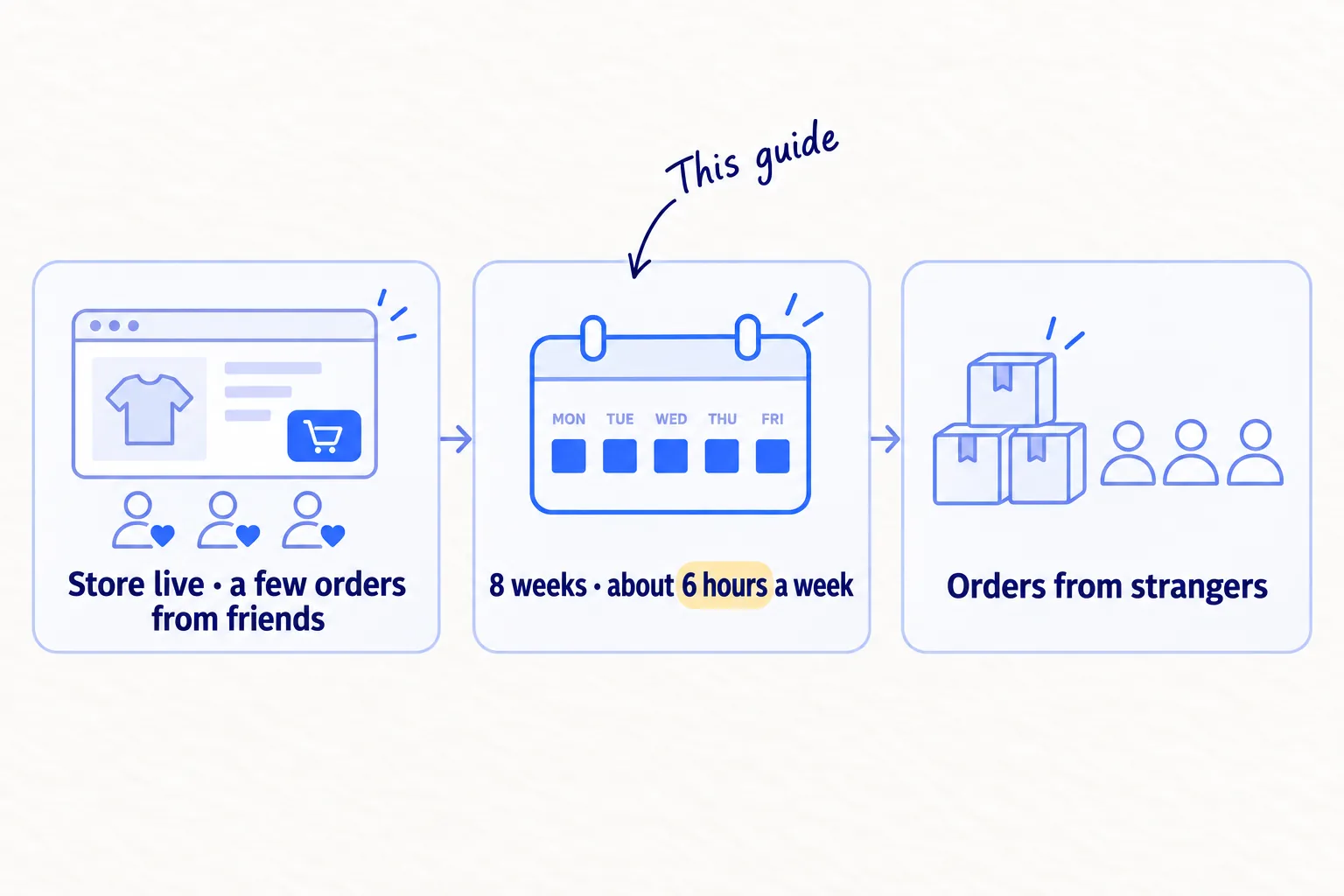
Your store is live, and the first orders came from friends and family. Here is how to market a D2C brand when you are one or two people with little money: one routine, about 6 hours a week, for 8 weeks. If you keep paying for ads now, expect clicks and very few sales, because Meta's ad system needs about 50 purchases a week to learn who buys.
Do these three things
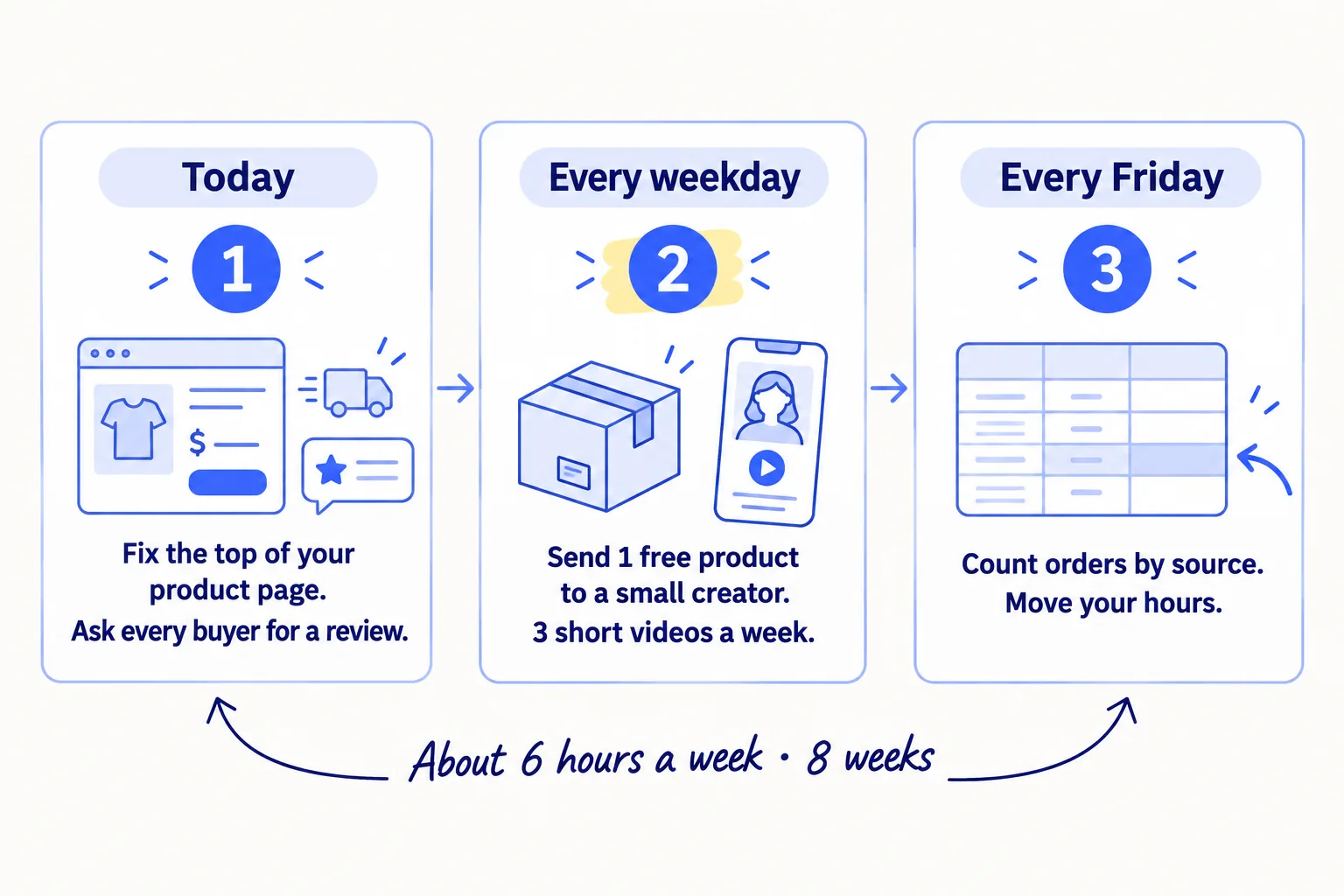
About 6 hours a week, plus 5 free products and postage. Judge views and creator posts after 4 weeks and orders after 8. Keep paid ads paused until then.
Show the three actions in fullHide the full list
- Today: put the total price with shipping, the delivery time and who the product is for at the top of your product page. Then ask every past buyer for a review.
- Every weekday: send one free product to a small creator who already posts about your kind of product. On 3 of those days, also post one short video of your product being used.
- Every Friday: count this week's visits and orders by where each one came from. Give next week's hours to the place that brought the most orders.
Get help doing these
ChatGPT or Claude reads this guide and works through it with you.
1. Ask your first buyers why they bought, then write who your product is for
Message every person who has bought from you, ask them three questions, and use their answers to write one sentence about who your product is for. Every later step uses this sentence: the product page, the creators you pick and the videos you make.
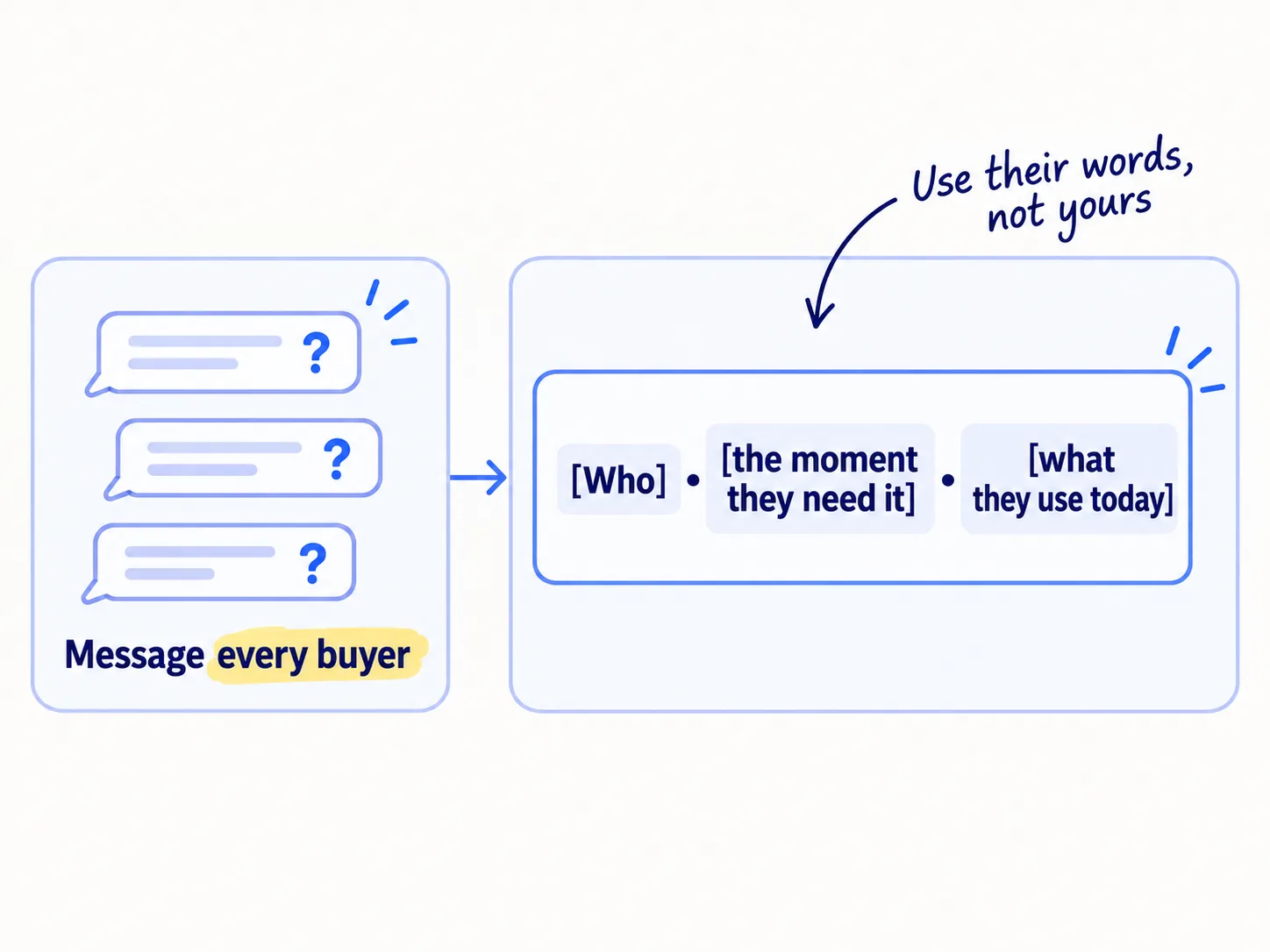
Friends and family count here. Ask them to answer as a customer, not as a friend. Send the questions by text, email or Instagram message, and write down their exact words.
What were you using before, and what did you not like about it?
What made you order, instead of just saying "nice"?
Who else do you know with the same problem?
Then fill in this line, using their words:
[Your brand] is for [who] who [the moment they need it], and today they [what they use instead].
- Tool: your phone, Instagram messages and a Google Doc.
- Time: 1 hour to send and follow up, then 30 minutes to write.
- You will have: one sentence, and a page of your buyers' own words to reuse on your product page and in your videos.
- It worked if: at least 3 buyers read the sentence and say "yes, that's me", and you can name 20 Instagram or TikTok accounts whose followers fit it.
- Common mistake: writing "for anyone who cares about their [skin / hair / home]". That is too wide to pick a creator or write a first line. Name the person and the moment.
See it done: Ferns & Rinse's sentence
Ferns & Rinse is a made-up plant-based haircare brand with its own Shopify store. It sells one shampoo and one conditioner at $28 each, or both for $49.
Store live for 2 months. About 400 visits a month and 9 orders, most from friends and family. $150 of Meta ads brought 1 sale.
The sentence: Ferns & Rinse is for people with dry, curly hair who already use plant-based skincare and want the same from their shampoo, and today they buy salon brands whose labels they cannot read.
Why it works: It names a person and a moment, so the founders can search for creators who post about exactly that.
For more on choosing who to sell to, see How to create an ideal customer profile. For running longer buyer calls, see How to do customer interviews.
2. Fix your product page so a stranger can buy without asking a question
Put five things in the first screen of your product page: what it is and who it is for, the total price with shipping, the delivery time, your returns promise, and a photo of the product being used. A stranger cannot ask you what a friend would ask, so the page has to answer first.
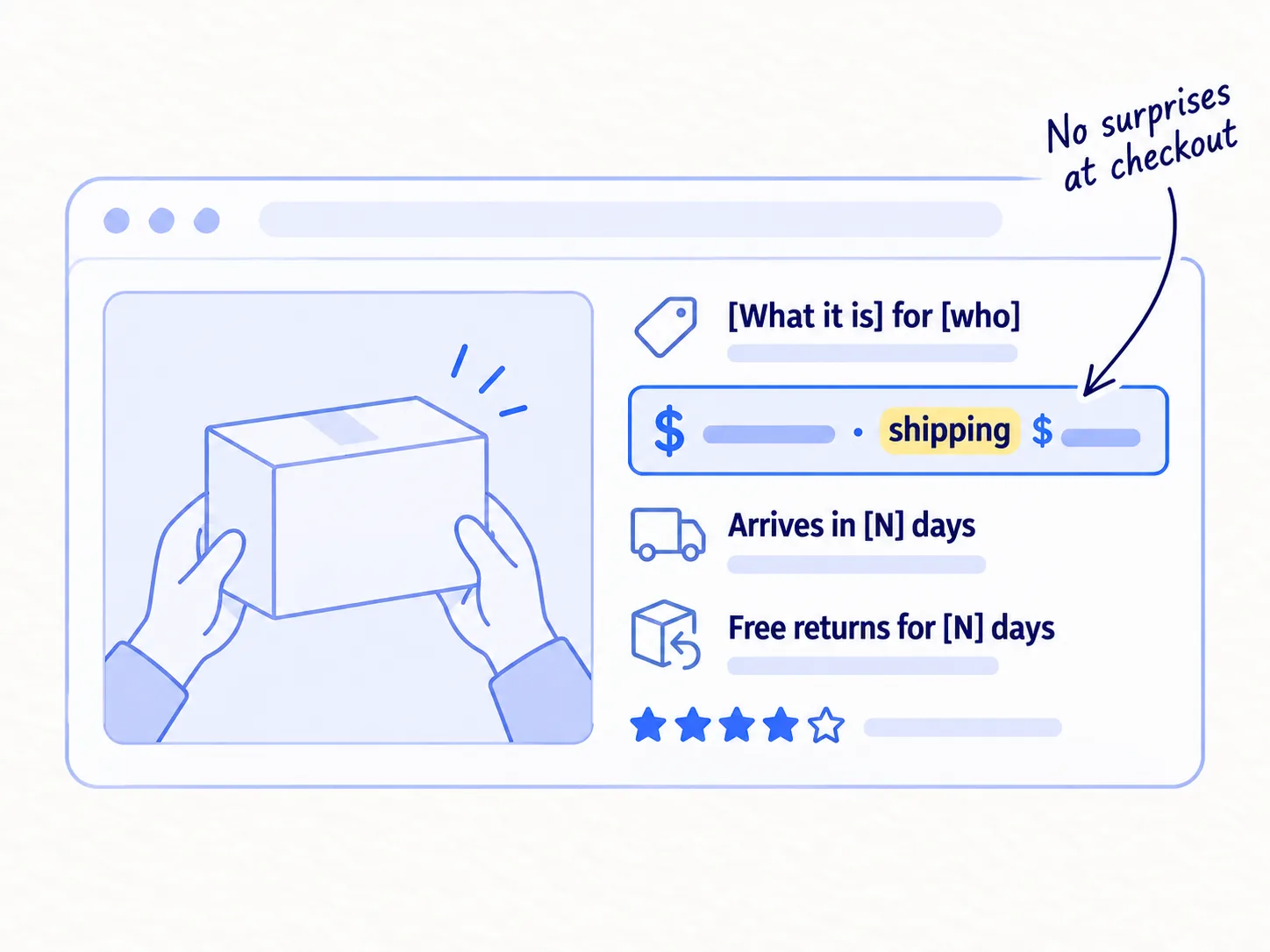
The biggest reason shoppers leave at checkout is cost they did not expect. Among US shoppers who left a checkout in Baymard's 2025 survey, 40% left because extra costs such as shipping were too high, 20% because delivery was too slow, and 19% because they did not trust the site with their card.
Title: [What it is] for [who, from step 1]First line: [The problem it fixes, in your buyers' words].Price: $[price]. Shipping: $[X], or free over $[Y].Delivery: arrives in [N] working days.Returns: [Your promise, for example "Not right for you? Send it back within 30 days."]Photos: 1 of the product in someone's hands, 1 that shows its size, 1 of the result, then your studio photos.
Then turn on the free email that goes to people who start checkout and leave. In your Shopify admin, go to Apps › Messaging › Automations, open "Abandoned checkout emails by Shopify", and choose "Send abandoned checkout emails automatically". Shopify does not charge for these emails.
If you sell on Amazon or Etsy: put the same five things into your listing title, your first photos and the first lines of your description. You cannot change the checkout, so the listing has to do the work.
- Tool: your Shopify admin, your phone camera, and Shopify Messaging.
- Time: about 3 hours.
- You will have: a product page a stranger can buy from, and an email that goes out when someone leaves checkout.
- It worked if: you show the page to 5 people who do not know you for 10 seconds, and at least 4 can say what it is, who it is for and the total price with delivery.
- Common mistake: showing shipping only at checkout, using only studio photos on white, or opening the page with your founder story. Put the story lower down.
For the rest of the page, see How to write a product description that sellssoon and How to make a new store look trustworthysoon. If you already get visits and no orders, start with How to fix a Shopify store with traffic but no salessoon.
3. Get your first 10 reviews from the people who already bought
Ask every past buyer for a review, one by one, about 7 days after their order arrived. Reviews are the first thing a stranger checks on a new store, and your past buyers are the only people who can write them today.
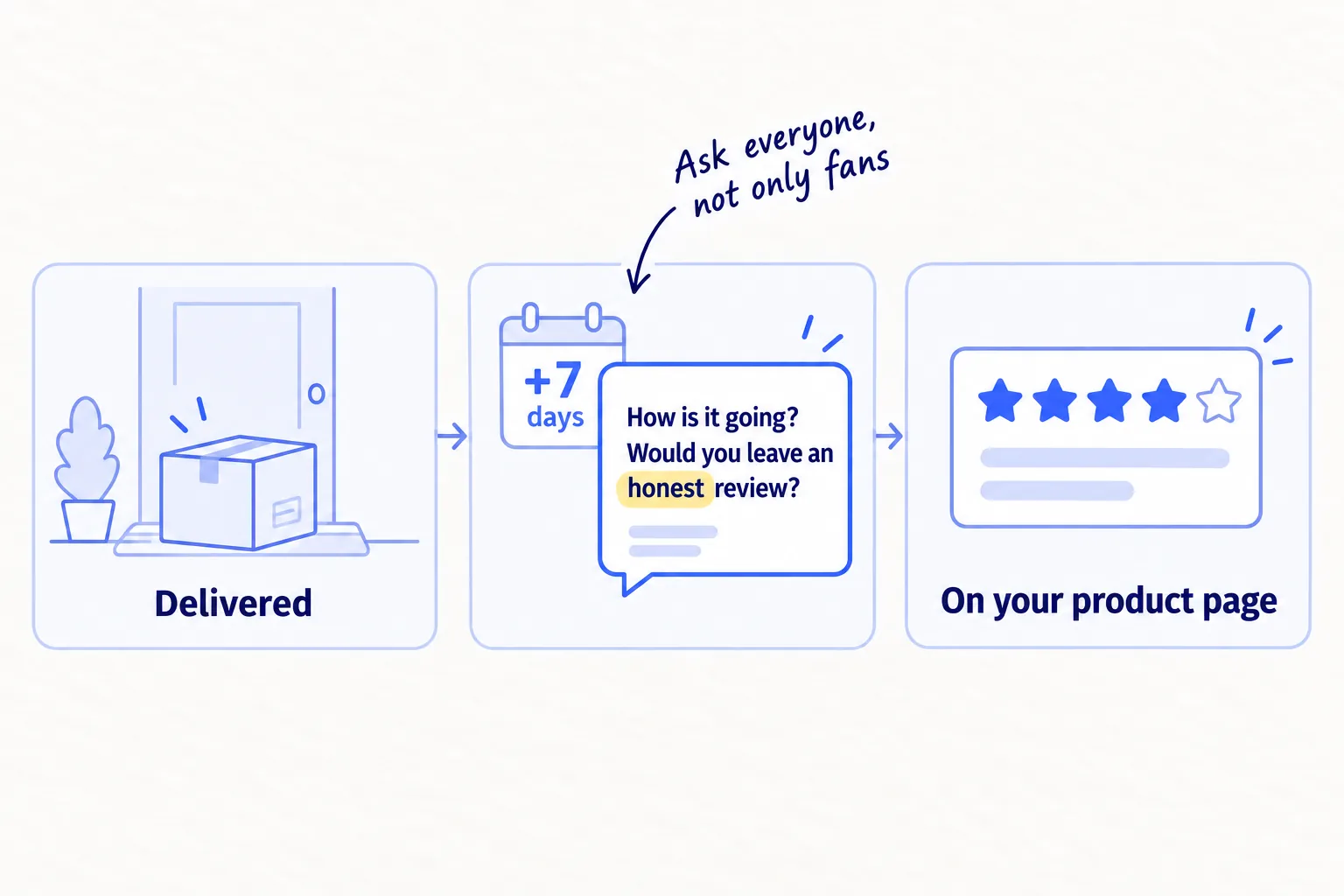
Install Judge.me from the Shopify App Store. Its Forever Free plan sends review requests after each order and shows photo reviews on your page. For the orders you already have, send your own personal message too.
Follow the US rules on reviews, which the FTC has enforced since October 2024:
- Ask every buyer, not only the ones you think liked it.
- Friends and family must say they know you in their review.
- Never tie a reward to a good review. No discount for 5 stars. No bought or made-up reviews.
Hi [first name],Your [product] should have arrived last week. How is it going so far?If you have a minute, would you leave an honest review? Good or bad, it helps the next person decide, and it helps us fix what's wrong. Here's the link: [review link][If they know you: Please mention that we know each other.]Thanks,
[Your name]
If you sell on Amazon: use the Request a Review button on each order in Seller Central, which sends Amazon's standard request. If your brand is in Amazon Brand Registry, you use FBA and the product has fewer than 30 reviews, enrol it in Vine: up to 2 units cost $0 to enrol.
- Tool: Judge.me (free), and email or Instagram messages.
- Time: 1 hour for your past buyers, then 10 minutes a day as new orders arrive.
- You will have: reviews with names, and ideally photos, on your product page.
- It worked if: at least half of your past buyers leave a review within 2 weeks. If fewer do, send each one a single short reminder, then stop.
- Common mistake: waiting until you have "enough" customers, or asking only your biggest fans. Ask everyone now.
For more ways to get the first ones, see How to get your first product reviewssoon.
4. Send free product to 5 small creators a week
Every weekday, send one free product to a small creator who already posts about your kind of product, with no promise to post. Small creators answer messages, and one honest video from someone your buyers already follow reaches people who have never seen your store.
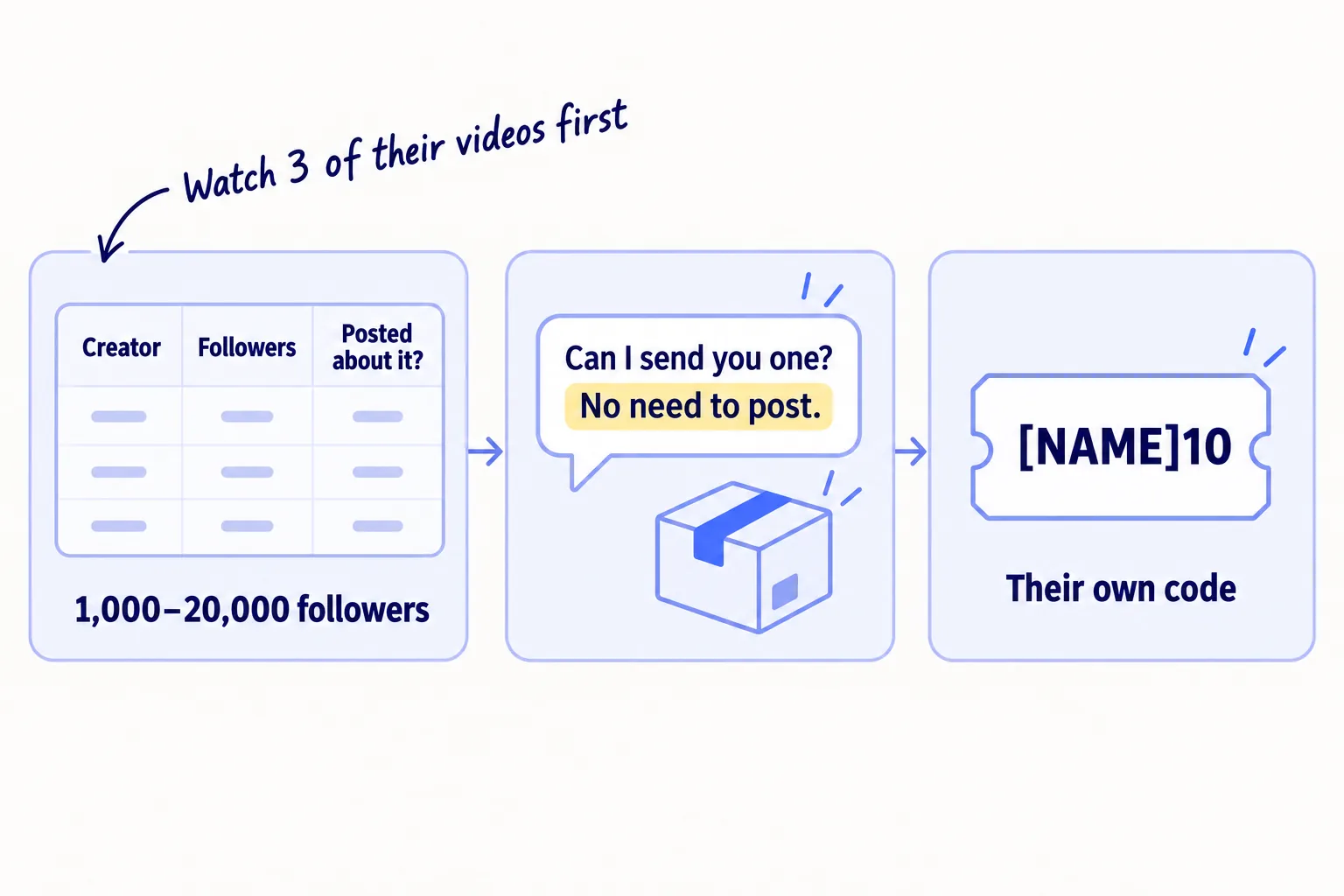
Find them where your buyers already look. Search Instagram and TikTok for the words from your step 1 sentence, such as "curly hair routine" or "[your product] review". Keep an account only if it has 1,000 to 20,000 followers, posted about a product like yours in the last 30 days, and has comments that are real questions. Watch 3 of its videos before you add it to your sheet. Aim for 40 names.
Give each creator their own discount code in Shopify (for example, their name plus 10% off) so you can see which orders they bring. Ask if you may reuse their video on your product page and ads, and get the yes in writing.
Hi [first name], I loved your video on [something specific they posted].We make [what it is] for [who, from step 1]. Could I send you one to try? It's free, and there's no need to post.If you do post about it, please say it was a gift, and here's a code for your followers: [CODE] for [X]% off.[Your name], [brand]
The FTC expects a creator who got something free to say so clearly, for example "Thanks to [brand] for the free product". Tell them in the message, as above.
If you sell on TikTok Shop: creators there ask for free samples through the affiliate program. Pick them the same way: watch their last 3 videos before you approve a sample. See How to get TikTok Shop affiliates to postsoon.
- Tool: Instagram and TikTok search, a Google Sheet, and Shopify discount codes.
- Time: 20 minutes a weekday, plus packing and posting.
- Cost: 5 products and postage a week.
- You will have: 20 creators with your product after 4 weeks, each with their own code.
- It worked if: by week 4, at least 3 of the 20 have posted, and at least 1 order used a creator's code. If only 1 or none posted, change who you pick, not the product.
- Common mistake: sending to big accounts because the follower count looks good, or sending without watching their videos. One founder on r/TikTokshop sent about 50 samples and said only 5–10% of the creators made good videos.
See it done: Ferns & Rinse's first creator message
To: Jess, who posts curly-hair routines to 6,000 followers
Hi Jess, I loved your video on getting second-day curls without dry ends.
We make a plant-based shampoo and conditioner for dry, curly hair. Could I send you both to try? They're free, and there's no need to post.
If you do post about them, please say they were a gift, and here's a code for your followers: JESS10 for 10% off.
Maya, Ferns & Rinse
Why it works: The first line is about her video, the ask is small, and the code shows the founders which orders she brings.
For finding and vetting creators, see How to find micro-influencers for your brandsoon. For turning their videos into content you can reuse, see How to get UGC for your brandsoon.
5. Post 3 short videos a week that show your product being used
Post three short portrait videos a week that show your product in someone's hands, solving the problem from step 1. Show what it does, not only what it looks like.
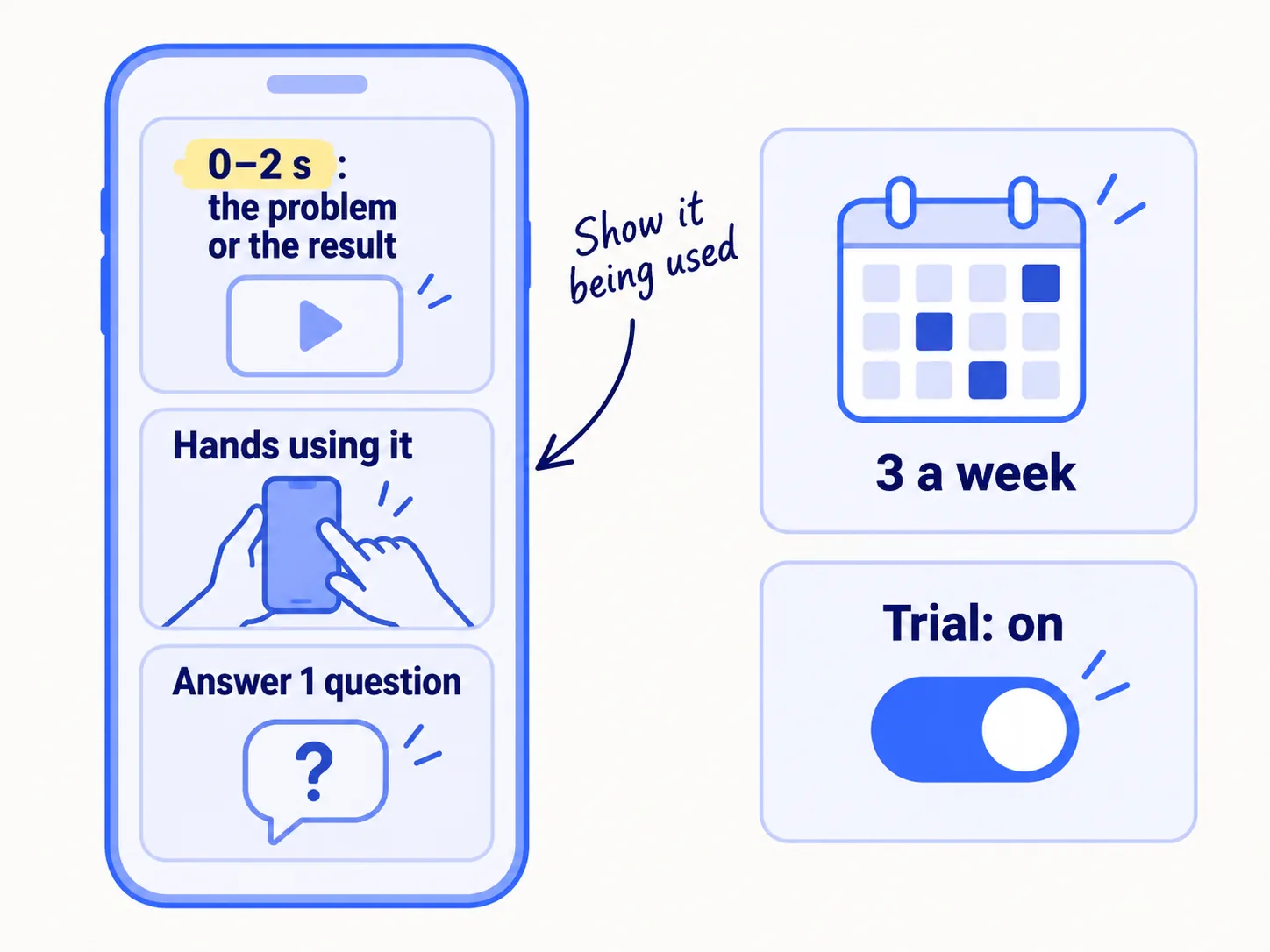
Film all three on one day. Each video is 15 to 30 seconds, in portrait (9:16). The first 2 seconds show the problem or the result, so a stranger knows at once why to keep watching. Use one question your buyers asked in step 1 for each video.
The problem, then the fix: [the problem in 2 seconds] → [hands using the product] → [the result].
A buyer's question: "[Question from step 1]?" → [the answer, shown, not told].
Before and after, or a creator's video you have permission to reuse.
On Instagram, post each one as a Reel. Before you share, turn on the Trial toggle, so Instagram shows it to people who don't follow you first. You need a professional account, which is free to switch to. Use no more than 5 hashtags: Instagram has capped posts at five since December 2025, and says hashtags help people find a post but do not add reach. Post the same video on TikTok.
- Tool: your phone, Instagram and TikTok.
- Time: about 3 hours a week: 2 hours to film and edit in one batch, then 20 minutes a day to post and reply to comments.
- You will have: 12 videos after 4 weeks, and a first sense of which problem people watch.
- It worked if: by week 4, at least one video reached 1,000 views, and Instagram or TikTok shows up in your Friday count of visits. If none of the 12 passed 500 views, change the first 2 seconds before you change anything else.
- Common mistake: a polished ad with music and no hands, or judging videos by likes. Count the visits and orders they bring.
For more on Instagram, see How to promote your business on Instagramsoon and Instagram post ideas for D2C brandssoon. For filming, see How to make short-form videos for your businesssoon. If your buyers shop on TikTok, see How to sell on TikTok Shopsoon.
6. List your products on Google and in ChatGPT for free
Turn on Google's free product listings, and check that your products can be found in ChatGPT and other AI chats. Both are free, both are new places strangers can find you, and most new stores have not checked either. This step is for your own Shopify store.
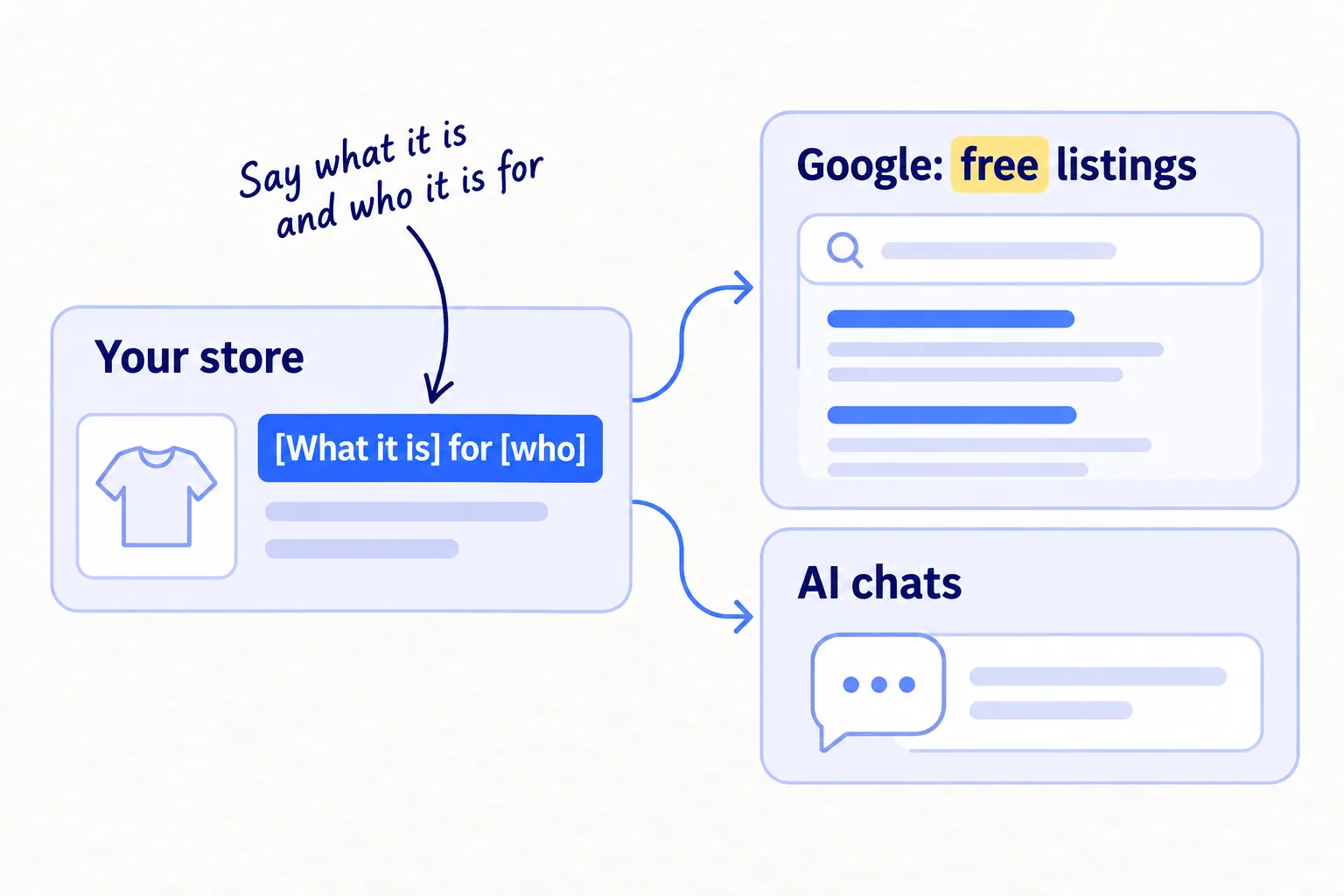
Google. Install the Google & YouTube channel from the Shopify App Store and connect a Google Merchant Center account. It sends your products to Google. Free listings are turned on by default in most cases, and they can show your products at no cost in Google Search, the Shopping tab, Images, Lens, YouTube and Gemini.
ChatGPT and other AI chats. Since March 2026, Shopify makes products discoverable in ChatGPT by default, with no extra fee. The same Agentic sales channel covers Microsoft Copilot, Google's AI Mode and Gemini. Check three things:
- 1
Complete your policies
In Settings › Policies, fill in your Terms of service, Privacy policy, and Return and refund policy. ChatGPT needs all three, and your store must sell to customers in the United States.
- 2
Check the Agentic channel
In your Shopify admin, open Sales channels and find Agentic. Check that the AI channels you want are on.
- 3
Rewrite your product titles
Google and AI chats match your products to what shoppers ask. Name each product "[what it is] for [who or what problem]", not a clever name alone.
- Tool: your Shopify admin and Google Merchant Center (both free).
- Time: about 2 hours.
- You will have: your products in Google's free listings and in AI chats, with titles that say what they are.
- It worked if: Merchant Center shows your products as approved, with no errors, and its Performance page shows your first free-listing clicks within a month. Once a month, ask ChatGPT "What's a good [your product] for [who]?" and write down who it names.
- Common mistake: product titles like "The Daily" or "No. 3", or missing policies. Neither Google nor ChatGPT can tell what the product is.
See it done: Ferns & Rinse's shampoo title
Before
The Daily Wash
After
Plant-Based Shampoo for Dry, Curly Hair | Ferns & Rinse
Why it works: The new title says what it is and who it is for, which is what a shopper types into Google or asks ChatGPT.
For the full setup, see How to list your products on Google Shopping for freesoon and How to get your products recommended by ChatGPTsoon. For the rest of your store's search setup, see How to do SEO for a Shopify storesoon.
7. Count every Friday and decide when ads come back
Every Friday, fill in one row: visits, orders and where each order came from, reviews, and creators sent and posted. After 4 weeks, stop what brought nothing. After 8, put more hours into what brought orders, and check whether you are ready for ads.
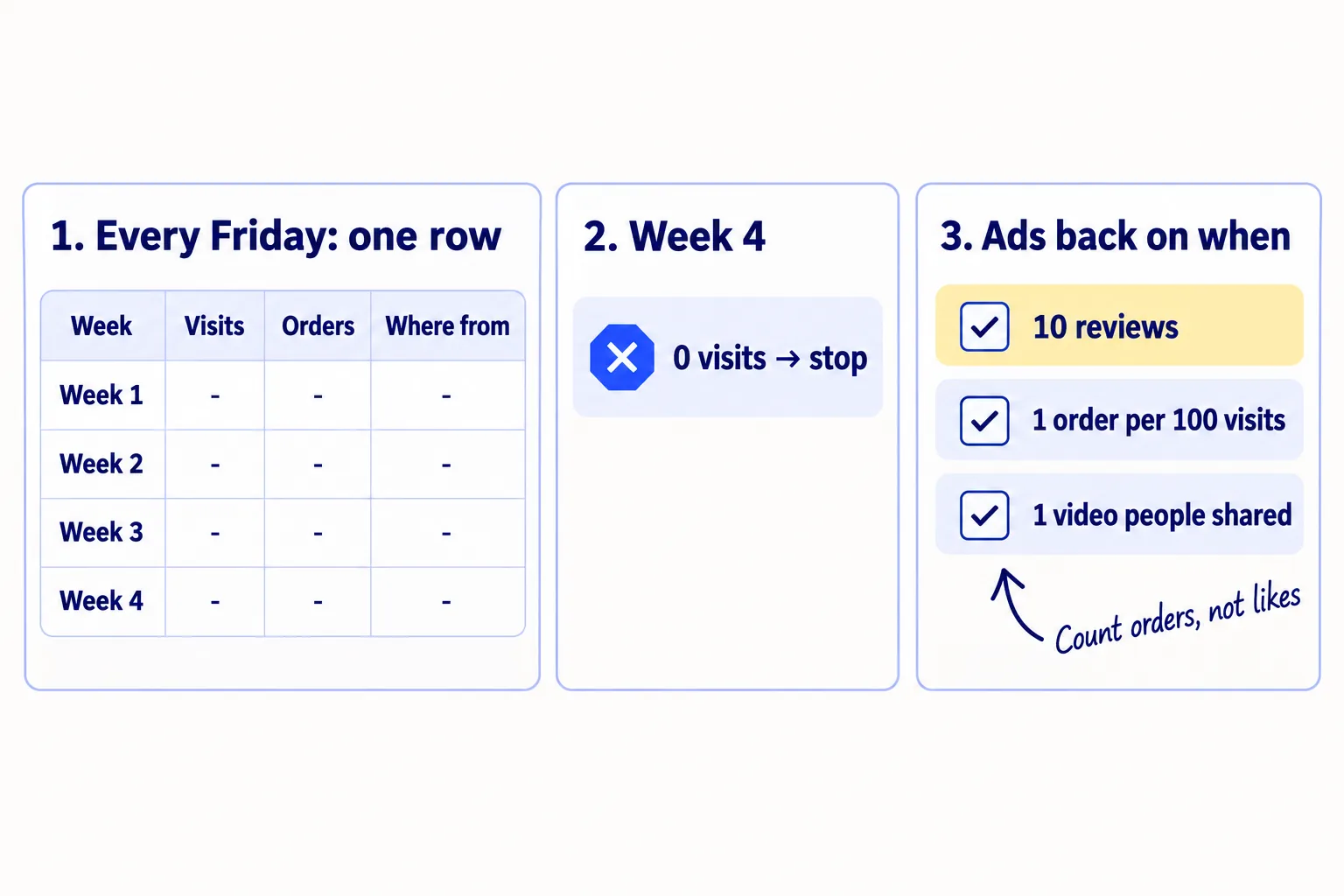
Take visits by source from Shopify: Analytics › Reports › Sessions by referrer. Take orders by source from the creator codes, and ask anyone you do not recognise how they found you.
Week | Visits | Orders | Orders: creator codes | Orders: social videos | Orders: Google or AI | Orders: people you know | Reviews (total) | Creators sent | Creators posted
At the end of week 4, stop anything that brought 0 visits and give its hours to what brought the most. At week 8, count orders by source, and do more of what brought them.
Turn paid ads back on only when all three are true:
- You have at least 10 reviews.
- You get at least 1 order for every 100 visits from people who do not know you.
- One video, yours or a creator's, got shares or comments without being paid for.
Before that, ads pay to send strangers to a page and a message you have not tested. Meta's system also needs about 50 purchases a week in one ad set to finish learning, which a new store cannot give it. When you are ready, start with the video that worked, and work out your break-even ROAS first: the return on ad spend at which an order just pays for itself. See How to calculate break-even ROASsoon and How to run Meta ads for a Shopify storesoon.
- Tool: Google Sheets, Shopify Analytics and your discount codes.
- Time: 20 minutes each Friday.
- You will have: one row a week, and a source for every order.
- It worked if: you can say where every order came from, and at week 8 you know which one or two places to keep.
- Common mistake: judging after one week, counting followers, or restarting ads because one week was slow.
See it done: Ferns & Rinse after 4 weeks
The Friday sheet, weeks 1 to 4
| Week | Visits | Orders | Creator codes | Social videos | Google or AI | People they know | Reviews | Creators sent | Creators posted |
|---|---|---|---|---|---|---|---|---|---|
| 1 | 105 | 2 | 0 | 0 | 0 | 2 | 5 | 5 | 0 |
| 2 | 120 | 2 | 1 | 0 | 0 | 1 | 7 | 5 | 1 |
| 3 | 140 | 3 | 1 | 1 | 0 | 1 | 9 | 5 | 2 |
| 4 | 160 | 3 | 2 | 0 | 1 | 0 | 11 | 5 | 1 |
The decision: creators brought 4 of the 6 orders from strangers, so the founders send 8 products a week instead of 5. Videos brought visits but 1 order, so they keep 3 a week and reuse the creator video that sold. They now have 11 reviews and about 1 order per 100 visits from strangers, but no video has been shared yet, so ads stay off. They judge orders at week 8.
Why it works: The founders move hours by counting orders from strangers, not likes or visits.
For choosing what to add next, see How to choose marketing channels for an ecommerce brand.
Where Scout7 helps
Scout7 speeds up parts of steps 1, 5 and 6.
Step 1. Scout7's brand intelligence reads your store and builds a brand profile: what you sell, who it is for and how you sound. Compare it with your step 1 sentence. If they do not match, your store does not say it clearly yet. Scout7's audience research reads public social conversations in your category and builds audience segments with pain points and quotes in shoppers' own words. It does not replace messaging your buyers.
Step 5. Scout7 makes portrait (9:16) videos from a script, with captions, and image posts with captions in your brand's voice. You choose the cast and voice, direct each scene and approve the cut. It schedules approved posts to Instagram, Facebook and Threads, and you download the video for TikTok. Nothing goes live until you approve it.
Step 6. Scout7 builds your competitor set and reports which competitors win the Google and AI answers you want, and by how much. That turns the monthly "who does ChatGPT name?" check into a list you can act on.
Your D2C marketing checklist for the next 8 weeks
0 of 15 done
Work through this list with an AI assistant
It drafts the work and keeps track of what is done.
Frequently asked questions
- Should I stop running Meta ads for my store?
Yes, for now. Meta's system needs about 50 purchases a week in one ad set to finish learning, and a new store cannot give it that, so a small budget buys clicks and little else. Turn ads back on when you have 10 reviews, 1 order per 100 visits from strangers, and one video people shared. See How to run Meta ads for a Shopify storesoon.
- How much should I spend on marketing in the first months?
For these 8 weeks, mostly time: about 6 hours a week, plus 5 free products and postage a week. The tools in this guide are free. Keep any ad money until the three conditions in step 7 are true. For a full budget, see How much to spend on marketing as an ecommerce brand.
- Should I sell on Amazon or TikTok Shop as well as my own store?
Only once your own store gets orders from strangers. Each new place needs its own reviews, listings and time, and you have about 6 hours a week. If your buyers already search Amazon for your kind of product, see How to launch a product on Amazonsoon. If they buy on TikTok, see How to sell on TikTok Shopsoon.
- How long does it take to get sales from people I don't know?
Expect the first creator posts in weeks 2 to 3, because creators need time to receive and try the product. Judge views and creator posts at week 4, and orders at week 8. If you have sent 40 products and posted 24 videos with no orders from strangers, go back to steps 1 and 2.
- Do I need an email list yet?
Turn on the free abandoned checkout email now (step 2). Add a signup form and a welcome email once you get about 100 visits a week, so visitors who are not ready can hear from you again. See How to set up Klaviyo flows for a new storesoon.
Sources
- 1.Millions of merchants can sell in AI chats — Shopify, 24 March 2026
- 2.Selling on ChatGPT — Shopify Help Center, checked 24 September 2026
- 3.Managing your agentic storefronts — Shopify Help Center, checked 24 September 2026
- 4.Free listings for products — Google Merchant Center Help, checked 24 September 2026
- 5.Google & YouTube channel — Shopify Help Center, checked 24 September 2026
- 6.Abandoned checkout emails — Shopify Help Center, checked 24 September 2026
- 7.Shopify Messaging email pricing — Shopify Help Center, checked 24 September 2026
- 8.Acquisition reports — Shopify Help Center, checked 24 September 2026
- 9.Cart abandonment rate statistics — Baymard Institute, updated 22 September 2025
- 10.Judge.me Product Reviews — Shopify App Store, checked 24 September 2026
- 11.Federal Trade Commission announces final rule banning fake reviews and testimonials — Federal Trade Commission, 14 August 2024
- 12.Soliciting and paying for online reviews: a guide for marketers — Federal Trade Commission, checked 24 September 2026
- 13.Disclosures 101 for social media influencers — Federal Trade Commission, checked 24 September 2026
- 14.Get customer reviews with Amazon Vine — Amazon, checked 24 September 2026
- 15.Trial reels: try content with non-followers first — Instagram for Creators, 10 December 2024, checked 24 September 2026
- 16.Instagram implements new limits on hashtag use — Social Media Today, 18 December 2025
- 17.About learning limited — Meta Business Help Centre, checked 24 September 2026
- 18.50 samples sent, 2 sales total — r/TikTokshop, 2026
Next article to read
How to get your first sales on ShopifyD2COnce your plan is set, this shows how to get orders from people you do not know.Read it nextRelated guides
- How to choose marketing channels for an ecommerce brandD2CChoose marketing channels for your ecommerce brand: check whether shoppers already search for what you sell, test 3 channels at full volume for 4 weeks, and keep what brings orders from strangers.
- How to price a productD2CPrice your product for a new store: add up what one order really costs, keep product and packaging at 30% of the price or less, ask 100 people a day what they would pay for 7 days, and check the money left on each order every Sunday.
- How to launch a D2C brandD2CComing soon
- How to promote your business on InstagramD2CComing soon
Guides that link here
Cite this page
Dinesh Bypilla (2026). How to market a D2C brand. Scout7 Academy. https://scout7.ai/academy/marketing-plan/how-to-market-a-d2c-brand
Written by Dinesh Bypilla, Agentic systems engineer at Scout7. Reviewed by Murali Sid. Last checked 24 September 2026.
Quote any part of this guide with a link back to this page. © 2026 Scout7.
Markdown version of this page: https://scout7.ai/academy/marketing-plan/how-to-market-a-d2c-brand.md