



How to do a competitor analysis
Do a competitor analysis in 5 days with free tools: list 10 alternatives your buyers use, read 100 complaints about the top 5 in their own words, put the gap you can fix in your headline, and check them for 45 minutes every Sunday.
ByDinesh BypillaReviewed byMurali SidLast checked 16 min read
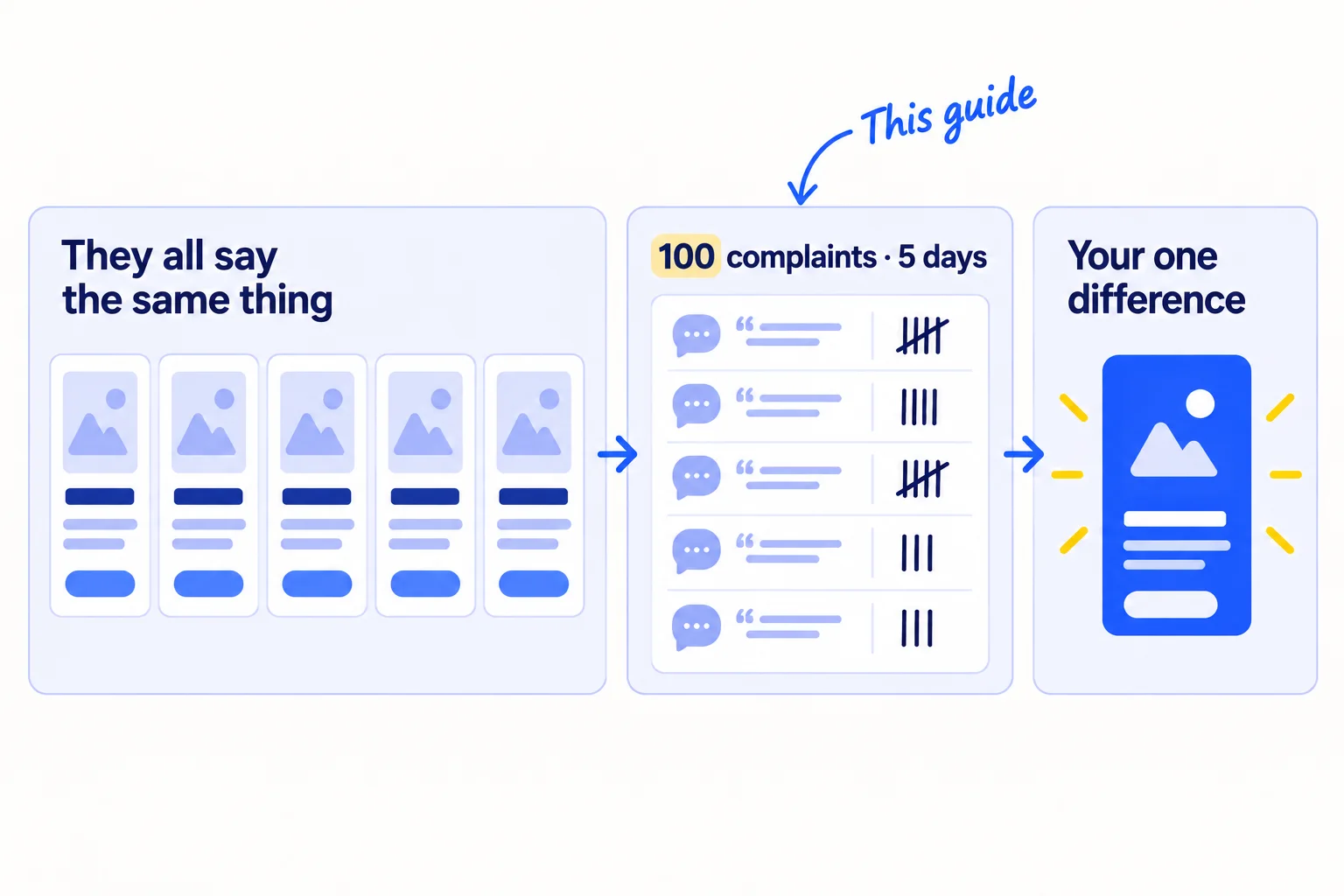
Other companies already sell what you sell, and your website sounds like theirs, so buyers have no reason to pick you. A competitor analysis fixes that when it ends in one clear difference you can put in your headline, not in a big spreadsheet nobody reads. Here is how to do a competitor analysis in 5 days with free tools, from the complaints of your rivals' own customers.
Do these three things
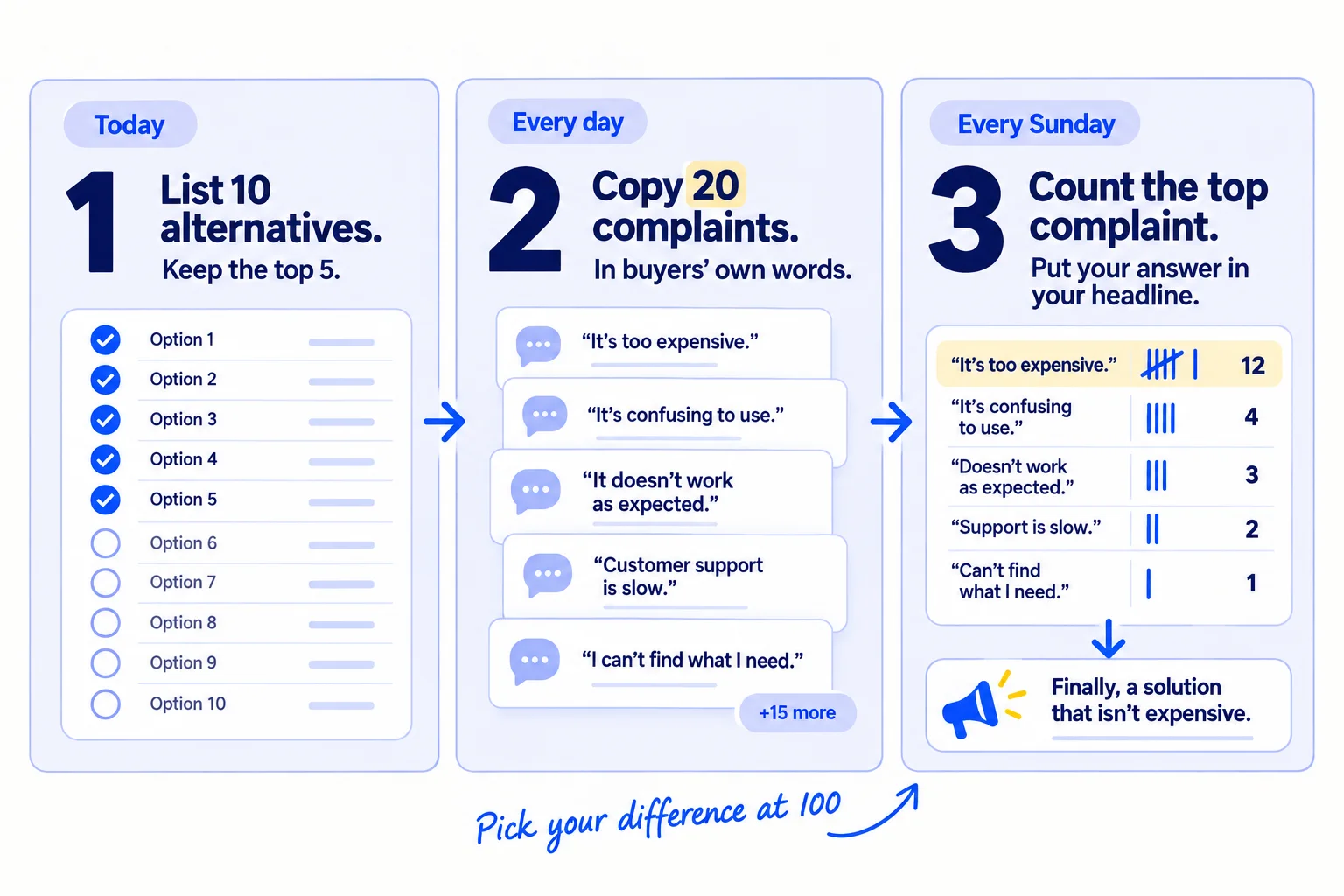
About 4 hours today, 30 minutes a day, and 45 minutes every Sunday. Pick your one difference after 100 complaints, about 5 days in.
Show the three actions in fullHide the full list
- Today: list 10 things your buyers use instead of you, including doing it by hand. Keep the 5 that come up most, and write down each one's price, promise and where it finds buyers.
- Every day: copy 20 complaints about those 5 into one sheet, in the buyers' own words, from 1- to 3-star reviews, forumssoon and your own chats with buyers.
- Every Sunday: count which complaint comes up most, and put your answer to it in your homepage headlinesoon and your messagessoon. Then check the 5 rivals' ads, prices and AI answerssoon for changes.
Get help doing these
ChatGPT or Claude reads this guide and works through it with you.
1. List 10 alternatives your buyers use instead of you
Write down 10 things your buyers use today instead of your product, then keep the 5 that come up most. A competitor is anything a buyer picks instead of you: another company, a cheaper tool, a local shop, a spreadsheet, or doing nothing.
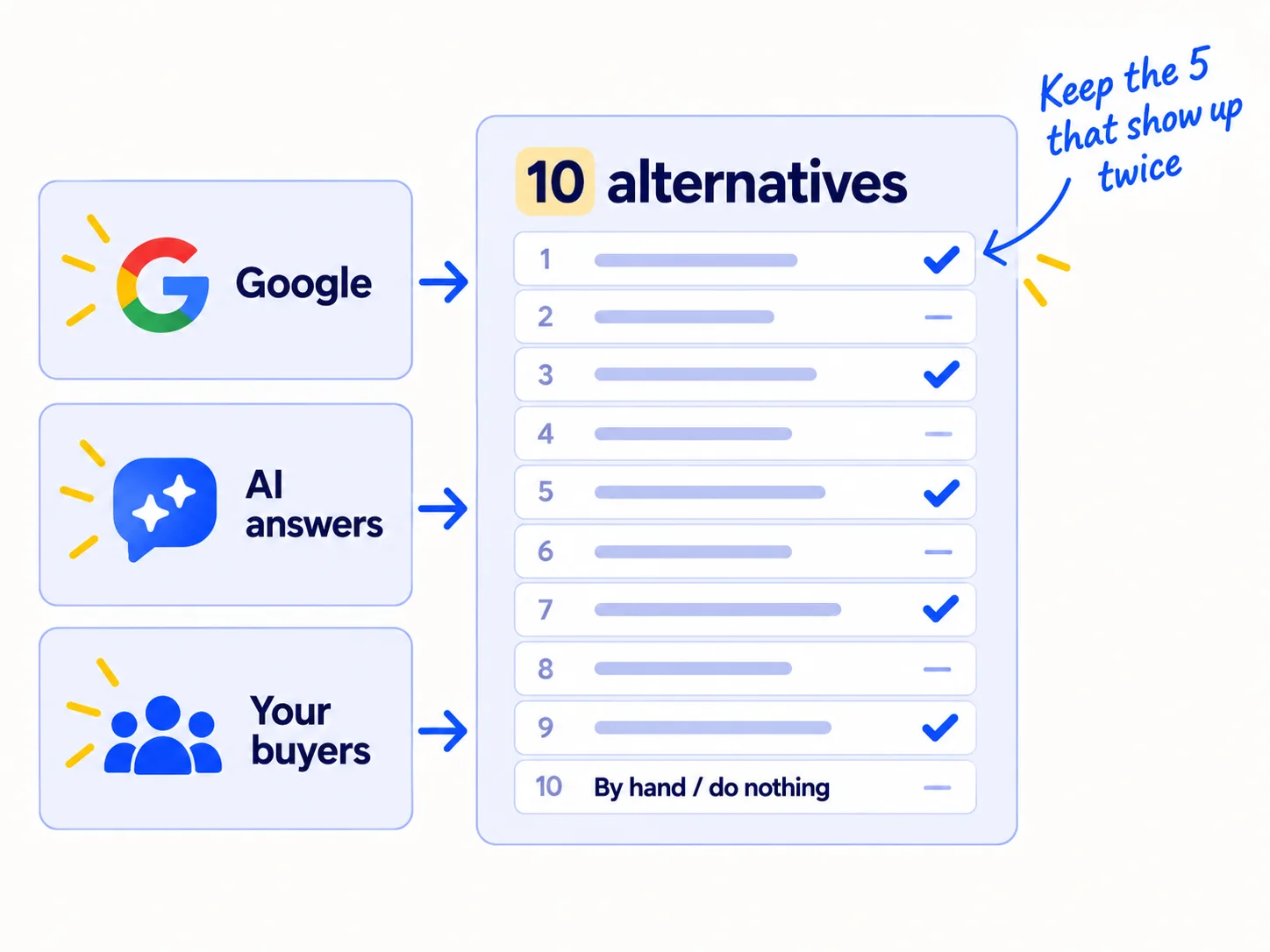
Look in three places, and write down every name in a Google Sheet with where you found it.
- Google. Search the problem the way your buyer would say it, then "best [kind of product] for [your buyer]", then "[the biggest name] alternatives". Write down every company on the first page, and the ones named inside best-of listssoon.
- AI answers. Ask ChatGPT, Perplexity and Google's AI Mode the same question: "What is the best [kind of product] for [your buyer]?" Write down every name they give. This matters more each year. In G2's March 2026 survey of 1,076 software buyers, 51% said they now start their research in an AI chatbot. A year earlier it was 29%.
- Your buyers. Ask every buyer you talk to: "What do you use for this today?" Their answer is often a spreadsheet, an email thread or a local supplier. That is your real rival. Use the list of people from your ideal customer profile.
If you run a SaaS: also check the category pages on G2 and Capterra, where buyers compare tools side by side.
If you run a D2C store: also search Amazon and TikTok Shop for your product. Many shoppers compare there first, and the Amazon listingssoon show you prices and reviews in one place.
If you run an agency: your rivals include freelancers on Upworksoon, agencies on Clutch, and the client hiring someone in-house. Search for agencies that serve your kind of clientsoon, not every agency.
If you run a B2B company: your rival is usually the supplier your buyer already uses. Ask "Who do you buy this from today?" on every call.
Then keep 5. Pick the ones that came up in at least 2 of the 3 places. If "by hand" or "do nothing" came up twice, it stays in your 5.
- Tool: Google, ChatGPT or Perplexity, and a Google Sheet. All free.
- Time: 1 hour.
- You will have: a sheet with 10 alternatives, 5 of them marked.
- It worked if: at least 1 of the 10 is "by hand" or "do nothing", and each of your 5 came up in at least 2 places.
- Common mistake: listing only the famous company everyone knows, or saying "we have no competitors". If buyers have the problem, they are doing something about it today. If you find nobody at all, check the problem is real before you market it.
See it done: Carvelian's 10 alternatives
Carvelian Packaging is a made-up maker of custom printed boxes for small food and drink brands. One founder sells through calls, samples and quotes.
What small food and drink brands use instead
| Alternative | Found on Google | Named by AI | Named by buyers | Keep |
|---|---|---|---|---|
| Big online custom box printer | Yes | Yes | Yes | Yes |
| Local print shop | Yes | No | Yes | Yes |
| Plain stock boxes with a printed sticker | Yes | Yes | Yes | Yes |
| Overseas factory with a large minimum order | Yes | Yes | No | Yes |
| Plain boxes, no branding at all | No | No | Yes | Yes (named twice) |
| Packaging broker | Yes | No | No | No |
| Eco box startup | Yes | No | No | No |
| Label printer, labels only | No | Yes | No | No |
| Gift box supplier | Yes | No | No | No |
| Mailer bag supplier | No | Yes | No | No |
Why it works: Two of the top 5 are not box companies at all: they are what small food brands do when printed boxes feel too hard.
2. Write down each competitor's price, promise and who it is for
For each of your 5, fill one row: the price, the promise in their headline, and who they say it is for. This takes 20 minutes a rival, and it shows you in one screen what buyers already hear from everyone else.
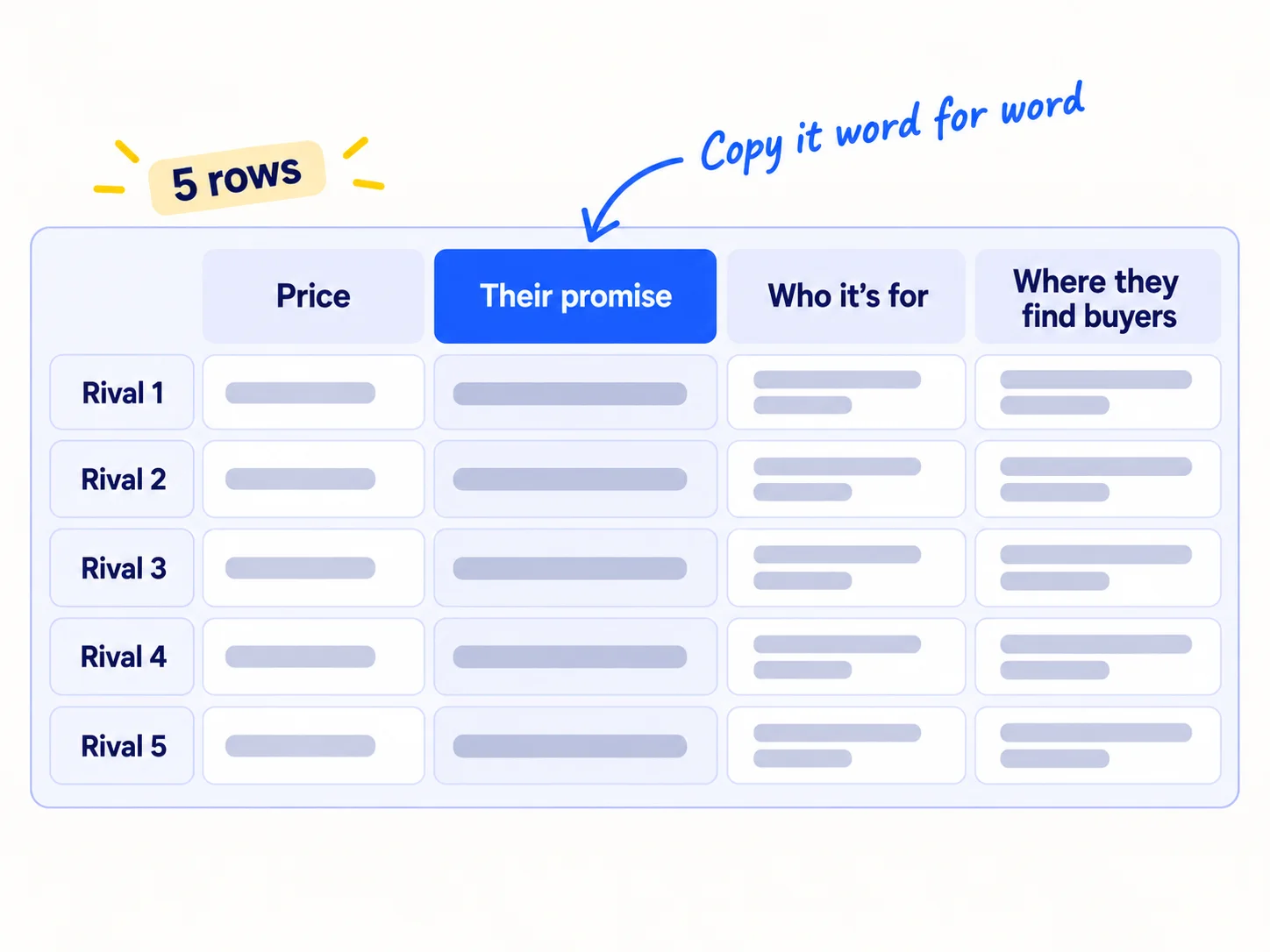
Open each rival's homepage and pricing page, and fill in:
Rival | Price (cheapest option, and what it includes) | Their promise (homepage headline, word for word) | Who they say it is for | Where they find buyers (step 3) | Top complaint (step 4)
Copy the headline exactly. When you put 5 headlines side by side, you will usually see they all promise the same thing. That tells you what not to say.
For price history, paste the rival's pricing page link into the free Wayback Machine and press "Browse History". A rival that raised its price twice this year leaves room under it. If you can, try the product: sign up for the free trial with your own name and email. Do not pretend to be someone else.
If you run a D2C store: write the price with shipping, and per unit (per ounce, per item), so you compare like with like. The pricing guide for products shows how.
If you run a B2B company: most rivals do not show prices. Ask your buyers what they paid last time, and use the 20 real prices method.
If you run an agency: Clutch listings show each agency's minimum project size and hourly rate range. Write both down, next to the packagessoon on their own site, and compare them with your own prices.
- Tool: your Google Sheet and the Wayback Machine. Both free.
- Time: 20 minutes a rival, 1 hour 40 minutes for all 5.
- You will have: 5 full rows.
- It worked if: every cell has an answer, and you can say each rival's promise in one short line.
- Common mistake: building a 40-column feature list. In April 2026, one founder called the feature spreadsheet "a trap": "Focusing on features just turns you into a cheap clone." Buyers rarely choose on feature 37. They choose on the promise, the price and what annoys them.
3. Find where your competitors get their customers: ads, Google and AI answers
Check three things for each rival: which ads it pays for, which Google searches bring it visits, and whether AI tools name it. Write the biggest one in the "Where they find buyers" column.
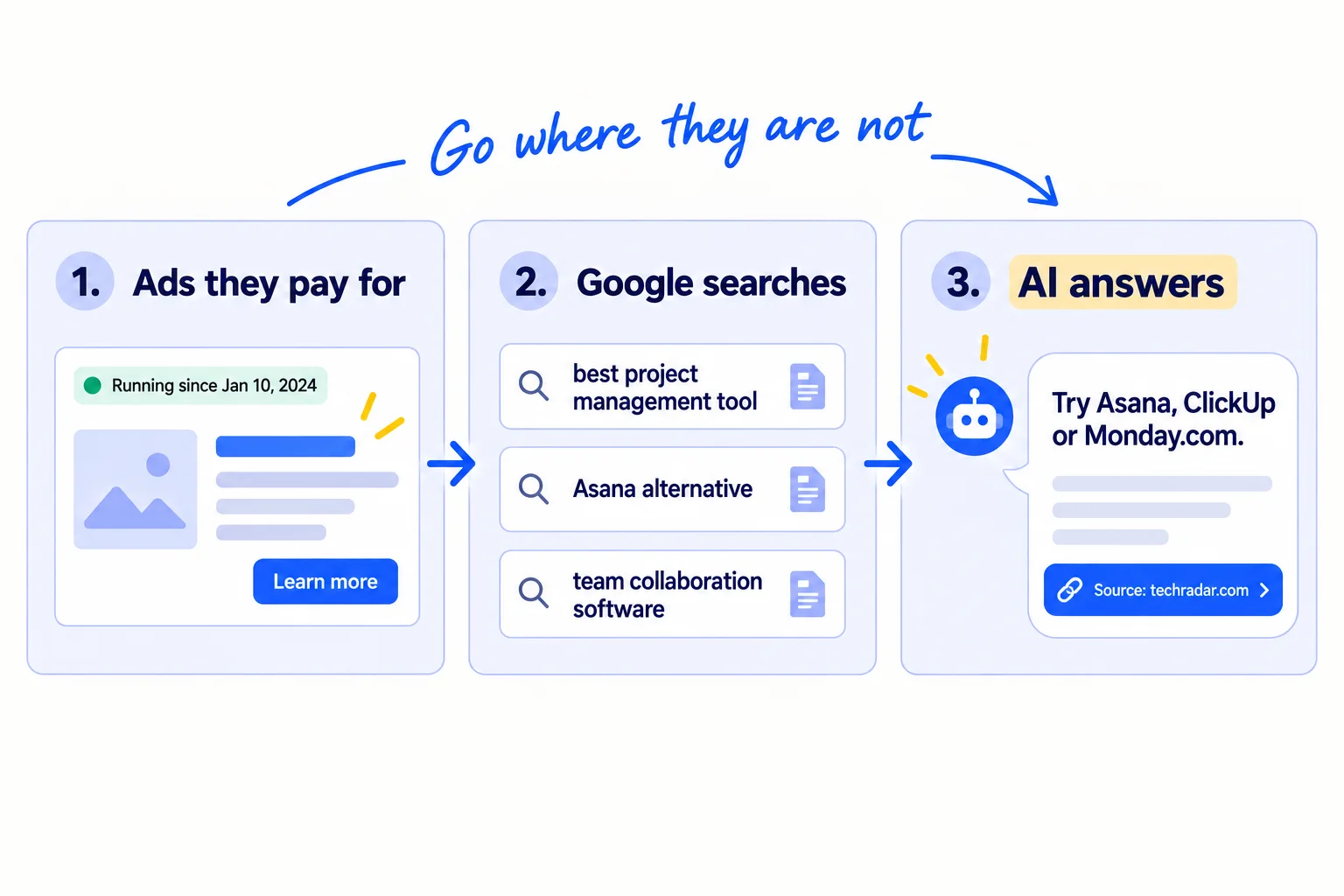
Do these checks, all free:
- 1
Look up their ads
Search each rival's name in the Meta Ad Library, which shows ads currently running on Facebook and Instagram. Then search their name or website in Google's Ads Transparency Center, which covers Search, YouTube and Gmail and filters by date and place. For B2B and agency rivals, also search LinkedIn's Ad Library, which keeps ads for a year after they last ran. An ad that has run for months is one they keep paying for. Write down what it offers, not how it looks. This helps later if you run Meta adssoon or LinkedIn adssoon.
- 2
Look up their Google searches
Put each rival's website into the free Ahrefs Website Traffic Checker. It estimates their search traffic and shows their top pages and the keywordssoon that send the most visits. These are estimates, so use them to compare rivals, not as real numbers. Note any "[rival] alternatives" or "vs" pages they rank for.
- 3
Look up AI answers
Ask ChatGPT, Perplexity and Google's AI Mode 5 questions your buyer would ask, such as "best [kind of product] for [your buyer]" and "cheaper alternative to [the biggest rival]". Write down who is named, and which pages the answer links to as sources. In G2's survey, 45% of software buyers said links to review sites inside AI answers gave them the most confidence. Those pages are where you want to be mentionedsoon too.
Then use this rule. If a rival leads a place with many ads or many ranking pages, do not fight it there with your small budget. Go where none of your 5 is strong: a community they ignore, a question no AI answer covers well, or direct messages to buyers they never talk to. Write down 3 places like that. They feed your choice of marketing channels.
If you run a D2C store: ask the AI tools for "best [product] for [shopper]" and note which stores and products they name. The guide on getting your products recommended by ChatGPTsoon shows what they read.
If you run a B2B company: ask "who makes [product] for [kind of company] in [your area]". AI tools often name suppliers from directories and reviews. Here is how to get named as a suppliersoon.
- Tool: Meta Ad Library, Google Ads Transparency Center, LinkedIn Ad Library, Ahrefs Website Traffic Checker, and ChatGPT or Perplexity. All free.
- Time: 1 hour for all 5.
- You will have: a "Where they find buyers" entry for each rival, and a list of 3 places none of them covers well.
- It worked if: you can point to proof for each rival's main place (an ad, a top page, an AI answer), and you have 3 open places written down.
- Common mistake: copying a rival's ads or pages, or trying to outspend them. You learn what they offer and where they are. You win by saying something different in a place they have left open.
4. Collect 20 complaints a day about your competitors, in buyers' own words
Every day, copy 20 complaints about your 5 rivals into one sheet, word for word, with a link to where each one came from. After 5 days you have 100, and the most common complaint is usually the gap you can win on.
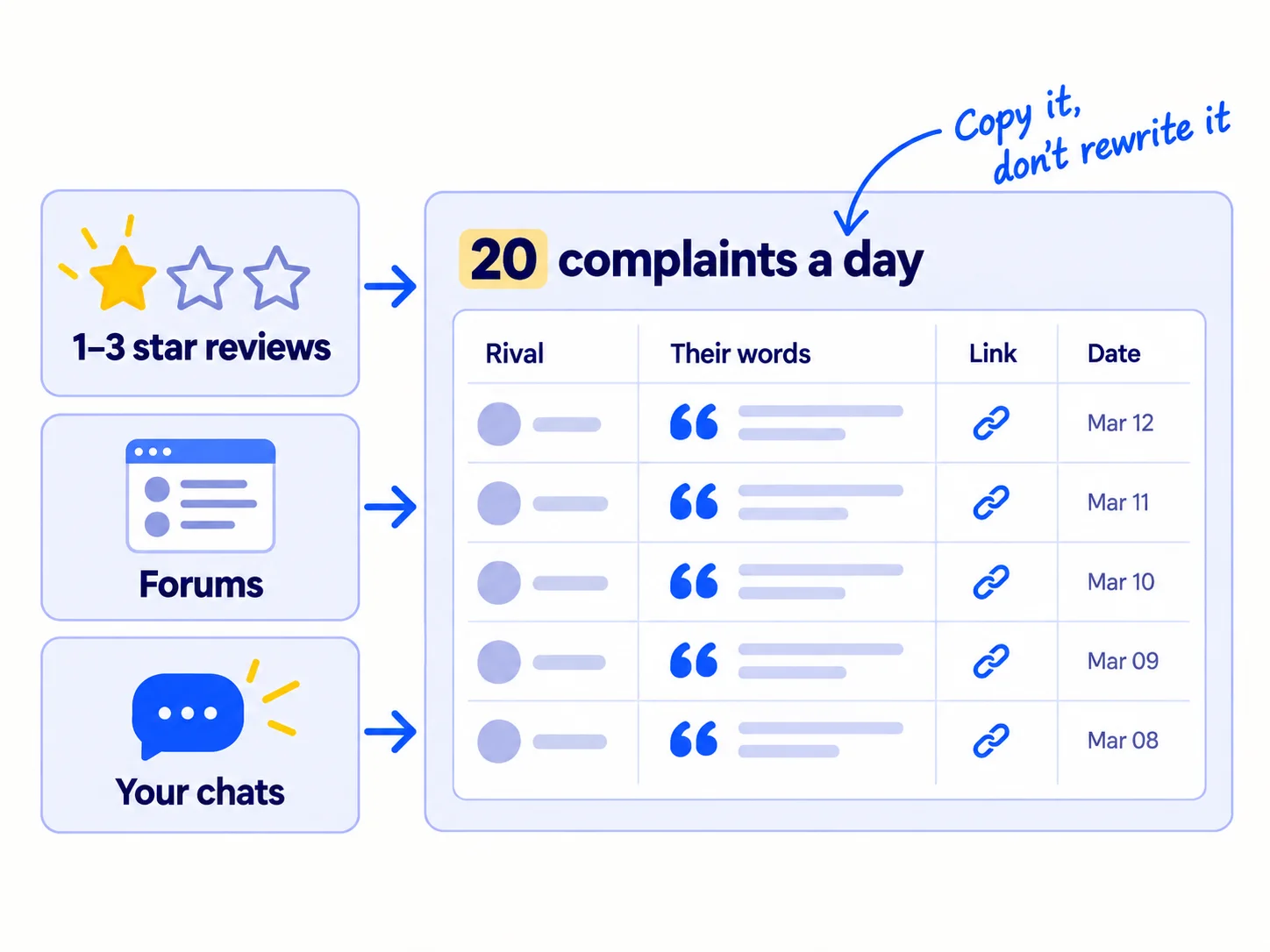
Read the 1-, 2- and 3-star reviews first. That is where paying customers say what annoys them. Three-star reviews are the most useful: the person likes the product enough to stay, and still says what is wrong.
Where to read, by reader:
- SaaS: G2 and Capterra reviews, and threads in the subredditssoon where your buyers talk.
- D2C: Amazon reviews, Trustpilot, TikTok comments on the rival's videos, and Shopify and Reddit threads.
- B2B: Google reviews on the rival's business profilesoon, trade forums, and LinkedIn comments.
- Agency: Clutch reviews, and posts where business owners say what went wrong with their last agency.
Then add your own source. In every sales callsoon and every chat you already have, ask two questions: "What do you use for this today?" and "What would you change about it?" Write the answer down in their words. These count toward your 20.
Use AI for the sorting, not the finding. Once a day, paste the day's complaints into ChatGPT or Claudesoon and ask it to group them into themes, such as price, speed, support or setup. Copy every quote yourself, from the real page, so every line is true and has a link.
- Tool: your Google Sheet, the review sites above, and ChatGPT or Claude to group them.
- Time: about 30 minutes a day, 1 to 2 minutes a complaint.
- You will have: 100 complaints after 5 days, each with the rival, the words, a link and a date.
- It worked if: you have 100 complaints from at least 3 kinds of source, all less than 12 months old.
- Common mistake: reading only 5-star reviews, or counting complaints from people who are not your buyer. A big company's complaint about missing admin features does not matter if you sell to 3-person teams. The other mistake is stopping at 15. With 15 complaints, one angry person can look like a pattern.
See it done: Carvelian's complaint count after 100
100 complaints, grouped by theme
| Theme | Count | One complaint, word for word |
|---|---|---|
| Minimum order too big for a small brand | 31 | "They wanted 5,000 boxes. We sell 300 jars a month." |
| Printed colour did not match the proof | 22 | "Our green came out grey, and the reprint took a month." |
| No real person to talk to | 18 | "Every question went to a ticket. Nobody knew our order." |
| Price | 16 | "Too expensive for what it is." |
| Slow delivery | 13 | "Six weeks, and we missed the market day." |
Why it works: The top theme is not price. It is the size of the first order, which Carvelian can change today.
5. Pick the gap you will win on and put it in your headline
After 100 complaints, pick one theme and write one sentence about how you fix it. Then put that sentence in your homepage headline, the first line of your messages, and an alternatives page.
![A tally of complaint themes with the top one circled. An arrow leads to one sentence, 'Unlike [rival], we [fix the top complaint] for [your buyer]', which then goes to three places: 'Headline', 'Messages', 'Alternatives page'.](/academy/illustrations/how-to-do-a-competitor-analysis/step-5-pick-the-gap-you-will-win-on-and-put-it-in-yo.webp)
Pick the theme with this rule. Take the complaint with the highest count that you can fix today, for your kind of buyer. If the top theme is price, skip it unless you can be cheaper and still pay yourself. A price gap is easy for a bigger rival to close. The second theme is often better.
Write the sentence. This is the core of your positioning, and it goes into your value proposition:
Unlike [the alternative your buyers use most], [your product] [fixes the top complaint, in the buyers' words] for [your buyer].
Then use it in three places, today:
- Your homepage headline. Say the fix, in the buyers' words, without the rival's name. Here is how to write homepage copysoon.
- The first line of your messages. If you send 100 personal messages a daysoon, open with the problem: "Most [buyers] tell me [the complaint]."
- An alternatives page for your biggest rival. Buyers search "[rival] alternatives" when the complaint hits. The guide to comparison and alternative pagessoon shows how to write one that is fair and still wins.
If you run a SaaS: also add the fix to your pricing pagesoon, next to the plan most buyers pick.
If you run a D2C store: put the fix in the first two lines of your product descriptionsoon, where shoppers look before they scroll.
- Tool: your sheet and your site editor.
- Time: 1 hour.
- You will have: one sentence, live in your headline, your message template and one alternatives page.
- It worked if: you show your homepage to 10 people who fit your buyer for 5 seconds, and at least 8 can say how you are different. Then, over your next 300 messages, replies per 100 stay the same or go up. If they go down, try the second theme.
- Common mistake: writing "better, faster, cheaper". Every rival says that. The other mistake is attacking a rival by name with claims you cannot show. Only write what a buyer could check.
See it done: Carvelian's new headline
Before
Premium custom packaging solutions for growing brands
After
Printed boxes for small food and drink brands. Order the number you actually sell, and see a printed sample first.
Why it works: It names the top complaint from 100 real reviews and says how Carvelian fixes it, in the buyers' own words.
6. Check your competitors every Sunday, and react only to what lasts
Set up free alerts once, then spend 45 minutes every Sunday checking what your 5 rivals changed. Most changes need no answer. Change your own message only when the complaint count changes.
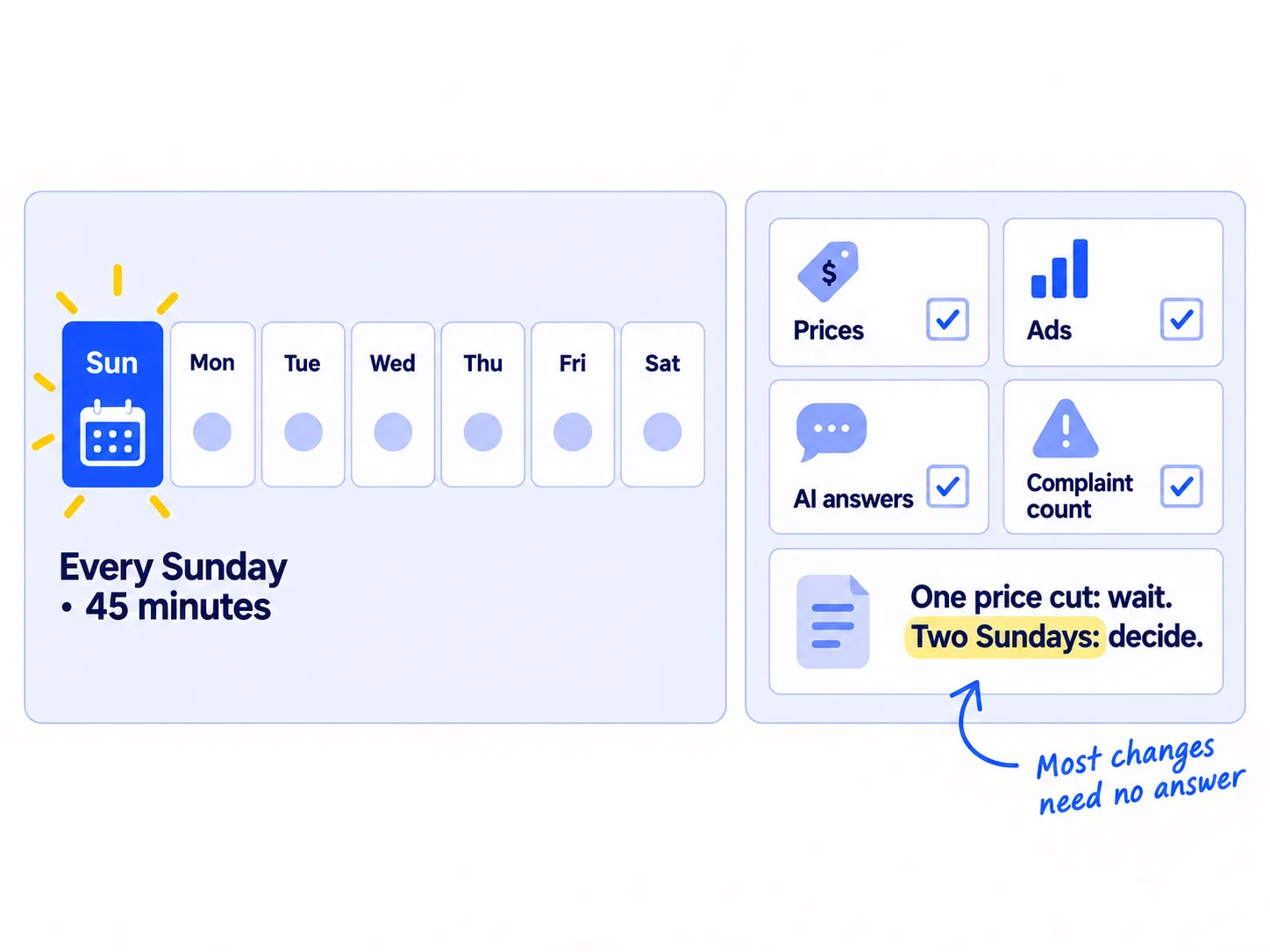
Set up once, in 30 minutes:
- Page alerts. Add each rival's pricing page to Visualping. The free plan watches 5 pages and gives 150 checks a month, which is about one check a day for each page. It emails you when a page changes.
- News alerts. In Google Alerts, type each rival's name in quotes, click "Show options", set how often to once a week, and click "Create Alert".
Then, every Sunday:
- Read the week's page alerts and news alerts. Write each change in a new tab of your sheet, with the date.
- Search the 5 names in the ad libraries from step 3. Note any new offer.
- Ask the AI tools your same 5 questions, and note who they name now. Use the same questions every week so you can compare. The guide on tracking ChatGPT mentionssoon shows how to keep this in one table.
- Recount your complaint themes with the week's 140 new complaints. If a new theme has taken the top spot, go back to step 5 and rewrite the sentence.
Use this rule for price cuts. If a rival cuts its price, wait. If the lower price is still there two Sundays later, decide. Before you lower your own, set your floor: the lowest price that still pays you. In a Shopify Community thread in August 2026, store owners said the same: "The competitor being cheaper for a day doesn't mean you have a pricing problem." Often the better answer is to raise what you givesoon, not cut the price.
Once a month, bring the sheet to your monthly marketing reviewsoon.
- Tool: Visualping free plan and Google Alerts. Both free.
- Time: 30 minutes to set up, then 45 minutes every Sunday.
- You will have: one dated row of changes each Sunday, with each change marked "act" or "ignore".
- It worked if: after 4 Sundays you have 4 rows, and you changed your message only when the top complaint changed.
- Common mistake: checking rivals every day and copying each move. You end up saying what they say, one week late. The other mistake is not checking at all until sales drop.
Where Scout7 helps
Scout7 speeds up steps 1, 3 and 4. The guide works the same without it.
Steps 1 and 3. Scout7 builds a competitor set for your business and shows which rivals are winning the Google searches and AI answers you want, and by how much. You check that the set is your real set of rivals, not only the famous names. Its keyword intelligence shows who leads on Google and in AI answers for each term, and AI question coverage collects the questions buyers ask AI assistants in your category and shows who answers them.
Step 4. Scout7's audience research reads public social conversations in your category and builds audience segments with pain points and quotes in buyers' own words. It does not read review sites or run interviews, so you still collect reviews and ask your buyers yourself.
Your competitor analysis checklist for the next 5 days
0 of 10 done
Work through this list with an AI assistant
It drafts the work and keeps track of what is done.
Frequently asked questions
- Should I give up if there are already big competitors?
No. Big competitors prove people pay for this. They also leave gaps: they build for bigger buyers, set large minimums or add features small buyers never use. Collect 100 complaints from their customers. If the same complaint shows up 20 or more times and you can fix it, you have a place to start. If you find no buyers at all, test the idea first.
- Is there a free competitor analysis template?
Yes. Use the one in step 2: one row per rival with price, promise word for word, who it is for, where it finds buyers, and its top complaint. Put it in Google Sheets and add a second tab for complaints, with rival, words, link and date. Five columns you fill in beat 40 you never finish.
- How many competitors should I analyse?
List 10, then study 5 in depth. Ten makes sure you include the cheap options and doing it by hand. Five is as many as you can follow every Sunday, and it fits the free page-alert plan in step 6. Swap one out when buyers start naming someone new.
- Can I use ChatGPT to do a competitor analysis?
Use it for two jobs: ask it who it recommends for your buyer's question, and group your complaints into themes. Do not let it write the complaints or guess prices. It can be out of date or wrong. Copy every quote and price from the real page, with a link, so your one difference rests on facts. Here is how to use ChatGPT for marketingsoon.
- How often should I do a competitor analysis?
Do the full version once, over 5 days. Then check for 45 minutes every Sunday, using free page and news alerts. Redo the full version when your buyers start naming a rival you have not seen, or when your reply rate drops for 300 messages in a row.
Sources
- 1.New G2 Research: Half of B2B Software Buyers Now Start Their Research With AI Chatbots — G2, via PR Newswire, 15 April 2026
- 2.What is the Meta Ad Library and how do I search it? — Facebook Help Center, checked 27 September 2026
- 3.Ads transparency — Google Advertising Policies Help, checked 27 September 2026
- 4.LinkedIn's Ad Library — LinkedIn Help, checked 27 September 2026
- 5.Website Traffic Checker — Ahrefs, checked 27 September 2026
- 6.Using the Wayback Machine — Internet Archive Help Center, checked 27 September 2026
- 7.Visualping pricing — Visualping, checked 27 September 2026
- 8.Create an alert — Google Search Help, checked 27 September 2026
- 9.Top Digital Marketing Agencies — Clutch, checked 27 September 2026
- 10.The massive 'Feature Matrix' spreadsheet is a trap. Here is how I actually analyze competitors now. — Indie Hackers, 30 April 2026
- 11.How do you handle it when a competitor undercuts your price? — Shopify Community, 15 August 2026
- 12.How to do a competitive analysis — Semrush, updated 21 May 2026
Next article to read
Related guides
- How to write a value propositionWrite a value proposition from your buyers' own words: copy 30 phrases, write 3 one-sentence versions, test them in 100 personal messages a day, and put the winner on your homepage after 900 messages.
- How to create an ideal customer profileCreate an ideal customer profile when you have one or two customers: list everyone who paid, tried or talked to you, write 2 or 3 one-sentence guesses, test them with 100 messages a day, and keep the one that gets the most chats after 1,500 messages.
- How to track AI traffic and ChatGPT mentionsComing soon
- How to get on the "best of" lists AI tools citeComing soon
Guides that link here
- How to create an ideal customer profile
- How to write a value proposition
- How to validate a business idea without spending money
- How to get beta users for your startupSaaS
- How to get your first sale on EtsyD2C
- How to do customer interviews
- How to price a B2B product or serviceB2B
- How to price a productD2C
- How to price a SaaS productSaaS
Cite this page
Dinesh Bypilla (2026). How to do a competitor analysis. Scout7 Academy. https://scout7.ai/academy/marketing-plan/how-to-do-a-competitor-analysis
Written by Dinesh Bypilla, Agentic systems engineer at Scout7. Reviewed by Murali Sid. Last checked 27 September 2026.
Quote any part of this guide with a link back to this page. © 2026 Scout7.
Markdown version of this page: https://scout7.ai/academy/marketing-plan/how-to-do-a-competitor-analysis.md