



How to choose marketing channels for a SaaS startup
Choose marketing channels for a SaaS startup: list 10 places your buyers already look, test 3 for 4 weeks with a pass mark, then double down on what brings active users and drop the rest.
ByDinesh BypillaReviewed byMurali SidLast checked 16 min read
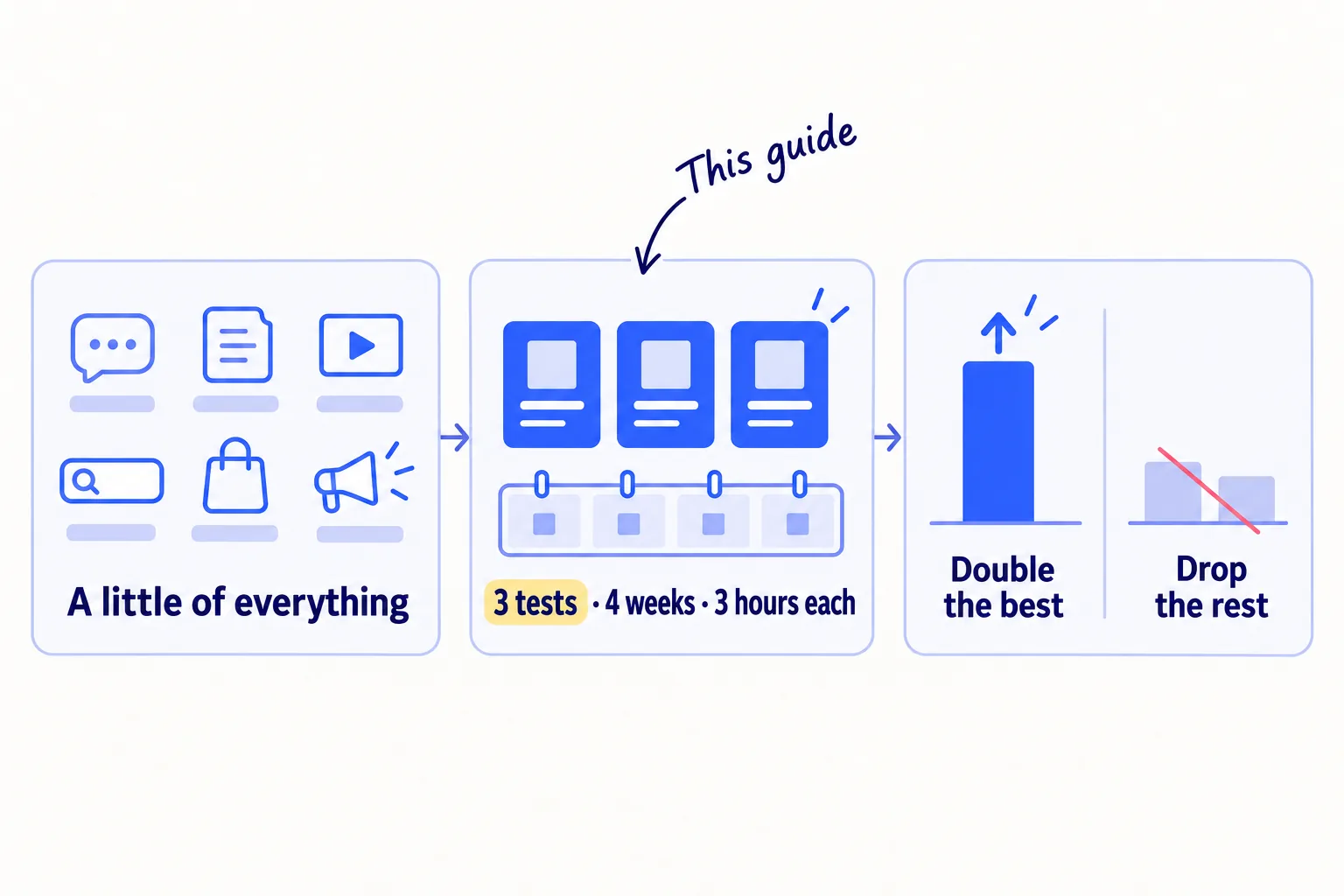
You have a few signups, but you spread your hours across many places and cannot tell which one brought the users who stayed. Here is how to choose marketing channels for a SaaS startup: list the places your buyers already look, test three of them properly for 4 weeks, then put more hours into what brings active users and drop what does not. If you keep doing a little of everything, every channel looks like it failed, because none of them got enough hours to show you a result.
Do these three things
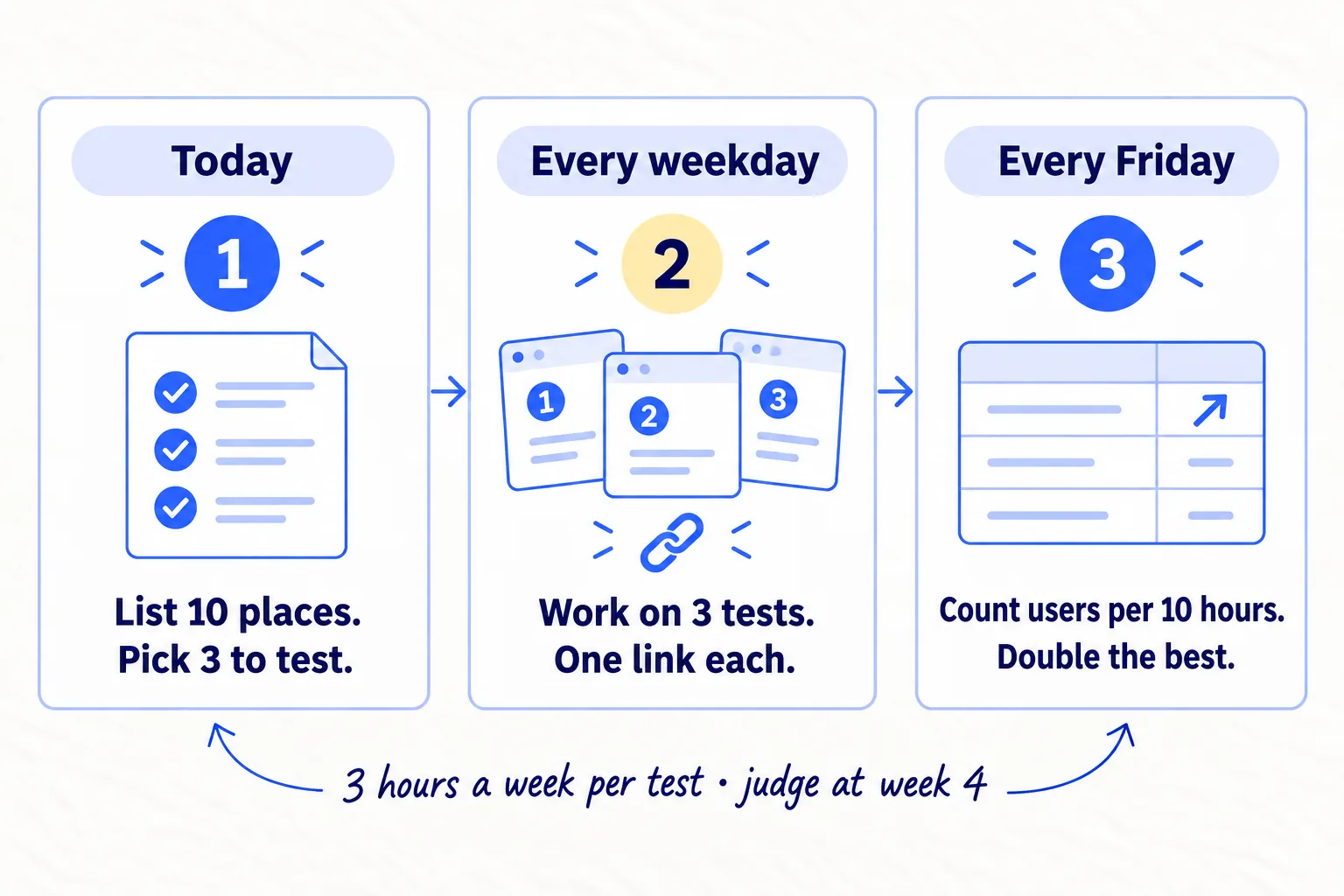
About 3 hours a week for each test, on top of what already works. Judge fast channels at week 4 and search at month 3.
Show the three actions in fullHide the full list
- Today: list 10 exact places where your buyers already look for a tool like yours. Pick the 3 where you can point to real buyers, could get a signup within 4 weeks, and can spend 3 hours every week.
- Every weekday: work on those 3 tests for 4 weeks, next to what already works. Give each one its own link, so you know where every signup came from.
- Every Friday: for each channel, count the signups who used your product for every 10 hours you spent. At week 4, put more hours into the best one, fix or drop the rest, and start the next place on your list.
Get help doing these
ChatGPT or Claude reads this guide and works through it with you.
1. List 10 places your buyers already look for a tool like yours
Write down 10 exact places where people who fit your buyer already look for help with your problem, with a number for each that proves they are there. A place is something you can name, like one subreddit, one search phrase or one app store. "Social media" is not a place.
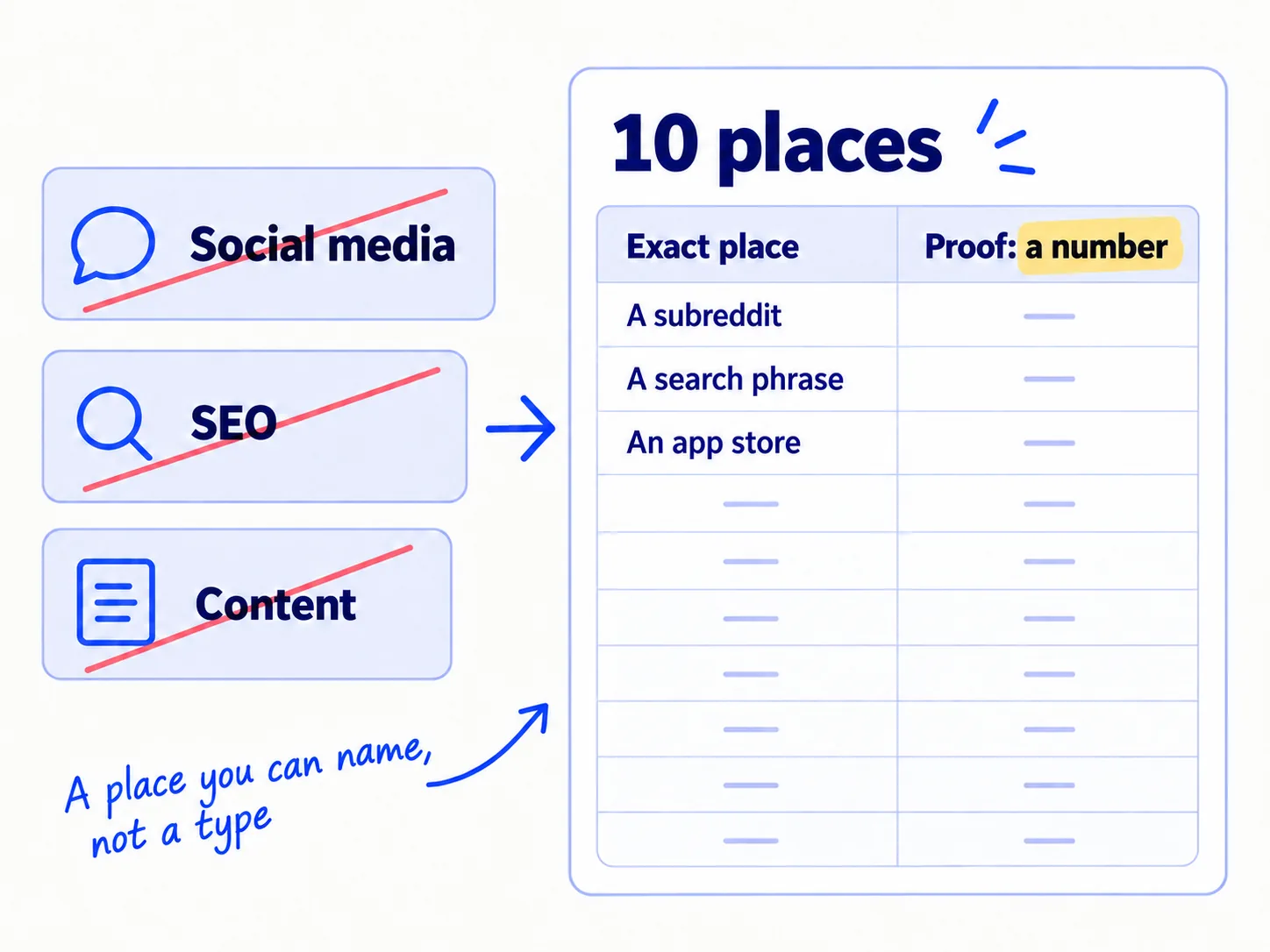
Start with what you already know. Keep every place that brought signups in your first weeks. If you followed How to market a SaaS product, that is your Friday sheet. Then email your paying users and your last 10 signups one question: "Before you found us, where did you look for a tool like this?" Their answers go on the list first.
Then fill the rest from these kinds of places, one exact place per row:
- Communities: search Reddit, Slack groups, Discord servers and forums for your problem in your buyers' words. Count the posts about it in the last 30 days. See How to find online communities where your buyers talksoon.
- Search: type the problem and "[competitor] alternative" into Google, and note which phrases appear as suggestions. Put them into the free Ahrefs Keyword Generator to see monthly searches. See How to find keywords for SEOsoon.
- AI answers: ask ChatGPT the question your buyer would ask, and note which tools it names. In G2's March 2026 survey of 1,076 software buyers, 51% said they now start their research in an AI chatbot more often than in Google. See How to get your brand mentioned by ChatGPTsoon.
- App stores inside tools your buyers already use: a browser extension store, or the app marketplace of the tool your buyers work in all day. See How to get listed in integration marketplacessoon.
- A free tool: a small, free thing your buyers would use without signing up, such as a template or a checker. See How to build a free tool that brings in leadssoon.
- People who already reach your buyers: a newsletter, a YouTube channel or a consultant your buyers follow.
- Paid search: the same phrases as your search rows, but paid. It goes on the list now and waits until step 6.
Exact place | Kind | Proof buyers are there (a number) | First signup expected in | Hours a week to do it properly | Decision
- Tool: Google Sheets, Google search suggestions, the Ahrefs Keyword Generator (free), and the search box on each site.
- Time: 1 hour, plus waiting for your users' replies.
- You will have: 10 rows, each with an exact place and a number.
- It worked if: every row names one place you could open in a browser, and has a number next to it: posts in the last 30 days, monthly searches, or people you can name.
- Common mistake: copying a list of "25 SaaS marketing channels". Those lists are written for companies with a team and a budget, and they include things like trade shows and account-based marketing that need both.
2. Pick 3 channels to test using three questions
Ask three yes-or-no questions about each place, and test the ones that get three yeses. Most founders with one or two people can test 3 at a time.
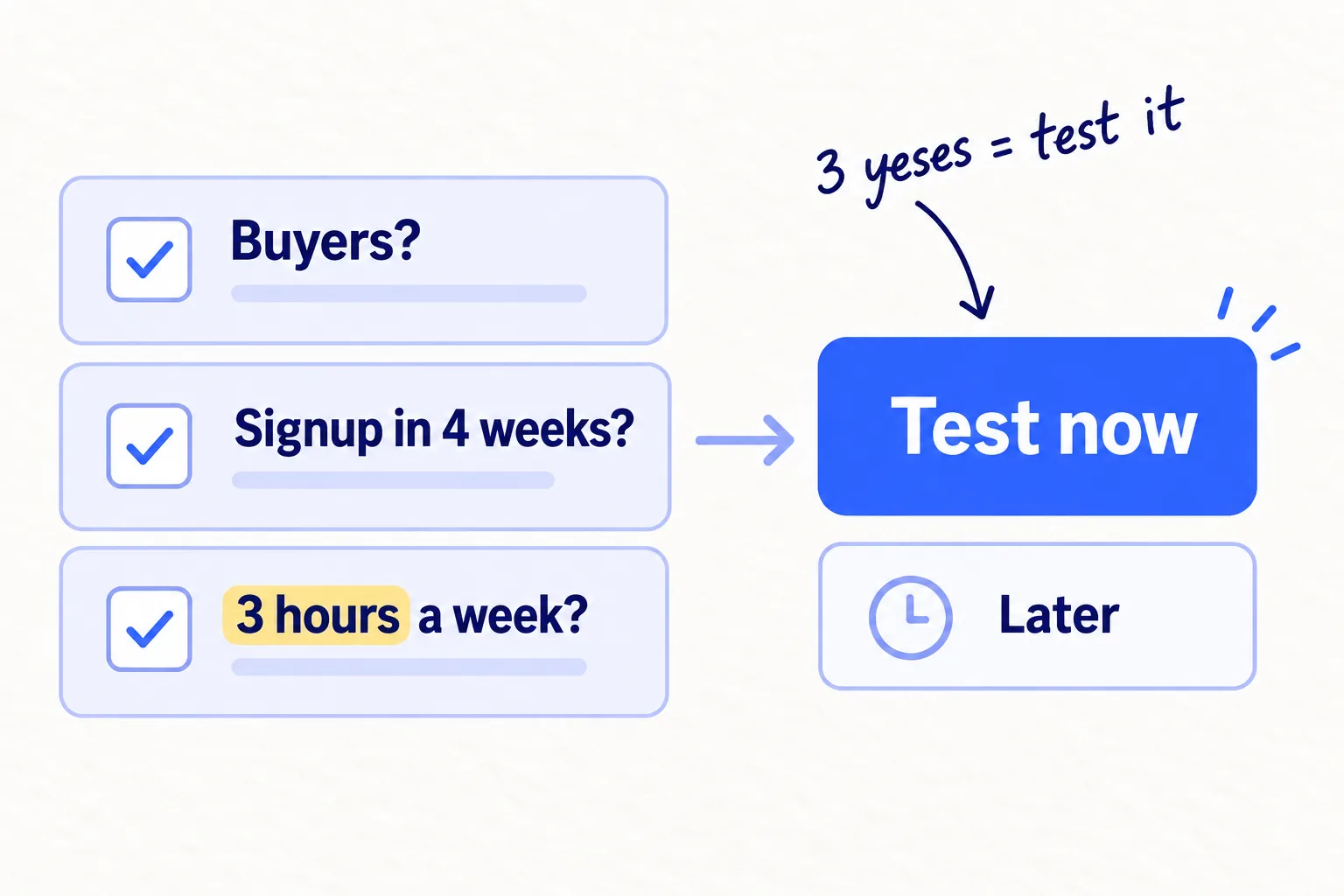
First, count your hours. Write down how many hours a week you really have for marketing. Take away the hours for what already works. Divide what is left by 3. That is how many channels you can test at once, because each test needs about 3 hours a week to show a result. If you have 9 spare hours, test 3. If you have 15, test 5. More tests at once means you find your best channel sooner.
Then ask the three questions about every row:
- Can you point to buyers there? Yes if you can name 20 people there, or find 10 posts about your problem from the last 30 days, or the phrase appears in Google's suggestions.
- Could it bring a signup within 4 weeks? Communities, personal messages, app stores and free tools usually can. Search pages usually cannot.
- Can you give it 3 hours every week for 4 weeks, in the hours you really have?
Then decide:
- No to question 1: cross it out. The other two do not matter if your buyers are not there.
- Three yeses: test it now. If more rows pass than you have hours for, take the ones with the biggest numbers.
- Yes to 1 and 3, no to 2: start it now only if it is search or AI answers, and judge it at month 3.
- It needs money: it waits for step 6.
Testing a few channels side by side, instead of one after another, comes from the Bullseye method in the 2015 book Traction. It is faster, because you learn from all of them in the same 4 weeks.
- Tool: your sheet from step 1.
- Time: 30 minutes.
- You will have: 3 or more channels to test, and a "later" list.
- It worked if: each channel you chose has three yeses and an exact place.
- Common mistake: picking the place you enjoy instead of the place your buyers are. Posting on X usually reaches other founders, not buyers. See How to build in public on Xsoon if you want to do it anyway, and do not count it as a test.
See it done: Bugmoth's scored list
Bugmoth is a made-up bug-reporting tool for small web teams. It costs $19 a month per team, with a 14-day trial.
The two founders have 18 hours a week between them. What already works takes 9, so they have 9 spare hours: 3 tests.
The channel list, scored
| Place | Buyers you can point to? | A signup within 4 weeks? | 3 hours every week? | Decision |
|---|---|---|---|---|
| Personal messages to agency owners | Yes: 11 chats in 4 weeks | Yes | Yes | Keep: already works |
| Two web design communities | Yes: 4 signups in 4 weeks | Yes | Yes | Keep: already works |
| "Alternative" pages for search | Yes: in Google's suggestions | No | Yes | Keep: judge at month 3 |
| Chrome Web Store listing for the browser extension | Yes: "bug report chrome extension" is a Google suggestion | Yes | Yes | Test now |
| Free bug-report form for clients | Yes: "bug report form template" is a Google suggestion | Yes | Yes | Test now |
| LinkedIn posts from Sam's profile | Yes: 60 agency owners they know are there | Yes | Yes | Test now |
| Short demo videos | Yes | Unsure | No hours left | Later |
| Sponsoring a web agency newsletter | Yes | Yes | Needs money | Later: step 6 |
| Google Ads on "alternative" phrases | Yes | Yes | Needs money | Later: step 6 |
| Posts on X | No: their followers are other founders | Crossed out |
Why it works: Every test they chose has proof that agency owners are there, and they have the hours to run it properly.
To find more hours in your week, see How to fit marketing into your week as a solo founder.
3. Set a fair test for each channel before you start
Before you start, write down for each test how much you will do each week, for how long, and what result counts as a pass. If you decide the pass mark after the test, you will talk yourself into keeping whatever you enjoyed.
Use this table for how much counts as a fair test. Less than this, and a zero tells you nothing.
| If the channel is… | a fair test is… | and you judge it… |
|---|---|---|
| personal messages | 50 messages a week, each written by hand | at week 4 |
| a community | 5 useful answers a week in each place | at week 4 |
| an app store listing | a full listing set up once, then a reply to every review and question | at week 4 |
| a free tool | built once, then shared in 5 answers a week | at week 4 |
| short videos | 3 videos a week, in portrait (9:16) or landscape (16:9) | at week 4 |
| search pages | 1 page a week | at month 3 |
| a launch site | 1 launch, then a message to everyone who comments | 1 week after the launch |
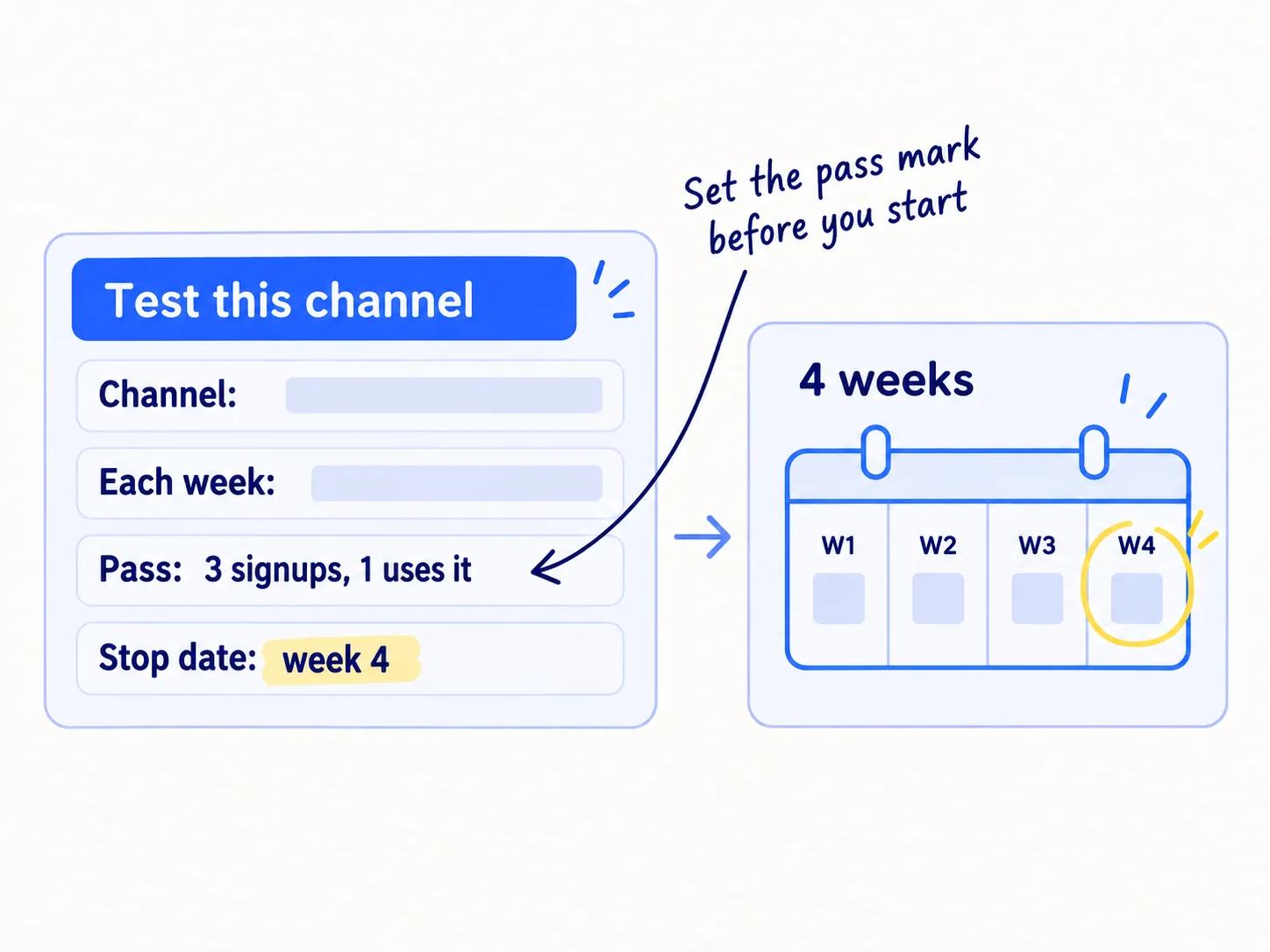
Use one pass mark for every 4-week test: at least 3 signups from this channel, and at least 1 of them used your main feature. Put the stop date in your calendar.
Channel: [exact place]Each week: [how much, from the table]Hours a week: [about 3]Link: [its own link, from step 4]Pass: at least 3 signups in 4 weeks, and at least 1 used the main featureStop date: [the Friday of week 4]
- Tool: Google Sheets and your calendar.
- Time: 20 minutes.
- You will have: one card for each test, and a stop date in your calendar.
- It worked if: a friend could read each card and know exactly what to do each week and when it ends.
- Common mistake: stopping after one week or 15 messages. A founder on Hacker News in September 2026 put it plainly: most people do not do enough targeted, steady volume on one channel. The other mistake is changing three things halfway through. Change nothing until the stop date.
See it done: Bugmoth's three test cards
Tests for the next 4 weeks
| Test | Each week | Hours a week | Pass mark | Stop date |
|---|---|---|---|---|
| Chrome Web Store listing | Set up in week 1, then answer every review and question | 3 | 3 signups, 1 used it | Week 4 |
| Free bug-report form for clients | Build in week 1, then share it in 5 answers a week | 3 | 3 signups, 1 used it | Week 4 |
| LinkedIn posts from Sam's profile | 3 posts about client bug reports | 3 | 3 signups, 1 used it | Week 4 |
Why it works: Each card says what to do each week and what counts as a pass, so the Friday decision is already made.
4. Give each channel its own link and count signups, not visits
Give every place its own tracking link, and save every new signup with where it came from. Then judge each channel by signups, not by visits, likes or upvotes.
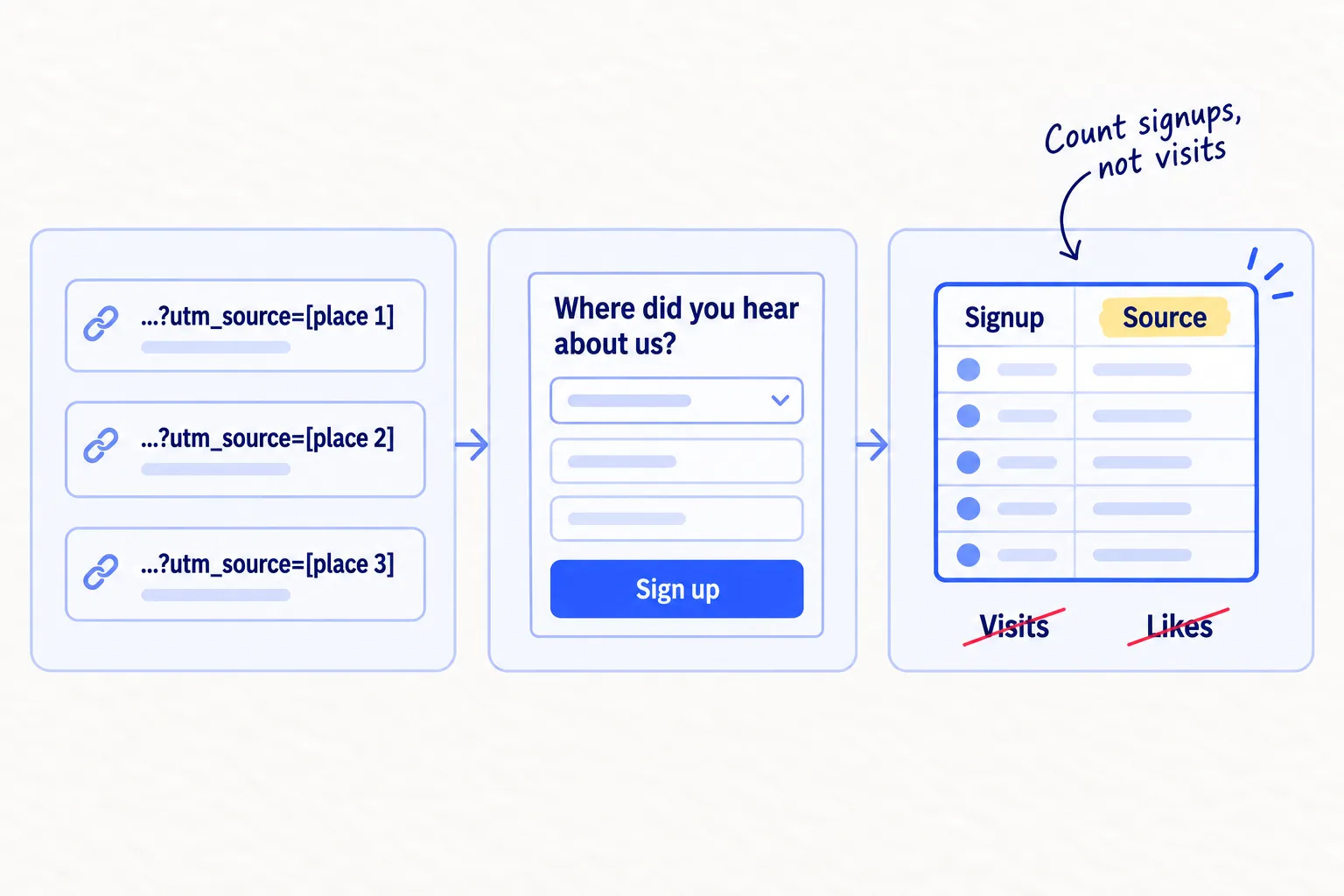
A tracking link, or UTM link, is your normal link with a few words added at the end that tell Google Analytics where the visitor came from. Make one for each place, and use it in every post, profile, listing and answer there:
yoursite.com/?utm_source=[exact place, such as r-webdev]&utm_medium=[kind, such as community]&utm_campaign=channel-test
Google Analytics 4 is free and shows these in the Traffic acquisition report, under "Session source/medium" and "Session campaign". That tells you visits. For signups, you built the product: save the utm_source value with each new account when it signs up. It is a few lines of code, and it gives you signups per channel without any extra tool.
Some people will not click your link. They see your answer, then type your name into Google later. So keep the "Where did you hear about us?" question on your signup form, and add each new channel as an option.
Count signups because visits can fool you. In August 2026, one founder's Google impressions went from 2,000 to 8,000 a day, and he got zero signups from them. All 6 of his signups came from launch sites and communities. In July 2026, another founder reached the top 50 on Product Hunt and also got zero signups. You cannot guess which channel will bring signups for your product. You can only count.
- Tool: Google Analytics 4 (free), your signup form and your own database.
- Time: 30 minutes, once.
- You will have: a link for every place, and a source saved on every new signup.
- It worked if: at least 9 of every 10 signups this week have a source, from the link or from the answer to the question.
- Common mistake: judging a channel by visits, likes or upvotes. They are easy to count and tell you nothing about who signs up.
For more on building the links, see How to use UTM parameterssoon.
5. Every Friday, compare channels and decide: double down, fix or drop
Every Friday, write down for each channel the hours you spent, the signups, the signups who used your main feature, and new paying customers. At each stop date, use the rules below to double down, keep, fix or drop each one.
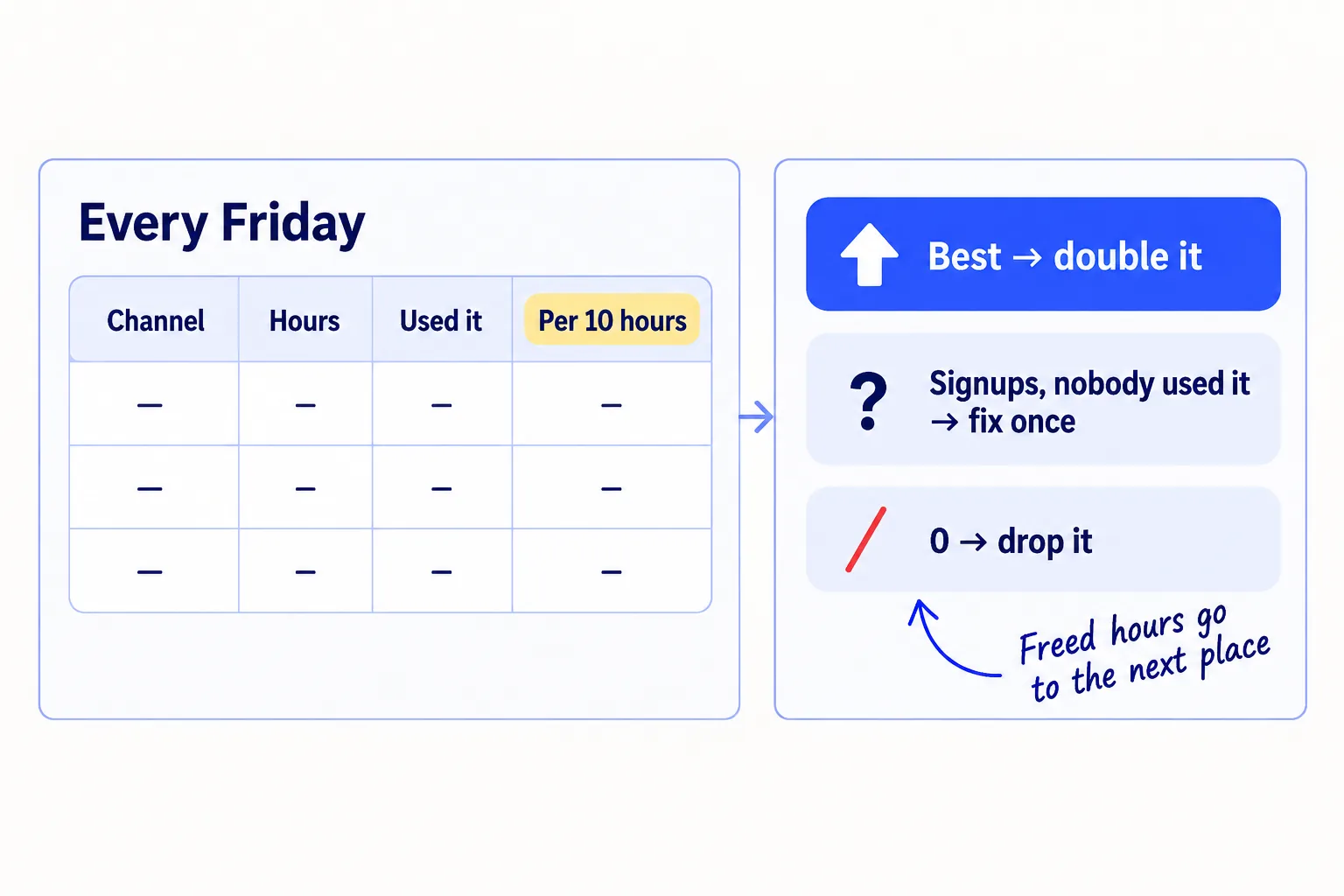
To compare channels fairly, work out one number for each: signups who used your main feature, per 10 hours. Take the signups who used the main feature, divide by the hours you spent, and multiply by 10. A channel that gave you 4 active users for 12 hours scores 3.3. A channel that gave you 8 signups but only 1 active user for the same 12 hours scores 0.8.
Channel | Hours spent | Signups | Signups who used the main feature | New paying customers | Used it, per 10 hours
At each stop date, decide:
- It brings paying customers: keep it, whatever its number. Paying customers matter more than anything else on the sheet.
- It passed and has the best number: double down. Double its weekly amount for 2 weeks. If signups go up, keep the new amount and try doubling again. If they do not go up at all, it has reached its limit for now. Go back to the old amount and give the extra hours to the next place on your list.
- It passed, but it is not the best: keep it at the same amount.
- It brought signups, but nobody used the main feature: you reached the wrong people, or promised the wrong thing. Change one thing, such as the place or the words, and run it for 2 more weeks. If it is the same, drop it. If this happens on every channel, the problem is your product's first steps, not the channels. See How to improve activation ratesoon.
- Zero signups after the full amount: drop it. Write one line on why, so you do not try it again next month.
- Search pages and AI answers: keep going and judge them at month 3. See How long does SEO take to work?soon
The same week you drop a channel, give its hours to the best channel or start the next place on your list with a new test card. Once a month, look at your list again with what you learned: add the places your newest paying customers say they looked.
- Tool: Google Sheets.
- Time: 20 minutes every Friday, and 1 hour at each stop date.
- You will have: a decision for every channel, written down.
- It worked if: after each stop date, every hour of next week belongs to a channel that passed or to a new test with a stop date.
- Common mistake: keeping a channel that brought nothing "in case it works later", or dropping one that never got its full amount. Both leave you guessing next month.
See it done: Bugmoth at week 4
The Friday sheet at the stop date
| Channel | Hours spent | Signups | Used the main feature | New paying teams | Used it, per 10 hours |
|---|---|---|---|---|---|
| Personal messages | 16 | 6 | 5 | 2 | 3.1 |
| Two web design communities | 8 | 3 | 2 | 0 | 2.5 |
| "Alternative" pages | 12 | 1 | 0 | 0 | judge at month 3 |
| Chrome Web Store listing | 12 | 8 | 1 | 0 | 0.8 |
| Free bug-report form | 12 | 6 | 4 | 0 | 3.3 |
| LinkedIn posts | 12 | 0 | 0 | 0 | 0 |
The decision: they keep personal messages, because both new paying teams came from them, and keep the communities. They double the free form to 10 answers a week. The store listing brought signups who did not use Bugmoth, so they rewrite it to say it is for agencies and their clients, and run it 2 more weeks. They drop LinkedIn posts and use those 3 hours to start short demo videos, the next place on their list.
Why it works: They compare channels by active users per 10 hours, and they keep the channel that brings paying teams even though its number is lower.
6. Test paid ads last, with a cap, once 10 people have paid
Add paid ads only after at least 10 people have paid you, and run them as a 2-week test with a spending cap. Before that, you do not know what a customer is worth, so you cannot tell whether an ad is cheap or expensive.
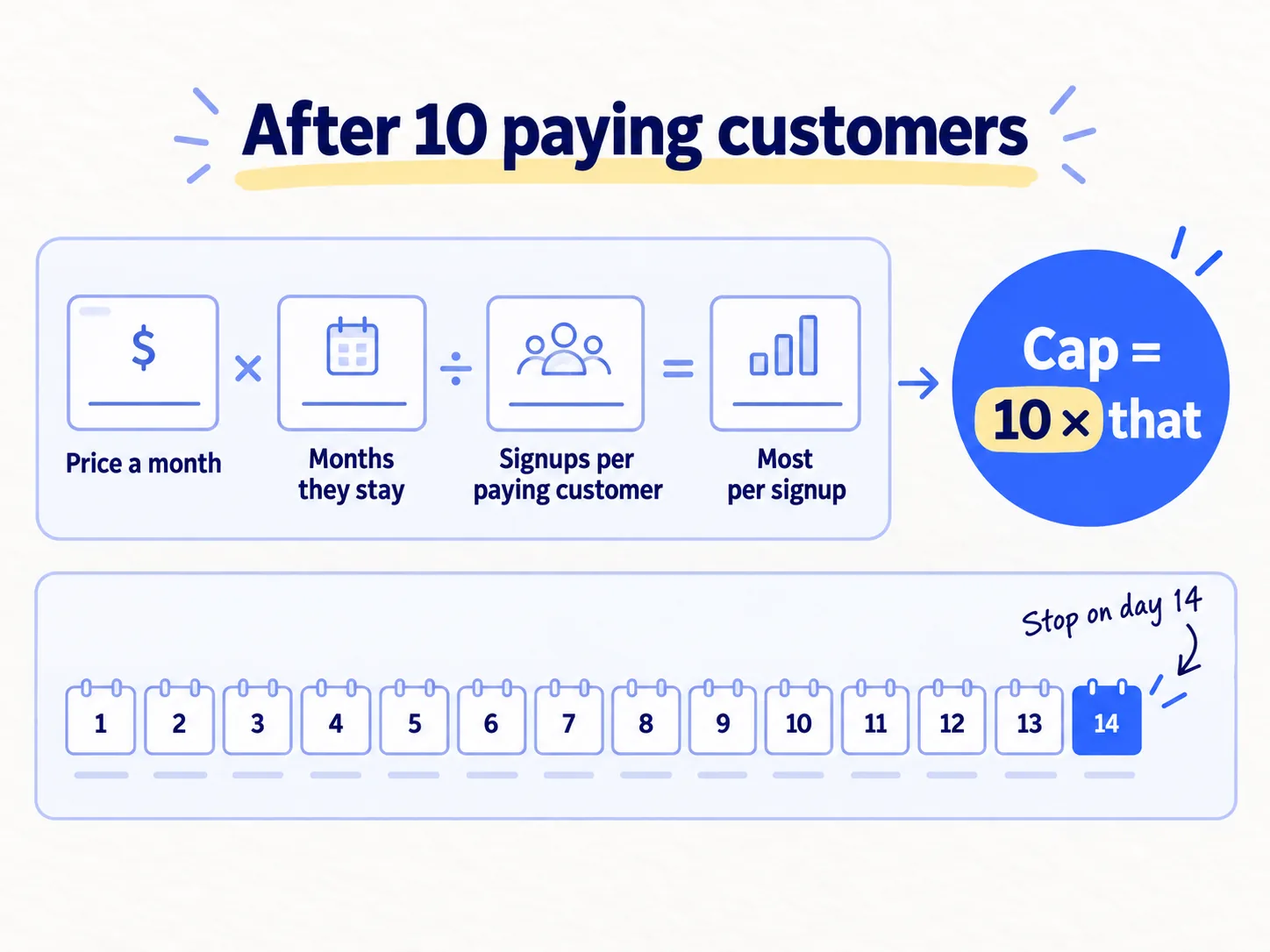
First, work out the most you can pay for one signup:
[Price a month] × [months an average customer stays] ÷ [signups it takes to get one paying customer] = the most you can pay per signupTest cap = 10 × that number
For example, a $20-a-month product where customers stay about 10 months, and 1 in 10 signups pays, can pay up to $20 a signup. Its test cap is $200.
Then run the test in Google Ads, as a Search campaign. Use only the exact phrases that already bring you signups from your search pages, such as "[competitor] alternative". Set the daily budget to your cap divided by 14. Google says a campaign can spend up to twice its daily budget on one day, but no more than 30.4 times it in a month. So stop the campaign yourself on day 14.
- Tool: Google Ads.
- Time: 2 hours to set up, then 15 minutes a day to check which searches your ads showed for.
- You will have: a cost per signup for paid search, from real spending.
- It worked if: your cost per signup is at or below your number, and those signups use the main feature about as often as signups from your other channels.
- Common mistake: broad phrases, and judging by clicks. A founder on Hacker News in July 2026 got "lots of clicks" from search ads but almost no signups. Another commenter replied that this is a targeting problem: good paid search traffic should sign up at about the same rate as people who find you on Google for free.
See How to run Google Ads for SaaSsoon and How to calculate CAC and payback periodsoon. For how much time and money to give each channel, see How much to spend on marketing as a SaaS startup.
Where Scout7 helps
Scout7 speeds up steps 1 and 6.
Step 1. Scout7's Join Conversations searches social platforms for live discussions about your problem. The threads it finds show where your buyers talk, which fills in the proof column for your community rows. Audience research reads public social conversations in your category and gives you your buyers' pain points in their own words, which you can use as search terms. For your search and AI rows, keyword intelligence shows monthly searches, difficulty, and who leads on Google and in AI answers for each phrase. AI question coverage collects the questions buyers ask AI assistants in your category and shows who is cited now.
Step 6. When you reach the paid test, Scout7 plans, builds, launches and monitors Google, Meta, LinkedIn and Reddit campaigns in the Scout7 app. This runs in the app, not over MCP yet. Every twelve hours it reviews each campaign and proposes what to cut or where more budget would earn more. You approve every creative, every change and the spend.
Your channel-testing checklist for the next 4 weeks
0 of 12 done
Work through this list with an AI assistant
It drafts the work and keeps track of what is done.
Frequently asked questions
- How many marketing channels should a SaaS startup use?
As many as your hours can run properly. Each channel needs about 3 hours a week to show a result, so divide your spare hours by 3. Most founders can test 3 at a time next to what already works. Keep every channel that passes its test, and add the next one as soon as you free up 3 hours.
- How long should I test a marketing channel before I give up?
Four weeks at the full amount for messages, communities, app stores, free tools and short videos. One week after the day for a launch. Three months for search pages and AI answers, because Google takes time to show new pages. Stopping earlier, or after doing less than the full amount, tells you nothing either way.
- What if none of my marketing channels work?
Look at which way they failed. If three channels brought signups but nobody used the main feature, fix your product's first steps before you test more channels. If none brought signups at the full amount, go back to who your product is for and your homepage headline. See Why no one is buying your product, and how to fix it.
- Should I pay a freelancer or an agency to run a channel for me?
Not before one channel has passed a test you ran yourself. Until then, you do not know what good looks like, so you cannot judge their work. Once a channel works and you have no hours to double it, handing over that one channel makes sense. See Should you hire a marketer, an agency or a fractional CMO?soon
- Is SEO worth it for a new SaaS?
Yes, for pages that match what buyers type just before they need you, such as "[competitor] alternative". Start them early, one a week, because they take about 3 months to show results. Do not count them as one of your 4-week tests, and do not judge them by traffic. Judge them by signups at month 3.
Sources
- 1.New G2 Research: Half of B2B Software Buyers Now Start Their Research With AI Chatbots — G2, via PR Newswire, 15 April 2026
- 2.About average daily budgets — Google Ads Help, checked 24 September 2026
- 3.Collect campaign data with custom URLs — Google Analytics Help, checked 24 September 2026
- 4.Free Keyword Generator — Ahrefs, checked 24 September 2026
- 5.Strategize, Test, Measure: The Bullseye Framework — Brian Balfour, on Traction by Gabriel Weinberg and Justin Mares, 2 September 2014
- 6.SEO 3x'd my traffic. Signups dropped to zero. — Indie Hackers, 24 August 2026
- 7.5 days post-launch: Top 50 on Product Hunt, zero signups — Indie Hackers, 7 July 2026
- 8.Ask HN: How do you do marketing in the age of slop? — Hacker News, 15 July 2026
- 9.How SaaS startup guys get first 100 customers — Hacker News, 12 September 2026
Next article to read
How much to spend on marketing as a SaaS startupSaaSOnce you pick your channels, this shows how much time and money to give each one.Read it nextRelated guides
- How to market a SaaS productSaaSMarket a new SaaS product with no budget: a 4-week routine for one founder, with the messages to send, where to answer questions, and the numbers to check every Sunday.
- How to find online communities where your buyers talkComing soon
- How to find keywords for SEOComing soon
- How to build in public on XSaaSComing soon
Guides that link here
- How to market a SaaS productSaaS
- How much to spend on marketing as a SaaS startupSaaS
- How to market your product as a technical founderSaaS
- How to get your first 100 SaaS usersSaaS
- How to launch on Product HuntSaaS
- How to do a competitor analysis
- How to fit marketing into your week as a solo founder
- How to price a SaaS productSaaS
Cite this page
Dinesh Bypilla (2026). How to choose marketing channels for a SaaS startup. Scout7 Academy. https://scout7.ai/academy/marketing-plan/how-to-choose-marketing-channels-for-a-saas-startup
Written by Dinesh Bypilla, Agentic systems engineer at Scout7. Reviewed by Murali Sid. Last checked 24 September 2026.
Quote any part of this guide with a link back to this page. © 2026 Scout7.
Markdown version of this page: https://scout7.ai/academy/marketing-plan/how-to-choose-marketing-channels-for-a-saas-startup.md