



How to get your first 100 SaaS users
Get your first 100 SaaS users when a few people signed up and most never used it: count only people who did the main thing, offer a 15-minute set-up call in 100 messages and 20 answers a day, set up every signup within 24 hours, launch once you have 20 users, and count users by source every Sunday.
ByDinesh BypillaReviewed byMurali SidLast checked 22 min read
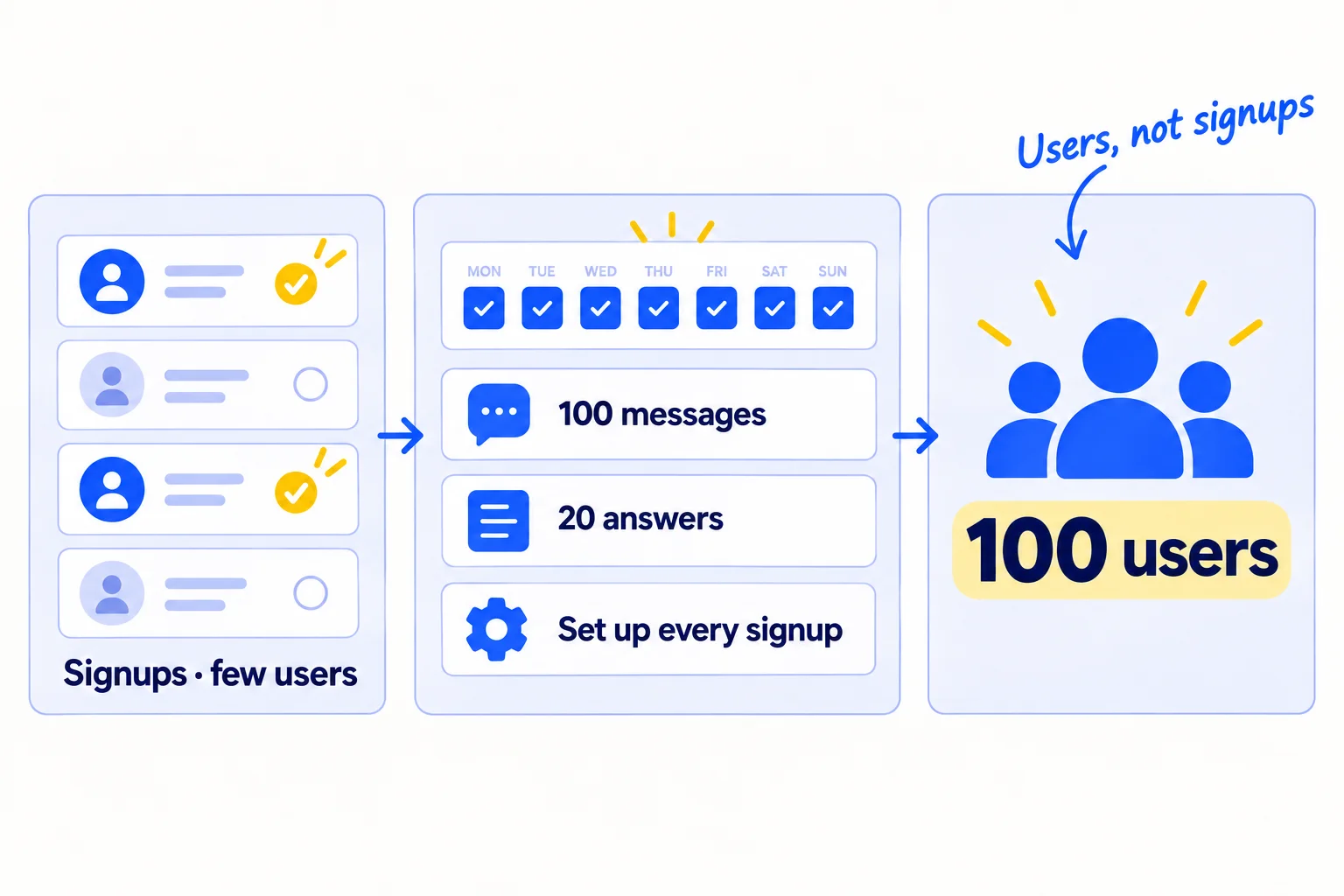
You built a SaaS, a few people signed up, and most of them never used it. This guide shows how to get your first 100 SaaS users: people who signed up and did the main thing your product is for, not just an email in your database. It takes 100 messages and 20 answers a day, and setting up every new signup yourself, because 10 messages a week and a welcome email will not get you there.
Do these three things
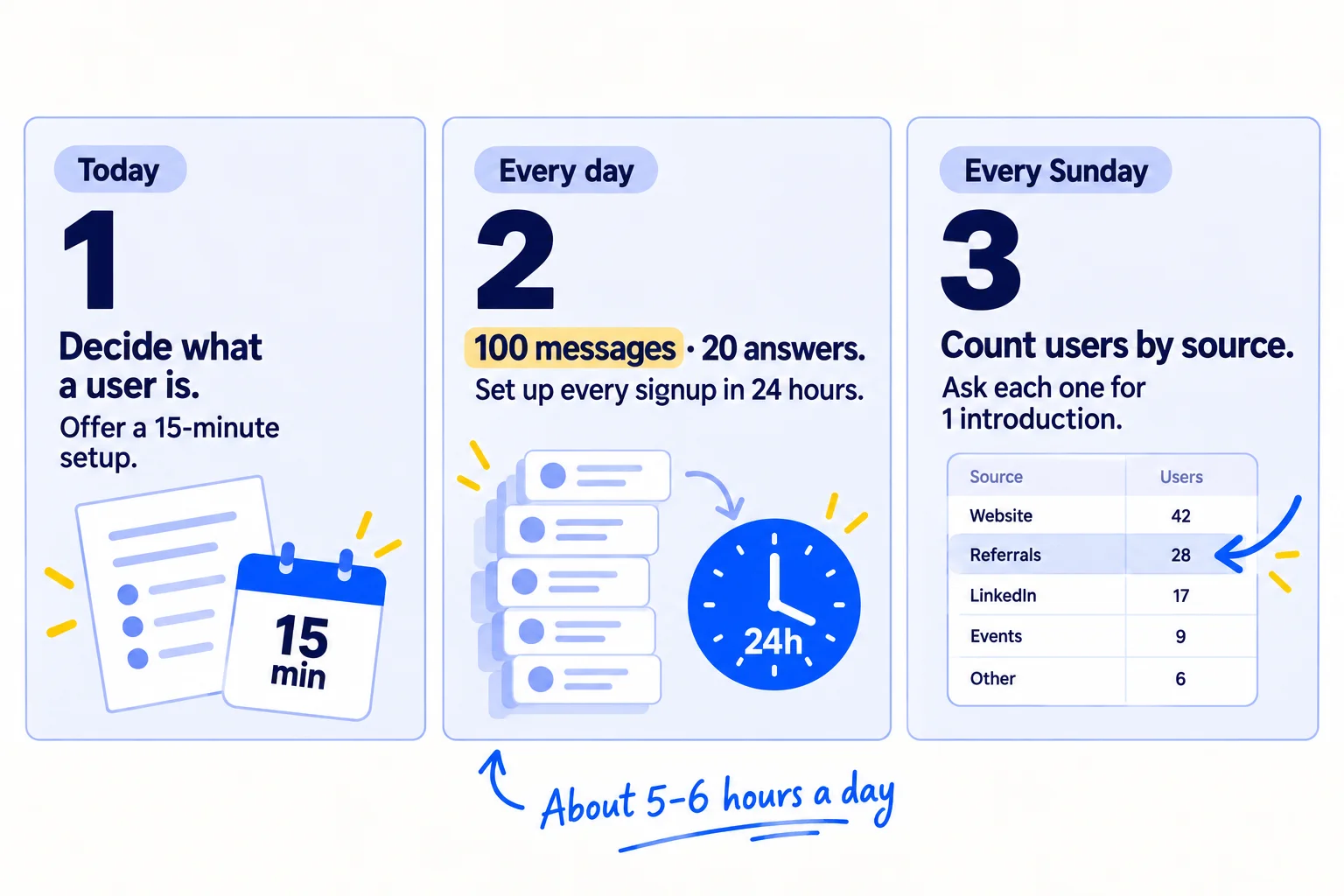
About 5 to 6 hours a day, every day. Judge each source after 2,800 messages and 560 answers. At about 1 user per 100 messages, plan on 2 to 3 months to reach 100.
Show the three actions in fullHide the full list
- Today: decide what counts as a user (signed up and did the main thing once), and start a sheet with one row per user and where they came fromsoon. Write an offer to set up your SaaS with each person on a 15-minute call.
- Every day: send 100 personal messagessoon and 20 helpful answers in places where your buyers ask for helpsoon that make that offer. AI drafts; you add one true line. Set up every new signup yourself within 24 hours.
- Every Sunday: count new users by where they came from. Ask each person who became a user that week for one introductionsoon. Give next week's hours to the source that brought the most users.
Get help doing these
ChatGPT or Claude reads this guide and works through it with you.
1. Decide what counts as a user and work backwards to a daily number
A user is someone who signed up and did the main thing your product is for at least once. Count only them. Then work backwards from 100 to the amount of work you need to do each day.
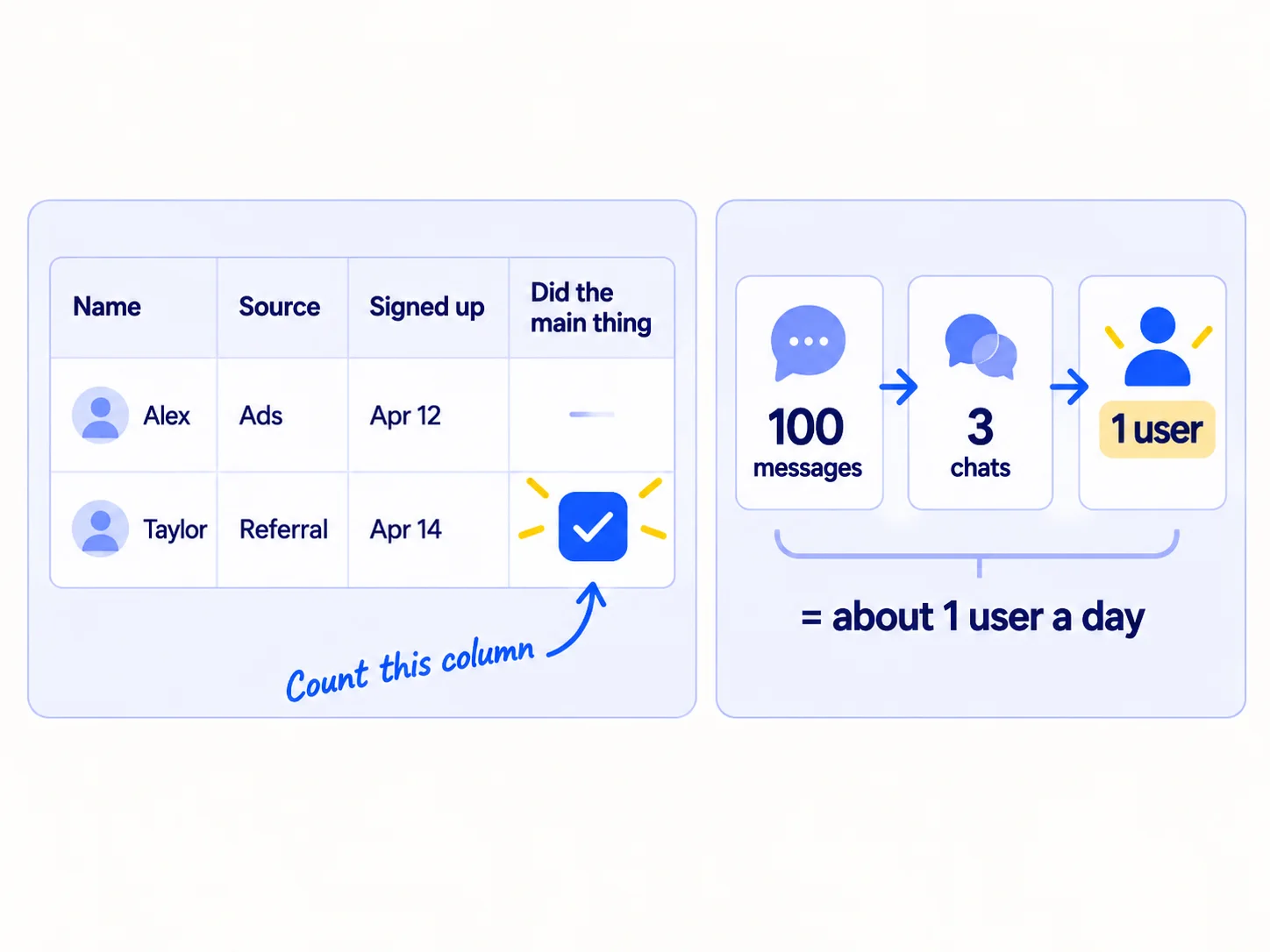
The main thing is the one action that shows the product did its job: the first report sent, the first invoice paid, the first file shared. A signup who never does it has not felt why your product exists, will not pay and will not tell anyone. This is your activation point, and raising itsoon is the next job after this guide.
Make a Google Sheet with one row per person: name, email, where they came from, signup date, and the date they first did the main thing. Fill it in now for everyone who has signed up so far. Then add one question to your signup form: "Where did you hear about us?" This is self-reported attribution, and it tells you what your analyticssoon cannot.
Now work backwards. Use your own numbers if you have them. If not, start with these and replace them after your first 300 messages:
Users I need: 100 − [users I have now] = [users needed]Chats per 100 messages: 3 (replace with mine after 300 messages)
Users per chat: 1 in 3 (replace with mine after 20 chats)
So 100 messages a day ≈ 1 user a day.Days of messages alone: [users needed] ÷ 1 = [days]
The answers, one launch and introductions from users (steps 5, 7 and 8) make this shorter.
This sum is why 10 messages a day does not work. At 10 a day, you get one user every 10 days, and 100 takes about 3 years. At 100 a day, it takes about 3 months from messages alone, and less with the rest of this guide.
- Tool: Google Sheets and your signup form. Both free.
- Time: 45 minutes.
- You will have: a user sheet with every current signup in it, and one number: how many users you need a day.
- It worked if: every person who has signed up so far has a row, and you can say how many of them did the main thing.
- Common mistake: counting signups. 100 signups where 80 never came back is 20 users. The other mistake is counting friends who signed up to be kind. If they would never have the problem, they are not users.
2. Write an offer to set it up with each person in 15 minutes
Write one short offer: you will set up your product with the person on a 15-minute call, so they get the result the same day. "Try it free and let me know" asks them to do the work. Most people never do.
![Before: a message saying 'Try it free and let me know what you think', crossed out. After: a message saying 'I'll set it up with you on a 15-minute call. You'll have [the result] today.' with a 'Book 15 minutes' button.](/academy/illustrations/how-to-get-your-first-100-saas-users/step-2-write-an-offer-to-set-it-up-with-each-person.webp)
This is the oldest advice on first users, and it still works. Paul Graham wrote in 2013 that "the most common unscalable thing founders have to do at the start is to recruit users manually." Stripe's founders did not send a link. When anyone agreed to try Stripe, they said "Right then, give me your laptop" and set them up on the spot. In July 2026, a founder on Hacker News offered his niche product free to business owners he knew. They said "That's awesome! I'll try it out." Not one of them tried it.
Your offer has three parts. First, the result, in the words your buyers use in customer interviews, from your value proposition. Second, the set-up call. Third, what they get for being early: your direct email, and their feedbacksoon shaping what you build next.
If you already charge, you can add a founding price: the first 100 users keep a lower price for as long as they stay. If you do not charge yet, do not add one. Keep your free trialsoon as it is.
Then make a booking page, so people can pick a time without emailing back and forth. In Google Calendar, click Create, then Appointment schedule, and set 15-minute slots. The basic booking page works on a free Google account. Some extra features need a paid plan.
[The result, in one line: what they get, in their words.]I'll set it up with you on a 15-minute call, so you have [the result] today, not "when you get round to it".You'll have my direct email, and what you tell me decides what I build next.[Only if you already charge:] The first 100 users keep [price] for as long as they stay.Pick a time: [booking link]
- Tool: a Google Doc for the offer, and a Google Calendar appointment schedule for bookings. Both free.
- Time: 45 minutes.
- You will have: the offer text and a working booking link.
- It worked if: you show the offer to 3 people who have the problem, and at least 2 say they would take the call, or book it.
- Common mistake: offering a product demosoon. A demo is you showing. A set-up call is them doing the main thing, with you there to help. Only the second one makes a user.
See it done: Bugmoth's offer
Bugmoth is a made-up bug-reporting tool for small web teams. It costs $19 a month per team, with a 14-day trial.
Before
Start your free 14-day trial.
After
I'll add Bugmoth to one of your client sites with you on a 15-minute call. By the end, your client can click a bug and you get the screenshot, their browser and the steps.
Why it works: It promises the result on the call, so the person does not have to find time to set it up alone.
3. Get your first 10 users from people you already know
Your first 10 users should come from people you already know, or people they introduce you to. Message every one of them who has the problem, or knows someone who does, with your offer.
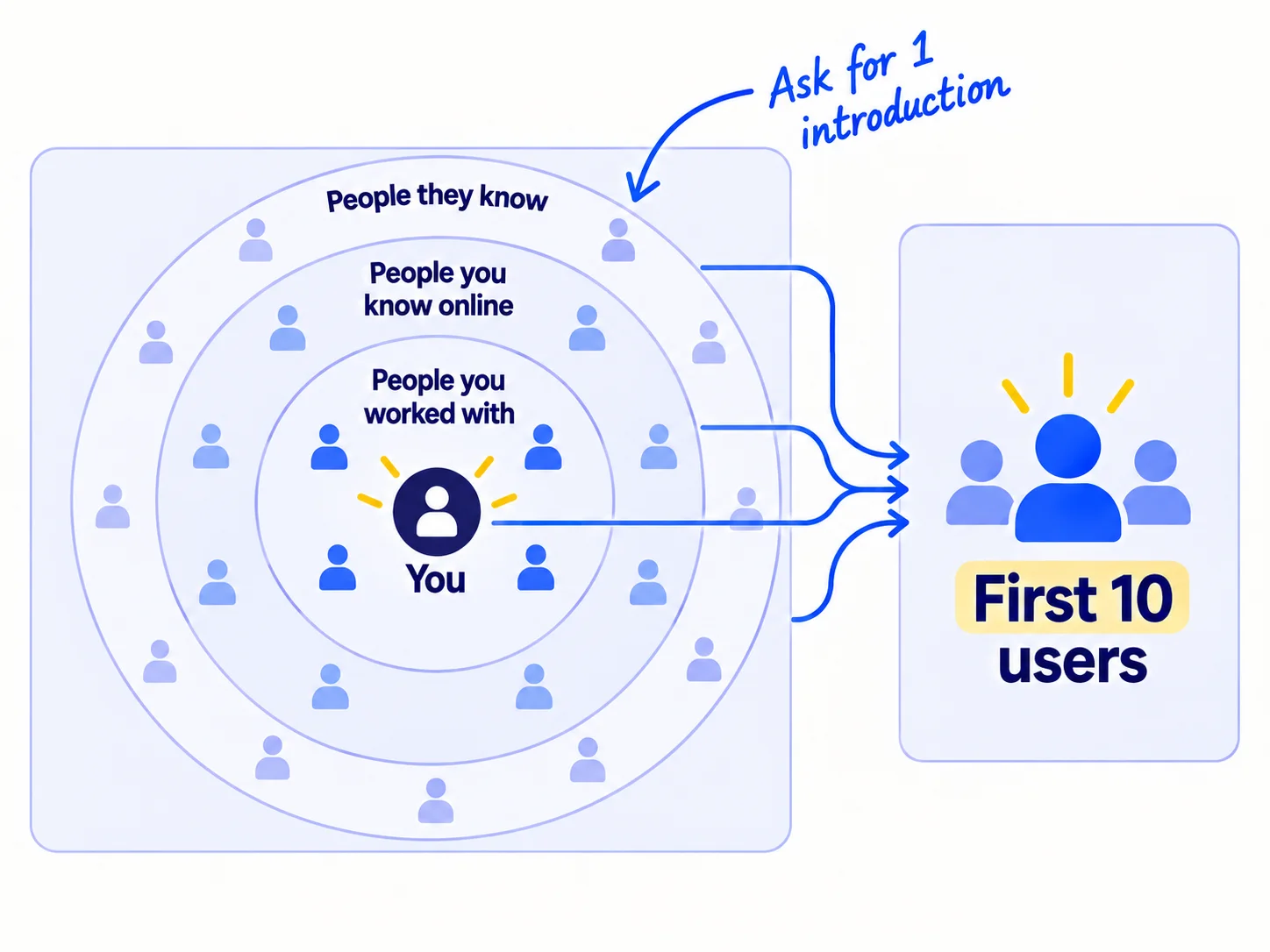
People who know you reply more, and they tell you the truth about the product. This is warm outreach, and it is the fastest place to start. A guide on the first 100 SaaS users in Europe, from August 2026, puts it simply: "The first ten are recruiting."
Build the list first. On LinkedIn, click Me, then Settings & Privacy, then Data privacy, then Get a copy of your data. Choose the larger archive, which includes your connections, and click Request archive. LinkedIn emails you a download link. It only shows the email addresses of people who allow it, so message the rest on LinkedIn. Then go through your email contacts, old team chats and past clients. Put everyone into your sheet with one of three marks: "has the problem", "knows people who do", or "neither". Give ChatGPT or Claudesoon your list of names and job titles and ask it to sort them the same way. Then check each one yourself.
Message everyone marked "has the problem" with your offer. Message everyone marked "knows people who do" with one clear ask: an introduction to one person. Send 100 a day until the list is done. AI drafts each message from your notes on the person; you add one true line about them and how you know them. That is about a minute a message. If you are a technical founder who hates selling, remember that you are asking about their problem, not selling to them.
Hi [first name],[One true line: how you know each other, or something they did recently.]I've built [product]. It [the result, in one line] for [kind of team].[If they have the problem:] Would you let me set it up with you on a 15-minute call? You'd have [the result] today. Pick a time: [booking link][If they know people who do:] Do you know one person who [has the problem]? An introduction to just one would help me a lot.[Your name]
If you want more people who will try it early and give honest feedback, find beta users the same way.
- Tool: your LinkedIn data export, your email, ChatGPT or Claude to draft, and your sheet.
- Time: 1 hour to build the list, then part of the 2 hours of messages a day in step 4.
- You will have: every person you know who fits, messaged once, and your first set-up calls booked.
- It worked if: you reach 10 users from people you know and their introductions, or you have messaged every one of them.
- Common mistake: asking friends to "support" you with an upvote or a share. That does not make a user. Ask people who have the problem to use it, and ask everyone else for one introduction.
See it done: Bugmoth's message to a former colleague
To: Priya, a former colleague who now runs a 5-person web studio
Subject: quick favour
Hi Priya,
It was good to see the new studio site. The case study page is great.
Sam and I built Bugmoth. Your clients click the bug on the page, and you get the screenshot, their browser and the steps, with no email chain.
Would you let me set it up on one of your client sites with you on a 15-minute call? You'd have it working today. Pick a time: [booking link]
Alex
Why it works: It is short, it says how they know each other, and it asks for one clear thing.
4. Send 100 personal messages a day to people who fit
Once people you know have heard from you, send 100 personal messages a day to strangers who fit your ideal customer profile, with the same set-up offer. This is where most of users 10 to 50 come from.
![A tall stack of personal messages labelled '100 a day'. The top card reads 'Hi [name], I saw [something you made]. Can I set it up with you in 15 minutes?' An arrow leads to a set-up call, then to a tick labelled 'User'.](/academy/illustrations/how-to-get-your-first-100-saas-users/step-4-send-100-personal-messages-a-day-to-people-wh.webp)
The full routine is in how to market a SaaS product, step 3. The short version:
- Find 100 new names a day. Search Google and LinkedIn for the kind of team that has the problem, add them to your lead listsoon, and find the right person's emailsoon. 100 a day needs about 3,000 names a month.
- Let AI draft, and you add the truth. Paste 10 names at a time into ChatGPT or Claude, each with one thing you found about them, plus your offer. Read each draft, make the first line true and about them, then send. About a minute each.
- Follow up twice. Follow upsoon with everyone who has not replied, 3 days apart, with one new line each time. Stop the moment someone says no.
Keep every message one-to-one, and follow the rules. Gmail requires every sender to have SPF or DKIM, and to keep spam reports below 0.3%. Since November 2025, Gmail has been rejecting more mail that fails these rules. If you email more than about 50 strangers a day, set up a second domainsoon for it and warm it up first. LinkedIn limits connection invitations, and a block usually lasts a week, so on LinkedIn message people you are already connected tosoon and send the rest by email. In the US, the CAN-SPAM Act covers business email too: every message needs your postal address and a way to say no, and you must honour a "no" within 10 business days. In the UK and EU, email marketing rules are stricter, so check them first and lean more on introductions and communities.
- Tool: Gmail or LinkedIn, ChatGPT or Claude, and your sheet. A CRMsoon can wait until the sheet gets slow.
- Time: about 2 hours a day for messages and follow-ups, and 45 minutes to find 100 new names.
- You will have: 700 messages sent and logged each week.
- It worked if: you get at least 3 set-up calls or chats from every 100 messages. Below 2, rewrite the first linesoon so it is more about them, then send the next 100.
- Common mistake: sending the same cold email to everyone from a mass-email tool. In July 2026, founders on Hacker News said mass cold email "just lands you in spam", while personal messages still work. The other mistake is stopping after 50 messages because nobody replied yet.
5. Answer 20 questions a day where your buyers ask for help
Pick 5 online places where your buyers ask for help with the problem, and answer 20 questions a day across them. Help first. Mention your product only if someone asks, or if the place allows it.
![Five community tiles labelled '5 places'. One tile opens to a question, 'How do you handle [the problem]?', and a reply card with three ticked lines: 'Answer first', '2–3 steps that work', 'Say it's yours, if asked'.](/academy/illustrations/how-to-get-your-first-100-saas-users/step-5-answer-20-questions-a-day-where-your-buyers-a.webp)
A place can be a subredditsoon, a Slack or Discord group, a forum, or a Facebook groupsoon. This works when you help. One SaaS founder counted where his first 100 customers came from in February 2026: 42 came from Reddit. His rule: "We didn't promote. We helped."
Read each place's rules on self-promotion before you post. Reddit's own rule is to "participate authentically in communities where you have a personal interest, and do not spam". Many places keep product links to one weekly thread. Spreading 20 answers over 5 places keeps you inside each one's rules; 20 in one place in a day looks like spam.
Search each place for how your buyers describe the problem, and sort by New. Answer the question fully, as if your product did not exist. If someone asks what you use, or the thread is one where products are allowed, say it is yours and make your set-up offer. AIsoon can find the questions and list the points to cover. Write each answer in your own words: communities remove replies that read as pasted from AI.
[Answer their exact question in the first line.][2–3 steps that fix it, which work without any product.][Only if someone asks, or the place allows it:] Disclosure: I'm building a tool for this. Happy to set it up with you if it would help, but the steps above fix most of it.
- Tool: the search box on each site.
- Time: about 1 hour a day, 3 minutes an answer.
- You will have: 140 useful answers a week, under your own name.
- It worked if: after 560 answers (4 weeks), at least 5 users say they came from one of these places.
- Common mistake: posting "I just launched my SaaS" or putting your link in every answer. Moderators remove posts like these, and accounts that keep doing it get banned.
6. Set up every new signup yourself within 24 hours
Email every new signup yourself within 24 hours, from your own address, with your set-up offer. Most people who sign up and do nothing were never going to work it out alone, and they cancelsoon when the trial ends.
![A new signup arrives. Within 24 hours a personal email goes out: 'Hi [name], I'm the founder. Can I set it up with you in 15 minutes?' Then a call where the person does the main thing, and a tick. After 7 days, a note: 'Ask for 1 introduction'.](/academy/illustrations/how-to-get-your-first-100-saas-users/step-6-set-up-every-new-signup-yourself-within-24-ho.webp)
Signups who never reach activation are the most common reason a SaaS gets stuck below 100 users. Paul Graham told founders to take "extraordinary measures" to make early users happy. Wufoo sent every new user a hand-written thank-you note.
Every morning, open your list of new signups. Send each one a short personal email, from you, with a reply address that reaches you. Ask one question and make your offer. Keep your automatic onboarding emailssoon if you have them; this one comes from a person.
On the call, the person drives. They do the main thing while you watch and help. Write down every place they got stuck, in their words. Each day, fix one of those, or add one line of help where it happens. This is how you get feedback from your first userssoon and turn trials into paying customerssoon at the same time.
Seven days after someone first does the main thing, send a second note: ask how it is going, and ask for one introduction (step 8 has the text). People who got a result are the ones who introduce you.
Subject: your [product] setupHi [first name],I'm [your name], the founder of [product]. Thanks for signing up.What made you try it today?If you'd like, I'll set it up with you on a 15-minute call, so you have [the result] by the end of it: [booking link]Or just reply here, and I'll help by email.[Your name]
- Tool: your email, Google Meet, and your sheet.
- Time: about 10 minutes per signup to research and write, and 15 minutes per call.
- You will have: a first-use date on most new rows, and a list of the places people get stuck.
- It worked if: at least half of new signups do the main thing within 7 days. If fewer do, spend a day improving activationsoon before you send more people.
- Common mistake: an automatic "Welcome aboard!" email from a no-reply address. Nobody answers it. The other mistake is doing the set-up for them while they watch. They need to do it once themselves.
See it done: Bugmoth's note to a new signup
To: Leo, who signed up this morning
Subject: your Bugmoth setup
Hi Leo,
I'm Sam, one of the two people who built Bugmoth. Thanks for signing up.
What made you try it today? A client with a bug, or just a look?
If you like, I'll add it to one of your client sites with you on a 15-minute call. By the end, your client can click a bug and you'll get the screenshot: [booking link]
Or just reply here, and I'll help by email.
Sam
Why it works: It comes from a founder, asks one question, and offers to get the result working today.
7. Launch on two sites in the same week once you have 20 users
When you have about 20 users and your set-up calls work, launch on two launch sites in the same week. Then message everyone who comments with your offer.
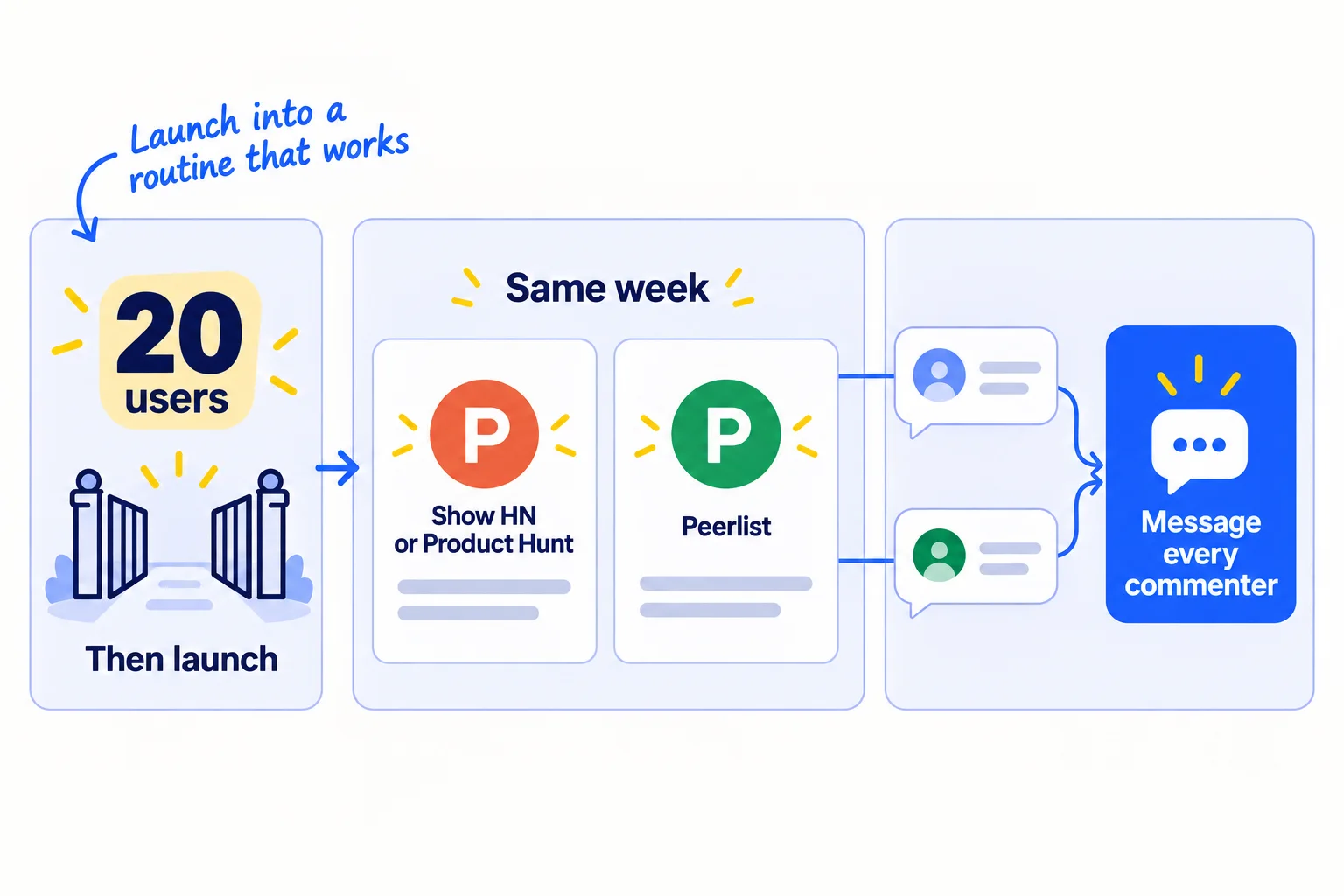
Launch after 20 users, not at zero. By then you know who it is for, your set-up call works, and you can turn a spike of visitors into users. A guide from August 2026 says it well: "Launch traffic is most useful when it enters a system that already knows how to learn from a new user." One founder got 38 of his first 100 customers from launching on Product Hunt and Peerlist, after 3 weeks of taking part in both communities first.
Results vary a lot. In a small survey of four SaaS launches on Product Hunt in May 2026, one week brought between 71 and about 450 signups. The launch that ranked highest had no paying users, and a mid-table one converted about 1 in 5.
Pick your two sites:
- If your buyers are developers: post a Show HNsoon. Its rules say to make it easy to try, "ideally without barriers such as signups or emails". Build a demo page where a visitor can try the main feature in under a minute with no account.
- If they are not: launch on Product Hunt. It is free. Use "Schedule" or "Create Draft"; "Launch Now" was removed in 2025. Product Hunt's team picks which launches to feature on the homepage, judged on four things: useful, novel, well made and creative. The rest sit in the "All" list and get far fewer visits.
- Add Peerlist Launchpad if your buyers build software or design. Its launch week opens every Monday and runs for a week, and only personal profiles can launch.
All three ban asking for upvotes. Hacker News says "Please don't ask friends to upvote or comment." Product Hunt can ban you for paying anyone to send traffic. Peerlist counts messaging strangers for upvotes as spam.
On launch day, reply to every comment within an hour. The next day, message each person who commented with your set-up offer. Do not count directory submissionssoon as a launch: the same founder got 3 signups and 0 paying customers from them. If launch week brings nothing, work out why a launch gets zero signups.
- Tool: Hacker News, Product Hunt and Peerlist.
- Time: half a day to build the demo page and write the posts, then launch week, when your messages and answers keep going.
- You will have: one launch week on two sites, and a list of everyone who commented.
- It worked if: you get signups on each launch day and at least 3 set-up calls that week from the follow-up messages.
- Common mistake: launching at 0 users, then deciding nobody wants it. The other mistake is judging the launch by rank. Count users.
8. Count users by source every Sunday and ask each new user for an introduction
Every Sunday, fill in one row: new users, and where each came from. Send the introduction ask to everyone who became a user that week. After 2,800 messages and 560 answers, move your hours to what brings users.
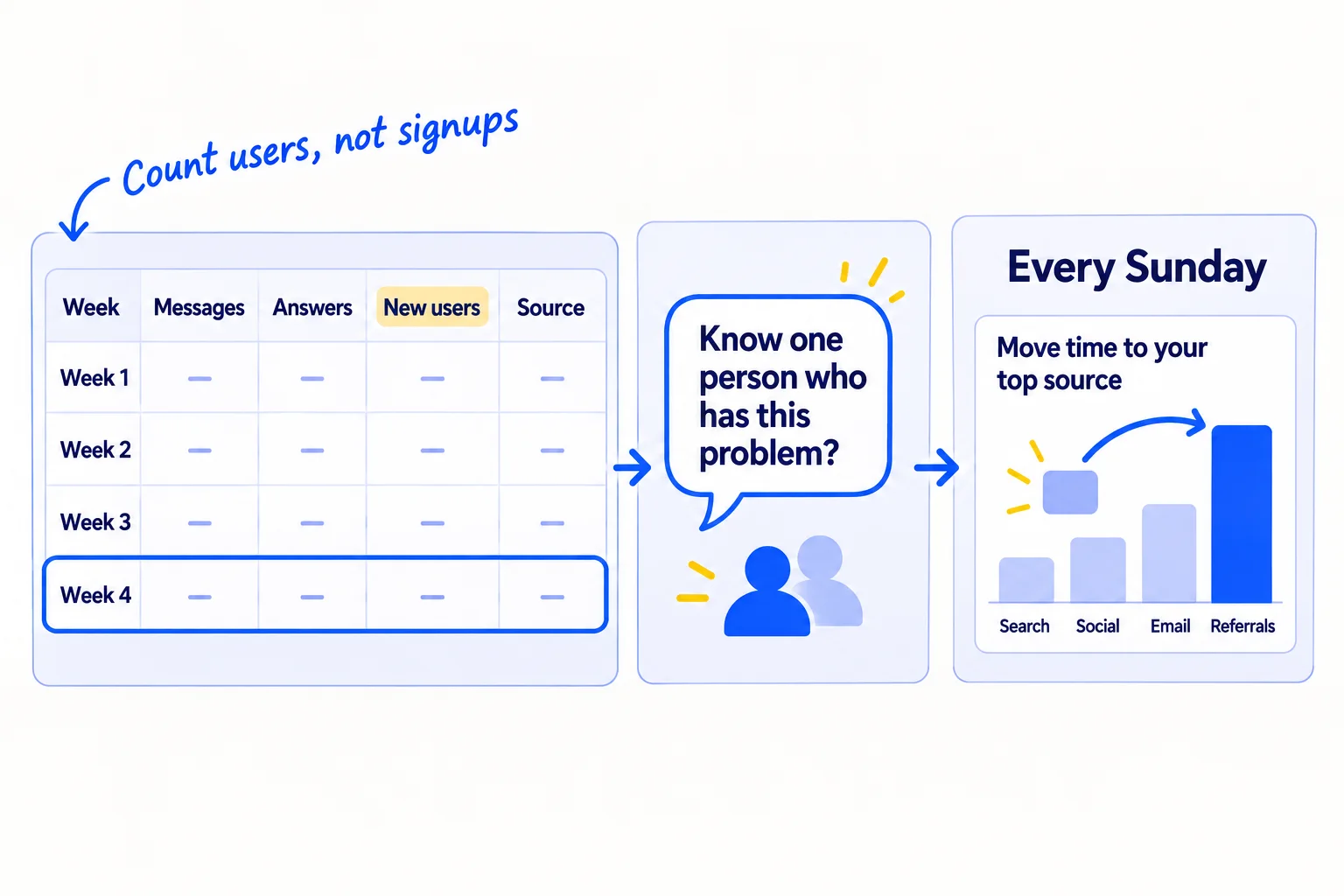
Use your sheet from step 1. Each Sunday, add up the week: messages sent, answers posted, signups, new users, and where each new user came from. Divide users by the work for each source, so you compare like with like: users per 100 messages, users per 100 answers, users from the launch, users from introductions.
Then send the introduction ask to everyone who became a user that week and has used it for 7 days. One clear ask works better than a referral programsoon at this size. If they are happy, ask for one sentence you can quote too. That is your first testimonialsoon. When a user can name a result with a number, turn it into a short case studysoon.
Hi [first name],You've been using [product] for a week. How is it going? Anything that annoys you?One favour: do you know one person who [has the problem]? If you're happy to introduce us, just copy me into an email. I'll set it up for them the same way.And if it's helped, could I quote one sentence from you on the site?[Your name]
After 2,800 messages and 560 answers (4 weeks), make the call for each source:
- 0 users from a source: stop it and give its hours to the source with the most users per hour.
- Many signups but few users: the problem is the set-up, not the source. Fix the places people get stuck (step 6) before you send more people.
- Chats but no signups: people are not buying what you offer. Your offer or your homepagesoon does not match what people expected. Rewrite the offer in the words people used on the calls.
- 0 chats at full volume: you are messaging the wrong people. Go back to who your SaaS is for, or check that people really want it.
Leave paid adssoon until at least 10 people have paid you and you know which message brought them.
- Tool: Google Sheets and your email.
- Time: 30 minutes each Sunday.
- You will have: one row a week, and a clear answer on where your users come from.
- It worked if: you can name where every user came from, and every new user from last week got the introduction ask.
- Common mistake: counting signups, visits or upvotes instead of users. The other mistake is changing everything after one bad week. Judge after 2,800 messages, not after 7 days.
See it done: Bugmoth's Sunday sheet after 4 weeks
New users by source, weeks 1 to 4
| Week | Messages | Answers | Signups | New users | From messages | From answers | From launch | From introductions |
|---|---|---|---|---|---|---|---|---|
| 1 | 700 | 140 | 9 | 6 | 5 | 1 | 0 | 0 |
| 2 | 700 | 140 | 11 | 7 | 6 | 1 | 0 | 0 |
| 3 | 700 | 140 | 31 | 12 | 7 | 1 | 3 | 1 |
| 4 | 700 | 140 | 14 | 10 | 6 | 2 | 0 | 2 |
The decision: 35 new users in 4 weeks. Messages brought 24, at about 1 user per 100 messages, so they keep 100 a day. The launch brought 20 signups but only 3 users, so they add a 2-minute set-up video to the signup page. Introductions are growing, so every new user gets the ask on day 7.
Why it works: They judge each source by users, so they can see the launch brought signups but the messages and introductions brought users.
When one source clearly works, add the next channel. Once a month, step back for a marketing reviewsoon.
Where Scout7 helps
Scout7 speeds up two of the eight steps: 2 and 5.
Step 2. Scout7's audience research reads public social conversations in your category and builds audience segments with pain points and quotes in buyers' own words. That gives you the words for the result in your offer. It does not replace the set-up calls, where you hear it first-hand.
Step 5. Join Conversations searches social platforms for live discussions about your problem, groups them by the kind of reply that fits, and drafts a reply in your voice. You read each thread yourself and approve or rewrite every reply. Nothing is posted without your approval.
Your first 100 SaaS users checklist
0 of 19 done
Work through this list with an AI assistant
It drafts the work and keeps track of what is done.
Frequently asked questions
- How long does it take to get your first 100 SaaS users?
At 100 messages a day, expect about 1 user a day from messages, if about 3 in 100 lead to a chat and 1 in 3 chats becomes a user. Answers, one launch and introductions add to that. So plan on 2 to 3 months of daily work. If you have sent 2,800 messages and have fewer than 10 users, go back to who you are messaging.
- Should I give my SaaS away free to get my first users?
Free does not make people use it; setting it up with them does. Keep your normal free trialsoon, and offer a 15-minute set-up call instead. If you already charge, a founding price for the first 100 users is fine. Giving everything away for free brings people who never had the problem, and they do not count as users.
- Do users from friends and family count?
Only if they have the problem and did the main thing because it helped them. A friend who signed up to be kind will not use it again or introduce you to anyone. Ask people you know for introductionssoon to people with the problem, not for support.
- I have 100 signups but almost nobody uses it. What now?
Stop sending new people for a few days. Email every signup who never did the main thing, offer a 15-minute set-up call, and watch where they get stuck. Fix the first place most people stop. That is your activation ratesoon, and it matters more right now than more signups.
- Should I pay for ads or a launch service to get my first 100 users?
Not yet. Adssoon send strangers to an offer you have not tested, and a small budget runs out before you learn anything. Paid launch and directory servicessoon mostly bring links, not users. Wait until 10 people have paid you and you know which message brought them. Put the time into messages, answers and set-up calls instead.
Sources
- 1.Do Things that Don't Scale — Paul Graham, July 2013, checked 27 September 2026
- 2.How to Get Your First 100 SaaS Users in Europe — Speartip, updated 15 August 2026
- 3.How We Got Our First 100 Customers for PostKing (What Actually Worked) — Indie Hackers, 26 February 2026
- 4.Ask HN: Should I promote my SaaS to get first 100 customers without budget — Hacker News, 14 July 2026
- 5.Product Hunt Launch Data: 5 Founders, 8 Questions — HappySupport, 3 June 2026
- 6.Export connections from LinkedIn — LinkedIn Help, checked 27 September 2026
- 7.Invitation limit reached — LinkedIn Help, checked 27 September 2026
- 8.Create an appointment schedule — Google Calendar Help, checked 27 September 2026
- 9.Email sender guidelines — Google Workspace Admin Help, checked 27 September 2026
- 10.Email sender guidelines FAQ — Google Workspace Admin Help, checked 27 September 2026
- 11.CAN-SPAM Act: A Compliance Guide for Business — Federal Trade Commission, checked 27 September 2026
- 12.Reddit Rules — Reddit, checked 27 September 2026
- 13.Show HN guidelines — Hacker News, checked 27 September 2026
- 14.How Product Hunt works — Product Hunt, checked 27 September 2026
- 15.How to schedule or draft a launch — Product Hunt Help Center, updated 24 February 2025, checked 27 September 2026
- 16.Product Hunt featuring guidelines — Product Hunt Help Center, updated 10 March 2026
- 17.Frequently asked questions about Peerlist Launchpad — Peerlist Help, checked 27 September 2026
Next article to read
Related guides
- How to market a SaaS productSaaSMarket a new SaaS product with no budget: a 4-week routine for one founder, with the messages to send, where to answer questions, and the numbers to check every Sunday.
- How to get beta users for your startupSaaSGet beta users for your startup who have the problem and will pay: write a 4-week beta deal with an end date and a founding price, send 100 personal invites and 20 answers a day, set up every beta user on a 20-minute call and watch, count who used it every Sunday, and ask every active beta user to pay at the end.
- How to fix a SaaS launch that got zero signupsSaaSFind out why your SaaS launch got zero signups from three numbers, fix a broken signup or unclear headline the same day, and replace the launch with a daily routine of messages and answers.
- How to launch on Product HuntSaaSLaunch your SaaS on Product Hunt so the day brings users: check you have about 20 users and a no-signup demo, build a launch list with 100 messages, 20 answers and 2 posts a day for 3 weeks, reply to every comment within an hour on launch day, and message every commenter the next day.
Guides that link here
- How to market a SaaS productSaaS
- How to get beta users for your startupSaaS
- How to fix a SaaS launch that got zero signupsSaaS
- How to launch on Product HuntSaaS
- How to get customers online for free
- How to get people to try your product
- Why no one is buying your product, and how to fix it
- How much to spend on marketing as a SaaS startupSaaS
- How to create an ideal customer profile
- How to price a SaaS productSaaS
- How to validate a business idea without spending money
Cite this page
Dinesh Bypilla (2026). How to get your first 100 SaaS users. Scout7 Academy. https://scout7.ai/academy/first-customers/how-to-get-your-first-100-saas-users
Written by Dinesh Bypilla, Agentic systems engineer at Scout7. Reviewed by Murali Sid. Last checked 27 September 2026.
Quote any part of this guide with a link back to this page. © 2026 Scout7.
Markdown version of this page: https://scout7.ai/academy/first-customers/how-to-get-your-first-100-saas-users.md