



How to price a SaaS product
Price your SaaS product when you have almost no customers: set one price from what the problem costs your buyer, what 10 alternatives charge and what one customer costs you, ask about it in every chat, and raise it after 30 price talks if fewer than 1 in 5 say it is too expensive.
ByDinesh BypillaReviewed byMurali SidLast checked 17 min read
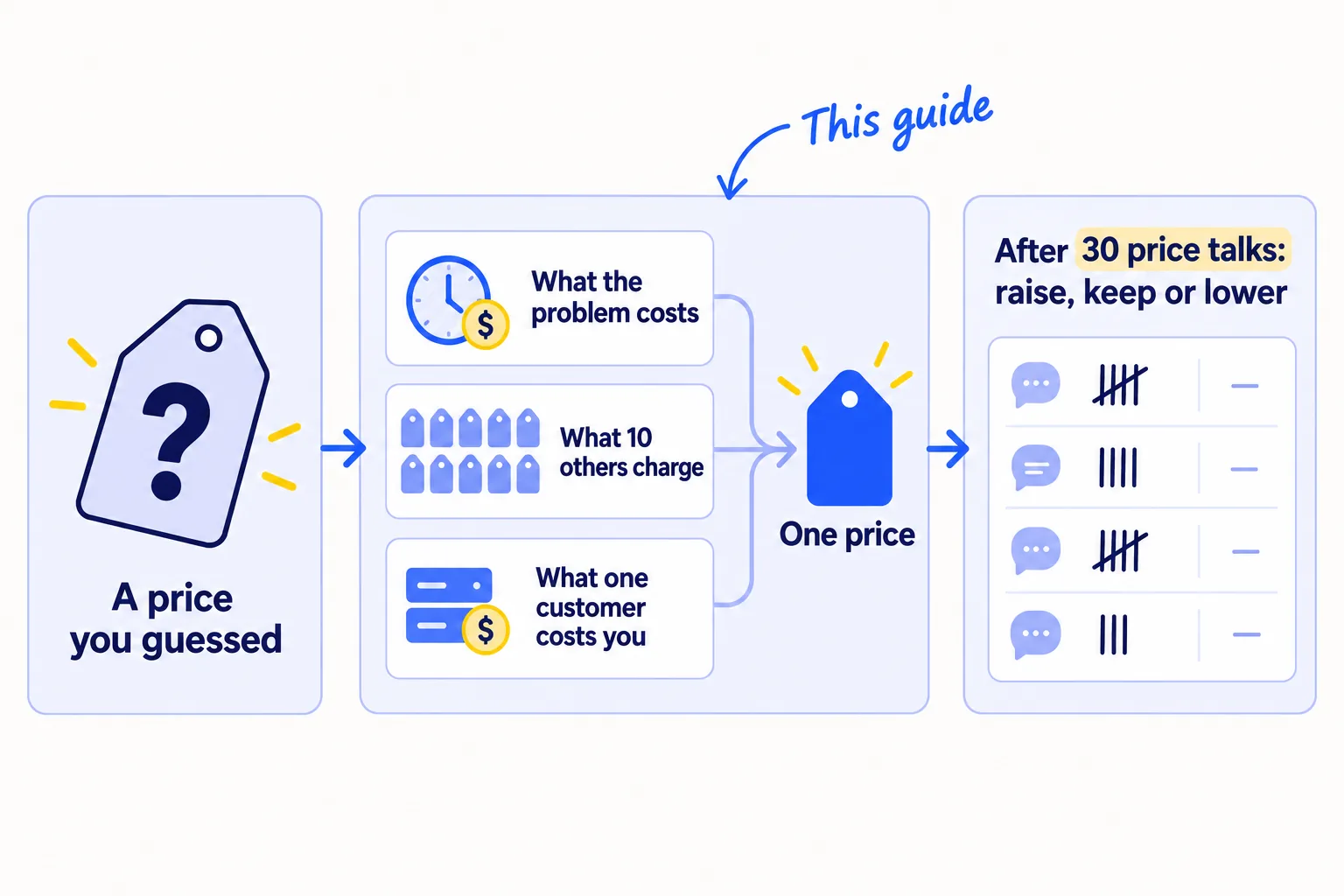
You built your SaaS and picked a price by looking at one competitor and going a little lower. Now a few people have signed up, one or two pay, and you cannot tell if the price is why the rest did not. Here is how to price a SaaS product when you have almost no customers: set one price from three numbers you can find today, say it in every chat, and let 30 real answers tell you when to raise it.
Do these three things
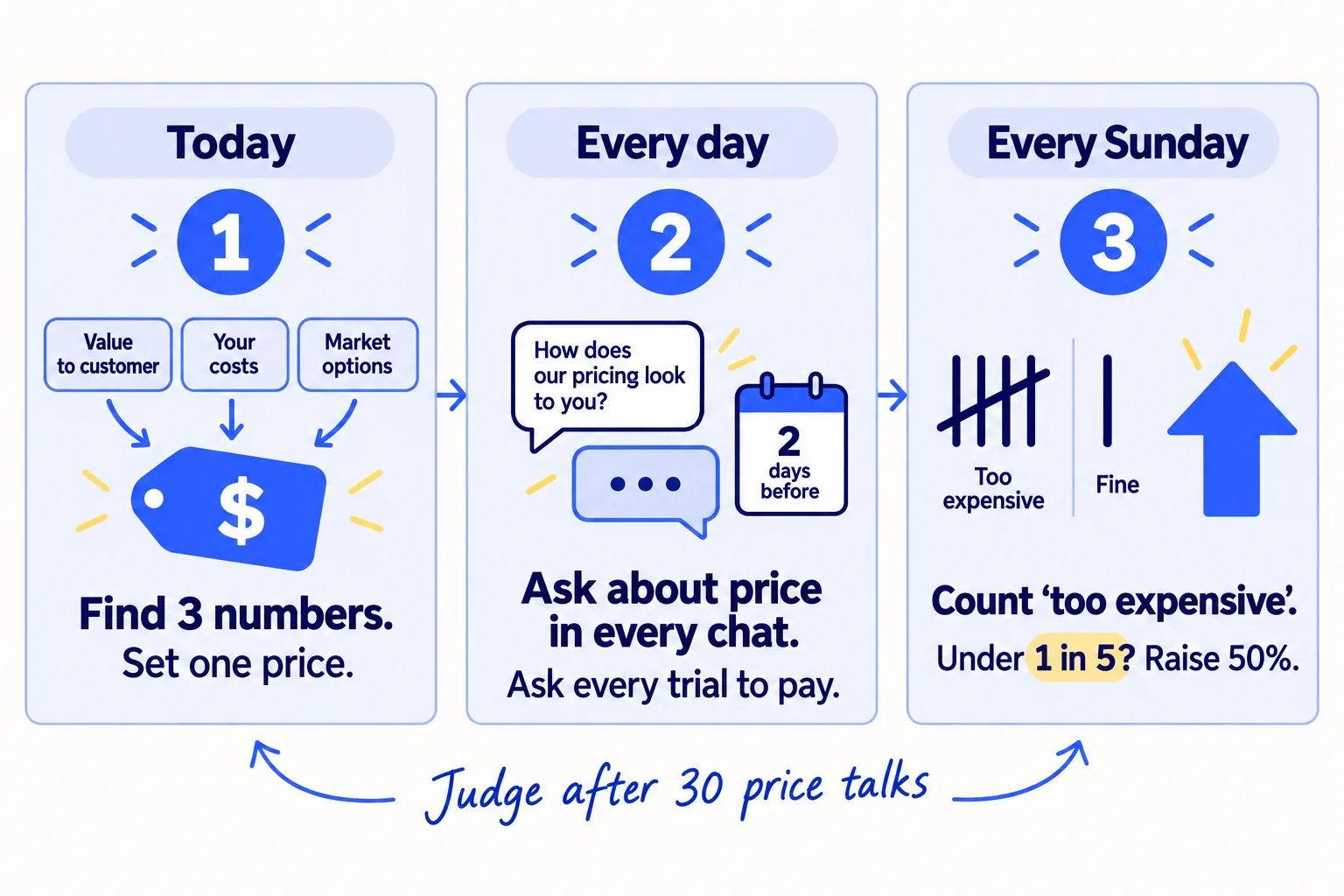
About 3 hours today, then 10 minutes a chat and 20 minutes each Sunday. Judge the price after 30 price talks: about 10 days at 100 messages a day.
Show the three actions in fullHide the full list
- Today: work out what the problem costs your buyer each month, list what 10 alternatives charge, and set one price in the top half of that range. Put it on your pricing pagesoon.
- Every day: in every chat with a buyer, ask 3 price questions before you say your price. Ask every trialsoon user to pay 2 days before their trial ends. Write down every answer.
- Every Sunday: count your price talks and the "too expensive" answers. After 30 price talks, if fewer than 1 in 5 said "too expensive", raise the pricesoon for new signups by 50%.
Get help doing these
ChatGPT or Claude reads this guide and works through it with you.
1. Work out what the problem costs your buyer each month
Write down how many hours and how much money the problem costs one buyer each month, then divide it by 10. That is the most you should charge, so the buyer gets back at least 10 times what they pay you.
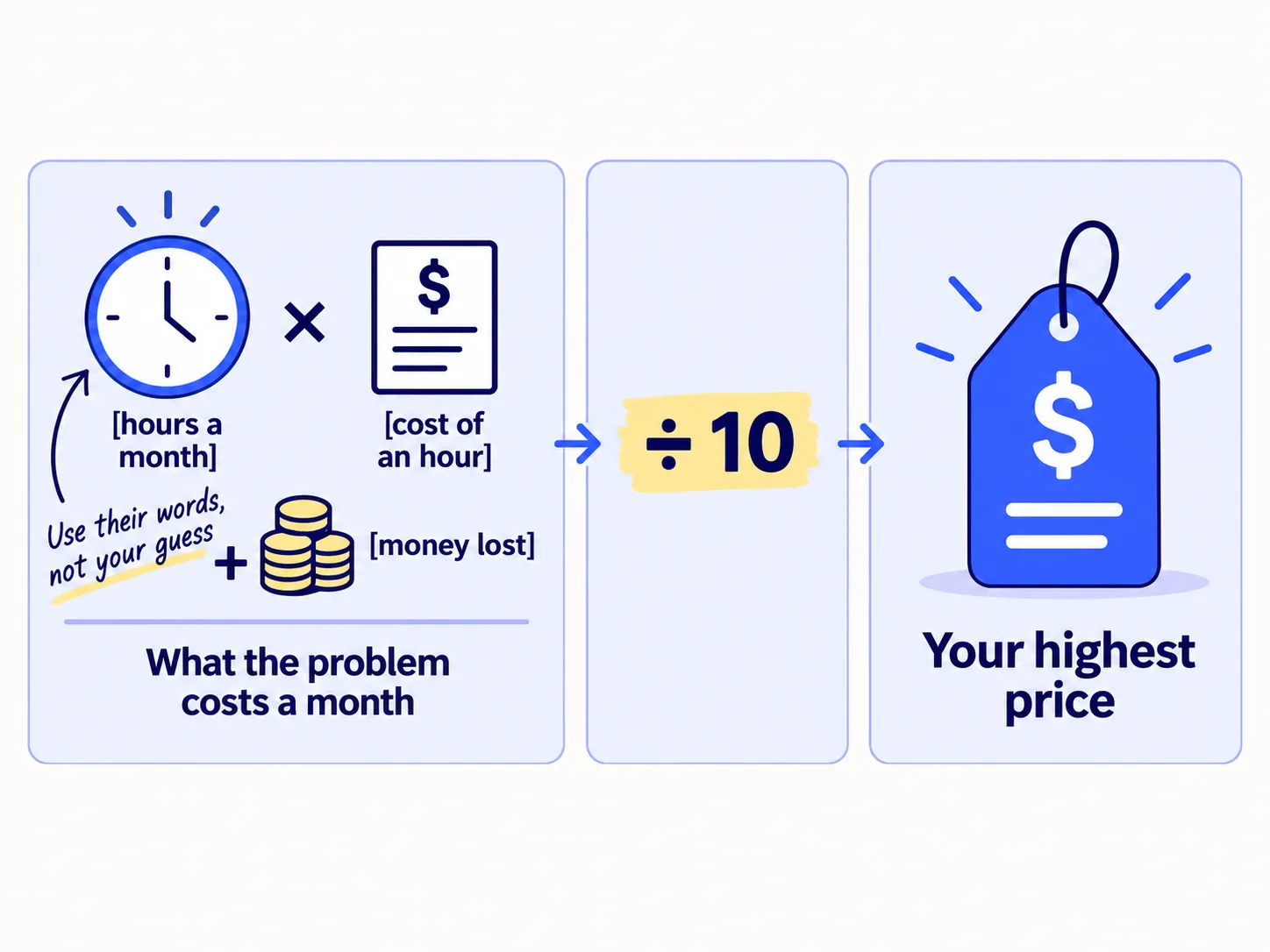
Your buyer does not compare your price with your costs. They compare it with the problem: the hours it eats, the work it breaks, the money it loses. So start with their numbers. Look at your notes from every chat and first-user feedbacksoon you have had. In your next chats, ask one question: "The last time this happened, how long did it take to sort out, and who did it?"
[Hours a month the problem takes] × [what an hour of that person's time costs] + [money lost a month] = what the problem costs a monthWhat the problem costs a month ÷ 10 = your highest price
If you have had no chats yet, fill it in with your own best guess and mark it "guess". Replace it with real numbers as soon as the 100 messages a day bring you chats. Paste your chat notes into ChatGPT or Claudesoon and ask it to pull out every number people said about time or money. Check each one against your notes.
- Tool: Google Sheets, and ChatGPT or Claude to pull numbers out of your notes.
- Time: 30 minutes.
- You will have: one number, what the problem costs a month, and your highest price.
- It worked if: the number comes from at least 3 real buyers' own words. With fewer, it is still a guess. If you cannot find 3 people who can put a number on the problem, check the problem is real before you set a price.
- Common mistake: pricing from what you would pay, or from what the product cost you to build. You are not your buyer, and they never see your costs.
See it done: What the problem costs Bugmoth's buyer
Bugmoth is a made-up bug-reporting tool for small web teams. It costs $19 a month per team, with a 14-day trial.
From 4 chats with agency owners
| Line | Number |
|---|---|
| Hours a month a developer spends working out vague bug reports | 13 |
| What an hour of developer time costs the agency | $50 |
| What the problem costs a month | $650 |
| Highest price (÷ 10) | $65 a team a month |
Why it works: The number comes from what agency owners said in chats, not from what the founders would pay.
2. List what 10 alternatives charge for the plan your buyer needs
Make a sheet of 10 things your buyer could use instead of you, with the monthly price of the plan they would really need. The top half of those prices is your range.
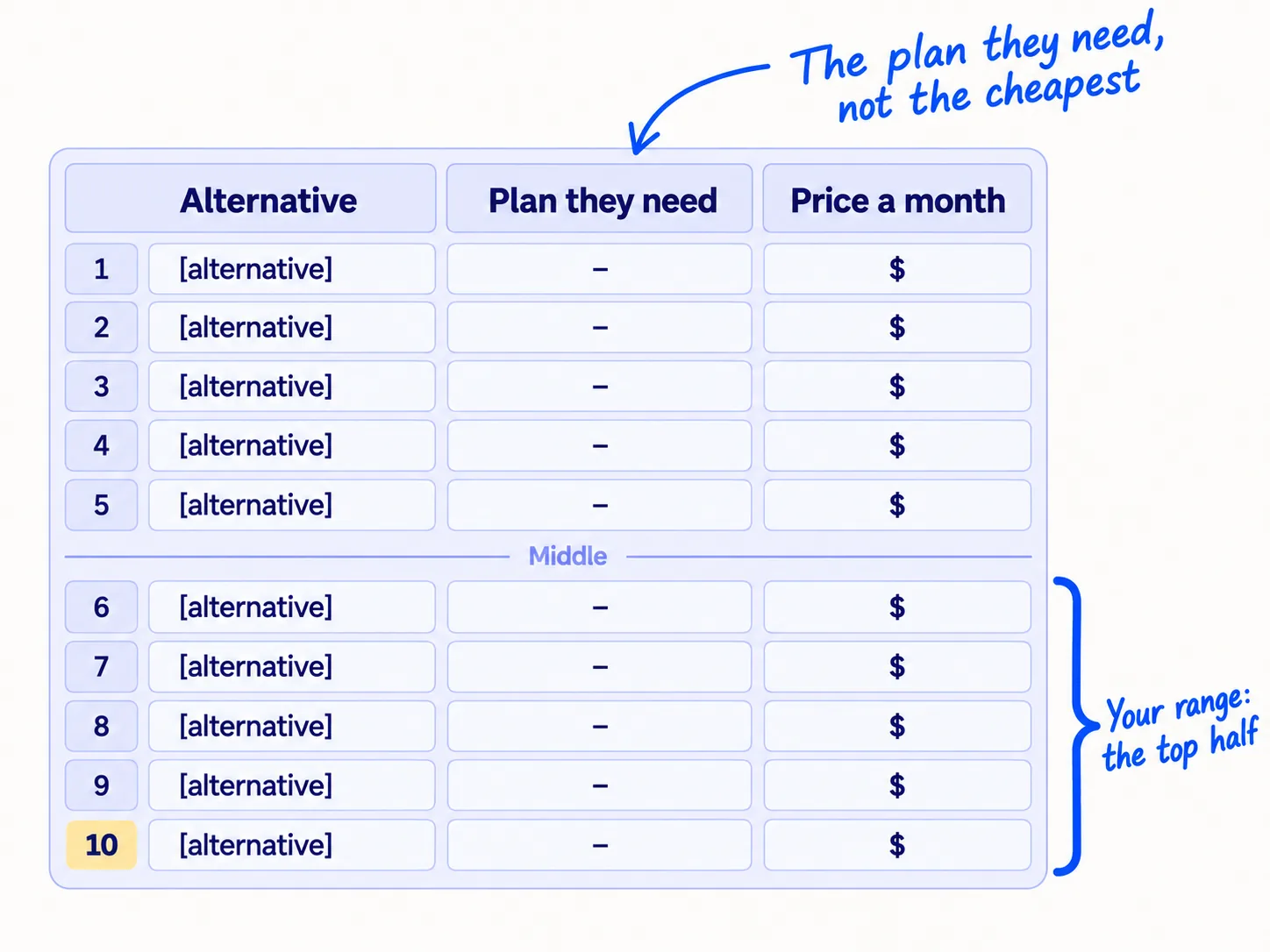
An alternative is anything your buyer could pay for, or do, instead of you. Fill the 10 rows from these:
- Direct competitors: the tools your buyers name in chats, the tools that come up when you search Google for your problemsoon, and the ones in your "[competitor] alternative" searchessoon.
- What they use now: a spreadsheet, a shared inbox, a bigger tool they already pay for.
- Doing it by hand, or hiring someone: the freelancer or the hours from step 1.
- A general AI tool: if your buyer could do the job in ChatGPT in 10 minutes, write down what that costs them too.
Give ChatGPT or Claude your buyer sentence and ask it to list alternatives; then open each pricing page yourself, because AI answers often show old prices. Write the price of the plan your buyer would need, for their team size and use, not the cheapest plan. Write what the price is per (a user, a team, a use) and whether it has a free trial or free plan. Then sort the rows by price and mark the middle. The top half is your range.
Alternative | Plan your buyer needs | Price a month | Per what (user / team / use) | Free trial or free plan | Date checked
- Tool: Google Sheets and each alternative's pricing page. A full competitor analysis can wait.
- Time: 1 hour.
- You will have: 10 rows, sorted, with your range marked.
- It worked if: every row has a price for the plan your buyer would pick, and a date.
- Common mistake: copying one competitor's price and going a little lower. It tells buyers you are the cheap choice, and it leaves you no room to learn. If your buyer is a company that buys through calls and quotes, use the B2B pricing guide instead.
3. Work out what one customer costs you each month
Add up what one paying customer costs you each month: hosting, email, AI model use, support tools and payment fees. Your price should be at least 5 times that number.
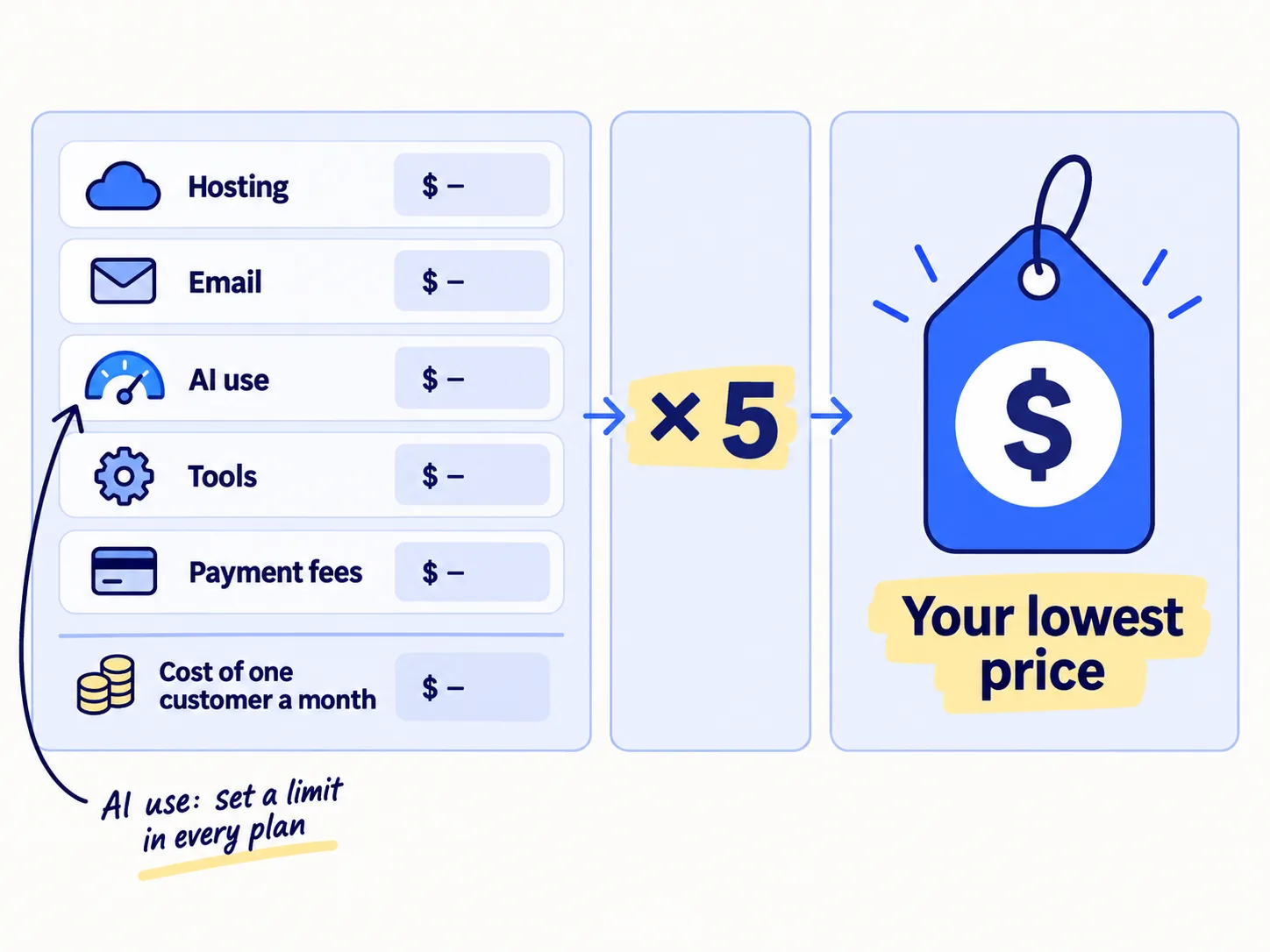
Take last month's bills and divide each by your number of paying customers. With 0 to 2 customers, divide by the number of people who used your product that month instead. You can paste the bills into ChatGPT or Claude and ask it to do the sums; check the total yourself. For payment fees, use your payment tool's rate. As of September 2026:
| If you charge with… | each payment costs you… | and on a $20 price that is about… |
|---|---|---|
| Stripe, with Stripe Billing for subscriptions | 2.9% + 30¢ per US card charge, plus 0.7% for Billing | $1.02 |
| Paddle, which also handles sales tax and VAT for you | 5% + 50¢, all in | $1.50 |
Pick Stripe if you sell mostly in one country and can handle sales tax yourself. Pick Paddle if you sell to many countries and want it to deal with tax for you.
If your product calls an AI model, count that cost with care. AI use can turn a small price into a loss. ICONIQ's 2026 State of AI report found AI products expected to keep about 52% of each payment in 2026 after the cost of running the product (their gross margin). Classic software has aimed to keep 70–80%. Work out the AI cost of a normal month and of a heavy month for one user. If AI is most of your cost, your price should be at least 2.5 times the heavy month, and every plan needs a usage limit. In June 2025, Cursor changed its $20 Pro plan from a fixed number of requests to $20 of usage at API rates. Users were surprised by the bills, and on 4 July 2025 its CEO apologised and offered refunds. Put the limit in your plan from day one, in plain words.
Hosting [ ] + email [ ] + AI use in a heavy month [ ] + other tools [ ] + payment fees [ ] = cost of one customer a monthCost × 5 = your lowest price (× 2.5 if AI use is most of the cost)
- Tool: your hosting, AI and payment dashboards, and Google Sheets.
- Time: 45 minutes.
- You will have: the cost of one customer a month, and your lowest price.
- It worked if: your lowest price is below your highest price from step 1. If it is not, this buyer cannot pay enough for you to make money. Pick a buyer with a bigger problem, or cut the cost, before you sell more.
- Common mistake: "unlimited" AI use on a small flat price. One heavy user can cost you more than ten normal ones pay.
4. Choose what you charge for, then set one price and show it on your site
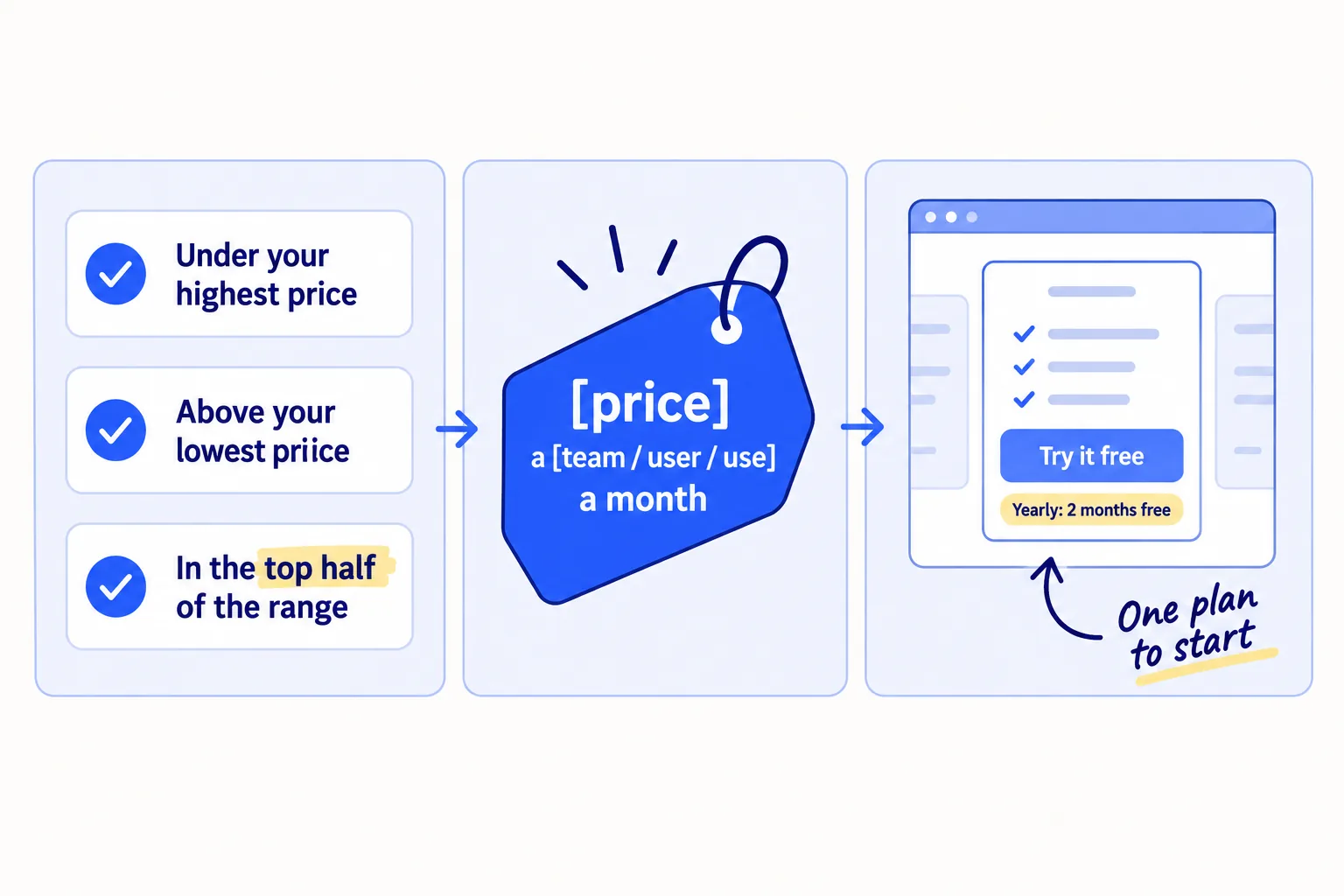
Charge for the thing that grows when your buyer gets more from your product, pick one price from your three numbers, and put it on your site today.
First, choose what you charge for. This is your price unit.
| If the value grows with… | charge… | for example… |
|---|---|---|
| the number of teams or clients using it together | per team or per workspace | a tool one small team shares |
| each person who uses it on their own | per user | a tool each person uses every day |
| each use, and each use costs you real money | per use, or a plan with a set amount of use | a product that calls an AI model for every job |
If you are unsure, charge per team. It is the easiest to explain, and buyers can try it without asking anyone.
Then set one price. Take the highest round number that is under your highest price (step 1), above your lowest price (step 3), and inside the top half of your range (step 2). Use plain numbers such as $29 or $49. If your buyers say they "just need something cheap", check that they fit your ideal customer before you lower anything.
Keep it to one paid plan and a free trial. Add a yearly option at 2 months free: 10 months' price for 12 months. Stripe's own Atlas guide on pricing low-touch SaaS says to charge more, to never put "unlimited anything" on a low price, and, later, to make the yearly plan the main choice. Leave a second plan until at least 3 of your first 10 customers ask for something much bigger. If one buyer asks for 50 seats, an invoice and a contract, that is a different kind of salesoon: quote it on its own. Whether to use a free trial or a free plansoon is its own decision; if you have one already, keep it.
Show it. Put the price on your pricing pagesoon, one click from your homepagesoon, not behind "Contact us". Your buyer signs up without a call, so they need to see the price without one. Say in one line what they get for it, using your value proposition. Then set up the same price and the yearly option in Stripe or Paddle, and make one test payment.
Highest price (step 1): [ ]
Lowest price (step 3): [ ]
Your range, the top half of 10 alternatives (step 2): [ ] to [ ]
Price unit: per [team / user / use]Price: [the highest round number that fits all three] a [unit] a month
Yearly: [price × 10] a year
- Tool: your sheet, your site, and Stripe or Paddle.
- Time: 1 hour.
- You will have: one price, live on your site and in your payment tool.
- It worked if: a stranger finds the price in 1 click from your homepage, and the test payment goes through.
- Common mistake: three plans, a free plan and a lifetime dealsoon all on day one. With 25 signups, three plans split them into groups too small to learn from.
See it done: Bugmoth's price worksheet
Bugmoth's three numbers
| Check | Number |
|---|---|
| Highest price (step 1) | $65 a team a month |
| Lowest price (step 3): $1.70 a team × 5 | $8.50 a team a month |
| Top half of 10 alternatives (step 2) | $25 to $49 |
| Price unit | per team |
| Price today | $19 a team a month, 14-day free trial |
| What the three checks allow | $29 to $49 |
The decision: $19 is safe on cost but below the range. They keep $19 for now, add a yearly option at $190, and plan to test $29 for new teams once step 6 gives them 30 price talks.
Why it works: The worksheet shows that $19 is below the range, so they know to test a higher price instead of guessing.
5. Ask about price in every chat and ask every trial user to pay
In every chat, ask 3 questions about price before you say yours, then say it and write down what the person says. Two days before each trial ends, ask that person to pay.
![Two parts. Left: a chat with three questions, 'What price would feel fair?', 'What price would feel expensive?', 'What price would be too much?', then 'It is [price]. How does that sound?'. Right: a message card 2 days before the trial ends, asking the person to pay, with a button 'Keep using it'.](/academy/illustrations/how-to-price-a-saas-product/step-5-ask-about-price-in-every-chat-and.webp)
In chats. At your size, you cannot run a price survey: the usual price survey needs about 100 answers to mean anything. You can ask in the chats you already have. The 100 messages a daysoon from the SaaS marketing routine bring about 3 chats a day, so you reach 30 price talks in about 10 days. At the end of each discovery chatsoon or demosoon, ask the three questions Madhavan Ramanujam uses in Monetizing Innovation, in this order, and only then say your price.
"For something that fixes [the problem], what price would feel fair?"
"What price would feel expensive, but you would still think about it?"
"What price would be too much, so you would not even look?"
Then: "It's $[price] a [unit] a month, with a [trial length]-day free trial. How does that sound?"
Write down their exact words and one of three marks: "fine", "expensive, but OK", or "too expensive". Do not argue and do not offer a discount. You are counting, not selling.
At the end of each trial. Two days before a trial ends, send the person a short message. AI drafts it from your sheet; you add one true line about what that person did in the product. That takes about 2 minutes each. Send it to every trial user, and write down what they did: paid, said no (and why), or did not answer. If someone does not answer, follow upsoon once, on the day the trial ends. If many trial users never used the main feature, that is an activationsoon problem, not a price problem, and onboarding emailssoon come first.
Subject: your [product] trial ends on [day]Hi [first name],[One true line about what they did: "You sent 6 reports through it last week."]Your trial ends on [day]. To keep going, it's $[price] a [unit] a month, or $[yearly price] a year: [payment link].If it's not worth that to you, could you reply with one line on why? It helps me more than anything.[Your name]
- Tool: your chat notes sheet, Gmail, and ChatGPT or Claude to draft the trial-end messages. A CRMsoon can wait until the sheet gets slow.
- Time: 10 minutes a chat for the questions and notes; about 2 minutes a trial-end message.
- You will have: a row for every price talk and every trial that ended.
- It worked if: every chat and every ended trial has a written answer, and you reach 30 price talks in about 10 days.
- Common mistake: offering a discount before anyone asks, or asking only "What would you pay?". People guess low when they have not seen the price, so always say your real price after the three questions.
See it done: Bugmoth's trial-end message
Subject: your Bugmoth trial ends on Thursday
Hi Priya,
Your clients sent 9 bug reports through Bugmoth this week, and 7 had a screenshot on the first try.
Your trial ends on Thursday. To keep going, it's $19 a team a month, or $190 a year: [payment link].
If it's not worth that to you, could you reply with one line on why? It helps me more than anything.
Sam
Why it works: It names what the person really did, gives the price plainly, and asks for one line if the answer is no.
6. Count the answers every Sunday and raise the price for new signups
Every Sunday, count your price talks, the "too expensive" answers, the trials that ended and the trials that paid. After every 30 price talks, use the rule below to raise, keep or lower your price.
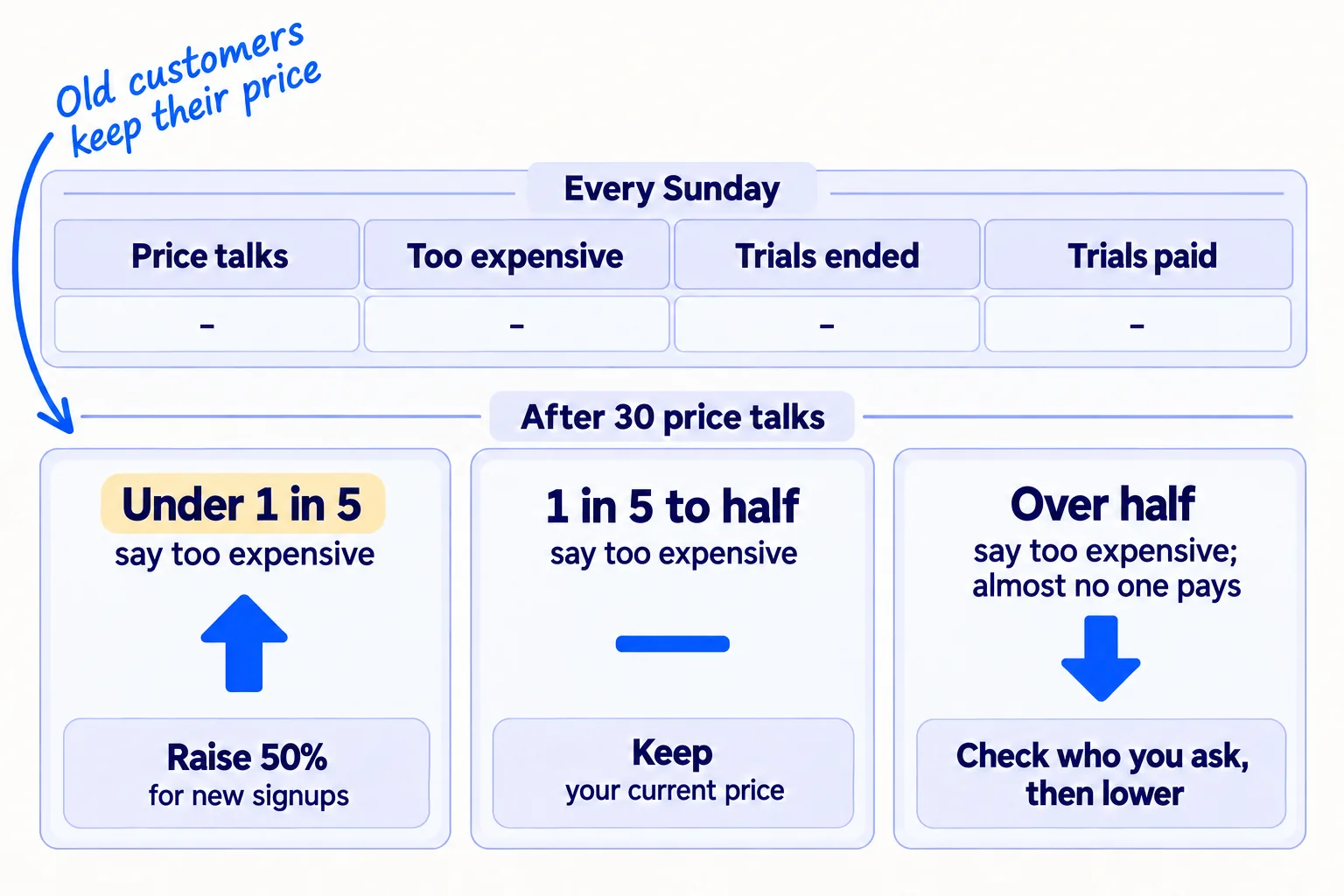
Week | Price | Price talks | "Too expensive" | Trials ended | Trials paid | What people said about price, in their words
After 30 price talks, decide:
- Fewer than 1 in 5 said "too expensive" (under 6 of 30): your price is low. Raise it by 50% for new signups.
- 1 in 5 to half said it: keep your price. Put your hours into more chats and into turning trials into paying customerssoon.
- More than half said it, and fewer than 1 in 10 ended trials paid: first check the people fit your buyer sentence. If they do, lower your price to the middle of your range from step 2.
- Few said it, but almost nobody pays: the price is not the problem. People are not getting to the point where the product helps them. Work on why no one is buying before you touch the price.
When you raise, raise for new signups only. Change the price on your pricing page and in your payment tool. Your current customers keep the price they signed up at. Tell them, because a customer who finds out from the pricing page may think they will be next. Then judge the new price the same way, after the next 30 price talks. Raising prices for existing customers later is a separate jobsoon.
Subject: your price is not changingHi [first name],From [date], new customers will pay $[new price] a [unit] a month for [product]. You signed up at $[old price], and that is what you will keep paying.Thank you for being one of the first. If there is one thing that would make [product] worth more to you, reply and tell me.[Your name]
A higher price also changes your other numbers. Each new customer adds more MRR, and you can spend more to win one: the cost to get a customersoon you can afford goes up with the price. That feeds into how much to spend on marketing and which channels you can afford, such as whether Google Ads can worksoon at your price.
- Tool: Google Sheets, your site, and Stripe or Paddle.
- Time: 20 minutes each Sunday, and 1 hour when you change the price.
- You will have: one row a week, and a price decision after every 30 price talks.
- It worked if: after the next 30 price talks at the new price, the share of ended trials that pay has not fallen by more than a third, so each 100 trials brings in at least as much money as before.
- Common mistake: raising the price on your first customers with no warning, or deciding after 5 talks. Five answers can all come from people who were never going to buy.
See it done: Bugmoth's first 30 price talks
Two weeks of price talks at $19 a team
| Week | Price | Price talks | "Too expensive" | Trials ended | Trials paid |
|---|---|---|---|---|---|
| 1 | $19 | 15 | 1 | 5 | 1 |
| 2 | $19 | 16 | 2 | 7 | 1 |
| Total | $19 | 31 | 3 | 12 | 2 |
The decision: 3 of 31 is under 1 in 5. So new teams will see $29 a team a month from Monday, and the 2 current teams keep $19. They judge $29 after the next 30 price talks.
Why it works: Only 3 of 31 said 'too expensive', which is under 1 in 5, so the rule says raise for new teams.
Once a month, look back at your price rows in your monthly marketing reviewsoon, next to your churn. If people who pay more leave faster, write down why they said they left, and work on churnsoon before you raise again.
Your SaaS pricing checklist for the next 2 weeks
0 of 11 done
Work through this list with an AI assistant
It drafts the work and keeps track of what is done.
Frequently asked questions
- Should I start with a low price to get my first customers?
No. A low price does not help a buyer who does not have the problem, and raising later is harder than lowering. Start in the top half of what alternatives charge. If more than half of 30 price talks say "too expensive" and almost nobody pays, lower it then. Your first customers are more likely to come from 100 messages a day than from a cheap price.
- Should my SaaS have a free plan?
Not at the start. A free plan costs you hosting for people who may never pay, and with few users it hides who would. A free trial with a clear end date gets you a yes or no sooner. The full trade-off is in free trial vs freemiumsoon.
- Monthly or yearly pricing, and how big a yearly discount?
Offer both: monthly, and a yearly option at 2 months free (10 months' price for 12 months). Once people are paying, test making yearly the main choice on your pricing page. Yearly money arrives up front, and people who pay for a year have more time to get value before they decide to leave. Do not go deeper than 2 months free at the start.
- Should I do a lifetime deal to get cash and users?
Not while you are still finding your price. A lifetime dealsoon sells a year or more of use for one payment, and those users will cost you hosting and support for as long as they stay. It also tells you nothing about what people will pay each month, which is the number this guide is trying to find.
- How do I price an AI SaaS product?
Use the same steps, but count AI use per user in a heavy month, charge at least 2.5 times that, and put a usage limit in every plan in plain words. ICONIQ's 2026 report found AI products expected margins of about 52%, well under classic software's 70–80%, so a flat "unlimited" price is where AI products lose money.
Sources
- 1.Pricing and fees — Stripe, checked 26 September 2026
- 2.Stripe Billing pricing — Stripe, checked 26 September 2026
- 3.All-in-one pricing — Paddle, checked 26 September 2026
- 4.Pricing low-touch SaaS — Stripe Atlas, checked 26 September 2026
- 5.2026 State of AI Report: The Builder's Economy — ICONIQ, 2026, checked 26 September 2026
- 6.Cursor apologizes for unclear pricing changes that upset users — TechCrunch, 7 July 2025
- 7.The art and science of pricing, with Madhavan Ramanujam — Lenny's Newsletter, checked 26 September 2026
- 8.The fundamentals of Van Westendorp price sensitivity for SaaS businesses — Monetizely, checked 26 September 2026
Next article to read
Related guides
- How to design a pricing pageComing soon
- How to raise prices without losing customersComing soon
- How much to spend on marketing as a SaaS startupSaaSSet your SaaS startup's first marketing budget when you have almost no revenue: 5 to 6 hours a day, under $100 a month for tools and $0 for ads until 10 people have paid, with the maths that shows when ads can pay and a Sunday sheet.
- How to turn free trials into paying customersSaaSComing soon
Guides that link here
- How much to spend on marketing as a SaaS startupSaaS
- How to get beta users for your startupSaaS
- How to get customers online for free
- How to get people to try your product
- How to get your first 100 SaaS usersSaaS
- Why no one is buying your product, and how to fix it
- How to do a competitor analysis
- How to do customer interviews
- How to price a B2B product or serviceB2B
- How to validate a business idea without spending money
- How to write a value proposition
Cite this page
Dinesh Bypilla (2026). How to price a SaaS product. Scout7 Academy. https://scout7.ai/academy/marketing-plan/how-to-price-a-saas-product
Written by Dinesh Bypilla, Agentic systems engineer at Scout7. Reviewed by Murali Sid. Last checked 26 September 2026.
Quote any part of this guide with a link back to this page. © 2026 Scout7.
Markdown version of this page: https://scout7.ai/academy/marketing-plan/how-to-price-a-saas-product.md