



How much to spend on ads
Set your first ad budget from what one sale leaves you: a yes-or-no check by business type, a test limit of 10 times that number over 14 days locked in Google, Meta or LinkedIn, a daily stop line at 3 times, and a Sunday rule to raise 20% or stop.
ByDinesh BypillaReviewed byMurali SidLast checked 20 min read
You have a little money, someone told you ads are how you grow, and every answer to how much to spend on ads is a range like "$500 to $1,500 a month" or a share of revenue you do not have yet. So you pick a number, get clicks and almost no sales, and cannot tell whether you spent too little or should not have spent at all. The right amount comes from one number: what one sale, signup or enquiry is worth to you. You then spend a fixed test on it, with a stop line, and raise it only when your own records say it pays.
Do these three things
About 3 hours to set up, then 15 minutes a day and 30 minutes every Sunday. Judge each test when it has spent its whole limit, not after a few days.
Show the three actions in fullHide the full list
- Today: work out the most you can pay for one sale, signup or enquiry, using what one sale leaves you. Set your first ad test's limit at 10 times that number, or at $0 if you do not pass the check in step 1 yet.
- Every day: turn off any ad that has spent 3 times that number with no sale in your own records. While your ad budget is $0, send 100 personal messages a day instead. AI drafts each one; you add one true line about the person.
- Every Sunday: divide what each test spent by the sales your own records show. Raise the next test by 20% only if each sale cost at or under your number. If not, stop and fix the page first.
Get help doing these
ChatGPT or Claude reads this guide and works through it with you.
1. Check if you should spend anything on ads yet
Before you choose an amount, check whether ads can work for you yet: you need proof that your page and message sell to strangers without ads. If you do not have it, your ad budget is $0 for now, and that is the right answer.
An ad sends strangers to your page. If strangers who found you for free do not buy, an ad sends more of the same strangers and you pay for each one. So the check is about sales that already happened without ads. Find the rule for your business:
If you run a SaaS: at least 10 people have paid you, and you know which sentence and which place brought them. This is the same rule as in how much to spend on marketing as a SaaS startup.
If you run a D2C store: you have at least 10 reviews, at least 1 order for every 100 visits from people who do not know you, and one video that people shared or commented on without being paid. These are the three conditions in how much to spend on marketing as an ecommerce brand.
If you run a B2B company: your free channels, such as personal messages, samples and introductions, have brought at least 5 orders. This matches how much to spend on marketing as a B2B company.
If you run an agency: at least 5 clients came from outreach and introductions, and you know which message books calls. This matches how to set a marketing budget for your agency.
Two more things are true for everyone. You can count every sale and where it came from: step 4 sets that up. And the test money is money you can lose without it hurting the business, so it never comes from rent, stock or payroll.
If any answer is no, your ad budget is $0 today. Put the hours into the free work that gets you to the rule fastest: 100 personal messages a day, 20 answers where your buyers ask for help and 1 page that answers a real search. ChatGPT or Claude drafts each message in about a minute; you add one line that is true about the person. The routine is in how to get customers online for free.
- Tool: Google Sheets.
- Time: 15 minutes.
- You will have: a yes or no for each condition, with your real number beside it.
- It worked if: every line has a number from your store, your signup list or your sales sheet, not a guess.
- Common mistake: "boosting" a post for $20 "to see what happens". It buys likes and clicks from strangers who land on a page nobody has tested, and it tells you nothing about sales.
2. Work out the most you can pay for one sale, signup or enquiry
The most you can pay for one sale is what that sale leaves you after costs. Work it out for one customer, then for the thing the ad will bring: an order, a signup or an enquiry.
Fill in the line for your business. Give it and your invoices to ChatGPT or Claude and ask it to build the sheet with formulas. Check every number it uses against an invoice, a price or a count.
Most per customer:
Store: price of a usual order − product − packing − shipping you pay − payment fees − returns = $[left]
SaaS: monthly price × 6 months (until you know how long customers stay) = $[left]
B2B: profit on a usual first order (the price minus what it costs you to make and deliver) = $[left]
Agency: one month of a client's fee = $[left]
Most per result the ad brings:
$[most per customer] ÷ [signups, enquiries or booked calls it takes to win one customer] = $[your number]
For a store, an order is a customer, so your number is the same as the first line.
The first line is your break-even customer acquisition cost: pay more than this for a customer and you lose money on them. For a store, the same number gives your break-even ROAS: price ÷ what one order leaves. How to calculate CAC and payback period has the longer version.
If you run a SaaS: your result is a signup. Divide by the signups it takes to get one paying customer, from your own list. If 12 signups make 1 paying customer, a $19 plan gives $19 × 6 ÷ 12 = $9.50 per signup.
If you run a B2B company or an agency: your result is an enquiry or a booked call. Divide by how many it takes to win one order or client, from your sales sheet.
Then compare your number with what ads cost today. In LocaliQ's 2026 benchmarks, a click on a Google search ad cost $5.42 on average, and a lead from search ads cost $66.69 ($93.69 for business services). A Facebook lead ad lead cost $27.39. If your number is far below these, ads will struggle at your price. Fix the price or the conversion rate of your page before you spend.
- Tool: Google Sheets and ChatGPT or Claude.
- Time: 30 minutes.
- You will have: two numbers: the most you can pay for one customer, and for one result.
- It worked if: every line has a real number, and none says "about".
- Common mistake: using the price instead of what is left. A $49 order that leaves $22 can only pay $22 for an ad sale. The other mistake is counting only the product cost and forgetting shipping, fees and refunds.
See it done: What one Ferns & Rinse order leaves
Ferns & Rinse is a made-up plant-based haircare brand with its own Shopify store. It sells one shampoo and one conditioner at $28 each, or both for $49.
One $49 order
| Line | Amount |
|---|---|
| Price of the pair | $49.00 |
| Product, box, shipping, payment fee, returns | −$26.27 |
| What one order leaves (the most they can pay) | $22.73 |
| Break-even ROAS ($49 ÷ $22.73) | 2.2 |
| Their first $150 of Meta ads | 1 order, so $150 per order |
Why it works: Their number shows that the old $150 test paid about 6.6 times what one order is worth.
3. Set your test budget, then how much to spend per day
Your first ad test's limit is 10 times your number from step 2. Spend it over 14 days, so your daily budget is the limit divided by 14. Any ad that spends 3 times your number with no result gets turned off.
Why these numbers: 10 times your number lets about 3 ads each reach the stop line, so you learn which one sells. The stop line at 3 times is where an ad has had a fair chance. The same rules are in the SaaS and ecommerce budget guides.
Your number (most per result): $[X]
Test limit (× 10): $[X × 10]
Days: 14
Daily budget (limit ÷ 14): $[limit ÷ 14]
Stop line (× 3): $[X × 3]
Platform: [one]
Check 1, buys 100 clicks: 100 × $[cost per click] = $[A]. Is the limit bigger? [yes / no]
Check 2, platform minimum: $[minimum a day] × 14 = $[B]. Is the limit bigger? [yes / no]
Then run the two checks. A test that buys fewer than 100 clicks tells you almost nothing. Use $5.42 a click for Google search and $0.60 for a Facebook traffic ad (LocaliQ, 2026). Then check the platform's own minimum:
| Platform | Lowest daily budget | How much a day can go over |
|---|---|---|
| Google Ads | the budget box shows a recommendation | up to 2 times the daily budget on one day, and never more than 30.4 times it in a month |
| Meta (Facebook and Instagram) | at least $1 a day for most ads charged on views; more for other goals, and Ads Manager warns you | some days more, but never more than 7 times the daily budget in a week |
| $10 a day for any format, and $100 for a new campaign with a lifetime budget; LinkedIn suggests $25 a day to new advertisers | up to 100% more on one day, and never more than 7 times the daily budget in a week |
If your limit fails either check, ads cannot give you an answer at your numbers yet. Do not stretch the limit. Keep the ad budget at $0 and raise your number first, with a higher price, a bigger order or a page that turns more visitors into buyers.
Pick one platform, the one where your buyers already are:
If you run a D2C store: Meta, using the video people shared. Follow Meta ads for a Shopify store. If you sell on Amazon, use Amazon ads with the same number.
If you run a SaaS: Google search ads, on only the exact phrases that already bring you signups from your own pages, such as "[competitor] alternative". Follow Google Ads for SaaS.
If you run a B2B company: Google search ads if buyers search for what you sell. LinkedIn ads if you must reach a job title, and only if your limit is at least $140 (14 days at $10).
If you run an agency: LinkedIn, at LinkedIn's suggested $25 a day, for clients who run software and other business-to-business companies. Spread the test over 30 days instead of 14, as in your budget guide, because calls book more slowly. Running ads for clients is a separate job: Facebook ads for clients.
- Tool: Google Sheets.
- Time: 20 minutes.
- You will have: a test limit, a daily budget, a stop line and one platform, written down.
- It worked if: the limit passes both checks, and you could lose all of it without trouble.
- Common mistake: splitting the money across three platforms at $5 a day each. None of them gets enough clicks to show a result. Put the whole limit on one.
See it done: Ferns & Rinse's first test, once all three conditions are true
The test
| Line | Amount |
|---|---|
| Their number | $22.73 |
| Test limit (× 10), under the $400 they put aside | $227 |
| Daily budget ($227 ÷ 14) | about $16 |
| Stop line (× 3) | $68 |
| Platform | Meta |
| Check 1: 100 clicks at $0.60 | $60, so the limit passes |
| Check 2: Meta minimum for 14 days | well under $227, so the limit passes |
Why it works: Every number comes from one order and the money they put aside, so they know when to stop before they start.
4. Track every sale before you spend $1
Set up conversion tracking on your site, tag your ad link with UTM parameters, and ask every new customer where they heard about you. Then make one test sale and check it shows up everywhere.
Ad platforms count sales their own way, and they can count the same sale twice or claim one that would have come anyway. Your store, your signup list and your sales sheet are the numbers that pay the bills. So you need both: the platform's tracking, so its system learns who buys, and your own records, so you judge.
- Install the platform's tracking: the Meta pixel, the Google tag, or the LinkedIn Insight Tag, with your purchase, signup or enquiry as the goal. Conversion tracking has the steps for each.
- Tag the link in every ad with UTM parameters, so your analytics and your store show the ad as the source.
- Add "Where did you hear about us?" to your checkout, signup or enquiry form. This is self-reported attribution.
- Make one real test purchase, signup or enquiry through the tagged link.
- Tool: the platform's tracking (free), Google Analytics 4 (free) and your form.
- Time: 1 hour.
- You will have: tracking that a real test sale has passed through.
- It worked if: the test sale shows in the ad platform and in your own records, with the ad as its source.
- Common mistake: launching first and adding tracking "later". Every dollar spent before tracking works is a dollar you cannot judge.
5. Launch one campaign with a locked limit and 3 ads
Launch one campaign with a total or lifetime budget equal to your limit and an end date 14 days away, so it cannot spend more. Draft 10 ad versions and put the best 3 in it.
Lock the limit. A daily budget is an average, not a ceiling, so on a busy day the platform spends more (see the table in step 3). Use the setting that never goes over:
- 1
Google Ads: a campaign total budget
When you create a new Search, Shopping or Performance Max campaign, under Budget, select "Campaign total budget". Enter your limit, then set the Start date and the End date 14 days later. Google says you will never be charged more than your total budget. It works only on new campaigns, and you cannot change the budget type later. Google opened it to these campaigns in January 2026, as a beta. If your account does not offer it yet, set the daily budget to your limit ÷ 14 and pause the campaign yourself on the day total spend reaches the limit. One day can still cost up to 2 times the daily budget.
- 2
Meta: a lifetime budget and an account spending limit
In the ad set, under Budget and schedule, choose a lifetime budget equal to your limit and set an end date 14 days away. Meta treats a lifetime budget as a hard cap. Then, in your billing settings, set an account spending limit equal to your limit too. When it is reached, every ad in the account pauses, and it does not reset by itself. Accounts on manual payments cannot use it.
- 3
LinkedIn: a lifetime budget
Set a lifetime budget equal to your limit, with an end date. LinkedIn says total spend will never exceed the lifetime budget. For 14 days the lowest lifetime budget is $140.
Draft 10 versions, launch 3. Give ChatGPT or Claude the words that already sold for free: lines from your best reviews, the message that got the most replies, the headline visitors understood. Ask for 10 versions of the first line, or of the first 2 seconds of your video. Pick the 3 that sound most like your buyers and put them in the campaign. Keep the other 7 as spares for step 6. 3 ads, because your limit lets about 3 ads each reach the stop line. How to make ad creatives covers the images and video.
First line: [the problem or the result, in a buyer's own words from a review, a reply or a call]
Second line: [what they get, and how fast]
Proof: [one true fact: a review, a number of customers, a guarantee]
Button: [Shop now / Start free trial / Book a call]
Send every ad to one landing page with one thing to do: buy, start the trial or book a call. Leave retargeting for later: at a few hundred visits a month there are too few people to show it to.
- Tool: Google Ads, Meta Ads Manager or LinkedIn Campaign Manager, and ChatGPT or Claude to draft.
- Time: about 1 hour 30 minutes.
- You will have: one live campaign with 3 ads that cannot spend more than your limit, and 7 spare versions.
- It worked if: the campaign shows your limit as its total or lifetime budget, and an end date 14 days after the start.
- Common mistake: a daily budget with no end date. It keeps spending every day until you remember to stop it.
6. Check every ad each day and turn off the ones that lose money
Every day, at the same time, compare each ad's spend with the sales your own records show from it. Turn off any ad that has reached the stop line with no sale, signup or enquiry, and put a spare in its place.
Use one row per ad in your sheet: date, spend so far, results in your records, and the stop line. Ask ChatGPT or Claude for a formula that turns a row red when spend passes the stop line with 0 results. Then:
-
Turn off any ad that has spent 3 times your number and brought 0 results in your records. Replace it with a spare from step 5.
-
Leave the rest alone. Turning ads off is the only change you make during the 14 days. Do not add money, change the audience or rewrite ads that are still under the line.
-
On Google search ads, open Campaigns, then Insights and reports, then Search terms. Add any search that has nothing to do with what you sell, such as "free" or "jobs", as a negative keyword, so your ad stops showing for it.
-
On Meta, expect "Learning limited". Meta shows it when an ad set is unlikely to get about 50 results in a week, and says it is not a penalty. A small test cannot buy 50 sales a week. Judge it on your own records.
-
Tool: the ad platform and your sheet.
-
Time: 15 minutes a day.
-
You will have: one row per ad for each day of the test.
-
It worked if: no ad is still running past the stop line with 0 results.
-
Common mistake: judging by clicks or click-through rate. An ad with cheap clicks and no sales is still losing money. The other mistake is changing everything on day 2 because nothing has sold yet.
See it done: Ferns & Rinse's check on day 6
Day 6, orders counted in Shopify
| Ad | Spent so far | Orders in Shopify | Action |
|---|---|---|---|
| A: "Clean hair in one wash" | $41 | 2 | keep |
| B: "Plant-based, salon feel" | $70 | 0 | off, past $68; spare D goes in |
| C: "Your scalp will thank you" | $19 | 0 | keep, under $68 |
Why it works: Only the ad that passed the $68 stop line with no order is turned off; the others are left alone.
7. Every Sunday, count sales in your own records, then raise or stop
Every Sunday, write one row per test: what it spent and the sales your own records show. When a test has spent its whole limit, decide: raise the next test by 20% if each sale cost at or under your number, or stop if it cost more.
Week | Test | Spent | Sales in your records | Sales the platform claims | Cost per sale (spent ÷ your sales) | Your number | Decision
Judge each test when it has spent its whole limit, 10 times your number, not after a few days. Then use these rules:
- Cost per sale at or under your number: run the next test with a limit 20% higher, keeping the ads that sold. Keep raising by 20% a test while the cost stays at or under your number. Small steps mean a bad week costs you a little, not your savings.
- Cost per sale over your number: stop. Move the money back into the free work from step 1. Find where buyers drop out with why ads get clicks but no sales, and fix the page or the offer before you run a new test.
- No sales at all: check step 4 first. If tracking works, the page or the audience is wrong. Read why no one is buying.
If you run a SaaS: also check that the signups from ads use the product about as often as your other signups. If they do not, fix your first minutes in the product before you raise anything.
If you run a B2B company or an agency: judge the test on enquiries or booked calls, because orders take weeks. Check which ones turned into orders or clients at week 12, after your discovery calls.
Paste the week's numbers into ChatGPT or Claude and ask it to fill the sheet and apply the rules. Check its sums against your store or sheet. Once a month, step back for a marketing review.
- Tool: Google Sheets.
- Time: 30 minutes every Sunday.
- You will have: one row a week, and a decision for every test that has spent its limit.
- It worked if: every sale you count from ads is a sale you can find in your own records.
- Common mistake: raising the budget because the platform shows a good ROAS. Check it against your own sales and your break-even ROAS first.
See it done: Ferns & Rinse after the $227 test
Test 1, 14 days
| Spent | Orders in Shopify from the ad link | Purchases Meta claims | Cost per order | Their number | Decision |
|---|---|---|---|---|---|
| $227 | 11 | 14 | $20.64 | $22.73 | next test $272, about $19.40 a day |
Why it works: They count orders in Shopify, not Meta's number, and the cost per order is under their $22.73, so they raise by 20% and no more.
When one platform pays back test after test, choose your next channel or test new ad versions before you add a second platform. On a store with a growing range of products, compare Google Shopping and Performance Max on the same number.
Where Scout7 helps
Scout7 speeds up three of the seven steps: 3, 5 and 6. It runs in the Scout7 app, not over MCP yet.
Step 3. Scout7's campaign strategy talks through the plan with you, researches locations, interests and targeting, and drafts a campaign with an audience, an estimated reach and a daily budget. You set the objective and the number you are willing to spend: use the limit and daily budget from step 3.
Step 5. Scout7 connects your Google, Meta, LinkedIn or Reddit ad account, builds the creatives, ad groups and ad sets, and walks the campaign through creative review, targeting and budget, including whether the budget is daily or lifetime. Choose lifetime and enter your limit. You review every creative and approve the spend before it launches. Nothing launches without your approval.
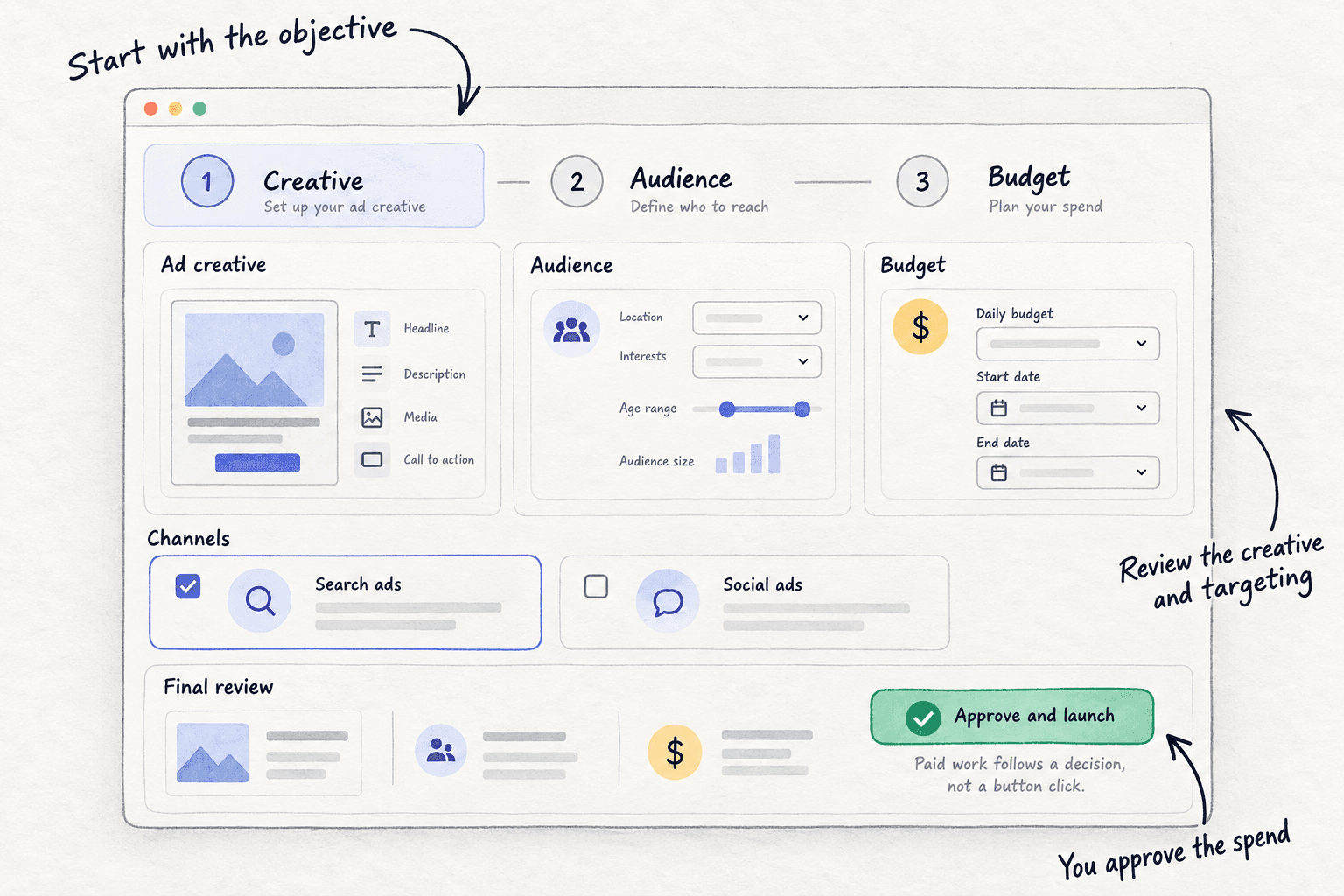
Step 6. Campaign monitoring reports live spend, impressions, clicks and click-through rate for each campaign, and every 12 hours reviews performance and proposes actions: which creative to stop, which campaign to cut, where more budget would earn more. You approve or reject each one. Your sales still come from your own records, so keep the daily row in step 6.
Your first ad budget checklist
0 of 11 done
Work through this list with an AI assistant
It drafts the work and keeps track of what is done.
Frequently asked questions
- How much should I spend on ads per day?
Your test limit divided by 14. The limit is 10 times the most you can pay for one sale, signup or enquiry, so a store whose order leaves $23 tests with about $227, roughly $16 a day. Never go below the platform's minimum: LinkedIn needs $10 a day, and Meta asks for at least $1 a day for most ads charged on views.
- Is $5 a day enough for Facebook ads?
It is enough to run, not to learn fast. Meta shows "Learning limited" when an ad set is unlikely to get about 50 results in a week, and $5 a day rarely buys that. Meta says this is not a penalty. Set the daily amount from your own number instead, and judge it on sales in your records once the test has spent its limit.
- How much should I spend on Google Ads per month?
Plan for the monthly number, not the daily one. Google can spend up to 2 times your daily budget on one day and up to 30.4 times it in a month, so a $10 daily budget can cost $304. For a first test, use a campaign total budget, which Google never bills above, set to 10 times your number. Google Ads for SaaS has the setup.
- How much should a small business spend on advertising?
Rules like "5 to 12% of revenue" are for businesses with steady revenue. With a few customers, spend $0 on ads until you pass the check in step 1, then spend one capped test at a time and raise it only when each sale costs less than it leaves you. Your marketing budget covers the hours and tools around it.
- I spent money on ads and got no sales. What now?
Stop the ads and check three things, in order. Does a test sale show in your own records? Did the clicks come from the right people: look at the search terms or the audience. Does the page sell to visitors who come for free? If it does not, more ad money will not fix it. Fix the page first.
Sources
- 1.About overdelivery and your average daily budget — Google Ads Help, checked 8 October 2026
- 2.About average daily budgets — Google Ads Help, checked 8 October 2026
- 3.About campaign total budgets — Google Ads Help, checked 8 October 2026
- 4.Campaign total budgets FAQs — Google Ads Help, checked 8 October 2026
- 5.Campaign total budgets for Search, Performance Max and Shopping — Google, 15 January 2026
- 6.About the search terms report — Google Ads Help, checked 8 October 2026
- 7.About budgets — Meta Business Help Centre, checked 8 October 2026
- 8.About lifetime budgets — Meta Business Help Centre, checked 8 October 2026
- 9.Update an account spending limit — Meta Business Help Centre, checked 8 October 2026
- 10.Best practices for minimum budgets — Meta Business Help Centre, checked 8 October 2026
- 11.About learning limited — Meta Business Help Centre, checked 8 October 2026
- 12.Facebook and Instagram ads pricing and cost — Meta, checked 8 October 2026
- 13.Campaign and ad set budgets — LinkedIn Help, checked 8 October 2026
- 14.Making the most of your budget — LinkedIn Marketing Solutions, checked 8 October 2026
- 15.Search Advertising Benchmarks for 2026 — LocaliQ, updated 1 June 2026
- 16.Facebook Advertising Benchmarks for 2026 — LocaliQ, updated 23 September 2026
- 17.Establishing an ad budget — Shopify Community, checked 8 October 2026
Next article to read
How to make ad creativesOnce the budget is set, make the ads you will test first.Read it nextRelated guides
- How much to spend on marketing as a SaaS startupSaaSSet your SaaS startup's first marketing budget when you have almost no revenue: 5 to 6 hours a day, under $100 a month for tools and $0 for ads until 10 people have paid, with the maths that shows when ads can pay and a Sunday sheet.
- How much to spend on marketing as an ecommerce brandD2CSet your first ecommerce marketing budget from what one order leaves you: a fixed monthly amount from savings you can afford to lose, free product for small creators first, a daily log, a Sunday cost-per-order check, and a capped first ad test once three conditions are true.
- How to calculate break-even ROASD2CComing soon
- How to set up conversion trackingComing soon
Guides that link here
- How much to spend on marketing as a SaaS startupSaaS
- How much to spend on marketing as a B2B companyB2B
- How to set a marketing budget for your agencyAgency
- How to get your brand mentioned by ChatGPT
- How to get your products recommended by ChatGPTD2C
- How to get booked as a podcast guest
- How to make short-form videos for your business
- How to fix a SaaS launch that got zero signupsSaaS
- How to get customers online for free
- How to get traffic to a new website for free
- How to get your first 100 SaaS usersSaaS
- How to get your first sale on EtsyD2C
- How to announce a new business on social media
- How to launch a product on AmazonD2C
- How much to spend on marketing as an ecommerce brandD2C
- How to choose marketing channels for an agencyAgency
- How to choose marketing channels for an ecommerce brandD2C
- How to fit marketing into your week as a solo founder
- How to market a SaaS productSaaS
- How to price a productD2C
- How to price digital marketing servicesAgency
- How to validate a business idea without spending money
- How to make ad creatives
- How to start a referral program
- How to list your products on Google Shopping for freeD2C
- How to rank on Google Maps
- How to promote on Reddit without getting banned
- How to sell on TikTok ShopD2C
Cite this page
Dinesh Bypilla (2026). How much to spend on ads. Scout7 Academy. https://scout7.ai/academy/paid-ads/how-much-to-spend-on-ads
Written by Dinesh Bypilla, Agentic systems engineer at Scout7. Reviewed by Murali Sid. Last checked 8 October 2026.
Quote any part of this guide with a link back to this page. © 2026 Scout7.
Markdown version of this page: https://scout7.ai/academy/paid-ads/how-much-to-spend-on-ads.md