



How to measure SEO success
Measure SEO success on a new site with free tools: write down the result that counts (signups, enquiries or orders from Google), track it as a key event in Google Analytics, ask every buyer where they found you, fill one Sunday scorecard row for seen, visited, acted and bought, fix the first number below its line, and work out what one customer from Google costs you each month.
ByDinesh BypillaReviewed byMurali SidLast checked 19 min read
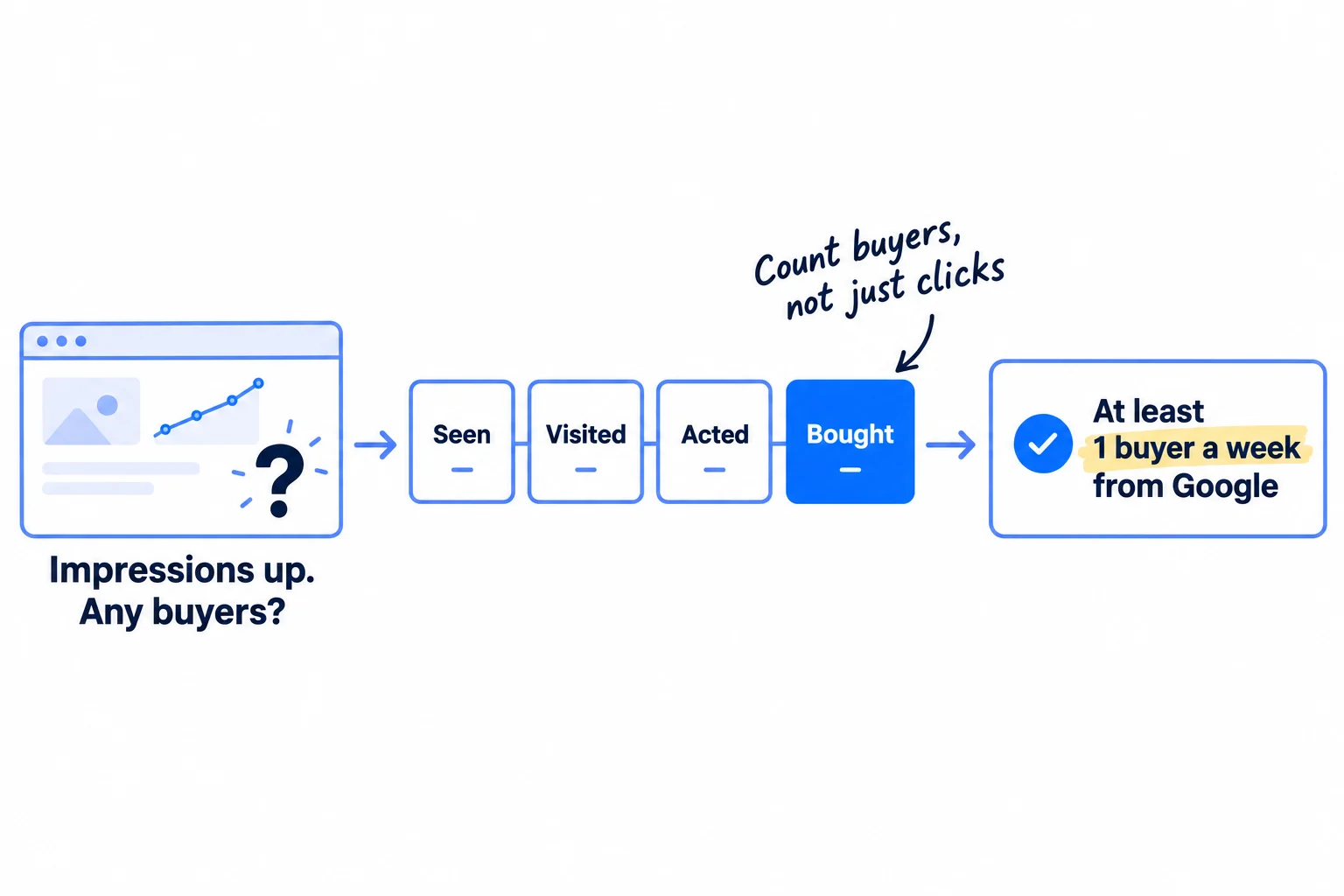
You publish pages, Search Console shows impressions going up, and you still cannot say if SEO has brought you a single customer. Here is how to measure SEO success when you have almost no customers: pick the one result that counts, track it from Google search to the buyer with free tools, and check one row of numbers every Sunday. Without it you either stop SEO a month before it starts to work, or keep writing pages for months that bring readers and no buyers.
Do these three things
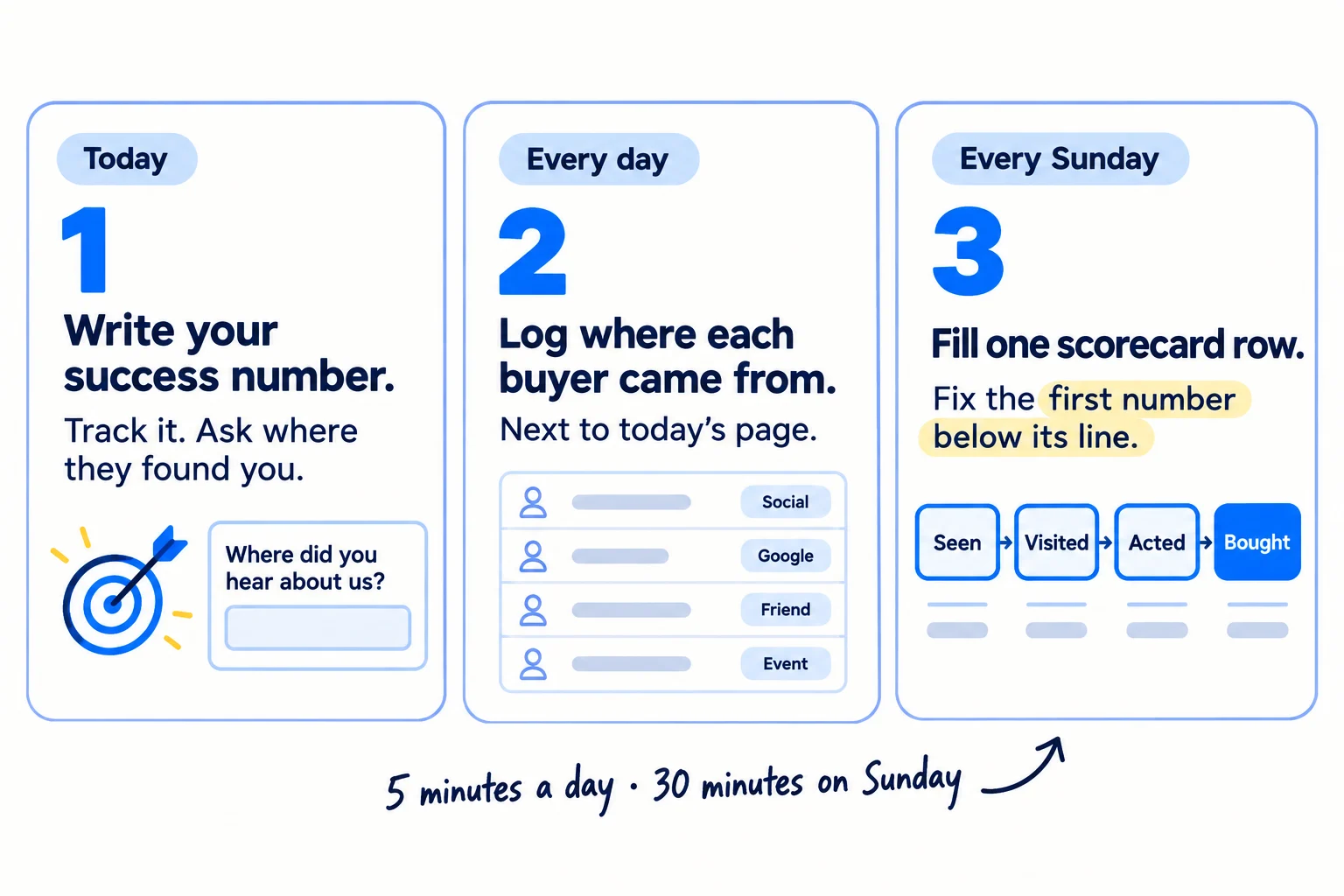
About 1 hour to set up, 5 minutes a day and 30 minutes every Sunday. Judge it by pages published, not by weeks: first clicks around 90 pages, first buyers around 180.
Show the three actions in fullHide the full list
- Today: write down the number that means SEO worked for you (signups, enquiries or orders from Google search), make it a key event in Google Analytics, and add "Where did you find us?" to your form.
- Every day: write down where each new signup, enquiry or order came from, next to the 1 page you published for a buyer search.
- Every Sunday: fill one row of your SEO scorecard (seen, visited, acted, bought) and fix the first number below its line, using the numbers from Google Search Console.
Get help doing these
ChatGPT or Claude reads this guide and works through it with you.
1. Write down what SEO success means for your business
SEO success for a new business is one number: how many signups, enquiries or orders a week come from people who found you on Google by searching for what you sell, not for your name. Write that number down today, with the date you will judge it, and the two earlier numbers that tell you that you are on the way.
![A card that reads: SEO success for [your business] = at least [1] [signups / enquiries / orders] a week from Google search by month 6. Under it, a row of three earlier check marks: month 1, pages with impressions; month 3, pages in the top 20 and first clicks; month 6, buyers. A crossed-out note says 'Rank on page one'.](/academy/illustrations/how-to-measure-seo-success/02-step-1.webp)
Pick the result that means money for your kind of business:
- If you run a SaaS: signups from Google who did the main thing in your product, not every signup. That is your activation step.
- If you run a B2B company: enquiries from Google that fit your ideal customer: a quote request, a call booked, an email that asks about an order.
- If you run a D2C store: orders from Google search.
- If you run an agency: enquiries from Google for your own agency. For a client, use the client's result, and agree it before you start.
Start with the same target the SEO timeline sets for month 6: at least 1 a week from Google. Until then, judge SEO by that guide's earlier pass lines, because buyers come last. At month 1, at least 10 of your pages get impressions from searches without your name. At month 3, at least 5 pages sit in the top 20, and searches without your name bring some clicks. At month 6, at least 1 buyer a week says Google. Put the three check dates in your calendar today.
These numbers assume the work behind them: 1 page a day that answers a search a buyer makes just before they buy, picked from your keyword list. That is 90 pages at month 3 and 180 at month 6. At 1 page a week, 90 pages takes almost 2 years, so judge by pages published, not by weeks.
SEO success for [your business] = at least [1] [signups that did the main thing / enquiries that fit / orders] a week from Google search, by [date 6 months from your first page].On the way:
Month 1 ([date], about 30 pages): 10+ pages with non-brand impressions.
Month 3 ([date], about 90 pages): 5+ pages in the top 20, and non-brand clicks.
Month 6 ([date], about 180 pages): 1+ [result] a week that says Google.
Once I pass month 6, the next target is: [a number you choose].
- Tool: a note or a sheet, and your calendar.
- Time: 15 minutes.
- You will have: one sentence that says what success is, and three dates in your calendar, each with its line.
- It worked if: someone else could read your sentence on any check date and say "pass" or "miss" without asking you.
- Common mistake: "rank on page one" or "get more traffic". You can reach both and still have no buyers, and neither tells you when to stop or keep going.
See it done: Ferns & Rinse's success line
Ferns & Rinse is a made-up plant-based haircare brand with its own Shopify store. It sells one shampoo and one conditioner at $28 each, or both for $49.
Before
SEO is working when we rank on page one for 'natural shampoo'.
After
SEO success = at least 1 order a week from Google search by month 6. On the way: 10+ pages with non-brand impressions at month 1, 5+ pages in the top 20 at month 3.
Why it works: It counts orders, not rankings, and it says when to judge it.
2. Track signups, enquiries and orders from Google in Google Analytics
To measure SEO in Google Analytics, mark the one action that is your result as a key event, then read it by source: Google Analytics then shows how many people who came from Google search did it. Search Console stops at the click. Google Analytics, or Shopify's own reports for a store, shows what happened after it. Neither costs extra.
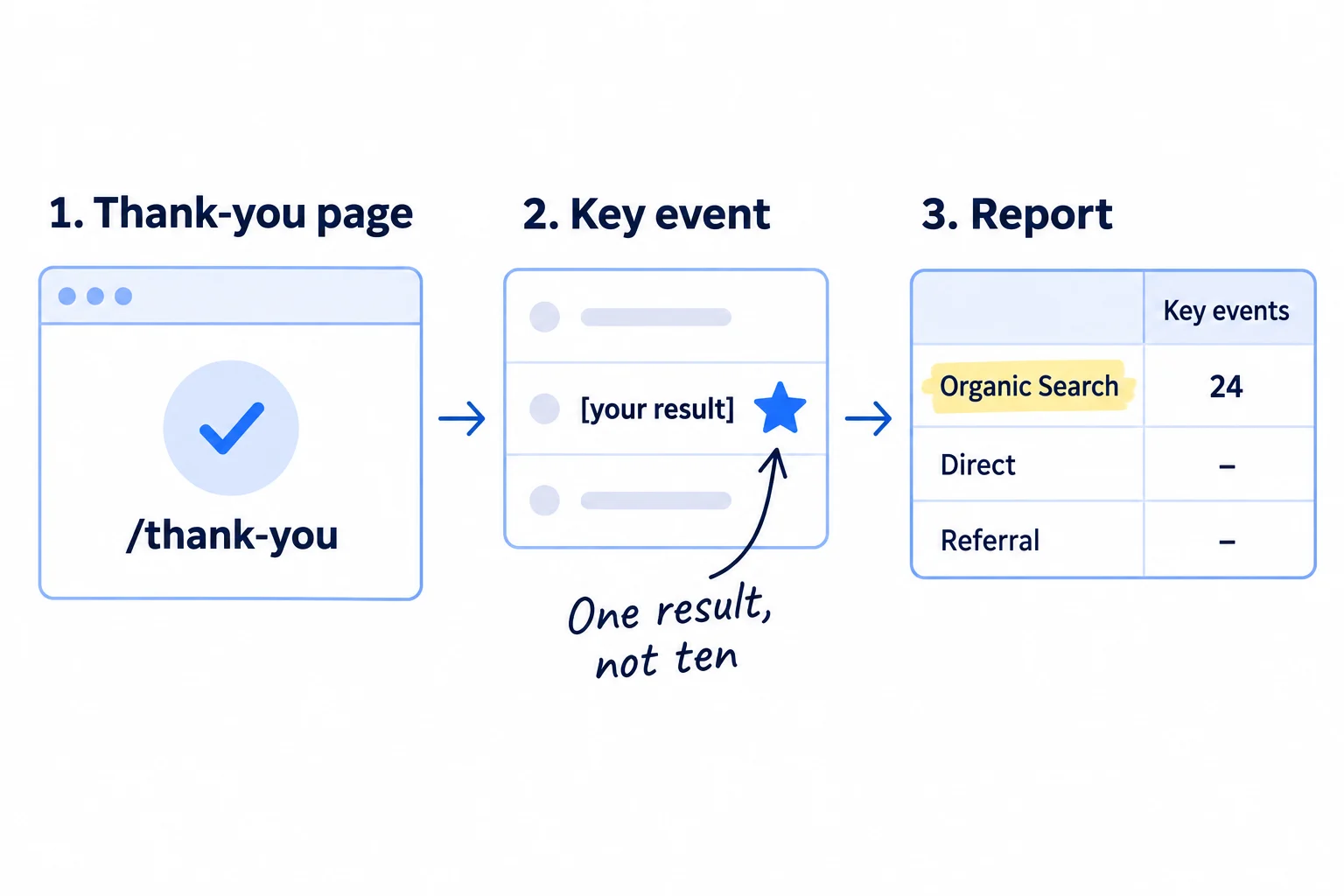
A key event is Google Analytics' name for an action that matters to your business. Google used to call it a "conversion"; now "conversion" means an action used to measure ads. You need Editor access to your Google Analytics property, and the Google tag already on your site. Most site builders add it when you paste your measurement ID; setting up conversion tracking covers that first part.
- 1
Make the event
Send people to a thank-you page after your form or signup, such as yoursite.com/thank-you. In Google Analytics, open Admin, then Events (under Data display). Click "Create event", then "Create". Give it a "Custom event name" such as enquiry_sent. Under "Matching conditions", add event_name equals page_view, then page_location contains thank-you. Click "Create". It only counts from now on; Google says changes take about an hour.
- 2
Mark it as a key event
In Admin, then Events, find your new event in Recent events once it has fired, and click the star next to it. Google says marking a key event "affects reports from time of creation. It doesn't change historic data", and reports can take up to 24 hours to show it.
- 3
Test it
Fill in your own form once from your phone. Open Reports, then Realtime, and check your event shows. The next day, open Reports, then Acquisition, then Traffic acquisition. The table is split by channel; Organic Search is visits from search engines. Type "google / organic" in the search bar above the table to see Google alone. Read the "Key events" and "Session key event rate" columns.
- 4
Link Search Console
In Admin, under Product links, click "Search Console links", then "Link", and pick your site. You must own the site in Search Console. Then open Library in the left menu and publish the Search Console collection, which Google leaves unpublished. You get two reports: Google Organic Search Queries and Google Organic Search Traffic, the second with each landing page's Google clicks next to what visitors did.
Two changes in 2026 decide what counts as SEO in these reports. Google's Organic Search channel now includes visits from Google's AI Overviews and AI Mode, so those are part of your SEO number. Since May 2026, visits from ChatGPT, Gemini, Claude and other assistants have their own channel, "AI Assistant", so they are not. Keep them out of this scorecard; tracking AI traffic and ChatGPT mentions covers them.
If you run a D2C store on Shopify: you can skip Google Analytics for now. In Shopify, open Analytics, then Reports. "Sessions by referrer" shows visits by referring channel and traffic type, so you can see Google and organic. "Performance by referring channel" shows orders and sales by channel. Use the same two reports every Sunday. If your store gets visits but no orders, fix the store first. The rest of SEO for a Shopify store is judged by these same two reports.
If you run a SaaS: if your signup happens on a different address, such as app.yoursite.com, put the same Google tag there too, and use the first page people see after signing up as the "thank-you" page, with its address in the matching condition.
- Tool: Google Analytics, free; or Shopify's built-in reports.
- Time: 45 minutes.
- You will have: one key event that counts your real result, readable by channel, and Search Console's data inside Google Analytics.
- It worked if: your own test shows in Realtime the same day and under its source in Traffic acquisition within 24 hours.
- Common mistake: starring ten events, such as page views, scrolls and clicks, as key events. Then "key events from Google" goes up every week and means nothing. Mark only the result from step 1.
3. Ask every new customer "Where did you find us?" and log it every day
Ask every new signup, enquiry and order where they found you, and write the answer down the same day. Analytics misses many buyers who found you on Google: they read your page, left, and came back days later by typing your name, so the sale shows as a brand search or "Direct".
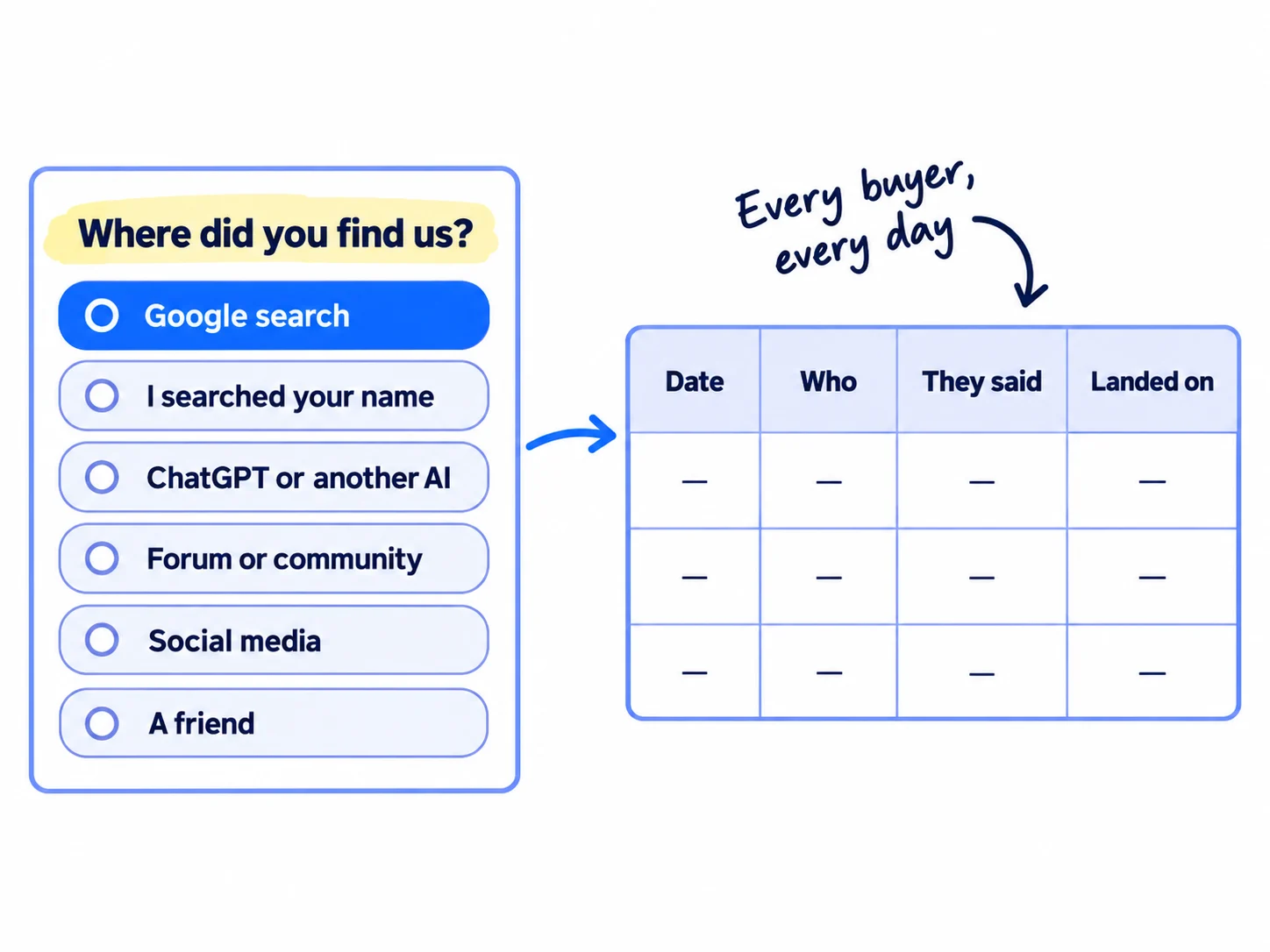
This is self-reported attribution: the buyer tells you the source. Put the question on your signup form, contact form or checkout, as a required choice with a free-text box for "Other". Split "Google search" from "I searched your name": only the first is SEO. When someone picks "Google search", ask in your reply or on your discovery call: "What did you type?" Their words are your next page.
Where did you find us? (required)
○ Google search (I searched for something like this)
○ I searched your name
○ ChatGPT or another AI assistant
○ A forum or community, such as Reddit
○ Social media
○ A friend or colleague
○ Other: ______Daily log: Date | Who (name or order number) | They said | What they typed (if Google) | Page they landed on (from Google Analytics or Shopify) | Today's new page
Every day, take 5 minutes: add each new signup, enquiry or order to the log, and the page you published that day. Keep publishing that 1 page a day while you measure; the pages are what you are measuring. Let ChatGPT or Claude draft each page in 10 minutes and spend the rest of the hour on what only you know, the way AI content creation works best. Tag every link you share yourself, in posts and personal messages, with UTM parameters, so those visits never land in your Google numbers.
If you run a B2B company: most enquiries come by email or phone, not through a form. Ask on the first call and log it in your sheet or CRM. Tracking which channel brought each deal shows how to carry it through to the order.
If you run a D2C store: ask it on your order confirmation page if your theme lets you add text there, or as the one question in the first email after each order, and log every reply.
- Tool: your form or checkout, and Google Sheets.
- Time: 15 minutes to add the question, then 5 minutes a day.
- You will have: one row for every new signup, enquiry and order, with what they said and the page they landed on.
- It worked if: at least 9 in 10 new customers this week have a source in the log.
- Common mistake: trusting analytics alone. A buyer who read three of your pages, then typed your name a week later, shows as "Direct" or as a brand search, and SEO gets no credit for the sale.
See it done: Ferns & Rinse's log for one week
Daily log, week 8
| Date | Order | They said | What they typed | Landed on |
|---|---|---|---|---|
| Mon | #1006 | A friend | Home page | |
| Wed | #1007 | Google search | sulfate free shampoo for curly hair | Sulfate-free shampoo for curly hair page |
| Sat | #1008 | I searched your name | Home page (read 3 pages the week before) |
Why it works: Two buyers came from Google, and the log says which page and which words brought each one.
4. Every Sunday, fill one row of your SEO scorecard
Every Sunday, write one row of five numbers that follow a buyer from Google to the sale: pages live, seen, visited, acted and bought. One row a week shows you where SEO is working and where it stops, in about 20 minutes.
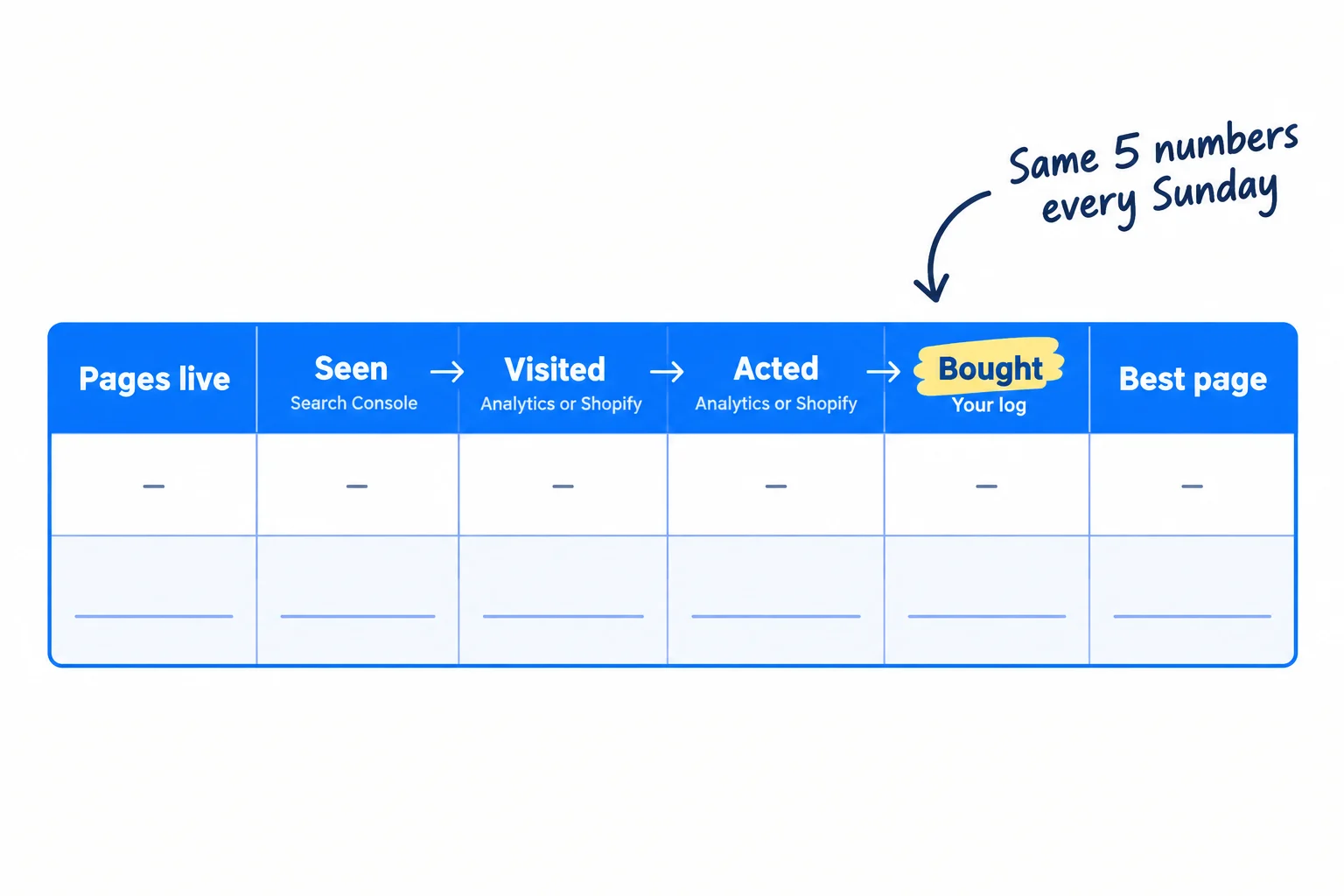
Fill it in this order, for the last 7 days:
- Pages live: how many pages you have published so far.
- Seen: non-brand impressions, the times Google showed your pages on its results page for searches without your name. Take it from the Sunday row you fill in Google Search Console, with the weekly view and your brand filtered out.
- Visited: visits from Google search. In Google Analytics, Traffic acquisition, "google / organic", Sessions. In Shopify, Sessions by referrer, Google, organic.
- Acted: key events from Google search, from the same row: what your analytics saw. For a store, the orders Shopify credits to Google in "Performance by referring channel".
- Bought: your result from step 1 (signups that did the main thing, enquiries that fit, or orders) where the buyer said "Google search" in your log: what buyers told you. It catches the buyers analytics missed.
- Best page: in Google Analytics, open Reports, then Engagement, then Landing page, and add "Session source / medium" as a second column. Note the page with the most key events from google / organic. In Shopify, take it from your log.
Week | Pages live | Seen (non-brand impressions) | Visited (Google search visits) | Acted (key events from Google) | Bought (said "Google search") | Best page this week
Next check date: [month 1 / month 3 / month 6] | Its line: [from step 1] | On track? yes / no
Search Console clicks and Google Analytics visits will never match. Google lists the reasons: visitors who refuse cookies, time zones (Search Console uses Pacific Time), and the two tools counting different things. Use each number for its own line and compare it only with itself, week after week.
Once a month, bring the last 4 rows to your monthly marketing review, next to your other channels.
- Tool: Google Search Console, Google Analytics or Shopify, your log and Google Sheets.
- Time: 20 minutes every Sunday, after the 15 minutes in Search Console.
- You will have: one row a week that follows a buyer from Google search to the sale.
- It worked if: there is a new row every Sunday, and on each check date you can read the pass or miss straight from it.
- Common mistake: putting searches for your own name into "Seen" and "Visited". People who already know you came from your other work, so SEO looks better than it is, until the day you stop that work.
See it done: Ferns & Rinse's scorecard row
Week 8 of 1 page a day
| Pages live | Seen | Visited | Acted (orders Shopify credits to Google) | Bought (said Google) | Best page |
|---|---|---|---|---|---|
| 56 | 690 | 21 | 1 | 1 | Sulfate-free shampoo for curly hair |
Why it works: Each number comes from one place, so the row shows exactly where buyers drop out.
5. Every Sunday, fix the first number that is below its line
After you fill the row, find the first of the four numbers that is too low, and put that week's SEO hours into fixing it. A number further along can only grow once the one before it is fixed, so work from left to right.
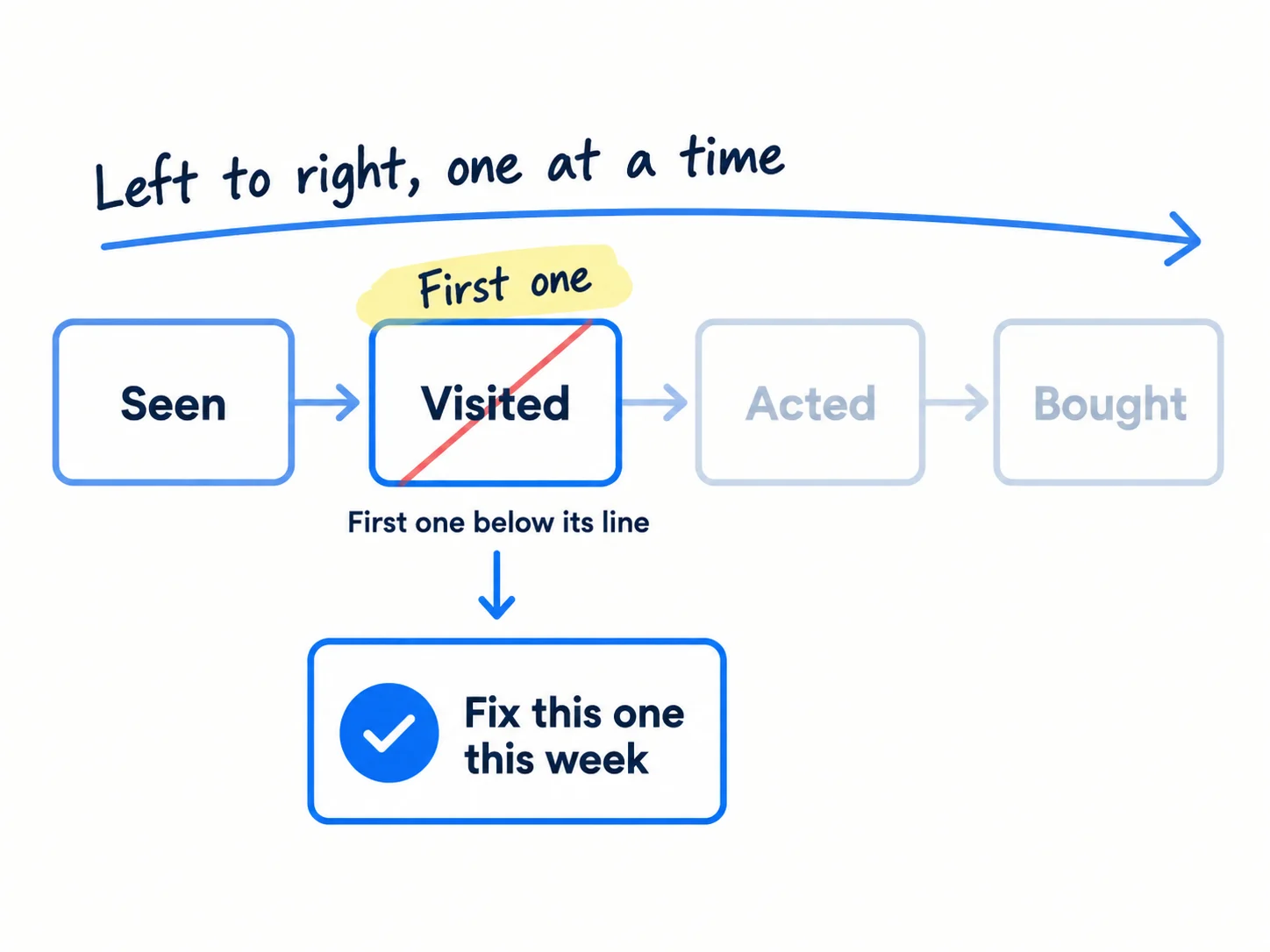
Use the rows that apply to your stage. Before month 3, most weeks you only check the first row.
| If this is the first number below its line | It usually means | Do this week |
|---|---|---|
| Seen: fewer than 10 pages with non-brand impressions after 30 pages | Your pages answer searches nobody makes, or Google has not added them | Check indexing, then redo your keyword check and pick searches buyers type |
| Visited: a page has 100+ non-brand impressions in 28 days and 0 clicks | The title does not answer the search, so few people click | Rewrite the title and first two lines; make the article rank higher if it sits at position 8 to 20 |
| Acted: a page has 30+ visits from Google in 28 days and 0 key events (for a store, 0 orders) | People read it and leave; the next step is missing or weak | Add one clear next step near the top: try it, ask for a quote, buy |
| Bought: key events happen, but nobody buys | The searches bring the wrong people, or you lose them after the first step | Look at what buyers typed in your log; write pages for those searches, and follow up every enquiry the same day |
| All four are on their line | It is working | Write 5 more pages like your best page, for the closest searches |
The "If this" lines are this guide's rules, not Google's. Leave a fixed page alone for 4 weeks before you judge the fix, and keep publishing 1 new page on the other days.
If you run a SaaS: if pages bring visits but no signups, fix the site before the signup. If signups come but nobody does the main thing, the problem is after the signup, not in SEO: work on your activation rate.
If you run a B2B company: if pages bring visits but no enquiries, get more leads from your website, and add a case study link to your best pages.
If you run a D2C store: if product pages get visits from Google but no orders, put the size, ingredients and delivery time in the first lines of each product description, and check the page loads fast on a phone.
- Tool: your scorecard, Google Search Console and Google Analytics or Shopify.
- Time: 10 minutes to decide; the fix takes the place of that day's new page.
- You will have: one named fix each week, tied to one number.
- It worked if: the number you fixed goes up within 4 weeks of the change.
- Common mistake: trying to fix all four at once, or stopping new pages to fix things. Fix one, and keep publishing on the other days.
See it done: Ferns & Rinse's Sunday decision
Week 8: where the row breaks
| Check, left to right | What they found | Below its line? |
|---|---|---|
| Seen: pages with non-brand impressions | 31 of 56 pages | No (line: 10+) |
| Visited: pages with 100+ impressions and 0 clicks in 28 days | None | No |
| Acted: pages with 30+ Google visits and 0 orders in 28 days | "Is sulfate-free shampoo better?": 34 visits, 0 orders | Yes |
So this week they add a "Shop the curly-hair set, $49" button under the first answer on that page, and check it again in 4 weeks.
Why it works: They find the first weak number from the row, then pick one page to fix instead of guessing.
6. Once a month, work out your SEO ROI: what one customer from Google costs you
Once a month, add up what SEO cost you in hours and money, and divide it by the customers who came from Google search. That is what one customer from SEO costs, and it is the number you compare with your other marketing channels at month 6.
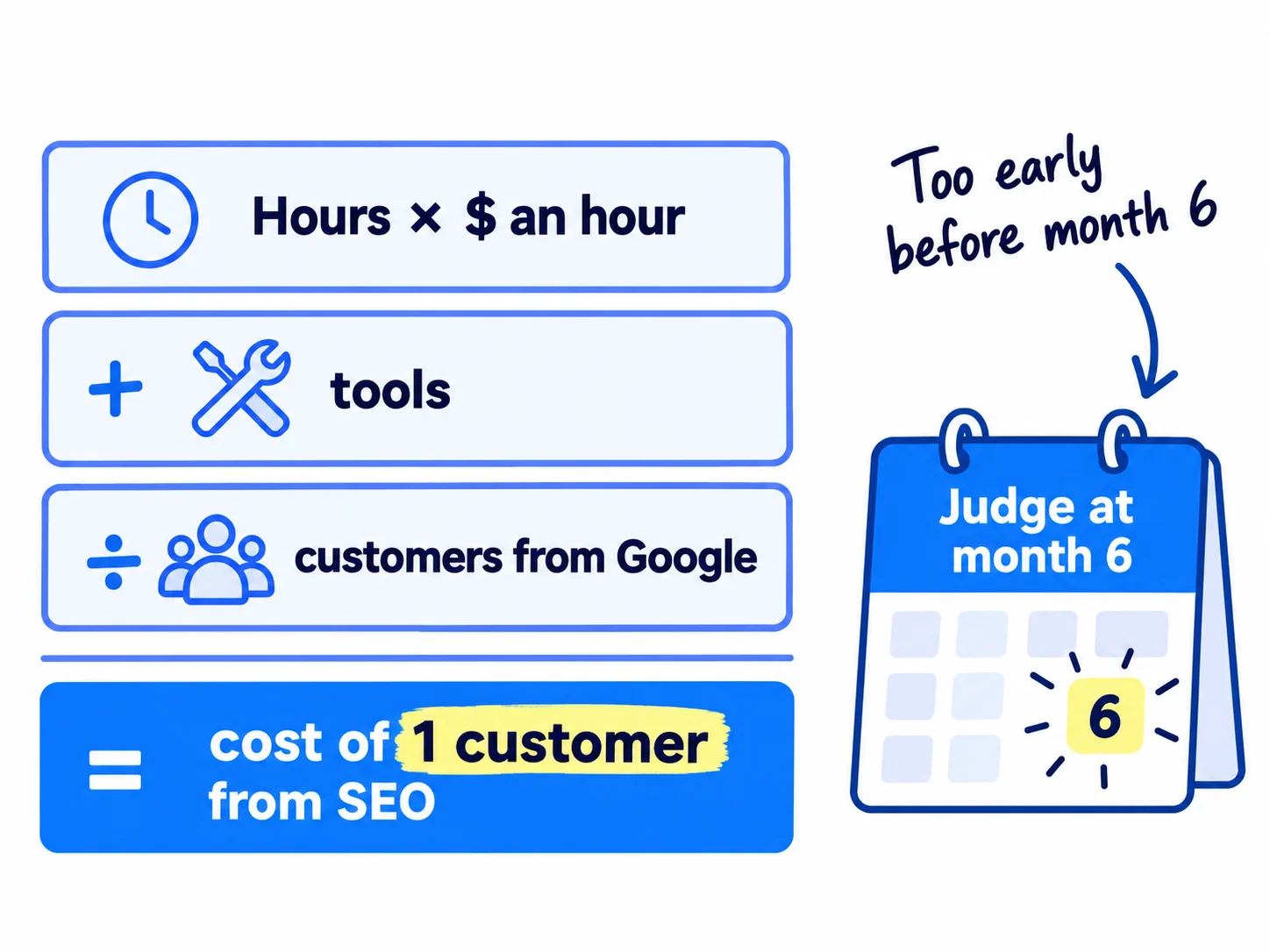
Month: [ ]
Hours on SEO this month: [pages × 1 hour + Sundays] × $[what an hour of your time is worth, or what you would pay a writer] = $[ ]
Tools and writers paid: $[ ]
Total SEO cost: $[ ]
Customers from Google search this month (from your log): [ ]
Cost of 1 customer from SEO: $[total ÷ customers]
Same number for your other channels: [channel]: $[ ] · [channel]: $[ ]
Month [1 / 3 / 6] line passed? yes / no
Before month 6 this number will look bad, because you pay for 180 pages before most of them bring anyone. So until month 6, judge SEO only by the pass lines in step 1. At month 6, compare the cost of one customer from SEO with your other channels, and with what a customer is worth to you: customer acquisition cost shows how. A page keeps bringing buyers after you stop paying for it, so the cost per customer should fall each month after month 6.
At month 6, decide:
- 1 or more customers a week from Google: keep going at 1 page a day, and set the next target.
- Impressions and visits grow, but no customers: go back to step 5 and fix the "Acted" and "Bought" lines before you write more.
- Impressions flat: stop new pages for 4 weeks, update your best 20 pages, and move the hours to getting customers directly until the fixes show.
If you meet customers in person: your Google Business Profile has its own Performance numbers: calls, website clicks and requests for directions. Add them to the monthly row; they measure how you rank on Google Maps, which Search Console does not show.
If you run an agency: fill one scorecard per client and put the month's four rows and this sum in your monthly client report. Lead with "Bought", then the line the client is on. It answers "is SEO working?" with their own numbers, and helps you explain SEO timelines before the client asks.
- Tool: your scorecard, your log and Google Sheets.
- Time: 20 minutes once a month.
- You will have: the cost of one customer from SEO each month, next to your other channels.
- It worked if: at month 6 you can say keep, change or stop SEO from this sum and the pass lines, without guessing.
- Common mistake: working out SEO ROI at month 2 and stopping. Almost every new site loses money on SEO in the first months; that tells you nothing yet.
See it done: Ferns & Rinse's month 2 sum
Month 2
| Hours | At $25 an hour | Tools | Orders from Google | Cost per order from SEO | Cost per order from Meta ads |
|---|---|---|---|---|---|
| 32 | $800 | $0 | 2 | $400 | $150 |
They keep going: the month-1 line passed, and the real check is month 6.
Why it works: The number is high, but they judge it by the month-1 line they passed, not by the cost, because it is month 2.
Where Scout7 helps
Scout7 does parts of steps 4 and 6.
Step 4. In the Scout7 app, connect your own Google Search Console property and Scout7 shows your real impressions, clicks and positions next to its search and AI audit. You own the property and authorise the connection. This part works in the app, not from a chat with your assistant yet. Google Analytics, your form and your log stay where they are.
Step 6. The Search & AI Audit scores your site health, your presence in Google Search and in AI answers, and how deeply your pages answer questions, with a count of pages audited and a list of priority fixes. Write the four scores in your monthly row, so you can see them move next to your customers from Google.
Your SEO measurement checklist
0 of 11 done
Work through this list with an AI assistant
It drafts the work and keeps track of what is done.
Frequently asked questions
- Is ranking on page one a good way to measure SEO?
Not on its own. A page can rank first for a search no buyer makes, and when an AI Overview shows, the top result gets far fewer clicks: a February 2026 Ahrefs study found 58% fewer. Use position to pick pages to improve, and judge success by buyers who came from Google search.
- How do I tell if my SEO company is working?
Ask for three things every month: non-brand impressions, visits from Google search, and signups, enquiries or orders from Google, each compared with the month before. Check one number yourself in Search Console. Google says "No one can guarantee a #1 ranking on Google", so be wary of reports full of rankings and no buyers. Read how to hire an agency without getting burned.
- What is a good ROI for SEO?
There is no single good number. Compare what one customer from SEO costs with what a customer is worth to you and with your other channels, from month 6 on. Before that, almost every new site is paying for pages that have not started to bring buyers yet. Customer acquisition cost and payback shows the sum.
- Why don't Search Console and Google Analytics show the same numbers?
They count different things. Search Console counts clicks on Google's results page; Google Analytics counts visits it can record on your site. Google lists the reasons they differ, including visitors who refuse cookies and time zones. Use each one for its own number and compare it only with itself, week after week.
- Should I count visits from ChatGPT as SEO?
Keep them separate. Since May 2026 Google Analytics puts visits from ChatGPT, Gemini, Claude and other assistants in an "AI Assistant" channel, while Google's own AI Overviews and AI Mode count as Organic Search. Measure the assistants on their own: see how to track AI traffic and ChatGPT mentions.
Sources
- 1.About key events — Google Analytics Help, checked 1 October 2026
- 2.Create or modify events — Google Analytics Help, checked 1 October 2026
- 3.Mark events as key events — Google Analytics Help, checked 1 October 2026
- 4.Traffic acquisition report — Google Analytics Help, checked 1 October 2026
- 5.Landing page report — Google Analytics Help, checked 1 October 2026
- 6.Connect Search Console to Google Analytics — Google Analytics Help, checked 1 October 2026
- 7.Default channel group (Organic Search and AI Assistant definitions) — Google Analytics Help, checked 1 October 2026
- 8.Google Analytics AI Assistant traffic tracks ChatGPT, Gemini and Claude traffic — Search Engine Roundtable, 14 May 2026
- 9.Using Search Console and Google Analytics data for SEO — Google Search Central, updated 7 January 2026, checked 1 October 2026
- 10.Do you need an SEO? — Google Search Central, updated 5 June 2026, checked 1 October 2026
- 11.Acquisition reports — Shopify Help Center, checked 1 October 2026
- 12.Marketing reports — Shopify Help Center, checked 1 October 2026
- 13.Understand your Business Profile performance and insights — Google Business Profile Help, checked 1 October 2026
- 14.AI Overviews reduce clicks (update) — Ahrefs (Ryan Law), 4 February 2026
- 15.SEO 3x'd my traffic. Signups dropped to zero. — Indie Hackers, 24 August 2026
Next article to read
How to track AI traffic and ChatGPT mentionsOnce Google numbers are tracked, add the visits and mentions that come from AI.Read it nextRelated guides
- How to use Google Search ConsoleUse Google Search Console on a new site: add it as a Domain property and submit your sitemap today, request indexing for each day's new page, and every Sunday write down non-brand impressions and clicks, pick 3 pages to improve and 5 new searches to write for, and check for problems.
- How long does SEO take to work?Find out how long SEO takes to work for a new site: check in 20 minutes that buyers search for what you sell, get your site onto Google today, publish 1 page a day for searches people make just before they buy, and judge it at week 2, month 1, month 3 and month 6 against a number for each, with a count every Sunday.
- How to run a monthly marketing reviewComing soon
- How to set up conversion trackingComing soon
Guides that link here
- How long does SEO take to work?
- How to make an article rank higher on Google
- How to use Google Search Console
- How to set up a Google Business Profile
- How to rank on Google Maps
- How to track AI traffic and ChatGPT mentions
- How to add llms.txt and schema markup
- How to get your company recommended by ChatGPT as a supplierB2B
- How to show up in Google AI Overviews
- How to build a free tool that brings in leadsSaaS
- How to write a case study
- How to get traffic to a new website for free
- How to do SEO for a Shopify storeD2C
- How to find keywords for SEO
- How to get backlinks for a new website
- How to get backlinks from news websites
- How to get your website indexed on Google
- How to write a blog post that ranks on Google
- How to write competitor comparison and alternative pages
- Technical SEO checklist for a new website
Cite this page
Dinesh Bypilla (2026). How to measure SEO success. Scout7 Academy. https://scout7.ai/academy/seo/how-to-measure-seo-success
Written by Dinesh Bypilla, Agentic systems engineer at Scout7. Reviewed by Murali Sid. Last checked 1 October 2026.
Quote any part of this guide with a link back to this page. © 2026 Scout7.
Markdown version of this page: https://scout7.ai/academy/seo/how-to-measure-seo-success.md