



How to start a YouTube channel for business
Start a YouTube channel for your business with no audience: set it up under your business name and verify it today, publish one video a day that answers a question your buyers type into YouTube, cut 2 Shorts from each, send every video to the people who asked, and check every Sunday which videos search brings viewers to.
ByDinesh BypillaReviewed byMurali SidLast checked 20 min read
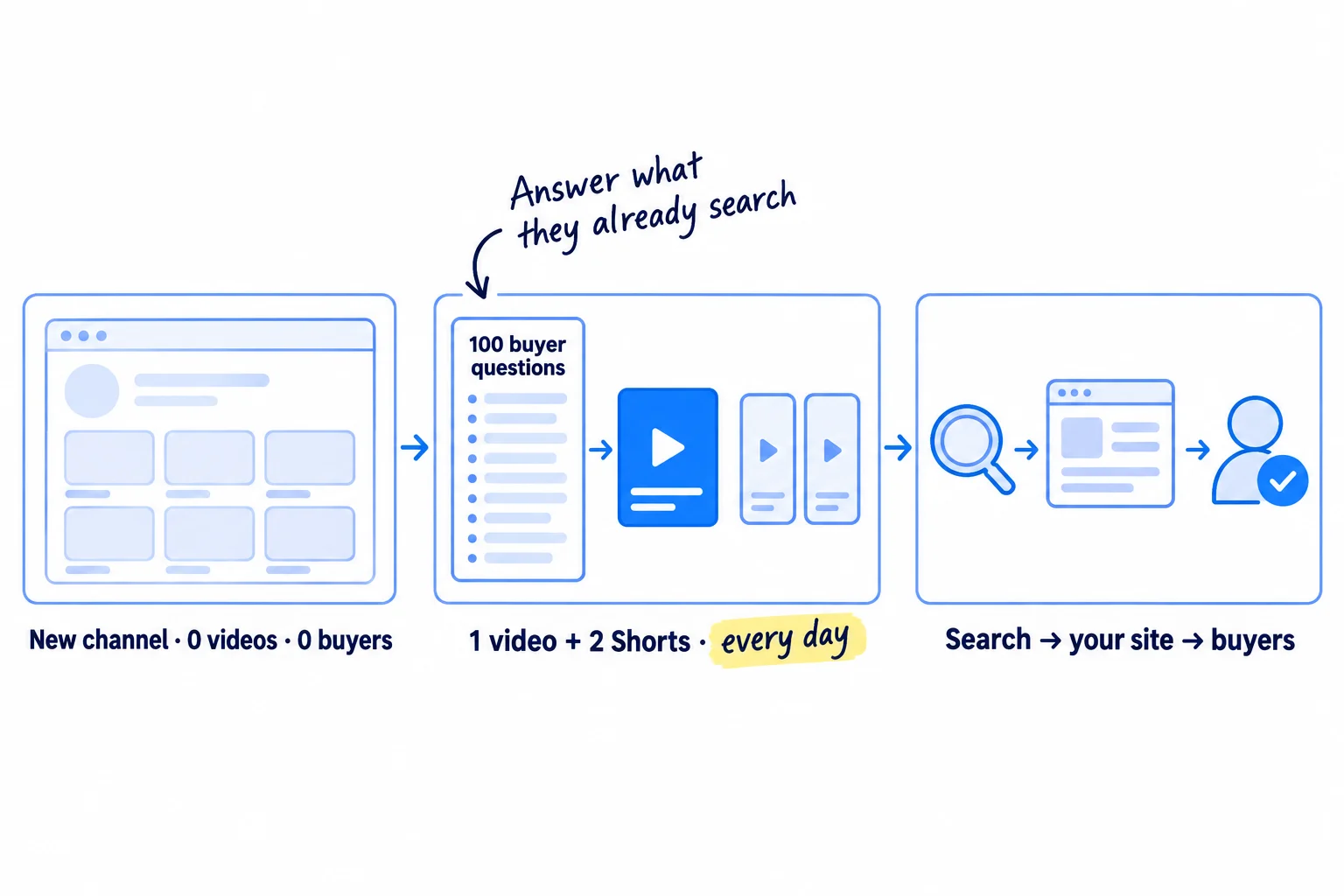
You built something people need, but nobody has heard of it, and you keep hearing that buyers watch video. Here is how to start a YouTube channel for business when you have no audience: answer the questions your buyers already type into YouTube, one video a day, and send each one to the people who asked. Most business channels post a few videos, get a handful of views and stop, but YouTube search brings people who want an answer now, and it only shows after dozens of videos.
Do these three things
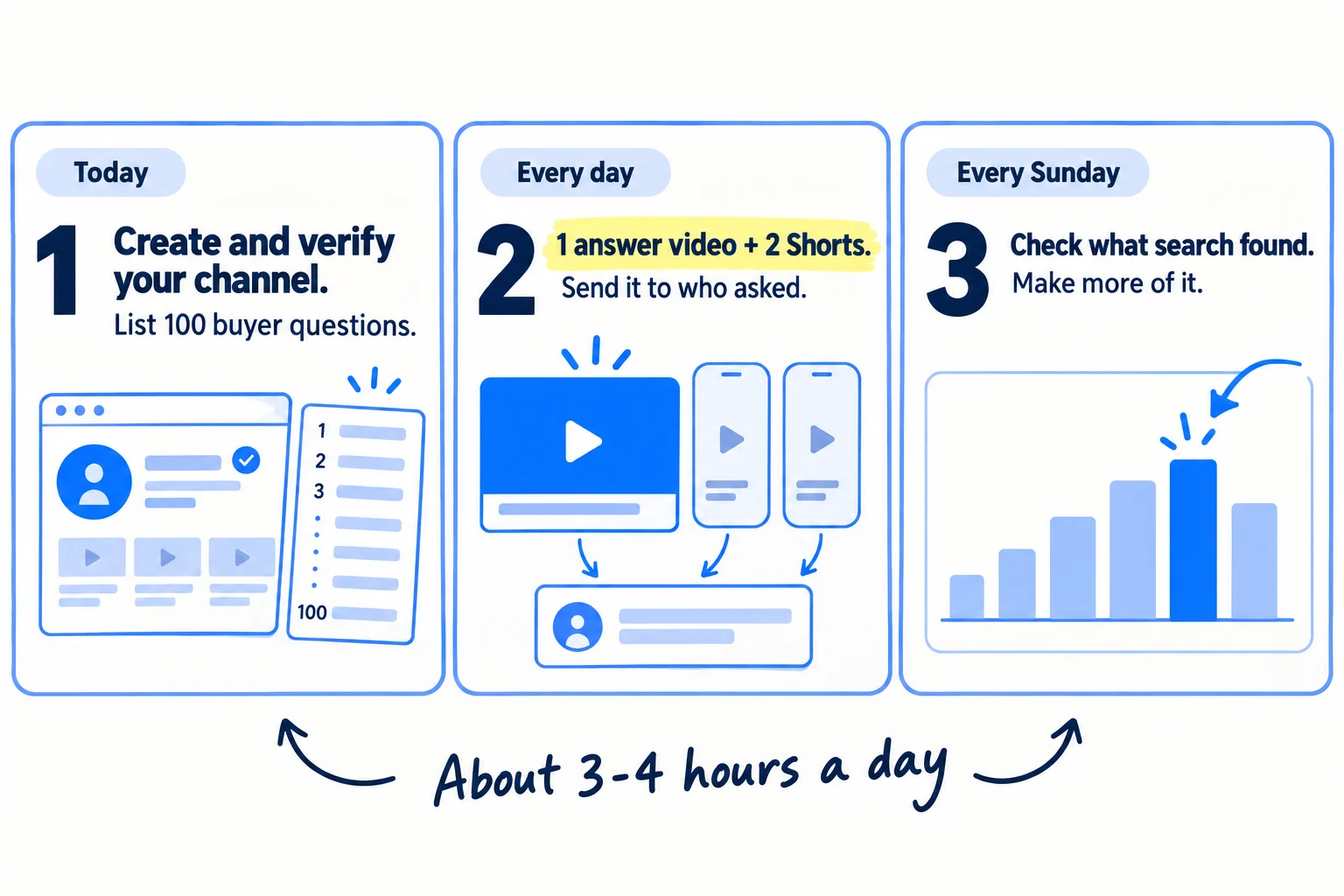
About 3 to 4 hours a day, with AI drafting each outline, title and description. Judge your topics after 30 videos and the channel after 90, by buyers, not subscribers.
Show the three actions in fullHide the full list
- Today: create a YouTube channel under your business's name, verify it, and list 100 questions your buyers type into YouTube.
- Every day: publish one video that answers one of those questions, cut 2 Shorts from it, and send it to the people who asked.
- Every Sunday: check which videos YouTube search brought viewers to and which sent people to your site, and make next week's videos on those topics.
Get help doing these
ChatGPT or Claude reads this guide and works through it with you.
1. Create a YouTube channel for your business and verify it
Create the channel under your business's name, not your personal Google account's name, and verify it the same day. Without verification, the links in your descriptions do not work.
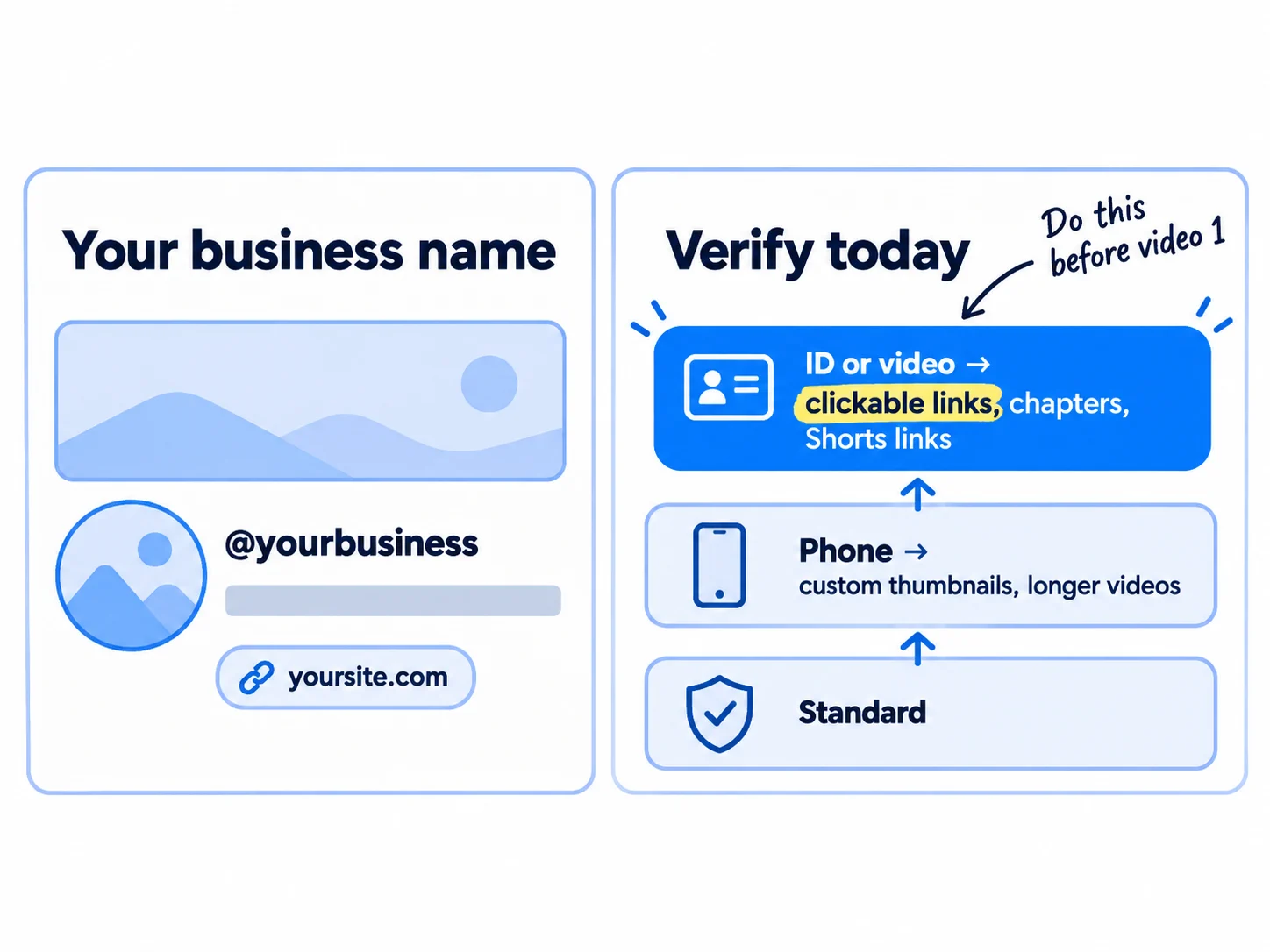
YouTube calls a channel with its own name a Brand Account. It lets you use "a different name on YouTube than your Google Account", and you can add owners and managers later, so the channel does not depend on one person's login.
- 1
Create the channel
Sign in to YouTube on a computer with the Google account you use for work. Open your channel list, click "Create a new channel", then add a picture (your logo), your business name and a handle such as @yourbusiness. Click "Create channel".
- 2
Fill in the channel details
Write a description that says who the channel is for and what it answers, in your value proposition's words. Add your website as a link. Add a banner with one line: who it helps and how often you post.
- 3
Verify your phone
In YouTube Studio, open Settings, then Channel, then Feature eligibility. Under Intermediate features, click "VERIFY PHONE NUMBER". This turns on custom thumbnails, videos over 15 minutes and a higher daily upload limit.
- 4
Verify your ID or a video
In the same place, open Advanced features, click "ACCESS FEATURES", and choose "Use your ID" or "Use video verification". Advanced features include clickable links in your descriptions, chapters and the link from a Short to a full video. A new channel without them has dead links in every description. Only the primary channel owner can do this.
If you run an agency: for a client's channel, the client creates it and owns it. They invite you in YouTube Studio under Settings, then Permissions, as a Manager. An invite expires after 30 days. Keep client approvals and logins separate for each client, as in managing several client accounts.
- Tool: YouTube and YouTube Studio. Free.
- Time: 45 minutes, plus however long ID or video verification takes to come back.
- You will have: a channel at youtube.com/@yourbusiness with a picture, a description, a website link and phone verification done.
- It worked if: Feature eligibility shows intermediate features on, and advanced features on or requested.
- Common mistake: starting on your personal channel because it already exists. Your personal videos, playlists and name come with it, and buyers see a person's account instead of your business.
2. List 100 questions your buyers type into YouTube
Write down 100 questions your buyers ask, in their own words, and check each one in YouTube's search box. These are your first 100 videos, one a day.
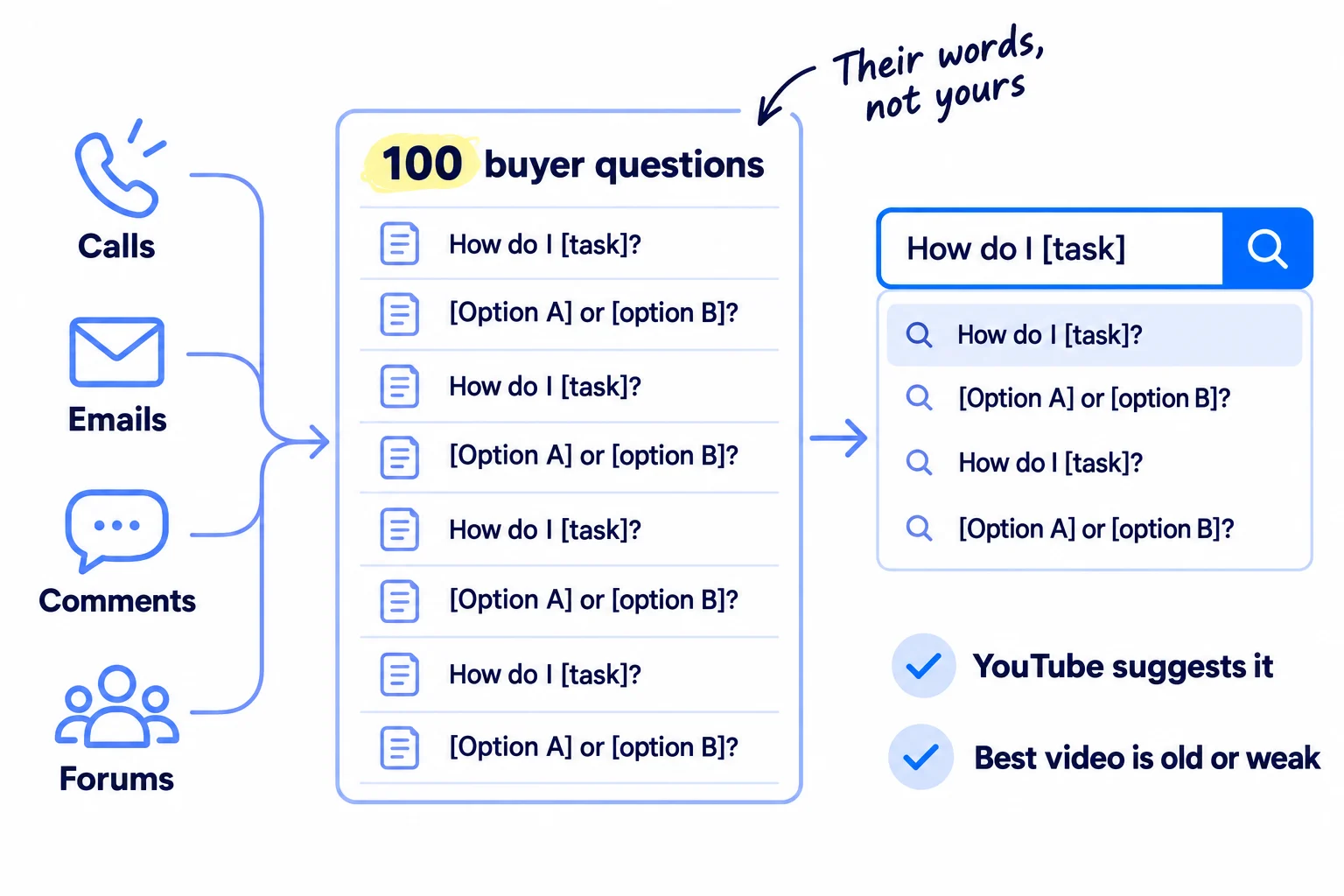
Start with what people already asked you. Go through your sales calls, customer interviews, emails, support messages and feedback from your first users, and copy every question word for word. Then add questions from the places your buyers ask for help and from the comments on your competitors' videos. Your competitor list tells you whose channels to read.
Give ChatGPT or Claude the questions you have and ask for 50 more that the same buyer would ask before, during and after buying. Delete any you have never heard a real buyer say.
Then check each question on YouTube. Type its first few words into YouTube's search box and see if YouTube finishes it for you. That means people search for it. Look at the top 3 videos too. Keep the question if YouTube suggests it, or if the best video is more than 2 years old or does not answer it. In YouTube Studio, Analytics, then the Trends tab, you can also search a topic and see "content gaps": searches where viewers "can't find enough quality search results". YouTube is updating Studio's look from July 2026, so the tab may sit in a new place.
Start with questions asked just before buying: "how do I…", "[option A] or [option B]", "how much does … cost", "best way to …". The same research works for Google search, so a good question can become a page and a video.
Question (buyer's words) | Where it came from | YouTube suggests it? (yes / no) | Best video now (age, does it answer?) | Date you publish yours
- Tool: a Google Sheet, YouTube's search box, and ChatGPT or Claude. All free.
- Time: 2 hours today. Then 20 minutes every Sunday to add 10 new questions from the week's calls, comments and messages, so the list never runs out.
- You will have: 100 questions, each with where it came from and what YouTube shows for it today.
- It worked if: at least 60 of the 100 came from real buyers or real searches, not from AI alone.
- Common mistake: filming what you want to say ("our story", "our new feature") instead of what buyers search. Nobody types your company name into YouTube until they already know you.
See it done: Quillfox's first rows
Quillfox is a made-up one-person agency. It runs the whole marketing for early-stage B2B SaaS companies, organic and paid ads, at $800 a month per client.
The question sheet
| Question | Where it came from | YouTube suggests it? | Best video now |
|---|---|---|---|
| how to get first b2b saas customers | client call | yes | 2 years old, about cold email only |
| how much should a saas startup spend on marketing | a founder's email | yes | a general talk, no numbers |
| linkedin or cold email for b2b saas | LinkedIn comment | no | none that compares both |
| how to write a saas homepage headline | client call | yes | good, 6 months old |
Why it works: Every question is something a founder asked Jess, checked against what YouTube already shows.
3. Pick one video format and set up to record in 10 minutes
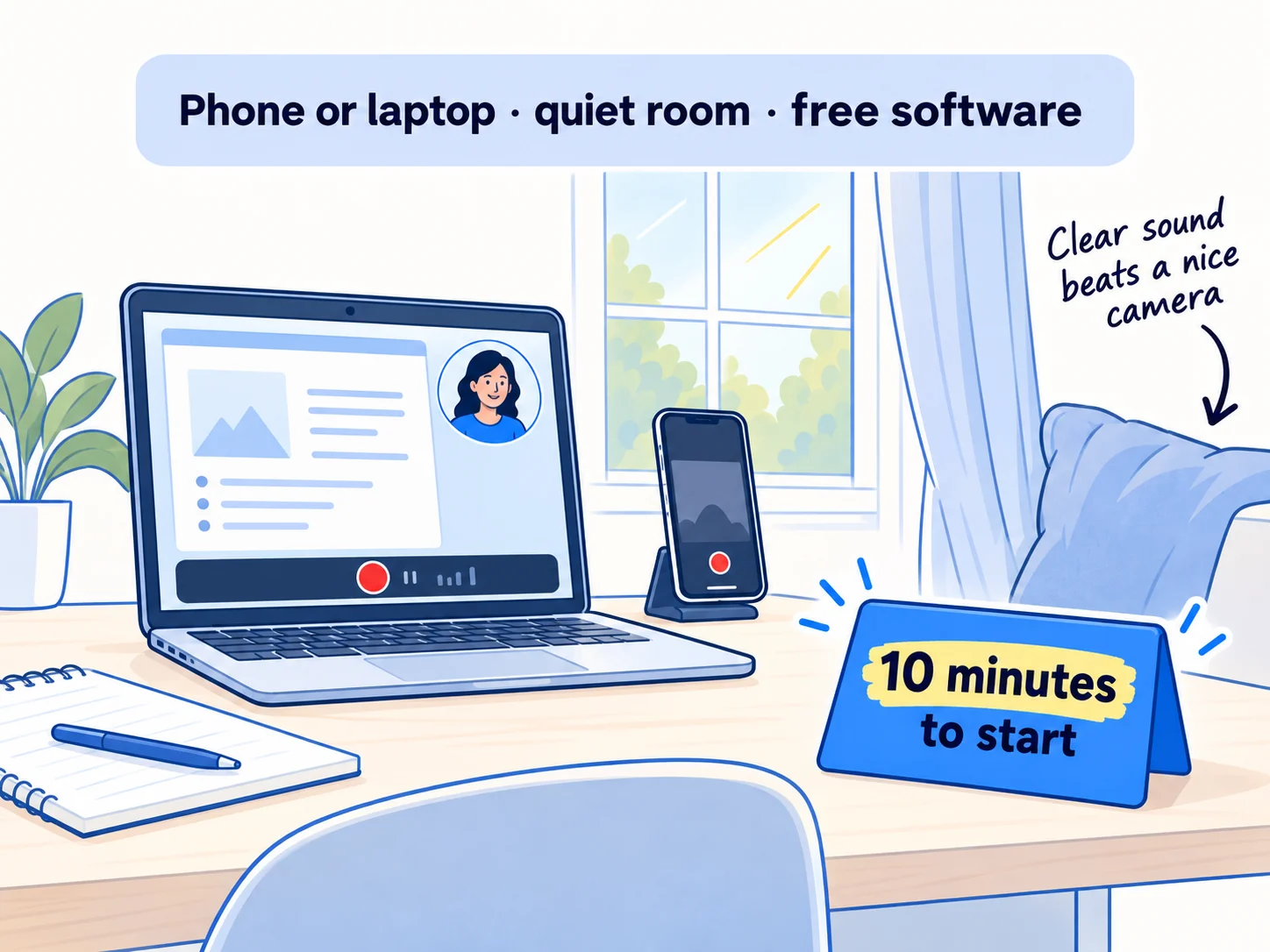
Choose one way of filming that you can repeat every day, and set it up so you can start recording within 10 minutes. You do not need a studio. A phone or a laptop, a quiet room and free software are enough.
Pick the format from what your buyer needs to see:
If you run a SaaS: record your screen while you do the task the question asks about, with your face in a small corner box. Answer the question first, then show how your product does it, if it does.
If you run a B2B company: sit at a table with your work in front of you, such as samples, a drawing or a case study with the client's name removed, and explain the buyer's problem as you would on a discovery call.
If you run a D2C store: film the product in someone's hands: how to use it, what it looks like up close, and how it compares with what people use now. Answer the doubts your product page gets asked. Clips customers film of the product, used with their permission, are user-generated content and work too.
If you run an agency: share your screen and walk through how a business like your clients' could fix something, using only public pages, ads and posts. Never show a client's private numbers without written permission. These videos also work as proof while you have no case studies yet.
For screen recording, use OBS Studio. It is free and open source, and it records your screen and camera together on Windows, Mac and Linux. For camera-only videos, use your phone's camera app, held sideways for long videos. Sit facing a window. Record in the quietest room you have; soft things like curtains and cushions cut echo. If your test sounds echoey, plug in a pair of earphones with a microphone and record again.
Record a 1-minute test and watch it back with the sound on. If you do not want to be on camera, you do not have to be: a screen recording with your voice, or your hands and the product, works.
- Tool: your phone or laptop, and OBS Studio. Free.
- Time: 1 hour today.
- You will have: one fixed setup and one format you will use for every video.
- It worked if: in your 1-minute test, every word is clear with the sound at half volume, and any text on screen is readable on a phone.
- Common mistake: spending the first week and the budget on a camera, lights and an intro animation. Sound and a useful answer matter more than the picture.
4. Publish one video a day that answers one question
Every day, take the next question from your list, record a video of about 4 to 10 minutes that answers it, and publish it with a title in the buyer's own words. This is the same idea as publishing a page a day: one real question, one full answer.
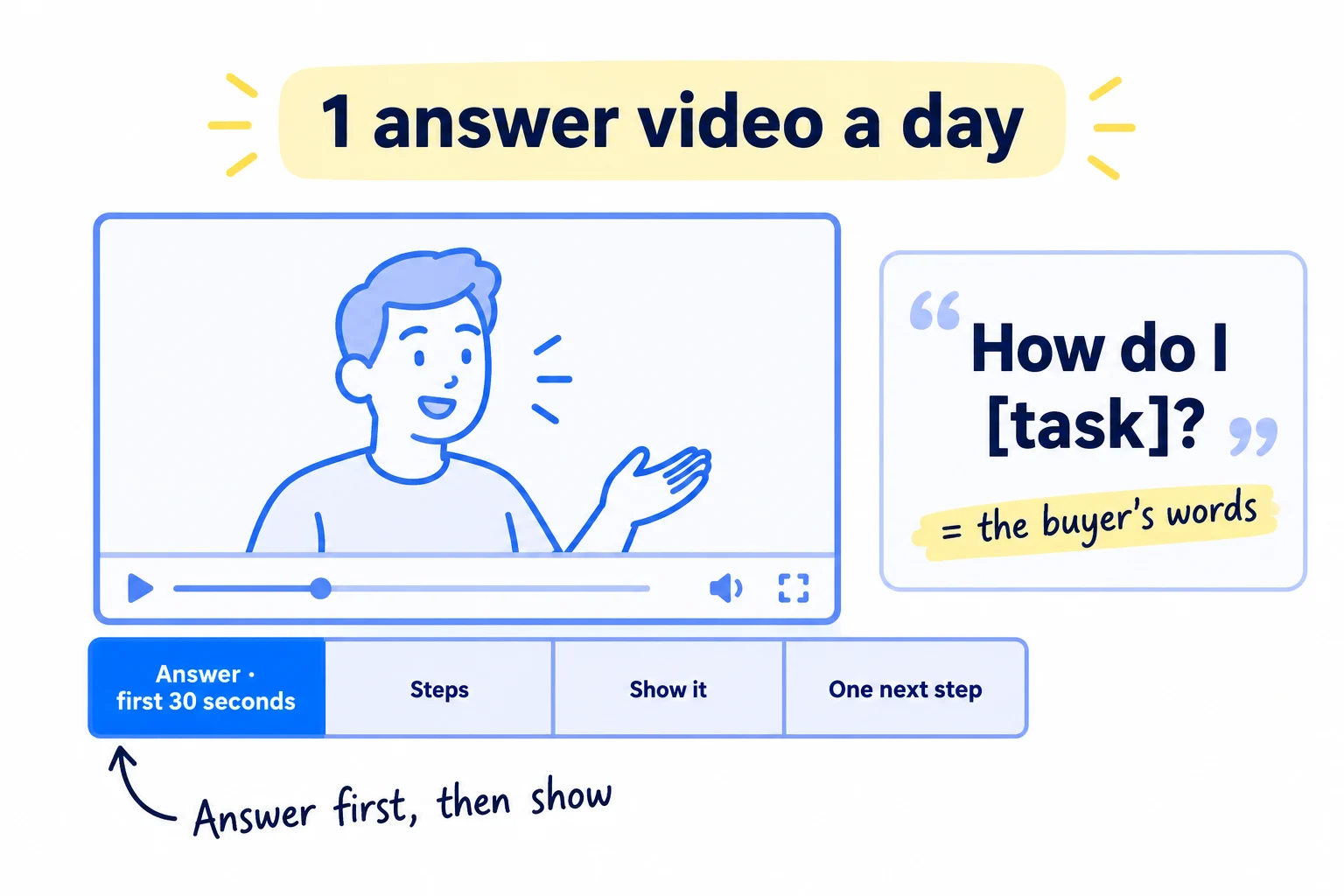
YouTube says it ranks search results on three things: how well "the title, tags, description, and video content match" the search, watch time for that search, and whether the channel shows expertise. So the title uses the buyer's words, the first 30 seconds give the answer, the rest shows it, and the end gives one call to action. YouTube says tags matter very little unless your topic is often misspelled, so skip them.
Let AI do the drafting. Give ChatGPT or Claude the question, your notes and one real example from your work. Ask for an outline in the four parts below, 3 title options and a description. You add the example only you have, then record in one take from the outline, not a word-for-word script. Cut mistakes in YouTube Studio: open the video, click Editor, then "Trim & cut". Save only when you are sure: since June 2025 you cannot undo it.
The answer, in the first 30 seconds: "[Question]? Here is the short answer: [answer in two sentences]."
The steps: [3 to 5 steps, one sentence each].
Show it: [your screen, your product, your work: one real example].
One next step: "If you want [the result], [one thing to do]. The link is in the description."
Title: [the buyer's question, word for word, under 70 characters]Description, first line: [the answer in one sentence].
[Two or three lines on what the video shows.]
[Your next step]: [link to the matching page on your site, with UTM tags]
00:00 [the short answer]
[mm:ss] [step 1]
[mm:ss] [step 2]
[mm:ss] [example]
[Your business name] helps [who] [do what].
Before you publish:
- Say your business's name in the video and put it in the description. In December 2025, Ahrefs studied 75,000 brands and found that how often a brand is named in YouTube titles, transcripts and descriptions tracked its visibility in ChatGPT, AI Mode and AI Overviews more closely than anything else they measured. That is a link between the two, not proof that one causes the other. In September 2026, YouTube was the most-cited website in Google's AI Overviews, with 22.9% of citations among the top 50 sources (Ahrefs, over 3 million US searches).
- Tag the link with UTM parameters, such as
?utm_source=youtube&utm_medium=video&utm_campaign=[question], so visits from each video show up in your analytics. - Add chapters: timestamps in the description, starting at 00:00, at least three, each part at least 10 seconds long.
- Add a thumbnail: a 16:9 image with 3 to 5 large words from the title. Custom thumbnails need phone verification. Until then, pick one of YouTube's suggested frames.
- Set "AI use" in the upload's Attributes section. Choose "Yes" only if AI makes a real person appear to say or do something they did not, including an AI version of you, or makes a realistic scene that did not happen. AI for the outline, script, title, thumbnail, captions or ideas needs no label.
- Add the video to a playlist for its topic, and add an end screen pointing to the next video on the same topic.
Every day, reply to every comment. A comment is often a buyer's next question, so add it to your list.
Volume is allowed when each video is a real answer. YouTube's "inauthentic content" policy, renamed in July 2025, targets videos that are "repetitive or mass-produced" from a template with little value. 100 different questions answered from your own work are the opposite of that. YouTube also says to keep a schedule you can sustain, so batch-record on a quiet day if you need to: record 3 and schedule them. A recorded webinar or a podcast interview you gave counts as a day's video too, if you cut it down to the part that answers one question from your list.
- Tool: OBS Studio or your phone, YouTube Studio, and ChatGPT or Claude. Free.
- Time: about 1 hour 30 minutes a video: 15 minutes for the outline, 30 minutes to record, 45 minutes to trim, write and upload.
- You will have: 7 videos at the end of week 1, and 30 after about a month.
- It worked if: every video's title is a question from your list, its first 30 seconds give the answer, and its description link opens the right landing page on your site.
- Common mistake: a long intro ("Hi everyone, welcome back to the channel…") before the answer. People who searched a question leave if they do not hear it answered quickly. The other mistake is a title like "Episode 4" or "Marketing tips #1", which matches no search.
See it done: Quillfox's video title
Before
Quillfox Marketing Tips #1
After
How to get your first B2B SaaS customers with no ad budget
Why it works: The new title is the exact question a founder types, so it can match a search.
5. Cut 2 Shorts a day from each video
Every day, cut 2 Shorts from that day's video: one point each, vertical, under 3 minutes, linked to the full video. Shorts reach people who do not search yet, and the link sends the interested ones to the full answer.
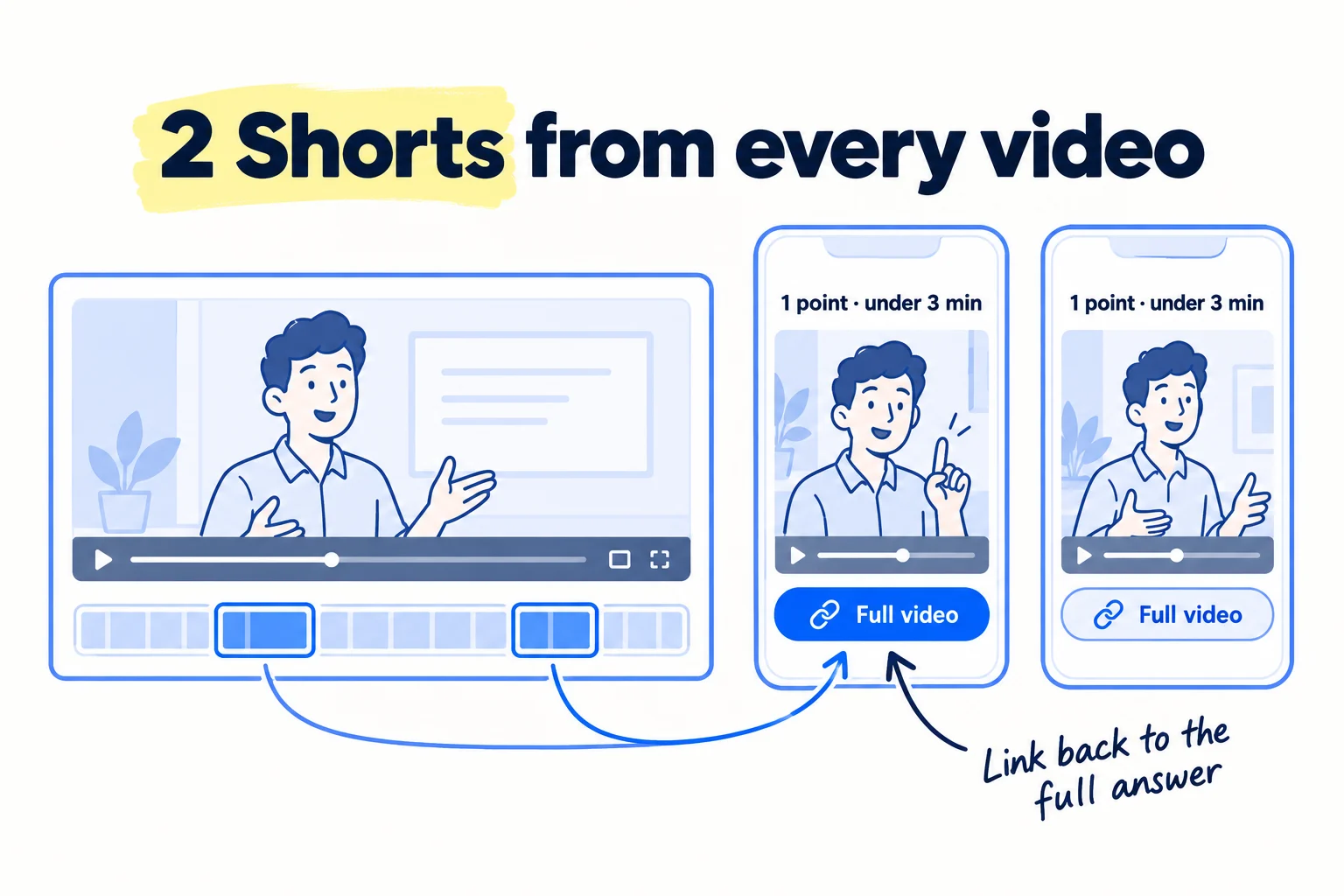
Pick the two strongest moments: usually the short answer from the first 30 seconds and the best step. Since October 2024, a square or vertical video up to 3 minutes long counts as a Short. Crop each clip to 9:16, add captions, and start with the point, not a greeting. Do not use music you do not own. A Short over 1 minute with any Content ID claim is blocked everywhere on YouTube.
Upload in YouTube Studio with "Upload videos". Then open each Short under Content, choose a "Related Video" (the full video) and click Save. Viewers see it as a link under your channel handle. This needs advanced features from step 1.
Ask AI to find the 2 best 30-to-60-second moments in the video's transcript, then cut them in your editor. More on hooks, captions and posting the same clips elsewhere is in making short-form videos and repurposing content across platforms.
If you run a D2C store: Shorts are where your product is seen in use, so post the same clips on Instagram and, if you sell there, TikTok Shop.
- Tool: YouTube Studio, plus the editor you used in step 3, and ChatGPT or Claude to pick the moments.
- Time: about 30 minutes for both.
- You will have: 14 Shorts at the end of week 1, each linked to its full video.
- It worked if: every Short has a Related Video link, and after 30 videos you can see in Studio which Shorts sent viewers to full videos.
- Common mistake: a Short that is just a trailer ("full video on my channel!"). Each Short has to give one useful point on its own.
6. Send each video to the people who asked
Every day, send the new video to the people who asked that question, put it on the matching page of your site, and use it in 20 answers in communities where the rules allow a link. A new channel gets almost no views on day one. The people who asked are the first ones who want it.
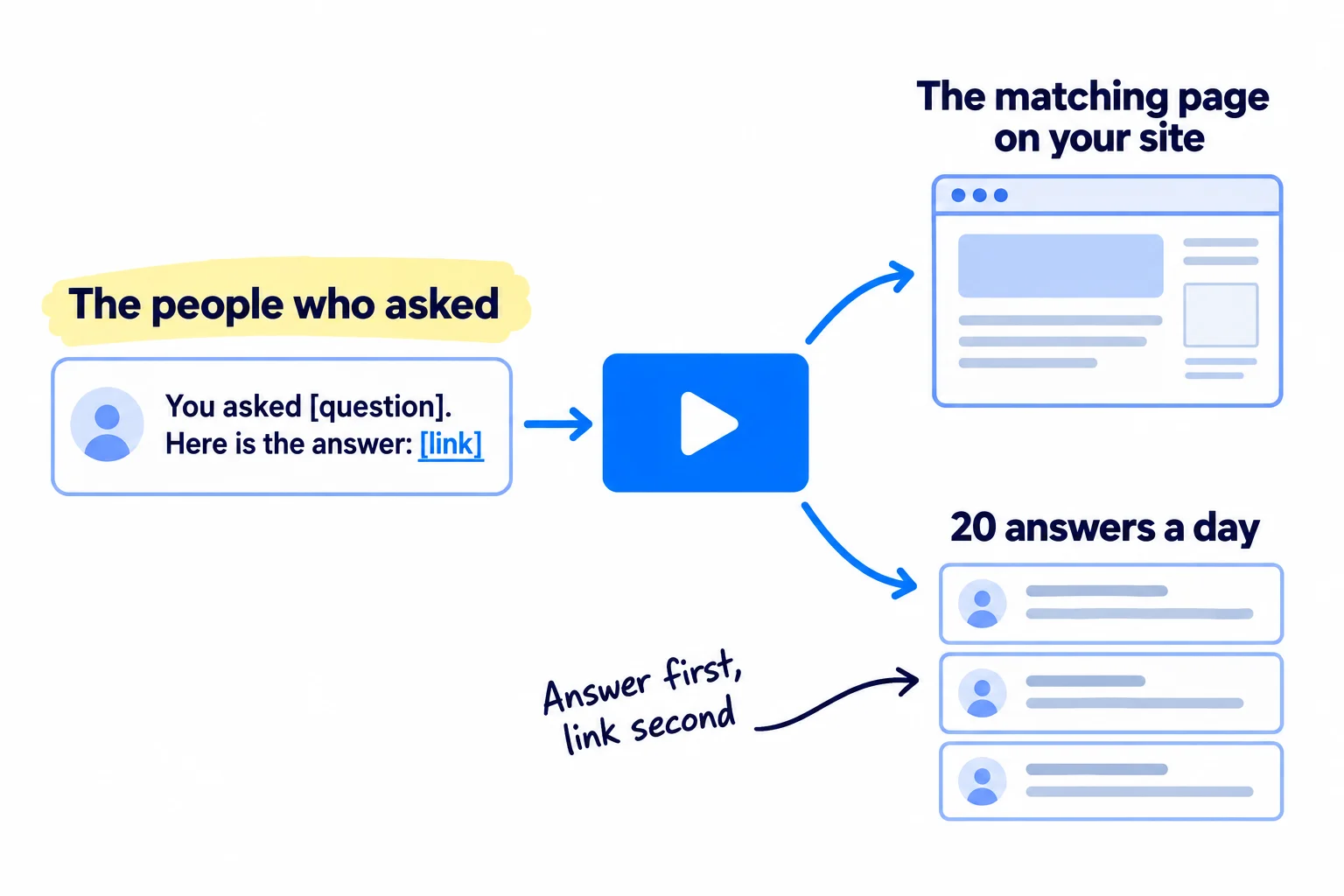
Look in your question sheet for who asked. Send each of them one personal message with the link and the time in the video where their part starts. This is warm outreach: they asked first. Use the channel they asked in: email, LinkedIn or a reply to their comment. AI can draft each message from the sheet; you check it and add one line about them. After a sales call, send the video that answers the buyer's biggest doubt; it works as a follow-up that is useful.
Add each video to the page on your site that answers the same question, near the top. This helps the people reading that page. Google shows a video in its video results only when the page's "main purpose is to show users a single video", so do not expect a blog post with a video in it to show up there.
Then answer 20 questions a day across at least 5 communities where your buyers ask. Write the answer in the reply first, in your own words. Add the video link only if it answers that exact question and the subreddit's or community's self-promotion rules allow it. Reddit's rules are in promoting on Reddit without getting banned. Spreading 20 answers over 5 places keeps you inside each place's limits.
If you run a B2B company: send the video before a call to answer the question buyers always ask, so the call starts further on. Keep a short list of these videos next to your sales deck.
If you run a SaaS: put the video on your help pages and in the first email a new signup gets, so it answers the question that stops people setting up. That raises your activation rate, the share of signups who use the main feature.
- Tool: your email, LinkedIn and the communities you use, your site editor, and ChatGPT or Claude to draft messages.
- Time: about 20 minutes for messages and the site, and 1 hour for 20 answers at about 3 minutes each.
- You will have: every video sent to everyone who asked its question, on its matching page, and 140 community answers a week.
- It worked if: at least 1 in 10 people you send a video to replies with a question, a thank-you or a request for a call.
- Common mistake: posting "New video!" with a link in every group you belong to. Moderators remove it, and people learn to skip your name. Answer first; link only when it is the answer.
See it done: Quillfox's message to a founder who asked
To: Tom, a SaaS founder who asked a question in a LinkedIn comment
Hi Tom,
Last week you asked how to get your first B2B SaaS customers without paying for ads. I made a 7-minute video that answers it, with the exact list and message I would use: [link]
The part on building the list starts at 2:10.
Jess, Quillfox
Why it works: It names the question he asked and points to the exact minute, so it reads as a reply, not an advert.
7. Check your YouTube numbers every Sunday
Every Sunday, fill in one row: how many videos you posted, how many views came from YouTube search, the search terms, visits to your site from YouTube, and buyers who said they found you there. Then make next week's videos on the topics that search and buyers picked.
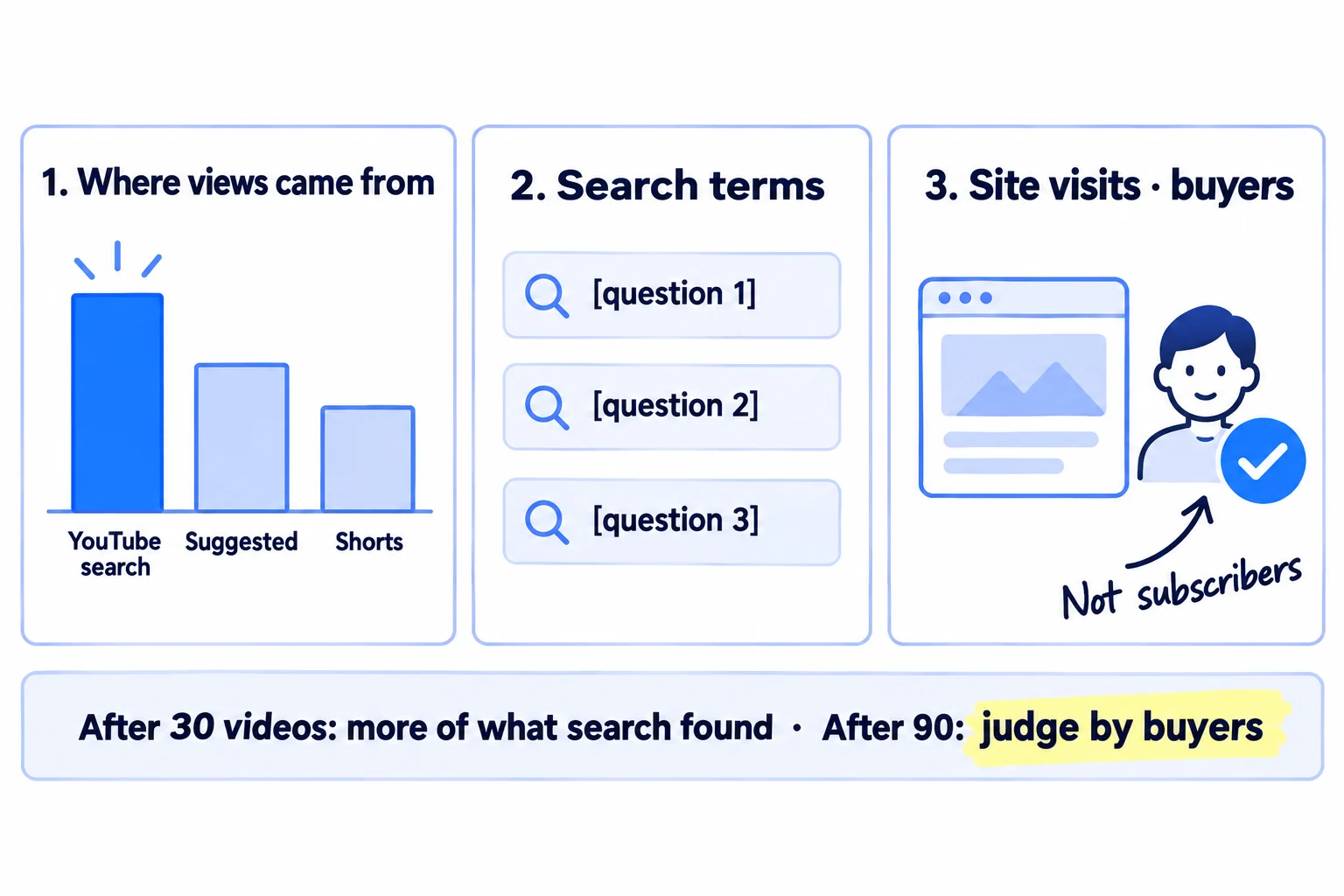
In YouTube Studio, open Content, click a video, then Analytics, then Reach. Find "Traffic source: YouTube search" and the "YouTube search terms" report. It shows what viewers searched before they found you. In your website analytics, filter visits by utm_source=youtube. And ask every new buyer "Where did you hear about us?" on your form or on the call. This is self-reported attribution, and it catches people who watched and then typed your name into Google. Tracking which channel brought each deal shows how to keep it in one sheet.
Week | Videos | Shorts | Views from YouTube search | Top 3 search terms | Site visits from YouTube | Buyers who said YouTube | New questions added
Use these rules:
- Titles and thumbnails: once a video has 1,000 impressions, look at its impressions click-through rate. YouTube says half of all channels and videos sit between 2% and 10%. Below 2%, rewrite the title in the buyer's words and change the thumbnail. New videos, and videos under 100 views, swing a lot, so wait for the 1,000.
- After 30 videos: sort them by views from YouTube search. Make next week's 7 videos on questions close to your top 5. Drop question types that brought no search views at all.
- After 90 videos: if any buyers named YouTube, keep going and double the videos on the topics they watched. If none did, your questions are not the ones buyers ask before they buy. Rebuild the list from your last 20 sales or customer interviews, and move half of the hours to the channel that brings you the most buyers until the new list is ready.
Judge by buyers and site visits, not subscribers. In a May 2026 Indie Hackers interview, Jacky Chou said he posted a video every day for more than two years before he launched his SaaS, LocalRank, which reached about $20,000 in monthly revenue at launch. One reply put it this way: a video with 300 views from someone searching for a tool is worth more than a post with 30,000 views from people scrolling. Nobody can promise views. What you can control is 90 real answers, each sent to the people who asked.
Once a month, add this row to your monthly marketing review, and plan the next month's questions into your content calendar.
- Tool: YouTube Studio Analytics, your website analytics and a Google Sheet.
- Time: 30 minutes every Sunday.
- You will have: one row a week, and a list of the topics YouTube search and your buyers chose.
- It worked if: after 30 videos, YouTube search is one of your top 3 traffic sources in Studio, and after 90 videos at least one buyer says they found you on YouTube.
- Common mistake: deciding after 5 videos because the views are small. Small view counts are normal for a new channel. Judge after 30, and judge the channel after 90.
Where Scout7 helps
Scout7 speeds up steps 2, 4 and 5. You still upload to YouTube yourself.
Step 2. Scout7's AI question coverage collects the questions buyers in your category ask AI assistants, and content ideas turns a topic into distinct angles. Add the ones your buyers really ask to your question sheet.
Step 4. Video Studio writes the script, splits it into scenes you direct one by one, and films each scene with the cast and voice you choose: your own likeness or another person, and a voice you record, pick or upload. Choose landscape for YouTube. It adds captions in the style you pick, and it can make a video from an article you have already written. You choose the cast, direct the scenes, reshoot what misses and approve the cut, then download it. If the video shows an AI version of a real person, set "AI use" to "Yes" when you upload.
Step 5. The same Video Studio makes portrait videos for Shorts, and Scout7 can schedule them to LinkedIn, X, Instagram, Facebook, Threads and Reddit. Nothing is posted without your approval.
Your YouTube channel checklist for the first 90 videos
0 of 13 done
Work through this list with an AI assistant
It drafts the work and keeps track of what is done.
Frequently asked questions
- Should I use my personal YouTube channel or make one for the business?
Make one for the business. A channel under the business name (YouTube calls it a Brand Account) can have several owners and managers, so it does not depend on one login, and your private videos and playlists stay private. You can still be the face of it.
- How many subscribers do I need before YouTube brings customers?
None. Search does not need subscribers: someone who types your buyer's question can find video 3 of a channel with 12 subscribers. Judge by the "YouTube search" traffic source, visits to your site and buyers who say they found you there. Subscribers and followers grow later, as a side effect.
- Do I have to show my face on YouTube for my business?
No. A screen recording with your voice, or your hands and the product, works for most buyer questions, which suits a technical founder who would rather not be seen. A face helps people trust a service business, so B2B founders and agencies gain the most from it. If you use an AI-made version of yourself or another real person, set "AI use" to "Yes" when you upload.
- Should I start with YouTube Shorts or long videos?
Long videos first, cut into Shorts. A long video answers a searched question, which brings people who want an answer now. Shorts reach people who are not searching yet. Making 2 Shorts from each long video gives you both from one recording, and each Short links back to the full answer.
- How long does a new YouTube channel take to get views?
Expect very few views for the first few weeks; that is normal, and nobody can promise a number. Judge your topics after 30 videos and the channel after 90, about 3 months at one a day. Like search on Google, it builds slowly, so keep sending each video to the people who asked while you wait.
Sources
- 1.Create a YouTube channel — YouTube Help, checked 2 October 2026
- 2.Learn about feature access for YouTube creators — YouTube Help, checked 2 October 2026
- 3.Get access to intermediate and advanced features — YouTube Help, checked 2 October 2026
- 4.Manage your channel permissions — YouTube Help, checked 2 October 2026
- 5.How YouTube search works — YouTube Help, checked 2 October 2026
- 6.Add tags to your videos — YouTube Help, checked 2 October 2026
- 7.Explore trends on YouTube — YouTube Help, checked 2 October 2026
- 8.Explore Inspiration tab on YouTube (deprecated from August 2026) — YouTube Help, checked 2 October 2026
- 9.Video chapters — YouTube Help, checked 2 October 2026
- 10.Add video thumbnails — YouTube Help, checked 2 October 2026
- 11.Edit videos in YouTube Studio — YouTube Help, checked 2 October 2026
- 12.Disclosing use of altered or synthetic content — YouTube Help, checked 2 October 2026
- 13.YouTube channel monetization policies: inauthentic content — YouTube Help, checked 2 October 2026
- 14.Upload schedule tips — YouTube Help, checked 2 October 2026
- 15.Understand three-minute YouTube Shorts — YouTube Help, checked 2 October 2026
- 16.Upload YouTube Shorts — YouTube Help, checked 2 October 2026
- 17.Add a related video to your YouTube Shorts — YouTube Help, checked 2 October 2026
- 18.Traffic sources in YouTube Analytics — YouTube Help, checked 2 October 2026
- 19.Impressions and click-through rate FAQ — YouTube Help, checked 2 October 2026
- 20.Video SEO best practices — Google Search Central, updated 18 December 2025
- 21.OBS Studio — OBS Project, checked 2 October 2026
- 22.The 50 most-cited websites in Google AI Overviews (September 2026) — Ahrefs, September 2026
- 23.AI brand visibility correlations (75,000 brands) — Ahrefs, 12 December 2025
- 24.Building a portfolio and growing it to $3M/yr via YouTube — Indie Hackers, 12 May 2026
Next article to read
How to make short-form videos for your businessCut each long video into short clips that bring new viewers to the channel.Read it nextRelated guides
- How to repurpose content across platformsRepurpose content across platforms without copy-pasting: list 30 questions your buyers ask, answer one a day in a 10-minute video or one-page article, turn it into 2 posts for each of your 2 or 3 channels with one 9:16 video, upload clean files and reply within an hour, and remake your 3 best pieces every Sunday.
- How to plan a content calendarPlan a content calendar that brings buyers, not just likes: collect 100 questions your buyers ask, fill 4 weeks in one Google Sheet with 1 article and 2 posts a day on each of 2 channels, write and schedule next week's 28 posts every Sunday, reply to every comment, and count what each question brought every Sunday.
- How to get your brand mentioned by ChatGPTGet your brand mentioned by ChatGPT: find the exact pages it reads when your buyers ask for a tool, agency or supplier, get your name onto them every day with pages, answers, messages and short videos, and count how often you are named every Sunday.
- How to use AI for content creationUse AI for content creation without sounding like everyone else: write a voice and facts file once, give AI 10 minutes of your own material every day, publish 1 page and 2 posts on each of 2 channels after a 6-line check, label realistic AI video, and count what each piece brought every Sunday.
Guides that link here
- How to repurpose content across platforms
- How to make short-form videos for your business
- How to get on the "best of" lists AI tools cite
- How to get your brand mentioned by ChatGPT
- How to get your company recommended by ChatGPT as a supplierB2B
- How to show up in Google AI Overviews
- How to get booked as a podcast guest
- How to plan a content calendar
- How to use AI for content creation
- How to choose marketing channels for an ecommerce brandD2C
- How to list your products on Google Shopping for freeD2C
- How to use Google Search Console
Cite this page
Dinesh Bypilla (2026). How to start a YouTube channel for business. Scout7 Academy. https://scout7.ai/academy/content-marketing/how-to-start-a-youtube-channel-for-business
Written by Dinesh Bypilla, Agentic systems engineer at Scout7. Reviewed by Murali Sid. Last checked 2 October 2026.
Quote any part of this guide with a link back to this page. © 2026 Scout7.
Markdown version of this page: https://scout7.ai/academy/content-marketing/how-to-start-a-youtube-channel-for-business.md