



How to repurpose content across platforms
Repurpose content across platforms without copy-pasting: list 30 questions your buyers ask, answer one a day in a 10-minute video or one-page article, turn it into 2 posts for each of your 2 or 3 channels with one 9:16 video, upload clean files and reply within an hour, and remake your 3 best pieces every Sunday.
ByDinesh BypillaReviewed byMurali SidLast checked 21 min read
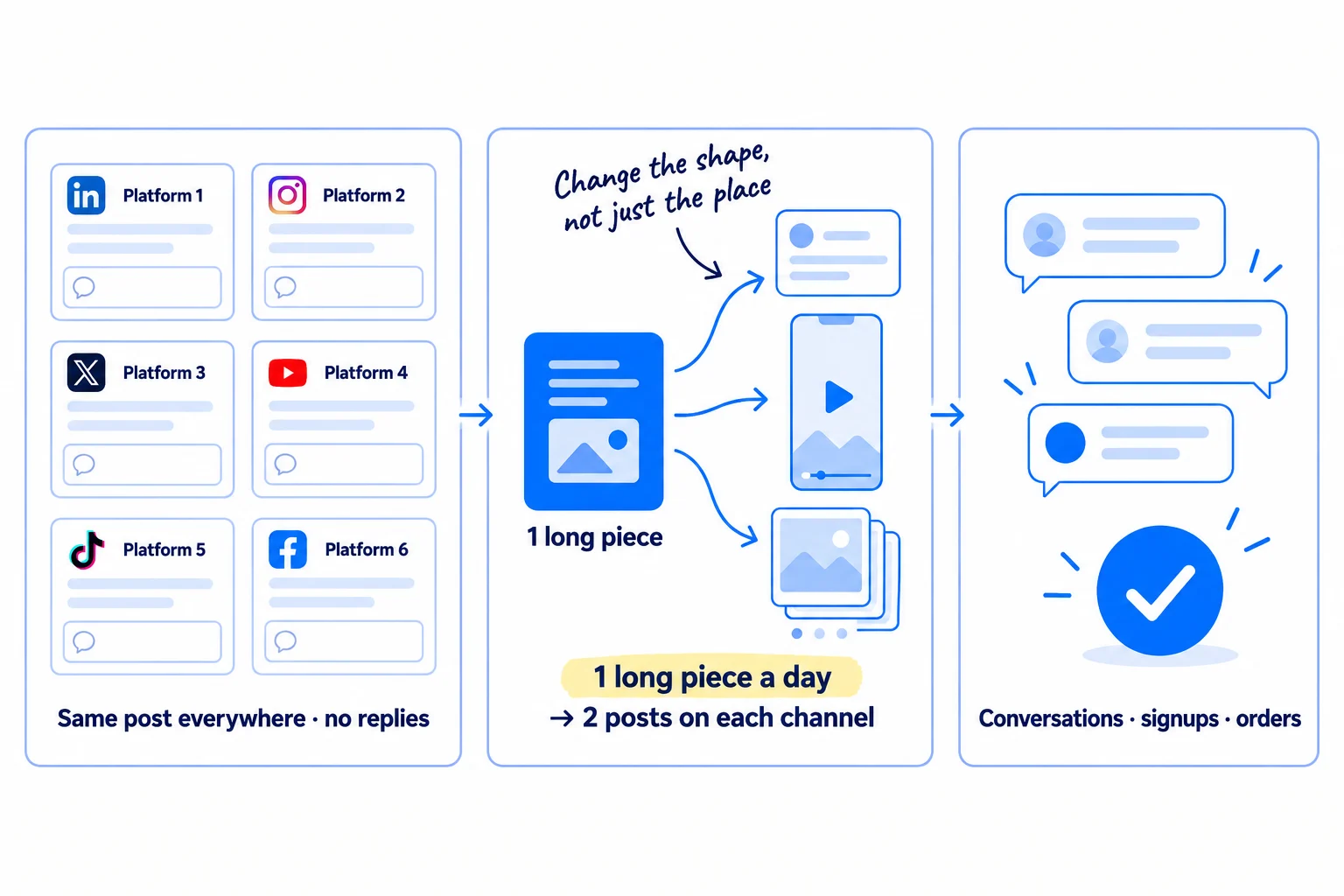
You made a blog post or a video, it got a few views, and you have no time to make something new for every platform. Most founders then repurpose content across platforms by pasting the same text and link everywhere, and get the same silence six times. Here is how to do it so it brings people: one new long piece a day, built on a question your buyers really ask, rewritten into the shape each platform wants, and counted by the conversations it starts.
Do these three things
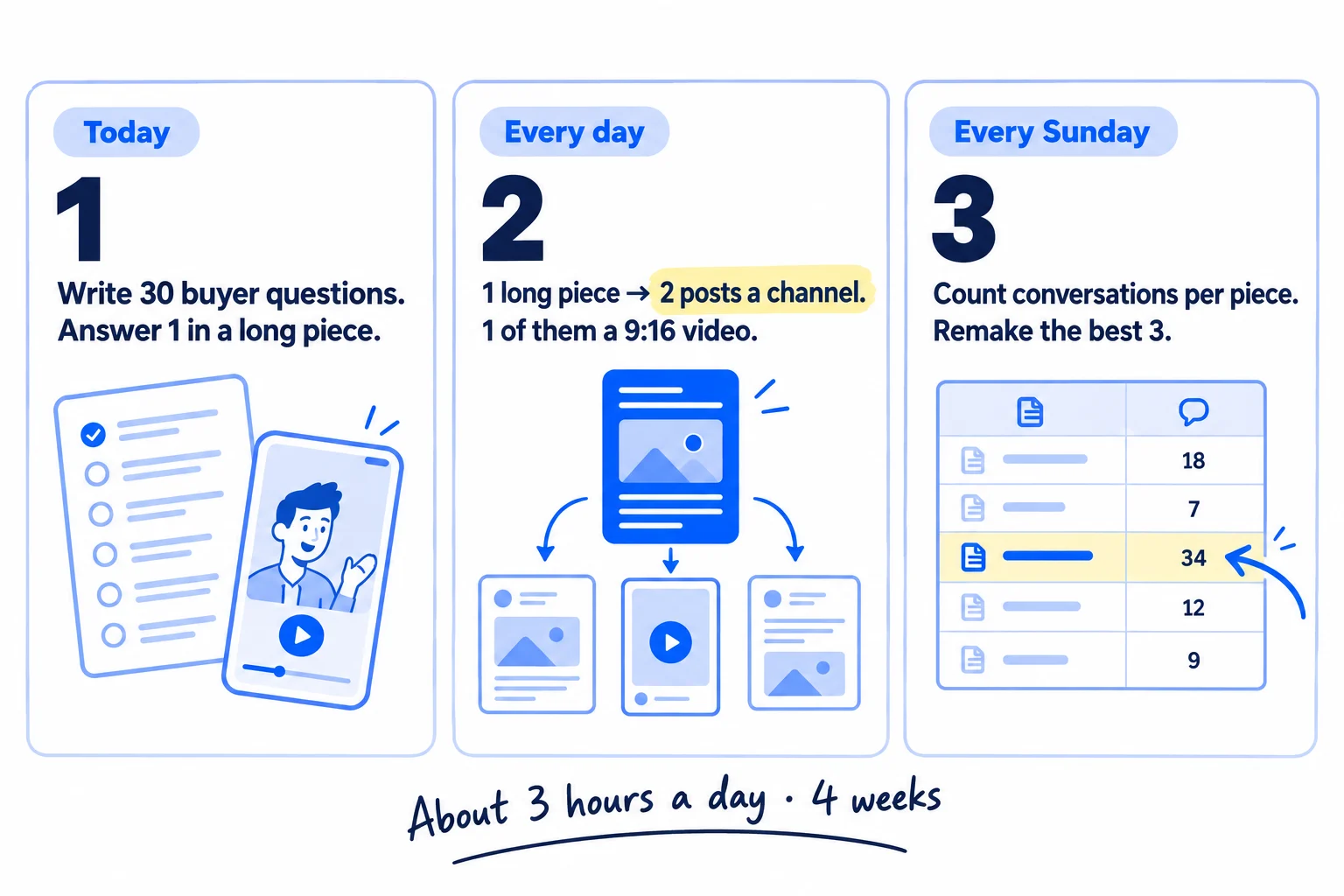
About 3 hours a day, every day, for 4 weeks: 28 long pieces and about 170 posts. Judge it by conversations, not views.
Show the three actions in fullHide the full list
- Today: write down 30 questions your buyers ask you, and answer the first one in one long piece: a 10-minute video of you talking, or a one-page article.
- Every day: make one new long piece and turn it into 2 posts for each of your 2 or 3 channels, one of them a 9:16 short video, rewritten for each platform. AI drafts the posts; you add one true detail and check every fact.
- Every Sunday: count the conversations, visits and signups or orders each piece brought, using where each one came from, and remake the 3 best in a new format the next week.
Get help doing these
ChatGPT or Claude reads this guide and works through it with you.
1. Pick 2 or 3 channels and write down what each platform wants
Choose the 2 or 3 social channels where your buyers already spend time, and write one line for each: the shape a post takes there, how long it can be, and the one rule you must not break. Every later step reads from this page.
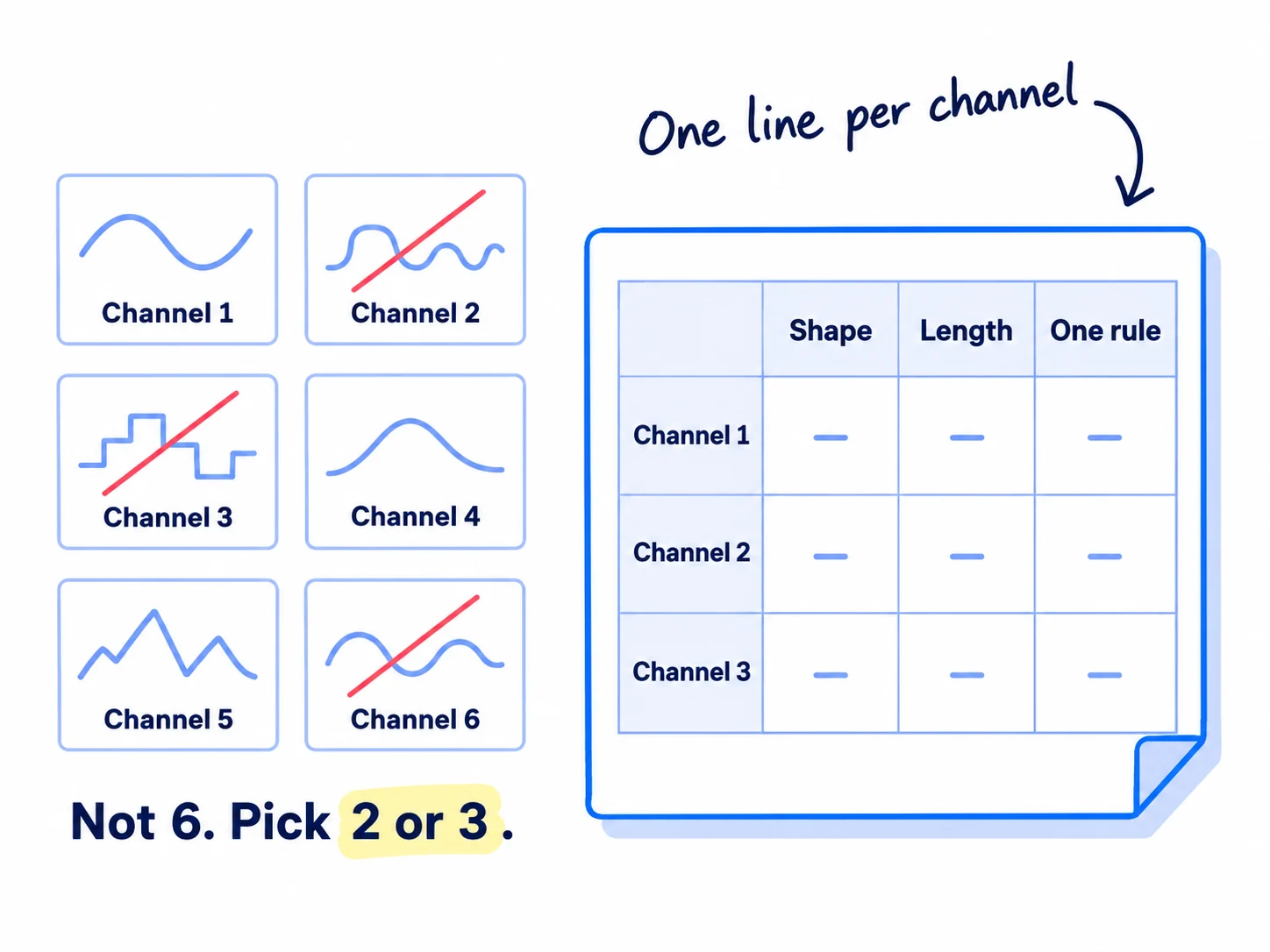
Pick 2 or 3, not 6. At 2 posts a day on each, 3 channels is 6 posts a day, which one person with AI can keep up for 4 weeks. Six channels would be 12 posts a day, and the quality drops before you learn anything. Get 2 or 3 running every day, then add the next one when they run without you thinking about it. If you already chose your marketing channels, use that list. If not, use this rule:
If you run a B2B business or an agency: LinkedIn from your own profile, plus X or your LinkedIn Page. Add Instagram only if your buyers post there, like food brands or shops.
If you run a D2C store: Instagram, plus TikTok or Facebook, whichever your shoppers use more. Your products sell in short videos.
If you run a SaaS: LinkedIn or X, whichever your users post on, plus Threads or the communities where they ask for help.
Then copy this table into a Google Doc, keep only your channels, and add anything your channel's help pages say that is not here.
| Channel | The shapes that work | Length and limits | The one rule |
|---|---|---|---|
| A text post, and a carousel added as a PDF document | Up to 3,000 characters | Write the whole idea in the post, so it works without a click | |
| A Reel (9:16 video) and a carousel of 8–10 slides | Captions up to 2,200 characters; 5 hashtags at most | Upload your own clean file, with no other app's logo on it | |
| A short video and an image post | Long posts are allowed; the first line does the work | Post your own work; Facebook cuts reach for accounts that mostly copy others | |
| X | A short text post, or a few posts in a row | 280 characters on a free account | One idea per post |
| Threads | A short text post or a video | 500 characters | Write it like a reply to a friend |
| TikTok or YouTube Shorts | A 9:16 video | Shorts can be up to 3 minutes | The first 2 seconds say what the video is about |
| Only as an answer to someone's question | Each community sets its own rules | Never post the same thing in several communities |
Two of those rules are new. Since December 2025, Instagram allows at most 5 hashtags on a post or Reel. In April 2026 it said accounts that mostly post content they did not make, or did not change in a real way, will not be shown to new people; a watermark or a credit line does not count as a change. Facebook did the same for copied content in July 2025. Your own work, rewritten for each place, is what both platforms want.
- Tool: a Google Doc. Free.
- Time: 30 minutes.
- You will have: a one-page channel sheet with 2 or 3 rows.
- It worked if: every channel has its shapes, its limits and one rule written down, and you can name 10 real buyers who use each one.
- Common mistake: starting on 6 channels because a tool makes it one click. You end up posting the same thing everywhere, which is the opposite of repurposing.
2. List 30 questions your buyers ask, starting with what you already have
Write down 30 questions your buyers have asked you, in their own words, and where you heard each one. Each question becomes one long piece, so this list is your next 30 days.
![Four small source cards on the left, labelled 'Messages', 'Emails', 'Calls', 'Reviews', with arrows into a sheet titled '30 buyer questions'. The first rows read '[question in their words]' and '[where you heard it]'. A note reads 'Their words, not topics'.](/academy/illustrations/how-to-repurpose-content-across-platforms/03-step-2.webp)
You already have more than you think. Every answer you have given a buyer by message, email, phone or in a comment is a long piece waiting to be written down. So is an old blog post, a talk you gave, a case study or a podcast you were a guest on. Start there before you make anything new.
Look in these places for questions, newest first:
If you run a D2C store: DMs, order emails, product reviews, comments under your posts and your competitors' posts, and the "Questions" on marketplace listings.
If you run a SaaS: support emails, onboarding chats, the questions people asked in demos and customer interviews, and threads in the communities your users read.
If you run a B2B business: questions from discovery calls, quotes and samples; the objections people raised before they said no.
If you run an agency: what clients and prospects ask in calls, audits and proposals, and what your clients' customers ask them.
Paste what you find into ChatGPT or Claude and ask it to pull out every question, word for word, with where it came from. Then read the list yourself and keep the 30 a buyer would type into Google or ask a friend. If you have fewer than 30, ask 10 customers or people who fit your ideal customer profile: "What did you want to know before you bought this?" You can also check which of them people search for on Google, and put those first.
Question (in the buyer's words) | Where you heard it | Date | Long piece made? (date) | Best line | The proof (a number, a result, a photo)
- Tool: Google Sheets, and ChatGPT or Claude to sort what you paste in. Both free.
- Time: 1 hour.
- You will have: a sheet with 30 questions, each with where you heard it.
- It worked if: all 30 rows are real questions in a buyer's words, not topics, and at least 10 came from people who bought or nearly bought.
- Common mistake: writing topics like "hair care tips" or "productivity". A topic gives you a post nobody needs. A question gives you an answer somebody was looking for.
See it done: The first 6 of Ferns & Rinse's 30 questions
Ferns & Rinse is a made-up plant-based haircare brand with its own Shopify store. It sells one shampoo and one conditioner at $28 each, or both for $49.
Buyer questions
| Question | Where they heard it |
|---|---|
| Why does it lather less than supermarket shampoo? | 3 DMs and 1 review |
| Will it work on curly hair? | Comments on a Reel |
| How long does one bottle last? | 2 order emails |
| Why is it $28 when shampoo at the shop is $6? | A friend's message |
| Can I use it on colour-treated hair? | Instagram DM |
| Do I need the conditioner too, or just the shampoo? | Checkout question by email |
Why it works: Each one is a shopper's own question, and each one is something they wanted answered before they bought.
3. Make one long piece a day: a 10-minute video or a one-page article
Every day, answer the next question on your list in one long piece: a 10-minute video of you talking to your phone, or a one-page article. Publish it whole on your own website the same day. Everything you post that day comes from it.
![Two paths from one question card labelled '[Question in their words]'. Path A: a phone held upright recording, labelled '10-minute video', then a transcript page. Path B: a page labelled 'One-page article'. Both arrows meet at a web page labelled 'On your site, the same day'.](/academy/illustrations/how-to-repurpose-content-across-platforms/04-step-3.webp)
A long piece is one full answer to one question. One a day sounds like a lot. It is about 45 minutes with AI, and it is the same work as the one page a day that brings search traffic, so you do it once and use it twice.
Pick video or text with this rule. If you can talk to a camera for 10 minutes, or you sell something people need to see, like a product, make the video. Recording takes 10 minutes, and the video gives you the clips for step 4. If you would rather write, make the article. Both work.
Use this outline either way. Say it out loud or write it down:
The question: [the buyer's question, word for word]
The answer, in 2 sentences. [Say it first.]
Why it happens. [One or two reasons, in plain words.]
What to do: [3 steps, each one a thing they can do today.]
The proof: [one number, result, photo or story only you have.]
The mistake people make: [one, and what to do instead.]
What to do next: [one step, which can be your product if it truly fits.]
For a video: hold your phone upright (9:16), so every clip you cut later is already the right shape. Record in one take; mistakes are fine. Then make the transcript in Otter, which is free for 300 minutes a month, 30 minutes a recording, enough for 10 minutes a day. Record straight into the Otter app, because the free plan only lets you import 3 files in total. Paste the transcript into ChatGPT or Claude and ask for a clean article with the same words and your outline. Read it, fix what is wrong, add the proof, and publish it on your blog with the video. If you want the full video on YouTube too, start a channel and upload it the same day.
For an article: write your notes under each part of the outline, then let AI turn them into a first draft. Spend your time on the proof and on what only you know; AI writing that sounds like everyone else's is what makes people scroll past. Then follow how to write a blog post that ranks on Google, and after you publish, ask Google to index it.
Publishing the whole piece on your own site first gives every post a home to point to, and gives Google and AI answers a page to find and cite.
- Tool: your phone, Otter's free plan, ChatGPT or Claude, and your website or blog.
- Time: about 45 minutes: 10 to record or 20 to write notes, 10 for AI, 25 to check and publish.
- You will have: one long piece a day, live on your site. 28 in 4 weeks.
- It worked if: a stranger who reads only the first 2 sentences gets the answer, and the piece has at least one detail no competitor could copy.
- Common mistake: polishing one piece for a week. One honest answer a day beats one perfect answer a month.
4. Repurpose each long piece into 2 posts a day on every channel
Turn today's long piece into 2 posts for each of your channels: one 9:16 video and one other post in that channel's best shape. Each post starts in a different place and works on its own, so someone who sees only that post still learns one thing.
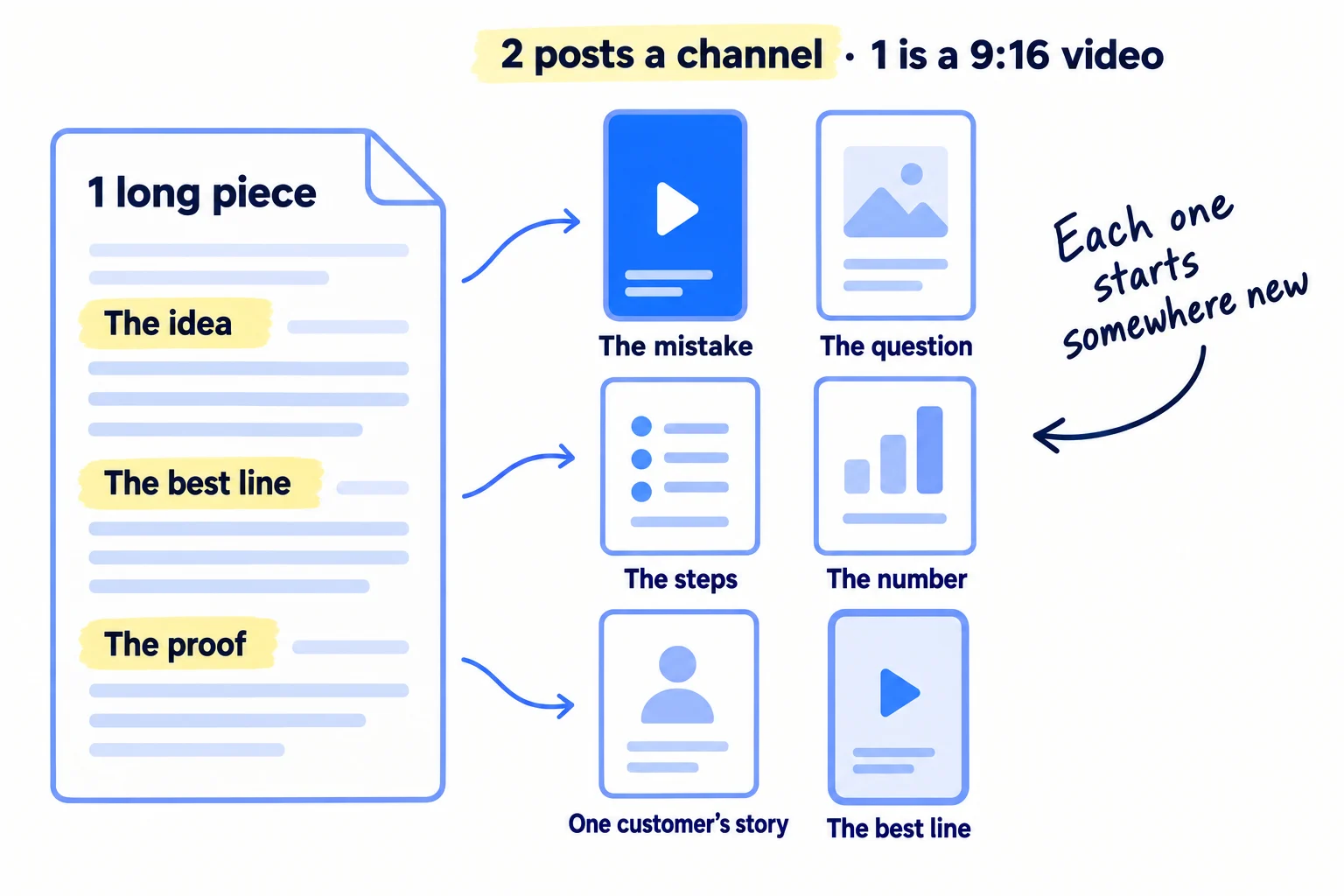
First, take three things out of the long piece and write them in your sheet: the one idea in a sentence you would say out loud, the best line that works with no context, and the proof: the number, the result, the photo. Every post carries one of the three.
Then give each post its own way in. The same idea can start six ways: the mistake people make, the question itself, the steps, the number, one customer's story, or the best line on its own. A follower who sees 2 posts from the same piece on the same day should not feel they read the same thing twice.
Let AI draft them. Paste the long piece and your channel sheet into ChatGPT or Claude with this prompt:
Here is a long piece I made today: [paste the article or transcript].
Here are my channels and their rules: [paste your channel sheet].For each channel, write 2 posts from this piece. One is a script for a 30–60 second 9:16 video. The other is in that channel's best shape (a text post, a carousel of 8–10 slides, or a short post).
Start each post a different way: the mistake, the question, the steps, the number, one customer's story, or the best line.
Use my words from the piece. Keep every fact exactly as I wrote it. No hashtags except up to 5 on Instagram. No emojis in the first line.
Put the whole idea in the post, so it works for someone who never clicks.
Then do the part AI cannot. Read each draft, cut anything you would not say, and add one true detail: a customer's words, a number from this week, what went wrong. Check every fact against the long piece.
The video: open your recording in Edits, Instagram's free video editor, and cut the best 30 to 60 seconds: the one that starts with the answer or the mistake. Add captions with its auto-caption button, because many people watch with the sound off. Edits exports with no watermark, so the same clean file works on Instagram, TikTok, Facebook and YouTube Shorts. If you wrote an article, record the 60-second script on your phone instead. How to make short-form videos for your business covers lighting, sound and the first 2 seconds.
The carousel: put one line per slide into Google Slides, 8 to 10 slides, and download it as a PDF for LinkedIn or as images for Instagram. In Buffer's study of 52 million posts from 2025, carousels got about 3 times the engagement of video or images on LinkedIn, and more than Reels on Instagram. So on those two, make one of your 2 daily posts a carousel on most days.
Posting this much is not too much. In Buffer's 2026 data, Instagram accounts that posted 10 or more times a week got about 24% more reach per post than those posting once or twice, and LinkedIn accounts posting 11 or more times a week got nearly 3 times the engagement per post of those posting once a week. If you need ideas beyond your 30 questions, use the post ideas for SaaS, B2B, D2C or agencies.
If you run an agency: do this for your own agency first. When you do it for clients, keep a separate channel sheet and prompt for each one, so client brand voices stay separate, and send each week's posts for client approval before they go out.
- Tool: ChatGPT or Claude, Edits (free, iPhone and Android), and Google Slides. All free.
- Time: about 1 hour a day: 10 minutes for AI, 30 minutes to rewrite and check 4 to 6 posts, 20 minutes for the video.
- You will have: 4 to 6 posts a day, ready to go out. About 170 in 4 weeks on 3 channels.
- It worked if: each post makes sense on its own, no two posts from the same piece start the same way, and every fact matches the long piece.
- Common mistake: one caption pasted on every channel with "New blog post! Link below." The other is letting a tool make 20 near-identical clips. In July 2025, YouTube renamed its rule against mass-produced, almost-the-same videos "inauthentic content", and Instagram and Facebook show copied-looking posts to fewer new people.
See it done: One long piece, 6 posts
Long piece: “Why does it lather less than supermarket shampoo?” (10-minute video)
| Channel | Post | First line |
|---|---|---|
| Reel, 40 seconds | "Less foam does not mean less clean. Here's what the foam really is." | |
| Carousel, 8 slides | "3 mistakes people make in their first week with a low-foam shampoo" | |
| TikTok | Video, 35 seconds | "I washed my hair with half the usual amount. Watch the foam." |
| TikTok | Video, 50 seconds | "Your question: why is there less lather? The answer in 50 seconds." |
| Video, 40 seconds | Same clip as the Reel, with a new first line: "We get this question every week." | |
| Image post | A shopper's words: "I thought it wasn't working. Then I tried the double wash." |
Why it works: Every post starts in a different place, and each one makes sense to someone who never saw the long piece.
5. Upload a fresh file to each platform and reply within an hour
Post each version on its own platform from the clean original file, never a copy downloaded from another app. Then reply to every comment within an hour.
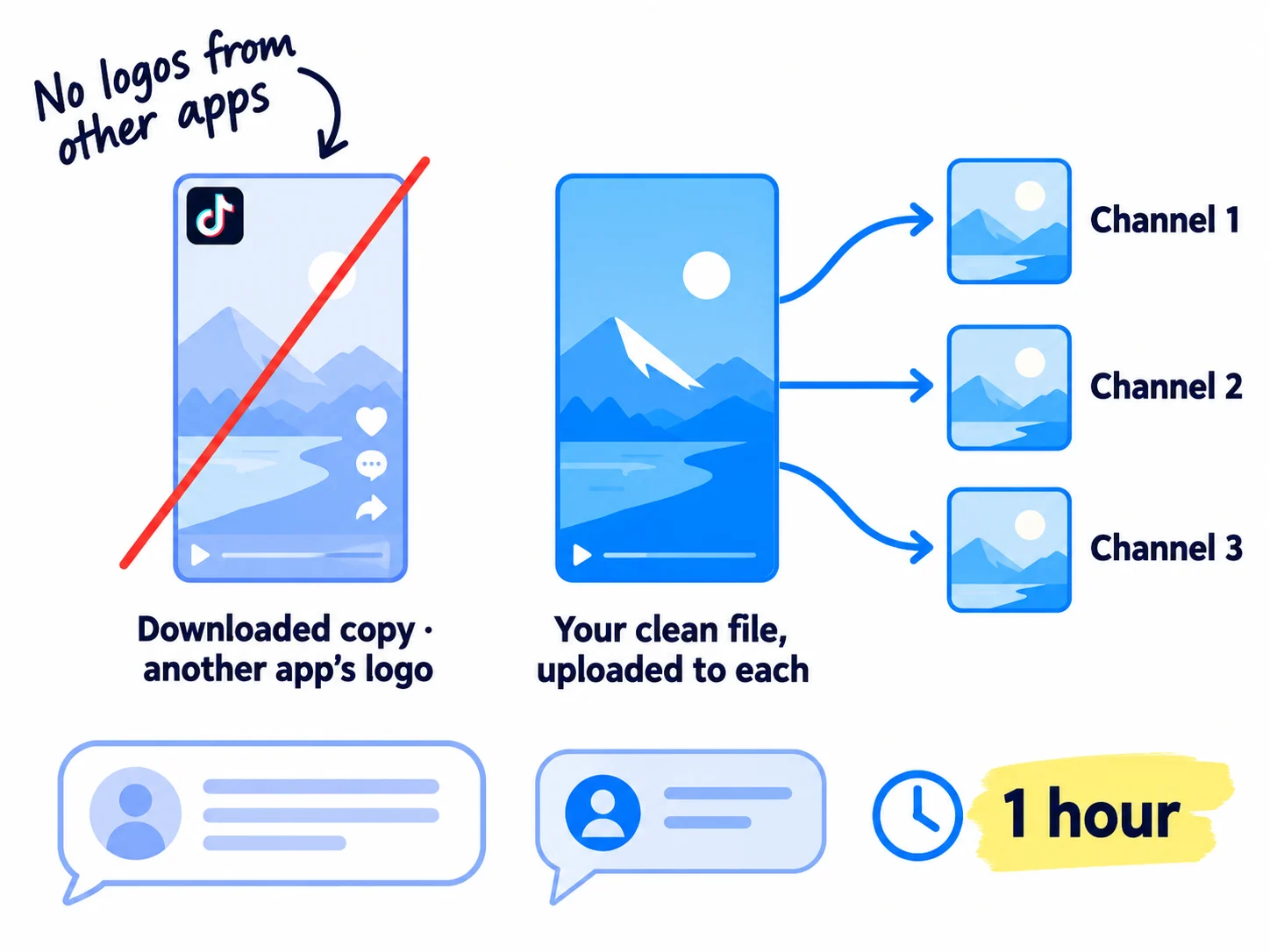
Upload each post yourself, or schedule it, on each platform. Instagram says it is less likely to recommend Reels with noticeable watermarks or Reels already posted on Instagram. So never download your TikTok and post that file on Instagram; post the clean file from Edits instead.
Schedule each day's posts as soon as they are ready, so posting takes minutes. Buffer's free plan connects 3 channels and holds 10 scheduled posts per channel at a time, which is 5 days at 2 posts a day, so add each day's posts the day you make them. Meta Business Suite, Meta's free tool, also schedules Instagram and Facebook. Plan the days ahead in a content calendar.
Three rules for links and places:
- Put the whole idea in the post. Add a link to the long piece only on the post that asks people to read more, once a day per channel. In Buffer's 2026 data, link posts got less than a fifth of the engagement of carousels on LinkedIn. Tag every link with UTM parameters, so step 6 can see which channel sent each visit.
- On Reddit, only answer questions. When someone asks your question, answer it in your own words from the long piece, in one community at a time, and follow its rules on self-promotion. Posting the same thing in several subreddits is treated as spam. How to promote on Reddit without getting banned has the details.
- Using a customer's post? Ask first, say whose it is, and add your own words around it. On Instagram, invite them as a collaborator. Their photos and videos are user-generated content; a post made only of other people's work does not count as yours.
Then answer people. Reply to every comment and message within an hour, in your own words, and end with a question back. The comments are where conversations start, and a buyer who asks a question in public is often ready to talk. Give another 20 replies a day on other people's posts where your buyers talk, across at least 5 places. This is how your first 1,000 followers find you. Add every new question you get to your 30-question list.
- Tool: Buffer's free plan, or Meta Business Suite for Instagram and Facebook. Both free.
- Time: 15 minutes a day to schedule, and about 1 hour a day for replies.
- You will have: every post live on its own platform, and every comment answered.
- It worked if: no post carries another app's logo, no comment waited more than an hour, and by the end of week 2 you get at least 1 conversation (a message, a question from a possible buyer, a call) for every 10 posts.
- Common mistake: posting the downloaded TikTok file on Instagram, or dropping the same link in 5 subreddits in one day.
6. Count what each piece brought every Sunday and remake the best 3
Every Sunday, write down what each long piece and each channel brought this week: conversations, visits, and signups or orders. Remake the 3 best pieces in a format they did not have yet.
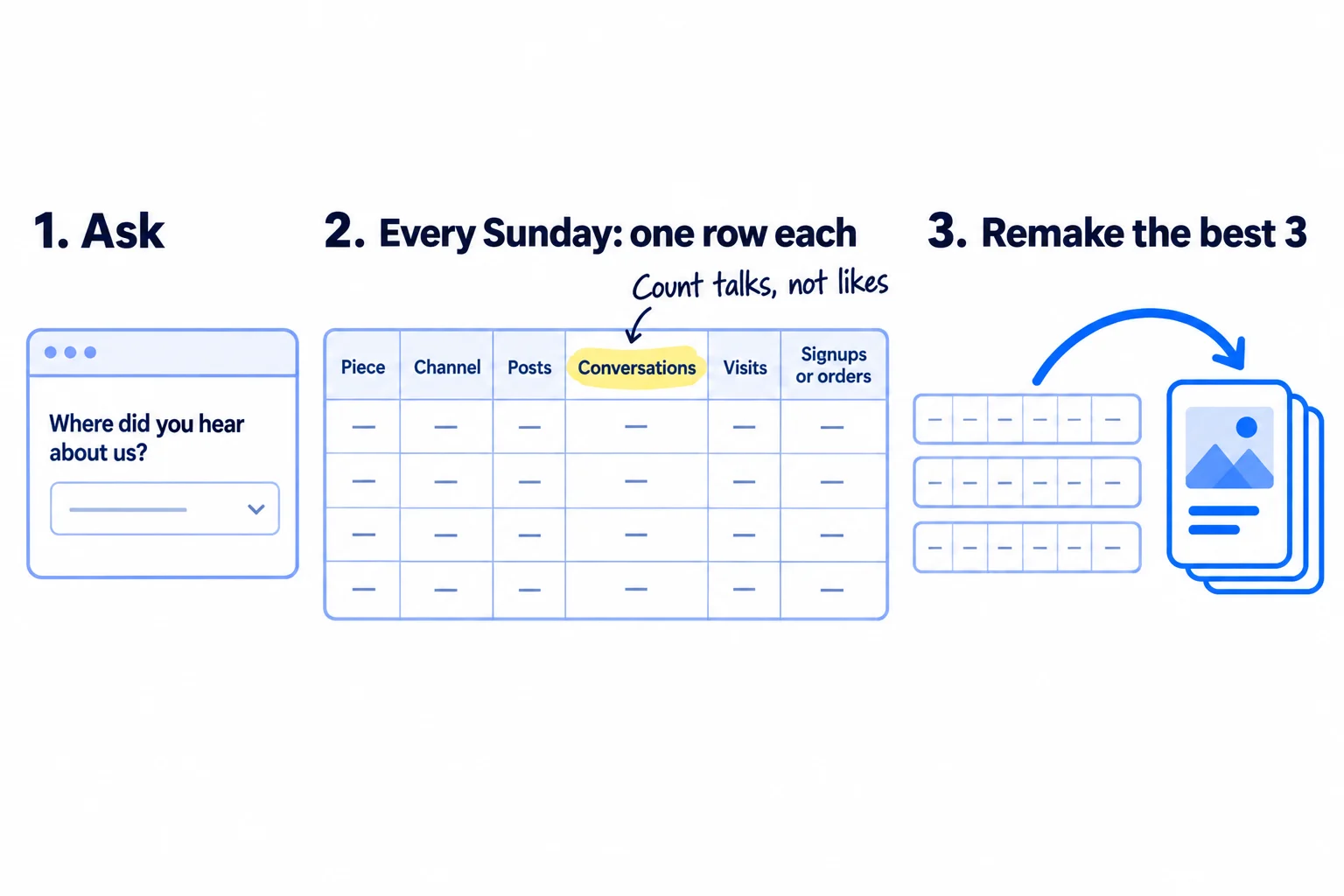
Set up the count once. Add "Where did you hear about us?" to your signup form, checkout or enquiry form, with your channels as answers. This is self-reported attribution, and at this size it tells you more than any dashboard. Your UTM links from step 5 show visits by channel in your analytics.
Then, each Sunday, fill in one row per long piece and channel. Count a conversation as any message, call or comment from a possible buyer that asks something or answers back. Views and likes go in no column.
Week | Long piece | Channel | Posts | Conversations | Visits | Signups or orders | Notes (what people asked)
Make two decisions:
- Every Sunday: remake the 3 best pieces. Take the 3 pieces with the most conversations and make each one again in a shape it did not have: a carousel becomes a video, a video becomes a carousel, an article becomes a LinkedIn post told as one customer's story. Post them next week. Two to four weeks later, post the idea again from a new side. Instagram is less likely to recommend a Reel that is already on Instagram, so always cut a new clip.
- After 28 long pieces (4 weeks): keep or move each channel. A channel that brought 0 conversations from 56 posts loses its 2 posts a day. Give them to the channel that brought the most conversations. Search is the exception: keep publishing the long pieces on your site and judge them at month 3.
Once a month, read the notes column for new questions and look at the whole picture in a monthly marketing review.
- Tool: Google Sheets, your signup or checkout form, and your analytics.
- Time: 15 minutes once to add the question, then 30 minutes each Sunday.
- You will have: one row per piece and channel, and a clear answer on which questions and which channels bring buyers.
- It worked if: you can name the piece and the channel behind every conversation, signup and order.
- Common mistake: judging by views and likes, or deciding after one week. A post that got 3,000 views and no messages did less for you than one with 50 views and 2 questions from buyers.
See it done: Ferns & Rinse after 4 weeks
Weeks 1 to 4, by channel
| Channel | Posts | Conversations | Visits | Orders |
|---|---|---|---|---|
| 56 | 14 | 61 | 3 | |
| TikTok | 56 | 6 | 38 | 1 |
| 56 | 0 | 9 | 0 |
The decision: Facebook's 2 posts a day move to Instagram. The 3 pieces with the most conversations (lather, curly hair, colour-treated hair) become carousels next week.
Why it works: They count conversations and orders by channel, so they can see Facebook brought nothing and Instagram brought the most.
When one channel clearly works, go deeper on Instagram, LinkedIn or X, and put the long pieces that bring orders into your email list too. If you turn a winning post into an ad later, make the ad creative from the same idea.
Where Scout7 helps
Scout7 speeds up steps 2, 3, 4 and 5.
Step 2. Content Co-Pilot proposes topics from the gaps in your search and AI audit, or takes your question, researches it and returns different angles you can choose from.
Step 3. It writes the long piece as an article: it asks research-backed shaping questions, then drafts the article with sources, images and FAQs. You answer the questions, edit the draft and approve it. It can host the article on a blog under your own domain.
Step 4. From a finished article, Scout7 builds a LinkedIn carousel, which works anywhere a carousel does, and a video in portrait (9:16) or landscape. It also makes image posts with captions in your voice. You direct the scenes and approve every post.
Step 5. It schedules posts to LinkedIn, X, Instagram, Facebook, Threads and Reddit, and shows the week or month in one calendar. Its Organic Loop plans, creates and schedules a full cycle of posts, videos, articles and carousels. Nothing goes live without your approval. Replies to comments on your own posts stay in your own words.
Your content repurposing checklist for the next 4 weeks
0 of 11 done
Work through this list with an AI assistant
It drafts the work and keeps track of what is done.
Frequently asked questions
- Can I post the same thing on every platform?
You can, but it rarely works. Each channel wants a different shape and length, and Instagram is less likely to recommend videos with another app's logo on them. Keep the same idea and change the post: a different first line, a different shape, a different part of the long piece. With AI drafting, rewriting a post for a second platform takes about 5 minutes.
- Does reposting my old content hurt my reach?
Posting the exact same file again usually reaches fewer people, and Instagram says it is less likely to recommend a Reel already on Instagram. Bringing back the idea does not hurt. Wait 2 to 4 weeks, then make it again from a new side: a new clip, a new first line or a different format. Your best ideas deserve to be seen more than once.
- What is the best tool to repurpose content?
Start free: ChatGPT or Claude to draft the posts, Instagram's Edits app to cut and caption clips without a watermark, Google Slides for carousels, and Buffer's free plan to schedule up to 3 channels. Paid tools that clip videos for you can wait until you post every day and know which pieces bring conversations. The tool matters less than having a real question to answer.
- I don't have any content yet. What do I repurpose?
Your answers. Every reply you have sent a buyer by message, email or phone is a long piece waiting to be written down. List 30 questions they asked, then answer one a day on video or in a page, as in step 3. If you have no buyers yet, ask 10 people who fit your ideal customer profile what they would want to know first.
- Is it against the rules to repurpose content with AI?
No. Platforms act against copied or mass-produced posts, not against AI. YouTube's rule on "inauthentic content" covers videos that are almost the same, made in bulk. Instagram and Facebook show fewer new people accounts that mostly post others' work. Using AI to rewrite your own long piece for each platform, with your own detail added, is your own work.
Sources
- 1.Instagram's recommendation algorithm will penalize 'unoriginal' photo and carousel posts — Engadget, 30 April 2026
- 2.New Instagram policies target reposted content — PetaPixel, 30 April 2026
- 3.Tips for improving your reach — Instagram for Creators, checked 2 October 2026
- 4.Instagram implements new limits on hashtag use — Social Media Today, 18 December 2025
- 5.Following YouTube, Meta announces crackdown on unoriginal Facebook content — TechCrunch, 14 July 2025
- 6.YouTube clarifies changes to monetization rules around inauthentic content — Social Media Today, July 2025, checked 2 October 2026
- 7.Understand three-minute YouTube Shorts — YouTube Help, checked 2 October 2026
- 8.The state of social media engagement in 2026: 52M+ posts analyzed — Buffer, 5 March 2026
- 9.How often to post on social media in 2026 — Buffer, 13 January 2026
- 10.How to crosspost on social media: a step-by-step guide for 2026 — Buffer, 13 May 2026
- 11.Buffer pricing — Buffer, checked 2 October 2026
- 12.Otter.ai pricing — Otter.ai, checked 2 October 2026
- 13.Edits: Video Editor — Instagram, on the App Store, checked 2 October 2026
Next article to read
How to make short-form videos for your businessTurn your best pieces into short videos, the format most people watch now.Read it nextRelated guides
- How to plan a content calendarPlan a content calendar that brings buyers, not just likes: collect 100 questions your buyers ask, fill 4 weeks in one Google Sheet with 1 article and 2 posts a day on each of 2 channels, write and schedule next week's 28 posts every Sunday, reply to every comment, and count what each question brought every Sunday.
- How to grow on LinkedIn as a founderGrow on LinkedIn as a founder in 4 weeks: rewrite your headline for your buyer, post twice a day from your own profile, leave 20 comments and send 100 personal messages a day, and count conversations by topic every Sunday.
- How to start a YouTube channel for businessStart a YouTube channel for your business with no audience: set it up under your business name and verify it today, publish one video a day that answers a question your buyers type into YouTube, cut 2 Shorts from each, send every video to the people who asked, and check every Sunday which videos search brings viewers to.
- How to use AI for content creationUse AI for content creation without sounding like everyone else: write a voice and facts file once, give AI 10 minutes of your own material every day, publish 1 page and 2 posts on each of 2 channels after a 6-line check, label realistic AI video, and count what each piece brought every Sunday.
Guides that link here
- How to plan a content calendar
- How to get booked as a podcast guest
- How to start a YouTube channel for business
- How to make short-form videos for your business
- How to use AI for content creation
- How to grow on LinkedIn as a founder
- Social media post ideas for SaaS companiesSaaS
- How to get your brand mentioned by ChatGPT
- How to write a case study
- How to get customers online for free
- How to get traffic to a new website for free
- How to get your first sale on EtsyD2C
- How to get your first sales on ShopifyD2C
- How to announce a new business on social media
- How to build a waitlist before you launch
- How to launch a D2C brandD2C
- How to launch a product on AmazonD2C
- How to launch on Product HuntSaaS
- How to post a Show HN on Hacker NewsSaaS
- How to fit marketing into your week as a solo founder
- How to get backlinks for a new website
- How to get backlinks from news websites
- How to make an article rank higher on Google
- How to write a blog post that ranks on Google
- How to build in public on XSaaS
- How to get your first 1,000 followers
- How to promote on Reddit without getting banned
- How to promote your business in Facebook groups
- How to promote your business on InstagramD2C
- How to sell on TikTok ShopD2C
- Instagram post ideas for a marketing agencyAgency
- Instagram post ideas for D2C brandsD2C
- LinkedIn post ideas for B2B companiesB2B
Cite this page
Dinesh Bypilla (2026). How to repurpose content across platforms. Scout7 Academy. https://scout7.ai/academy/content-marketing/how-to-repurpose-content-across-platforms
Written by Dinesh Bypilla, Agentic systems engineer at Scout7. Reviewed by Murali Sid. Last checked 2 October 2026.
Quote any part of this guide with a link back to this page. © 2026 Scout7.
Markdown version of this page: https://scout7.ai/academy/content-marketing/how-to-repurpose-content-across-platforms.md