



How to build a waitlist before you launch
Build a waitlist before you launch: set a launch date no more than 4 weeks away, put up one page with an email field and one question about the problem, fill it with 100 personal invites, 20 answers and 2 posts a day, write back to everyone who joins within 24 hours, and email the list first on launch day.
ByDinesh BypillaReviewed byMurali SidLast checked 22 min read
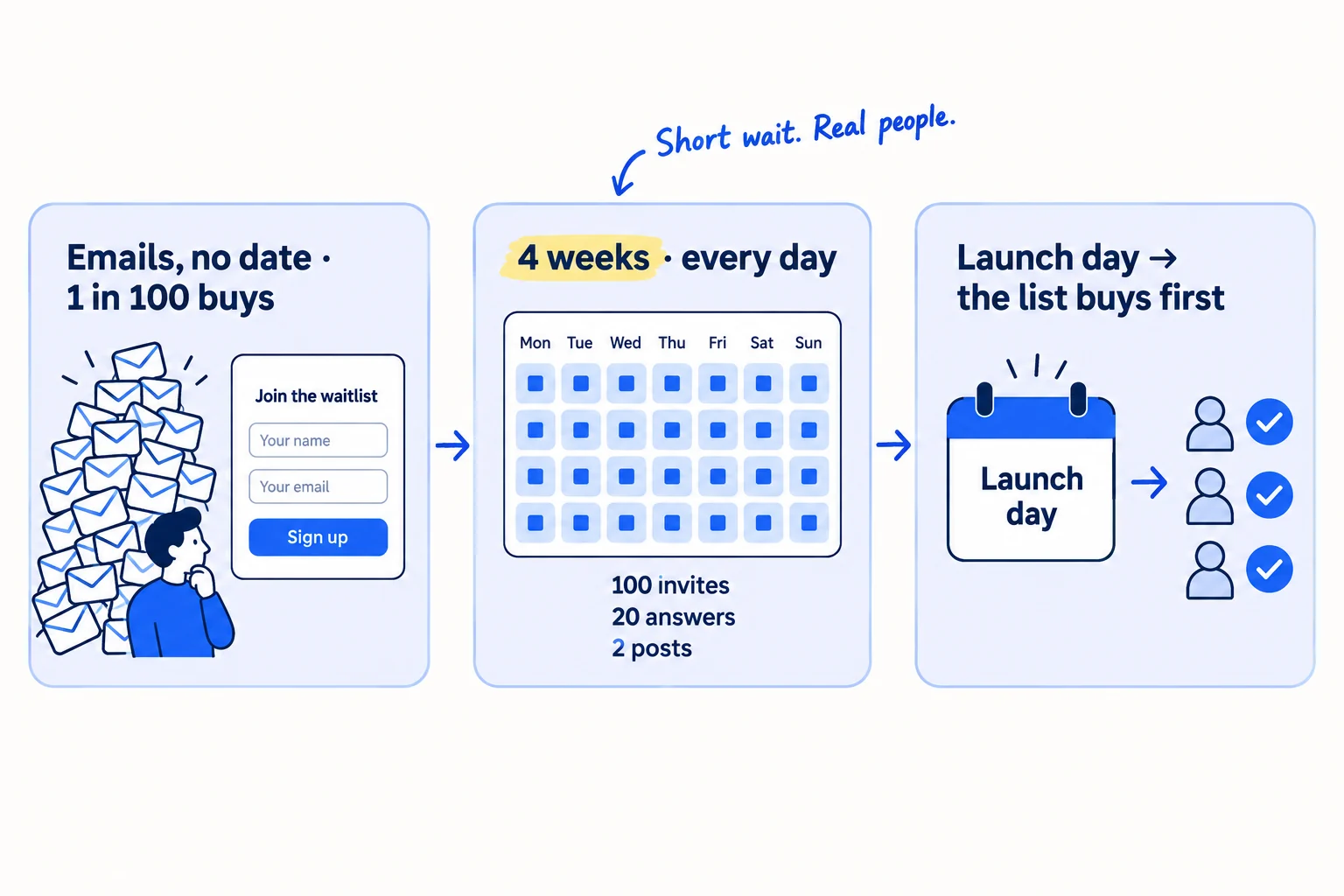
You are about to open your store, your SaaS or your new service, and you are afraid nobody will be there on the day. A waitlist helps only if the people on it have the problem and hear from you while they wait: in April 2026 one founder shared that a list of more than 300 people brought 3 paying users. Here is how to build a waitlist before you launch in 4 weeks or less, one person at a time, so the people on it buy first on launch day.
Do these three things
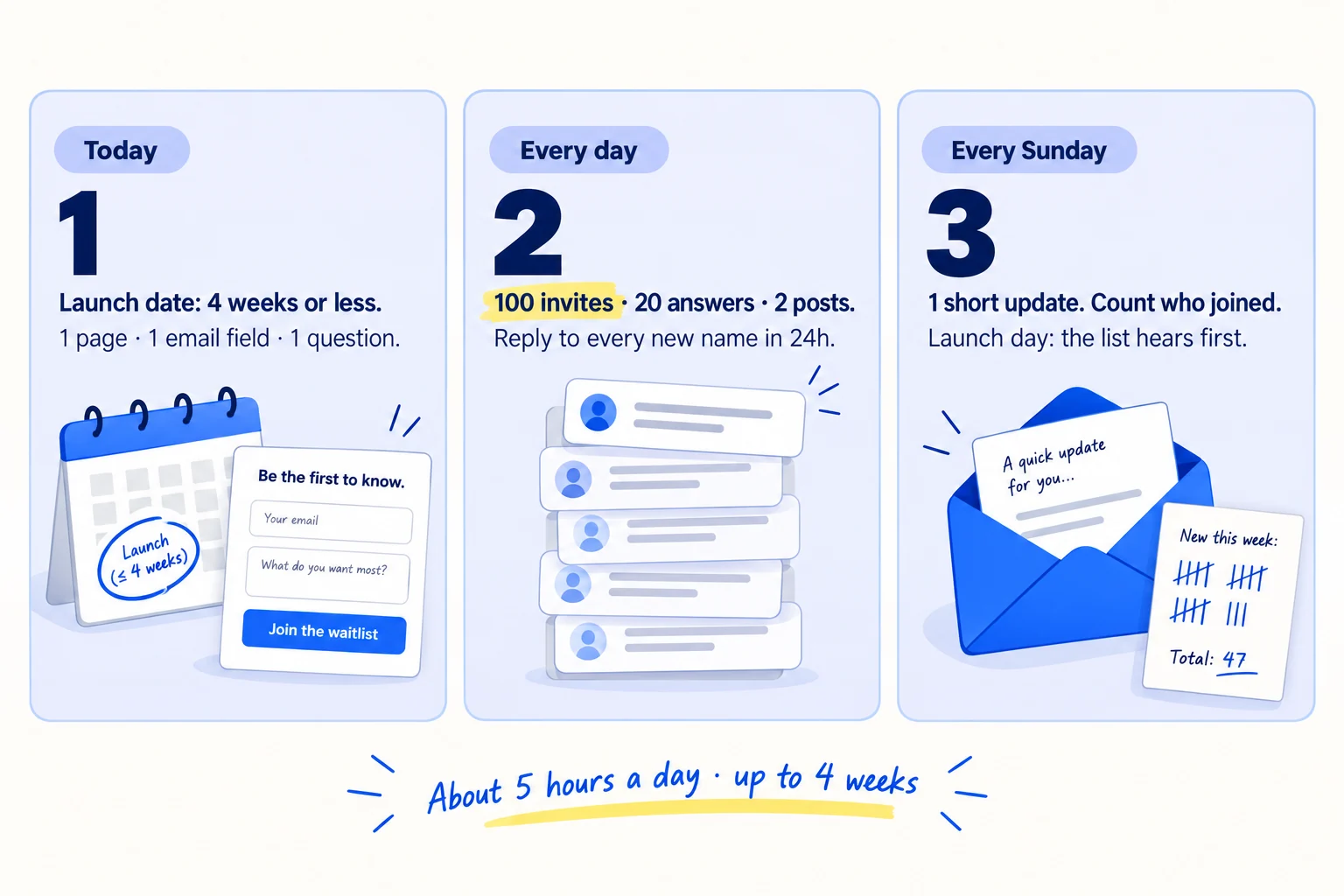
About 5 hours a day, every day, for up to 4 weeks. That is 2,800 invites before you launch. Judge it 7 days after launch, by how many people on the list bought or started.
Show the three actions in fullHide the full list
- Today: set a launch date no more than 4 weeks away. Put up one waitlist page that says who it is for, what joining gets and the date, with one email field and one question about their problem.
- Every day: send 100 personal invites, answer 20 questions in 5 places where your buyers ask for help, and post twice on each channel. Write back to everyone who joined within 24 hours. AI drafts; you add one true line.
- Every Sunday: send your list one short update, and count who joined and who answered, by where they came from. On launch day, email the list before anyone else, and follow up twice.
Get help doing these
ChatGPT or Claude reads this guide and works through it with you.
1. Pick your launch date and what people on your waitlist get
Build a waitlist only if people cannot use or buy your product yet. Set a launch date no more than 4 weeks away, and write one sentence that says what joining gets people and when.
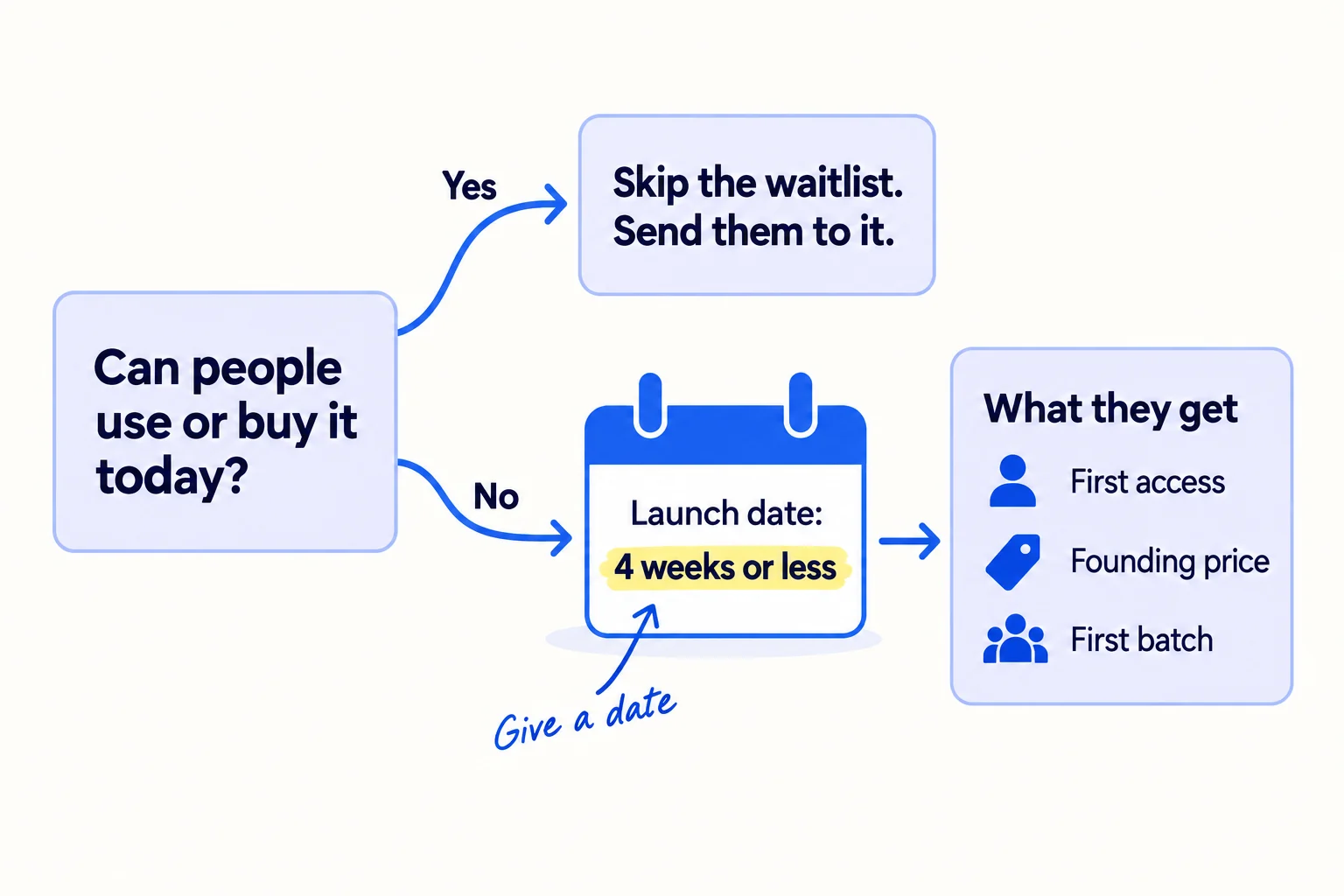
First, check whether you need a waitlist at all. If people can already sign up, try or buy it, send them straight to the product and get them to try it today. A waitlist in front of a product that works makes people wait for no reason, and Product Hunt does not feature "waitlisted products (unless immediate access is provided)". A waitlist is for a store that is not open yet, a product that is not ready, or a beta or first batch with limited places.
A waitlist is also not proof that people will pay. Joining costs nothing. If you do not yet know whether anyone will pay, ask for money first, with a pay button and a refund promise, and use the waitlist to tell people when you open.
Keep the wait short. The newest numbers we found are from a 2022 survey of founders by Lenny Rachitsky. When people got in within a month, about half signed up for the free version and about 20% paid. When they waited more than 3 months, under 20% signed up and under 10% paid. The survey was small, but the direction is clear: the list goes cold. So set your launch date 4 weeks from today or sooner, and write it down.
Then pick one thing people get for joining, and an end date for it:
- First access: they get in on the launch date, before it opens to everyone.
- A founding price: a lower price for people who join before the launch date, and how long it lasts.
- The first batch: they can order on the launch date, before the store opens to everyone.
Promise only what you can keep. A founding price you raise after 2 months breaks trust with your first customers.
Join the list and you get [first access / a founding price of $X a month for [how long] / the first batch] on [launch date]. After [end date], [what changes].
If you run a D2C store: a pre-order is a stronger sign than an email, because people pay. If you take pre-orders, follow the pre-order rules for shipping dates and refunds. Use the waitlist for everyone who is not ready to pay yet.
If you run a B2B business: a public waitlist rarely fits, because each deal needs a conversation. Make a list of 20 to 50 named companies for a founding-customer pilot, and book a call with each one. Steps 3 to 7 still apply: the invites fill the list, and launch day is when the pilot starts.
If you run an agency: build a waitlist only for a packaged service with limited places, such as "3 new clients in November". For everything else, book calls instead of collecting emails.
- Tool: Google Calendar and a Google Sheet.
- Time: 30 minutes.
- You will have: a launch date no more than 4 weeks away and one sentence that says what joining gets.
- It worked if: you read the sentence to 3 people and each one can tell you what they get and when.
- Common mistake: "Coming soon" with no date, or a date 3 months away "to build interest". People forget you, and a waitlist with no date reads as "not really open".
2. Make a waitlist page with one email field and one question
Make one page with a headline that says who it is for and what they get, the launch date, one email field and one question about their problem. Send every signup into one Google Sheet.
![A simple waitlist page. Headline: '[Who it is for]: [the result they get]'. Under it: 'Opens [date]. Join and you get [what they get].' A form with 'Email' and 'What's the hardest part of [the problem] for you?'. A button 'Join the list'. An arrow leads to a sheet with the columns 'Email', 'Answer', 'Source'.](/academy/illustrations/how-to-build-a-waitlist-before-you-launch/step-2-make-a-waitlist-page-with-one-email-field-and-on.webp)
Write the page in this order:
- The headline: who it is for and the result they get, in their words. It is your value proposition, the same one your homepage headline will use. Leave out the technology.
- One line under it: the launch date and what joining gets, from step 1.
- The form: an email field and one question about their problem, such as "What's the hardest part of [the problem] for you right now?" Add an optional "Where did you hear about us?" That is self-reported attribution, and you will count it every Sunday.
- What you will email them: "One email a week until launch, then one on launch day. Leave any time." This line is their consent. In the UK, for example, you may not send marketing emails to people unless they agreed to hear from you or already bought from you.
- The button: "Join the list". One call to action, nothing else to click.
The question is what makes the list useful. In the April 2026 post, the top reply said a waitlist email "only tells you someone liked the idea enough to type their address, not that they have the painful, budget-having version of the problem". The answers sort your list into people who have the problem now and people who were curious. You will write to the first group yourself in step 6.
Build it with Tally's free plan: it has unlimited forms and unlimited submissions. Create the form, then open the "Integrations" tab, click "Connect" next to Google Sheets, log in to Google and pick a sheet. Every signup now lands in that sheet. Put the form on a page of your site from the "Share" tab, with the "Standard" embed. If you have no site yet, share the form's own link from the same tab, or make a one-page site first.
Tag every link to the page with UTM parameters, one per place you share it. Then show the page to 3 people who have never seen it, for 5 seconds each, and ask who it is for and what they get. It is a small version of a landing page test.
[Who it is for]: [the result they get, in their words].Opens [launch date]. Join the list and you get [first access / a founding price / the first batch].Email: [field]
What's the hardest part of [the problem] for you right now? [field]
Where did you hear about us? (optional) [field][Join the list]One email a week until launch, then one on launch day. Leave any time.
If you run a D2C store on Shopify: use the password page. In your Shopify admin, go to Online Store > Preferences, and under Store access turn on "Private mode". The password page has an "Email signup banner" for people to subscribe. Turn on double opt-in under Settings > Notifications > Customer notifications > "Customer marketing confirmation", so each person confirms by email. Sign up with your own email and check it shows on the Customers page, in the "Email subscribers" segment. The banner has no room for your question, so ask it in your first email (step 6).
- Tool: Tally (free) and a Google Sheet, or the Shopify password page for a store that is not open.
- Time: about 2 hours.
- You will have: a live waitlist page, with every signup landing in one sheet.
- It worked if: 3 people who never saw it can each say who it is for and what they get after 5 seconds, and your own test signup appears in the sheet.
- Common mistake: a page about you or your technology, or a form that asks for name, company, phone and job title. Every extra field loses people who were ready to join.
See it done: Ferns & Rinse's password page, before the store opened
Ferns & Rinse is a made-up plant-based haircare brand with its own Shopify store. It sells one shampoo and one conditioner at $28 each, or both for $49.
Before
Something good is coming. Sign up for updates.
After
Plant-based shampoo and conditioner for dry, curly hair. Opens on the 1st. Join the list and order before anyone else.
Why it works: The new headline says who it is for, what it is and when it opens, and joining gets them something real: the first order.
3. Send 100 personal invites to your waitlist every day
Send 100 personal messages every day until launch. Each one says one true thing about the person and what you are making, and asks if they want to be first. Everyone who says yes gets the link.
![A tall stack of message cards labelled '100 invites a day'. The front card reads 'Hi [name], I saw [something you made]. I'm opening [product] on [date]. Want to be first?' An arrow leads to a reply 'Yes!' and then to the waitlist link. A crossed-out single post reads 'Join my waitlist' with a link.](/academy/illustrations/how-to-build-a-waitlist-before-you-launch/step-3-send-100-personal-invites-to-your-waitlist-every.webp)
Posting the link once and waiting is what most founders do, and it is why most waitlists stay small. In June 2026 a founder shared that his early-access page had "basically zero" signups from posting, and he moved to talking to buyers directly. A list you build one person at a time is also a list of people who know your name.
Message in this order: people you know, then people you have worked with or sold to before, then new people who fit who your product is for. Start with warm outreach: friends, past colleagues, people in your groups. They join fastest, and some will introduce you to others. At 100 a day, you need 100 new names every day on your lead list: 2,800 over 4 weeks.
Let AI draft. Paste 10 names at a time into ChatGPT or Claude, each with one thing you know about the person, plus the template below. Read each draft, make the first line true, and send. That is about a minute a message. Put the link in messages to people you know. For strangers, ask first and send the link when they say yes: the first message stays short, and fewer land in spam. Follow up twice with anyone who has not replied, 3 days apart.
Keep to each channel's rules. By email, set up SPF and DKIM on your domain, and use a second domain if you email more than about 50 strangers a day. In the US, every email needs your postal address and a clear way to say no. On LinkedIn, message people you are already connected to, because LinkedIn limits how many invitations you can send. Spread the 100 across email, LinkedIn and direct messages on the social sites your buyers use.
Subject: [the problem, in 3–5 words]Hi [first name],[One true line about them: something they made, wrote or said.]I'm opening [product] on [launch date]. It [the result, in one line] for [kind of person or team].Would you like to be one of the first? People on the list get [what they get]. Say yes and I'll send you the link.[Your name]
[Your company, postal address]
Not for you? Reply "no" and I won't write again.
- Tool: Gmail, LinkedIn or direct messages, ChatGPT or Claude to draft, and a Google Sheet with one row per person and a "Said yes" column.
- Time: about 2 hours a day for invites and follow-ups, and 45 minutes to find 100 new names.
- You will have: 2,800 invites sent by launch day, and a sheet showing who said yes.
- It worked if: at least 5 people join for every 100 invites. Below 2, rewrite the first line so it is more about them, then send the next 100.
- Common mistake: the same cold email to everyone, or a message that is all about your launch and says nothing about them.
See it done: Ferns & Rinse's invite, before the store opened
To: Leah, a stylist who posts curly cuts on Instagram
Subject: for your curly clients
Hi Leah,
Your post on why curly hair should be cut dry made me rethink how I wash mine.
My sister and I are opening Ferns & Rinse on the 1st: a plant-based shampoo and conditioner for dry, curly hair.
Would you like to be one of the first to try it? People on the list can order before anyone else. Say yes and I'll send you the link.
Maya, Ferns & Rinse [Postal address] Not for you? Reply "no" and I won't write again.
Why it works: It starts with her work, says what it is and when in two lines, and asks a small yes-or-no question instead of sending a link.
4. Answer 20 questions a day where your buyers ask for help
Pick 5 online places where your buyers ask for help with the problem you solve, and give 20 useful answers a day across them. Answer the question fully. Mention your waitlist only when someone asks or the place allows it, and say it is yours.
![Five tiles labelled '5 places'. A forum question reads 'How do you deal with [your problem]?'. A reply card has three ticks: 'Answer first', '2–3 tips that work', 'Say it's yours, only if asked'. Label: '20 answers a day'.](/academy/illustrations/how-to-build-a-waitlist-before-you-launch/step-4-answer-20-questions-a-day-where-your-buyers-ask.webp)
Good places are a subreddit, a Facebook group, a Slack or Discord group, and a forum about your kind of problem. Read each place's rules on self-promotion before you post. Spreading 20 answers over 5 places keeps you inside each one's rules.
Answer as if your product did not exist: 2 or 3 things that help today, from what you know. If someone asks what you use, or the place has a thread for sharing projects, say you are making something for this, it opens on your date, and they can join the list. Add everyone who asks to your sheet. Spend 20 minutes a day of this time on questions about how your competitors fall short; the words people use there go into your posts and page.
AI can find the threads and list the points to cover. Write each answer yourself. Communities remove replies that read as pasted from AI.
- Tool: the search box on each site, and your sheet.
- Time: about 1 hour a day, 3 minutes an answer.
- You will have: 560 useful answers under your name by launch day.
- It worked if: by day 14, at least 5 people who joined picked one of these places in "Where did you hear about us?".
- Common mistake: a link to your waitlist in every answer. The posts get removed, and people remember you as the one who spams.
5. Post twice a day on each channel about the problem and the launch date
Post twice a day on the two social channels where your buyers spend time, every day until launch. Show the problem, show the product being made or used, and end some posts with the date and "reply and I'll send you the link".
![Two channel columns, '[Channel 1]' and '[Channel 2]', each with two post cards a day across a week strip. Post types are labelled 'The problem', '9:16 clip', 'What people told me', 'Opens [date]'. One post ends 'Reply and I'll send you the link'.](/academy/illustrations/how-to-build-a-waitlist-before-you-launch/step-5-post-twice-a-day-on-each-channel-about-the-probl.webp)
Pick two channels where your buyers are: LinkedIn for most business buyers, Instagram for most shoppers, X for founders and people who build software. Post twice a day on each: 4 posts a day, 112 over 4 weeks. Mix four kinds of post:
- The problem, in your buyers' words, from your replies and customer interviews.
- A short clip, portrait (9:16), 20 to 45 seconds: the product being made, tested or used. Short videos can be filmed on your phone.
- What people told you, with their permission: one line from someone on your list. It is your first social proof.
- The date, twice a week: what opens, when, what people on the list get, and "reply and I'll send you the link".
Write for buyers, not for other founders. The June 2026 founder found his build-in-public followers liked the work but did not join: "Builders like watching builders. That is not the same as buyers." Building in public on X works when each post helps someone who has the problem. Grow on LinkedIn as a founder the same way.
Write in batches and let AI draft. Give ChatGPT or Claude your notes and your list's answers from the week, and ask for 10 first drafts. Keep the ones that say something true, and rewrite them in your voice. Reuse each post on both channels. Everyone who replies "send me the link" goes into your sheet.
[The problem, in one line, in your buyers' words.]For [time], I've been making [product]: [the result, in one line].It opens on [date]. People on the list get [what they get].Want the link? Reply here and I'll send it.
- Tool: LinkedIn, Instagram or X (free), ChatGPT or Claude to draft, and your phone for clips.
- Time: about 40 minutes a day, once the first week's clips are made.
- You will have: 112 posts by launch day, and clips you can reuse on launch day.
- It worked if: by the end of week 4, at least 10 people who joined say they came from a post.
- Common mistake: posting only countdowns: "3 days to go!" A countdown tells nobody why to care.
6. Write to everyone who joins within 24 hours, and email the list every Sunday
Write a short personal email to everyone who joins, within 24 hours, using their answer to your question. Every Sunday, send the whole list one short update, and count who joined and who answered, by where they came from.
![A new name arrives in a sheet. An arrow leads to a personal email card: 'Thanks for joining. You said [their answer]. Can I ask one more question?'. The sheet has a column 'Has the problem now?' with 'Yes' and 'Curious' rows. Beside it, a Sunday calendar tile with one envelope labelled 'One short update'.](/academy/illustrations/how-to-build-a-waitlist-before-you-launch/step-6-write-to-everyone-who-joins-within-24-hours-and.webp)
Your reply is what keeps people on the list. Most founders collect emails, say nothing for weeks, then send one "we're live" email, and few people remember why they joined. A personal note within a day tells you who has the problem, and it gets you feedback from your first users before you have users.
Reply to every new person from your own email. Thank them, answer what they wrote, and ask one more question about the problem. When someone clearly has the problem now, offer a 15-minute call. Those calls are the best customer interviews you will get, and many of those people buy first. In your sheet, mark each person "has the problem now" or "curious". On launch day you will write to the first group yourself.
Every Sunday, send the whole list one short email: what you finished this week, one thing you learned from people on the list, the date and what they get, and one question they can reply to. Send it from Kit's free plan, which covers lists of up to 10,000 people: add the people from your sheet, write the email and send it. Keep "reply to" as your own address. Your domain needs SPF and DKIM, and Gmail asks senders to keep spam complaints under 0.3%, so email only people who joined. Every email needs your postal address and a way to leave the list. Grow a newsletter goes further once the launch is done.
Then fill in one row of your sheet: people who joined this week by source, answers, "has the problem now", calls booked. Move next week's hours toward the source that brought the most "has the problem now" people.
If you run a D2C store on Shopify: your password page has no question, so ask it in your first email. Send the Sunday update with Shopify Messaging: stores on the Basic plan and up get 10,000 free emails a month. You will send your first automatic emails once orders start.
Subject: [one thing that happened this week]Hi [first name],This week we [what you finished, in one line].One thing people on this list told us: [a short quote or point, no names]. So we [what you changed].We open on [date]. You get [what they get], and I'll email you first.One question: [a question about their problem]? Just reply. I read every answer.[Your name]
[Your company, postal address]
[Leave the list]
- Tool: your own email, Kit (free up to 10,000 people) or Shopify Messaging, and your Google Sheet.
- Time: about 30 minutes a day for replies, and 30 minutes every Sunday.
- You will have: a personal reply sent to every person who joined, 4 Sunday updates, and a list marked "has the problem now" or "curious".
- It worked if: at least 1 in 5 people reply to your personal email, and by launch day you can name everyone on the list who has the problem now.
- Common mistake: collecting emails and saying nothing until launch. The other mistake is a long newsletter; one short email with one question gets more replies.
See it done: Ferns & Rinse's reply to someone who joined, before the store opened
To: Nadia, who joined and answered: 'Everything I try leaves my curls dry by day two.'
Subject: your answer about wash day
Hi Nadia,
Thank you for joining, and for the honest answer. Dry by day two is exactly why we started.
Can I ask one more thing? What did you use last wash day, and what happened?
If you'd rather talk, I'd love 15 minutes this week. I'll send you a bottle of each before we open, so you can tell me if it works for you.
Maya, Ferns & Rinse
Why it works: It answers what she wrote, asks about the last time the problem happened, and offers a call only because she clearly has the problem.
7. Launch to your waitlist first and follow up twice
On launch day, email your whole waitlist before you tell anyone else, with the date their offer ends. Write yourself to everyone marked "has the problem now". Follow up on day 3 and day 7, then count how many people on the list bought or started.
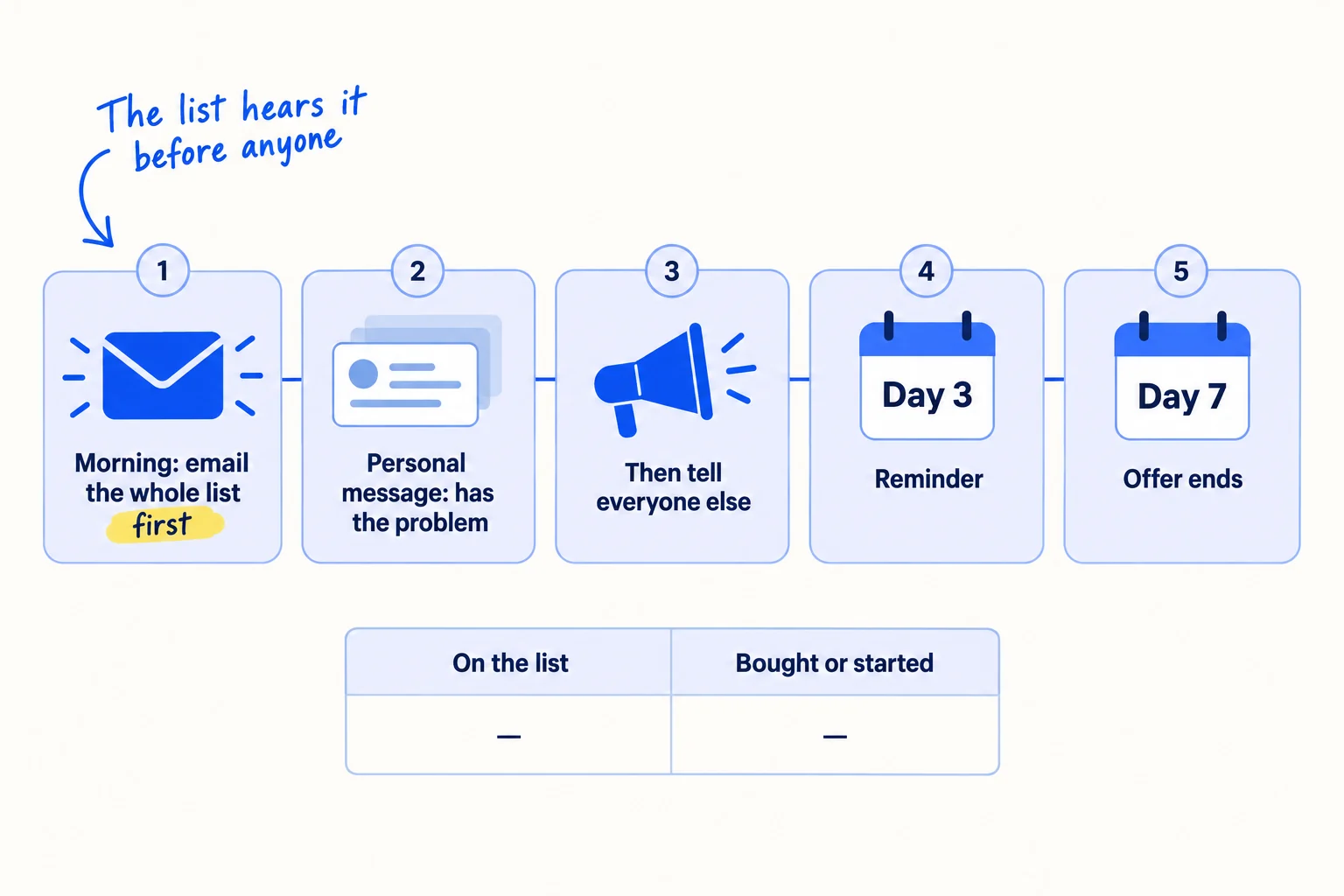
Work through launch day in this order:
- In the morning, email the whole list. Say it is open, what they get, and the date the offer ends, no more than 7 days away. Put one link in the email, to the page where they buy or start.
- Write to everyone marked "has the problem now" yourself, with the link and one line about what they told you. These are your most likely first customers.
- Then tell everyone else, the same day, or on the day the list's first access ends. Post on both channels, and announce it on social media. Launch on Product Hunt only if people can use it that day, or post a Show HN if your buyers are developers.
- On day 3, email everyone on the list who has not bought or started: one line, the link and the end date.
- On day 7, send the last one: "The offer ends tonight." Then stop. Anyone who left the list gets nothing more.
Help every new customer the same day. If you run a SaaS, set up each new user within 24 hours with the 15-minute set-up offer, and send your onboarding emails. Ask anyone happy with it for one sentence you can quote. It is your first testimonial.
Seven days after launch, count what the list did. Expect small numbers. The 2022 survey found that under 5% of people on waitlists for physical products bought, and 5% to 25% of people on software waitlists paid. The April 2026 founder turned more than 300 names into 3 paying users. Then use this rule:
- At least 1 in 20 people on the list bought or started: the list worked. Keep the 100 invites a day going, now pointing straight to the product. That routine is how you get your first sales on Shopify or your first 100 SaaS users.
- Fewer than 1 in 20: message 10 people who had the problem but did not buy, and ask what stopped them. Then fix that first. Work through why no one is buying, or fix a launch that got zero signups.
Subject: [Product] is open, and you're firstHi [first name],[Product] is open today. You joined the list, so you get [what they get] until [end date, no more than 7 days away].[The result, in one line, for the kind of person they are.][One link: start / order here]If anything gets in the way, reply to this email. I'll help you myself.[Your name]
[Your company, postal address]
[Leave the list]
- Tool: Kit or Shopify Messaging for the list, your own email for personal messages, and your Google Sheet.
- Time: most of launch day, then about 1 hour on day 3 and on day 7.
- You will have: a launch row in your sheet showing people on the list, emails sent, and who bought or started.
- It worked if: at least 1 in 20 people on the list bought or started within 7 days, and you know which ones had marked "has the problem now".
- Common mistake: telling the public before the list, or sending one email and never following up. The other mistake is judging the waitlist by its size; count the people who bought.
See it done: Ferns & Rinse's launch email, before the store opened to everyone
To: Everyone on the waitlist
Subject: Ferns & Rinse is open, and you're first
Hi Nadia,
Ferns & Rinse is open today, just for the list. You can order now, before anyone else. We open to everyone on Sunday.
Shampoo and conditioner for dry, curly hair, made from plants: $28 each, or both for $49.
[Order here]
If anything gets in the way, reply to this email. I'll help you myself.
Maya, Ferns & Rinse [Postal address] [Leave the list]
Why it works: It says it is open, what she gets and when that ends, with one link and an offer of help, in five short lines.
Where Scout7 helps
Scout7 speeds up two of the seven steps: 4 and 5.
Step 5. Scout7 makes image posts with captions in your voice, and short portrait (9:16) videos from a script you direct. It schedules them to LinkedIn, X, Instagram, Facebook, Threads and Reddit, and shows the 4 weeks in one calendar. You approve each post and each video. Nothing goes live without your approval.
Step 4. Join Conversations searches social platforms for live discussions about your problem, groups them by the kind of reply that fits, and drafts a reply in your voice. You read each thread and approve or rewrite every reply.
Your waitlist checklist until launch day
0 of 14 done
Work through this list with an AI assistant
It drafts the work and keeps track of what is done.
Frequently asked questions
- How many people should be on a waitlist before you launch?
There is no number that makes a launch work. What matters is how many people on the list have the problem now and heard from you in the last week. Launch on your date with what you have, even 50 people, and keep the 100 invites a day going after launch. Waiting for a bigger list lets the people on it go cold.
- Is a waitlist worth it if my product is ready?
No. If people can sign up or buy today, a waitlist only makes them wait. Send them straight to the product, with the easiest way to try it. Product Hunt also does not feature waitlisted products unless people get in right away. A waitlist is for a store or product that is not open yet, or a beta with limited places.
- What is the best free tool to build a waitlist page?
Tally's free plan has unlimited forms and signups, and it sends every signup to a Google Sheet. Put the form on a page of your site, or share its own link. For a Shopify store that is not open yet, use the password page and its email signup banner. Paid waitlist tools add referral boards, which you do not need until your list is bigger.
- How often should I email my waitlist?
Write to each new person once, yourself, within 24 hours. Then email the whole list once a week, every Sunday, with what you finished, one thing you learned and the launch date. On launch day, email them first, then follow up on day 3 and day 7. Keep each email short and ask one question, because replies tell you who has the problem.
- Should I add a referral reward to my waitlist?
Not at first. A referral reward, such as moving up the list for each friend who joins, needs people who already care enough to share. Until 100 people on your list have answered your question, your hours bring more from personal invites. After that, a simple "forward this to one person who has this problem" line in your Sunday update is enough. A referral program comes later.
Sources
- 1.What is good waitlist conversion — Lenny's Newsletter, 1 March 2022, checked 29 September 2026
- 2.300+ waitlist signups, launched March 12... and only 3 paying users — Indie Hackers, 1 April 2026
- 3.I was about to open my waitlist. Almost nobody was asking for it. — Indie Hackers, 4 June 2026
- 4.Product Hunt featuring guidelines — Product Hunt Help Center, updated 10 March 2026, checked 29 September 2026
- 5.Tally pricing — Tally, checked 29 September 2026
- 6.Google Sheets integration — Tally Help Center, checked 29 September 2026
- 7.Restrict access to your online store — Shopify Help Center, checked 29 September 2026
- 8.Collecting customer contact information — Shopify Help Center, checked 29 September 2026
- 9.Shopify Messaging email pricing — Shopify Help Center, checked 29 September 2026
- 10.Kit pricing — Email Tool Tester, updated 3 September 2026, checked 29 September 2026
- 11.Email sender guidelines — Google, checked 29 September 2026
- 12.CAN-SPAM Act: A Compliance Guide for Business — US Federal Trade Commission, checked 29 September 2026
- 13.Electronic mail marketing — UK Information Commissioner's Office, checked 29 September 2026
Next article to read
How to announce a new business on social mediaOnce people have joined, this shows how to tell them and everyone else on launch day.Read it nextRelated guides
- How to write a landing page that convertsComing soon
- How to build an email list for freeComing soon
- How to validate a business idea without spending moneyValidate a business idea without spending money: set a pass mark, message 100 people a day about the problem, ask everyone who has it to pay through a free one-page offer, and decide after 2,800 messages.
- How to launch on Product HuntSaaSLaunch your SaaS on Product Hunt so the day brings users: check you have about 20 users and a no-signup demo, build a launch list with 100 messages, 20 answers and 2 posts a day for 3 weeks, reply to every comment within an hour on launch day, and message every commenter the next day.
Guides that link here
- How to validate a business idea without spending money
- How to get beta users for your startupSaaS
- How to launch on Product HuntSaaS
- How to announce a new business on social media
- How to launch a D2C brandD2C
- How to fix a SaaS launch that got zero signupsSaaS
- How to launch a product on AmazonD2C
- How to post a Show HN on Hacker NewsSaaS
- How to submit your SaaS to directoriesSaaS
Cite this page
Dinesh Bypilla (2026). How to build a waitlist before you launch. Scout7 Academy. https://scout7.ai/academy/launch/how-to-build-a-waitlist-before-you-launch
Written by Dinesh Bypilla, Agentic systems engineer at Scout7. Reviewed by Murali Sid. Last checked 29 September 2026.
Quote any part of this guide with a link back to this page. © 2026 Scout7.
Markdown version of this page: https://scout7.ai/academy/launch/how-to-build-a-waitlist-before-you-launch.md