



How to write a blog post that ranks on Google
Write a blog post that ranks on Google: read the top 5 results for your keyword, add one thing only you know, let AI draft from your notes, check every fact, link it from 3 of your pages, publish 1 a day, and count posts with impressions every Sunday.
ByDinesh BypillaReviewed byMurali SidLast checked 20 min read
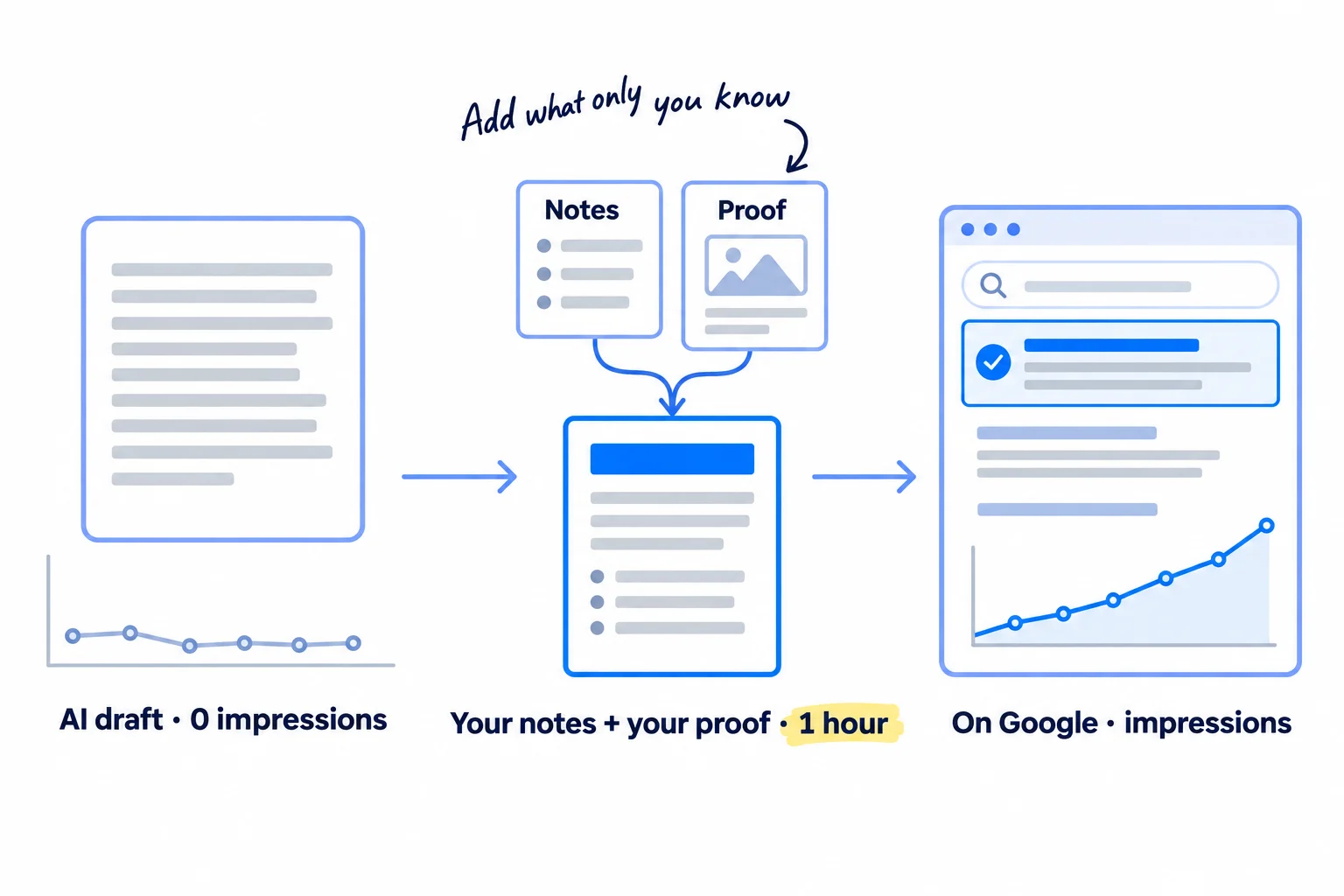
You have a keyword, and AI can write 1,500 words about it in a minute, but your posts get no impressions, or they get readers and no signups. Here is how to write a blog post that ranks on Google now: check what Google already shows, add one thing only you know, and let AI draft from your notes, 1 post a day. Posts that only repeat what already ranks are the ones Google and AI answers pass over.
Do these three things
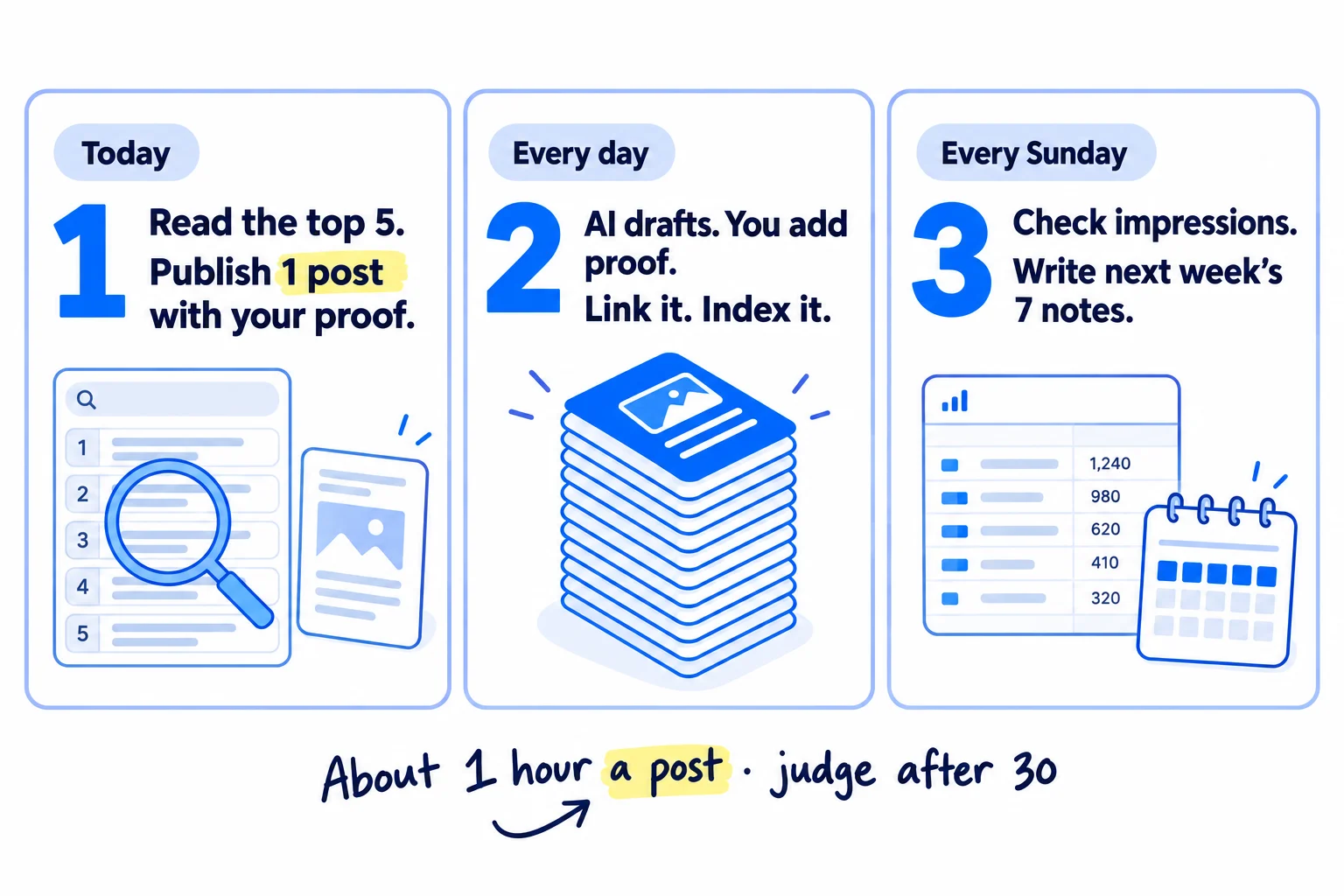
About 1 hour a post, every day. Judge the method after 30 posts: at least 10 of them should show impressions in Search Console.
Show the three actions in fullHide the full list
- Today: search your next keyword, write down what the top 5 results all say and what they leave out, and publish one post that answers it in the first two lines with one thing only you know.
- Every day: publish 1 post the same way: AI drafts from your notes, you add your proof, check every fact, link it from 3 of your pages, and ask Google to index it.
- Every Sunday: check in Search Console which posts are on Google with impressions, send the ones at position 8 to 20 to be improved, and write next week's 7 post notes.
Get help doing these
ChatGPT or Claude reads this guide and works through it with you.
1. Search your keyword and copy what the top 5 results have in common
Before you write, search your keyword on Google and spend 10 minutes on the top 5 results. They show you what kind of page Google wants for that search, what every good answer covers, and what they all leave out. What they leave out is the reason your post should exist.
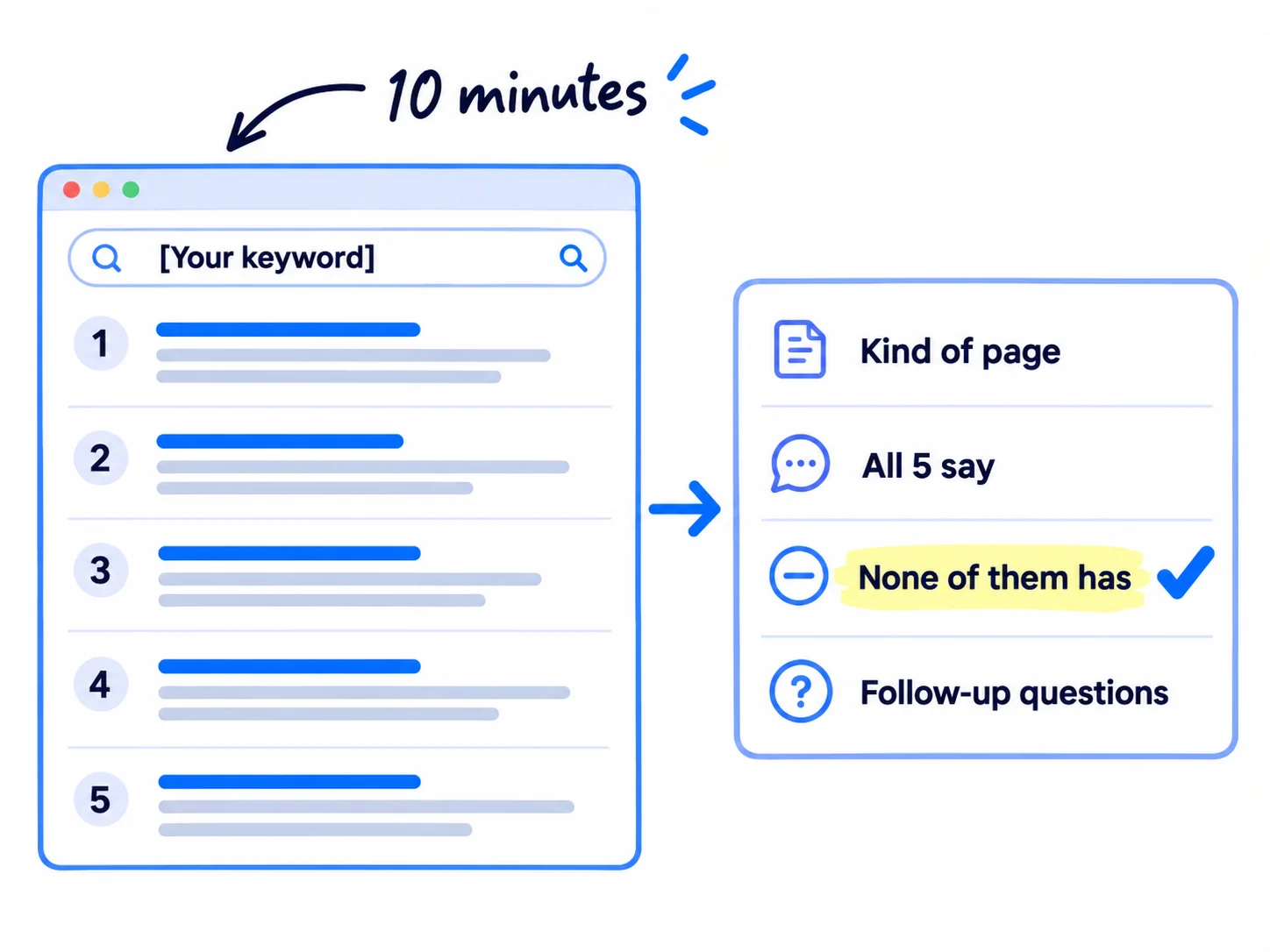
Open a private browser window, so your own past searches do not change what you see, and search the keyword as your buyer would type it. Then fill in the post notes below from the top 5 results. Your keyword and the kind of page should already be in your list; this is the last check before you write.
- Kind of page. Write what most of the top 5 are: a how-to guide, a list of options, a comparison, a product page, a tool. Your page must be the same kind. This is what people mean by search intent.
- All 5 say. Write the 3 to 6 points every result covers. Your post needs them too, or it looks incomplete next to the others.
- None of them has. Write what is missing: a real price, a step for your kind of buyer, a screenshot, the exact words to send, a newer rule. This is your gap.
- Follow-up questions. Copy the questions in the "People also ask" box and in Google's AI answer, and add the question you would ask next. Most People also ask answers are now AI answers themselves, but the questions are still what people want to know.
Then decide:
- If 3 or more of the top 5 are product, category or service pages, do not write a blog post. The keyword belongs on a product page or a service page. For a store, that is SEO for your Shopify store; for a B2B company, the service pages that bring enquiries.
- If 3 or more are "[A] vs [B]" or "[tool] alternatives" pages, write a comparison or alternatives page instead.
- If the top 5 are strong and complete, and you cannot fill "None of them has", skip the keyword today and take the next one on your list. Step 2 decides for sure.
- Otherwise, write the post.
Plan for AI Overviews too. On "how" and "what is" searches, Google often answers on the results page, and in a February 2026 Ahrefs study the top result got 58% fewer clicks, on average, when an AI Overview was shown. So every post you write ends with one clear next step to the page that sells, and buyer keywords come before learner keywords, as in the order from how long SEO takes to work.
Keyword: [the phrase, as people type it]
Kind of page that ranks: [how-to guide / list / comparison / product page / tool]
All 5 say: [point 1] · [point 2] · [point 3]
None of them has: [the gap]
Follow-up questions: [question 1] · [question 2] · [question 3]
Only I know (step 2): [your proof]
Next step for the reader: [try it free / ask for a quote / see the product], link: [your page]
- Tool: Google in a private window, and a Google Doc or Sheet for the notes. Free.
- Time: 10 minutes.
- You will have: one post notes block with the kind of page, the points all 5 cover, the gap and 3 to 5 follow-up questions.
- It worked if: you can name the kind of page, list at least 3 points all 5 cover, and write at least 1 thing none of them has.
- Common mistake: copying the top result's headings and writing the same post again. Google asks whether your content provides "substantial value when compared to other pages in search results". A copy of page one does not.
See it done: Bugmoth's post notes for one keyword
Bugmoth is a made-up bug-reporting tool for small web teams. It costs $19 a month per team, with a 14-day trial.
| Field | What they wrote |
|---|---|
| Keyword | how to get clients to report bugs |
| Kind of page that ranks | how-to guides (4 of 5), one list of tools |
| All 5 say | use a form · ask for the steps · ask for the browser · add a screenshot |
| None of them has | the exact message to send a client · what to do when a client sends a phone screenshot and nothing else |
| Follow-up questions | What should a bug report include? · Is there a free bug report template? · How do I stop clients reporting bugs by email? |
| Next step | 14-day free trial, link to the signup page |
Why it works: The notes show the kind of page to write, and the gap is something only a team that watches clients report bugs can fill.
2. Write down the one thing only you can add to the post
Write 3 to 5 lines about this question that none of the top 5 results can say, because they come from your business. This is what Google calls non-commodity content, and it is the part AI cannot write for you.
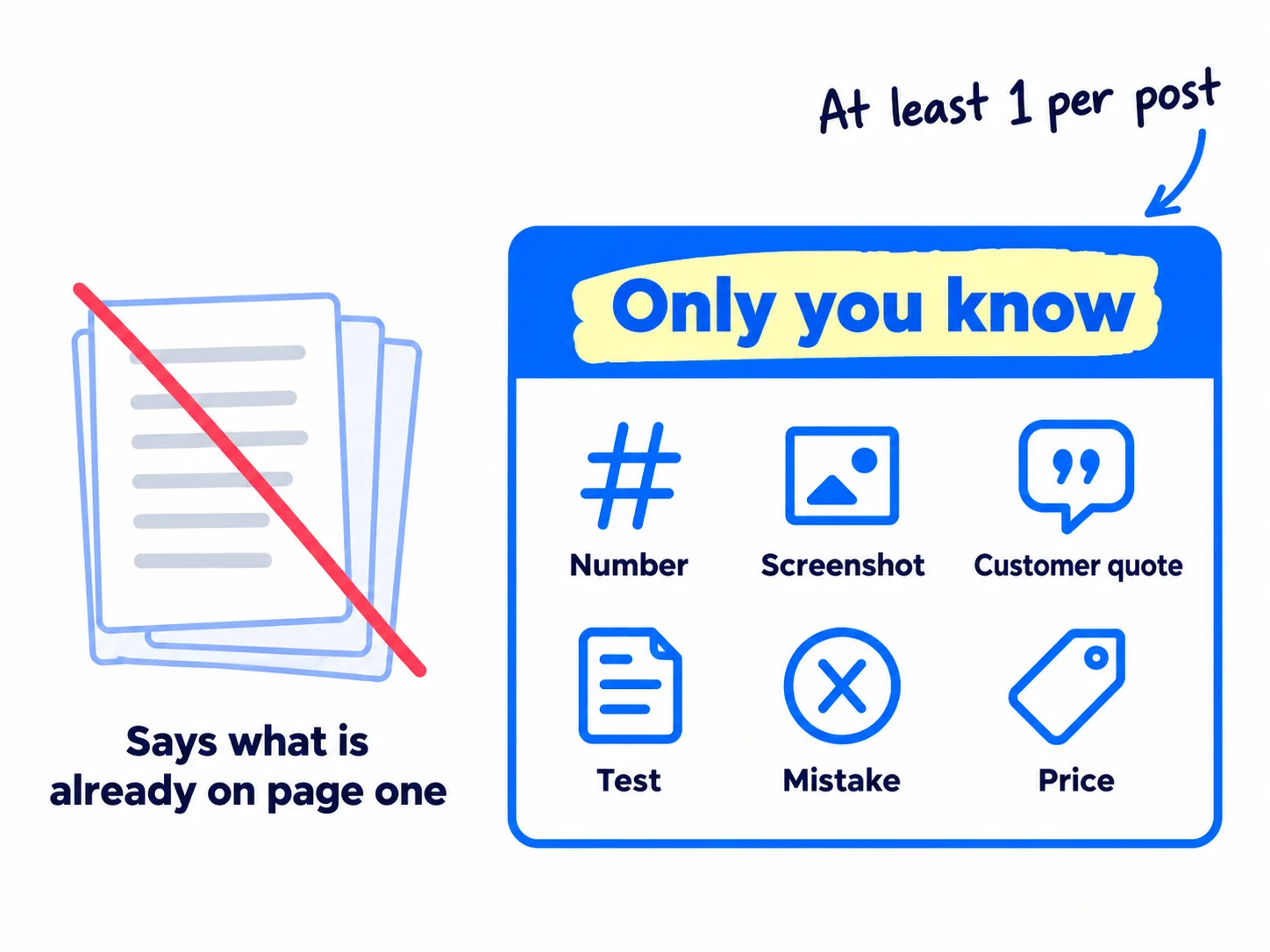
Google's own guide on AI search, updated in July 2026, puts it plainly. It calls a post like "7 Tips for First-Time Homebuyers" commodity content that "adds little unique insight", and says "a first-hand review provides a unique perspective based on personal experience, whereas a summary of existing content simply restates information already available elsewhere." A July 2026 Ahrefs study found the same thing from the other side: basic AI posts repeat common knowledge without adding anything new and leave out "first-person experiences", and pages with less AI text got 2 to 3 times the impressions of pages that were mostly AI.
Pick at least one of these for every post:
- A number from your business: your price, how long the work takes, your minimum order, how many customers asked this.
- A screenshot or a photo of the real thing: your product doing the step, your work, your packaging.
- A customer's own words, with their permission. Collecting testimonials gives you a stock of these.
- A test you ran: "we tried both for 2 weeks, and this is what happened".
- A mistake you made, and what you changed.
- An opinion you can back up: "we do not recommend X for small teams, because …".
Take them from your last 10 sales calls and emails, your customer interviews, your product and your own notes. If you have nothing for this keyword, spend 15 minutes asking one customer the question, or take the next keyword.
If you run a B2B company: your proof is the numbers buyers ask for on calls: price ranges, lead times, minimum orders, the standards you meet. Put them in the post, with a short case study where one fits, and send readers to your quote page.
If you run a D2C store: your proof is photos of the product in use, what it is made of, and what buyers said in their first reviews. Take the photos yourself; a stock photo proves nothing.
If you run an agency and write for clients: the proof has to come from the client. Book 15 minutes with them each week, ask 5 questions about the week's topics, and record the call. Put the client's expert on the byline, and keep each client's voice separate when AI drafts.
- Tool: your call notes, emails and product. No paid tool.
- Time: 10 minutes.
- You will have: 3 to 5 lines of proof in the "Only I know" line of your post notes.
- It worked if: at least one line is something a competitor could not write, because it comes from your customers, your numbers or your product.
- Common mistake: writing "in our experience" or "we have found" with nothing after it. Name the number, the customer or the test. And never make a number up: Google asks whether a page has "any easily-verified factual errors".
See it done: Bugmoth's proof line
What the AI draft said
Clear bug reports help your team fix issues faster and keep clients happy.
What they wrote instead
Both of our paying teams told us the same thing: clients send a phone screenshot and no link. So the first field on our form asks for the page link, before anything else.
Why it works: The new line says what their own customers did, which no other page can say, and it leads straight to the tip.
3. Draft the post with AI from your notes, with the answer in the first two lines
Give ChatGPT or Claude your post notes and ask for a first draft that answers the question in its first two lines. With your notes in the prompt, the draft takes about 5 minutes, and it starts from your gap and your proof instead of from what already ranks.
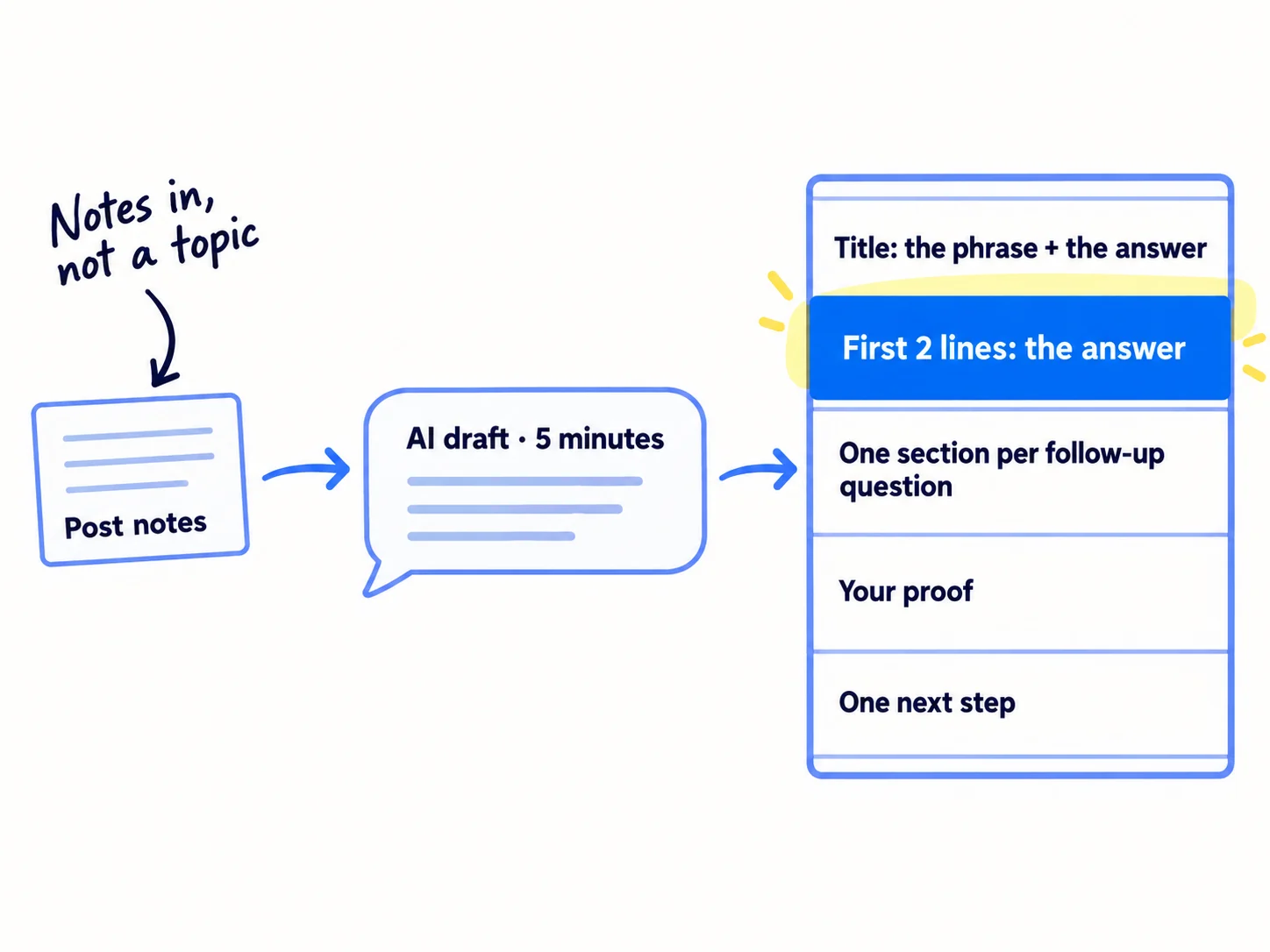
Paste this prompt with your notes filled in:
Write a first draft of a blog post for [your business], which sells [what you sell] to [who buys it].Keyword: [keyword]. The page must be a [kind of page that ranks].
Title: start with the keyword, then give the short answer.
First two lines: answer the question in full, with a number if there is one. No introduction before the answer.
Cover these points, because every top result does: [All 5 say].
Add what they miss: [None of them has].
Use my proof in the section where it helps, in my words: [Only I know].
Give each of these questions its own short section, with the question as the heading: [Follow-up questions].
End with one sentence that sends the reader to [next step] at [link].
Write in plain English, short sentences, for someone who is busy. No "in today's world", no hype words, no made-up facts, numbers or quotes. Mark anything you are unsure of with [CHECK].
Why this shape works now:
- The answer comes first. A reader who lands from Google wants the answer before anything else. A post that starts with "In today's fast-moving world" loses them in the first line.
- One section per follow-up question. Google's AI Overviews and AI Mode run related searches in the background, which Google calls query fan-out, so a post that answers the follow-ups can be shown for them too. Put them on this page. Google says that making separate pages "for every possible variation of how people might search" breaks its scaled content abuse policy.
- One next step. Pick one call to action: start a trial, ask for a quote, see the product. A post with no next step can rank and still bring no customers.
You do not need to write in a special way for AI answers. Google's July 2026 guide says you can ignore "chunking" posts into tiny pieces, rewriting "just for generative AI search", and "LLMS.txt files". Clear headings and the answer first are for people, and they are enough for Google too. Getting named by ChatGPT is its own job: getting your brand mentioned by ChatGPT.
Write 1 post a day. With your notes ready, one post is about 1 hour of your time. That is well inside Google's rules as long as each post answers a real question with your own proof: the problem Google names is "many pages" made "without adding value for users".
- Tool: ChatGPT or Claude, both free to start, and a Google Doc.
- Time: 5 minutes.
- You will have: a full first draft in a Google Doc.
- It worked if: the first two lines answer the keyword on their own, every follow-up question has its own heading, and your proof is in the body, not tacked on at the end.
- Common mistake: typing "write a blog post about [keyword]" with no notes. You get the average of what already ranks, which is exactly what Google says adds "little unique insight".
See it done: Bugmoth's title and first two lines
Before
The Ultimate Guide to Bug Reporting. In today's fast-paced world of web development, bugs are a fact of life, and clear communication with clients has never been more important.
After
How to get clients to report bugs: send them one short form. Ask for 4 things: the page link, what they clicked, what they expected, and a screenshot. You get what you need to fix it the first time.
Why it works: The new version answers the search in the title and the first two lines, so a reader gets the answer without scrolling.
4. Edit the draft: add your proof, check every fact and cut what repeats
Edit the draft until every line is true, every fact has a source, and nothing is said twice. This is where most of your hour goes, about 25 minutes, and it is the difference between your post and the unedited AI drafts ranking below it.
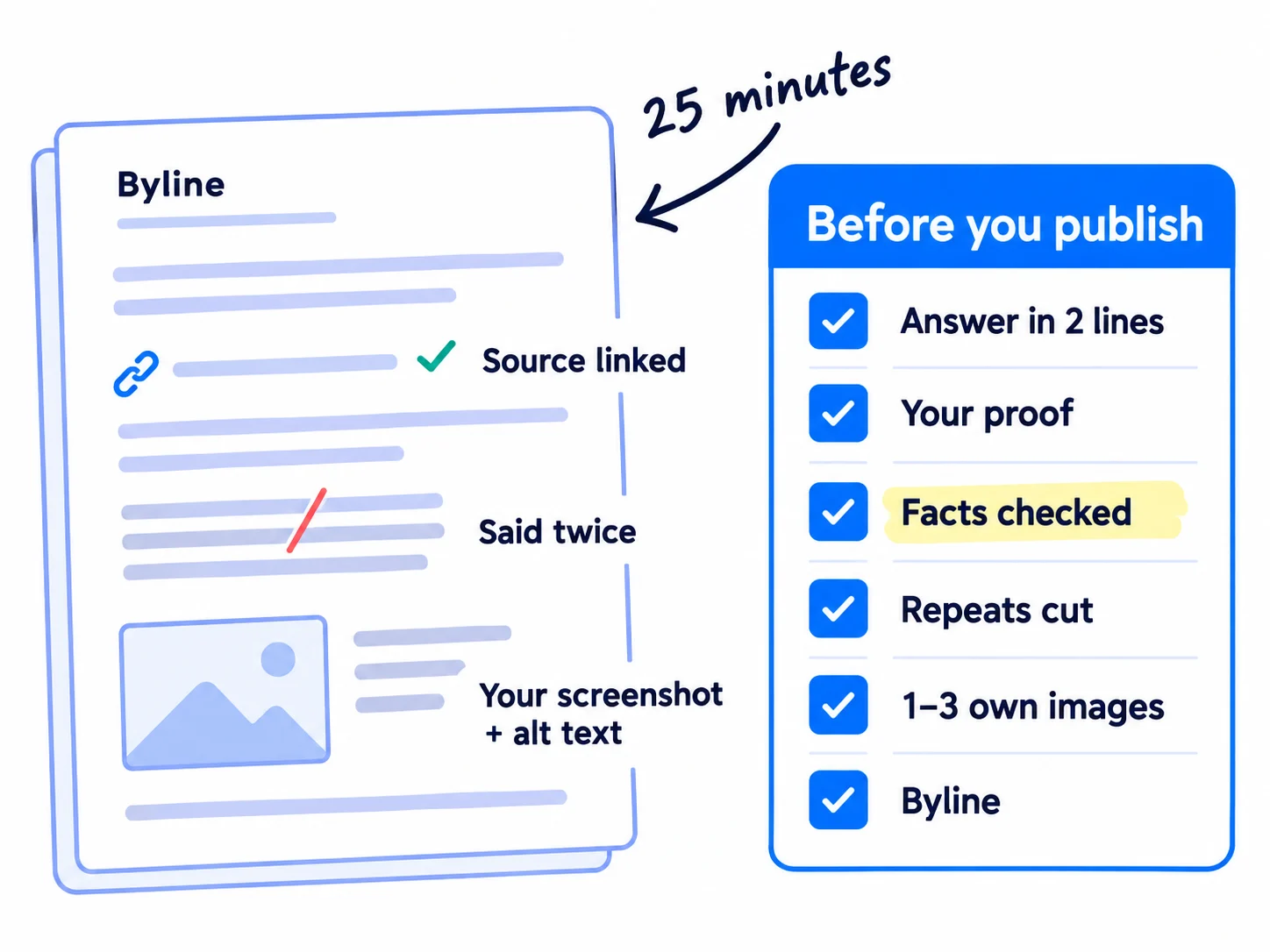
Read the draft out loud once, then go through this check. Fix each line before you move on.
The first two lines answer the keyword on their own.
Your proof is in, in your own words: the number, the screenshot, the customer, the test.
Every price, date, number, rule and quote is checked against its source, and the source is linked. Every [CHECK] is gone.
Nothing is said twice. Cut any sentence a busy reader could skip.
1 to 3 images you made: a screenshot, a photo, a simple table. Each sits next to the text it explains and has alt text that says what it shows.
A byline with your name and one line on why you know this, linked to your about page.
Google says links to other sites "can help establish trustworthiness (for example, citing your sources)", and it asks: "Is it self-evident to your visitors who authored your content?" That is what the sources and the byline are for.
How long should the post be? There is no target. Google says it has no preferred word count, and "there's no magical word count target". Use this rule: cover every point all 5 top results cover, add your gap and your follow-up questions, then stop. If a point all 5 cover is missing, add it. If your post is more than twice as long as the longest of the top 5, cut repeats until it is not.
If you run a SaaS: add a screenshot of your product doing the step the post describes, and put your free trial link right after it. A reader who has just seen the step is the one most likely to try it. If posts bring readers but no trials, fix the page before the signup.
- Tool: Google Docs. Free.
- Time: about 25 minutes.
- You will have: a finished post that passes the 6-line check.
- It worked if: all 6 lines pass, and when you show the page to someone who fits your buyer, they find the answer within 10 seconds.
- Common mistake: publishing the AI draft as it came out. The July 2026 Ahrefs study lists what those drafts get wrong: no links, no images, no first-person experience, and "obvious mistakes and inaccuracies". The other mistake is padding a post to reach a word count.
5. Set the title, URL and links, then publish and ask Google to index it
Before you press publish, set the title, the URL, the description and the links. They take about 10 minutes, and they decide whether Google can find the post, understand it, and show it with a title people click.
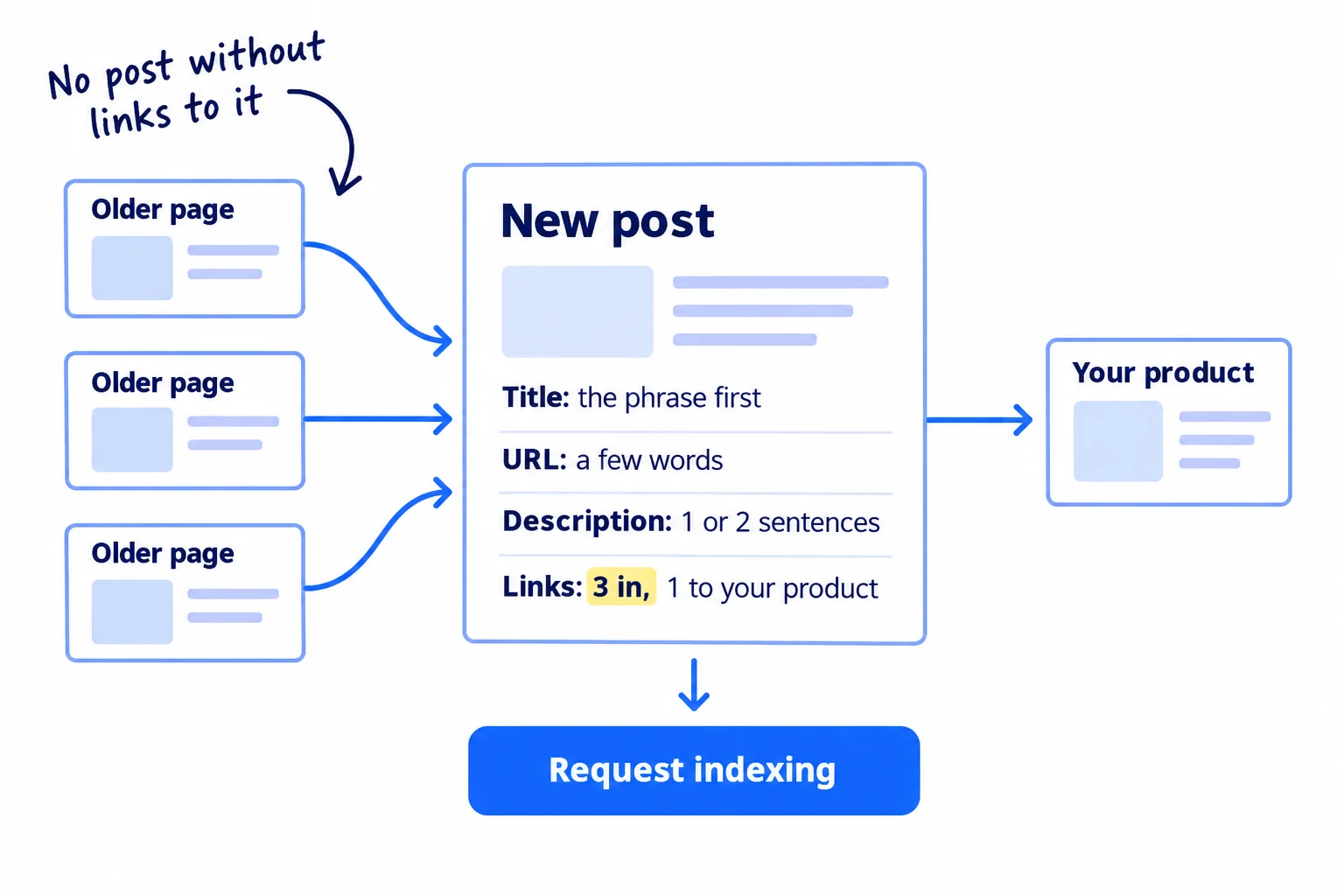
Set these in the SEO or search settings of your site builder for the post:
- Title. Put the search phrase in the first words, then the short answer: "[search phrase]: [the short answer]". Google sets no length limit, but it cuts titles to fit the screen, so the phrase goes first. Use the same words in the main heading on the page. Never repeat the keyword in different forms: Google gives "Foobar, foo bar, foobars, foo bars" as an example of a title to avoid.
- URL. A few plain words from the phrase, such as yoursite.com/blog/[a-few-words-from-the-phrase]. Leave out dates and numbers, so the URL still fits after you update the post.
- Description. One or two sentences that say what the post answers and for whom. Google shows it sometimes, and writes its own from your page other times. Make it different on every post.
- Links to the post. Add a link to it from 3 of your older posts or pages, on words that describe it. The words you link are called anchor text. Google says "every page you care about should have a link from at least one other page on your site".
- Links from the post. One link to the page that sells (your trial, quote page or product), and links to your sources.
Then publish, paste the post's URL into URL Inspection in Google Search Console, and click "Request indexing". If posts stay off Google after 2 weeks, find what stops Google, and run the technical SEO checklist once for the whole site.
The same day, share the post where it answers someone's real question: a reply in the places your buyers ask for help, a LinkedIn post, or your email list. On Reddit, read the rules on links first. Each post gets its first readers this way, long before Google sends any, and a good post can be turned into posts for other channels.
If you run a D2C store: link from the post to the product, with the product's name as the link words, and link back to the post from the product page. Blog posts help, but your product descriptions and collection pages usually bring the first orders from Google, so fix those first.
- Tool: your site builder and Google Search Console. Free.
- Time: about 10 minutes.
- You will have: a live post with a clear title, a short URL, 3 links pointing to it, and indexing requested.
- It worked if: 3 of your pages link to it, indexing was requested today, and within 2 weeks URL Inspection shows "URL is on Google".
- Common mistake: a post that no other page on your site links to. Google and readers find pages through links, and a post with none is hard for both to reach. The other mistake is changing the date later to make a post look new. Google lists "changing the date of pages to make them seem fresh when the content has not substantially changed" as a warning sign.
6. Every Sunday, check which posts Google shows and plan the next 7
Every Sunday, spend about 45 minutes checking which posts Google now shows, and write the notes for next week's 7 posts. Judge the method by how many posts you have published, not by how many weeks have passed.
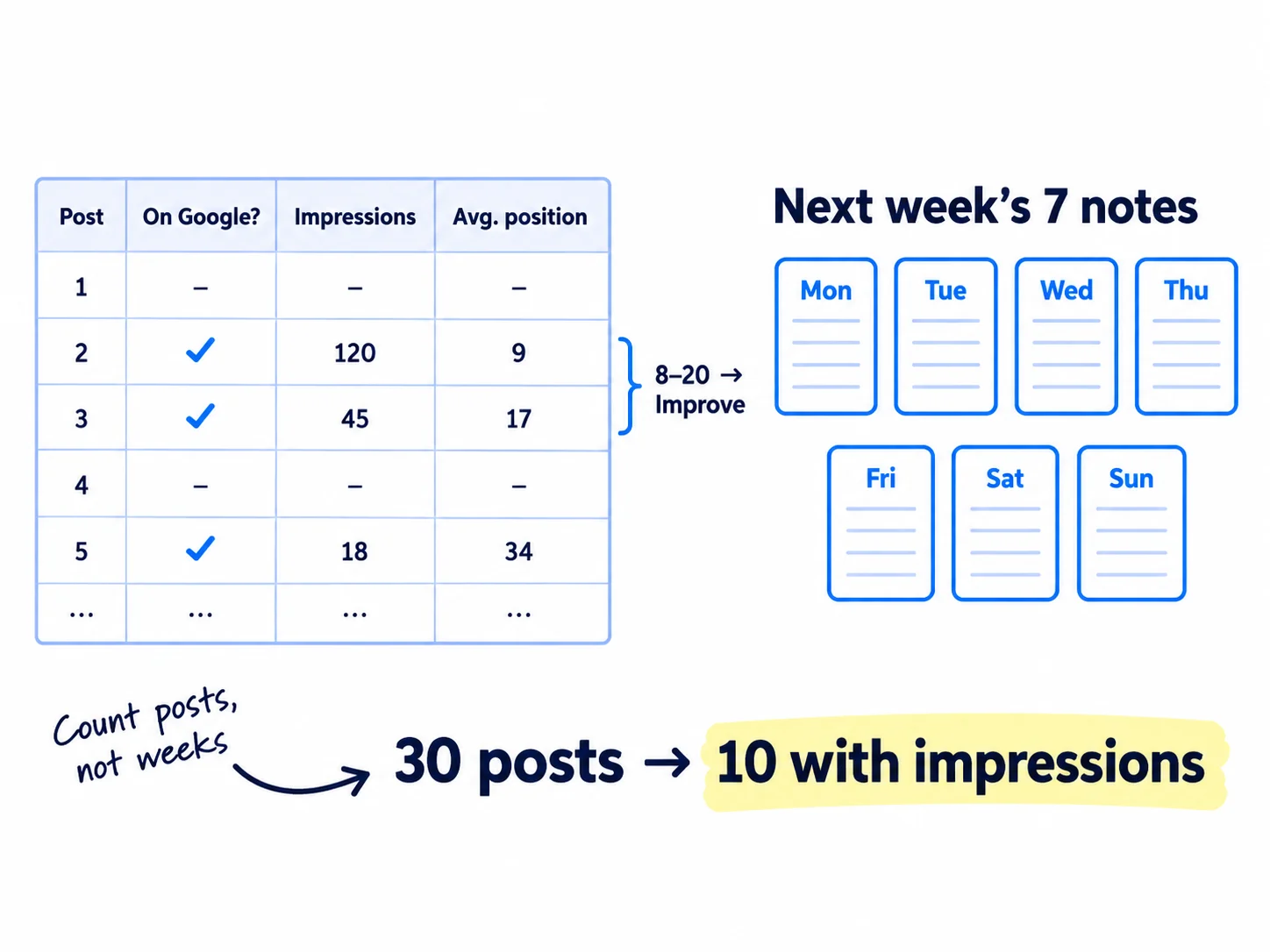
In Search Console, open Performance, then Search results, and click the Pages tab. Write one row in your sheet: posts live, posts with impressions, and posts with an average position between 8 and 20. Impressions are how often Google showed a post. Average position is where it showed: 1 to 10 is page one, 11 to 20 is page two. Then use these rules:
| After this many posts | You pass if | If you miss it |
|---|---|---|
| 14 | At least 12 show "URL is on Google" in URL Inspection | Fix indexing before you publish more |
| 30 | At least 10 have impressions | Your keywords may be searches nobody makes, or the kind of page is wrong. Redo step 1 for the next 7 keywords, and check them against your keyword list |
| 90 | At least 5 have an average position under 20 | Go back to buyer keywords, and start getting backlinks |
These are the same pass lines as in how long SEO takes to work. At 1 post a day, 30 posts is month 1 and 90 is month 3. Every post at position 8 to 20 is close to page one: put it on your list to make it rank higher, up to 3 a week in place of new posts, from month 3.
Since 31 August 2026, every site also has Search Console's Search Generative AI report, which counts how often your pages were shown in AI Overviews and AI Mode. Fewer people click from those answers, so count impressions and enquiries, not only clicks. Once a month, ask ChatGPT your top buyer question and write down who it names.
Then fill in next week's 7 post notes (steps 1 and 2) from the top of your keyword list, and put them in your content calendar. Each day then starts with the notes ready, and the post takes an hour.
Google says to "wait a few weeks" before you judge a change. Also wait while a ranking update runs (a spam update started on 24 September 2026; Google lists each one on its Search Status Dashboard), and judge on the week after it ends.
If you run an agency: fill in one sheet per client, and show the posts with new impressions in your monthly client report. When a client asks why nothing ranks yet, the pass lines help you explain SEO timelines.
- Tool: Google Search Console and a Google Sheet. Free.
- Time: about 45 minutes every Sunday: 15 to count, 30 for the 7 post notes.
- You will have: one row in your sheet, a short list of posts to improve, and 7 post notes for next week.
- It worked if: you can say pass or miss from one number, and next week's 7 notes are written before Monday.
- Common mistake: rewriting or re-dating a post every week because it has not moved. Leave a post alone for 4 weeks after a change. The other mistake is counting searches for your own brand name, which come from your other work, not from your posts. Measuring SEO success shows how to leave them out.
Where Scout7 helps
Scout7 does parts of steps 1 to 6. You still choose the keywords, add the proof and approve every post.
Step 1. Keyword intelligence gives each term its monthly searches, difficulty and trend, and shows who leads on Google and who leads in AI answers for it, so you see who you are writing against before you start.
Steps 2 to 4. Content Co-Pilot asks you research-backed questions about the post, with recommended answers and the evidence behind them, then lays out the sections and drafts the article with images, keyword placement, FAQs and structured data. Your answers to its questions are where your proof goes in; they are what stop ten articles sounding the same. It cites real sources inside each article and links your articles to each other. You edit the draft and approve it. Nothing is published without your approval.
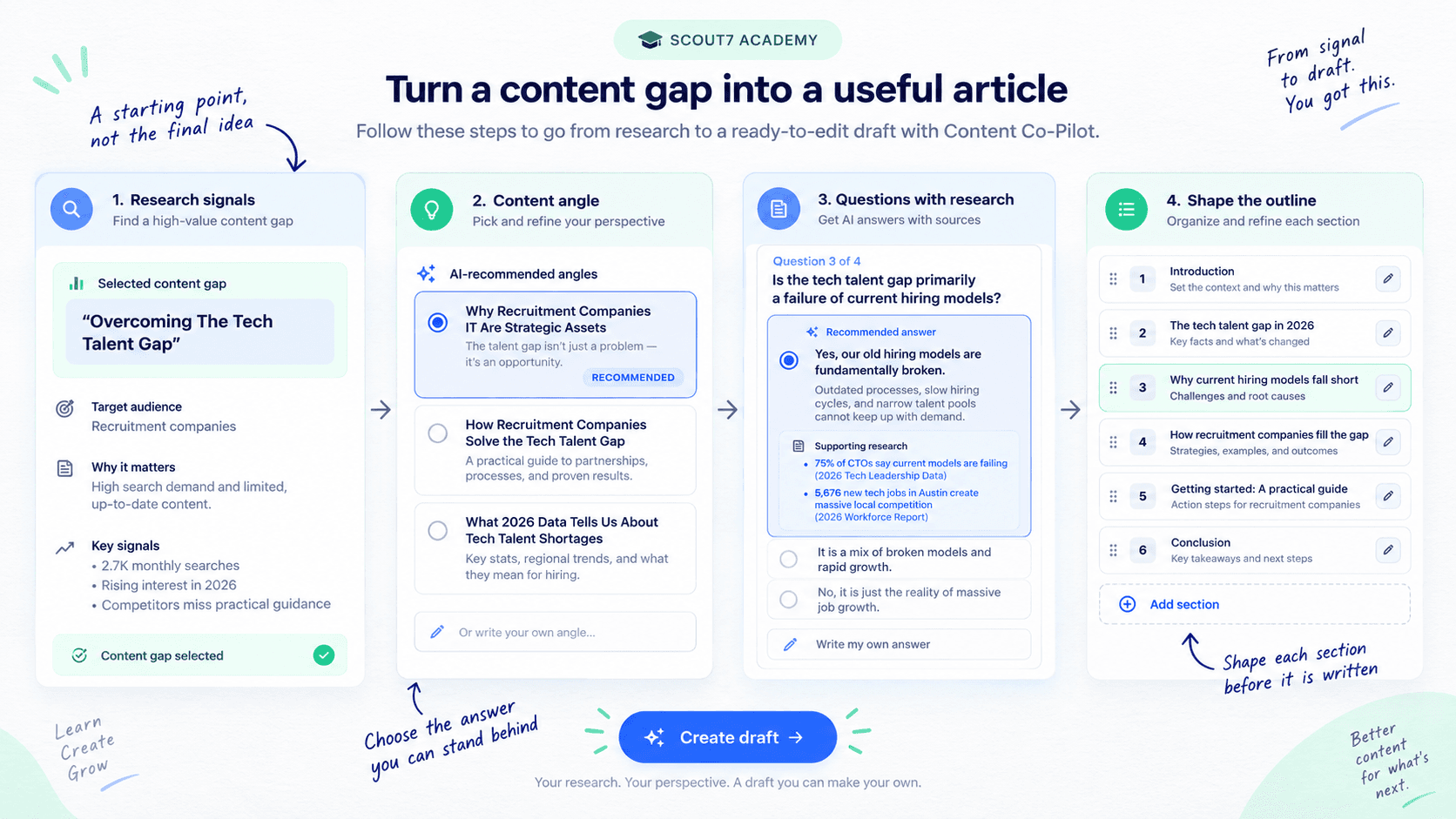
Step 5. It can host your blog under your own domain at /content, and makes the sitemap, robots.txt and structured data for it. It publishes to the Scout7-hosted blog, not into a site builder you already use.
Step 6. In the Scout7 app, once you connect your own Google Search Console, it shows your real impressions, clicks and positions next to its search and AI audit.
Your blog post checklist: 1 post a day
0 of 9 done
Work through this list with an AI assistant
It drafts the work and keeps track of what is done.
Frequently asked questions
- How long should a blog post be for SEO?
There is no right length. Google says it has no preferred word count, and length alone does not change rankings. Cover every point the top 5 results all cover, add what they miss and answer the follow-up questions, then stop. Some posts need 600 words; some need 2,500. Cut repeats before you add words.
- Does AI-written content rank on Google?
It can. Google does not punish AI use; it treats pages made in bulk "without adding value for users" as spam. In a July 2026 Ahrefs study, 5.3% of top-3 pages were fully AI-written, but pages with less AI text got 2 to 3 times the impressions. Let AI draft, then add your own proof and check every fact. Using AI for content goes further.
- How many blog posts per week do I need to rank?
Aim for 1 a day, 7 a week, each on a real buyer question with your own proof. Fewer posts means fewer chances and a longer wait. Judge the method after 30 posts: at least 10 should show impressions. A few posts a month usually leaves you guessing at month 6. The full timeline is in how long SEO takes to work.
- Do I need an FAQ section or schema markup to rank or get into AI answers?
No. Google stopped showing FAQ rich results on 7 May 2026, and its July 2026 guide says structured data "isn't required for generative AI search". A short FAQ still helps readers who have one more question. Schema markup still makes some pages eligible for other rich results; adding schema and llms.txt covers when it is worth it.
- How long until a new blog post ranks?
A new post is usually on Google within days to a few weeks, and can show for small, exact searches soon after. Clicks usually start around month 3 for a new site that publishes every day. If a post is stuck at position 8 to 20 after 4 weeks, make it rank higher instead of writing it again.
Sources
- 1.Optimizing your website for generative AI features on Google Search — Google Search Central, updated 10 July 2026, checked 30 September 2026
- 2.A new resource for optimizing for generative AI in Google Search — Google Search Central Blog, 15 May 2026
- 3.Creating helpful, reliable, people-first content — Google Search Central, updated 10 December 2025, checked 30 September 2026
- 4.SEO Starter Guide — Google Search Central, updated 10 December 2025, checked 30 September 2026
- 5.Google Search's guidance on using generative AI content on your website — Google Search Central, updated 10 December 2025, checked 30 September 2026
- 6.Spam policies for Google web search: scaled content abuse — Google Search Central, updated 28 August 2026, checked 30 September 2026
- 7.Influencing your title links in search results — Google Search Central, updated 10 December 2025, checked 30 September 2026
- 8.Control your snippets in search results — Google Search Central, updated 20 April 2026, checked 30 September 2026
- 9.Link best practices for Google — Google Search Central, updated 10 December 2025, checked 30 September 2026
- 10.Latest Google Search documentation updates: FAQ rich result removed — Google Search Central, 8 May and June 2026, checked 30 September 2026
- 11.Introducing Search Generative AI performance reports in Search Console — Google Search Central Blog, 3 June 2026, rolled out to all sites 31 August 2026
- 12.Google Search Status Dashboard: ranking incident history — Google, checked 30 September 2026
- 13.Google Doesn't Punish AI Content; It Punishes Bad Content — Ahrefs (Ryan Law), 27 July 2026
- 14.Update: AI Overviews Reduce Clicks by 58% — Ahrefs (Ryan Law), 4 February 2026
- 15.Almost All People Also Ask Results Are Google AI Overviews — Search Engine Roundtable, 9 September 2026
- 16.Whether SEO blogs are still effective in 2026 — Shopify Community, 14 May 2026
- 17.SEO 3x'd my traffic. Signups dropped to zero. — Indie Hackers, 24 August 2026
- 18.Claude plans and pricing — Anthropic, checked 30 September 2026
Next article to read
How to make an article rank higher on GoogleAfter the post is live, this shows how to push it up the results.Read it nextRelated guides
- How to find keywords for SEOFind keywords for SEO when every tool says 0: collect 300 phrases your buyers type from Google suggestions, forums and a free tool, keep the 100 a new site can win with one page each, add 5 new ones every day, and add Search Console's real queries every Sunday.
- How to use AI for content creationUse AI for content creation without sounding like everyone else: write a voice and facts file once, give AI 10 minutes of your own material every day, publish 1 page and 2 posts on each of 2 channels after a 6-line check, label realistic AI video, and count what each piece brought every Sunday.
- How to get your brand mentioned by ChatGPTGet your brand mentioned by ChatGPT: find the exact pages it reads when your buyers ask for a tool, agency or supplier, get your name onto them every day with pages, answers, messages and short videos, and count how often you are named every Sunday.
- How long does SEO take to work?Find out how long SEO takes to work for a new site: check in 20 minutes that buyers search for what you sell, get your site onto Google today, publish 1 page a day for searches people make just before they buy, and judge it at week 2, month 1, month 3 and month 6 against a number for each, with a count every Sunday.
Guides that link here
- How to find keywords for SEO
- How to make an article rank higher on Google
- How to show up in Google AI Overviews
- How to add llms.txt and schema markup
- How to get your brand mentioned by ChatGPT
- How to get your company recommended by ChatGPT as a supplierB2B
- How to track AI traffic and ChatGPT mentions
- How to build a free tool that brings in leadsSaaS
- How to plan a content calendar
- How to repurpose content across platforms
- How to start a YouTube channel for business
- How to use AI for content creation
- How to write a case study
- How to get clients for a consulting business without referralsB2B
- How to get traffic to a new website for free
- How much to spend on marketing as a SaaS startupSaaS
- How to choose marketing channels for an agencyAgency
- How to do customer interviews
- How to fit marketing into your week as a solo founder
- How to market a SaaS productSaaS
- How to price digital marketing servicesAgency
- How long does SEO take to work?
- How to do SEO for a Shopify storeD2C
- How to get backlinks for a new website
- How to get backlinks from news websites
- How to get your website indexed on Google
- How to measure SEO success
- How to rank on Google Maps
- How to use Google Search Console
- How to write competitor comparison and alternative pages
- Technical SEO checklist for a new website
Cite this page
Dinesh Bypilla (2026). How to write a blog post that ranks on Google. Scout7 Academy. https://scout7.ai/academy/seo/how-to-write-a-blog-post-that-ranks-on-google
Written by Dinesh Bypilla, Agentic systems engineer at Scout7. Reviewed by Murali Sid. Last checked 30 September 2026.
Quote any part of this guide with a link back to this page. © 2026 Scout7.
Markdown version of this page: https://scout7.ai/academy/seo/how-to-write-a-blog-post-that-ranks-on-google.md