



How to get your products recommended by ChatGPT
Get your products recommended by ChatGPT: check your Shopify store is in ChatGPT's shopping results, ask ChatGPT 20 questions your shoppers ask, rewrite your product pages with the facts it looks for, and get onto the pages it reads with 100 messages and 20 answers a day.
ByDinesh BypillaReviewed byMurali SidLast checked 21 min read
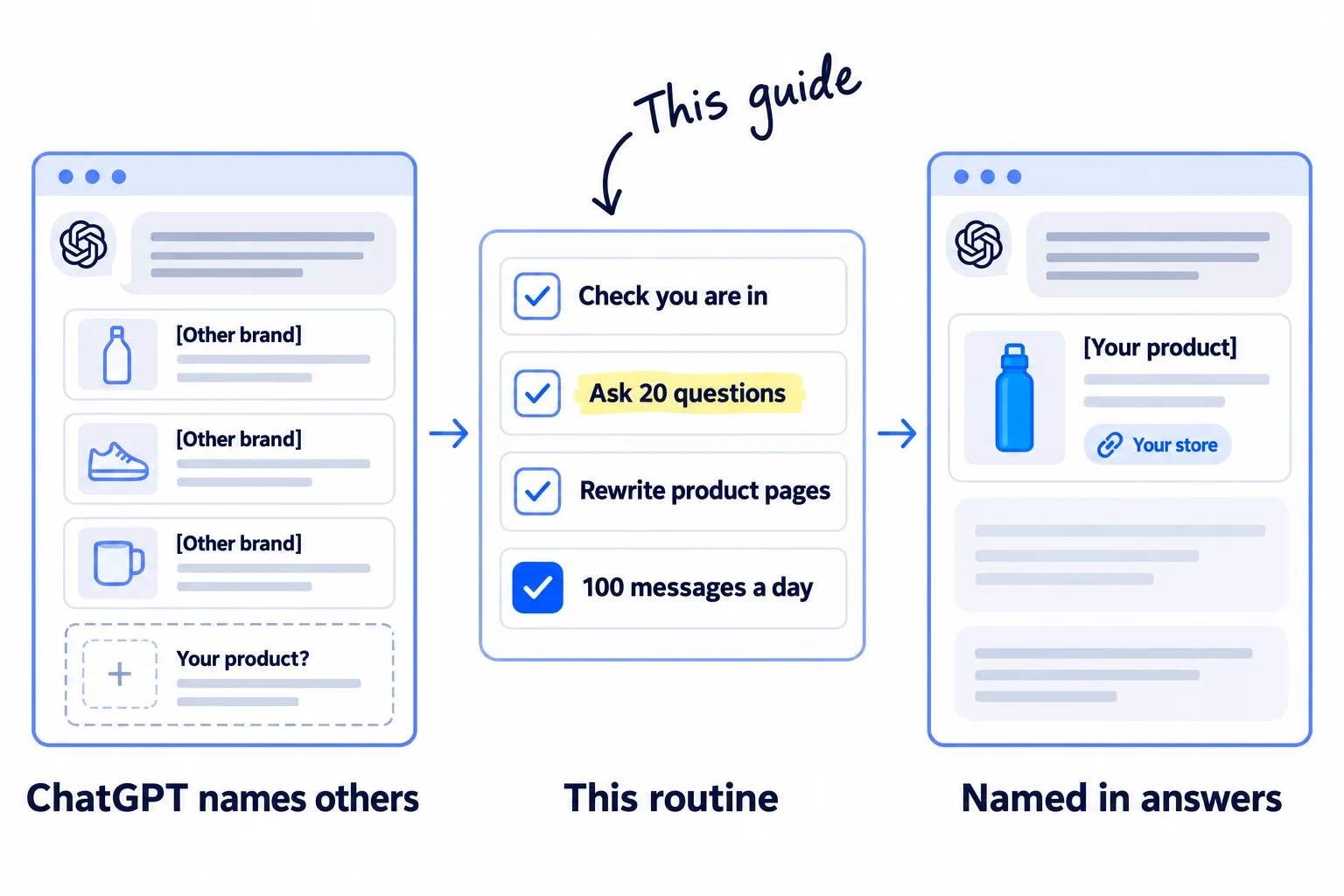
You ask ChatGPT for a product like yours and it names big brands, never your store, and you cannot tell if your products are even in there. Here is how to get your products recommended by ChatGPT: check they can show up, find out what ChatGPT reads when it answers your shoppers, and get your products onto those pages every day. Most new stores flip one switch, hear nothing, and decide AI shopping is only for big brands.
Do these three things
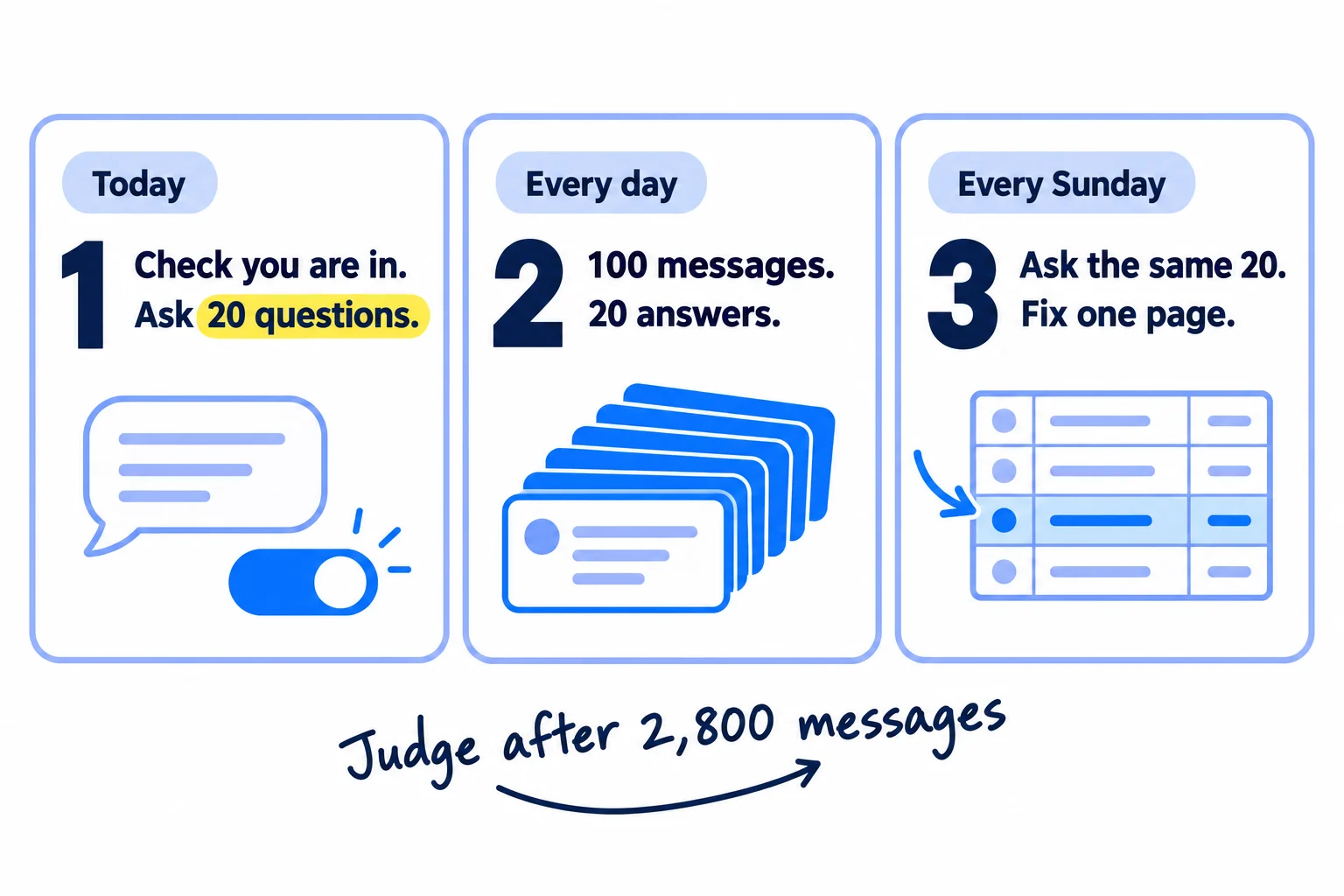
About 3 hours today and 40 minutes for each product page, then about 4 and a half hours a day. Judge it after 2,800 messages and 4 Sundays of the same 20 questions.
Show the three actions in fullHide the full list
- Today: check ChatGPT is on in Shopify's Agentic channel, ask ChatGPT 20 questions your shoppers ask, and write down every product and page it names.
- Every day: send 100 personal messages to the people behind the reviews, lists and gift guides ChatGPT quoted, answer 20 shopper questions in communities, and ask every new buyer for a review.
- Every Sunday: ask ChatGPT the same 20 questions, write down who it names and your visits and orders from ChatGPT, and fix the product page it skips most.
Get help doing these
ChatGPT or Claude reads this guide and works through it with you.
1. Check your products can show up in ChatGPT
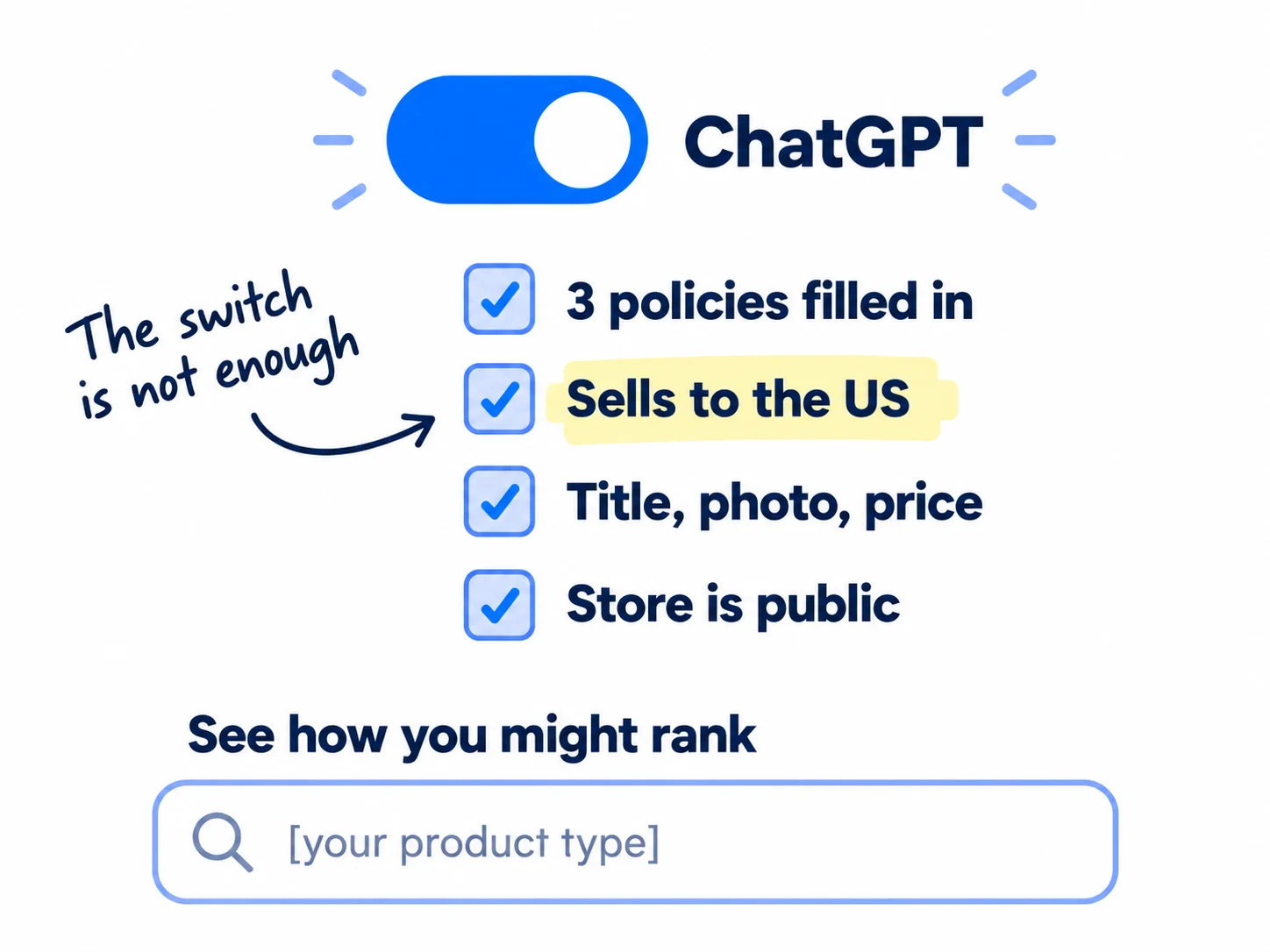
If you sell on Shopify, your products can already show up in ChatGPT: since 24 March 2026, Shopify sends eligible stores' products to ChatGPT by default, with no fee beyond your normal payment fees. Spend 30 minutes checking your store passes every rule, because a store that fails one is left out without a message.
This changed in March 2026. Until then, ChatGPT tested "Instant Checkout", where shoppers paid inside the chat. OpenAI said that first version "did not offer the level of flexibility" it wanted, and moved its effort to helping people find and compare products. Now ChatGPT shows your product and sends the shopper to your own checkout: inside ChatGPT's browser on a phone, or in a new tab on a computer. Advice that still tells you to apply for Instant Checkout is out of date.
Work through this list in your Shopify admin:
- The ChatGPT channel. Open Sales channels › Agentic. Check ChatGPT is listed and on. "Allow Shopify to manage for me" is the default, and it adds you to new AI channels as Shopify adds them. The same page covers Google's AI Mode and Gemini, Microsoft Copilot and Meta.
- Three policies. Under Settings › Policies, fill in Terms of service, Privacy policy, and Return and refund policy. ChatGPT needs all three. The same pages make a new store look trustworthy to shoppers.
- US shipping. Your store must sell to customers in the United States. It can be based anywhere.
- Every product. Shopify Catalog, the product list Shopify shares with AI channels, takes a product only if it has a title, at least 1 photo and a price above $0, is published to your Online Store, and is not Unlisted or hidden from search engines. Your store must be on the Starter plan or higher and not password-protected.
- Your account. Turn on two-step login and verify your email. Shopify also looks at your record over time: real sales to real customers, orders shipped on time, and few chargebacks. A store with a handful of orders from friends may not qualify yet. The fix is real orders, which is what getting your first sales on Shopify is for.
- Let ChatGPT read your store. Open yourstore.com/robots.txt. If OAI-SearchBot or "User-agent: *" is followed by "Disallow: /", remove those lines. OpenAI says sites that block OAI-SearchBot are not shown in ChatGPT search answers, and a change takes about 24 hours to count. It is one line on any technical SEO checklist.
Then test it. On the Agentic page, type what your product is, in plain words, into Enter a search query to see how you might rank and press Enter. This shows Shopify Catalog's own ranking. Shopify warns that each AI channel also uses its own logic, so step 2 checks ChatGPT itself.
List your products on Google too, if you have not yet. In a March 2026 study of more than 43,000 products in ChatGPT's shopping results, Peec AI found 83% were strong matches to products in Google's top 40 free shopping results. Shopify's Agentic channel also uses your Google & YouTube app for Google's AI Mode and Gemini. Setup is in listing your products on Google Shopping for free.
Not on Shopify? ChatGPT can still name your products from what it reads on the web, so steps 2 to 6 still work. To get into ChatGPT's shopping results as well, Shopify's Agentic plan has no monthly fee and lists your products in Shopify Catalog. OpenAI also takes direct product feeds, but says only "approved partners" can send them for now. If you sell only on Etsy or Amazon, start with those guides, or make a website for your business.
Not selling to the US? Shopify's ChatGPT channel is not open to you yet. Do steps 2 to 6. They work on the pages ChatGPT reads, wherever you sell.
- Tool: your Shopify admin. Free.
- Time: about 30 minutes, once.
- You will have: ChatGPT on, three policies filled in, US shipping, and every product passing Shopify Catalog's rules.
- It worked if: the search preview shows at least one of your products when you type what it is in plain words.
- Common mistake: thinking the switch is the whole job. It only lets your products in. Whether ChatGPT names them depends on steps 3 to 5.
2. Ask ChatGPT 20 questions your shoppers ask and write down who it names
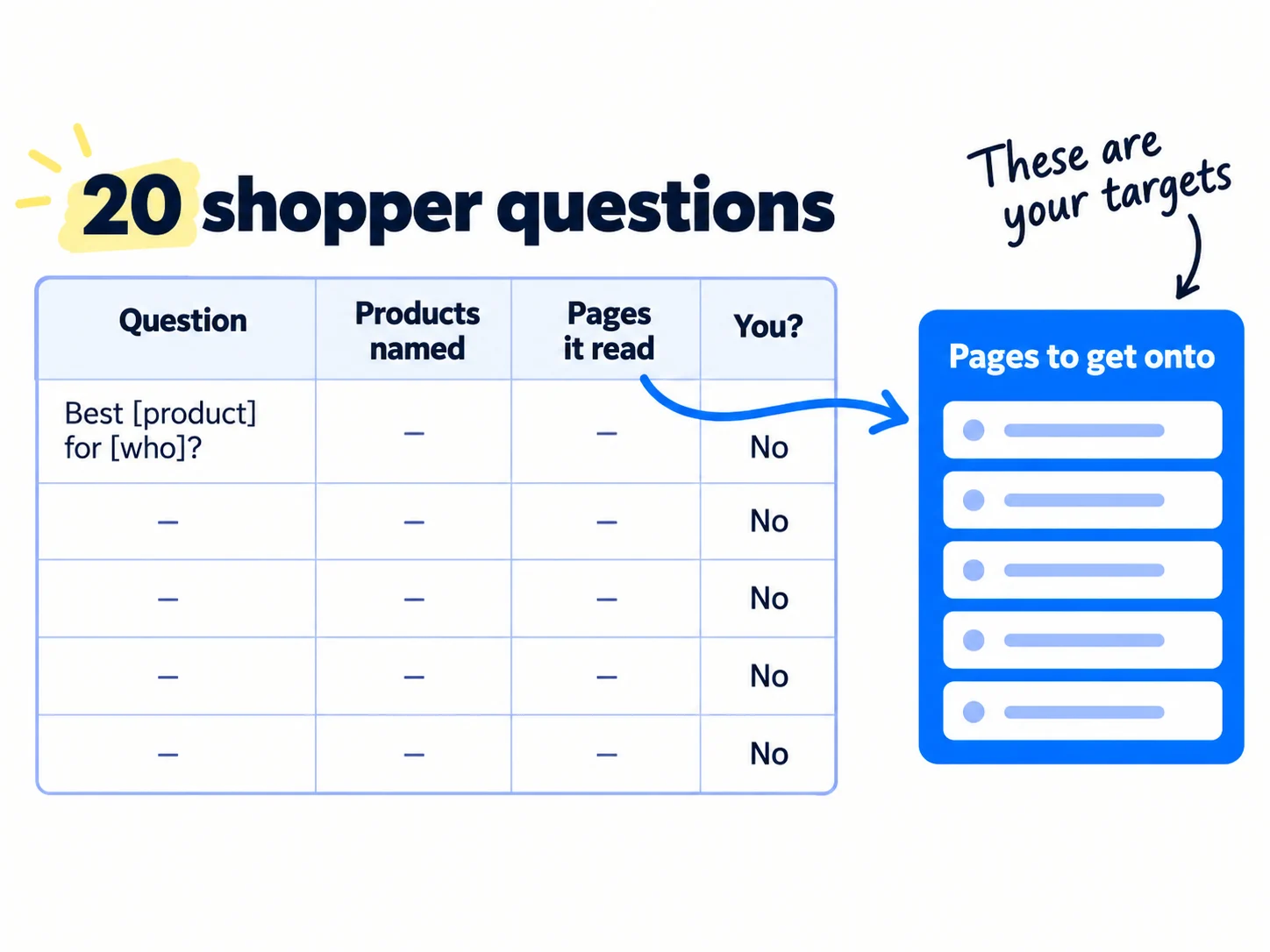
Write down 20 questions a shopper would ask ChatGPT before buying a product like yours, ask each one, and write down every product, store and page it names. That sheet tells you who ChatGPT recommends today and which pages it reads to decide.
Use your shoppers' words, not yours. Take them from:
- Shopify's Agentic page. It lists Top search queries in your category and Queries where your products appeared.
- What buyers asked you in messages and customer interviews.
- Google's suggestions. Type "best [your product] for" and note what Google adds, the way you find keywords for SEO.
- Forums where your buyers ask for advice.
Mix these five kinds, four of each:
What's the best [product] for [who or what problem]?
I need a [product] that doesn't [thing they hate]. What should I buy?
What's a good alternative to [the big brand]?
What's a good [product] under $[your price plus a little]?
What's a good gift for someone who [likes or needs something]?
Never put your brand name in a question. Shoppers who do not know you will not type it.
Ask each question in a private browser window, in a new chat. OpenAI says ChatGPT uses your memory and custom instructions when it picks products, so a private window shows you what a stranger sees. For each answer, write down every product, every store, and every page ChatGPT links to as a source. Then run the same questions through Shopify's search preview, so you can compare the two.
ChatGPT or Claude can turn your customer messages into first drafts of the questions, and can copy each answer's sources into the sheet. You check every row against the real answer.
Last, make a second list: every page ChatGPT cited, with how many of your 20 answers it appeared in. The pages that appear most are your targets in step 5. They are also how you do a quick competitor analysis of who wins these answers today.
- Tool: ChatGPT (the free plan is enough), the Agentic page in Shopify, and a Google Sheet.
- Time: about 1 hour 30 minutes.
- You will have: 20 questions, each with the products, stores and pages ChatGPT named, and a list of cited pages sorted by how often they appear.
- It worked if: all 20 rows are filled, and at least 5 cited pages appear in more than one answer.
- Common mistake: asking while logged in, after weeks of chats about your own store. ChatGPT then leans towards what it knows you like, and the sheet tells you nothing about strangers.
See it done: Ferns & Rinse's first 4 questions
Ferns & Rinse is a made-up plant-based haircare brand with its own Shopify store. It sells one shampoo and one conditioner at $28 each, or both for $49.
Asked in a private window, week 0
| Question | Products named | Pages it cited | Ferns & Rinse named? |
|---|---|---|---|
| What's the best shampoo for dry, curly hair? | 2 big salon brands, 1 drugstore brand | A magazine's "best curly hair shampoos" list; a curly hair subreddit thread | No |
| I need a curly hair shampoo that doesn't use sulfates. What should I buy? | 1 big salon brand, 2 indie brands | The same subreddit thread; a curly hair blog review | No |
| What's a good shampoo and conditioner set under $60? | 3 drugstore sets | A shopping site's "best sets" page | No |
| What's a good gift for someone with curly hair? | 4 products from 3 brands | A magazine gift guide | No |
Why it works: The same two kinds of page come up again and again, so those writers and threads go to the top of the message list.
3. Rewrite each product page with the facts ChatGPT looks for
Rewrite each product page so it answers your 20 questions in plain facts: what it is, who it is for, what is in it, how to use it and how it compares. Shopify sends this text to ChatGPT, and shoppers from AI chats usually land straight on it.
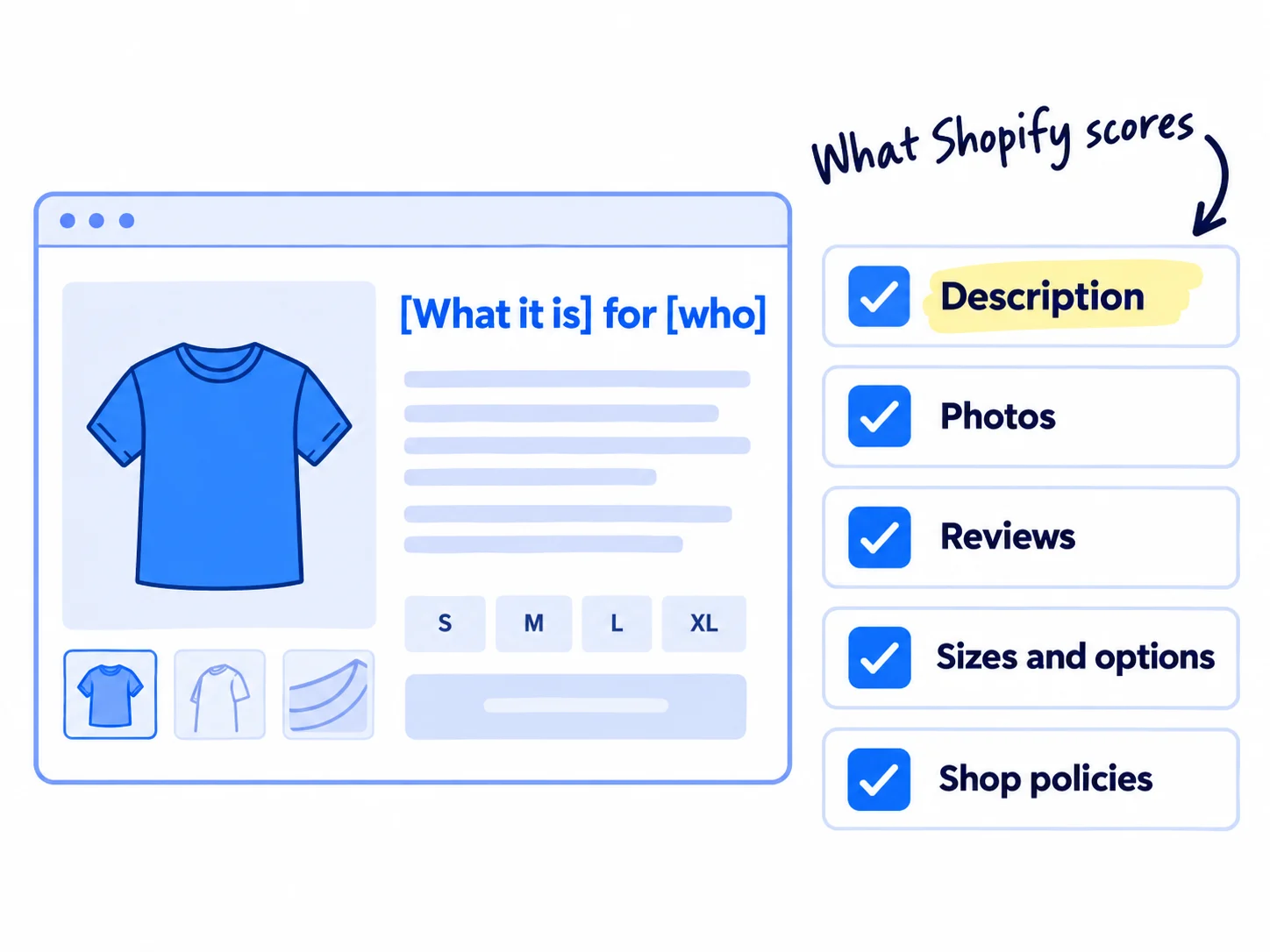
Shopify scores each product on five things in its Agentic page: description completeness (how many words), image coverage (how many photos), product reviews (your average rating and how many), variant and option completeness, and shop policy completeness. It does not publish a target for any of them. Shopify's May 2026 report found that more than half of visits from AI chats start on a product page, against about 20% from Google search, so this page is where the sale happens too.
For each product, in this order:
- Title. "[What it is] for [who or what problem]", not a made-up name. The rules for writing it are in listing your products on Google Shopping, and the same title serves your Shopify SEO. Use one title everywhere.
- First two lines. What it is, who it is for, what is in it and how much, in plain words. The rest of writing a product description that sells is in its own guide.
- A facts block. Answer your 20 questions with the template below. Shopify's own advice for AI asks for specifications, materials, care, sizing and how it compares with similar products. Put this block lower on the page if it is long. Aim for about 300 words in all.
- Photos. At least 5: the product alone, in use, in a hand to show size, the label or ingredients, and the texture or result. Clips from your short videos can give you the in-use shots. The main photo follows Google's rules from the Google Shopping guide.
- Variants. Each size, scent or pack is a variant with a clear option name, such as "Size", and its own stock level.
- Product organization. Fill in Type, Vendor (your brand), Tags and Collections. A barcode only if you bought real ones.
Who it is for: [who], especially if [the problem in their words].
Who it is not for: [who should pick something else, and why].
What is in it: [main materials or ingredients]. No [things your buyers avoid].
Size and how long it lasts: [size], about [how many uses or weeks].
How to use it: [2 or 3 short steps].
How it compares: unlike most [kind of product], it [the one real difference].
Price and delivery: $[price]. Ships to [countries] in [days]. Returns within [days].
Then answer the same questions inside AI chats. Install Shopify Knowledge Base, a free app made by Shopify. Open Apps › Knowledge Base, read the answers Shopify wrote from your policies, and select Override on any that are wrong. Select Add FAQ for each of your 20 questions and give a 1 or 2 sentence answer. Use Test your knowledge base to check each question now says "Matched to". Shopify says this makes AI answers about your store more accurate, but does not change how often your store appears. Steps 4 and 5 do that.
Let AI draft, and check every word. Give ChatGPT, Claude or Shopify Magic your notes, the facts block and three things customers said, and ask for a first draft. Then correct every fact, cut every claim you cannot prove, and add one thing only you know. That is using AI for content the safe way. Shopify themes already add product schema markup, so you do not need to write code.
- Tool: your Shopify admin, Shopify Knowledge Base (free), and ChatGPT, Claude or Shopify Magic to draft.
- Time: about 40 minutes a product, plus 30 minutes for the 20 FAQs.
- You will have: every product page with a plain title, a facts block, at least 5 photos and named variants, and 20 FAQs in Knowledge Base.
- It worked if: a friend who reads only the page can answer 5 of your 20 questions for that product, and Knowledge Base shows "Matched to" for all 20.
- Common mistake: pasting a hidden list of keywords, or the same AI text on every product. ChatGPT reads the page like a shopper does, and Google treats many near-identical AI pages as spam.
See it done: Ferns & Rinse's first two lines
Before
Our hero wash, made with love from plants. Your hair will thank you.
After
A plant-based, sulfate-free shampoo for dry, curly hair that frizzes after washing. $28, or $49 with the matching conditioner.
Why it works: Each fact answers one of their 20 questions, so the page can match a shopper who asks about curls, sulfates or a set under $60.
4. Ask every buyer for a product review
Seven days after each order arrives, ask the buyer for an honest review on the product page. Shopify scores your average rating and number of reviews, and OpenAI's own documents say reviews improve ranking in ChatGPT's shopping results.
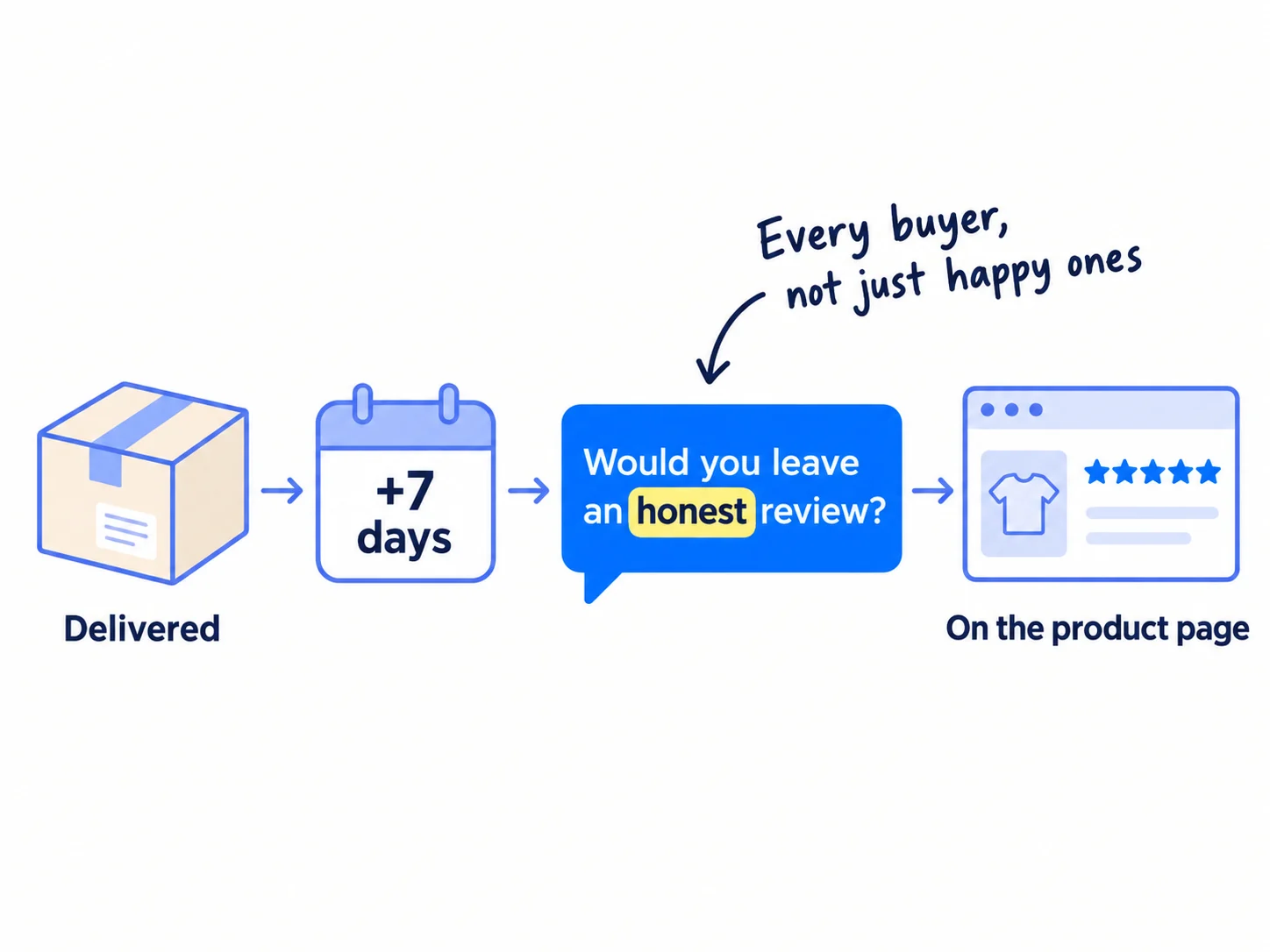
Use Judge.me's free plan, as in getting your first product reviews, so reviews show on each product page with stars. Ask every buyer, not only the ones you think liked it. Since 21 October 2024, the FTC's rule on reviews bans any gift or discount that depends on a good review. Reply to every review within a day, including the bad ones. Reviews are also the social proof a stranger looks for before a first order.
Hi [name], your [product] arrived a week ago. Is it working for your [problem]?
If you have a minute, would you leave an honest review on the product page? Good or bad, it helps the next person decide. [review link]
- Tool: Judge.me (free plan) and your store's email.
- Time: about 10 minutes a day.
- You will have: a review request sent to every buyer 7 days after delivery, and reviews showing with stars on each product page.
- It worked if: every buyer whose order arrived 7 days ago got a request today, and your review count rises each week.
- Common mistake: asking only the buyers you think liked it, or copying reviews from somewhere else. Copied or made-up reviews break the FTC rule.
5. Get your products onto the pages ChatGPT reads
Every day, send 100 personal messages to the people who write the pages ChatGPT cited in step 2, and answer 20 shopper questions in communities. ChatGPT's product answers come mostly from other people's pages, so being named there matters more than anything on your own store.
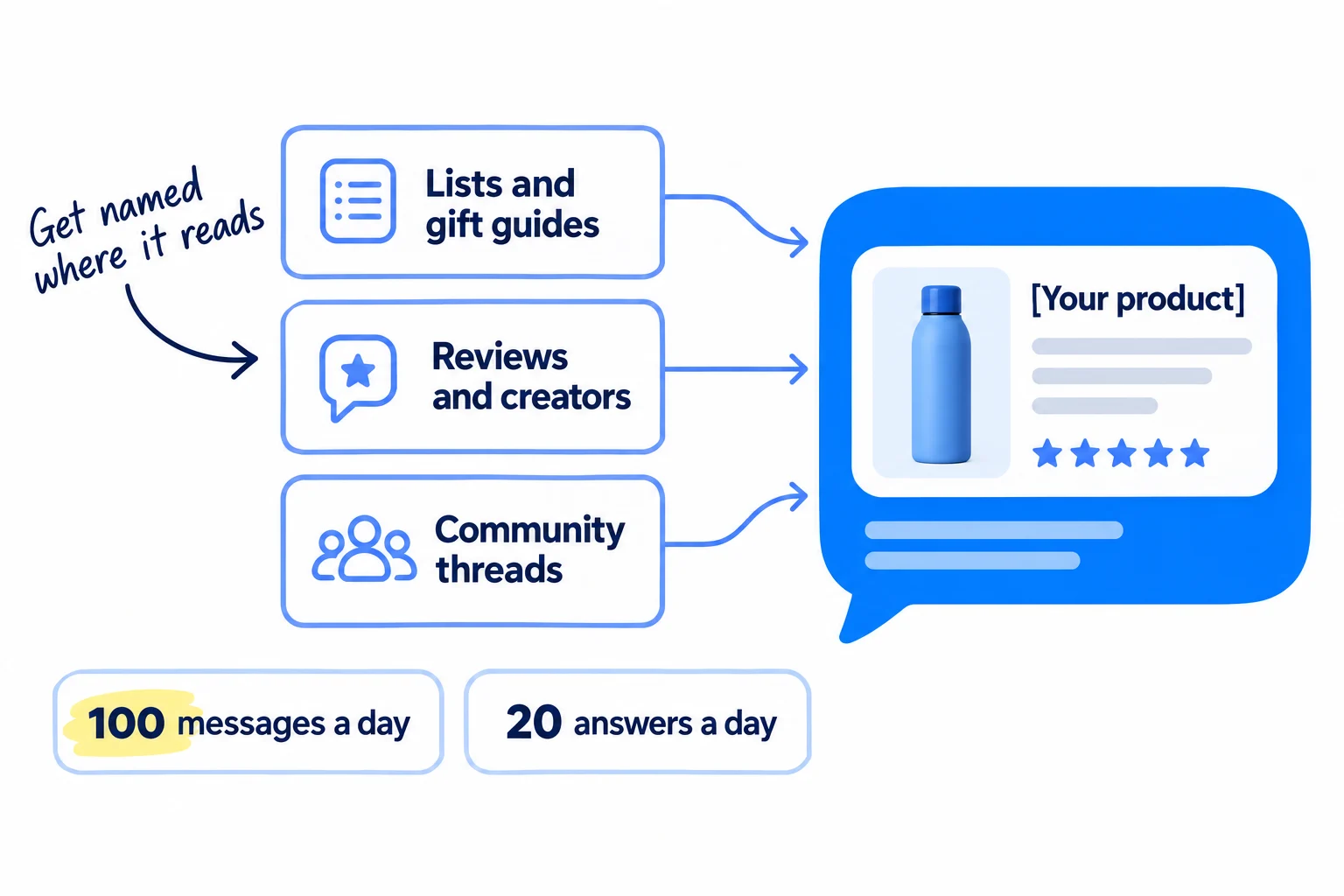
One count of millions of ChatGPT shopping citations, from April to June 2026, found 41% came from news and review sites, 37% from retailers, 19% from forums and shoppers' posts, and 3% from brands' own websites. The study was by Azoma, a company that sells AI visibility tools, and it did not publish its sample size. Your own step 2 list is the better guide: it shows which pages ChatGPT reads for your questions.
100 personal messages a day. Write to the people behind those pages, in this order:
- The writers of the best-of lists and reviews ChatGPT cited most.
- Gift guide editors and journalists who cover your kind of product.
- Small creators with 1,000 to 20,000 followers who review products like yours.
Offer a free product to test, with no need to write about it. Send a short facts sheet: your step 3 facts block and price. Ask anyone who writes about it after a free product to say so. A mention that links to your store is also a backlink that helps your Google ranking, and press mentions are covered in getting backlinks from news websites. Follow up up to 3 times with each person until they answer.
The list must match the volume. 100 a day is about 3,000 names a month. Start with the authors of your cited pages, then search Google for "best [product] for [who]" and "[product] review" and add the writers on the first 3 pages. Every Sunday, add the new pages ChatGPT cites. If you already send 100 creator messages a day from your first sales routine, keep them going and put the writers of cited pages first.
Spread the volume across channels. A new email address that sends 100 messages to strangers on its first day lands in spam, so warm up your email domain and send the rest by Instagram message and contact forms.
20 answers a day, across at least 5 subreddits, Facebook groups and forums where shoppers ask what to buy. Answer the question fully first. Name your product only when it really fits, and say you make it. Read each place's rules before you post: promoting on Reddit without getting banned has the details. When real buyers post about your product, that is user-generated content, and ChatGPT reads it too.
Keep 1 page a day on your store. If you follow the Shopify SEO routine, take each day's topic from your 20 questions: a "best [product] for [who]" guide, or an honest comparison page.
AI makes the volume possible. Paste 10 names at a time into ChatGPT or Claude, each with one line about what they wrote, and ask for one message per person. You check the first line is true and about their page. That is about a minute a message and 5 minutes an answer.
Hi [name], I read your [title of their page]. Your point about [one specific thing they said] matched what our customers tell us.
I make [product], a [what it is] for [who]. Could I send you one to test? No need to write about it.
If it is useful, here are the facts in one place: [3 lines from your facts block].
[Your name], [store]
- Tool: Gmail on your own domain, Instagram, Reddit and Facebook, a Google Sheet to log each message, and ChatGPT or Claude to draft.
- Time: about 4 hours 25 minutes a day, every day: 1 hour 45 minutes for messages, 1 hour 40 minutes for answers, and about 1 hour for your daily page.
- You will have: 700 messages and 140 answers a week, each logged.
- It worked if: after 2,800 messages (4 weeks at 100 a day), a few writers have said yes, and at least one new page that names you shows up in your Sunday sources. If no one has said yes, change the first two lines of the message, not the number.
- Common mistake: paying for a spot on a "best of" list with no label saying it is paid, or dropping your store link into every community answer. Both get pulled down, and neither earns you an honest mention.
See it done: Ferns & Rinse's message to a blogger
To: Dana, who writes a curly hair blog cited in 2 of their 20 answers
Subject: your curly hair shampoo list
Hi Dana, I read your "best sulfate-free shampoos for curly hair" post. Your point that most of them still leave hair dry at the ends is exactly what our customers told us.
We make a plant-based, sulfate-free shampoo for dry, curly hair. Could I send you one to test? No need to write about it.
The facts in one place: $28, or $49 with the conditioner. Made for curls that frizz after washing.
Maya, Ferns & Rinse
Why it works: It names one real point from her review and asks her to test, not to post, so saying yes costs her nothing.
6. Check what ChatGPT says every Sunday and fix the product it skips
Every Sunday, ask ChatGPT the same 20 questions the same way, write down who it names, and add your visits and orders from ChatGPT. Then fix one product page: the one ChatGPT skips most.
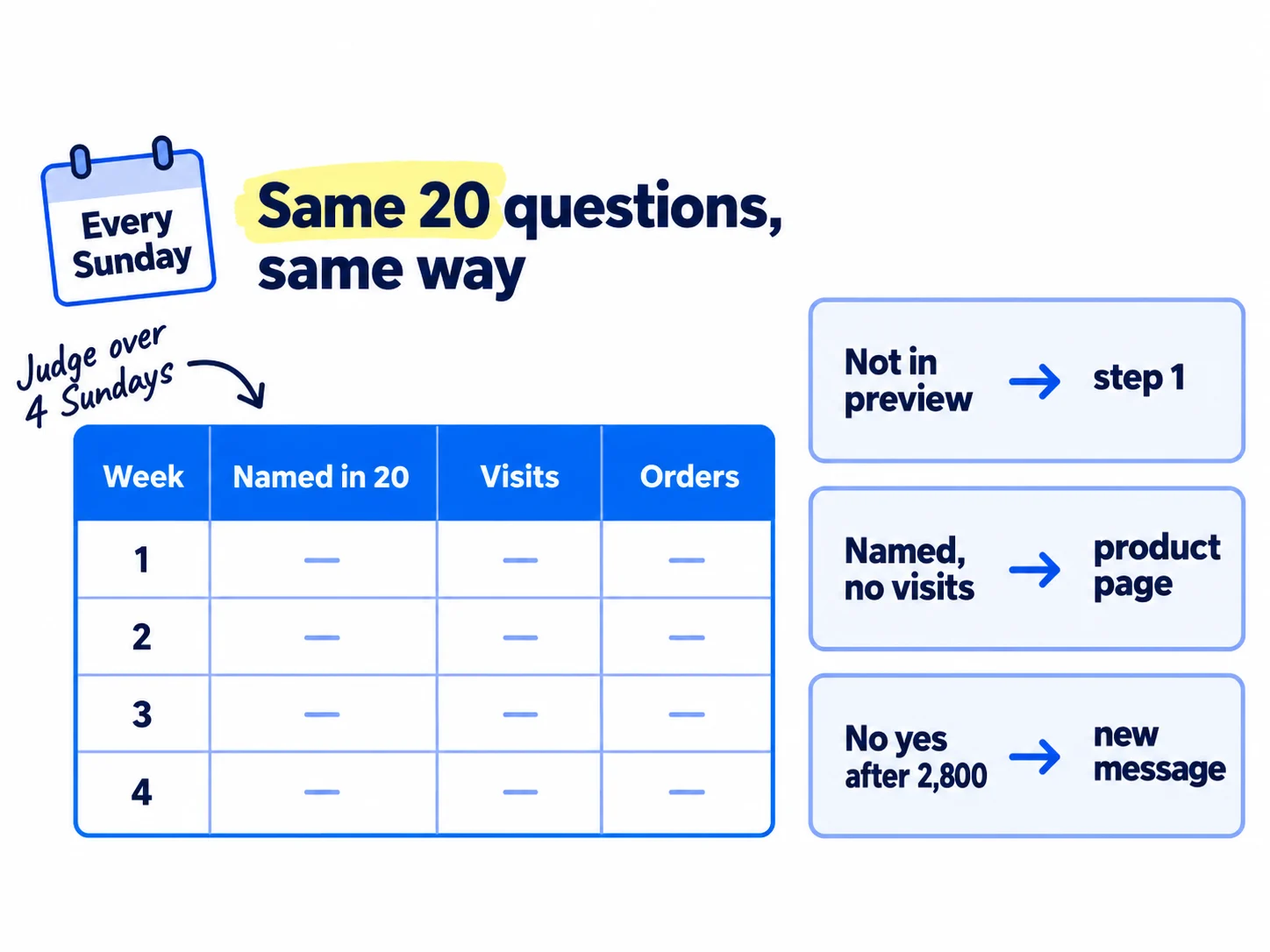
Fill in one row each Sunday:
- Ask the 20 questions in a private window, as in step 2. Count how many answers name your product, and add any new cited pages to your step 5 list.
- Open Sales channels › Agentic. Read Sales, Orders, Online store sessions and Online store conversion for ChatGPT. Change Last 30 days to the last 7 days and select Apply.
- Open Analytics. Filter a sessions report by Referrer name, and a sales report by Order referrer name, and enter "ChatGPT". OpenAI adds utm_source=chatgpt.com to the links it sends, so the same visits show up in your UTM reports. Tracking AI traffic and ChatGPT mentions covers Google Analytics and conversion tracking.
- Ask every new buyer "How did you first hear about us?" This is self-reported attribution. Shopify says some AI-led visits are counted as organic search, so a buyer's own answer catches what the reports miss.
Week | Named in how many of 20 | New pages that name you | ChatGPT visits | ChatGPT orders | Buyers who said "ChatGPT" | Product fixed
Then use these rules. ChatGPT's answers change from one run to the next, so judge across 4 Sundays, not one.
- Your products do not show in Shopify's search preview after 2 Sundays: go back to step 1. Check every rule, and keep working on real orders.
- They show in the preview but ChatGPT names you in 0 of 20 after 4 Sundays: your product pages are not the problem yet. The pages ChatGPT reads do not name you. Send more of your 100 daily messages to the writers of the pages cited most.
- ChatGPT names you but sends 0 visits: your product card loses next to the others. Change the main photo first, then the first words of the title, on that product.
- More than 100 visits from ChatGPT and no orders: the listing works and the page does not. Work through fixing a store with traffic but no sales.
Each Sunday, rewrite one product page with step 3: the product named least often in your 20 answers. Once a month, put these numbers into your marketing review, next to your other channels.
ChatGPT is one channel, and it is slow. Keep the daily work from your D2C marketing routine going next to it, because every real order, review and mention you earn there also feeds what ChatGPT reads. Being named more widely, beyond product answers, is covered in getting your brand mentioned by ChatGPT, and Google's own AI answers in showing up in Google AI Overviews.
- Tool: ChatGPT in a private window, the Agentic page and Analytics in Shopify, and your Google Sheet.
- Time: about 45 minutes every Sunday, plus 40 minutes to rewrite one product page.
- You will have: one row a week, and one product page rewritten each Sunday.
- It worked if: after 4 Sundays you can say, with numbers, whether ChatGPT names you more often than in week 0, and which pages caused it.
- Common mistake: asking ChatGPT once, seeing your name, and calling it done, or seeing nothing and quitting after one week. One answer is a sample of one.
See it done: Ferns & Rinse's first 4 Sundays
20 questions, asked every Sunday in a private window
| Week | Named in how many of 20 | New pages that name them | ChatGPT visits | ChatGPT orders | Product fixed |
|---|---|---|---|---|---|
| 0 | 0 | none | 0 | 0 | all pages rewritten |
| 1 | 0 | none | 2 | 0 | set |
| 2 | 1 | a curly hair blog review | 5 | 0 | shampoo |
| 3 | 1 | none | 4 | 0 | set |
| 4 | 3 | the blog review and one subreddit thread | 11 | 1 | conditioner |
Why it works: Mentions only rose after a blog and a subreddit thread named them, so they keep the messages and fix the conditioner page, which ChatGPT never named.
Where Scout7 helps
Scout7 speeds up steps 1, 2, 5 and 6. Steps 3 and 4 are yours.
Steps 2 and 6. Scout7's AI question coverage collects the questions real buyers ask AI assistants in your category and shows who answers them today, on Google and in AI answers. Its competitor set reports which competitors win those answers, and by how much. Use them to pick your 20 questions and to see who to beat. You still ask ChatGPT yourself every Sunday and log what it says.
Step 1. Scout7's search and AI audit crawls your store and checks your robots.txt, llms.txt and structured data, with a page-level list of fixes. It does not edit your Shopify store: you make the fixes in your admin.
Step 5. Join Conversations finds live threads where shoppers ask for products like yours, and drafts a reply in your brand's voice. You read each thread and approve or rewrite every reply. Nothing is posted without your approval.
Your ChatGPT product checklist for the next 4 weeks
0 of 12 done
Work through this list with an AI assistant
It drafts the work and keeps track of what is done.
Frequently asked questions
- Does Shopify automatically put my products in ChatGPT?
Yes, for eligible stores, since 24 March 2026, with no fee beyond your normal payment fees. Your store must sell to US customers, have its three policies filled in, and pass Shopify Catalog's rules, including a record of real sales. Check it under Sales channels › Agentic. Being included only lets ChatGPT show your products. Whether it names them depends on your product pages, reviews and what other sites say.
- Can I pay to get my products recommended by ChatGPT?
No. OpenAI says ads do not influence ChatGPT's answers. Ads are separate, labelled placements, and since May 2026 any US advertiser can buy them in OpenAI's Ads Manager. A paid ad is not a recommendation. Leave ads off until you have 10 reviews and 1 order per 100 visits from strangers, then set an ad budget.
- Do I need to apply to ChatGPT's merchant program?
Not if you sell on Shopify. OpenAI says Shopify product data already reaches ChatGPT through Shopify Catalog, with no extra work. OpenAI's direct product feed is open only to approved partners for now. If your store is on another platform, Shopify's Agentic plan has no monthly fee and puts your products in Shopify Catalog.
- Can people buy my products inside ChatGPT?
They find and compare them in ChatGPT, then pay on your own store's checkout: inside ChatGPT's browser on a phone, or in a new tab on a computer. OpenAI stopped focusing on its in-chat Instant Checkout in March 2026. You keep the customer, the order shows in your Shopify admin, and Shopify charges no fee for it.
- How long until ChatGPT recommends my products?
There is no set time, and no one can promise it. A robots.txt change counts in about 24 hours, and Shopify's search preview shows Catalog changes sooner. Being named depends on pages other people write, which takes weeks or months, like SEO. Ask the same 20 questions every Sunday and judge after 4 Sundays and 2,800 messages.
Sources
- 1.Selling on ChatGPT — Shopify Help Center, checked 1 October 2026
- 2.Agentic storefronts — Shopify Help Center, checked 1 October 2026
- 3.Managing agentic storefronts: search preview, listing quality and performance — Shopify Help Center, checked 1 October 2026
- 4.Shopify Catalog requirements — Shopify Help Center, checked 1 October 2026
- 5.Optimizing your products for AI platforms — Shopify Help Center, checked 1 October 2026
- 6.Optimizing your store for AI — Shopify Help Center, checked 1 October 2026
- 7.Managing FAQs in Shopify Knowledge Base — Shopify Help Center, checked 1 October 2026
- 8.Shopify Knowledge Base — Shopify App Store, checked 1 October 2026
- 9.Shopify Agentic plan — Shopify Help Center, checked 1 October 2026
- 10.Agentic commerce momentum — Shopify, 24 March 2026, checked 1 October 2026
- 11.AI-referred shoppers convert better and spend more — Shopify, 11 May 2026, checked 1 October 2026
- 12.AEO for ecommerce: drive traffic from AI search — Shopify, 13 February 2026, checked 1 October 2026
- 13.Powering product discovery in ChatGPT — OpenAI, 24 March 2026, checked 1 October 2026
- 14.Shopping with ChatGPT search — OpenAI Help Center, checked 1 October 2026
- 15.Using shopping research in ChatGPT — OpenAI Help Center, checked 1 October 2026
- 16.Agentic commerce: get started — OpenAI, checked 1 October 2026
- 17.Agentic commerce: key concepts — OpenAI, checked 1 October 2026
- 18.Overview of OpenAI crawlers — OpenAI, checked 1 October 2026
- 19.Publishers and developers FAQ — OpenAI Help Center, checked 1 October 2026
- 20.Ads in ChatGPT — OpenAI Help Center, checked 1 October 2026
- 21.OpenAI opens ad platform to CPC bidding, self-serve buys — MediaPost, 6 May 2026, checked 1 October 2026
- 22.How ecommerce managers can optimize ChatGPT product rankings — Peec AI, study from March 2026, checked 1 October 2026
- 23.What sources does ChatGPT cite for products? — Azoma, via GlobeNewswire, 26 August 2026, checked 1 October 2026
- 24.Consumer Reviews and Testimonials Rule: questions and answers — US Federal Trade Commission, rule in force since 21 October 2024, checked 1 October 2026
- 25.Merchant present in Global Catalog but absent from ChatGPT Shopping — Shopify Developer Community, 27 August 2026, checked 1 October 2026
Next article to read
Related guides
- How to do SEO for a Shopify storeD2CDo SEO for your Shopify store with a few products and no budget: check Google can see your store, give every product and collection page one phrase shoppers type, publish 1 buying-question page a day on your Shopify blog, ask 20 sites a day for a link, and check Search Console every Sunday.
- How to list your products on Google Shopping for freeD2CList your products on Google Shopping for free: pass Google's store checks, connect your store to Merchant Center with the free Google & YouTube app, write titles in the words shoppers type, fix every flagged issue the same day until each product is approved, and check views and clicks every Sunday.
- How to get on the "best of" lists AI tools citeGet on the "best of" lists ChatGPT, Perplexity and Google AI cite: ask them 20 "best [what you sell]" questions and copy every list they use, publish a listing kit an author can use in 5 minutes, pitch 100 list authors a day until every list has heard from you, and count the lists and AI answers that name you every Sunday.
- How to get your brand mentioned by ChatGPTGet your brand mentioned by ChatGPT: find the exact pages it reads when your buyers ask for a tool, agency or supplier, get your name onto them every day with pages, answers, messages and short videos, and count how often you are named every Sunday.
Guides that link here
- How to do SEO for a Shopify storeD2C
- How to list your products on Google Shopping for freeD2C
- How to add llms.txt and schema markup
- How to get on the "best of" lists AI tools cite
- How to get your brand mentioned by ChatGPT
- How to get your company recommended by ChatGPT as a supplierB2B
- How to show up in Google AI Overviews
- How to track AI traffic and ChatGPT mentions
- How to get customers online for free
- How to get your first sale on EtsyD2C
- How to get your first sales on ShopifyD2C
- How to launch a D2C brandD2C
- How much to spend on marketing as an ecommerce brandD2C
- How to choose marketing channels for an ecommerce brandD2C
- How to do a competitor analysis
- How to market a D2C brandD2C
- How to get backlinks from news websites
- How to promote your business on InstagramD2C
Cite this page
Dinesh Bypilla (2026). How to get your products recommended by ChatGPT. Scout7 Academy. https://scout7.ai/academy/ai-search/how-to-get-your-products-recommended-by-chatgpt
Written by Dinesh Bypilla, Agentic systems engineer at Scout7. Reviewed by Murali Sid. Last checked 1 October 2026.
Quote any part of this guide with a link back to this page. © 2026 Scout7.
Markdown version of this page: https://scout7.ai/academy/ai-search/how-to-get-your-products-recommended-by-chatgpt.md