



How to find keywords for SEO
Find keywords for SEO when every tool says 0: collect 300 phrases your buyers type from Google suggestions, forums and a free tool, keep the 100 a new site can win with one page each, add 5 new ones every day, and add Search Console's real queries every Sunday.
ByDinesh BypillaReviewed byMurali SidLast checked 19 min read
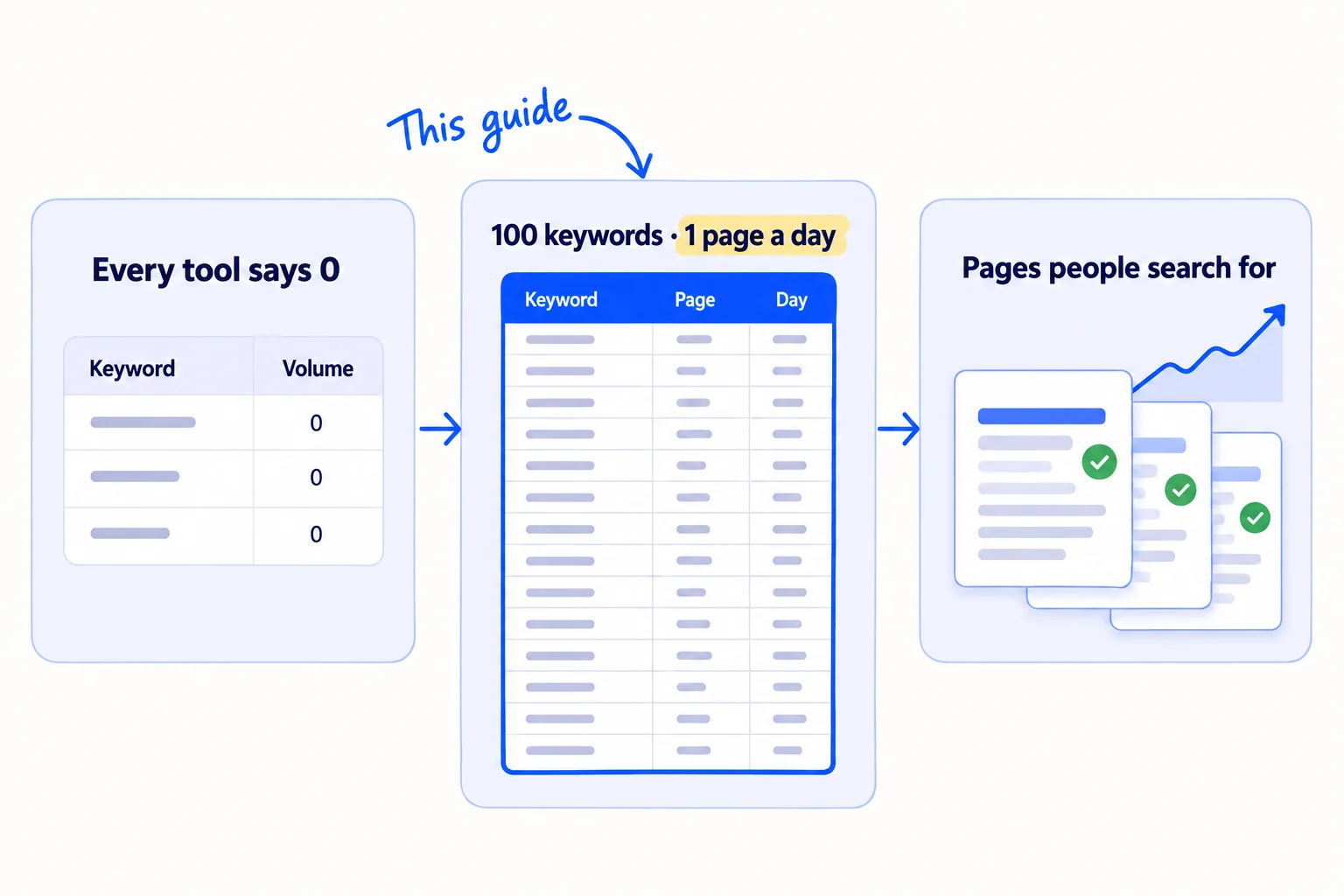
You want to publish pages that people find on Google, but every keyword tool says your words get 0 searches, and the words with big numbers belong to huge sites. Here is how to find keywords for SEO when your site is new: take them from your buyers, check each one on Google in under a minute, and keep a list big enough to feed 1 page a day. Most founders pick 10 keywords, write 10 posts and run out of ideas; 300 phrases collected today give you 100 days of pages.
Do these three things
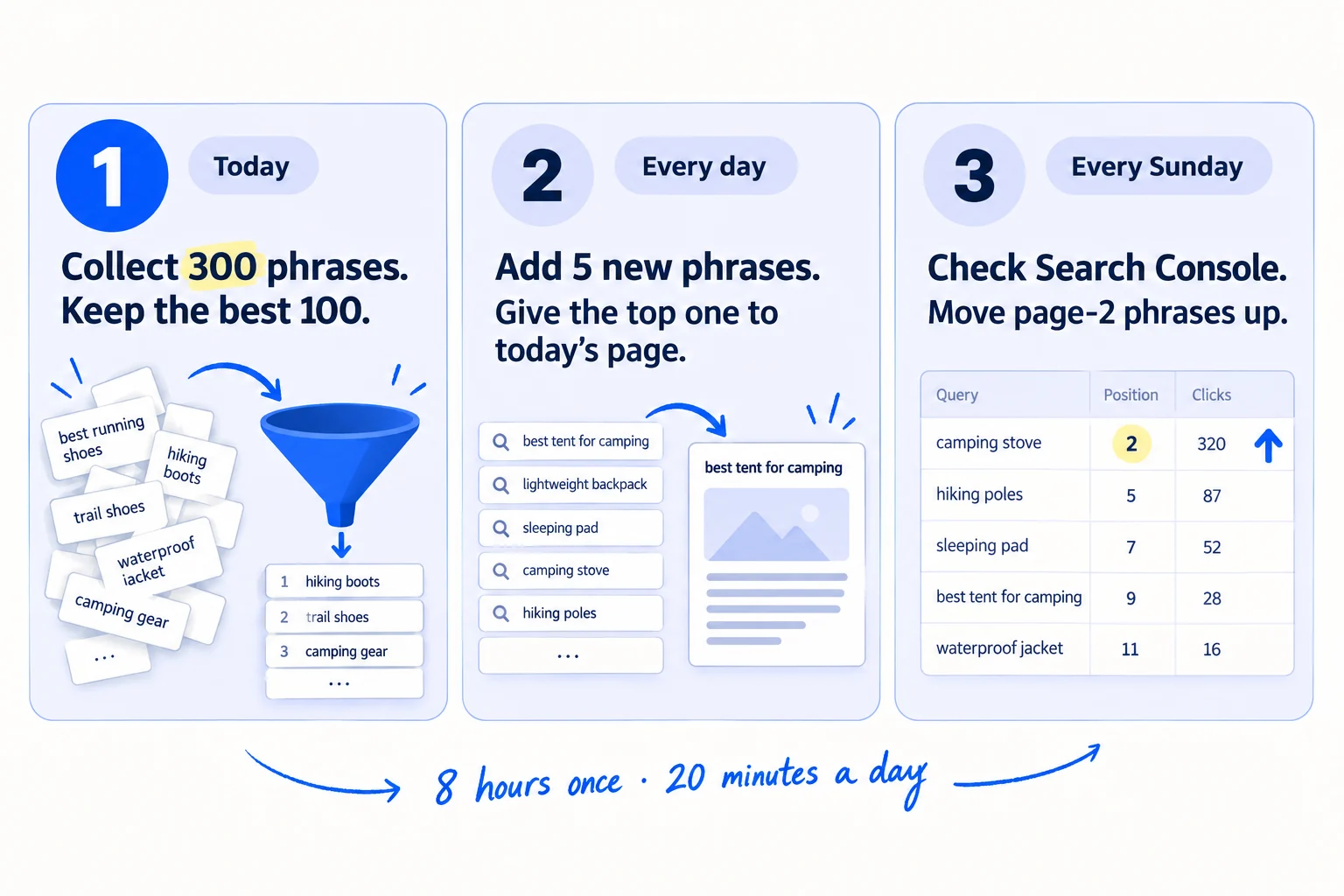
About 8 hours to build the first list, then 20 minutes a day and 30 minutes on Sunday. 100 keywords is 100 days of pages at 1 a day.
Show the three actions in fullHide the full list
- Today: collect 300 phrases your buyers type, from Google's suggestions, forums and the free Ahrefs Keyword Generator. Search each one on Google and keep the 100 that a new site can win, with one keyword for each page.
- Every day: add 5 new phrases from your sales calls, emails and online communities, and give the top phrase on your list to today's page.
- Every Sunday: open the Queries report in Google Search Console, add every new phrase people used to find you, and move the phrases where you sit on page 2 to the top of your list.
Get help doing these
ChatGPT or Claude reads this guide and works through it with you.
1. Write down 30 words your buyers use for what you sell
Start with 30 words or short phrases that your buyers use, not the words on your website. Every keyword you find later grows from these, so if they are your words and not theirs, the whole list will be wrong.
![A product brochure reading '[Your product word]' is crossed out. A speech bubble reading '[What the buyer calls it]' is ticked, and it leads to a list labelled '30 seed words · In their words'. Note: 'Copy what they say'.](/academy/illustrations/how-to-find-keywords-for-seo/step-1-write-down-30-words-your-buyers-use-for-what-you.webp)
Take them from where buyers talk to you or about you:
- Your calls and emails. Open the last 10 emails or call notes from buyers, and copy the words they used for the problem, the thing they wanted, and what they compared you with. If you have none yet, do 5 customer interviews first.
- Reviews of other products. Read the reviews of the 3 tools or products your buyers compare you with. You may already have them from a competitor analysis. Copy the words people use when they complain.
- Forums. Search Reddit and the places your buyers ask for help for your problem, and copy the words in the thread titles.
Then give ChatGPT or Claude your homepage text and those 10 emails, and ask: "List 30 words or short phrases a buyer would type into Google to find this, in their words, not mine." Cross out any phrase you have never heard a buyer say or seen in a forum. AI is good at spelling out every way to say a thing. It does not know your buyers, so you decide what stays.
If you run a SaaS: add the name of every tool your buyers use today, and "[tool] alternative" for each. People type these just before they switch, and they become alternatives pages. Phrases like "free [thing] template" or "[thing] calculator" can become a free tool.
If you run a B2B company: add the questions buyers ask before they order: the minimum order, how long it takes, the price, the material or the standard it meets. They sound too small to be keywords. They are the words your buyers type, and they belong on the service pages that bring enquiries.
If you run a D2C store: add what the product is plus who it is for or the problem it fixes, such as "[product] for [hair type]". Your product and collection pages will use these first, and so will your product titles in free Google Shopping listings.
If you run an agency: use your clients' words, not other marketers' words. "Who can run our LinkedIn" beats "B2B social media management". If you work in one city, add the city.
- Tool: a Google Sheet, and ChatGPT or Claude. Both free to start.
- Time: 45 minutes.
- You will have: one column of 30 seed words.
- It worked if: you have heard a buyer say, or read in a forum, at least 20 of the 30.
- Common mistake: using your own product words, like "visual feedback platform" or "sustainable packaging solutions". Buyers do not search for the name of your category. They search for their problem and the thing they want. Put their words in your homepage copy too.
See it done: Carvelian's seed words
Carvelian Packaging is a made-up maker of custom printed boxes for small food and drink brands. One founder sells through calls, samples and quotes.
| What the founder called it | What buyers said on calls |
|---|---|
| sustainable packaging solutions | custom printed boxes |
| short-run print production | no minimum order |
| retail-ready food packaging | bakery boxes with a window |
| flexible packaging | coffee bags with a valve |
| fast turnaround | how long does it take |
Why it works: The buyer's words name the exact product and the worry, so they can be searched; the founder's words describe the company.
2. Turn your 30 words into 300 phrases people really type
Put each of your 30 seed words into Google, a free keyword tool, forums and an AI chat, and copy what comes back until you have 300 phrases. Aim for 10 phrases from each seed word.
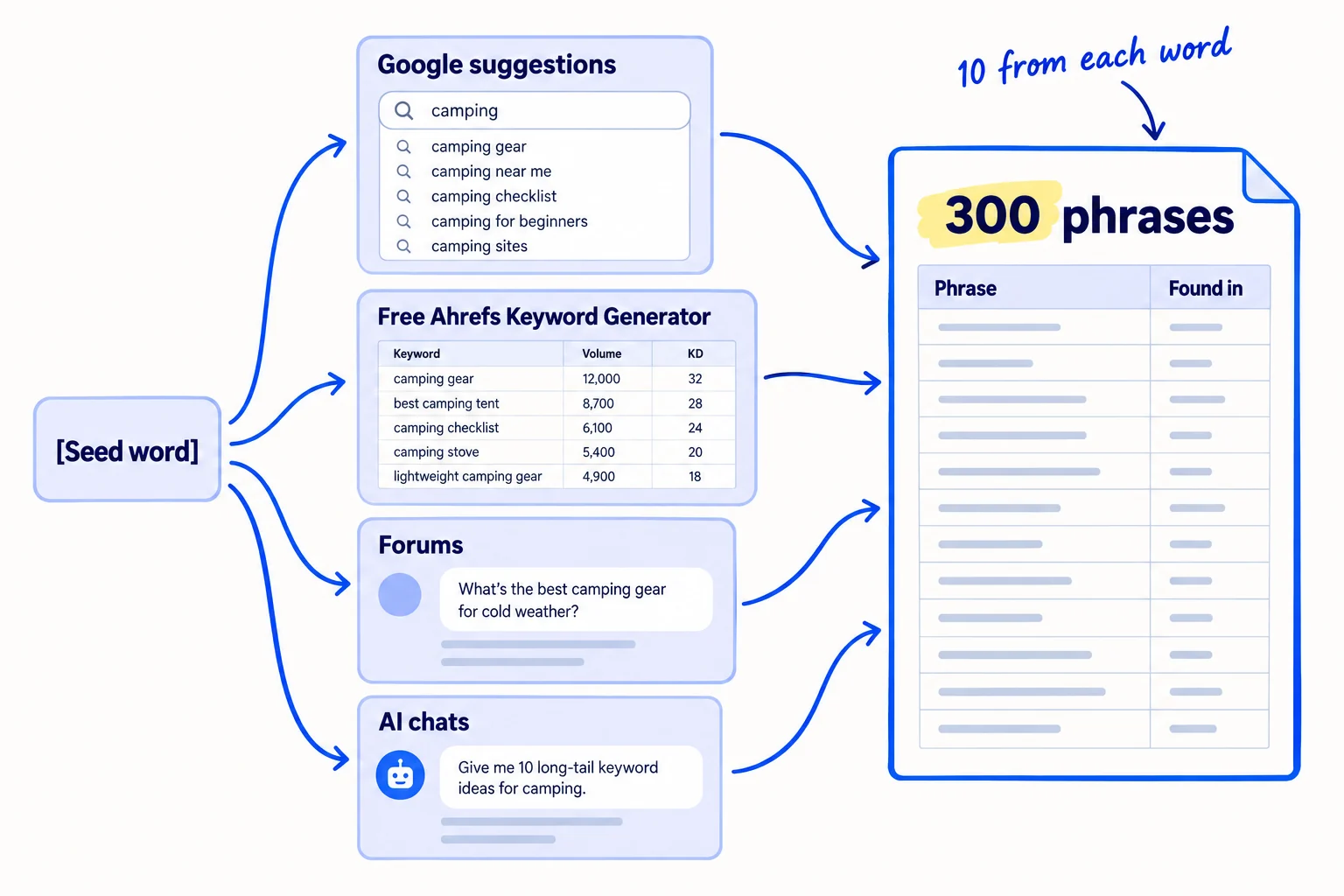
Work through each seed word in this order, and write every phrase in your sheet with where you found it:
- 1
Google's suggestions
Open a private browser window, so your own past searches do not change the list. Type the seed word into Google slowly and copy what Google suggests. Then type the seed word followed by a space and "a", then "b", and so on, and copy the new suggestions. Google says its suggestions "reflect real searches that have been done on Google", so each one is a phrase real people typed. Also copy the questions in the "People also ask" box on the results page.
- 2
The free Ahrefs Keyword Generator
Open the free Ahrefs Keyword Generator. It needs no account. Type the seed word, pick Google and your buyers' country, and search. Copy the useful phrases from the "Phrase match" and "Questions" tabs. The tool also shows a rough monthly search volume for each. Write it down, but do not delete anything yet.
- 3
Forums
Search Reddit and your buyers' communities for the seed word. Copy the titles of threads from the last 12 months, written as the person wrote them. A question that 5 different people asked is a keyword, whatever a tool says.
- 4
AI chats
Ask ChatGPT or Claude: "What would a [kind of buyer] ask before buying [the thing you sell]? List 20 questions in their words." Keep only the questions that also appear, or nearly appear, as a Google suggestion. AI can invent questions nobody asks.
Keep the long phrases, even whole sentences. People now type much longer searches: Google said in May 2026 that the average search in its AI Mode is three times as long as a normal search, and it rebuilt its search box to give people more room to describe what they need. A long, exact phrase from a forum is often closer to what your buyer types than a short word from a tool.
Let AI do the tidying. When you have 300 rows, ask ChatGPT or Claude to remove exact repeats and sort the sheet by seed word. You still copy the phrases in yourself, so every row comes from a real source.
- Tool: Google in a private window, the free Ahrefs Keyword Generator, and your Google Sheet.
- Time: about 3 hours, or 6 minutes for each seed word.
- You will have: 300 phrases, each with where you found it and, if the tool had one, a rough monthly volume.
- It worked if: you have 300 rows, and at least 150 of them came from Google's suggestions or the Ahrefs tool.
- Common mistake: stopping after the 10 obvious phrases, or deleting every phrase the tool says gets 0 searches. You will judge each phrase in step 3, not here.
3. Search each phrase and keep the ones a new site can win
Search every phrase on Google and look at the top 5 results for about 45 seconds. Keep the phrase if the results show you what the searcher wants and you can make a better page than one of those 5.
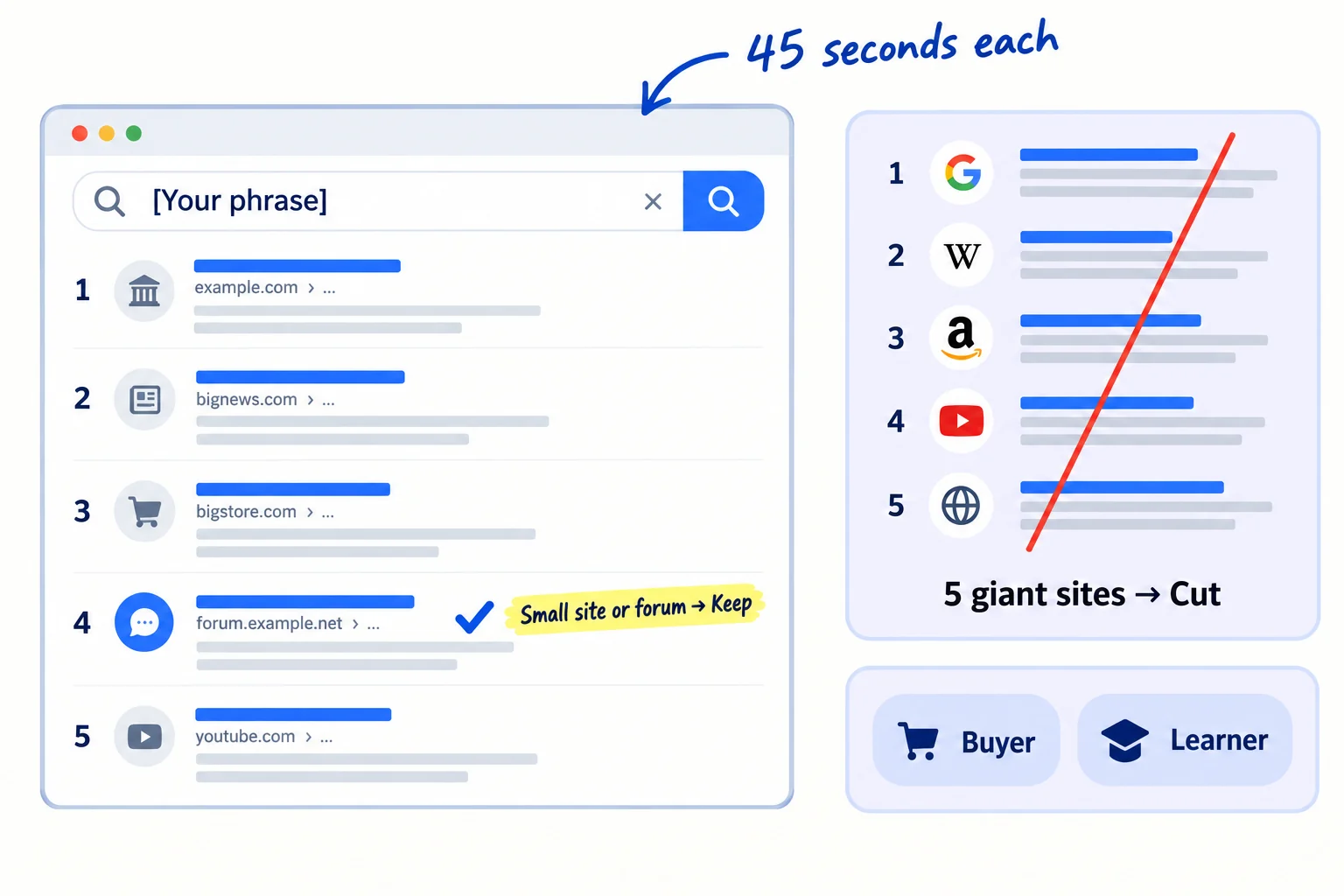
Search in a private window, in your buyers' country. For each phrase, answer three questions and write the answers in your sheet:
- Is it about what you sell? If the results are about something else, cut it. Type "how long does custom packaging take" and Google suggests phrases about parcels at customs, not about printing boxes; results like that mean the phrase is not yours.
- What kind of page ranks? Write down what most of the top 5 are: a product page, a service page, a list of the best options, a how-to guide, or a comparison. This is the search intent, and your page must be the same kind. If Google shows product pages, a blog post will not rank.
- Can a new site win it? Keep it if at least one of the top 5 is a forum thread, a small business site, or a page that does not really answer the phrase. Cut it if all 5 are huge sites, like marketplaces or national brands, with a page made for exactly that phrase. If you are unsure, put the phrase into the free Ahrefs Keyword Difficulty Checker: under 10, keep it; 10 to 30, keep it for after your first 30 pages; over 30, save it for when other sites link to you.
Then mark each kept phrase "buyer" or "learner". A buyer phrase is typed by someone close to choosing: it has a price, "best", "vs", "alternative", "for [kind of business]", "no minimum", "near me" or a product detail in it. A learner phrase asks how or why. Put buyer phrases first. In a February 2026 study of 300,000 learner-type searches, Ahrefs found that when Google showed an AI Overview, the top result got 58% fewer clicks, on average, than top results on searches without one. Learner pages still help, because AI answers need pages to quote and that is how ChatGPT comes to mention you, but they bring fewer visits.
The rule for zero-volume phrases. Tools guess volume from samples, and they round rare searches down to 0. Keep a phrase the tool calls 0 if a buyer said it to you or it was asked in a forum, and it is a buyer phrase. Ten searches a month from people about to order are worth a page. Cut a 0-volume learner phrase unless you have nothing better.
- Tool: Google in a private window, and the free Ahrefs Keyword Difficulty Checker when you are unsure.
- Time: about 4 hours for 300 phrases at 45 seconds each. Split it over two sittings if you need to fit it around your week.
- You will have: every row marked keep or cut, buyer or learner, with the kind of page that ranks.
- It worked if: you kept at least 100 phrases and at least 40 of them are buyer phrases. If you kept fewer than 100, go back to step 2 with 10 more seed words.
- Common mistake: cutting every phrase a tool says gets 0 searches. For a new site, those are often the only phrases it can win this year. The other mistake is keeping short, popular words like "packaging" or "CRM" that huge sites own.
4. Give each keyword its own page, in the order you will publish
Group your kept phrases so that each group is answered by one page, give each group one main keyword, and put the groups in the order you will publish them. This turns a list of words into 100 days of work.
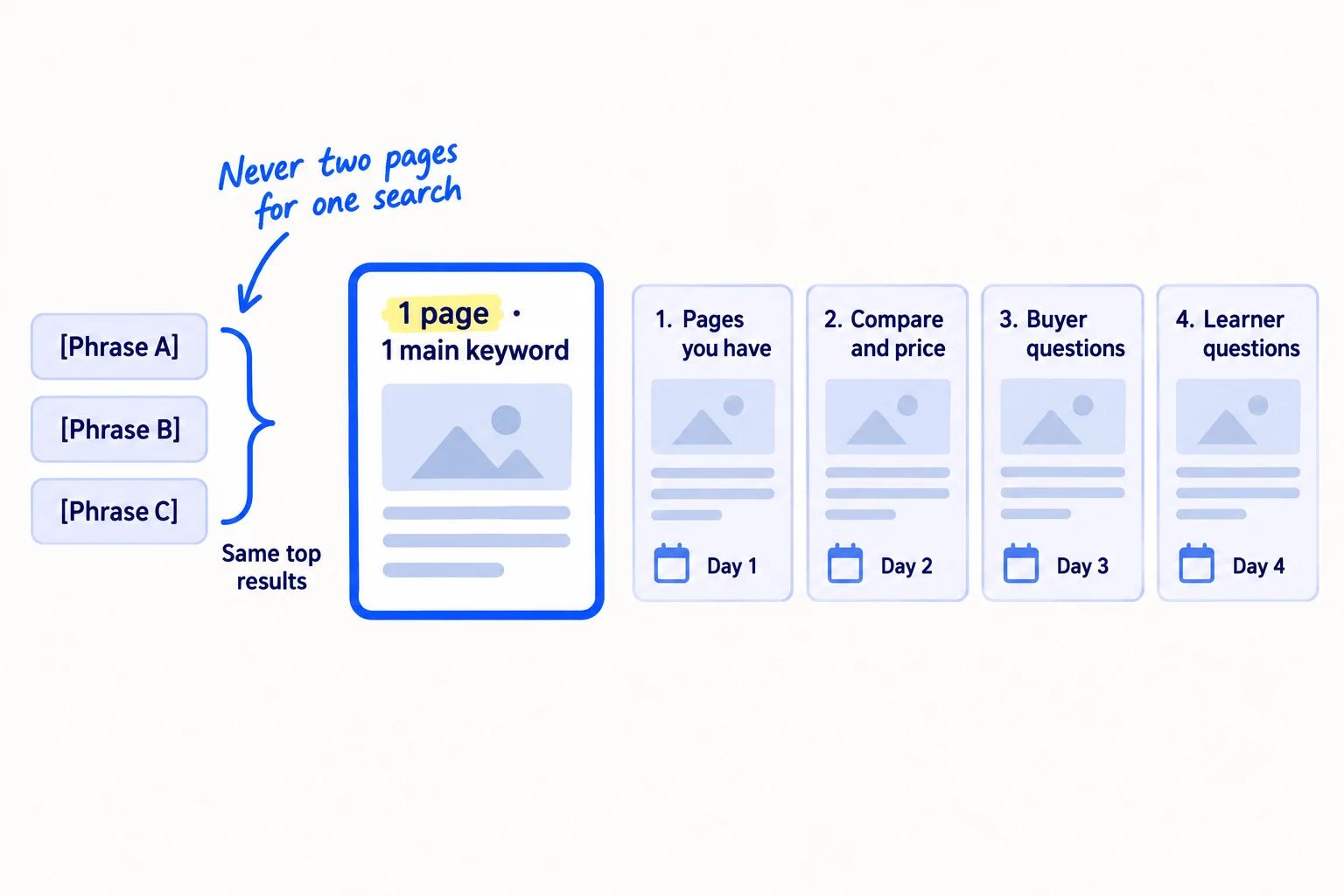
Two phrases belong on the same page when Google shows mostly the same results for both. Search both, and if 3 of the top 5 results are the same pages, they are one keyword. Put them on one row: the main keyword first, and the other phrases as headings or lines on the same page. Two pages for the same search compete with each other, and often neither ranks.
Then put the rows in this order:
- Pages you already have. Your product, service, collection and pricing pages come first. Put their buyer keyword in the page title and main heading. This is a fix, not a new page, so it takes 20 minutes each. For a store, product descriptions and collection pages usually do better than blog posts.
- Compare and price pages. "[Competitor] alternative", "[A] vs [B]" and "how much does [thing] cost". These are comparison and alternatives pages.
- Buyer questions. The questions buyers ask just before they order.
- Learner questions. How and why questions about the problem.
Give each row a date, one a day, starting tomorrow. 100 rows at 1 page a day takes you to about month 3, which is when you first judge search. How long results take is covered in how long SEO takes to work. The dated list is your content calendar for search.
Google's spam rules shape this list. Google treats many pages made only to rank, including pages "where the content makes little or no sense to a reader but contains search keywords", as spam. It also treats pages "targeted at specific regions or cities that funnel users to one page" as doorway pages. So never make 50 copies of one page with a different city or a different word swapped in. One real page for each real question is what this list is for.
Keyword | Other phrases on the same page | Found in | Buyer or learner | Kind of page that ranks | Your page (existing link or new) | Day | Published link
If you run an agency or a B2B company that serves one area: a page for each town you really work in is fine only if each page says something true and different about that town. Otherwise use one page, put the towns on your Google Business Profile, and go after "near me" searches by ranking on Google Maps.
- Tool: your Google Sheet.
- Time: 1 hour.
- You will have: 100 rows, each with one main keyword, the page it belongs to, and a day.
- It worked if: no two rows would be answered by the same page, and the next 30 days each have a row.
- Common mistake: writing a new blog post for a phrase your product page should own, or two posts for the same search.
See it done: The first 6 rows of Carvelian's keyword list
| Day | Keyword | Found in | Buyer or learner | Page |
|---|---|---|---|---|
| 1 | custom printed boxes no minimum | Google suggestion | buyer | existing: printed boxes page |
| 2 | custom coffee bags low minimum order | Google suggestion | buyer | existing: coffee bags page |
| 3 | custom bakery boxes with window | Google suggestion | buyer | new product page |
| 4 | how much does custom packaging cost | Google suggestion | buyer | new price page |
| 5 | are printed boxes food safe | 3 buyer calls, 0 in tools | buyer | new page |
| 6 | what size box for 6 inch cake | Google suggestion | learner | new guide |
Why it works: The pages Carvelian already has come first, then prices and buyer questions, and every row names one page.
5. Add 5 new keywords every day and give today's page its keyword
Every day, add 5 new phrases to your list and check them, then take the top row and give it to today's page. At 1 page a day you use 30 keywords a month, so the list has to grow every day or it runs out.
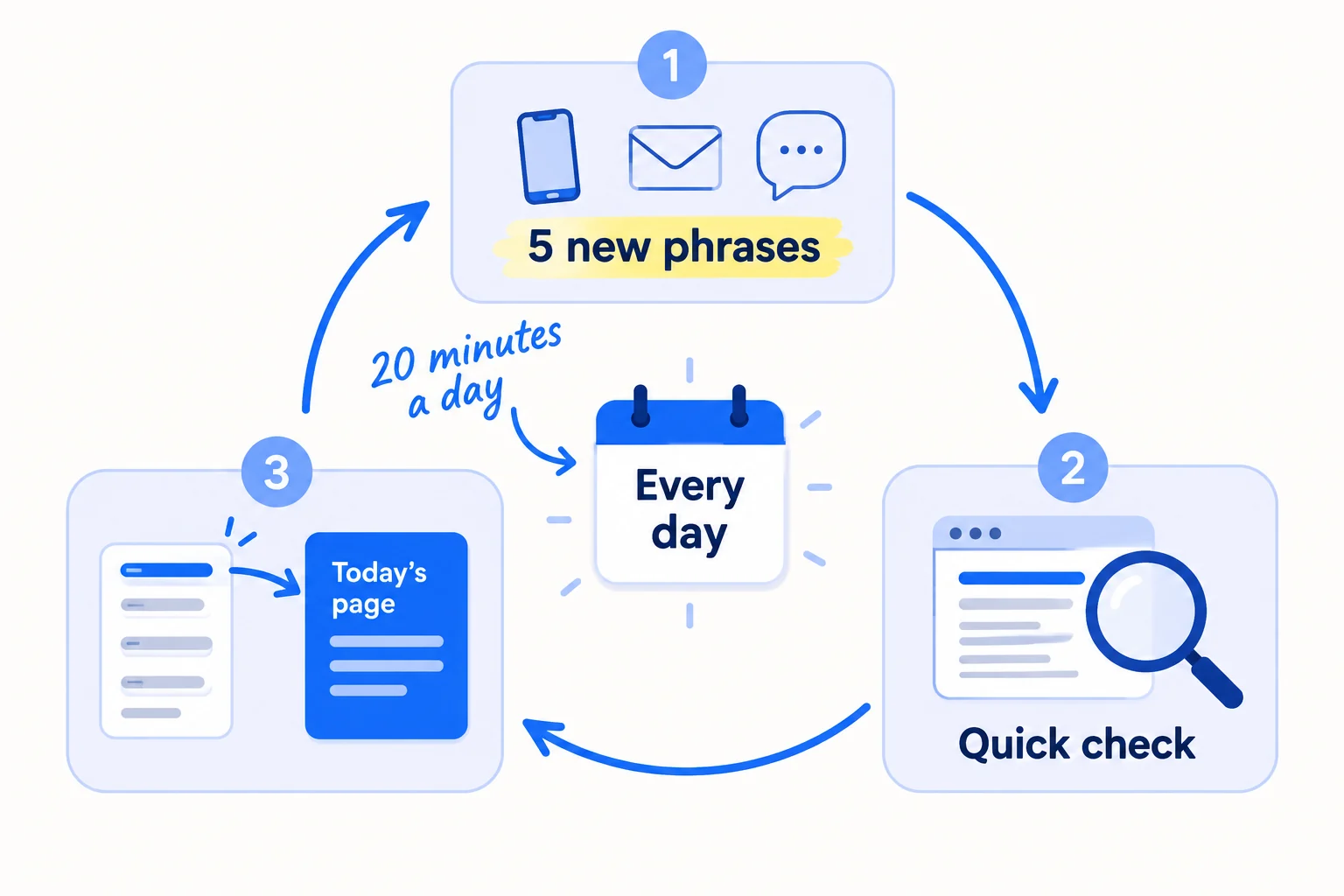
Take the 5 new phrases from the day's work:
- the exact words from today's sales calls and emails;
- one forum search for your problem, sorted by New;
- the questions you saw while giving your 20 daily answers in communities.
Run the step 3 check on each, and add the ones you keep in the right place in your order. This is the list behind the daily page in getting traffic to a new website. Then take today's row. Search its keyword once more, and write down what the top 3 results leave out. That gap is what your page adds. Hand the keyword, the kind of page and the gap to your writing, whether you write it yourself or with AI. How to write the page is in writing a blog post that ranks. When it is live, paste its link into your sheet and ask Google to index it.
- Tool: your Google Sheet and Google.
- Time: 20 minutes a day.
- You will have: a list that grows by a few rows a day while you publish 1 page a day.
- It worked if: every Sunday, your list still has at least 60 rows you have not used, which is 2 months of pages.
- Common mistake: choosing a topic on the day because it feels interesting. Google asks site owners whether they are "producing lots of content on many different topics in hopes that some of it might perform well". Take the next row, even when another idea feels more fun.
6. Every Sunday, add the words people used to find you in Search Console
Once your pages start to appear on Google, Search Console shows the real phrases people typed before they saw your site. Every Sunday, add the new ones to your list, and move the phrases where you are on page 2 to the top.
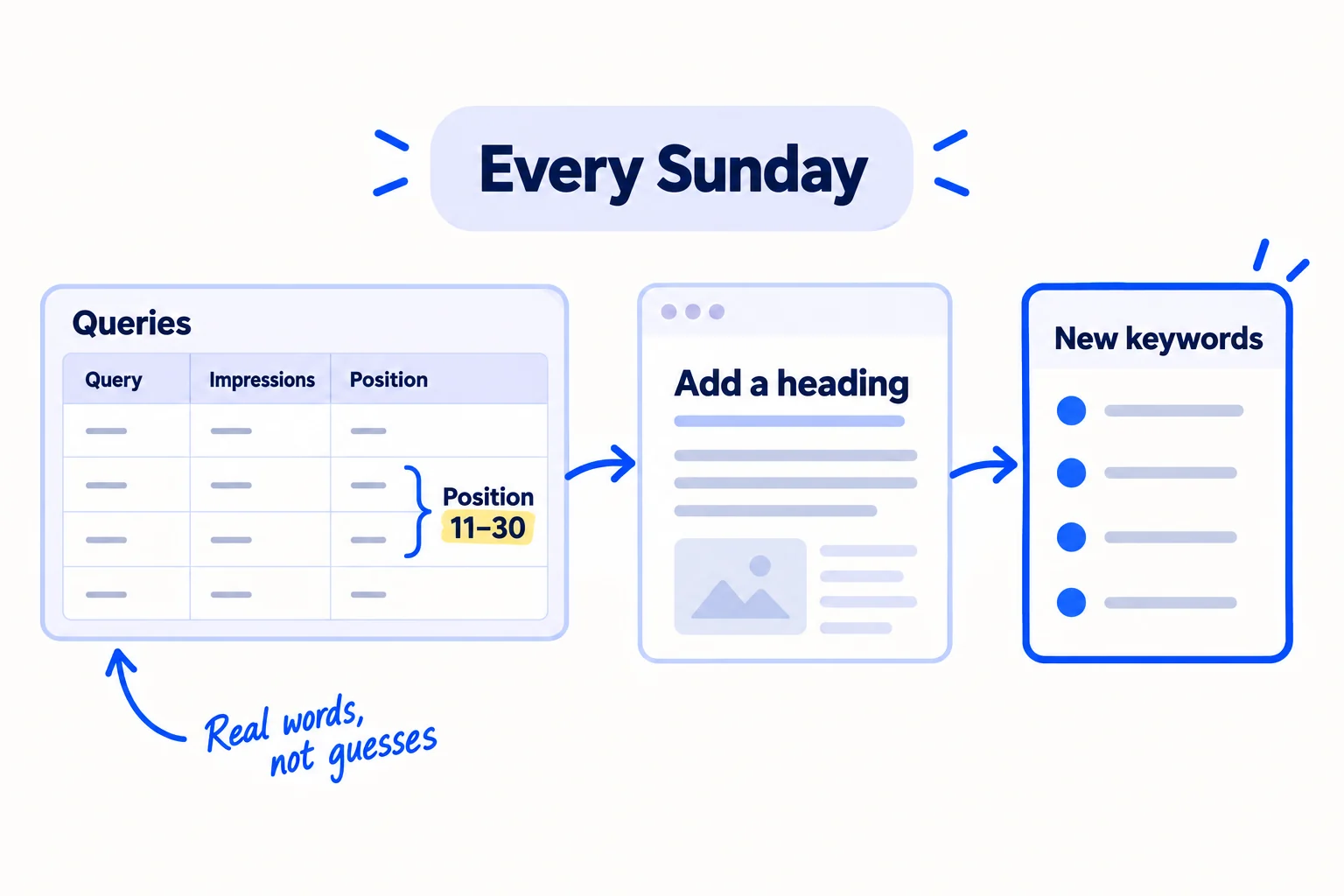
In Google Search Console, open Performance, then Search results. Set the date to the last 3 months and click the "Average position" heading above the chart, so the table shows it. Open the Queries tab. To see only buyer words, click "+ Add filter", choose Queries, choose "Custom (regex)", type (price|cost|best|vs|alternative|minimum) with your own buyer words, and click Apply. Search Console counts searches in Google's AI Overviews and AI Mode too.
Then go down the table:
- A new phrase, not on your list: add it, and run the step 3 check.
- A phrase at position 11 to 30 for a page you have: you are on page 2 or 3. Add the phrase to that page as a heading or a short answer, and put a row at the top of your list to do it this week. More on this is in making an article rank higher.
- A phrase where two of your pages both show up: pick one page for it and link the other to it.
Google hides rare searches from this table to protect people's privacy, so the list is always shorter than your real searches. It is still the only list of words that people really typed to find you.
Once a month, ask ChatGPT and Google's AI Mode your top 5 buyer questions, and write down which businesses they name. That shows you which questions to track in AI answers and whose pages you need to beat.
If you run a B2B company: ask the way a buyer looking for a supplier would, such as "Who makes [thing] in small runs in [country]?". Getting named there is its own job: getting recommended by ChatGPT as a supplier.
If you run an agency: do this for every client every Sunday, and show the new rows in your monthly client report. When clients ask when SEO will work, this list shows them the words it is starting to work on, which makes it easier to explain SEO timelines.
- Tool: Google Search Console. Free.
- Time: 30 minutes every Sunday.
- You will have: new rows that came from real searches, and a short list of pages to improve this week.
- It worked if: once your pages show impressions, you add at least 5 new rows from Search Console every Sunday. If 30 published pages still show no impressions at all after 4 weeks, open the Page indexing report and fix what stops Google, then run the technical SEO checklist.
- Common mistake: judging your keywords by clicks in the first month. A new site shows impressions first and clicks later. Before your pages have any impressions, skip this step and do step 5 twice on Sunday instead. Measuring SEO success says what to count and when.
See it done: Carvelian's Search Console queries in week 8
| Query | Impressions | Position | What they did |
|---|---|---|---|
| printed bakery boxes small order | 41 | 18 | added a heading to the bakery boxes page |
| coffee bags with valve minimum 100 | 12 | 9 | new row, day 38 |
| food safe ink for boxes | 7 | 24 | added a short answer to the food-safe page |
| custom cake boxes near me | 5 | 33 | not added: the top 5 are maps and big stores |
Why it works: Real searches showed which pages were close to page 1 and one new buyer phrase, and each one got a job this week.
Where Scout7 helps
Scout7 speeds up steps 2 to 6.
Steps 2 and 3. Scout7's keyword intelligence researches thousands of keywords and narrows them to target terms, with monthly searches, difficulty, trend, where your site ranks, and who leads on Google and in AI answers for each one. AI question coverage collects the questions real buyers ask AI assistants in your category and shows who answers them today. You still choose the terms that match what you actually sell.
Step 4. The topic opportunity map plots topics by how hard they are to win against how many people search for them, so the ones a new site can win stand apart from the ones that need links first. You pick where to start.
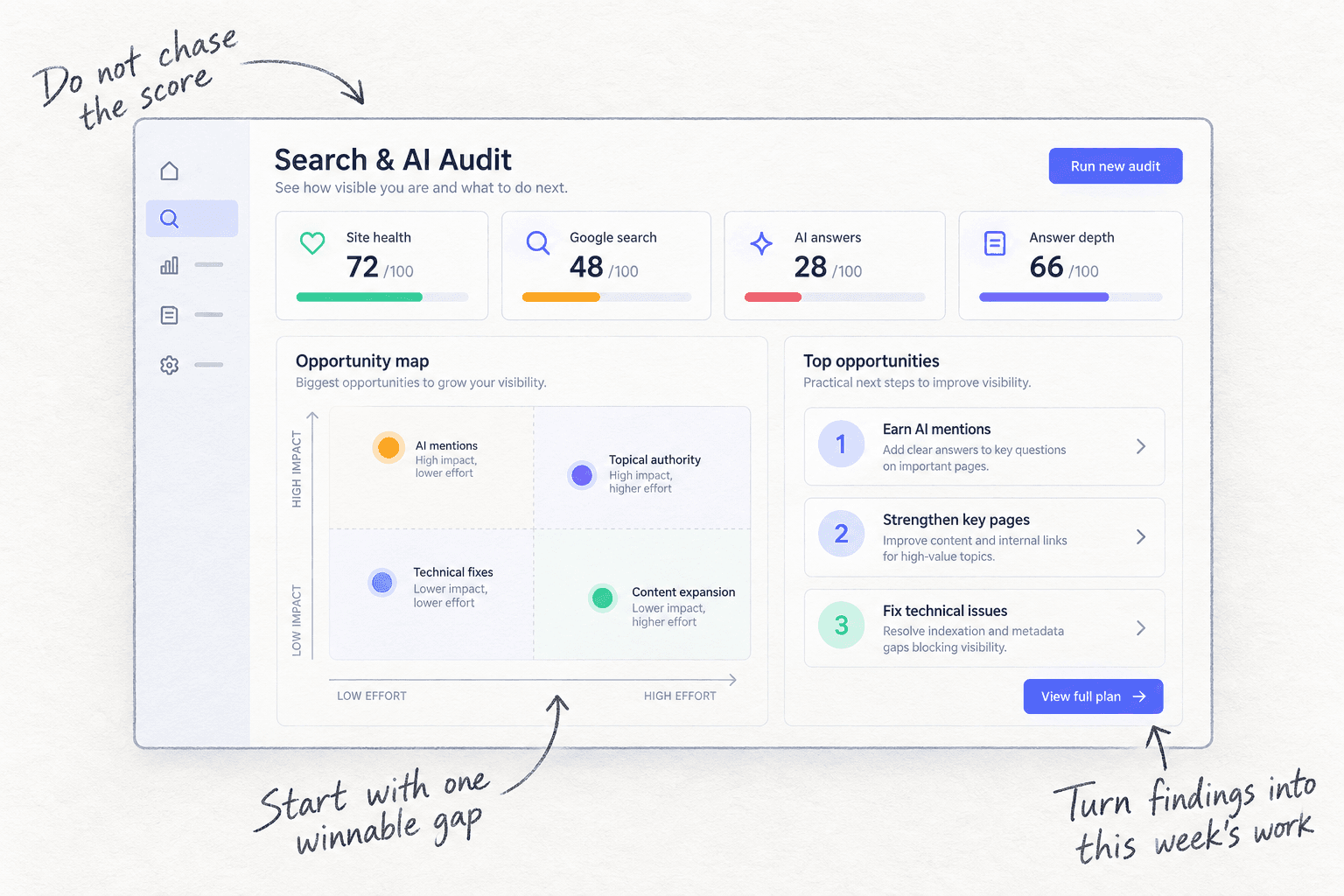
Step 5. Content Co-Pilot turns a keyword into a full article: it asks research-backed questions, then drafts the article with keyword placement, FAQs and structured data. You answer its questions, edit the draft and approve it. Nothing is published without your approval.
Step 6. In the Scout7 app, connect your Search Console property and Scout7 reports your real impressions, clicks and positions next to its search and AI audit.
Your keyword checklist for the next 100 days
0 of 8 done
Work through this list with an AI assistant
It drafts the work and keeps track of what is done.
Frequently asked questions
- What is a good search volume for a keyword?
For a new site, there is no minimum. A buyer phrase with 10 searches a month from people about to order is worth more than a learner phrase with 1,000, because the big phrase is owned by huge sites and the learners may never buy. Judge a phrase by who ranks for it and who types it, not by the number alone.
- Do zero-volume keywords get traffic?
Some do. Tools estimate volume from samples and round rare searches down to 0, and Google hides rare searches in Search Console too. Keep a 0-volume phrase if a buyer said it to you or it was asked in a forum, and it is a buyer phrase. Your page's impressions in Search Console will tell you the truth within a few months.
- How many keywords should I target per page?
One main keyword per page, plus the close phrases that Google answers with the same results. Test it: search both phrases, and if 3 of the top 5 results are the same, they belong on one page. If the results are different, give each its own page. Never make two pages for the same search.
- Can ChatGPT do keyword research?
It can suggest phrases and group your list, and it is good at every way to say one thing. It cannot see what people really search. Keep an AI-suggested phrase only if it also shows up in Google's suggestions, a keyword tool or a forum, and check who ranks for it yourself. More ways to use it are in using ChatGPT for marketing.
- Do I need a paid keyword tool like Ahrefs or Semrush?
Not to start. Google's suggestions, the free Ahrefs Keyword Generator and Keyword Difficulty Checker, and Search Console are enough for your first 100 keywords. A paid tool helps once you publish every day and want exports and filters. Buy one then, if the free tools are slowing you down.
Sources
- 1.How Google autocomplete predictions work — Google Search Help, checked 29 September 2026
- 2.Free Keyword Generator — Ahrefs, checked 29 September 2026
- 3.Free Keyword Difficulty Checker — Ahrefs, checked 29 September 2026
- 4.How AI Mode is changing and expanding the way people search — Google, 19 May 2026
- 5.Google Search's I/O 2026 updates — Google, 19 May 2026
- 6.Update: AI Overviews Reduce Clicks by 58% — Ahrefs, 4 February 2026
- 7.AI features and your website — Google Search Central, updated 10 December 2025
- 8.Spam policies for Google web search: scaled content abuse and doorway abuse — Google Search Central, updated 28 August 2026
- 9.Creating helpful, reliable, people-first content — Google Search Central, updated 10 December 2025
- 10.Performance report (Search results): Overview and basic setup — Search Console Help, checked 29 September 2026
- 11.Performance report (Search results): Advanced filtering and comparison — Search Console Help, checked 29 September 2026
- 12.Performance report (Search results): Dimensions and data groupings — Search Console Help, checked 29 September 2026
- 13.Should You Target Zero-Volume Keywords? It Depends — Ahrefs, 21 October 2022
- 14.What should I prioritize first to improve SEO for a new Shopify store? — Shopify Community, 31 August 2026
Next article to read
Related guides
- How long does SEO take to work?Find out how long SEO takes to work for a new site: check in 20 minutes that buyers search for what you sell, get your site onto Google today, publish 1 page a day for searches people make just before they buy, and judge it at week 2, month 1, month 3 and month 6 against a number for each, with a count every Sunday.
- How to write competitor comparison and alternative pagesComing soon
- How to use Google Search ConsoleComing soon
- How to make an article rank higher on GoogleComing soon
Guides that link here
- How to choose marketing channels for a SaaS startupSaaS
- How to get traffic to a new website for free
- How long does SEO take to work?
- How to get your first sale on EtsyD2C
- How to launch a product on AmazonD2C
- How to submit your SaaS to directoriesSaaS
- How to choose marketing channels for an agencyAgency
- How to choose marketing channels for an ecommerce brandD2C
- How to do a competitor analysis
- How to do customer interviews
- How to market a SaaS productSaaS
- How to market your product as a technical founderSaaS
- How to price a SaaS productSaaS
- How to validate a business idea without spending money
Cite this page
Dinesh Bypilla (2026). How to find keywords for SEO. Scout7 Academy. https://scout7.ai/academy/seo/how-to-find-keywords-for-seo
Written by Dinesh Bypilla, Agentic systems engineer at Scout7. Reviewed by Murali Sid. Last checked 29 September 2026.
Quote any part of this guide with a link back to this page. © 2026 Scout7.
Markdown version of this page: https://scout7.ai/academy/seo/how-to-find-keywords-for-seo.md