



How to rank on Google Maps
Rank on Google Maps: check Google lets your business show, copy the primary category the top 3 use, ask every customer for a review, add a page for each service, ask 20 local sites a day for a listing, and scan your rank once a month for free.
ByDinesh BypillaReviewed byMurali SidLast checked 22 min read
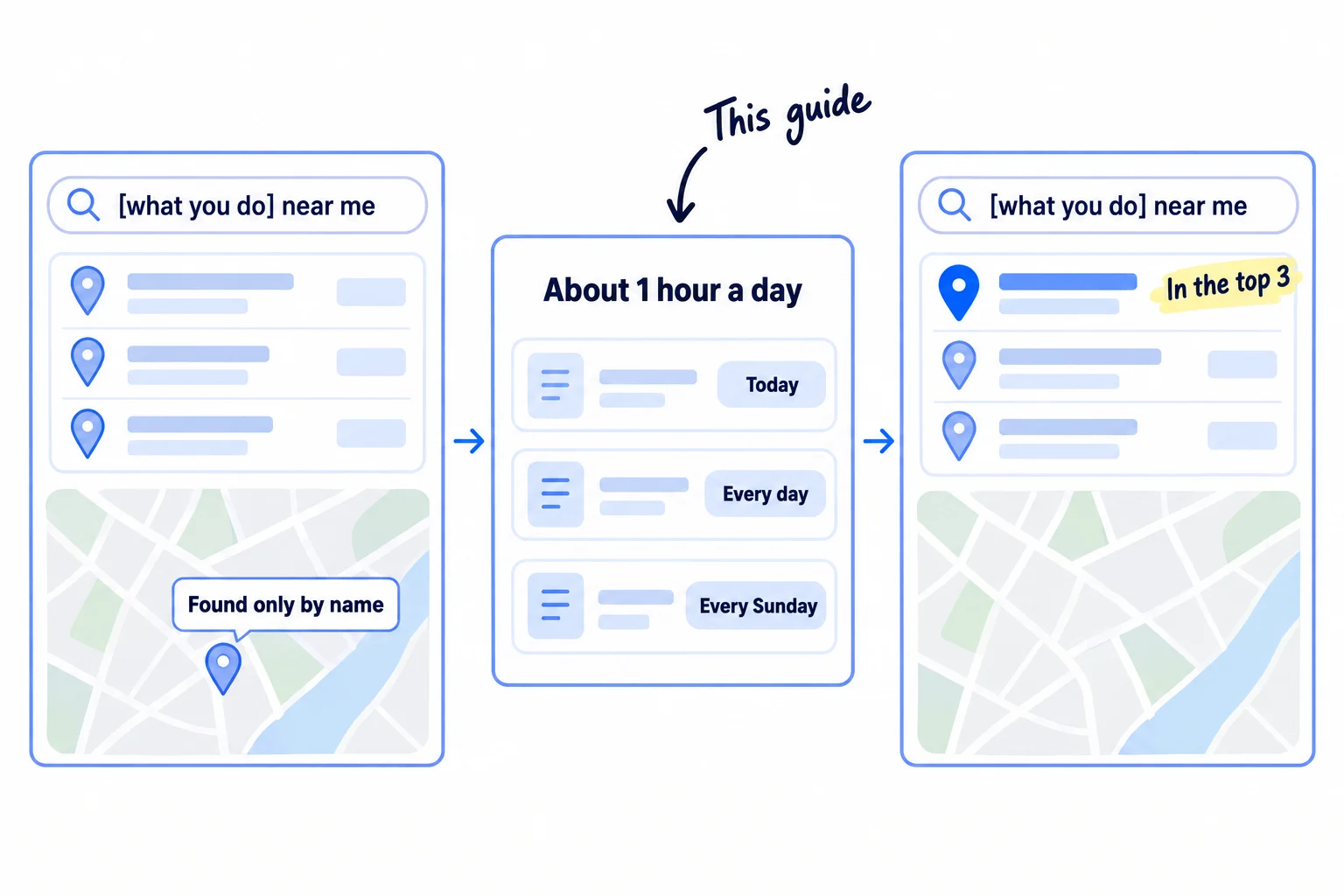
Your business has a Google Business Profile and people who type your name can find it, but when a buyer nearby searches for what you do, three other businesses fill the map and you are not there. To rank on Google Maps, your profile needs the category Google matches to that search, a steady flow of new reviews, and a website and local sites that back it up. If you change nothing, the businesses at the top keep getting the calls and the reviews, and the gap grows every week.
Do these three things
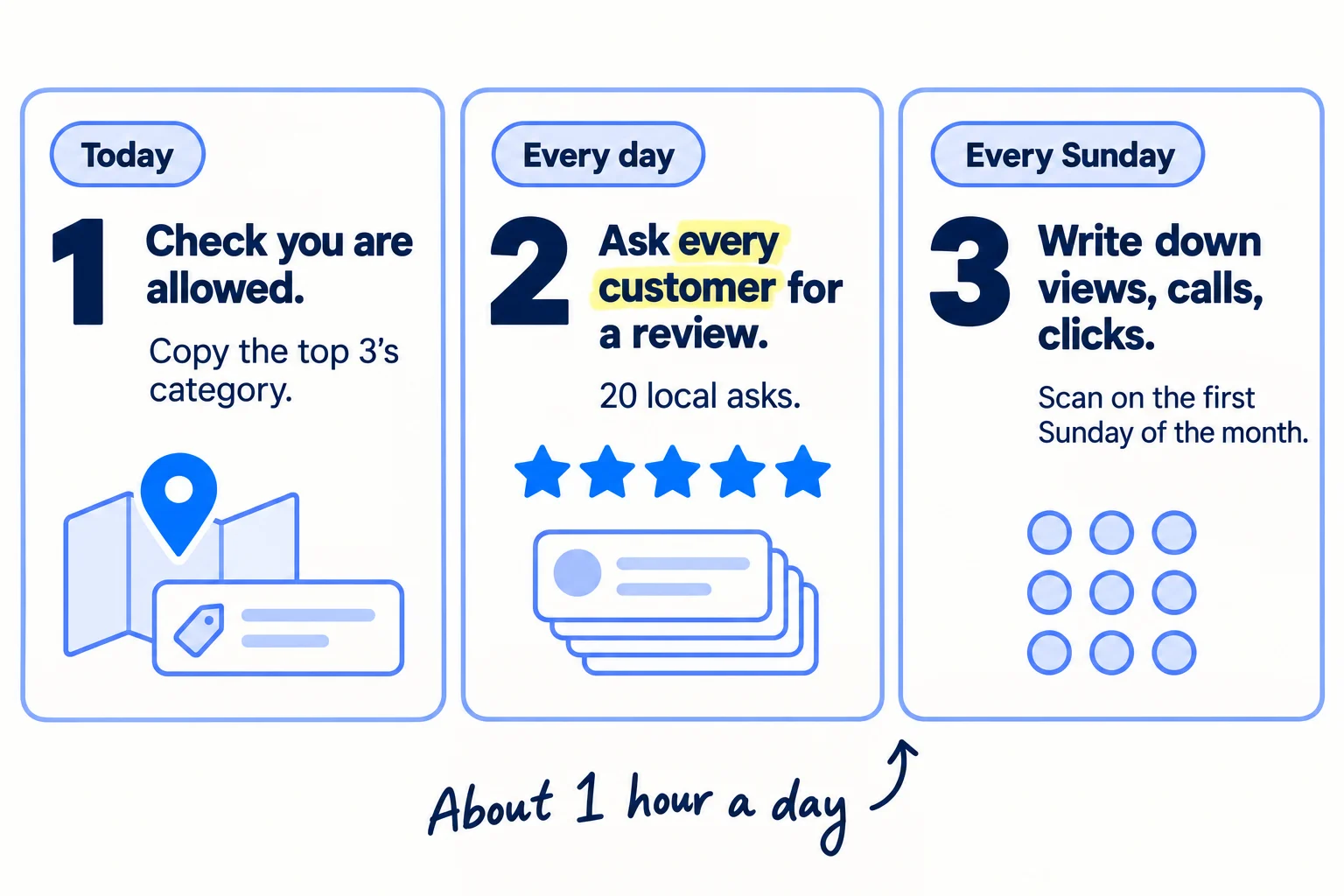
About 2 hours today, then about 1 hour a day and 20 minutes every Sunday. Google says a new business can take up to a month to show in results, so judge it after 8 weeks and 1,000 local asks.
Show the three actions in fullHide the full list
- Today: check your business is allowed on Google Maps, scan where you rank for your 3 main searches, and set your primary category to the one the top 3 businesses use.
- Every day: ask every customer you served for a Google review, reply to every new review the same day, and send 20 personal asks to local websites for a listing or a link.
- Every Sunday: write down your profile's views, calls, website clicks and direction requests, and on the first Sunday of each month scan your 3 searches again to measure what changed.
Get help doing these
ChatGPT or Claude reads this guide and works through it with you.
1. Check your business is allowed to show on Google Maps
Google only shows businesses on Maps that meet customers in person during their stated hours, so first check you qualify, that your profile is verified, and that it shows up when you search your own name. Google's rule is: "a business must make in-person contact with customers during its stated hours." Online-only businesses are not eligible at all.
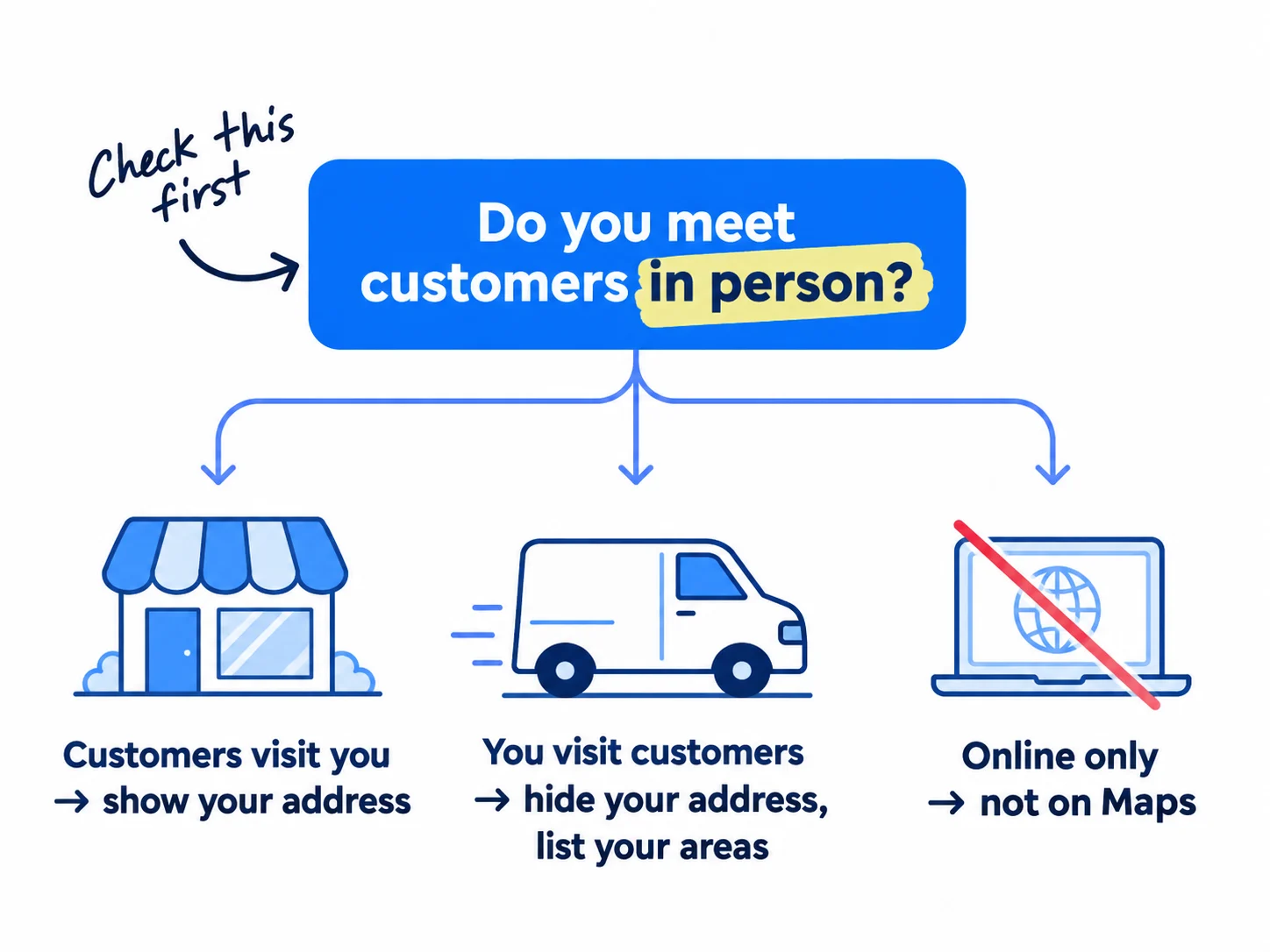
Pick the line that fits you:
| If your business… | Then on Google Maps you… |
|---|---|
| has a place customers visit, like an office, workshop, shop or studio, with staff there during your hours | show your address. You are a storefront business. |
| goes to customers, like site visits, installs or meetings at their office, and you work from home or a unit they do not visit | hide your address and list up to 20 towns or postcodes you really serve, no more than about 2 hours' drive from your base. You are a service-area business. |
| sells only online, by video call or by phone | cannot have a profile. Google lists "online-only businesses" as not eligible. Skip to the guides below. |
If you run a SaaS: you almost certainly sell online only, so Google Maps is not for you. Put the same hours into pages that answer what buyers search, getting mentioned by ChatGPT and your first 100 users.
If you run a D2C store: you qualify only for a real place with stated hours where shoppers meet you: a shop, a studio or a local pickup point. An online store alone does not qualify. Your free Google listings are Google Shopping free listings instead.
If you run an agency: you qualify if you meet clients face to face, at your office or at theirs. Make one profile for your own agency, as part of marketing your agency. For local clients, this guide is the work you do on their profile, and each Sunday's numbers go in your monthly client report. Google does not allow profiles for "lead generation agents", so never make a profile for a town you do not work from.
No profile yet? Set up a Google Business Profile first: create it, verify it, and fill in every field. Then come back here. A virtual office or a mailbox address is not allowed, and a profile that breaks the rules can be suspended.
Then run the name test. Search Google and Google Maps for "[your business name] [your town]". If your profile shows, it works; it just does not rank for other searches yet. Google says a new business can take up to a month to show in results, and an edit can take up to 3 days.
Last, check your name. It must be your real business name, exactly as it is on your sign, your website and your invoices. Do not add what you do or where you are, such as "Smith & Co – Plumber London". Whitespark's 2026 survey of 47 local search experts put keywords in the name as the third strongest ranking factor, but Google's guidelines say adding unneeded words "could result in the suspension" of your profile. A suspended profile shows nowhere.
- Tool: Google Search and Google Maps. Free.
- Time: 15 minutes.
- You will have: a yes or no on whether you can be on Maps, a verified profile, and your real name on it.
- It worked if: "[your business name] [your town]" shows your profile on Google Maps.
- Common mistake: using a virtual office, a co-working desk with no sign or staff, or a home address you do not serve customers from as a shown address. All three break Google's rules.
2. Find where you rank on Google Maps today for your 3 main searches
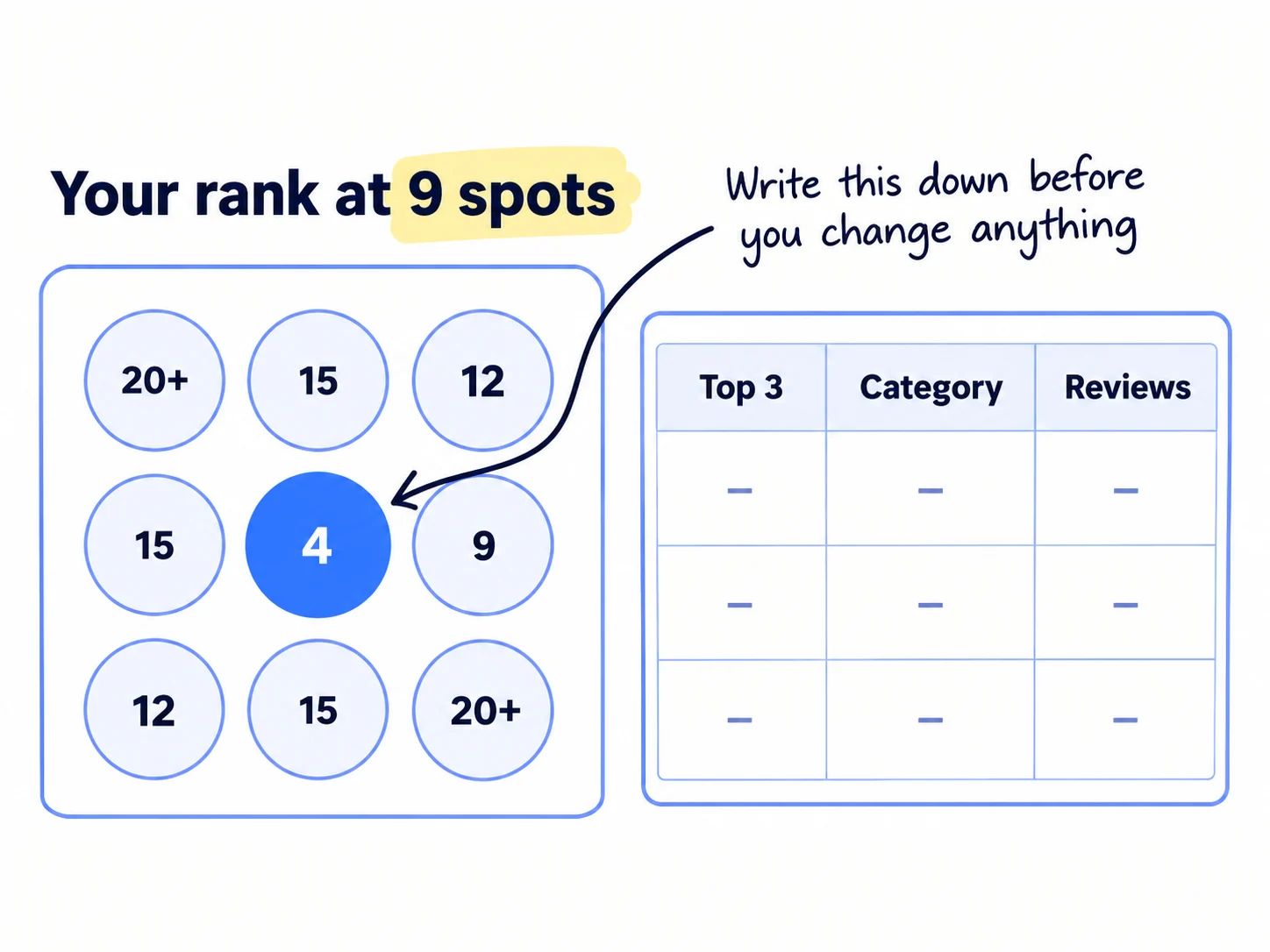
Before you change anything, write down where your business ranks today for the 3 searches buyers near you type, and what the top 3 businesses for each search have. This is how you will know if anything you do in steps 3 to 6 works.
Pick 3 searches. Write the keywords your ideal customers type when they need you now: "[what you do] near me", "[what you do] [your town]" and your most asked-for service, such as "emergency boiler repair" or "custom printed boxes". Type each into Google and note the suggestions, the same way you find keywords for SEO. Pick the 3 that match what you sell. ChatGPT or Claude can list 20 more ways buyers might say it, and you keep the 3 that match the Google suggestions.
Scan your rank. Do not check by searching on your own phone. Google ranks by distance from the person searching, so at your office you look higher than you are for a buyer 5 kilometres away. Use a grid scan instead, which checks your rank from many points at once. Local Falcon gives 100 free credits when you sign up, and each point on the grid costs 1 credit. Run a 3 by 3 grid (9 credits) for each of your 3 searches, centred on your business and sized to the area you serve. That is 27 credits, and the rest covers the same scan in each of the next 2 months.
Write down the top 3. For each search, open the 3 businesses at the top of Google Maps. Write down their primary category (it shows under the name on the profile), their number of reviews, their star rating and the date of their newest review. The free GMB Everywhere Chrome extension also shows their other categories. This is your competitor analysis for Maps.
Search | Your average rank (9 points) | Your best point | #1 name, category, reviews, rating, newest review | #2 … | #3 …
- Tool: Google search suggestions, Local Falcon (100 free credits) and the GMB Everywhere extension (free). All free.
- Time: 45 minutes.
- You will have: a sheet with your rank at 9 points for each of 3 searches, and the category, reviews and rating of the top 3 for each.
- It worked if: all 27 points have a number (or "not in top 20"), and you can say which category most of the top 3 use.
- Common mistake: choosing searches by what you call your business instead of what buyers type. Nobody searches for your product name before they know you.
See it done: Carvelian Packaging's baseline
Carvelian Packaging is a made-up maker of custom printed boxes for small food and drink brands. One founder sells through calls, samples and quotes.
Google Maps baseline, day 1
| Search | Carvelian's average rank | #1 | #2 | #3 |
|---|---|---|---|---|
| custom printed boxes near me | not in top 20 | Packaging company, 112 reviews, 4.7 | Packaging company, 61 reviews, 4.8 | Commercial printer, 38 reviews, 4.6 |
| packaging company near me | 18 | Packaging company, 112 reviews, 4.7 | Packaging company, 61 reviews, 4.8 | Packaging supply store, 44 reviews, 4.5 |
| food packaging supplier | not in top 20 | Packaging company, 61 reviews, 4.8 | Packaging company, 112 reviews, 4.7 | Packaging supply store, 44 reviews, 4.5 |
Carvelian's founder takes samples to food and drink makers, so it is a service-area business with its address hidden. Its profile has 2 reviews, one from each client, and the primary category "Commercial printer".
Why it works: Most of the top 3 use 'Packaging company' and have 38 to 112 reviews against Carvelian's 2, so the gap is the category and the reviews.
3. Set your primary category, services and hours to match the search
Your primary category is the strongest ranking signal you control, so set it to the category most of the top 3 use, as long as it truly describes your business. Then fill in your services, hours, description and photos, so Google and its AI answers can match you to more searches.
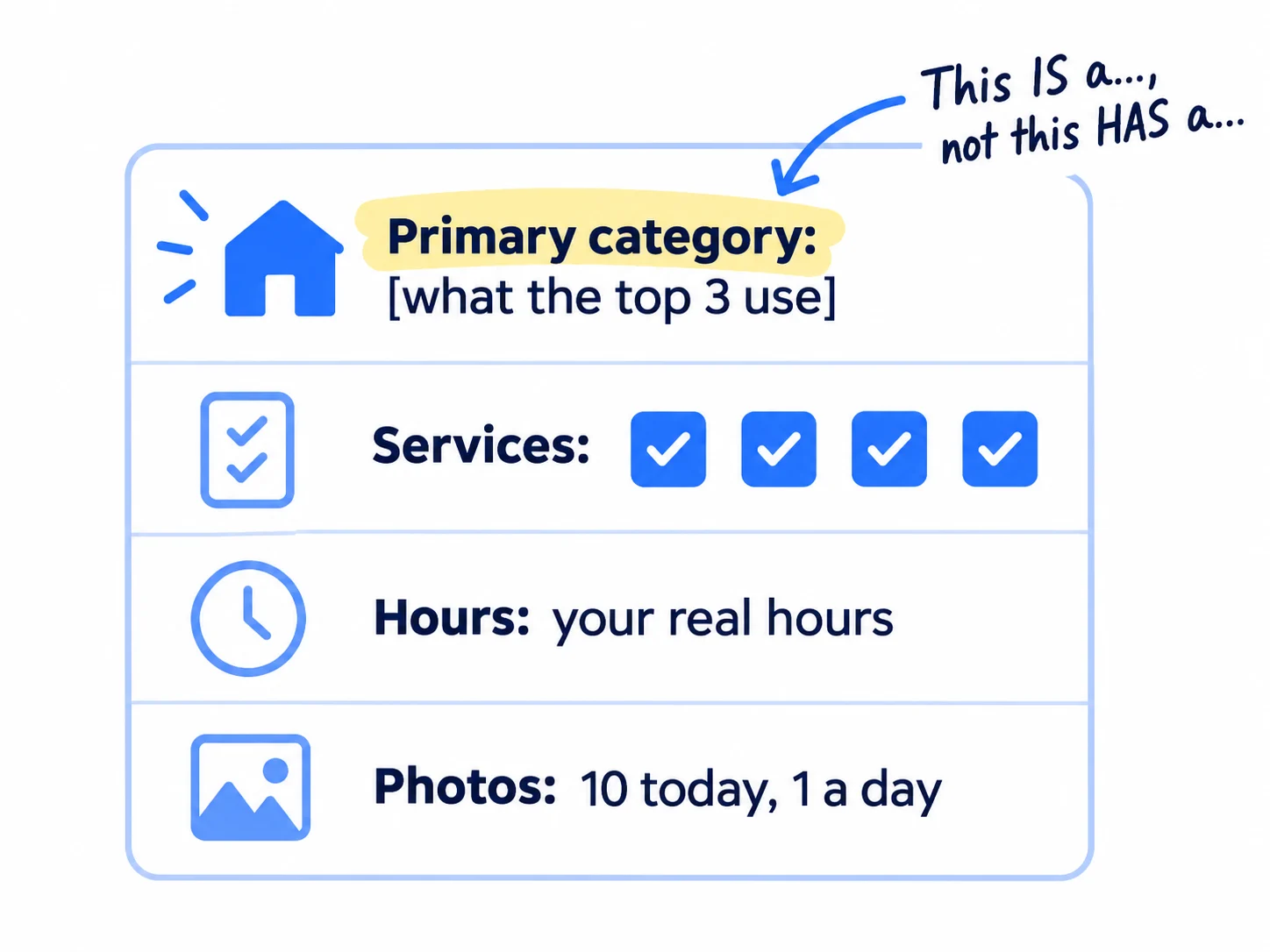
Primary category. In your Business Profile, select Edit profile, then Edit next to "Business category". Type the category most of the top 3 use and pick it from Google's list. Use it only if it finishes the sentence "This business IS a ___" truthfully. Google's rule is to use "as few categories as possible", so add 1 to 3 more with Add another category only if each one is also true. Google says your categories "affect your local ranking", and that changing one may ask you to verify your business again. So make all your category changes in one sitting, then leave them alone for 4 weeks.
Services. Select Edit services and tick every suggested service you really do. These suggested services moved from 81st to 22nd place in the 2026 experts' survey. Use Add custom service for anything missing, in plain words, with no prices or phone numbers in the name.
Hours. Enter the hours customers can really reach you, and add holiday hours before each holiday. The 2026 survey ranks "business is open at the time of the search" fifth, so a business shown as closed ranks lower at that moment. Do not list hours you do not work. Google asks for your real customer-facing hours.
Description. Say who you serve, what you do, the area you cover and how ordering works. Your value proposition in one sentence is a good first line. Google allows no links and no offers or prices in the description.
[Business name] [does what] for [who] in [town or area]. We [the 2 or 3 main services, in buyers' words]. [How ordering works: for example, "Send us your sizes and we quote within 1 business day."] [One fact that shows you are real: years, a kind of client, where you make it.] We serve [list of areas].
Answers to buyers' questions. Google removed the questions and answers section from profiles from December 2025. Since 12 March 2026, Ask Maps in the US and India lets people ask Google Maps questions about a place, and it answers from profile details, reviews and photos. So put the answers to the 5 questions buyers ask you most, such as minimum order, area, lead time and price range, into your services, your description and your website (step 5). The same answers help with Google's AI Overviews.
Photos. Add 10 photos today: the outside with your sign, the inside, you at work, finished work and your team. Then add 1 new photo of real work every day, which takes 2 minutes on your phone. A short clip works too, the same kind you make for short-form video. Google's own tips say photos and videos help customers understand what you offer. To share a photo with a line of text, use Posts, then Add post, and choose Update.
- Tool: your Google Business Profile. Free.
- Time: 1 hour today, then 2 minutes a day for the photo.
- You will have: a primary category that matches the top 3, every true service ticked, real hours, a description, 10 photos, and 1 new photo a day.
- It worked if: every field on your profile is filled in, and 3 days later the profile is still verified and shows the new category.
- Common mistake: changing the name, address and category again and again to test what works. Each change can send the profile back to verification, and it may not show while Google checks it.
See it done: Carvelian Packaging's primary category
Primary category before
Commercial printer
Primary category after
Packaging company
Why it works: Most of the top 3 for its main searches use 'Packaging company', and Carvelian is a packaging company that also prints, not a printer that sometimes makes boxes.
4. Ask every customer for a Google review and reply to every review the same day
Reviews are the part of Google's "prominence" you can grow every day, and the social proof buyers read first, so ask every customer you serve for a Google review, and reply to every new review on the day it arrives. Google names how many reviews you have as part of prominence, and it says replies help your business stand out.
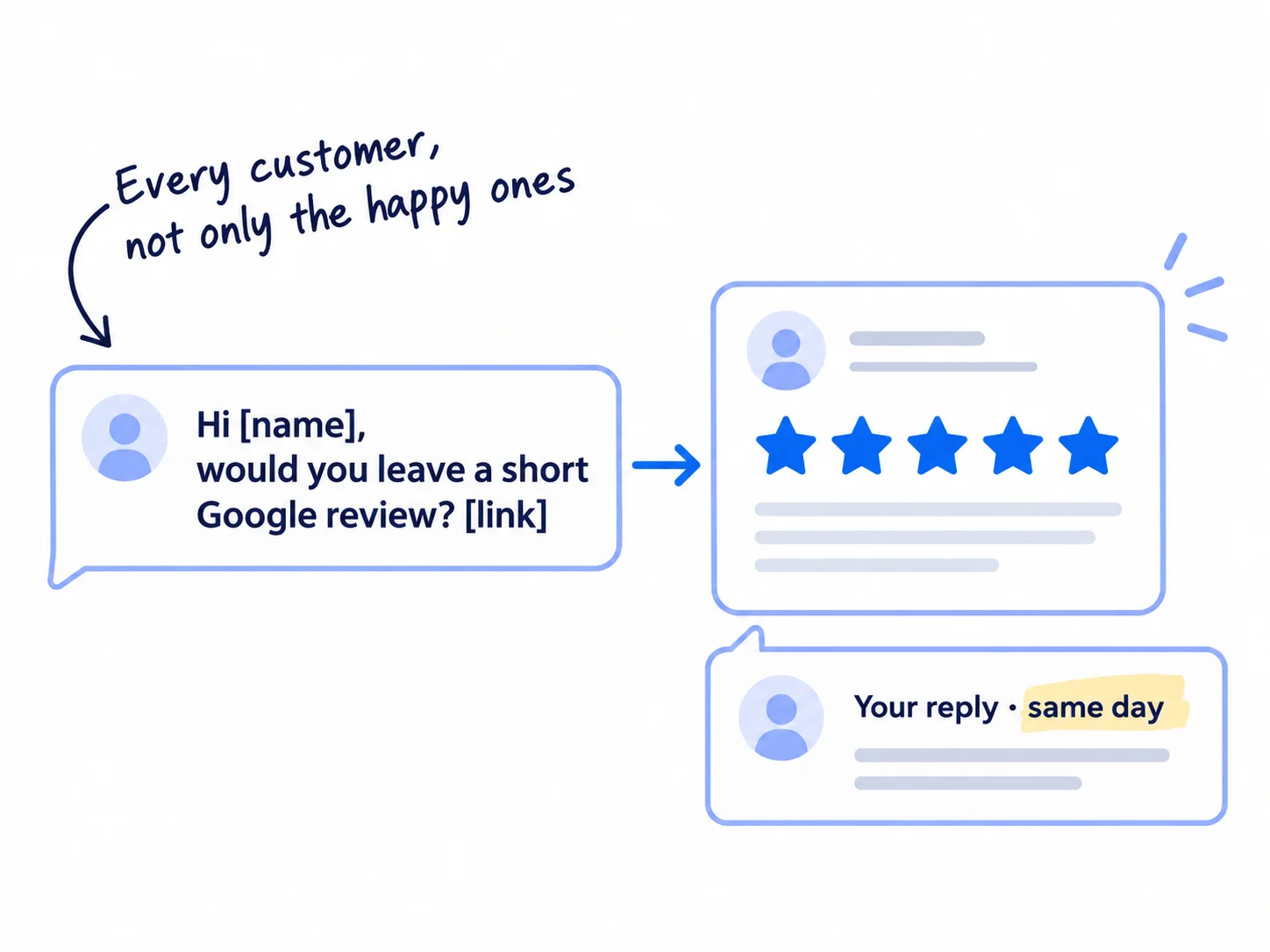
The full method is in how to get Google reviews for your business. The short version:
- Get your link. On your Business Profile, select Read reviews, then Get more reviews, then Copy. A QR code for the same link can only be made on a computer.
- Ask every customer, personally, the day the job is done or the order arrives. Then ask every past customer once. AI can draft each message from your notes in 30 seconds; you add one true line about the job.
- Set your target from step 2. Aim for the average review count of the top 3 for your main search. Your first target is 20: a 2026 survey of 1,002 US adults found 47% will not use a business with fewer than 20 reviews.
- Keep them coming. In the same survey, 74% look for reviews from the last 3 months. A review every week beats 30 in one week and then none.
Stay inside Google's rules. They were tightened on 17 April 2026:
- No discounts, gifts or free work in return for a review.
- Ask every customer, not only the happy ones. Google bans asking only happy customers and putting people off leaving bad reviews.
- No review targets for staff, and do not have staff ask for reviews that name them or say set words.
- Never buy reviews, write your own, or ask friends who were not customers. Google says breaking these rules can lead to anything from losing account features to losing the account.
Reply to every review the same day. Use the person's name and the thing they mentioned. In the 2026 survey, 80% said they are more likely to use a business that replies to all its reviews, and 50% are put off by replies that look like a template. AI drafts the reply; you change it so it is about this customer. For a bad review, thank them, say what you will fix, and give a way to talk directly. Never argue in public.
Hi [first name], thanks again for [the job or order, in one line]. [One true line: something about their project or what they said.]
Would you leave a short Google review? It helps other [kind of business] near us find us. It takes about a minute: [your review link]
Either way, thank you for working with us.
[Your name]
If you run a B2B company or an agency: you may have only a few clients, so you will have only a few reviews for a while. That is the honest start. Ask each one, and do step 6 harder: links and listings are the other half of prominence. A client happy enough to review you is also the one to ask for a referral and a case study. Reviews on Clutch are a separate job and do not count on Google Maps.
If you run a D2C store with a shop: put the QR code next to the till and on the receipt, and ask each customer in person.
- Tool: your review link from Google Business Profile, and ChatGPT or Claude to draft messages and replies. Free.
- Time: about 2 minutes a customer to ask, 1 minute a review to reply.
- You will have: a message sent to every customer and every past customer, and a reply under every review.
- It worked if: every review has your reply within a day, and you get at least 1 new review for every 4 customers you ask.
- Common mistake: offering 10% off for a review, or sending the link only to customers you know are happy. Both break Google's rules.
See it done: Carvelian Packaging's reply to a review
To: Reply under a 5-star Google review from Priya, founder of a small hot sauce brand
Thank you, Priya. Seeing your three-sauce gift boxes on the market stall, with the labels standing out on the matte black, was the best part of our month. Good luck with the farm shop orders, and we are here when you need the next run. [Founder's first name], Carvelian Packaging
Why it works: It names the reviewer and the detail she wrote about, so it reads as a real reply and not a template.
5. Make your website match your profile, with one page per service
Google also judges your profile by the website it links to, so make every page show the same name, phone number and address or area as your profile, and give each service you list its own page.
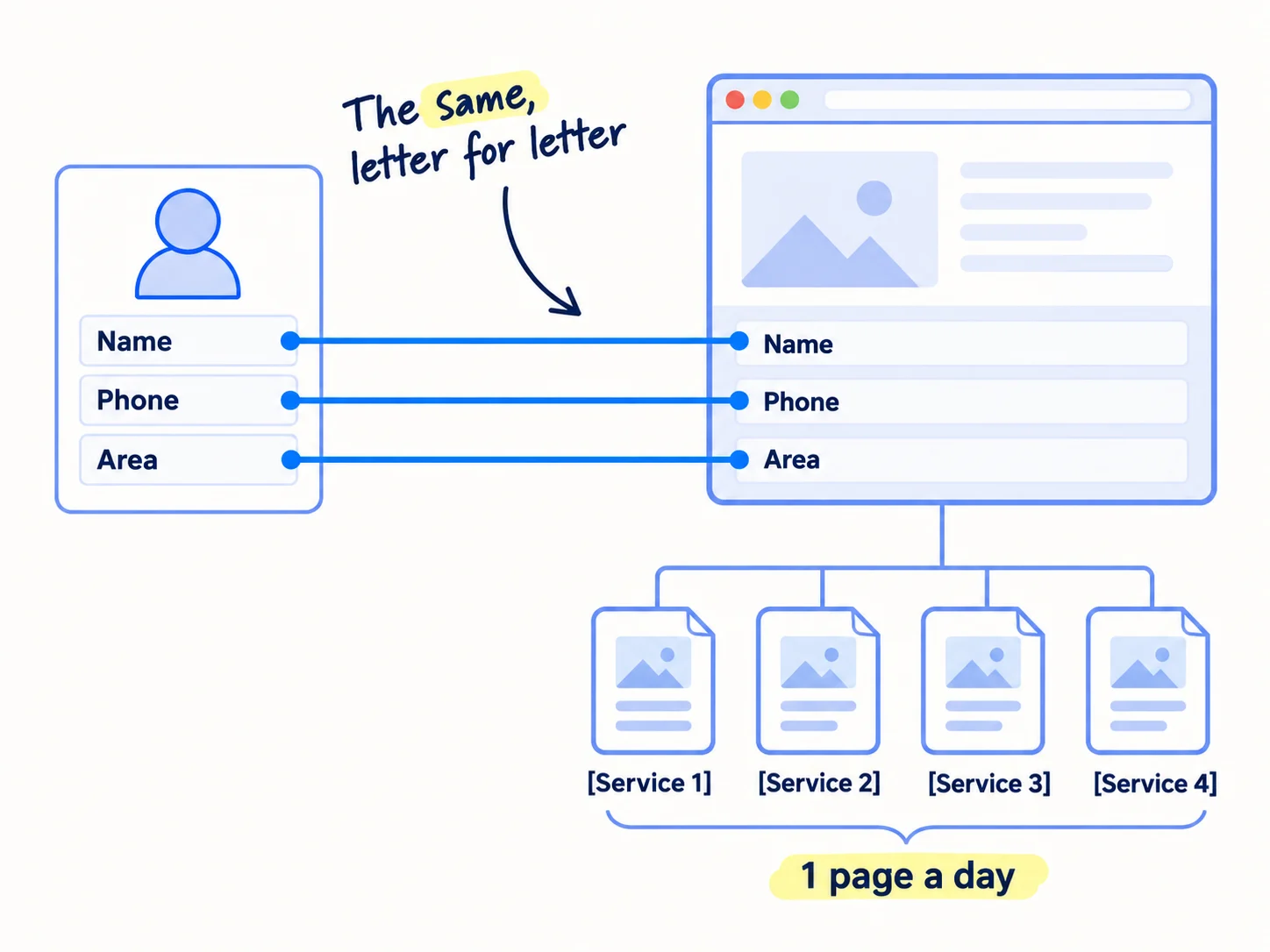
Match your details. Put your business name, phone number and either your address (storefront) or your towns (service-area) in the footer of every page, written exactly as on your profile. Add LocalBusiness schema markup with the same details, your hours and a link to your profile. No website yet? Make a website for your business first.
Write one page a day, one for each real service, until every service on your profile has a page. Each page says what the service is, who it is for, how pricing or quoting works, the area you cover, 2 or 3 photos of real work, one customer quote and answers to the questions buyers ask. AI drafts the page from your notes in a few minutes; you add the photos, the prices and one real job, about 1 hour a page. Write it like any page that ranks on Google, with the search from step 2 in the title.
Add a town page only where you have done real work there and can say something true about it: a job, a client, a delivery time. Google's spam rules name "pages targeted at specific regions or cities that funnel users to one page" as doorway abuse, and many AI-made pages "without adding value" as scaled content abuse. Ten near-identical pages with only the town name changed can hurt the whole site.
Point your profile at the right page. Set the website on your profile to the page for your primary category's main service, not always the homepage. Each page needs one clear next step, like any landing page: call, send sizes, or book a visit. Add UTM parameters to that link, so your analytics shows visits from your profile. Then request indexing for each new page, the way you get your website indexed on Google.
- Tool: your website, ChatGPT or Claude for drafts, and Google Search Console. Free.
- Time: 30 minutes for the footer and schema, then about 1 hour a page, 1 page a day.
- You will have: the same details on your site and profile, one page for every service, and a tagged link from your profile to your main service page.
- It worked if: every service on your profile has a page, Search Console shows each page as indexed within 2 weeks, and your analytics shows visits from the tagged profile link.
- Common mistake: making 30 town pages with the same text and a different town name. That is the doorway pattern Google's spam rules describe.
6. Get your business listed and linked on local websites
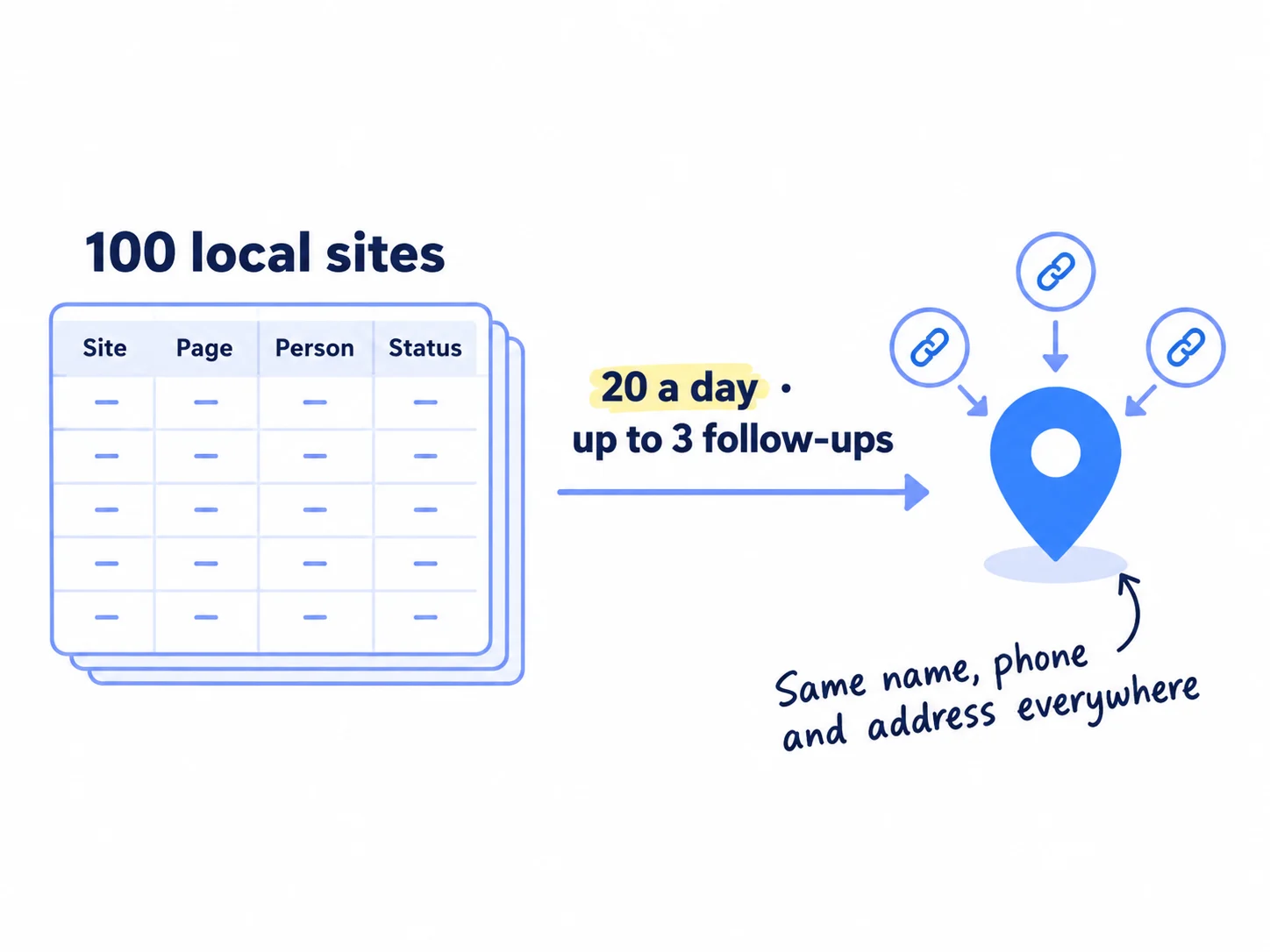
The other half of prominence is how many websites mention and link to your business, so put your business on Bing and Apple Maps today, then ask 20 local websites a day to list or link to you. Google names "how many websites link to your business" as part of prominence.
Today, in 1 hour:
- Bing Places for Business. Free. Sign in and choose to import from Google Business Profile. Bing copies your name, hours and contact details from your Google profile, and you check the rest.
- Apple Business. Free since 14 April 2026, when it replaced Apple Business Connect. Claim your place card for Apple Maps and add the same details, photos and hours.
Then build a list of 100 local sites in one sheet, the way you build a lead list, with the page you want to be on and the person to ask:
- your chamber of commerce and local business groups
- associations of your buyers, such as a local food makers' group for a packaging firm
- suppliers and partners with a "partners" or "where to buy" page, and referral partners
- clients who list their suppliers
- events you go to or sponsor, from networking events to trade shows
- local news sites and blogs, with a story from your own numbers, the way you get links from news websites and pitch journalists
- local directories that already show on page 1 for your 3 searches
Send 20 personal asks a day. Make these 20 part of the 100 personal messages a day you already send to buyers. Each one names the exact page and what to add, with one true line about them. AI drafts each ask in 30 seconds; you add the line. Follow up each one up to 3 times. A town has a few hundred sites like these, not thousands, so 20 a day reaches all of them in about a month. After that, add each new contact you meet. Ask for the listing first; a backlink to your website is a bonus.
Use the same name, phone and address or area on every listing as on your profile. The 2026 experts' survey found listings count a little less for Maps than they used to, but being on lists put together by experts was the top factor for showing up in AI answers. The same work helps you get named in the "best of" lists AI tools cite and recommended by ChatGPT as a supplier.
Subject: Adding [your business] to your [page name]
Hi [first name], [one true line: something on their site, an event they ran, or how you know them].
I run [your business], [what you do] for [who] in [town]. Could you add us to [exact page name and link]? Here is what you need:
[Business name] · [one-line description] · [phone] · [website page]
Happy to return the favour on our [partners or suppliers] page.
[Your name]
- Tool: Bing Places for Business and Apple Business (both free), a Google Sheet, and ChatGPT or Claude for drafts.
- Time: 1 hour today, then about 40 minutes a day for 20 asks.
- You will have: listings on Bing and Apple Maps, a sheet of 100 local sites, and 20 asks sent every day.
- It worked if: at least 5 of every 100 asks end in a listing or link, and every listing shows the same name, phone and address or area.
- Common mistake: paying for a pack of hundreds of unrelated directories. A few listings on sites your buyers really use count for more, and each one has to stay correct.
See it done: Carvelian Packaging's ask to a food makers' group
To: Dan, who runs the member suppliers page of a regional food and drink producers' group
Subject: Adding Carvelian Packaging to your member suppliers page
Hi Dan, I saw your May meetup on getting into farm shops, and the packaging question came up three times in the Q&A.
I run Carvelian Packaging. We make custom printed boxes for small food and drink brands. Could you add us to your member suppliers page? Here is what you need: Carvelian Packaging · Custom printed boxes for small food and drink brands · [phone] · [website page]
Happy to give a short talk on packaging costs at a future meetup if that helps your members. [Founder's first name]
Why it works: It names the exact page, gives everything needed to add the listing, and offers something back.
7. Check your Google Maps ranking every Sunday and decide what to change
Every Sunday, open your profile's Performance report and write down views, calls, website clicks and direction requests, and once a month run the same 3 by 3 scan as step 2. Then use the rules below to decide what to change.
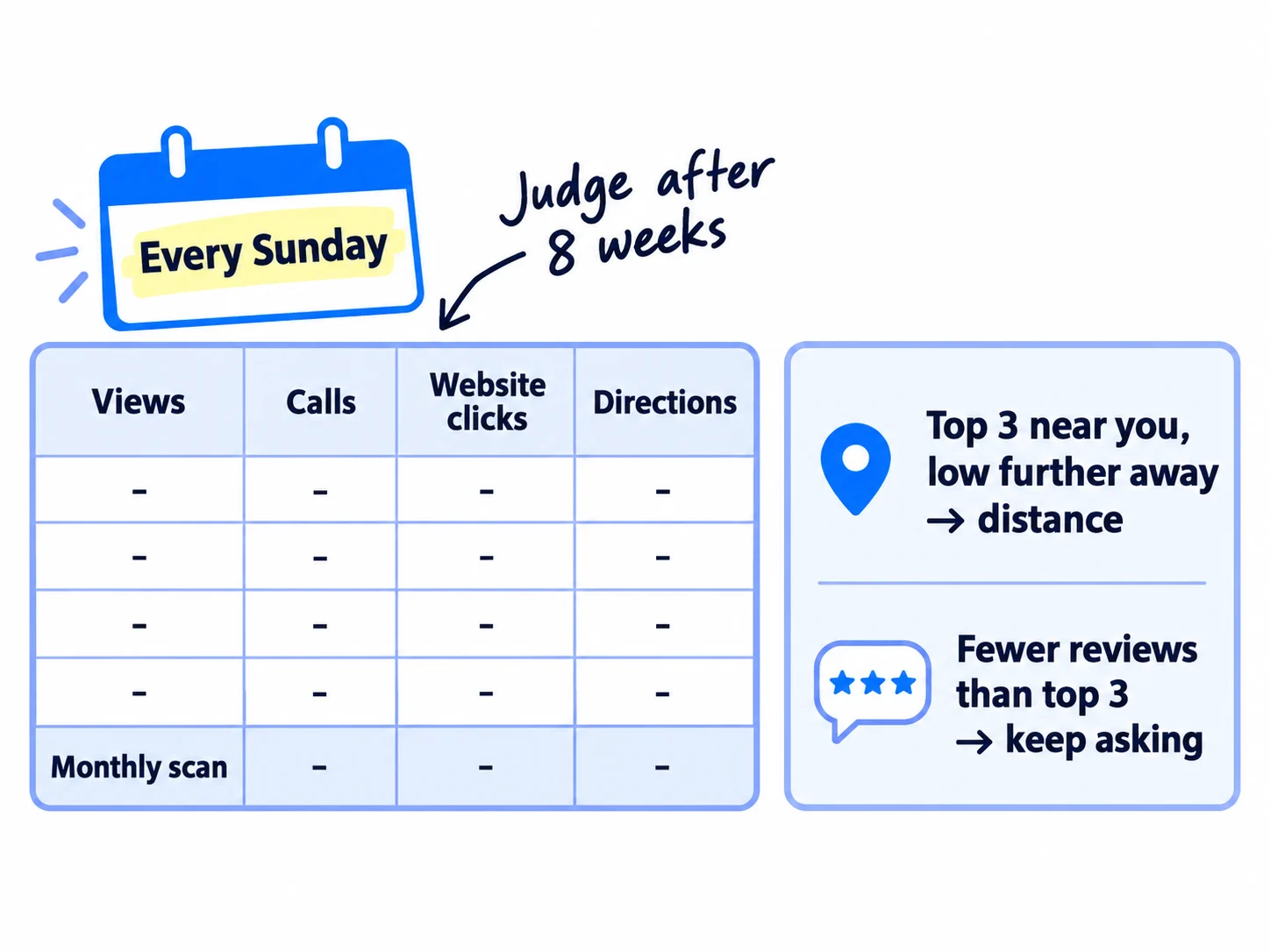
Every Sunday. On Google Search, open your profile and select Performance. Write down views, calls, website clicks and direction requests. Ask every new enquiry "How did you first hear about us?" and note the answer, which is self-reported attribution, and log which channel brought each deal.
Once a month. Google updates the Searches part of the report at the start of each month, up to 5 days late. Copy the top 10 phrases people used to find you; new ones are ideas for pages in step 5. For searches on your website rather than your profile, the same check is in measuring SEO success. Then run the same 3 by 3 scan for your 3 searches (27 credits). Your free credits cover today's scan and the next 2 months. After that, Local Falcon's Starter plan is $24.99 a month, or keep only the Performance numbers.
Week | Views | Calls | Website clicks | Direction requests | New reviews | Review asks sent | Local asks sent | Listings or links won | What I changed
Then use these rules:
- Not in the top 20 even at your own location, 4 weeks after step 3: check the primary category matches the top 3, run the name test from step 1, and check your profile is not suspended.
- In the top 3 near you, but below 10 a few kilometres away: that is distance, one of Google's three factors. You cannot change it. Never add a fake address. Win those areas with service pages (step 5) and with reviews and listings from customers there.
- Fewer reviews than the top 3 average: keep asking every customer. This gap closes only one customer at a time.
- Views going up, but calls and clicks flat: people see you and choose someone else. Read your newest reviews and replies, add photos of finished work, and fix the page your profile links to, the way you get more leads from a B2B website.
Judge it after 8 weeks and 1,000 local asks, not sooner. Ranking on Maps moves slowly because reviews and links build one at a time, so keep the outreach that wins your first B2B clients going next to it. Each month, add these numbers to your monthly marketing review next to your other channels.
- Tool: Google Business Profile Performance report, Local Falcon (free credits, then $24.99 a month) and a Google Sheet.
- Time: 20 minutes every Sunday, plus 15 minutes once a month for the scan.
- You will have: a row every Sunday, the top 10 search phrases each month, and a rank scan each month to compare with day 1.
- It worked if: your average rank for at least 1 of your 3 searches is higher than on day 1 by week 8, and calls or website clicks from your profile are higher than in week 1.
- Common mistake: changing your category or name after one bad week. Rank moves day to day; judge on the monthly scan.
Your Google Maps ranking checklist for the next 8 weeks
0 of 14 done
Work through this list with an AI assistant
It drafts the work and keeps track of what is done.
Frequently asked questions
- How long does it take to rank on Google Maps?
Google says a new business can take up to a month to show in results, and an edit up to 3 days. Climbing into the top 3 for a busy search takes longer, because reviews and links build one at a time. Scan your rank once a month and judge after 8 weeks. How long SEO takes explains the same slow build for your website.
- Why is my business not showing on Google Maps?
Search Google Maps for your business name and town. If it shows, it works and simply does not rank for other searches yet. If it does not show, check the profile is verified and not suspended, and that a recent edit is not still being checked. Online-only businesses and virtual offices cannot have a profile at all. Setting up a Google Business Profile covers verification.
- Can I rank on Google Maps without a physical address?
Yes, if you go to your customers. Set your profile up as a service-area business, hide your address, and list up to 20 areas you really serve, within about 2 hours' drive. You still need a real base: Google does not allow virtual offices or mailboxes, and you must meet customers in person during your stated hours.
- Do keywords in my business name help me rank on Google Maps?
Experts surveyed in 2026 rank them highly, which is why some competitors do it. But Google's guidelines say extra words in your name can get your profile suspended, and a suspended profile shows nowhere. Use your real business name. If a competitor breaks the rule, anyone can suggest a change to a place's name on Google Maps.
- Can I pay Google to rank higher on Google Maps?
No. Google says there is no way to request or pay for a better local ranking. Google Ads can show your business in a paid spot, but that is an ad, not your ranking, and it stops when you stop paying. Set an ad budget only after the free steps here are running.
Sources
- 1.Tips to improve your local ranking on Google — Google Business Profile Help, checked 1 October 2026
- 2.Overview of Google Business Profile policies (eligibility) — Google Business Profile Help, checked 1 October 2026
- 3.Guidelines for representing your business on Google — Google Business Profile Help, checked 1 October 2026
- 4.Manage your service areas — Google Business Profile Help, checked 1 October 2026
- 5.Find your business on Google — Google Business Profile Help, checked 1 October 2026
- 6.Edit your business categories — Google Business Profile Help, checked 1 October 2026
- 7.Add or edit services — Google Business Profile Help, checked 1 October 2026
- 8.Create posts on your Business Profile — Google Business Profile Help, checked 1 October 2026
- 9.Create a link or QR code to request reviews — Google Business Profile Help, checked 1 October 2026
- 10.Read and reply to reviews — Google Business Profile Help, checked 1 October 2026
- 11.Prohibited and restricted content (fake engagement) — Maps User Contributed Content Policy, updated 17 April 2026, checked 1 October 2026
- 12.Google tightens Maps review policy: staff names and quotas now banned — PPC Land, April 2026, checked 1 October 2026
- 13.Understand your Business Profile performance — Google Business Profile Help, checked 1 October 2026
- 14.Deprecation schedule (Q&A API discontinued 3 November 2025) — Google Business Profile APIs, checked 1 October 2026
- 15.Ask Maps and Immersive Navigation — Google, 12 March 2026, checked 1 October 2026
- 16.Spam policies for Google web search — Google Search Central, checked 1 October 2026
- 17.2026 Local Search Ranking Factors — Whitespark, 6 November 2025, checked 1 October 2026
- 18.Local Consumer Review Survey 2026 — BrightLocal, 11 February 2026, checked 1 October 2026
- 19.Pricing — Local Falcon, checked 1 October 2026
- 20.GMB Everywhere — GMB Everywhere, checked 1 October 2026
- 21.Introducing the new Bing Places for Business — Microsoft Bing Blogs, 3 October 2025, checked 1 October 2026
- 22.Introducing Apple Business — Apple Newsroom, 24 March 2026, checked 1 October 2026
Next article to read
Related guides
- How to set up a Google Business ProfileSet up a Google Business Profile that stays up: check in 10 minutes that you meet customers in person, create it with your real name, one category and your address or service area, verify it by video, phone or email, fill in every section, send your review link to every customer the day you serve them, and write down 5 numbers every Sunday.
- How to collect testimonialsComing soon
- How to measure SEO successMeasure SEO success on a new site with free tools: write down the result that counts (signups, enquiries or orders from Google), track it as a key event in Google Analytics, ask every buyer where they found you, fill one Sunday scorecard row for seen, visited, acted and bought, fix the first number below its line, and work out what one customer from Google costs you each month.
Guides that link here
- How to set up a Google Business Profile
- How to add llms.txt and schema markup
- How long does SEO take to work?
- How to find keywords for SEO
- How to get your website indexed on Google
- How to measure SEO success
- How to use Google Search Console
- Technical SEO checklist for a new website
- Instagram post ideas for a marketing agencyAgency
Cite this page
Dinesh Bypilla (2026). How to rank on Google Maps. Scout7 Academy. https://scout7.ai/academy/seo/how-to-rank-on-google-maps
Written by Dinesh Bypilla, Agentic systems engineer at Scout7. Reviewed by Murali Sid. Last checked 1 October 2026.
Quote any part of this guide with a link back to this page. © 2026 Scout7.
Markdown version of this page: https://scout7.ai/academy/seo/how-to-rank-on-google-maps.md