



How to do SEO for a Shopify store
Do SEO for your Shopify store with a few products and no budget: check Google can see your store, give every product and collection page one phrase shoppers type, publish 1 buying-question page a day on your Shopify blog, ask 20 sites a day for a link, and check Search Console every Sunday.
ByDinesh BypillaReviewed byMurali SidLast checked 26 min read
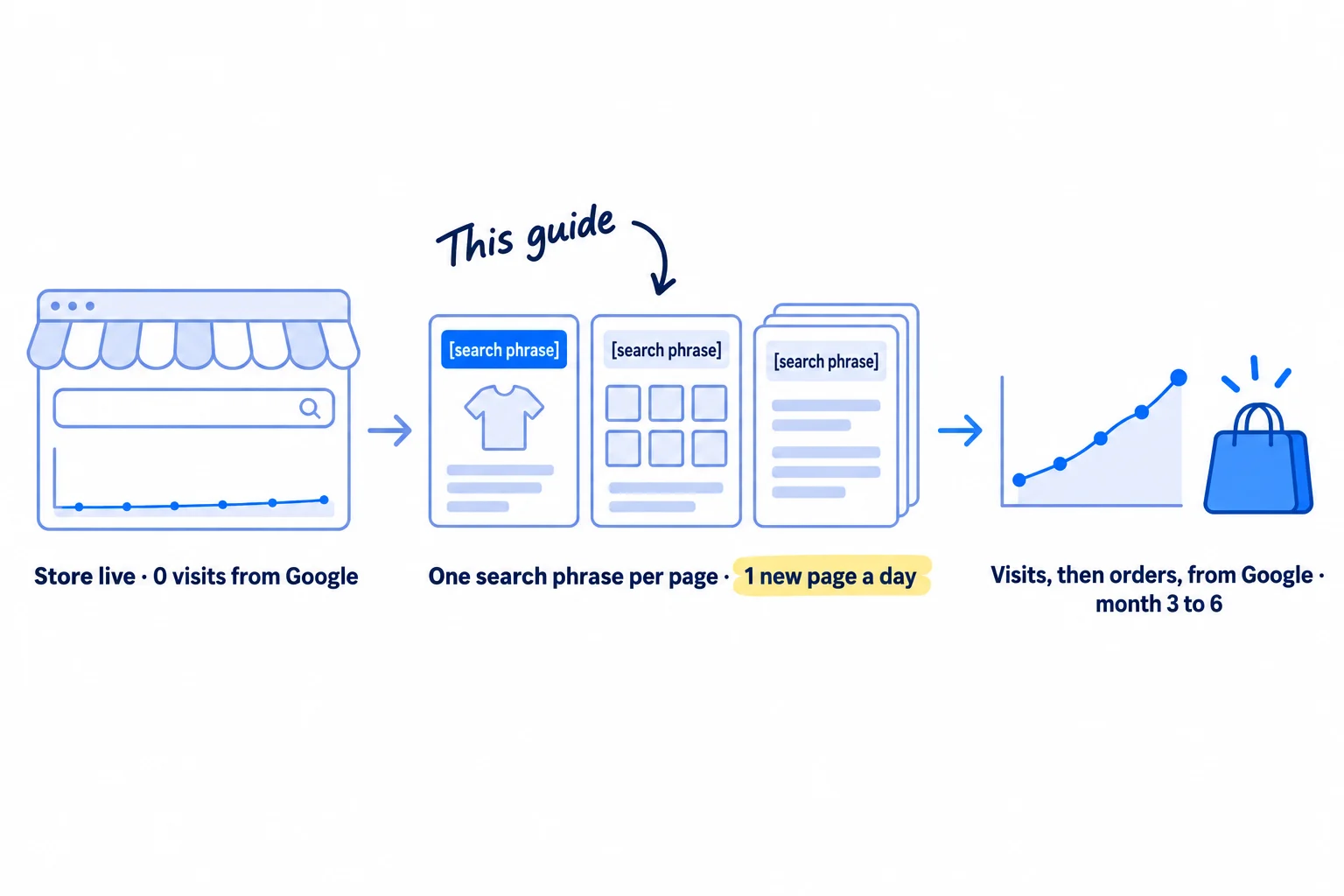
Your Shopify store is live, but almost no visits come from Google, and you are not sure whether Shopify does SEO for you or whether you need an app. Here is how to do SEO for a Shopify store with a few products and no budget: give every product and collection page the words shoppers type, add one new page every day, and ask other sites to link to you. Most new stores fill in nothing, install an SEO app, write one blog post and wait; six months later Google still does not know what they sell.
Do these three things
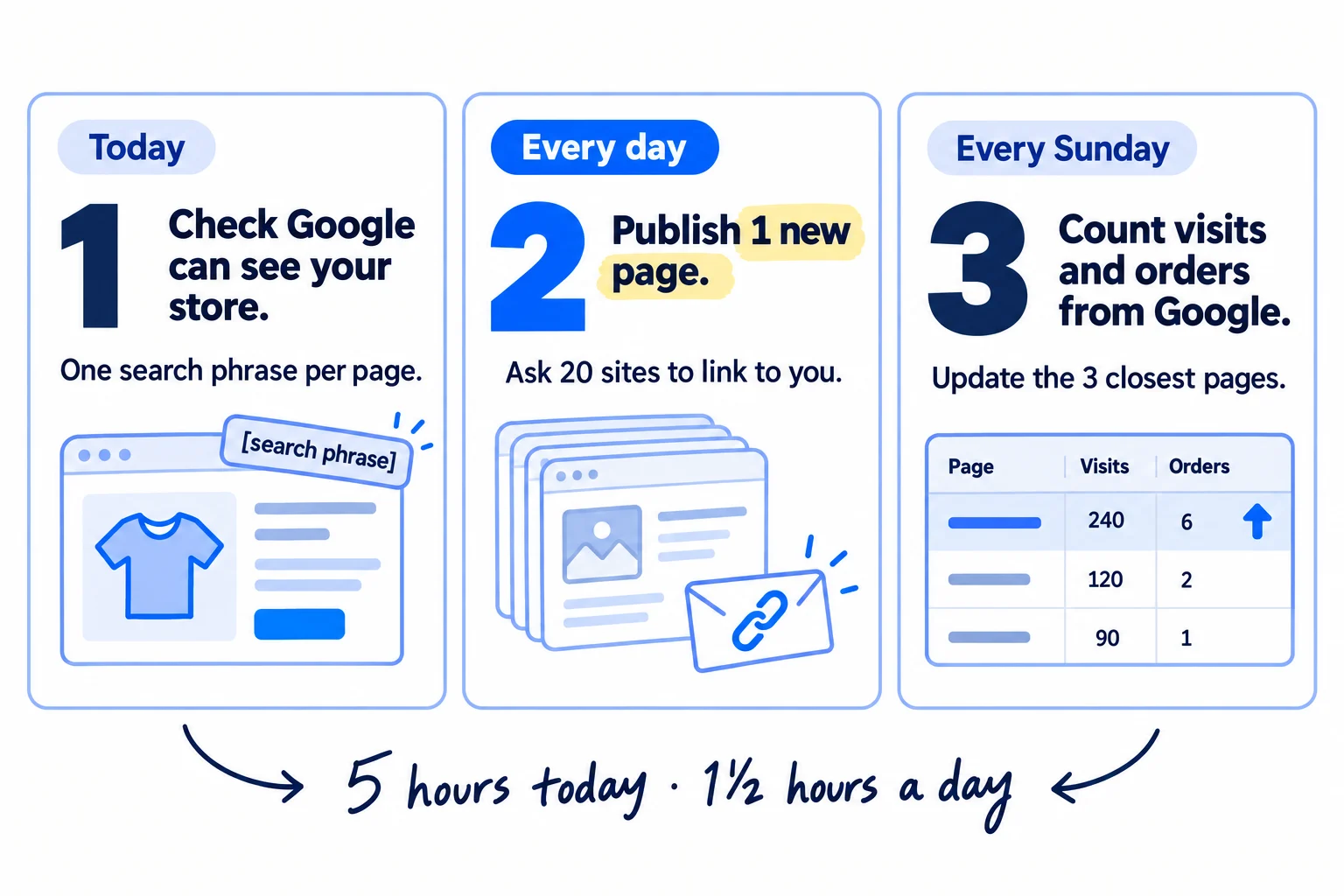
About 5 hours today, then about 1 hour 30 minutes a day and 30 minutes on Sunday. Expect the first clicks around month 3 and the first orders from Google around month 6, after 90 to 180 pages.
Show the three actions in fullHide the full list
- Today: check that Google can find your store: it is public, it is in Google Search Console, and its sitemap is sent. Then give every product and collection page one search phrase in its title, its first line and its search listing.
- Every day: publish 1 new page for a search shoppers type just before they buy, on your Shopify blog or as a collection, and link it to your products. Send 20 of your daily messages to sites that could link to your store. AI drafts; you add what only you know.
- Every Sunday: write down this week's impressions, clicks and orders from Google, leaving out searches for your store's name, and update the 3 pages closest to page one.
Get help doing these
ChatGPT or Claude reads this guide and works through it with you.
1. Check that Google can find your Shopify store
Before you change a single page, check that Google is allowed to see your store and knows where its pages are. Shopify makes most of the technical parts for you, so this takes about 30 minutes, and you should not need an app.
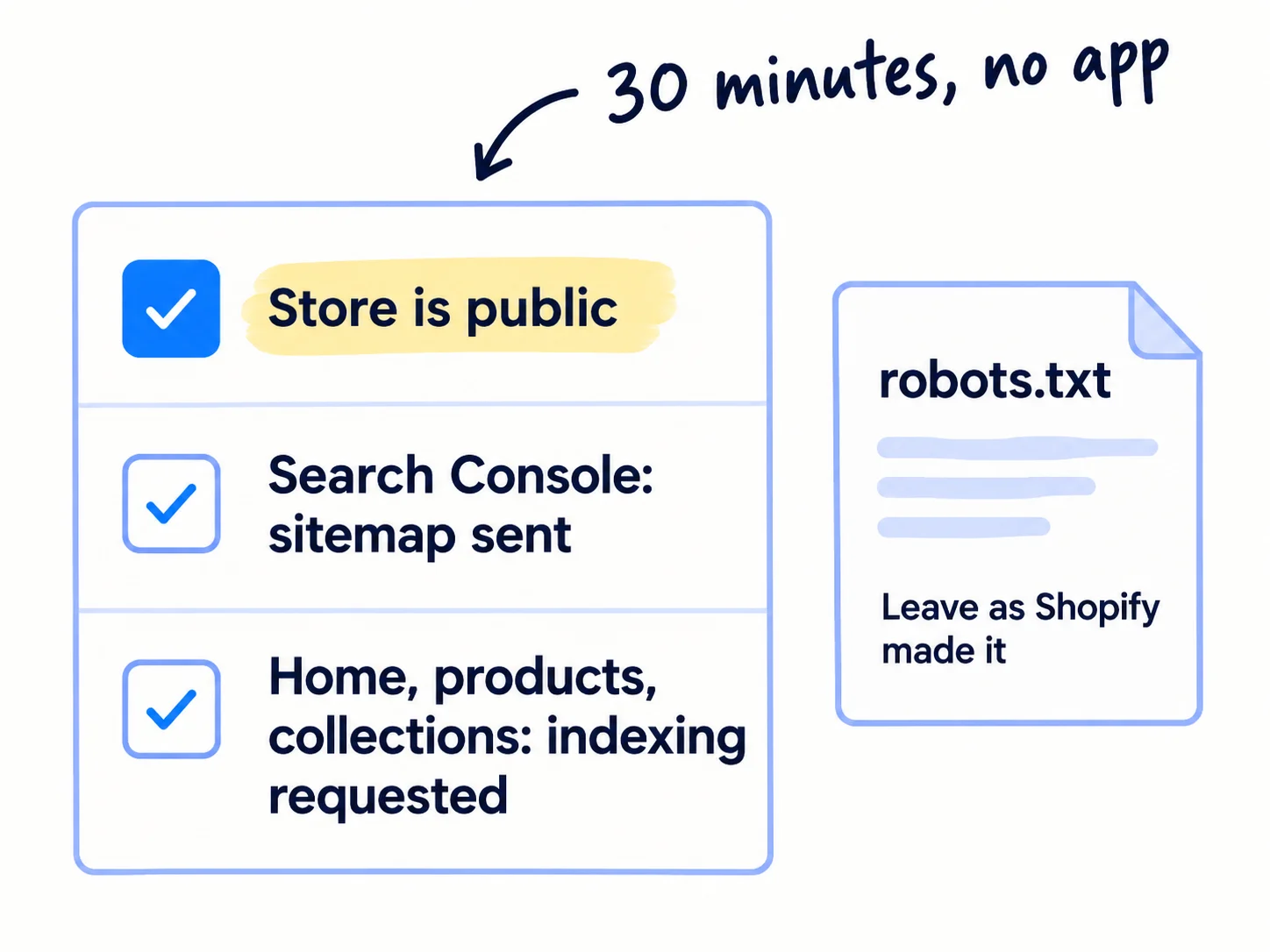
Shopify's Help Center lists what it already does for every store: it makes your sitemap and your robots.txt file, adds canonical tags so the same product at two addresses does not count twice, turns on SSL, and its themes add product schema markup so Google can read the price. Your job is to open the door and point Google at your pages.
- 1
Make the store public
In your Shopify admin, go to Online Store. If you see a "Private" button, click it, choose "Public", and launch the store. Shopify says Google "can't access" your sitemap while the store is in private mode, so none of the rest works until it is public. The test order that comes first is in getting your first sales on Shopify.
- 2
Add your store to Search Console and send the sitemap
Add your domain to Google Search Console as a Domain property. Then open Indexing › Sitemaps, type
sitemap.xmlin "Add a new sitemap" and click Submit. Shopify's sitemap lists your products, collections, pages and blog posts, and updates itself. - 3
Ask Google to look at your main pages
Paste your home page, each product page and each collection page into URL Inspection at the top of Search Console, and click "Request indexing". Google says crawling "can take anywhere from a few days to a few weeks", and there is a daily limit on requests, so do this for new and important pages only.
- 4
Leave robots.txt as it is
Shopify's robots.txt already keeps Google out of your cart, checkout, store search and the endless sorted and filtered copies of your collections. Do not edit it. The rest of the checks are on the technical SEO checklist.
While you are in the admin, check your homepage's own listing: go to Online Store › Preferences and, in "Social sharing image and SEO", write a title that says what you sell and for whom, not only your store name.
- Tool: your Shopify admin and Google Search Console. Both free.
- Time: 30 minutes.
- You will have: a public store, a sitemap sent to Google, and your main pages waiting to be indexed.
- It worked if: Sitemaps shows "Success" within a few days, and within 2 weeks URL Inspection shows your home page as "URL is on Google". If it does not, fix what the Page indexing report lists.
- Common mistake: paying for an SEO app on day one. Most of what those apps "fix" on a new store, Shopify already does. The other mistake is leaving the store private "until it is ready".
2. Pick one search phrase for each product and collection page
Give every page in your store one phrase that shoppers really type, and let Google's top results tell you which kind of Shopify page should own it. This is the list the next three steps fill in.
![A search results page for '[product] for [need]' with the top 5 results marked. If most are product pages, an arrow leads to 'Product page'. If most are store category pages, an arrow leads to 'Collection'. If most are guides, an arrow leads to 'Blog page'. Label: 'Google's top 5 decide'.](/academy/illustrations/how-to-do-seo-for-a-shopify-store/03-step-2.webp)
Make a sheet with one row for each product and each collection you have. For each row, write 5 phrases in your shoppers' words: what the product is, plus who it is for or the problem it fixes. "[What it is] for [who or what problem]" is the pattern: it is the same pattern that makes your product titles work in Google's free listings and in ChatGPT's product answers. Take the words from customer messages, reviews of competitors' products, and what your buyers say in forums.
Then check each phrase in a private browser window:
- Does Google suggest it? Type it slowly into Google. If Google does not suggest it, or something very close, drop it. Use the shoppers' spelling, even if it is not yours: in the US people type "sulfate", not "sulphate".
- What kind of page is in the top 5? Mostly single products: it belongs to a product page. Mostly store category pages or "shop all" pages: it belongs to a collection. Mostly guides or lists: it belongs to a blog page. As one store owner put it on the Shopify Community in July 2026: "If the top results for your keyword are collections or blogs, a single product page will almost never rank there."
- Can a new store win it? Keep it if at least one of the top 5 is a small store, a forum thread or a page that does not really answer it. If all 5 are giant retailers, save it for later.
Give each page one phrase, and never give the same phrase to two pages. Phrases that belong to blog pages go to the bottom of the sheet for step 5. The full method, with free tools and a 300-phrase list, is in finding keywords for SEO.
Page (product / collection / blog) | Its search phrase | Google suggests it? | What the top 5 are | A new store can win it? | Done (title, first lines, listing)
- Tool: Google in a private window, and a Google Sheet.
- Time: about 1 hour for a store with under 10 products.
- You will have: every product and collection with one phrase no other page has, and a list of phrases for blog pages.
- It worked if: every phrase appears in Google's suggestions, and no two rows share a phrase.
- Common mistake: chasing the one big word, like "shampoo" or "candles". A store owner on the Shopify Community in July 2026 said it plainly: a new store "almost never wins its single main keyword for months". The other mistake is using your brand name or a clever product name as the phrase. Nobody searches for a brand they have not heard of.
See it done: Ferns & Rinse's page and phrase sheet
Ferns & Rinse is a made-up plant-based haircare brand with its own Shopify store. It sells one shampoo and one conditioner at $28 each, or both for $49.
| Page | Search phrase | What the top 5 are |
|---|---|---|
| Shampoo (product) | sulfate free shampoo for curly hair | single products and two small stores |
| Conditioner (product) | best conditioner for dry curly hair | lists and single products |
| Both for $49 (product) | curly hair shampoo and conditioner | sets from small stores |
| Curly hair care (new collection) | shampoo for dry curly hair | store category pages |
| Blog, for step 5 | how often should you wash curly hair | guides |
Why it works: Each page has one phrase Google suggests, and the top 5 results decided which kind of page gets it.
3. Rewrite each product page's title, description and search listing
Put each product's phrase in four places on its page: the product title, the first two lines of the description, the search engine listing, and the image alt text. These are the words Google reads first, and they are also what shoppers see in the search result.
![A product page with four numbered labels: 1 'Title: [what it is] for [who]', 2 'First 2 lines: size, what's in it, delivery', 3 'Search listing: page title + description', 4 'Image alt text'. A small search result card shows the page title and description as Google shows them.](/academy/illustrations/how-to-do-seo-for-a-shopify-store/04-step-3.webp)
Open Products in your Shopify admin and click the product. Then do these, in order:
- 1
The product title
Rename it "[what it is] for [who or what problem]", using the phrase from step 2. Your theme shows the product title as the page's main heading. If you add your brand name, put it last.
- 2
The first two lines of the description
Answer the shopper's first questions straight away: what it is, who it is for, the size, what is in it, and how fast it arrives. The phrase goes in the first sentence, once, in plain words. Put the longer story, the ingredients and how to use it below that. How to write the rest is in writing a product description that sells. Shopify's own advice on AI shopping asks for the same things: clear titles, detailed descriptions, and material and care details.
- 3
The search engine listing
Scroll to the "Search engine listing" section at the bottom of the product page and click the edit icon. Write a Page title of up to 60 characters: the phrase first, then "| [Store name]". Shopify lets you type 70, but longer titles get cut off in results. Write a Meta description of about 150 characters that says what the shopper gets and one reason to pick yours, such as the price or free delivery. Google does not always show it, so it never replaces the words on the page.
- 4
The URL handle
In the same box, change the URL handle to the phrase with hyphens, such as
/products/[what-it-is]-for-[who], only if the old one is a code or a clever name. Keep the option to create a redirect from the old URL ticked, so old links and past visitors still land on the page. Do this now, while the store is new; later, change a handle only when you must. - 5
The image alt text
Click each product photo, then "Edit alt text", and describe what the photo shows in a few words, such as "[product] bottle in a hand, with [what is in it] on the label". Google's image guide says to describe the image and warns that stuffing alt text with keywords "may cause your site to be seen as spam". Before you upload new photos, rename the files the same way:
[what-it-is]-for-[who].jpg, notIMG_0423.jpg. - 6
Your review stars
Stars next to your result in Google come from reviews on the page. Install Judge.me: its Forever Free plan includes unlimited reviews and "Google reviews sync & rich snippets". Ask every buyer for a review 7 days after delivery, as in getting your first product reviews. Google does not promise to show stars, but it cannot show them without reviews, and reviews on the page also help a new store look trustworthy.
Let AI draft, then check every word. In the description box, the "Generate text" icon is Shopify Magic, free on every plan; ChatGPT or Claude works too. Give it the phrase, the product facts and three things customers said, and ask for two opening lines, a page title under 60 characters and a meta description under 150. Then correct every fact and add one thing only you know, such as why you made it or what a customer said. Type the product title itself by hand, from your phrase; it is also the title your free Google listings use.
Then paste one product page into Google's Rich Results Test. It should find "Product" data with the price; once you have reviews, it should find them too.
- Tool: your Shopify admin, Shopify Magic or ChatGPT, Judge.me (free), and Google's Rich Results Test.
- Time: about 40 minutes a product, so about 2 hours for 3 products.
- You will have: every product page carrying its own phrase in the title, the first two lines, the search listing and the alt text.
- It worked if: the Rich Results Test finds Product data on every product page, and 3 people who read only your page title and meta description can say what the product is and who it is for.
- Common mistake: copying the supplier's description, or pasting the same AI text on every product. Google's spam policy counts "using generative AI tools … to generate many pages without adding value for users" as scaled content abuse. The other mistakes are repeating the phrase five times, and changing a URL handle without the redirect.
See it done: Ferns & Rinse's shampoo search listing
Before: Shopify's default
Fern Wash No. 1 – Ferns & Rinse
After: page title and meta description
Sulfate-Free Shampoo for Dry, Curly Hair | Ferns & Rinse. Plant-based shampoo that cleans dry, frizzy curls without stripping them. $28, or $49 with the conditioner.
Why it works: The page title starts with the phrase shoppers type, and the description answers who it is for, the price and delivery in one line.
4. Build collection pages for searches that show collections
Make a collection for each phrase from step 2 where Google's top 5 are store category pages, and give it a title, a short description, a search listing and a place in your menu. For many shopping searches, Google shows collections, not single products, so a store with no collections cannot appear there.
![A collection page: a title '[Kind of product] for [need]', two short lines of text above a grid of product cards, and a menu bar with the collection's name highlighted. Two rules beside it: 'A real search' and 'At least 2 products'.](/academy/illustrations/how-to-do-seo-for-a-shopify-store/05-step-4.webp)
Make a collection only when both are true: Google suggests the phrase and shows category pages for it, and at least 2 of your products truly fit. A collection with 1 product is a copy of the product page. Twenty collections that differ by one word look like the doorway pages Google's spam policy describes. With 3 to 10 products, 1 to 3 collections is normal.
To make one, go to Products › Collections and click "Add collection". Then:
- Title: the phrase, written for people: "Shampoo for Dry, Curly Hair", not "Curly Hair Shampoo Dry Best".
- Description: 100 to 200 words. The first two lines say who the collection is for and how to choose between the products, because most themes show them above the product grid. Below that, answer 2 or 3 questions shoppers ask before they buy, and link to the one blog page from step 5 that helps them choose.
- Collection type: pick "Smart" if you want Shopify to add products by a rule, such as a tag or product type, or add them by hand.
- Search engine listing: click the edit icon and write the Page title and Meta description the same way as for products.
- Image: add a collection image and its alt text through "Update", then "Edit image".
- Menu: go to Content › Menus, open your main menu and add the collection. Shopify's Help Center says every page "should have a link in your online store menus" and should not be "more than 3 clicks away from the home page". Google says the more links a page has from your own site, the more important it looks, and that category pages should link to every product in them.
If you sell a set, give it its own product page and phrase, as a set is also how you raise the value of each order. Product tags on their own do not make pages that rank. Use tags to fill a Smart collection, and give the collection the phrase. If you sell in shops too, those shops' "where to buy" pages are also a good place to be listed, which step 6 uses.
- Tool: your Shopify admin.
- Time: about 45 minutes a collection.
- You will have: 1 to 3 collections, each with its phrase, a short description, a search listing and a menu link.
- It worked if: every collection is in your menu, holds at least 2 products, and shows "URL is on Google" in URL Inspection within 2 weeks.
- Common mistake: leaving the description empty, so the page is a grid of pictures with no words for Google to read. The other is making a collection for every tag, colour or size.
See it done: Ferns & Rinse's collection description, first two lines
Before
(empty)
After
Shampoo for dry, curly hair that cleans without stripping your curls. Wash once or twice a week: start with the shampoo, or take both with the conditioner for $49.
Why it works: The first line uses the phrase and names who it is for, and the second tells the shopper how to choose.
5. Publish one page a day on your Shopify blog for questions shoppers ask
Every day, publish one page that answers a question shoppers type before they buy, on your Shopify blog, and link it to the product that solves it. Your product and collection pages cover the few phrases that name your product; these pages catch everyone who searches with a question first.
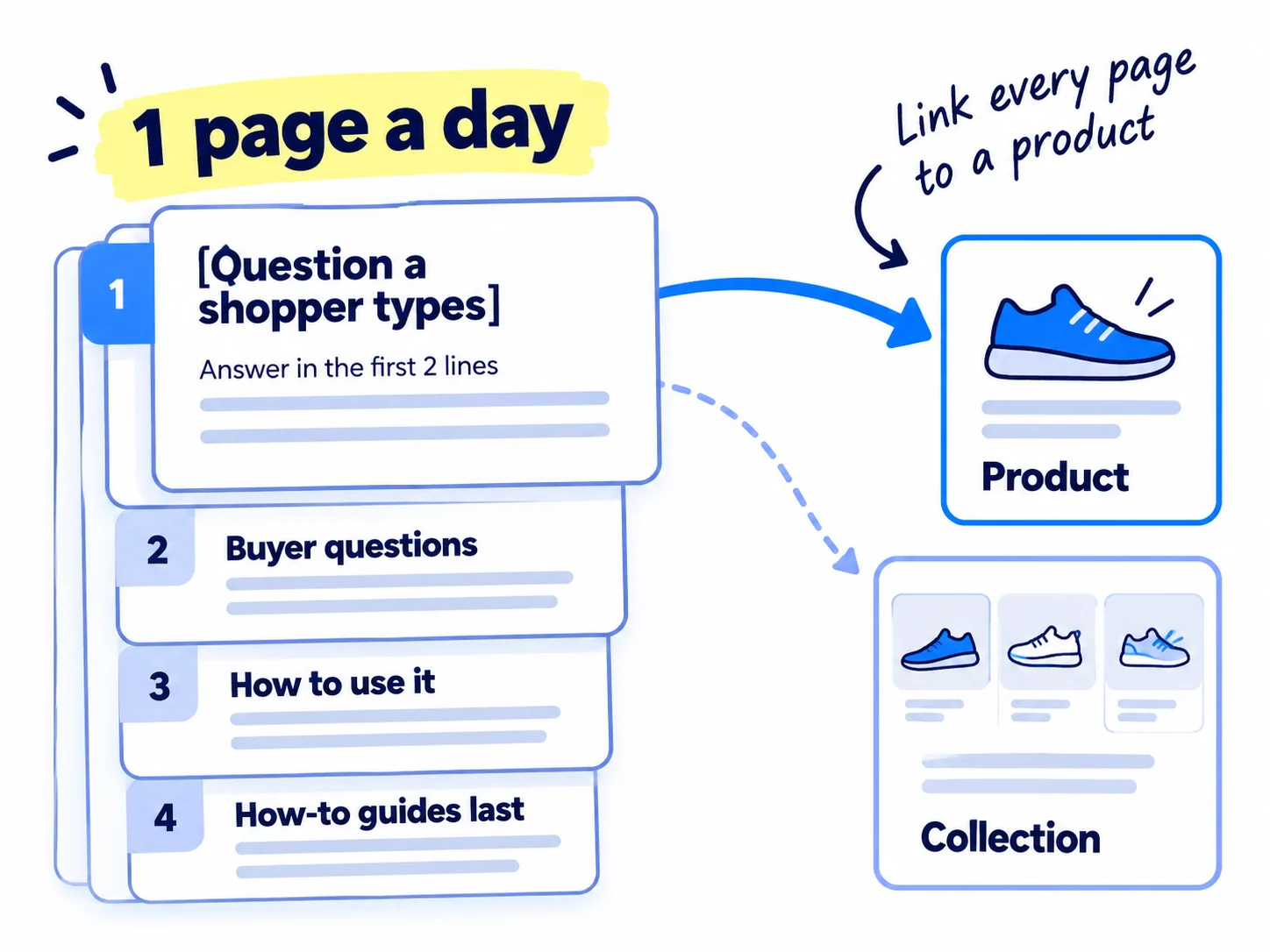
Go to Content › Blog posts and click "Add blog post". It is built into every Shopify plan, so you need no other tool. Take the next phrase from your sheet, in this order:
- Compare and choose: "best [product] for [need]", "[your kind of product] vs [other kind]", and "[big brand] alternative". These are close to buying. Keep comparisons fair, as in writing comparison and alternative pages.
- Buyer questions: "does [kind of product] [worry]", "is [ingredient] good for [need]". These are the doubts that stop an order.
- How to use it: "how often should you [use it]", "can you use [product] without [other product]".
- General how-to guides come last. Since AI Overviews, general questions often get answered on Google's own page: in a February 2026 study of 300,000 learner searches, Ahrefs found the top result got 58% fewer clicks when an AI Overview was shown.
Write each page the same way. The title is the phrase, as people type it. The first two lines answer it fully. Then add what only you know: a photo of your product in use, a customer's words, a number you tested. End with a link to the product that fixes the problem, and one to its collection, using the phrase as the link text. Then add a link from the product or collection page back to the page, so shoppers and Google can move both ways. Fill in the page's search engine listing (the pencil icon) the same way as a product, then request indexing in URL Inspection. How to write a page that ranks is in writing a blog post that ranks on Google.
Let AI do the drafting, so 1 a day fits next to the rest of your day. Give ChatGPT or Claude the phrase, your notes, and the questions customers asked you in messages and customer interviews, and ask for a first draft with the answer in the first two lines. Then check every claim, cut anything you cannot stand behind, and add your own photo and proof. More on this is in using AI for content. Plan the next 7 phrases each Sunday in a simple content calendar. When you run low, add 5 new phrases a day from Google's suggestions and the places your buyers ask for help.
Title: [the phrase, as shoppers type it]First two lines: [the full answer, with a number if there is one].[Why, in 3–5 short lines, from what you know.][One thing only you know: a photo of your product in use, a customer's words, a result you tested.][2–3 follow-up questions shoppers ask, each answered in 2–3 lines.][One line and a link: "Our [product] is made for this: [link, with the phrase as the link text]." Plus a link to its collection.]
Every page you publish can also start working the same day. When someone in a community asks the question it answers, answer them fully in the thread and share the page only where the rules allow; on Reddit, read how to post without getting banned first. Turn the answer into one of your short videos too.
- Tool: Content › Blog posts in Shopify, and ChatGPT, Claude or Shopify Magic to draft.
- Time: about 1 hour a page: 10 minutes for the draft, 50 minutes to check it and add your own proof.
- You will have: 30 pages at month 1, 90 at month 3 and 180 at month 6, each answering one phrase and linking to a product.
- It worked if: every page answers a phrase Google suggests in its first two lines, links to a product, and shows "URL is on Google" within 2 weeks.
- Common mistake: general posts about your industry, like "the history of haircare" or "10 trends for 2027", that link to nothing you sell. The other mistake is pasting AI drafts with nothing of your own in them, which is exactly what Google's spam policy warns about.
See it done: Ferns & Rinse's first 7 blog pages
| Day | Page title (the phrase) | Links to |
|---|---|---|
| 1 | best shampoo for curly hair with dry scalp | shampoo, collection |
| 2 | does sulfate free shampoo lather | shampoo |
| 3 | does sulfate free shampoo dry out hair | shampoo |
| 4 | does curly hair need conditioner | conditioner |
| 5 | can you use conditioner without shampoo | both for $49 |
| 6 | how often should you wash curly hair | collection |
| 7 | how to reduce frizz in curly hair naturally | both for $49 |
Why it works: Every title is a phrase Google suggests, and the questions closest to buying come first.
6. Ask 20 sites a day to link to your store
Every day, send 20 personal messages to sites that already list or write about products like yours, and ask to be included with a link. Links from other sites tell Google your store is real and worth showing, and a new store has almost none.
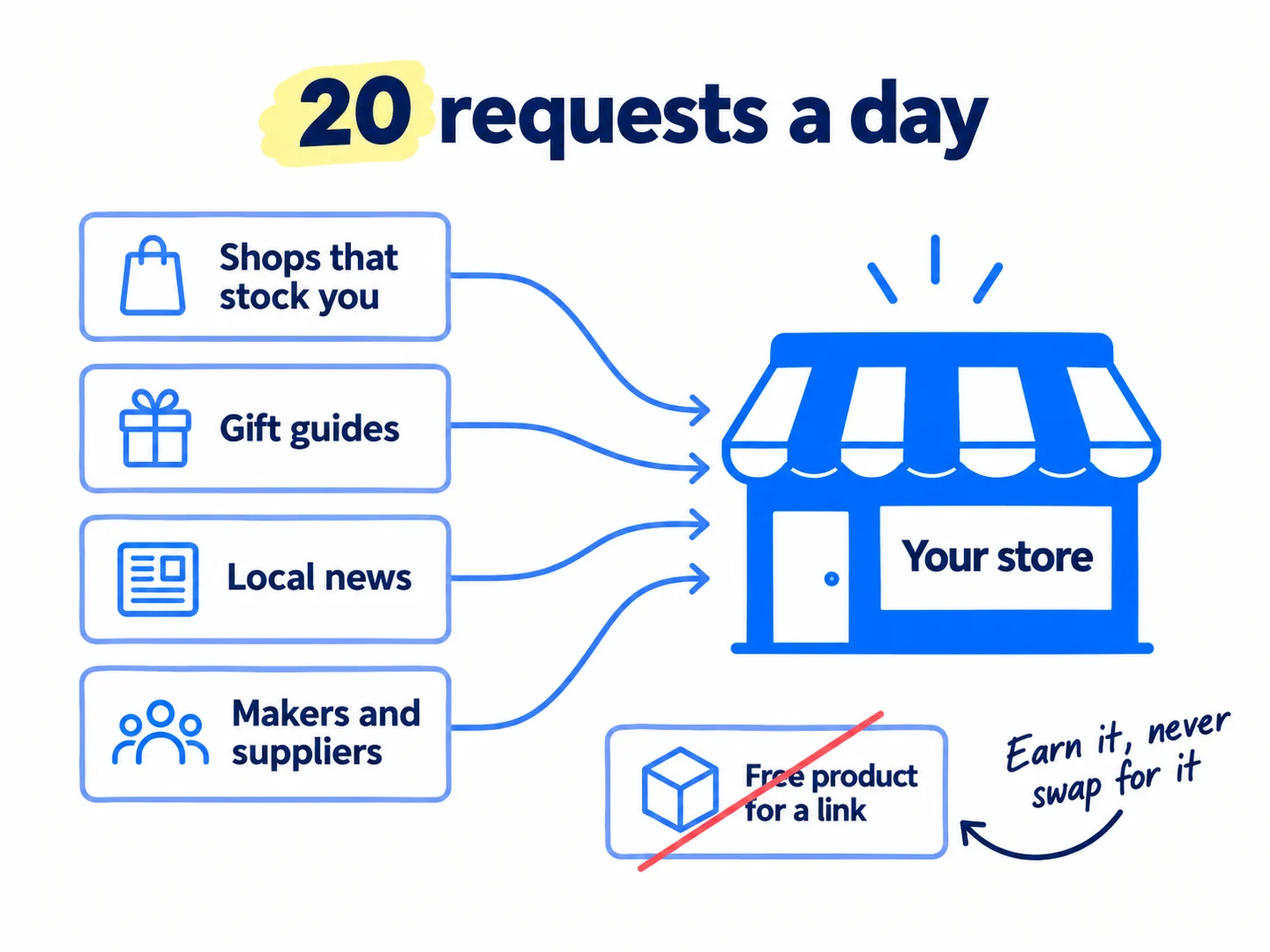
These 20 are part of your 100 personal messages a day from getting your first sales on Shopify, not extra to them. Spread them over these places, in this order:
- Anyone who already sells or uses your product: shops that stock you, the maker or supplier of your packaging or ingredients (many have a "brands we work with" page), and any event or market you sold at. They know you, so most say yes. Getting into shops is its own job: getting your product into retail stores.
- Gift guides and "best of" lists in blogs and local magazines. Search "[your kind of product] gift guide" and "best [product] for [need]" and write to the person who made the list. Editors plan holiday lists from October, so start now: getting into holiday gift guides.
- Local news and podcasts that cover new local businesses. One short story about why you started is enough. How to write the pitch is in pitching journalists, and links from news sites has more places to look.
Log every site in a sheet with the date, and follow up up to 3 times, 3 days apart. AI finds the sites and drafts each message; you add one true line about their page. If you email more than about 50 people a day who do not know you, send from a second, warmed-up domain so your store's email stays safe.
The one rule that keeps you safe: never offer a free product, money or a discount in return for a link. Google's spam policy lists "sending someone a product in exchange for them writing about it and including a link" as link spam, unless the link is marked nofollow or sponsored. So the products you gift to small creators are for honest videos and customer content, not for links. If a site wants payment or a product for a link, say no or ask for it marked "sponsored". Skip paid directory lists too.
Subject: [their list or page name]Hi [first name],[One true line about their page: the list, the article, the shop.]I make [what it is] for [who it is for], sold on our own store. [One line: why a reader of their page would care.]Would you consider adding us, with a link to [the product or collection page]? Here are the details and photos you might need: [link].[Your name], [store name]
[Postal address]
Not for you? Reply "no" and I won't write again.
- Tool: Google search, Gmail, and a Google Sheet.
- Time: about 30 minutes a day, inside your daily messaging time.
- You will have: 560 link requests sent in 4 weeks, each logged.
- It worked if: you win about 1 link for every 100 requests, and new sites start to appear in Search Console's Links report, under External links, in "Top linking sites". At 560 requests with no link, rewrite the first line so it is more about their page.
- Common mistake: swapping products for links, buying links, or sending the same text to hundreds of sites. The full method, and what to do when this is slow, is in getting backlinks for a new website.
See it done: Ferns & Rinse's email to a gift guide editor
To: Dana, who writes a yearly gift list for a local lifestyle blog
Subject: your plastic-free gifts list
Hi Dana,
Your "Plastic-free gifts under $50" list last December was where I found my favourite soap. The short notes on each pick are so useful.
My sister and I make Ferns & Rinse, a plant-based shampoo and conditioner for dry, curly hair, sold on our own store. The pair is $49, which fits your list.
Would you consider us for this year's list, with a link to the pair? Details and photos are here: [link].
Maya, Ferns & Rinse [Postal address] Not for you? Reply "no" and I won't write again.
Why it works: It is about her list, asks for a small, clear thing, and offers nothing in return for the link.
7. Check Search Console every Sunday and update pages close to page one
Every Sunday, write down one row of numbers from Search Console and Shopify, compare them with the pass line for your next check date, and pick 3 pages to improve that week. This is how you measure SEO before it brings orders.
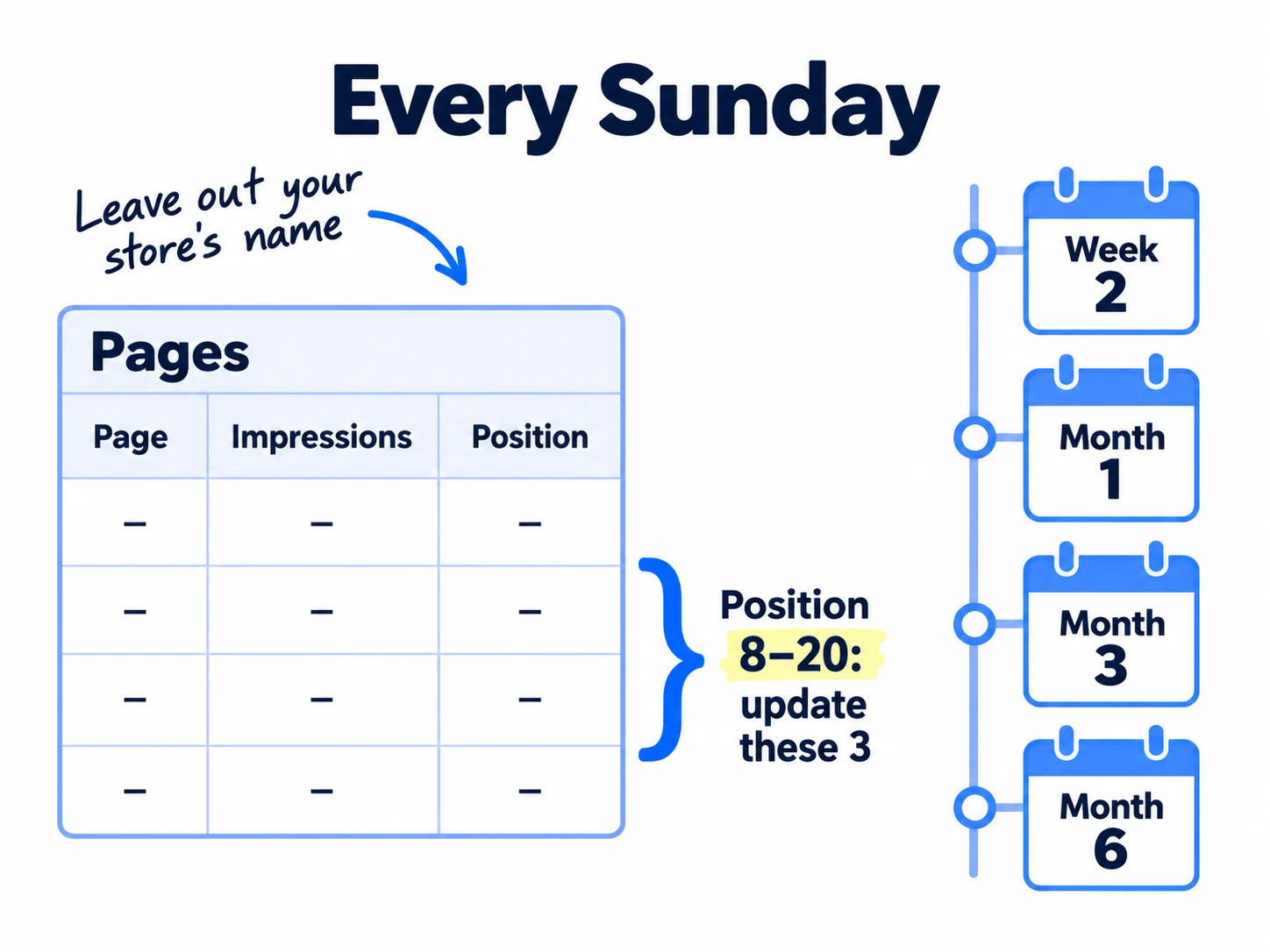
In Search Console, open Performance, then Search results, switch the chart to Weekly, and leave out searches that contain your store's name: click the filter bar, choose Query and pick "Non-branded" if Search Console offers it (it only does once a site has enough searches), or add a Query filter that leaves out your store's name. Searches for your name come from your other work, not from these pages. Write down impressions, clicks and pages with impressions. Then, in Shopify, open Analytics › Reports and the "Sessions by referrer" report for visits from Google, and count orders whose buyers say they found you on Google. Ask every new buyer "How did you first hear about us?". This is self-reported attribution, and at your size it is the most reliable source you have. Tag the links you share elsewhere with UTM parameters, so Google visits are not mixed up with them.
Compare your row with the pass lines from how long SEO takes to work: at week 2, most pages show "URL is on Google"; at month 1, at least 10 pages have impressions from searches without your name; at month 3, at least 5 pages sit at an average position under 20 and some bring clicks; at month 6, at least 1 order a week comes from Google. If you miss one, that guide says what to change.
Then open the Pages tab, sort by impressions, and pick the 3 pages with the most impressions at an average position between 8 and 20. Click each one and open Queries to see which searches show it. Add a heading or a short answer for the top search, one real photo or number, and a link from 2 of your other pages using those words, then request indexing. Update these in place of 3 of that week's new pages. The full method is in making a page rank higher.
Google changed its ranking in March and May 2026, and a spam update started on 24 September; if your positions jump during one, judge the weekly view once it ends. If Google sends visits but nobody orders, ask a few visitors what stopped them and fix the store, including pages that are slow to load. Once a month, ask ChatGPT and Google's AI Mode "What's a good [your product] for [need]?" and write down which stores they name; being named there is its own job, getting mentioned by ChatGPT.
Week | Pages live | Pages on Google | Impressions (no store name) | Clicks (no store name) | Pages at position under 20 | Google visits (Shopify) | Orders from Google
Next check date: [week 2 / month 1 / month 3 / month 6] | Pass line: [from above] | On track? yes / no
3 pages to update this week: [page] [page] [page]
- Tool: Google Search Console, Shopify Analytics, and a Google Sheet.
- Time: 30 minutes every Sunday.
- You will have: one row a week, a pass or miss at each check date, and 3 pages to update.
- It worked if: at each check date you can say "pass" or "miss" from one number, and 2 of every 3 updated pages gain impressions or move up within 4 weeks.
- Common mistake: counting searches for your own store's name as SEO results, or judging after one week. Leave an updated page alone for 4 weeks before you judge it.
See it done: Ferns & Rinse at the month-1 check
Week 4, after 30 blog pages
| Pages live | Pages on Google | Impressions (no store name) | Clicks (no store name) | Pages with impressions | Orders from Google |
|---|---|---|---|---|---|
| 34 | 26 | 180 | 3 | 14 | 0 |
The decision: 14 pages have impressions, so they pass month 1. The 8 pages not yet on Google go into URL Inspection again, and the phrase sheet gets 10 more "does sulfate free shampoo…" questions, because those pages got the most impressions.
Why it works: They judge by the pass line for month 1, not by orders, which are not due yet.
Leave paid Shopping ads until your free listings and pages bring some orders; Shopping ads for a small store has the test for when. While search builds, keep your other daily work going too: search is one of the channels for your store, and the full routine is in marketing a D2C brand. Once a month, step back for a marketing review.
Where Scout7 helps
Scout7 speeds up steps 1, 2, 3, 5 and 7. Steps 4 and 6 are yours.
Steps 1 and 3. Scout7's search and AI audit crawls your store and scores its site health and how it shows up on Google and in AI answers, with a page-level list of fixes by priority. It checks your robots.txt, llms.txt and structured data. It does not edit your Shopify store: you make the fixes in your admin.
Steps 2 and 5. Keyword intelligence researches thousands of keywords and narrows them to target terms, with monthly searches, difficulty, trend, where your store ranks, and who leads on Google and in AI answers for each one. AI question coverage collects the questions shoppers ask AI assistants in your category and shows who answers them today. You choose the phrases that match what you sell.
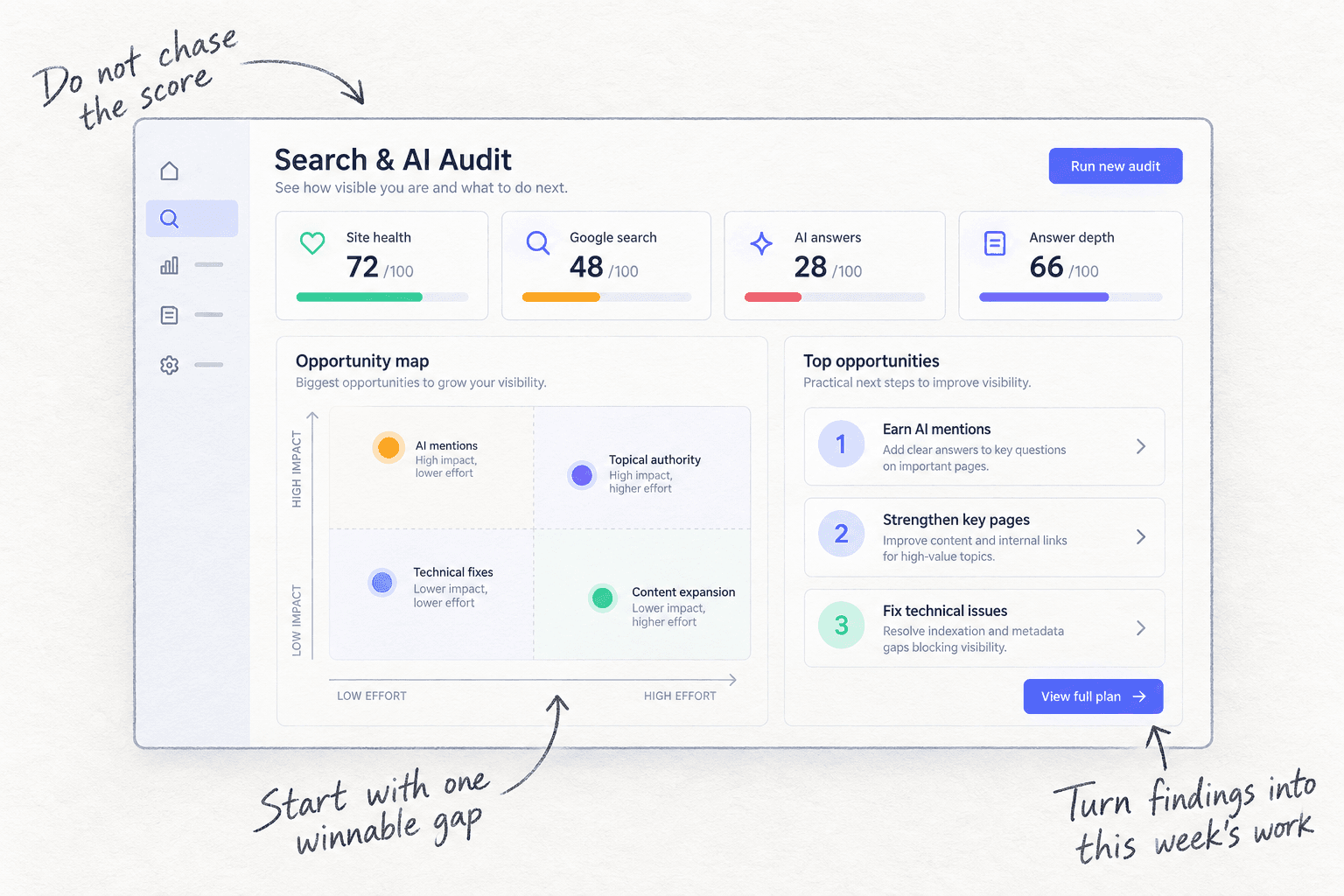
Step 5. Content Co-Pilot asks you research-backed questions about the page, then drafts the article with sections, FAQs and structured data. You answer its questions, edit the draft and approve it. It publishes to a Scout7-hosted blog, not into Shopify, so to post it on your Shopify blog you copy the approved text into Content › Blog posts yourself.
Step 7. In the Scout7 app, connect your own Search Console property and Scout7 reports your real impressions, clicks and positions next to its audit.
Your Shopify SEO checklist for the next 6 months
0 of 13 done
Work through this list with an AI assistant
It drafts the work and keeps track of what is done.
Frequently asked questions
- Is Shopify good for SEO?
Yes, for a small store. Shopify makes your sitemap and robots.txt, adds canonical tags and SSL, and its themes add product schema, so the technical basics are done. What it cannot do is choose the words. Your rankings come from the phrases on your product, collection and blog pages, and from links. The technical SEO checklist covers the few checks left.
- Do I need an SEO app for my Shopify store?
Not to start. With under 50 products you can fill every title, description and alt text by hand in a day, and Shopify already does the technical basics. The one free app worth installing is a review app that shows review stars, such as Judge.me's free plan. Buy a paid SEO app only once you have hundreds of products to update at once.
- Why is my Shopify store not showing on Google?
Most often the store is still private, it is not in Search Console, or it is too new to have been crawled. Make it public, submit sitemap.xml, and request indexing for your main pages; crawling takes a few days to a few weeks. If pages still do not appear, open the Page indexing report and follow getting your website indexed.
- Do Shopify tags help SEO?
Not on their own. Google says it does not use a list of keywords to rank pages, and Shopify's robots.txt keeps Google out of most tag-filtered pages. Use tags to sort products and to fill a Smart collection, then give that collection a real search phrase, a description and a menu link. The collection is the page that can rank.
- How long does SEO take for a new Shopify store?
New pages usually reach Google in days to weeks. The first clicks usually come around month 3 and the first orders around month 6, if you publish enough pages on searches shoppers make before they buy. Keep your daily messages and videos going meanwhile. The checkpoints are in how long SEO takes to work.
Sources
- 1.SEO overview — Shopify Help Center, checked 30 September 2026
- 2.Finding and submitting your sitemap — Shopify Help Center, checked 30 September 2026
- 3.Adding keywords for SEO to your Shopify store — Shopify Help Center, checked 30 September 2026
- 4.Managing collection settings — Shopify Help Center, checked 30 September 2026
- 5.Creating smart collections — Shopify Help Center, checked 30 September 2026
- 6.Optimizing your site structure for search engines — Shopify Help Center, checked 30 September 2026
- 7.Adding and managing blog posts — Shopify Help Center, checked 30 September 2026
- 8.Generating product descriptions with Shopify Magic — Shopify Help Center, checked 30 September 2026
- 9.Optimizing your store for AI — Shopify Help Center, checked 30 September 2026
- 10.Judge.me Product Reviews — Shopify App Store, checked 30 September 2026
- 11.Help Google understand your ecommerce site structure — Google Search Central, updated 10 December 2025, checked 30 September 2026
- 12.Introduction to Product structured data — Google Search Central, updated 10 December 2025, checked 30 September 2026
- 13.Influencing your title links in search results — Google Search Central, updated 10 December 2025, checked 30 September 2026
- 14.Control your snippets in search results — Google Search Central, updated 20 April 2026, checked 30 September 2026
- 15.Google image SEO best practices — Google Search Central, updated 2 March 2026, checked 30 September 2026
- 16.Meta tags and attributes that Google supports — Google Search Central, updated 10 December 2025, checked 30 September 2026
- 17.Ask Google to recrawl your URLs — Google Search Central, updated 10 December 2025, checked 30 September 2026
- 18.Spam policies for Google web search: scaled content abuse, doorway abuse and link spam — Google Search Central, updated 28 August 2026, checked 30 September 2026
- 19.Google Search Status Dashboard: ranking incidents — Google, checked 30 September 2026
- 20.Introducing the branded queries filter in Search Console — Google Search Central Blog, November 2025, checked 30 September 2026
- 21.Links report — Search Console Help, checked 30 September 2026
- 22.Update: AI Overviews Reduce Clicks by 58% — Ahrefs, 4 February 2026
- 23.How do you usually figure out which type of page should target a keyword on Shopify? — Shopify Community, 23 April 2026
- 24.Anyone else struggling to rank a new Shopify store on Google? — Shopify Community, 22 July 2026
Next article to read
How to list your products on Google Shopping for freeD2COnce your store pages are set up, show your products in free Google Shopping results.Read it nextRelated guides
- How to write a product description that sellsD2CComing soon
- Technical SEO checklist for a new websiteRun the technical SEO checks that matter for a new website in one afternoon: turn off every setting that hides it, check Google sees your words, one secure address, your sitemap in Google and Bing and a free crawl with 0 errors, then test each new page the day you publish it and the whole site every Sunday.
- How to get your products recommended by ChatGPTD2CGet your products recommended by ChatGPT: check your Shopify store is in ChatGPT's shopping results, ask ChatGPT 20 questions your shoppers ask, rewrite your product pages with the facts it looks for, and get onto the pages it reads with 100 messages and 20 answers a day.
- How to find keywords for SEOFind keywords for SEO when every tool says 0: collect 300 phrases your buyers type from Google suggestions, forums and a free tool, keep the 100 a new site can win with one page each, add 5 new ones every day, and add Search Console's real queries every Sunday.
Guides that link here
- How to choose marketing channels for an ecommerce brandD2C
- Technical SEO checklist for a new website
- How to list your products on Google Shopping for freeD2C
- How to get your products recommended by ChatGPTD2C
- How to add llms.txt and schema markup
- How to track AI traffic and ChatGPT mentions
- How to plan a content calendar
- How to get traffic to a new website for free
- How to get your first sales on ShopifyD2C
- How to launch a D2C brandD2C
- How to market a D2C brandD2C
- How long does SEO take to work?
- How to find keywords for SEO
- How to get backlinks for a new website
- How to get backlinks from news websites
- How to get your website indexed on Google
- How to make an article rank higher on Google
- How to measure SEO success
- How to use Google Search Console
- How to write a blog post that ranks on Google
- How to write competitor comparison and alternative pages
- Instagram post ideas for D2C brandsD2C
Cite this page
Dinesh Bypilla (2026). How to do SEO for a Shopify store. Scout7 Academy. https://scout7.ai/academy/seo/how-to-do-seo-for-a-shopify-store
Written by Dinesh Bypilla, Agentic systems engineer at Scout7. Reviewed by Murali Sid. Last checked 30 September 2026.
Quote any part of this guide with a link back to this page. © 2026 Scout7.
Markdown version of this page: https://scout7.ai/academy/seo/how-to-do-seo-for-a-shopify-store.md