



How to show up in Google AI Overviews
Show up in Google AI Overviews: check in Search Console that Google can show your pages, list 100 buyer questions and see which get an AI Overview and who it links to, answer 1 a day in the first two lines of a page with proof only you have, give 20 answers a day where those AI Overviews link, and check the Generative AI report every Sunday.
ByDinesh BypillaReviewed byMurali SidLast checked 21 min read
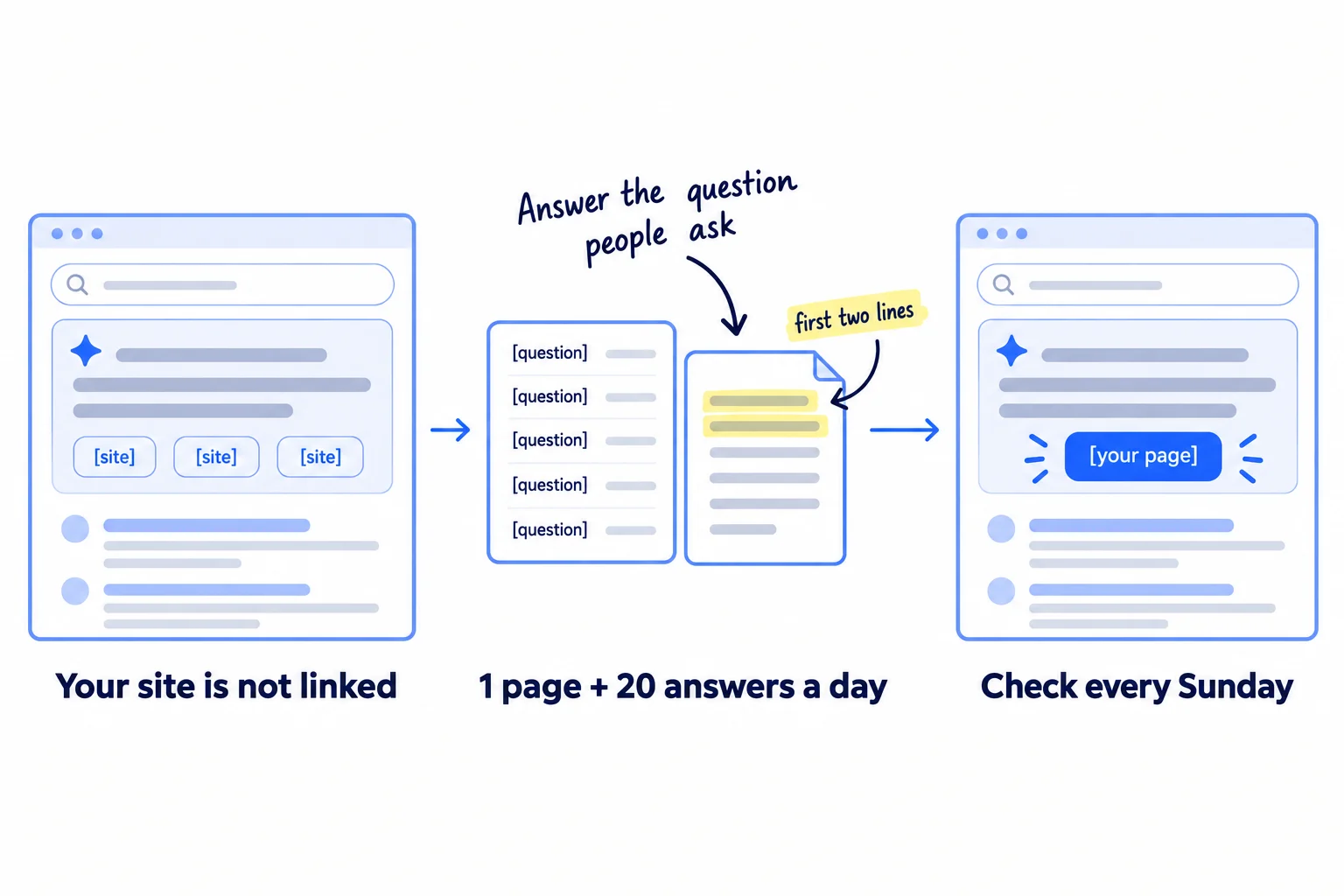
Your buyers type a question into Google, and an AI answer at the top of the page gives them the answer with links to a few sites. Here is how to show up in Google AI Overviews: check that Google can show your pages, answer the questions your buyers ask in the first two lines of a page, and answer the same questions on the sites those AI answers already link to. If you do nothing, the AI Overview keeps sending your buyers to other sites, and fewer people scroll down to the normal results.
Do these three things
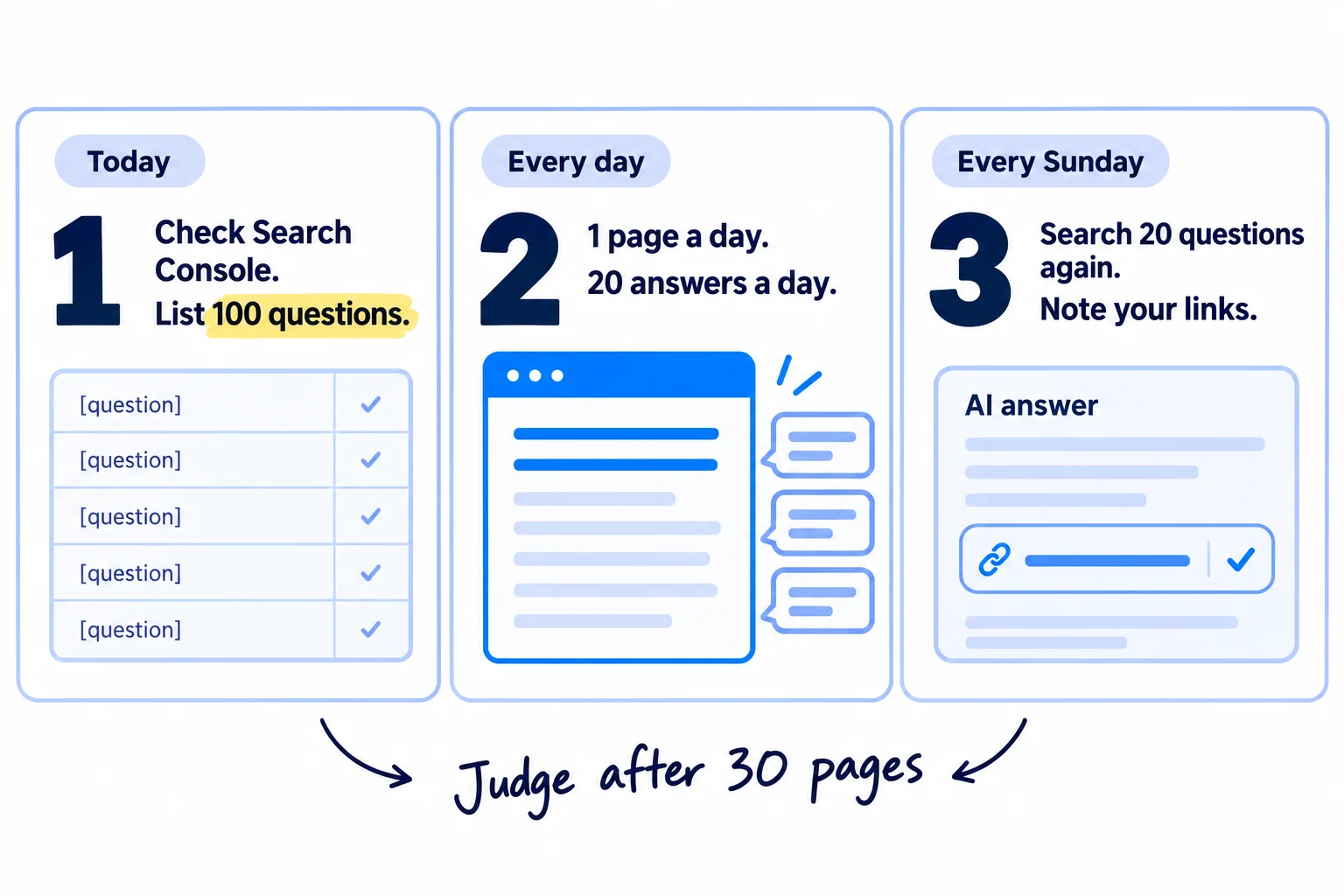
About 3 hours today, then about 2 hours a day. Judge the method after 30 pages and 600 answers. Nobody can promise a place in an AI Overview.
Show the three actions in fullHide the full list
- Today: check in Google Search Console that Google can index your pages and show them with a snippet. Then list 100 questions your buyers type into Google, and note which show an AI Overview and which sites it links to.
- Every day: publish or update 1 page that answers one question from your list in its first two lines, with proof only you have. Then post 20 helpful answers on the forums, videos and lists those AI Overviews link to. AI drafts both; you add what only you know.
- Every Sunday: open the Generative AI performance report in Search Console, search your top 20 questions again, and write down which of your pages are linked. That is how you measure this part of SEO.
Get help doing these
ChatGPT or Claude reads this guide and works through it with you.
1. Check that Google is allowed to show your pages in AI Overviews
Google shows a page in an AI Overview only if the page is on Google and allowed to show a short text preview, called a snippet. Google says there are "no additional requirements" beyond that, so check those two things on your main pages today, and check one setting in Search Console.
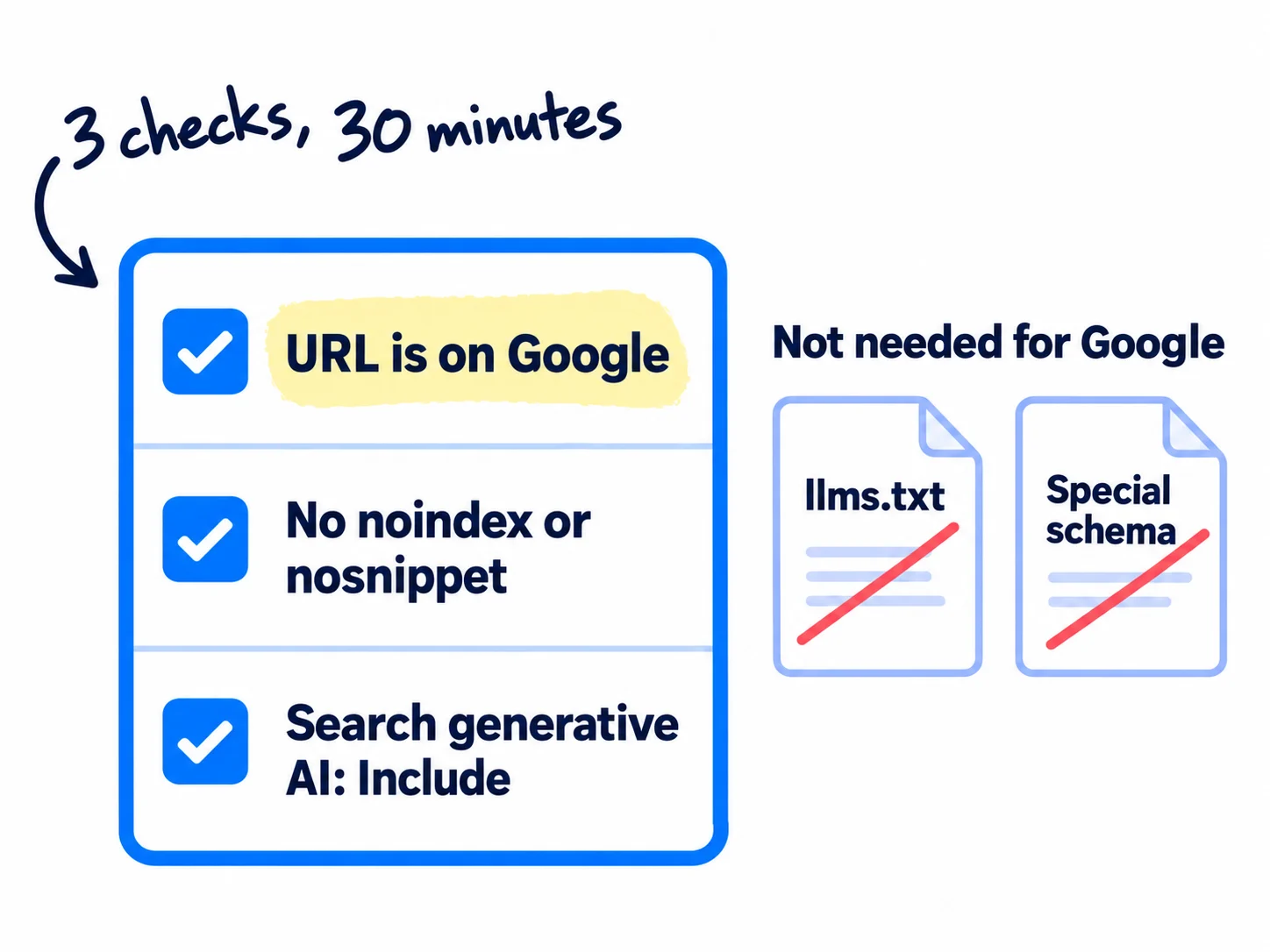
Open Search Console. If your site is not in it yet, add it first; it is free. Then check 5 pages: your home page, the page that says what you sell, your pricing page, and the 2 pages that best answer a buyer's question.
- Is each page on Google? Paste the page's address into the bar at the top of Search Console. This is URL Inspection. "URL is on Google" means the page can be shown. "URL is not on Google" means it cannot: click "Test live URL" to see why, and follow the indexing guide to fix it.
- Can Google show text from it? On the same screen, click "View crawled page" and look through the HTML for
noindex,nosnippetandmax-snippet. Google lists these as the settings that limit what it shows from your page. If you find one on a page you want in AI answers, remove it, or ask whoever built your site to. - Can Googlebot get in? Your robots.txt must not block Googlebot. Google adds that crawling must also be allowed "by any CDN or hosting infrastructure", so check the bot protection in Cloudflare or your host if pages fail the live test. The technical SEO checklist covers the full set of checks.
- Is your site included? Open Settings, then "Search generative AI". It should be on include, which is the default. Google rolled this setting out to every site on 31 August 2026, and a site must be included to appear in AI Overviews and AI Mode.
You do not need anything else for Google. Its own guide, updated in July 2026, says: "You don't need to create new machine readable files, AI text files, markup, or Markdown to appear in Google Search." It says Google Search ignores llms.txt, and that structured data "isn't required for generative AI search". Some sites add llms.txt and schema markup for other tools; for AI Overviews, spend the time on pages.
If you run a D2C store: Google says Merchant Center and Business Profiles can help your products "be visible in both AI responses and other Google Search results". Put your products in free Google Shopping listings if you have not yet.
If you run a B2B company or an agency that serves one area: set up a Google Business Profile and keep its hours, services and address correct. Google names it in the same list.
- Tool: Google Search Console. Free.
- Time: 30 minutes.
- You will have: 5 pages that say "URL is on Google", no
noindexornosnippeton them, and the Search generative AI setting on include. - It worked if: all 5 pages pass. If one fails, fix it before you write anything new: a page Google cannot show cannot be linked.
- Common mistake: paying for "AI optimisation" fixes such as llms.txt files or special schema. Google says it ignores them. The other mistake is a security plugin or CDN setting that blocks Googlebot without you knowing.
2. List 100 questions your buyers ask Google and see which show an AI Overview
Write down 100 questions your buyers type into Google, search each one, and note whether an AI Overview shows and which sites it links to. AI Overviews show mostly on questions: in an Ahrefs study of 146 million searches, they appeared on 57.9% of question searches, but on only 4.3% of searches for a product or service.
![A sheet with the columns Question, AI Overview?, Sites it links to, and Mine linked?. Rows show 'Yes' and 'No' in the second column, and '[forum]', '[video]', '[list]' in the third. The rows marked 'Yes' with small sites are bracketed as 'Answer first'. The label above reads '100 questions', and a handwritten note reads 'Search each one in a private window'.](/academy/illustrations/how-to-show-up-in-google-ai-overviews/03-step-2.webp)
Collect questions from these places. Aim for 150, then keep the best 100.
- Search Console: open Performance, then the Queries tab. Click "+ Add filter", choose Queries, choose "Custom (regex)" and type
(how|what|why|which|best|cost|price|can|does|vs). These are questions Google already shows you for. - Google itself: type the start of a question into Google and copy what autocomplete suggests. Copy the questions in the "People also ask" box too.
- The AI Overview and AI Mode: click "Show more" at the bottom of an AI Overview, and ask the question in AI Mode. Copy the follow-up questions they cover. Google runs these related searches in the background, which it calls "query fan-out".
- Your buyers: the questions from sales emails, calls and customer interviews, and what your competitors answer on their sites.
Give ChatGPT or Claude your buyer, your product and the questions you have, and ask for 50 more in the words a buyer would type. Cross out any that a buyer would not ask. Keep the long ones: Ahrefs found AI Overviews on 46.4% of searches of 7 words or more.
Then search each question. Use a private browser window, so your past searches do not change what you see. For each one, write down:
- Did an AI Overview show? Yes or no.
- Which sites does it link to? Note the kind: a forum like Reddit, a video, a list article, a competitor, a big brand. In September 2026, the most-linked sites in AI Overviews were YouTube, Reddit, Facebook, Google's own pages, Instagram and Quora.
- Is your site linked?
Each search takes about a minute. An AI Overview can change every few days, so do not judge a question by one search. You are looking for a pattern across 100.
Sort the list into this order:
| If the question shows | Do this |
|---|---|
| An AI Overview that links to forums, videos or small sites | Answer it first, in steps 3 and 4. These are open to you. |
| An AI Overview that links only to big brands | Answer it second. Your page needs something they do not have. |
| No AI Overview | Keep it for your normal SEO pages. Google says AI Overviews "often don't trigger". |
Put buyer questions above general ones in each row: questions about price, how long, which one to choose, and what is included. "What is packaging?" brings readers who will never buy. "How much do custom printed boxes cost for 500 units?" brings buyers.
Question (as buyers type it) | Where it came from | AI Overview? (yes/no) | Sites it links to | Kind (forum / video / list / competitor / big brand) | My site linked? | Order (1 / 2 / 3) | My page for it (link) | Date answered | Linked on Sunday? (date)
If you run a SaaS: many of your buyers' questions are "how do I [do the job]". Those trigger AI Overviews often. Your help pages answer them, so put your help centre on public pages that Google can index, not behind a login. Check 3 help pages in URL Inspection.
If you run an agency: build this sheet for each client in their first week. It shows the client, in one table, which questions bring AI answers and who gets linked. It also becomes the first page of a monthly client report.
- Tool: Google in a private window, Search Console, ChatGPT or Claude, and Google Sheets. All free.
- Time: about 2½ hours: 30 minutes to collect, 2 hours to search 100 questions.
- You will have: a sheet of 100 questions, each with "AI Overview: yes or no", the sites it links to, and an order.
- It worked if: at least 30 of the 100 show an AI Overview. Fewer than 30 means your list is mostly short buying words. Add more questions that start with how, what, why, which or can.
- Common mistake: listing only short buying words like "custom boxes". Google rarely shows an AI Overview for those, so you learn nothing.
See it done: Carvelian's question sheet
Carvelian Packaging is a made-up maker of custom printed boxes for small food and drink brands. One founder sells through calls, samples and quotes.
5 of 100 questions (38 showed an AI Overview)
| Question | AI Overview? | Sites it links to | Linked? | Order |
|---|---|---|---|---|
| How much do custom printed boxes cost for 500 units? | Yes | Reddit, 2 print firms, a video | No | 1 |
| What is the minimum order for custom printed boxes? | Yes | Quora, a list article, a big printer | No | 1 |
| How long does it take to make custom printed food boxes? | Yes | 3 big printers | No | 2 |
| Custom boxes for cookies | No | — | — | 3 |
| Are printed boxes safe for food without a liner? | Yes | A government page, a forum | No | 1 |
Why it works: The questions are what buyers ask before an order, and the sheet shows which AI Overviews link to forums and small sites, so those go first.
3. Answer one question a day in the first two lines of a page
Every day, publish or update 1 page that answers one question from your list in its first two lines, with something only you know. Google's AI Overviews link to pages that answer the question and add something the other pages do not.
![A page card. The title reads '[The question, as buyers type it]'. The first two lines, labelled 'The answer, with a number', are highlighted. Below them, three headings read '[Follow-up question]', and a block reads 'Your proof: price · photo · test'. A crossed-out stack of cards reads 'A page for every wording'. A handwritten note reads 'One question, one page'.](/academy/illustrations/how-to-show-up-in-google-ai-overviews/04-step-3.webp)
First, decide: new page or update? Look up the question in Search Console's Queries tab and click it, then open the Pages tab.
- One of your pages already shows for it: update that page. The steps for that are in how to make an article rank higher.
- None of your pages shows for it: write a new page. How to write a blog post that ranks covers the writing in full.
Then build the page in this shape:
- Title: the question, in the words buyers type.
- First two lines: the full answer, with a number if there is one. A reader who stops here should have their answer.
- One section for each follow-up question from step 2, with the question as its heading. Google's AI answers run those follow-up searches too, so a page that answers them can be linked for them. Put them on this page. Google says making separate pages "for every possible variation" of a search, to rank, breaks its scaled content abuse policy.
- One thing only you know: your real price, a photo of your work, a result from a test you ran, or what a customer told you, in a case study or a testimonial. Google calls a page made only of common knowledge "commodity content", and says pages with "unique expert or experienced takes" do better in its AI answers.
- An image or a short video of the real thing, where it helps. Google says its AI answers can show images and video from your page.
- Your name and role at the top. Google's own questions for site owners ask: "Do pages carry a byline, where one might be expected?"
- One next step at the end: a call to action such as "Ask for a sample" or "Start a free trial".
Give ChatGPT or Claude the question, the follow-ups, your notes and your proof, and ask for a first draft in this shape. Then spend most of the hour on what AI cannot add: the real numbers and photos. Google says you do not need to write in a special way for AI, or break pages into tiny pieces. Write for the buyer.
When the page is live, link to it from 3 of your other pages, using the question's words as the link text. Then paste its address into URL Inspection and click "Request indexing" once.
Title: [The question, in the buyer's words]
First two lines: [The answer in one sentence, with a number]. [Who it applies to, or the one exception.]
Section: [Follow-up question 1] — [2 to 4 lines]
Section: [Follow-up question 2] — [2 to 4 lines]
Section: [Follow-up question 3] — [2 to 4 lines]
Only I know: [our price / a photo of our work / a test we ran / a customer's words]
Written by: [Your name], [your role]
Next step: [Ask for a quote / Start a free trial / Order a sample] — [link]
If you run a B2B company: buyers ask about prices, minimum orders and lead times, and most suppliers hide them. Put real ranges on the page. Those are the facts an AI answer can quote, and they turn readers into enquiries. Getting named when buyers ask ChatGPT for a supplier is its own job: getting recommended as a supplier.
If you run a D2C store: answer questions shoppers ask before they buy, such as "is [product type] safe for [use]", on a guide page, and link it to the product. Google rarely shows AI Overviews on shopping searches; in Ahrefs' study, only 3.2% of shopping searches had one. Getting your products into ChatGPT's answers is covered in getting your products recommended by ChatGPT.
- Tool: ChatGPT or Claude for the draft, your site editor, and Search Console. Free.
- Time: about 1 hour a page: 5 minutes for the AI draft, 55 to check it and add your proof. Block it at the same time each day, as in fitting marketing into your week.
- You will have: 1 new or updated page a day, with the answer in its first two lines, 3 follow-up sections, your proof, 3 links to it and a recrawl request.
- It worked if: a friend who reads only the first two lines can answer the question, and within 2 weeks URL Inspection says "URL is on Google".
- Common mistake: a page that starts with a long introduction, or a "7 tips" page with nothing in it you could not find elsewhere. The other mistake is changing the date on a page that did not really change.
See it done: Carvelian's first two lines
Before
At Carvelian Packaging, we believe every box tells a story. Since we started, we have helped food brands bring their packaging to life with beautiful custom printing.
After
Custom printed boxes cost us $4.60 a box for 300 and $3.20 a box for 1,000, including printing and delivery. Our smallest order is 300 boxes, which suits most small food brands for their first run.
Why it works: The new opening answers the question with real prices in two lines, which is what an AI answer can quote and other printers leave out.
4. Answer the same questions on the sites AI Overviews already link to
Every day, post 20 helpful answers to your list's questions on the forums, video sites and list articles that the AI Overviews already link to. In September 2026, YouTube and Reddit were the two sites AI Overviews linked to most, so an answer there can be the link people see.
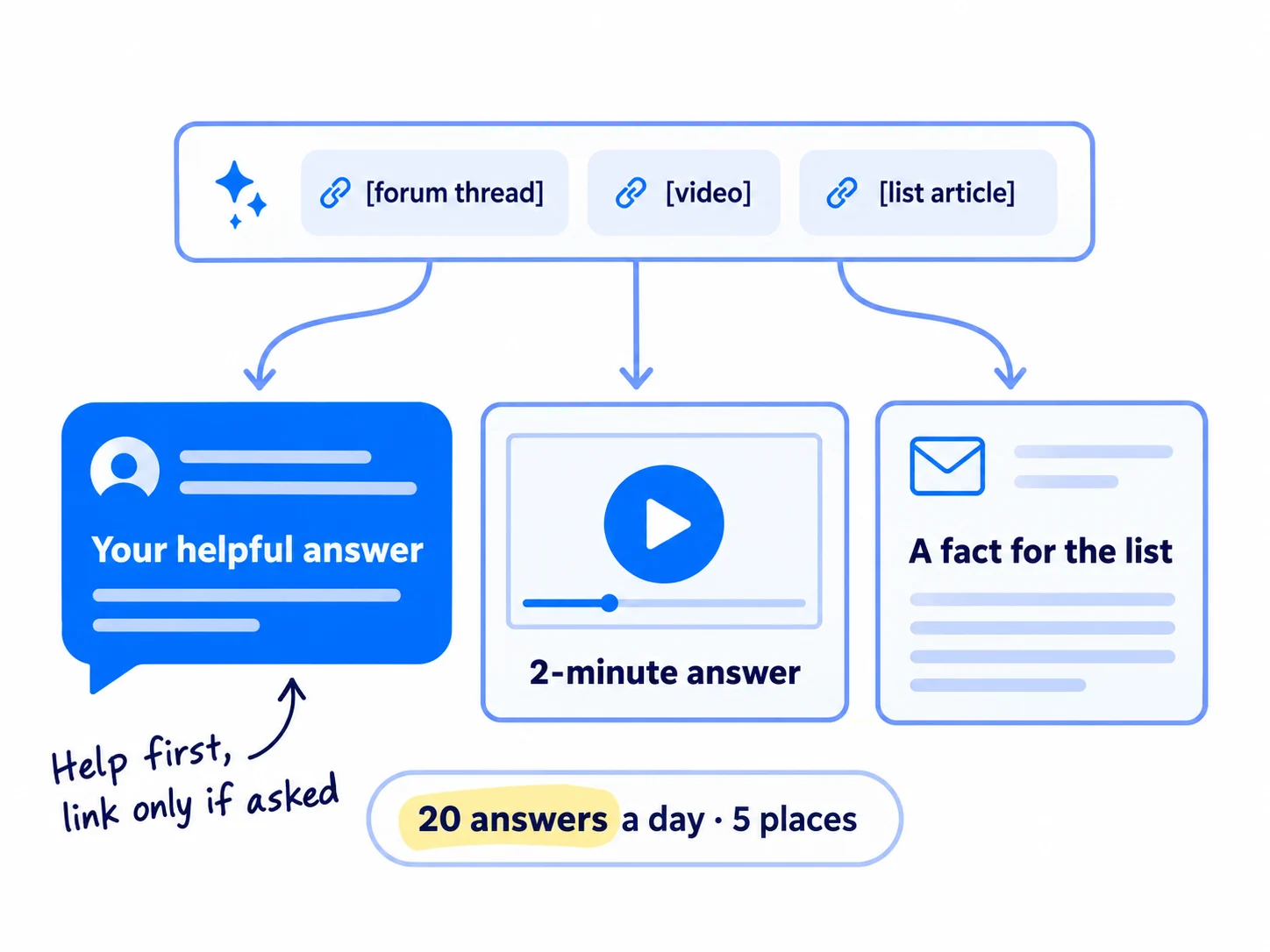
Look at the "Sites it links to" column in your sheet. For each question in order 1, go to the places its AI Overview links to, and answer there:
| If the AI Overview links to | Do this |
|---|---|
| A Reddit thread or another forum | Reply in that thread, or in a newer one on the same question. Answer the question in full. Say who you are. Read how to post on Reddit without getting banned first. |
| Quora or a Facebook group | Answer the question there, in the same way. Facebook groups have their own rules on links. |
| A YouTube video | Record a 2-minute video that answers the question, with the question as its title. How to start a YouTube channel covers the setup. |
| A "best [product]" or "top [service]" list | Email the writer once, with a fact or a price they can add. How to get on the "best of" lists shows how. |
| A competitor's page | Make your page better in step 3, with the proof they leave out. |
Do 20 a day, spread across at least 5 places. Each one is a real answer to a real question, written for that thread. Ask ChatGPT or Claude for a first draft from your page in step 3, then add one true line from your own work. That makes each answer about 3 minutes.
[The answer to their question in one or two sentences, with a number if there is one.]
[Why, or the one thing to watch out for, in one or two sentences.]
[One true line from your own work: "I run [your business], and we see [what you see]."]
[One step they can take today, even if they never use you.]
Follow every site's rules. Many subreddits limit self-promotion or ban links, so answer without a link there, and spread your 20 across more communities where your buyers talk rather than posting more in one. Never use fake accounts or post the same text twice. Google says that "seeking inauthentic 'mentions' across the web isn't as helpful as it might seem", because its systems are built to block spam.
The same answers help you get mentioned by ChatGPT, which reads many of the same sites.
If you run a D2C store: Instagram and TikTok are also among the sites AI Overviews link to most. A short video that answers a shopper's question there counts as one of your 20. How to make short-form videos covers the format.
- Tool: the forums, YouTube and email, and ChatGPT or Claude for drafts. Free.
- Time: about 1 hour a day, at about 3 minutes an answer.
- You will have: 20 answers a day across at least 5 places, each logged in your sheet with its link and date.
- It worked if: after 600 answers (30 days at 20 a day), some answers have replies or upvotes, and at least one AI Overview on your list links to one of your answers, your video or a list that names you.
- Common mistake: dropping a link to your site in every reply. Moderators remove it, and readers skip it. Answer the question, and link only where the rules allow and the person asked.
See it done: Carvelian's forum answer
Asked in A forum for small food makers, in a thread the AI Overview links to
“What's the minimum order for custom printed boxes? Every printer I ask wants 5,000.”
The reply
Big printers set high minimums because each job needs new printing plates, and that setup cost is the same for 500 boxes or 50,000. Short-run printers start lower. I run a small box printer, so here are our real numbers: our smallest order is 300 boxes at $4.60 each, and at 1,000 it drops to $3.20. Ask any printer for the price at 300, 500 and 1,000, so you can see where the price per box drops. And ask for a sample box before you order.
Why it works: It answers the question with real numbers, says who is writing, and does not push a link.
5. Check every Sunday which pages Google shows in AI Overviews
Every Sunday, open the Generative AI performance report in Search Console, search your top 20 questions again, and write down which of your pages are linked. AI Overviews change often, so a weekly count across 20 questions tells you more than one search on one day.
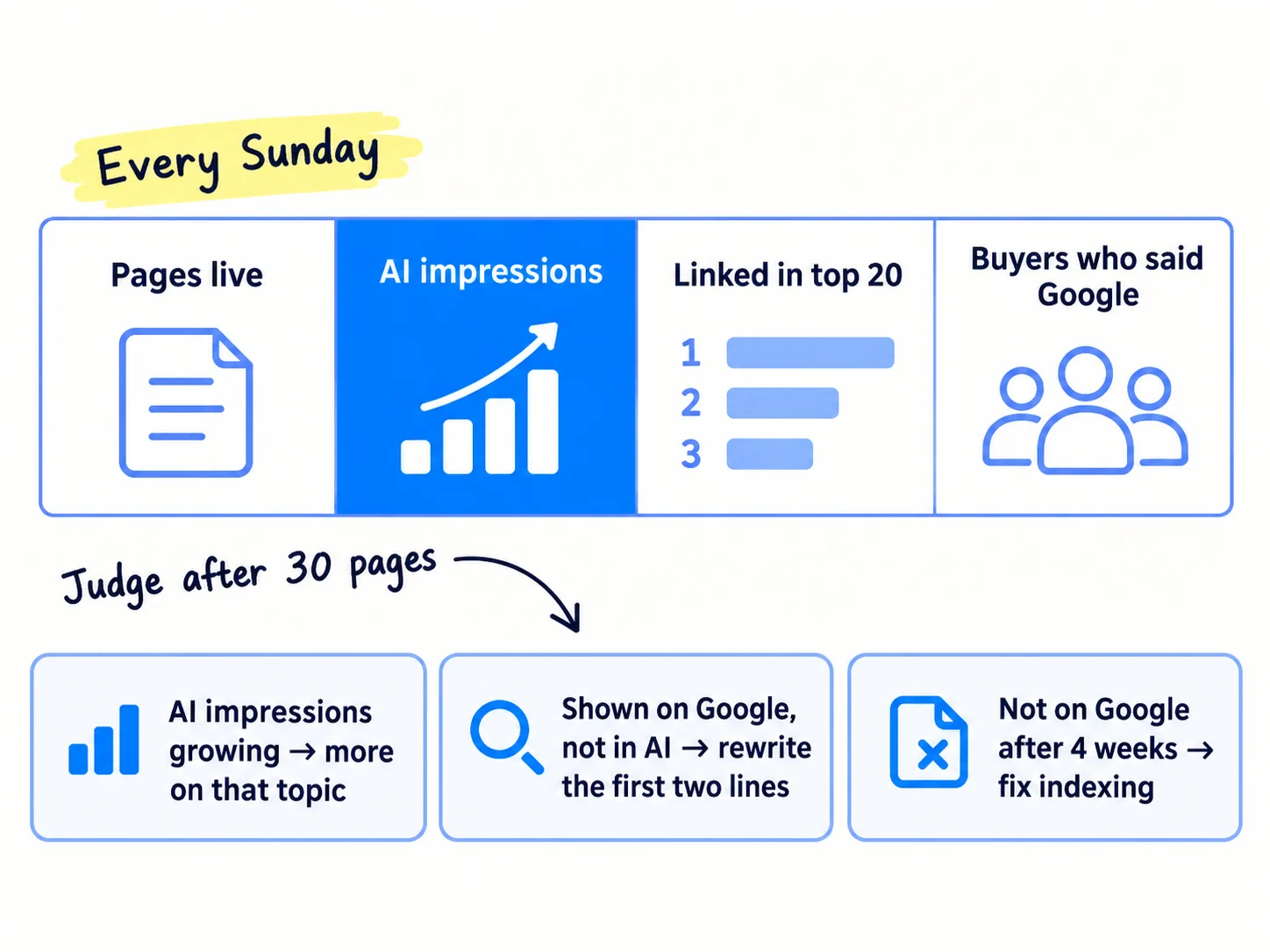
Do these four things, in this order:
- Open the Generative AI performance report. In Search Console, find it under Performance reports. It shows how often links to your pages appeared in AI Overviews and AI Mode, page by page. It shows impressions only, not clicks or the searches. A site with very few AI impressions may see no data yet. That is normal for a new site. Write down the total for the week and the pages with any impressions.
- Search your top 20 questions again in a private window. Mark "linked" or "not linked" for each in your sheet, with the date.
- Count buyers. Add a "Where did you find us?" question to your contact, signup or checkout form, which is self-reported attribution, and count the answers that say Google. Fewer people click when an AI Overview shows: an Ahrefs study in February 2026 found the top result got 58% fewer clicks. So enquiries, signups and orders tell you more than clicks. If you have not yet, set up conversion tracking so each one is counted.
- Add 5 new questions to your sheet from this week's Search Console queries and your sales emails, so the list never runs out.
After 30 pages and 600 answers, decide with this table:
| What you see | Do this |
|---|---|
| A page has AI impressions, or you are linked for 2 or more of your top 20 questions | Keep going. Write the next questions on the same topic first. |
| A page shows in Search Console's normal report but has no AI impressions | Rewrite its first two lines so they answer the question with a number, and add one more piece of proof (step 3). |
| AI Overviews on your list link only to forums and videos | Move more of your daily 20 to those places (step 4). |
| A page has no impressions anywhere after 4 weeks | Check it in URL Inspection and fix indexing. |
| An AI Overview says something wrong about your business | Click the thumbs down at the bottom of it, then "Report a problem", and fix the fact on your own page. |
Google cannot promise a place, and neither can anyone else. Google's July 2026 guide says to "be wary of third-party tools that promise ranking success", because "no third-party tool has access to our internal ranking or AI systems".
To see visits from ChatGPT and other AI tools as well, track AI traffic and mentions. Once a month, put this week's row next to your other numbers in a monthly marketing review.
If you run an agency: the Sunday row is the client's proof of work. Put it in the monthly report. If clients ask why they are not in AI answers, this guide is the service: how to sell AI visibility services covers pricing it.
If you run a B2B company: buyers often read your page, then email days later. Ask every new enquiry where they found you, or the page will look like it brought nothing. How to track which channel brought each deal shows how.
- Tool: Google Search Console, Google in a private window, and your sheet. Free.
- Time: about 45 minutes every Sunday.
- You will have: one row a week: pages live, AI impressions, questions linked out of 20, and buyers who said Google.
- It worked if: after 30 pages, at least 3 pages have AI impressions, or you are linked for at least 2 of your top 20 questions. If neither, use the table above before you write more.
- Common mistake: searching one question on one day and deciding it worked or failed. In an Ahrefs study, AI Overviews changed 70% of the time between checks.
See it done: Carvelian's Sunday row after 30 pages
Week 5
| Pages live | AI impressions this week | Pages with AI impressions | Linked in top 20 | Answers posted (total) | Enquiries that said Google |
|---|---|---|---|---|---|
| 30 | 41 | 3 | 2 | 600 | 1 |
The decision: the 3 pages with AI impressions are all about prices and minimum orders, so the next 10 pages answer price questions. The page on lead times shows on Google but has no AI impressions, so its first two lines get a real number of days.
Why it works: They judge by AI impressions, links across 20 questions and real enquiries, not by one search or by clicks.
Where Scout7 helps
Scout7 does parts of steps 1, 2, 3, 4 and 5.
Step 1. Scout7's search and AI audit crawls your site and scores its site health, its Google presence and its presence in AI answers, with a list of fixes by page. It checks your robots.txt, llms.txt and structured data. It tells you what to fix; you make the fixes on your own site.
Step 2. AI question coverage collects the questions real buyers ask AI assistants in your category and shows who answers them on Google and in AI answers today. Keyword intelligence shows, for each term, who leads on Google and who leads in AI answers. You judge which questions are worth answering.
Step 3. Content Co-Pilot asks you research-backed questions, then drafts the article with sources, FAQs and links between your articles. You answer its questions, add your proof and approve the draft. It can host the blog under your own domain. Nothing is published without your approval.
Step 4. Join Conversations finds live discussions on social platforms and drafts a reply in your voice for each thread. You read the thread yourself and approve or rewrite every reply.
Step 5. In the Scout7 app, connect your own Search Console and Scout7 shows real impressions, clicks and positions next to its audit.
Your checklist to show up in Google AI Overviews
0 of 9 done
Work through this list with an AI assistant
It drafts the work and keeps track of what is done.
Frequently asked questions
- Do I need llms.txt or schema markup to show up in Google AI Overviews?
No. Google's July 2026 guide says you need no "AI text files" or special markup, that Google Search ignores llms.txt, and that structured data "isn't required for generative AI search". Your page needs to be on Google and allowed to show a snippet. Some tools other than Google read these files; adding llms.txt and schema markup covers them.
- Why does my page rank on Google but not show in the AI Overview?
The AI Overview links to pages for the follow-up questions too, so a page that ranks for one search can be passed over. In a March 2026 Ahrefs study, only 38% of AI Overview links came from the top 10 results. Answer the follow-ups on the same page, put the answer in the first two lines, and add proof the other pages lack.
- How long until my page shows in an AI Overview?
First Google has to find and index it, which takes days to a few weeks. Then it depends on the question and the pages it competes with, and the AI Overview itself changes every few days. Judge the method after 30 pages, not one page after one week. Nobody can promise a place, as how long SEO takes explains.
- An AI Overview says something wrong about my business. What do I do?
Click the thumbs down at the bottom of the AI Overview, then "Report a problem", choose the category, add the correct fact and click Submit. Then fix the source: put the correct fact in the first lines of your own page, correct your Google Business Profile if you have one, and answer the question where the wrong fact came from.
- Should I stop my site from appearing in AI Overviews to get more clicks?
For a small business, no. Excluding your site in Search Console's Search generative AI setting removes your links from AI Overviews and AI Mode, so buyers who read the answer never see you. Google says this setting does not change your normal rankings, so you gain nothing back. Count enquiries, not only clicks, as in step 5.
Sources
- 1.Optimizing your website for generative AI features on Google Search — Google Search Central, updated 10 July 2026, checked 1 October 2026
- 2.AI features and your website — Google Search Central, updated 10 December 2025, checked 1 October 2026
- 3.Latest Google Search documentation updates — Google Search Central, 15 May, 15 June and 8 May 2026 entries, checked 1 October 2026
- 4.Search generative AI control — Google Search Console Help, rolled out to all sites 31 August 2026, checked 1 October 2026
- 5.Introducing Search Generative AI performance reports in Search Console — Google Search Central Blog, 3 June 2026, rolled out to all sites 31 August 2026, checked 1 October 2026
- 6.Generative AI performance report (Search) — Google Search Console Help, checked 1 October 2026
- 7.Performance report data: how AI Overviews and AI Mode are counted — Google Search Console Help, checked 1 October 2026
- 8.URL Inspection tool — Google Search Console Help, checked 1 October 2026
- 9.Find information in faster & easier ways with AI Overviews in Google Search — Google Search Help, checked 1 October 2026
- 10.100 things we announced at Google I/O 2026 — Google, 20 May 2026
- 11.Creating helpful, reliable, people-first content — Google Search Central, updated 10 December 2025, checked 1 October 2026
- 12.What Triggers AI Overviews? 86 Factors and 146 Million SERPs Analyzed — Ahrefs (Ryan Law), 10 November 2025
- 13.Update: 38% of AI Overview Citations Pull From The Top 10 — Ahrefs (Louise Linehan), 2 March 2026
- 14.The 50 Most-Cited Websites in Google AI Overviews (September 2026) — Ahrefs (Si Quan Ong), 2 September 2026
- 15.AI Overviews Change Every 2 Days (But Never Change Their Mind) — Ahrefs (Louise Linehan), 11 November 2025
- 16.We Tracked 1,885 Pages Adding Schema. AI Citations Barely Moved. — Ahrefs (Louise Linehan), 11 May 2026
- 17.Update: AI Overviews Reduce Clicks by 58% — Ahrefs (Ryan Law), 4 February 2026
Next article to read
How to track AI traffic and ChatGPT mentionsOnce your pages are live, see which AI tools show you and send you visitors.Read it nextRelated guides
- How to make an article rank higher on GoogleMake an article rank higher on Google: list the articles Search Console already shows at position 8 to 20, update 1 a day in about an hour with a title that answers the search, what the top 3 results miss, proof only you have and 3 internal links, and compare each one's numbers 4 weeks later every Sunday.
- How to get your brand mentioned by ChatGPTGet your brand mentioned by ChatGPT: find the exact pages it reads when your buyers ask for a tool, agency or supplier, get your name onto them every day with pages, answers, messages and short videos, and count how often you are named every Sunday.
- How to write a blog post that ranks on GoogleWrite a blog post that ranks on Google: read the top 5 results for your keyword, add one thing only you know, let AI draft from your notes, check every fact, link it from 3 of your pages, publish 1 a day, and count posts with impressions every Sunday.
- How to get on the "best of" lists AI tools citeGet on the "best of" lists ChatGPT, Perplexity and Google AI cite: ask them 20 "best [what you sell]" questions and copy every list they use, publish a listing kit an author can use in 5 minutes, pitch 100 list authors a day until every list has heard from you, and count the lists and AI answers that name you every Sunday.
Guides that link here
- How to make an article rank higher on Google
- How to get your brand mentioned by ChatGPT
- How to add llms.txt and schema markup
- How to get on the "best of" lists AI tools cite
- How to get your company recommended by ChatGPT as a supplierB2B
- How to get your products recommended by ChatGPTD2C
- How to track AI traffic and ChatGPT mentions
- How to start a YouTube channel for business
- How to write a case study
- How to get traffic to a new website for free
- How to market a SaaS productSaaS
- How to market your product as a technical founderSaaS
- How long does SEO take to work?
- How to do SEO for a Shopify storeD2C
- How to find keywords for SEO
- How to get backlinks for a new website
- How to get backlinks from news websites
- How to get your website indexed on Google
- How to list your products on Google Shopping for freeD2C
- How to measure SEO success
- How to rank on Google Maps
- How to set up a Google Business Profile
- How to use Google Search Console
- How to write a blog post that ranks on Google
- How to write competitor comparison and alternative pages
- Technical SEO checklist for a new website
- How to promote on Reddit without getting banned
- How to promote your business on InstagramD2C
Cite this page
Dinesh Bypilla (2026). How to show up in Google AI Overviews. Scout7 Academy. https://scout7.ai/academy/ai-search/how-to-show-up-in-google-ai-overviews
Written by Dinesh Bypilla, Agentic systems engineer at Scout7. Reviewed by Murali Sid. Last checked 1 October 2026.
Quote any part of this guide with a link back to this page. © 2026 Scout7.
Markdown version of this page: https://scout7.ai/academy/ai-search/how-to-show-up-in-google-ai-overviews.md