



How to build a free tool that brings in leads
Build a free tool that brings in leads for your SaaS: pick one job your product already does that people search for and ChatGPT cannot do in one reply, put it on your own site with no signup, send 100 people a day their own result, and count uses, emails and signups every Sunday.
ByDinesh BypillaReviewed byMurali SidLast checked 22 min read
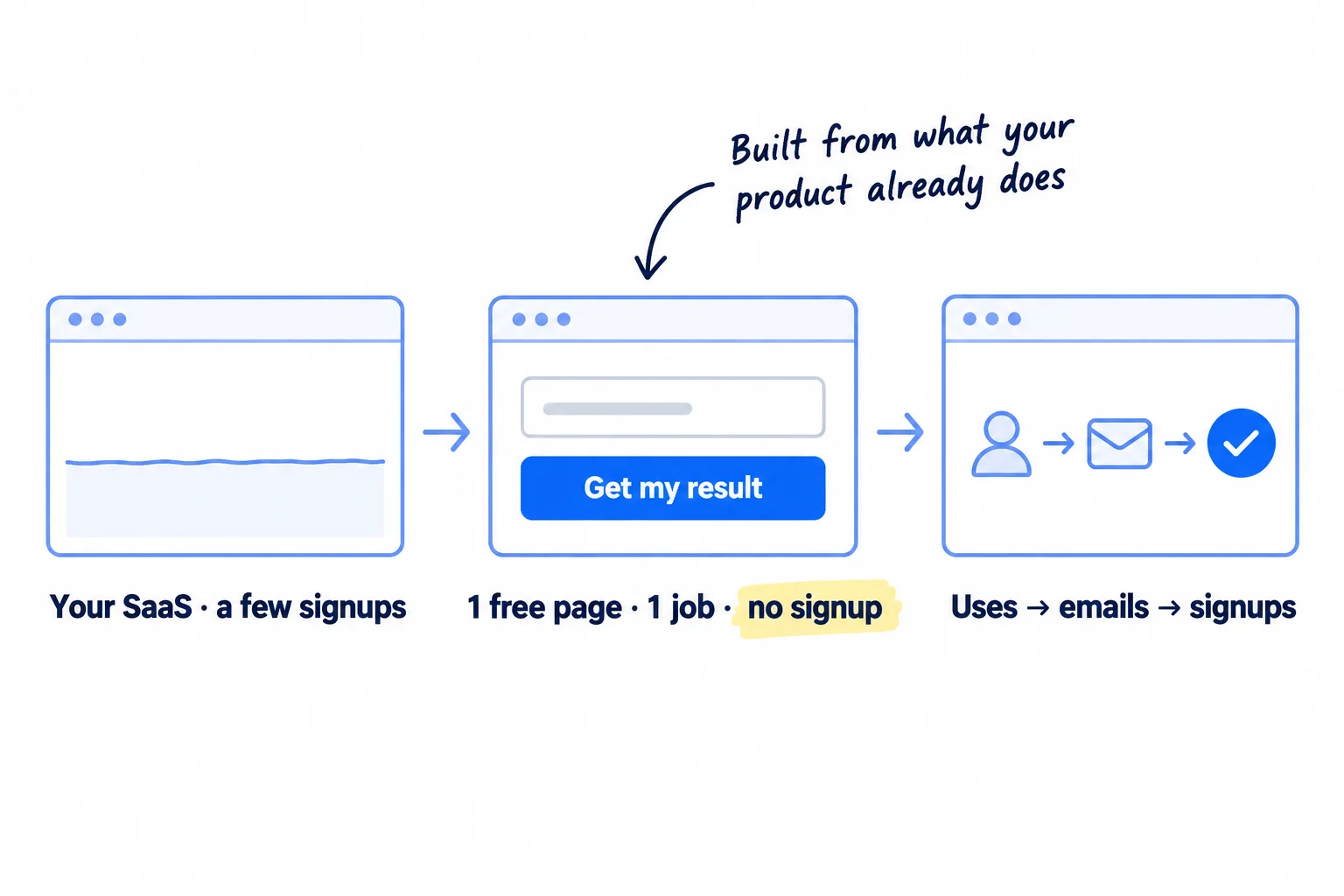
You can build a small free tool in a week with AI, but most free tools bring a few visits and no leads. That happens when the tool is a generic calculator every big site already has, sits behind an email form, and waits for Google. Here is how to build a free tool that brings in leads for your SaaS: one job your product already does, free on your own site, sent by hand to 100 people a day while search slowly builds.
Do these three things
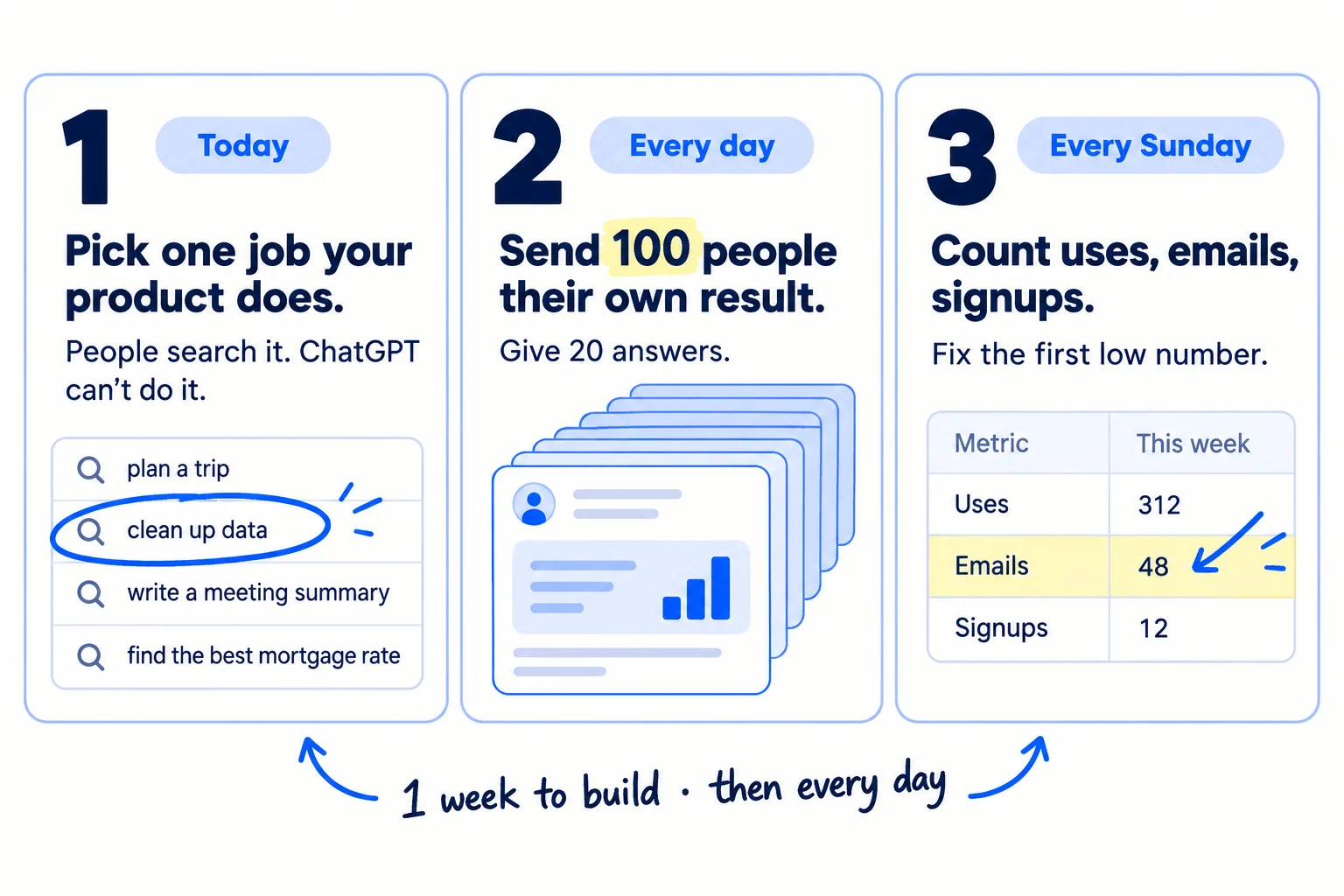
About a week of code hours to build it, then about 6 to 7 hours a day, every day. Judge the messages after 2,800 and search at month 3.
Show the three actions in fullHide the full list
- Today: pick one job your SaaS already does that people type into Google and ChatGPT cannot do in one reply. Plan a free page that does that job in under a minute, with no signup.
- Every day: send 100 personal messages, each with that person's own result from the tool, and give 20 answers in the places your buyers ask for help where the tool solves the problem.
- Every Sunday: count tool uses, emails, clicks to your product and signups from the tool, tagged with UTM parameters. Fix the first number that is below its line.
Get help doing these
ChatGPT or Claude reads this guide and works through it with you.
1. Pick one job your SaaS already does that people search for as a free tool
Pick one small job your product already does that passes three checks: people type it into Google, ChatGPT cannot finish it in one reply, and your product does it today. That job is your free tool, and it is your best lead magnet because it is a small piece of your real product.
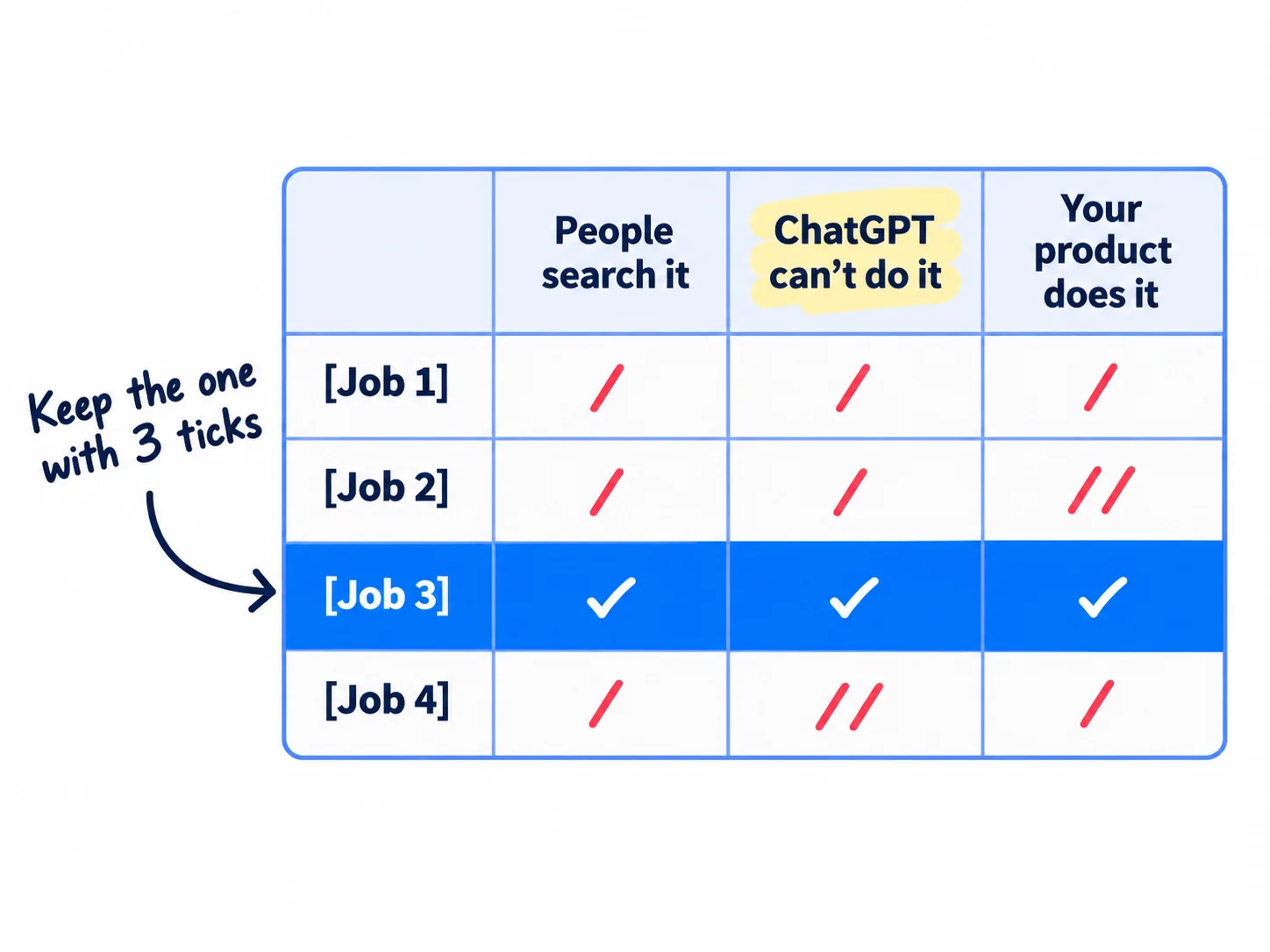
Write down 10 jobs your SaaS does that a stranger could use in under a minute. Then check each one three ways:
- 1
Check people search for it
Type the job into Google with the words people add to tools: "[job] free", "[job] checker", "[job] generator", "[job] calculator", "online [job]". Write down every phrase that appears as a suggestion. Then put the best one into the free Ahrefs Keyword Generator, which needs no signup. A phrase in Google's suggestions is enough to start. You do not need a big search volume.
- 2
Check ChatGPT cannot do it in one reply
Paste the job into ChatGPT as a visitor would ask it. If one reply gives a full answer, a template or a sum, drop that job. Nobody needs your page for it. Keep jobs that need something a chat cannot see: the visitor's own website, file, device or account, live data, or your product's own engine.
- 3
Check your product already does it
The tool should be one part of your product, cut down. Then everyone who uses it has already tried a small version of what you sell, and the step to trying the full product is short.
Keep the job that passes all three. If two pass, open the top 5 Google results for each phrase. Pick the one where you see small sites and forum threads, not five big brands. If none pass, pick the job that needs the visitor's own data. That is the check that matters most now.
Founders describe this working in 2026. The founder of Filestash, an open-source file manager, says on Hacker News that free online tools are the most important channel: people who search "online ftp client" or "online s3 browser" find the product, and then the founder calls them. Another founder built 26 small free tools, each aimed at one search phrase, and called them their best acquisition channel after 6 months, at just over 100 users.
- Tool: Google, the free Ahrefs Keyword Generator, and ChatGPT.
- Time: 1 hour.
- You will have: one job, the exact phrase people type for it, and a one-line plan: what the visitor puts in, and what they get back.
- It worked if: the phrase appears in Google's suggestions, ChatGPT cannot finish the job in one reply, and your product does the job today.
- Common mistake: building the generic calculator every big site already has. In March 2026, one founder built churn, customer cost and lifetime value calculators. After 6 weeks they had 1,260 Google impressions and 6 clicks, at an average position of about 21. All 3 sales came from community posts and direct messages. Look at who already ranks before you build.
See it done: Bugmoth's three candidate jobs
Bugmoth is a made-up bug-reporting tool for small web teams. It costs $19 a month per team, with a 14-day trial.
| Job | In Google's suggestions | Can ChatGPT do it in one reply? | Does Bugmoth already do it? | Verdict |
|---|---|---|---|---|
| A website bug report template | Yes: "website bug report template" | Yes | No | Drop |
| A full-page screenshot of a website | Yes: "screenshot website online free" | No | Partly | Maybe: many free tools already |
| Show a client their browser and screen size, with a "copy for your developer" button | Yes: "what browser am i using" | No: it needs the visitor's own device | Yes: every Bugmoth report includes it | Build this |
Why it works: Only one job needs something ChatGPT cannot see, the visitor's own device, and it is a job Bugmoth already does.
2. Build the smallest free version in a week, on your own site, with no signup
Build a page on your own site that does the one job in under a minute, with no account and no email needed to see the result. One input, one result.
![A tool page on your own site, at yoursite.com/tools/[the search phrase]. One input box, one 'Get my result' button, and the result straight away with no signup. Under it: what it does, how it works, and one line to your product.](/academy/illustrations/how-to-build-a-free-tool-that-brings-in-leads/03-step-2.webp)
Put it on your own domain, at a short address made from the phrase: yoursite.com/tools/[phrase]. Every link and visit the tool earns then helps your main site. Use the phrase as the page title and the main heading.
Keep it small. Build in your normal stack. Ask ChatGPT or Claude to draft the code from a short description of the input and the result, then check it and test it yourself. Give it about a week of 2-hour code blocks, the hours a technical founder keeps for code. If it needs more than a week, cut it down. If you do not code, Lovable builds small apps from plain English. Its free plan gives 5 credits a day but no custom domain, so you need Pro, at $25 a month, to put the tool on your own address.
Write the page around the tool. Under the result, add: one line on what the tool does, how it works (the method or formula), what the result means, and 3 to 5 questions people ask about it, each with a short answer. This is what Google and AI answers read, so it helps the page get found by ChatGPT as well as Google. Then add one line to your product, with a UTM tag on the link, such as ?utm_source=free-tool&utm_medium=tool-page.
Link to it from your site. Add it to your footer and to every page about the same problem. Then open Google Search Console, paste the page address into URL Inspection and click "Request indexing", so it gets indexed sooner.
Count three things from day one. Add three events in PostHog, your conversion tracking for the tool: the tool was used, an email was left, and the product link was clicked. PostHog's free plan covers 1 million events a month, with no card.
- Tool: your own stack, with ChatGPT or Claude drafting the code, or Lovable if you do not code. PostHog for counting.
- Time: about a week of 2-hour code blocks.
- You will have: a live free tool on your own site, linked from your other pages, with three events counting.
- It worked if: you watch 10 people who have never seen it try the page, and at least 7 get a result without your help. Within 2 weeks, URL Inspection shows "URL is on Google".
- Common mistake: putting the tool on a new domain or a free host. A new domain starts with no links, and Vercel's free Hobby plan is for "personal, non-commercial use" only. The other mistake is asking for an account first. Hacker News even asks for Show HN posts to be easy to try "ideally without barriers such as signups or emails". Keep the page fast too: if the result takes more than a few seconds, show progress.
3. Turn tool users into leads without gating the result
Show the whole result for free. Then, under it, offer one extra thing for an email address, and one line that leads to your product. Never hide the result behind the email.
![Under a free result, two choices. Left: an optional email field for an extra, such as 'Email me this report' or 'Check again every week', with an unticked box for news. Right: one line to the product, 'Need this for [the bigger job]? Try [your product] free.' A crossed-out email wall sits in the corner.](/academy/illustrations/how-to-build-a-free-tool-that-brings-in-leads/04-step-3.webp)
A free tool brings leads in two ways. Some people click through to your product. Others leave an email for something extra, and you write to them. Do both on the same page.
The extra. Offer one thing that is only useful with an email: the full report as a file, a weekly re-check, a saved result, or their own link to send to others. Use your own signup form if it can take a single email. If not, embed a free Tally form, which sends each email to a Google Sheet. Add an unticked box for news from you. People who tick it have agreed to hear from you. In the UK, marketing emails to individuals need that agreement. In the US, every marketing email needs your postal address and a working way to say no. Those emails start your email list.
The product line. Write one line that names the bigger job the tool is part of, not your features. Use the words from your value proposition. Point it at your free trial signup, with the UTM tag.
Write back to every email within 24 hours, yourself, not with an automated series. Thank them, ask what they were trying to do, and offer a 15-minute call. Their answers are your next customer interviews, and a call is the best place to help someone start a trial that turns into a paying account. Automated onboarding emails can wait until you get more than you can answer.
Want this every week? [Email me my report / Check it again every week / Get my own link]
[ ] Send me occasional tips from [your product]. (Not ticked.)Need this for [the bigger job]? [Your product] does it for [who it is for]. Try it free →
Subject: your [tool name] resultHi [first name],Thanks for trying [tool name]. I built it, and I read every email that comes in.What were you trying to fix when you found it? If it helps, I can look at your [result / site / file] with you on a 15-minute call this week.[Your name], founder of [your product]
[Postal address]
Reply "stop" and I won't write again.
- Tool: your own signup form, or a free Tally form linked to Google Sheets. Gmail for the replies.
- Time: 2 hours to set up, then about 30 minutes a day for replies.
- You will have: an optional email field under the result, one line to your product, and a reply to every person who left an email.
- It worked if: out of every 100 people who use the tool, at least 5 leave an email and at least 5 click through to your product. These are our lines to judge by, not industry averages. Below 2 on either, rewrite that line before you send more people.
- Common mistake: putting the result behind an email. Some guides still tell you to. But then the tool gives nothing to the people you send it to in step 4, and Show HN asks for tools people can try without signups or emails. The other mistake is a product line that lists features. If people use the tool but nobody clicks, fix the signup page they land on, too.
See it done: Bugmoth's line under the result
Before
Sign up for Bugmoth to get more features.
After
Web agency? Get your own link to send clients, and every bug they report arrives with this info. Email me my link · Try Bugmoth free
Why it works: The new line offers agencies their own link, which is useful only with an email, and names the bigger job instead of features.
4. Send 100 people a day their own result, and answer 20 questions with it
Every day, send 100 personal messages to people who fit your buyer, each with their own result from the tool. Then give 20 answers in the places your buyers ask for help, using the tool only where it really answers the question.
![A tall stack of 100 personal messages a day. The front message reads 'Hi [name], I ran [your site] through [free tool]. Here is what it found.' with a small result box inside. Next to it, 5 community places with 20 answers a day.](/academy/illustrations/how-to-build-a-free-tool-that-brings-in-leads/05-step-4.webp)
This is how a free tool brings your first users in week 1. Search is slow from a new site. The founder with the calculators in step 1 got every sale from messages and posts, not from Google. A message that already holds the person's own result is the easiest personal message you will ever write, because it is useful before they reply.
Build the list. 100 messages a day uses about 3,000 names a month, so add 100 new names every day: people who fit your ideal customer profile, found on Google, LinkedIn and the sites your buyers use. Start with people you already know.
Make each result. If the tool works on a website or a public page, run it on theirs. If it works on the visitor's own device or file, make them their own link or a filled-in example. Paste the name, the one thing you noticed and the result into ChatGPT or Claude with the template below, and ask for a draft. Read it, make the first line true and about them, and send it. That is about a minute and a half a message.
Send it safely. Send one at a time, from your normal work email or to your LinkedIn connections, not from a bulk tool. Gmail needs SPF or DKIM on your domain and a spam-report rate below 0.3%. If you email more than about 50 strangers a day, set up a second domain and warm it up first. LinkedIn limits connection invitations, and a block usually lasts a week, so message people you are already connected to there and send the rest by email. Follow up twice, 3 days apart, with one new line each time. Stop when someone says no.
Answer 20 questions a day. Pick 5 places where your buyers ask about the problem: a subreddit, a Slack or Discord group, a forum, a LinkedIn group. Read each place's rules first. Answer the question fully in your own words. Link the tool only when it does the job the person asked about, and say it is yours. Spreading 20 answers over 5 places keeps you inside each place's rules.
Subject: your [the thing the tool checks]Hi [first name],[One true line about them: something they built, wrote or said.]I built a free [tool name] and ran [their site / their page / an example like theirs] through it. It found: [the one most useful line of the result].Here is the full result: [link with UTM tag]. No signup needed.If it's useful, I'd love to hear how you handle [the problem] today. 15 minutes this week?[Your name], founder of [your product]
[Postal address]
Not for you? Reply "no" and I won't write again.
- Tool: Gmail or LinkedIn, ChatGPT or Claude to draft, and a Google Sheet to log who you messaged, their result, who replied and when to follow up.
- Time: about 1 hour to find 100 names and make their results, 2 hours 30 minutes for the messages, 30 minutes for follow-ups, and 1 hour for the 20 answers. About 5 hours a day, so block it first in your day.
- You will have: 700 messages and 140 answers a week, each logged, and 2,800 messages after 4 weeks.
- It worked if: you get at least 3 replies, chats or signups from every 100 messages. Below 2, change which part of the result you put in the message, then send the next 100.
- Common mistake: one email with the tool link sent to everyone. It is spam, it gets your domain blocked, and it misses the point: the person's own result is what makes them reply. The other mistake is dropping the link in every community answer. Moderators remove those posts and ban the accounts.
See it done: Bugmoth's message to an agency owner
To: Priya, owner of a 3-person web studio
Subject: a link for your clients' bug reports
Hi Priya,
I saw Fieldhouse just rebuilt the Tidewater Rowing Club site. The race calendar works really well on a phone.
I built a free page that shows a client their browser and screen size, with one button to copy it all to their developer. I made you your own link, with Fieldhouse's name on it: [link]. No signup needed.
If it's useful, I'd love to hear how your clients report bugs today. 15 minutes this week?
Sam, co-founder of Bugmoth [Postal address] Not for you? Reply "no" and I won't write again.
Why it works: It hands her something ready to use for her own clients before asking for anything.
5. Launch the tool once on Show HN or Product Hunt
Launch the free tool once, on Show HN if your buyers are developers and your Hacker News account is established, or on Product Hunt if not. Then message everyone who comments.
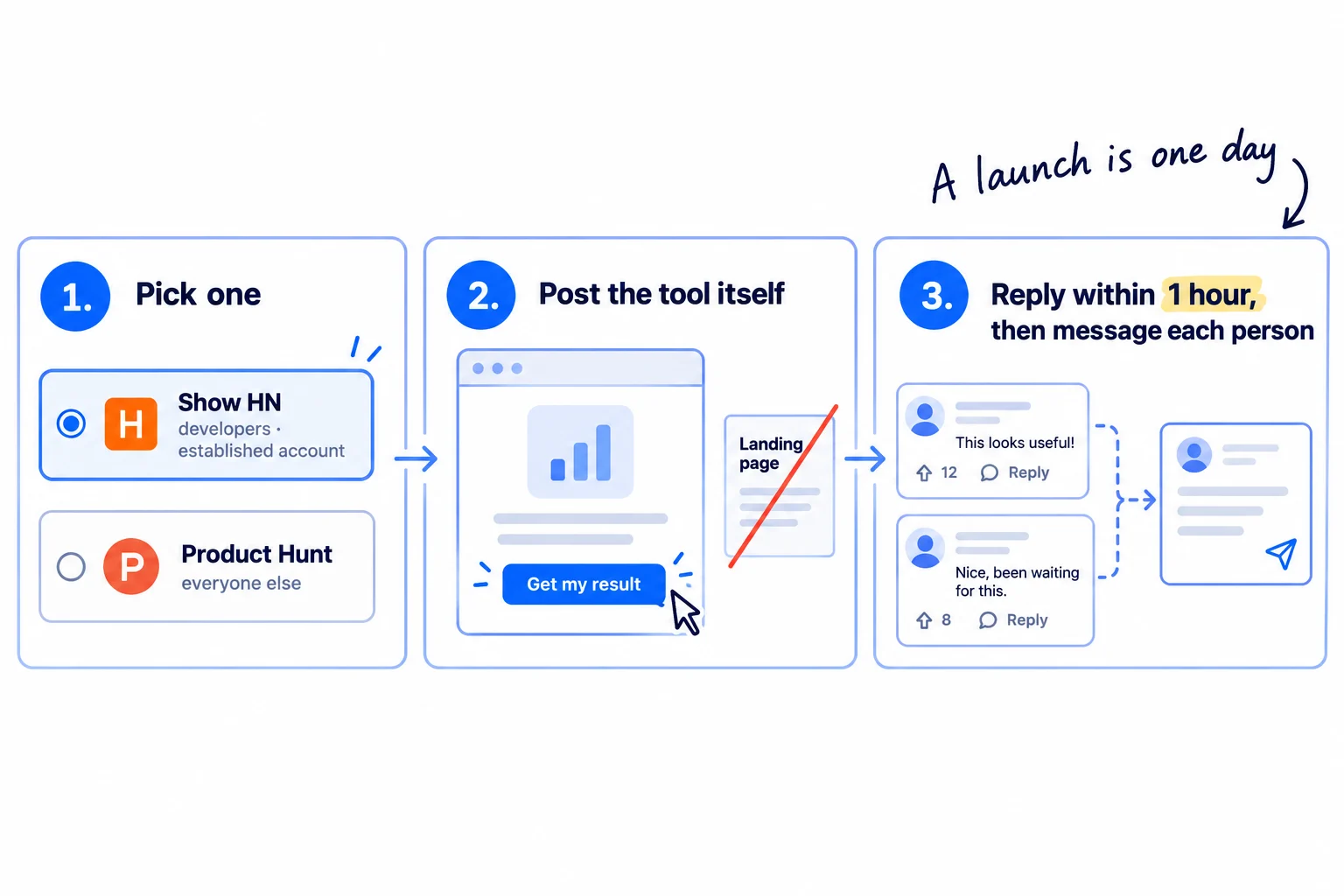
A free tool fits both places, because people can try it at once. Show HN's rules ask you to make it easy to try "ideally without barriers such as signups or emails", and they do not allow landing pages or sign-up pages. Since March 2026, Hacker News has restricted Show HN posts from people new to the site. Its notice asks you to get to know the community first. If your account is new, comment helpfully on Hacker News every day for a few weeks before you post, or use Product Hunt. On Product Hunt, never pay anyone to hunt your product or send it traffic. Its rules say this can get you banned for good.
Title the post with what the tool does for free, not your company:
Show HN: A free [what the tool does] – [the result] in [how long], no signup
On the day, reply to every comment within an hour. The next day, send each commenter a personal message with their own result, using the step 4 template.
- Tool: Hacker News or Product Hunt. Both are free.
- Time: half a day to write the post, then the launch day.
- You will have: one launch, and a list of everyone who commented.
- It worked if: the tool gets more uses that day than in any day before, and you get at least 3 chats that week from the follow-up messages.
- Common mistake: asking friends to upvote. Hacker News forbids it. The other mistake is treating the launch as the plan. Visits fall away after the day; the daily messages in step 4 keep going. If the day brings nothing, work out why a launch gets zero signups, and keep the tool.
6. Publish one page a day that links to the tool
Every day, publish one page that answers a question your tool's users ask, and link it to the tool. This is how the tool slowly starts to bring visitors from Google and AI answers.
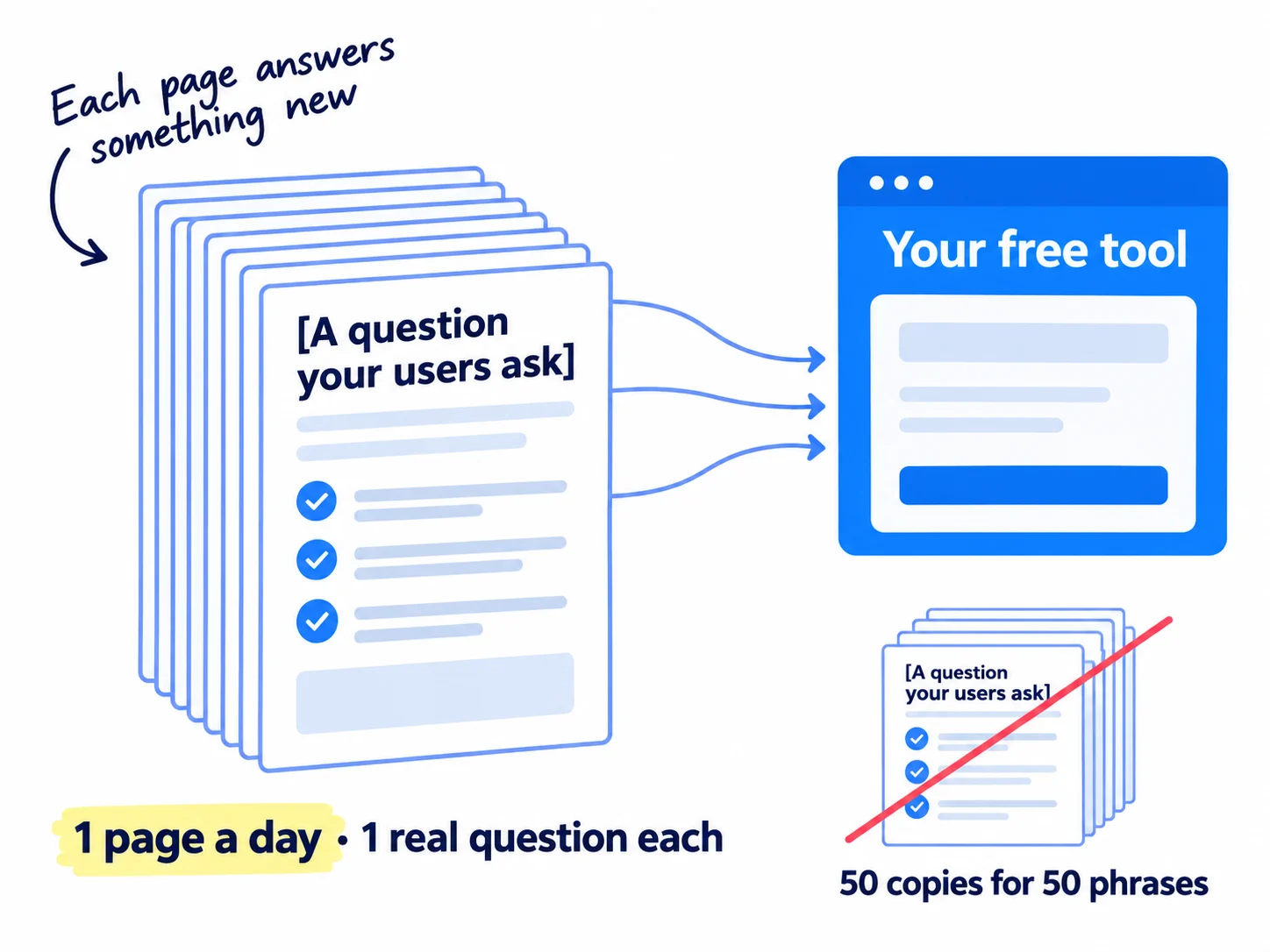
Find the questions. Use what people wrote back in step 3, the replies in step 4 and the comments in step 5. Each question becomes one page: what the result means, how to fix what the tool found, how the job is done by hand. Check that people really search each one in Google's suggestions.
Write it with AI, then add what only you know. Give ChatGPT or Claude the question, your notes and real results from the tool, and ask for a draft. AI drafting makes one page a day possible. Then add a real example, a number from your product, or a step you tested. Follow the steps for a blog post that ranks, and link each page to the tool in its first few lines.
Do not copy the tool across many phrases. Google's spam policies, updated 28 August 2026, call it scaled content abuse when many pages are made "for the primary purpose of manipulating search rankings and not helping users", and doorway abuse when pages are made "to rank for specific, similar search queries". 50 copies of one calculator with a different keyword in each title fit both. One tool and one useful page a day do not.
Ask for links inside your 100 messages. Sites that list free tools in your field, and best-of lists that AI answers quote, are easy backlinks for a tool, because it is free and useful to their readers. Search Google for "free [your field] tools", and make about 10 of each day's 100 messages a short note to the person who keeps such a list.
- Tool: ChatGPT or Claude to draft, Google Search Console to request indexing.
- Time: about 1 hour a page.
- You will have: 28 new pages in 4 weeks, each answering one real question and linking to the tool.
- It worked if: each page shows "URL is on Google" within 1 to 2 weeks. Once a month, ask ChatGPT your tool's phrase and write down whether it names your tool. At month 3, the tool page shows impressions in Search Console for its phrase.
- Common mistake: judging search at week 4. From a new site it is slow, so keep publishing and measure it at month 3.
7. Count tool uses, emails and signups every Sunday
Every Sunday, write down one row of numbers for the tool, and fix the first number that is below its line. After 2,800 messages, decide whether to keep pushing this tool or build the next one.
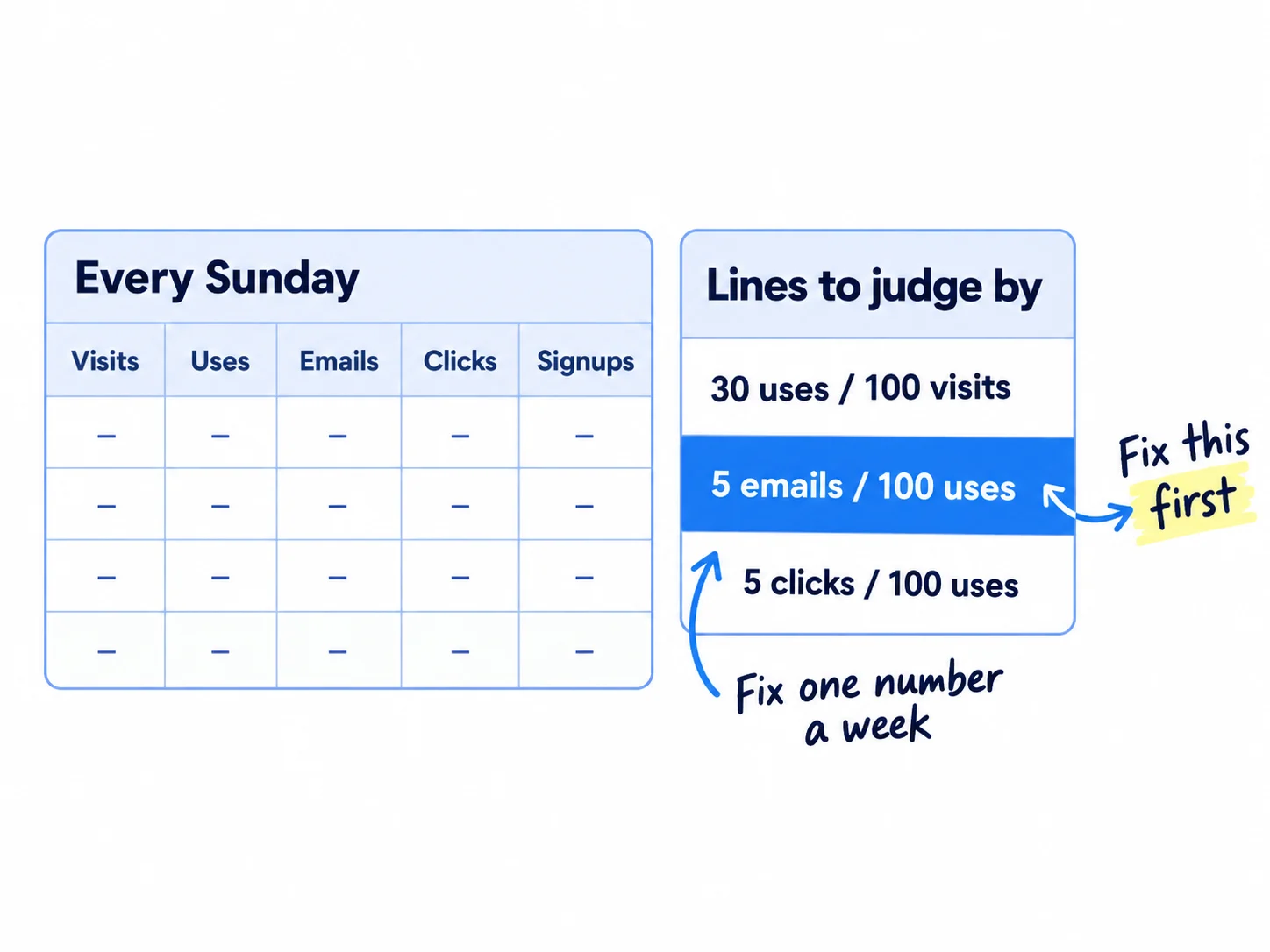
Take the numbers from PostHog and your UTM-tagged signups, and add a source question at signup: "Where did you hear about us?" This self-reported attribution catches people who used the tool on one device and signed up on another.
Week | Messages sent | Tool page visits | Tool uses | Emails left | Clicks to product | Signups from the tool | Paying from the tool
Lines: uses ≥ 30 per 100 visits · emails ≥ 5 per 100 uses · clicks ≥ 5 per 100 uses
Fix the first number below its line, in this order:
- Under 30 uses per 100 visits: people do not understand the page. Make the input box the first thing they see and the button say what they get.
- Under 5 emails per 100 uses: the extra is not worth an email. Offer a different one.
- Under 5 clicks per 100 uses: the product line does not connect the tool to the bigger job. Rewrite it.
- Signups but no one uses the product: the problem is after signup. Work on your activation rate before you send more people.
After 2,800 messages, decide. If the tool brought at least 10 signups, keep it, and keep the messages and pages going. If it brought none, go back to your step 1 sheet and build the job that came second. If people sign up from the tool but nobody pays, find out where they stop first. When the tool works, choose the next channel to add. Judge search on its own at month 3. Once a month, put these numbers into your monthly marketing review.
- Tool: Google Sheets and PostHog.
- Time: 20 minutes each Sunday.
- You will have: one row a week, and the one number to fix next week.
- It worked if: you can say how many signups and paying customers came from the tool.
- Common mistake: counting visits and likes instead of uses and signups. The other is building a second tool before the first one passes its lines.
See it done: Bugmoth's first 4 Sundays
The Sunday row, weeks 1 to 4
| Week | Messages | Tool uses | Emails | Clicks to Bugmoth | Signups from the tool |
|---|---|---|---|---|---|
| 1 | 700 | 120 | 9 | 4 | 2 |
| 2 | 700 | 230 | 14 | 12 | 5 |
| 3 | 700 | 170 | 11 | 10 | 4 |
| 4 | 700 | 190 | 13 | 12 | 5 |
The decision: in week 1, clicks were 3 per 100 uses, below the line, so they rewrote the product line. From week 2 it stayed above 5. 16 signups came from the tool in 4 weeks, so they keep it, and keep 100 messages a day.
Why it works: They fixed the one number below its line, clicks, and left the rest alone.
Where Scout7 helps
Scout7 speeds up three of the seven steps: 1, 4 and 6.
Step 1. Keyword intelligence shows monthly searches, difficulty, and who leads on Google and in AI answers for each phrase on your list. That tells you in minutes which tool phrases are crowded by big sites.
Step 4. Join Conversations searches social platforms for live discussions about the problem your tool solves, groups them by the kind of reply that fits, and drafts a reply in your voice. You read each thread yourself and approve or rewrite the reply. Nothing is posted without your approval.
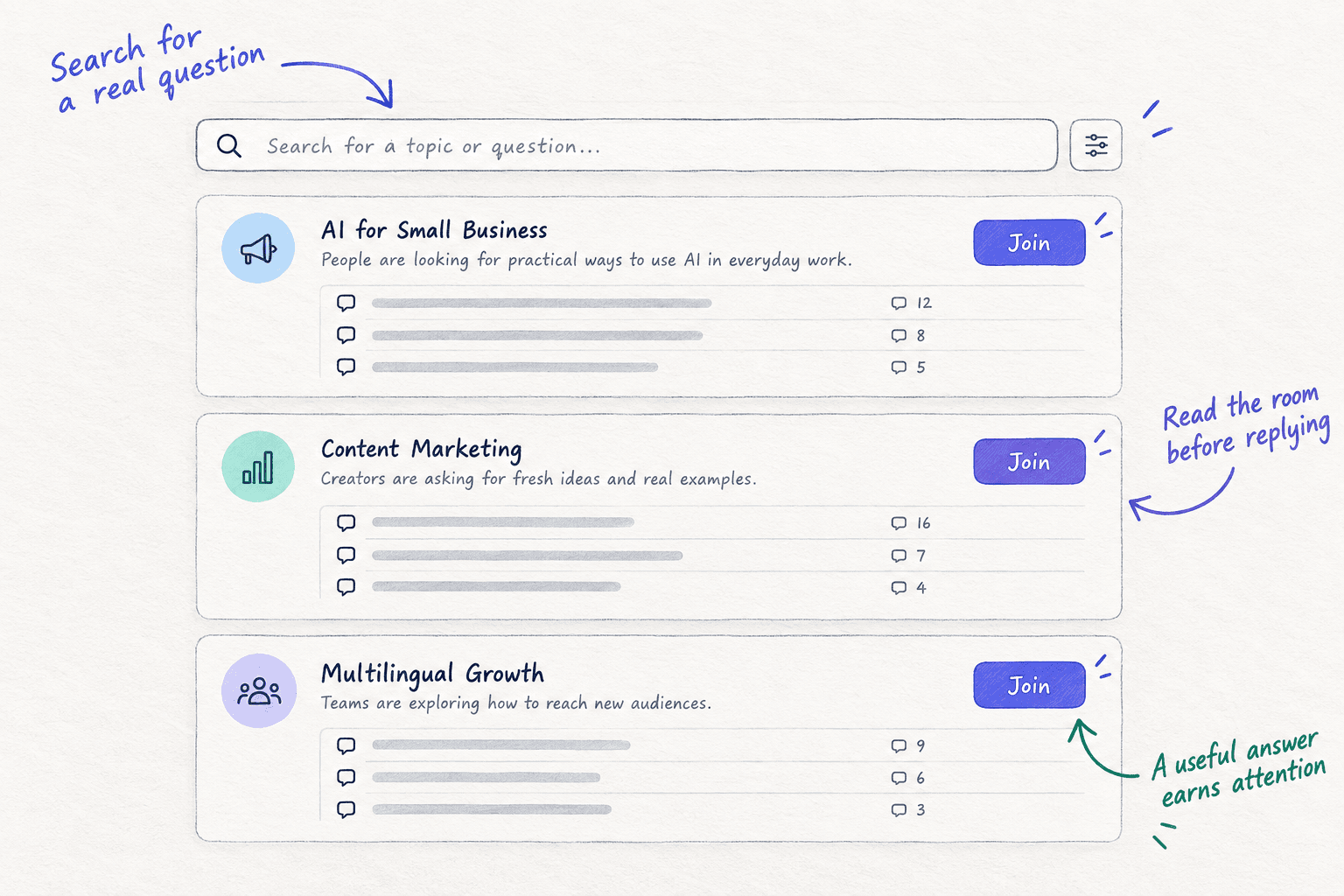
Step 6. Content Co-Pilot takes a question your tool's users ask, researches it, and asks you shaping questions before it drafts the article with sources and FAQs. You answer the questions, add the link to your tool, and approve the draft.
Your free tool checklist: one week to build, then 4 weeks
0 of 18 done
Work through this list with an AI assistant
It drafts the work and keeps track of what is done.
Frequently asked questions
- Do free tools still bring traffic now that ChatGPT answers everything?
Yes, if the tool needs something a chat cannot see: the visitor's own site, file, device or live data. Simple sums and templates are now done in one chat reply, so few people need a page for those. Either way, do not wait for search. Send the tool by hand in step 4 from day one, and judge search at month 3.
- Should my free tool have its own domain?
No. Put it on your own domain, at yoursite.com/tools/[phrase], or tools.yoursite.com if your setup needs that. A new domain starts with no links and no history, and every link the tool earns would help that domain instead of your product's. Moving it later means redirects and lost time.
- I can't code. Can I still build a free tool?
Yes. Lovable builds small apps from plain English; you need its Pro plan, $25 a month, to use your own domain. For a simple calculator, a free Tally form can do the sums with its calculation feature. Keep the same rules: one input, one result, no signup for the result.
- How many free tools should I build?
One first. Build a second only when the first passes its lines and has brought signups after 2,800 messages. One founder in 2026 built 26 small tools over 6 months, one at a time, each for its own search phrase. Each new tool must do a different job, not repeat the first with a new keyword.
- What if my free tool costs money to run?
If it calls a paid AI model or another paid service, set a daily spending cap in that provider's dashboard, and a limit per visitor, such as 5 results a day. Cache results that repeat. If the cost per use is more than you can carry at 1,000 uses a month, cut the tool down to the part that is cheap to run.
Sources
- 1.I built 5 free tools to rank on Google. 6 weeks later, here's the honest numbers — Indie Hackers, 14 March 2026
- 2.Things I got wrong building my first SaaS that nobody warned me about — Indie Hackers, 2 April 2026
- 3.I built a 50+ page calculator website. Publishing it was easy; earning trust and traffic wasn't — Indie Hackers, 18 August 2026
- 4.Comment by the founder of Filestash on free online tools as a channel — Hacker News, April 2026, checked 2 October 2026
- 5.Show HN guidelines — Hacker News, checked 2 October 2026
- 6.Show HN restriction notice — Hacker News, checked 2 October 2026
- 7.How Product Hunt works — Product Hunt, checked 2 October 2026
- 8.Spam policies for Google web search — Google Search Central, updated 28 August 2026
- 9.URL Inspection tool — Google Search Console Help, checked 2 October 2026
- 10.Free Keyword Generator — Ahrefs, checked 2 October 2026
- 11.Subscription plans — Lovable, checked 2 October 2026
- 12.Vercel pricing — Vercel, checked 2 October 2026
- 13.Tally pricing — Tally, checked 2 October 2026
- 14.PostHog pricing — PostHog, checked 2 October 2026
- 15.Email sender guidelines — Google Workspace Admin Help, checked 2 October 2026
- 16.CAN-SPAM Act: A Compliance Guide for Business — Federal Trade Commission, checked 2 October 2026
- 17.Electronic mail marketing — Information Commissioner's Office (UK), checked 2 October 2026
- 18.Invitation limit reached — LinkedIn Help, checked 2 October 2026
Next article to read
How to get backlinks for a new websiteOnce the tool is live, get other sites to link to it.Read it nextRelated guides
- How to find keywords for SEOFind keywords for SEO when every tool says 0: collect 300 phrases your buyers type from Google suggestions, forums and a free tool, keep the 100 a new site can win with one page each, add 5 new ones every day, and add Search Console's real queries every Sunday.
- How to build an email list for freeComing soon
- How to fix a SaaS website with traffic but no signupsSaaSComing soon
- How to market your product as a technical founderSaaSMarket your product as a technical founder: freeze new features, put 5 hours of marketing before any code every day, send 100 personal messages, turn part of your product into a free tool, and build only what 3 or more users asked for, with a count every Sunday.
Guides that link here
- How to market your product as a technical founderSaaS
- How to get backlinks for a new website
- How to get booked as a podcast guest
- How to post a Show HN on Hacker NewsSaaS
- How to choose marketing channels for a SaaS startupSaaS
- How to find keywords for SEO
- How to get backlinks from news websites
- How to build in public on XSaaS
- How to promote on Reddit without getting banned
- How to promote your business in Facebook groups
Cite this page
Dinesh Bypilla (2026). How to build a free tool that brings in leads. Scout7 Academy. https://scout7.ai/academy/content-marketing/how-to-build-a-free-tool-that-brings-in-leads
Written by Dinesh Bypilla, Agentic systems engineer at Scout7. Reviewed by Murali Sid. Last checked 2 October 2026.
Quote any part of this guide with a link back to this page. © 2026 Scout7.
Markdown version of this page: https://scout7.ai/academy/content-marketing/how-to-build-a-free-tool-that-brings-in-leads.md