



How to grow on LinkedIn as a founder
Grow on LinkedIn as a founder in 4 weeks: rewrite your headline for your buyer, post twice a day from your own profile, leave 20 comments and send 100 personal messages a day, and count conversations by topic every Sunday.
ByDinesh BypillaReviewed byMurali SidLast checked 19 min read
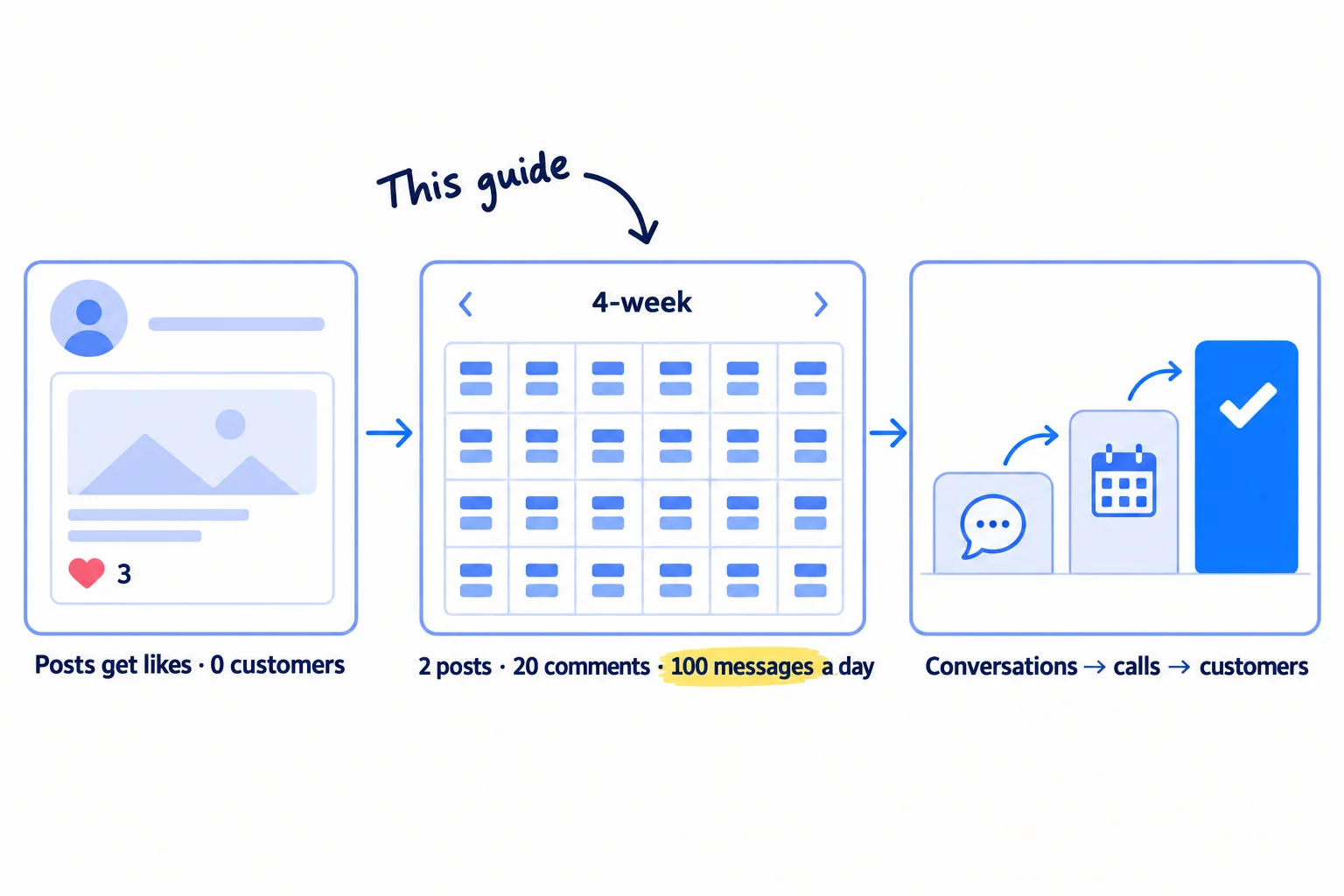
You posted on LinkedIn a few times, friends liked it, and no customer came. This is how to grow on LinkedIn as a founder when you have a few hundred connections and no time to waste: fix your profile today, then post, comment and message every day for 4 weeks. Most founders post twice a week and never talk to the people who react, so they never find out what LinkedIn could bring them.
Do these three things
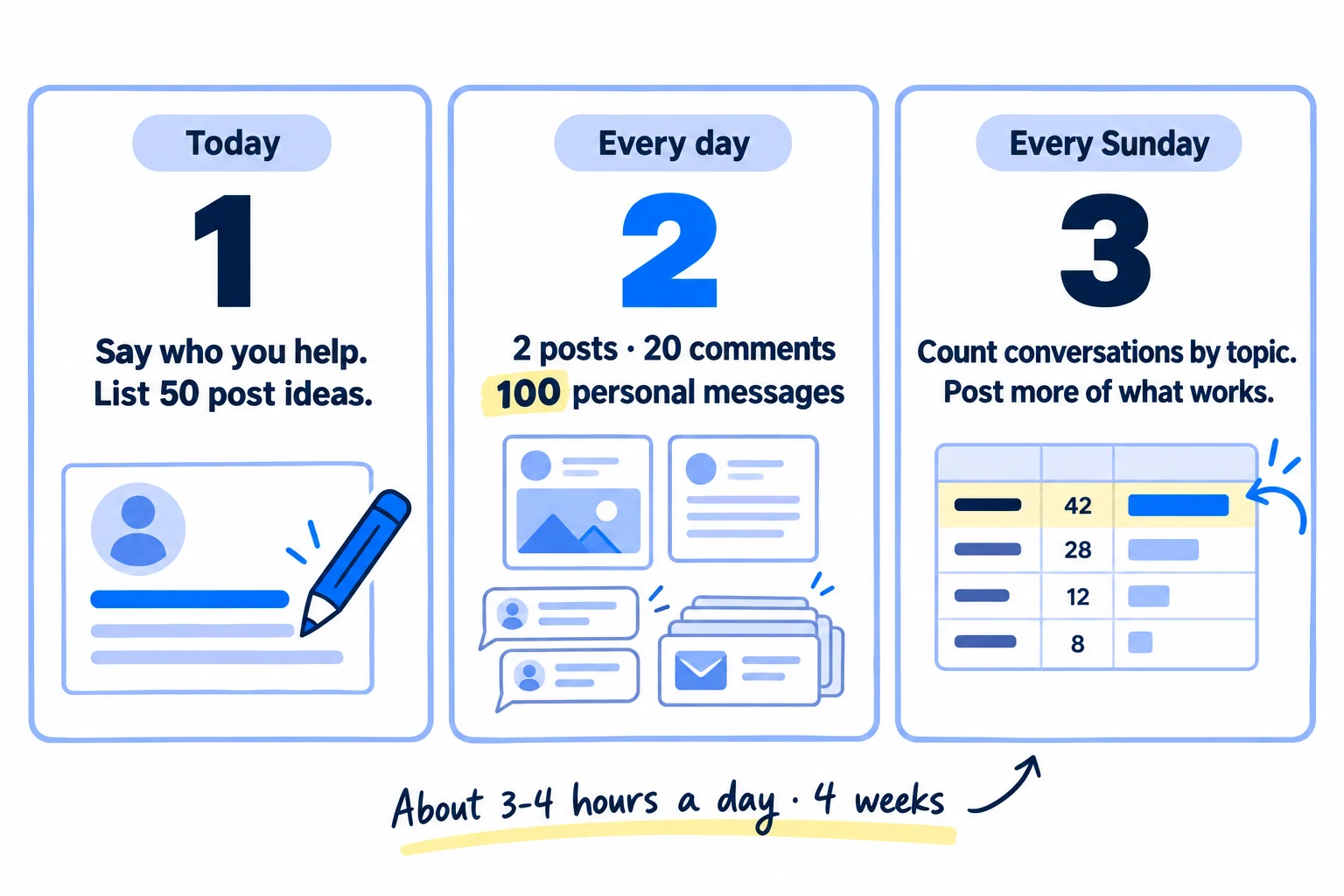
About 3 to 4 hours a day, every day, for 4 weeks. Judge it after 56 posts, 560 comments and 2,800 messages, not after a week of likes.
Show the three actions in fullHide the full list
- Today: rewrite your LinkedIn headline to say who you help and what you fix, and list 50 post ideas from questions your buyers asked you.
- Every day: post twice from your own profile, leave 20 comments on your buyers' posts, and send 100 personal messages, starting with everyone who reacted. AI drafts; you add the true part.
- Every Sunday: count conversations and calls by the post topic that started them, and give next week's posts to the topic that started the most.
Get help doing these
ChatGPT or Claude reads this guide and works through it with you.
1. Rewrite your LinkedIn profile so buyers see who you help in 5 seconds
Change your headline from your job title to who you help and what you fix, then fill your About and Featured sections so a buyer who clicks your name knows what to do next. Every post, comment and message in this guide sends people to this page.
![Before: a profile headline reading 'Founder & CEO at [Company]'. After: a headline reading 'I help [kind of buyer] [fix the problem] · Founder, [company]', with a Featured link underneath. A note says LinkedIn reads your headline to decide who sees your posts.](/academy/illustrations/how-to-grow-on-linkedin-as-a-founder/02-step-1.webp)
Since March 2026, LinkedIn's feed uses AI to match each post to the people likely to find it useful. LinkedIn's engineers say it reads the post together with the author's name, headline, company and industry. So your headline is not only for visitors. It helps decide who sees your posts.
Start from your ideal customer profile sentence and your value proposition. Give both to ChatGPT or Claude and ask for 5 headlines in the template below. Pick the one a buyer would say out loud.
Headline: I help [kind of buyer] [fix the problem / get the result] · Founder, [company]About:
[The problem, in your buyer's words, in one sentence.]
[What you built and who it is for.]
[One number or fact from your work so far.]
[What to do next: "Message me" or "Try it at [site]".]Featured: one link to the page where a buyer can try, book or ask for a quote. Add your best post later.
Then do the rest in one sitting. Use a clear, friendly photo of your face. Put one line on your banner: who you help. Set your current job to your company, with the same one line as its description. Keep "Connect" as your main profile button, so buyers can connect and you can message them. To add Featured, click Me, then View Profile, then Add profile section, then Recommended, then Add Featured.
If you run a D2C store: your shoppers are rarely on LinkedIn, but shop buyers, wholesale buyers, partners and journalists are. Write the headline for them: "I make [product] for [kind of shop]'s shelves · Founder, [brand]".
- Tool: LinkedIn (a free account), and ChatGPT or Claude.
- Time: 1 hour.
- You will have: a profile that says who you help, with one next step on it.
- It worked if: you show it to 5 people for 5 seconds, and at least 4 can say who you help and what you fix.
- Common mistake: a headline like "Founder & CEO at [company]" or "Building the future of [industry]". Nobody knows if it is for them. The other mistake is posting from your company page instead of your own profile. A new page has almost no followers.
See it done: Bugmoth's headline
Bugmoth is a made-up bug-reporting tool for small web teams. It costs $19 a month per team, with a 14-day trial.
Before
Co-founder at Bugmoth | Building in public | Full-stack developer
After
I help web agencies get bug reports with the screenshot and browser details, not 'the site is broken' · Co-founder, Bugmoth
Why it works: It names the buyer and the problem in their words, so the right agency owner knows the posts are for them.
2. Pick one topic and list 50 post ideas from your buyers' questions
Write down one topic you will post about for the next 4 weeks, then fill a sheet with 50 post ideas, each one taken from something a buyer said or did. One topic helps LinkedIn learn who your posts are for, and 50 ideas means you never stare at a blank box.
![One topic sentence at the top, '[Your buyer] + [the problem you fix]'. Below, a sheet labelled '50 post ideas' with five kinds of post: a question a buyer asked, a mistake you see, a number from your work, a before and after, and how you do it step by step.](/academy/illustrations/how-to-grow-on-linkedin-as-a-founder/03-step-2.webp)
Your topic is your buyer plus the problem you fix: "bug reports for small web agencies", not "startups" or "productivity". Founders who post about everything teach LinkedIn nothing about who should see them.
Now collect the raw material. Go through your last 20 customer chats, sales calls, support emails and the threads in your buyers' communities. Copy every question and complaint, in their words, into a sheet. Add the complaints from your competitors' reviews. Then paste the list into ChatGPT or Claude and ask for 50 post ideas in five kinds:
- A question a buyer asked, and your answer.
- A mistake you see buyers make, and what to do instead.
- A number from your work: a price, a time, a count.
- A before and after.
- How you do one task, step by step.
Keep only ideas you can add a true detail to. If you hate posting about yourself, as many technical founders do, this is the fix: you are answering buyers, not talking about you. Every day, add 2 new ideas from that day's conversations, so the sheet never runs out. If you need more starting points, there are lists for SaaS and B2B companies, and a content calendar puts them in order.
If you run an agency: your best posts are your clients' results, with their permission. Write each one as a short case study: the problem, what you did, and the number that changed.
If you run a B2B company: post photos and facts from the work itself: a sample, a quote with prices hidden, a lead time, a mistake you caught before it shipped. Your buyers trust what they can see.
- Tool: Google Sheets, and ChatGPT or Claude.
- Time: 1 hour 30 minutes, then 10 minutes a day to add 2 ideas.
- You will have: a sheet of 50 ideas, each tagged with the buyer question behind it and the kind of post.
- It worked if: every idea comes from something a buyer said or did, and at least 40 of the 50 are on your one topic.
- Common mistake: posting about yourself: your launch, your funding, your morning routine. Buyers follow people who solve their problem, not people who announce things.
3. Post twice a day from your personal profile, not your company page
Publish 2 posts a day from your own profile, one in the morning and one in the afternoon in your buyers' time zone. Each post answers one idea from your sheet and carries one true detail only you could add.
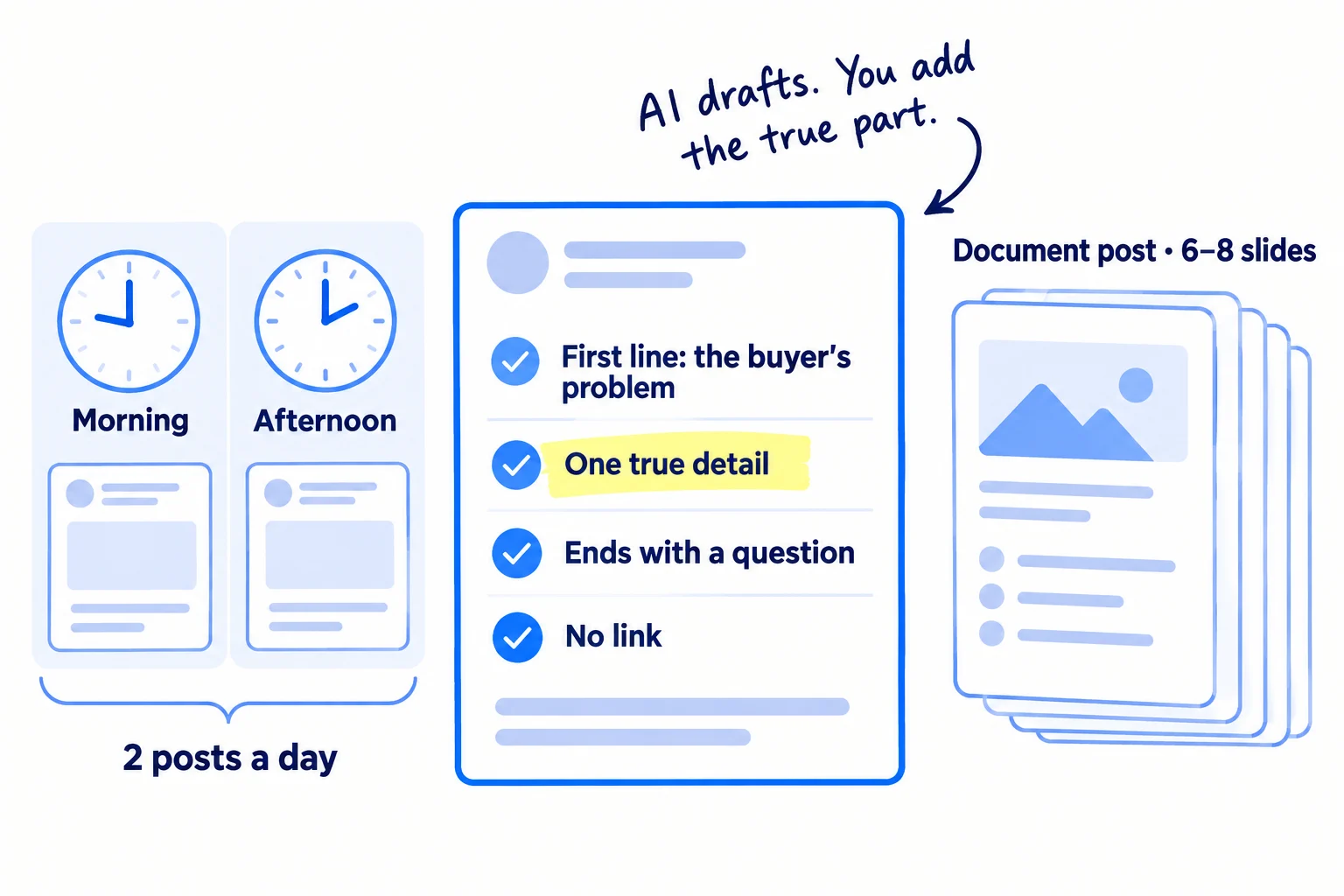
Post from your personal profile. People follow people, and studies of AI answers in 2026 found that ChatGPT and other AI tools quote LinkedIn posts by people more than posts by company pages. Share your best posts on your company page too, if you have one, but write them on your profile.
Two a day sounds like a lot. It is the point. Buffer studied more than 2 million LinkedIn posts. People who posted 11 or more times a week got about 3 times the engagement per post of people who posted once a week, and Buffer found no penalty for posting more. At 2 a day, you have 56 posts after 4 weeks, which is enough to see which topics start conversations.
How to write one post in about 25 minutes:
- Pick the next idea in your sheet.
- Write 3 lines of notes in your own words: what happened, the detail, what you would tell a friend.
- Paste the notes into ChatGPT or Claude with the template below and ask for a draft of 150 to 300 words.
- Rewrite it in your own voice. Cut every line you would not say out loud, and put your true detail in: the number, the name of the tool, the thing the client said.
- Schedule it. In LinkedIn, click Start a post, then the clock icon, pick a time, then Next and Schedule.
Write the true part yourself. In July 2026, LinkedIn started testing a "Seems like AI slop" option in each post's menu, built new systems to show fewer low-quality AI posts, and removed its own AI post writer. AI makes 2 posts a day possible. Your detail is what makes people stop.
[First line: the buyer's problem or question, in their words.][2–3 short lines: what you saw, did or found. One true detail: a number, a quote, a screenshot.][3–5 short lines or a numbered list: what to do about it.][One question to the reader, about their version of the problem.]
Mix the formats. Every second or third post, make a document post: 6 to 8 slides in Google Slides, one idea per slide, then File, Download, PDF document. On LinkedIn, click Start a post, then More, then Add a document. In Buffer's 2026 study of LinkedIn posts, document posts (carousels) got about three times the engagement of video and image posts. You can turn your best articles or videos into these. A short video now and then is fine too. Leave links out of the post. Buffer found link posts got less engagement than image posts. Send the link in a message to people who ask, and keep it in your Featured section.
For the first hour after each post, reply to every comment with a real answer and a question back. Then message the person (step 5).
- Tool: LinkedIn (Start a post, the clock icon, Add a document), Google Slides, and ChatGPT or Claude. All free.
- Time: about 25 minutes a post, so 50 minutes a day, plus 10 minutes of replies after each post. If the hours are hard to find, cut product work first.
- You will have: 14 posts a week, 56 after 4 weeks.
- It worked if: after 56 posts, the post analytics ("Profile viewers from this post" and new followers) show people with your buyers' job titles, and at least 1 post in 10 starts a conversation in the comments or your messages.
- Common mistake: asking friends to like and share your post at a set time, or joining a "pod" that does it. LinkedIn's rules forbid agreeing ahead of time to like or reshare each other's posts. The other mistake is a post with no true detail, posted from a company page. In May 2026, one founder posted every day from his company page, sent about 10 LinkedIn messages and got 0 signups.
See it done: One of Bugmoth's posts
"The site is broken."
That was the whole bug report. No page, no browser, no screenshot. We counted: 31 of the last 50 client bug emails we saw at agencies looked like this.
What fixed most of them:
- Send clients one form with 4 fields: page link, what you clicked, what you expected, a screenshot.
- Reply to every vague email with the form link, not with questions.
- For layout bugs, ask for a phone video. It shows the device.
What do your clients send you when something breaks?
Why it works: It opens with the buyer's exact words, gives a fix that works without the product, and ends with a question agency owners can answer.
4. Write 20 comments a day on posts your buyers read
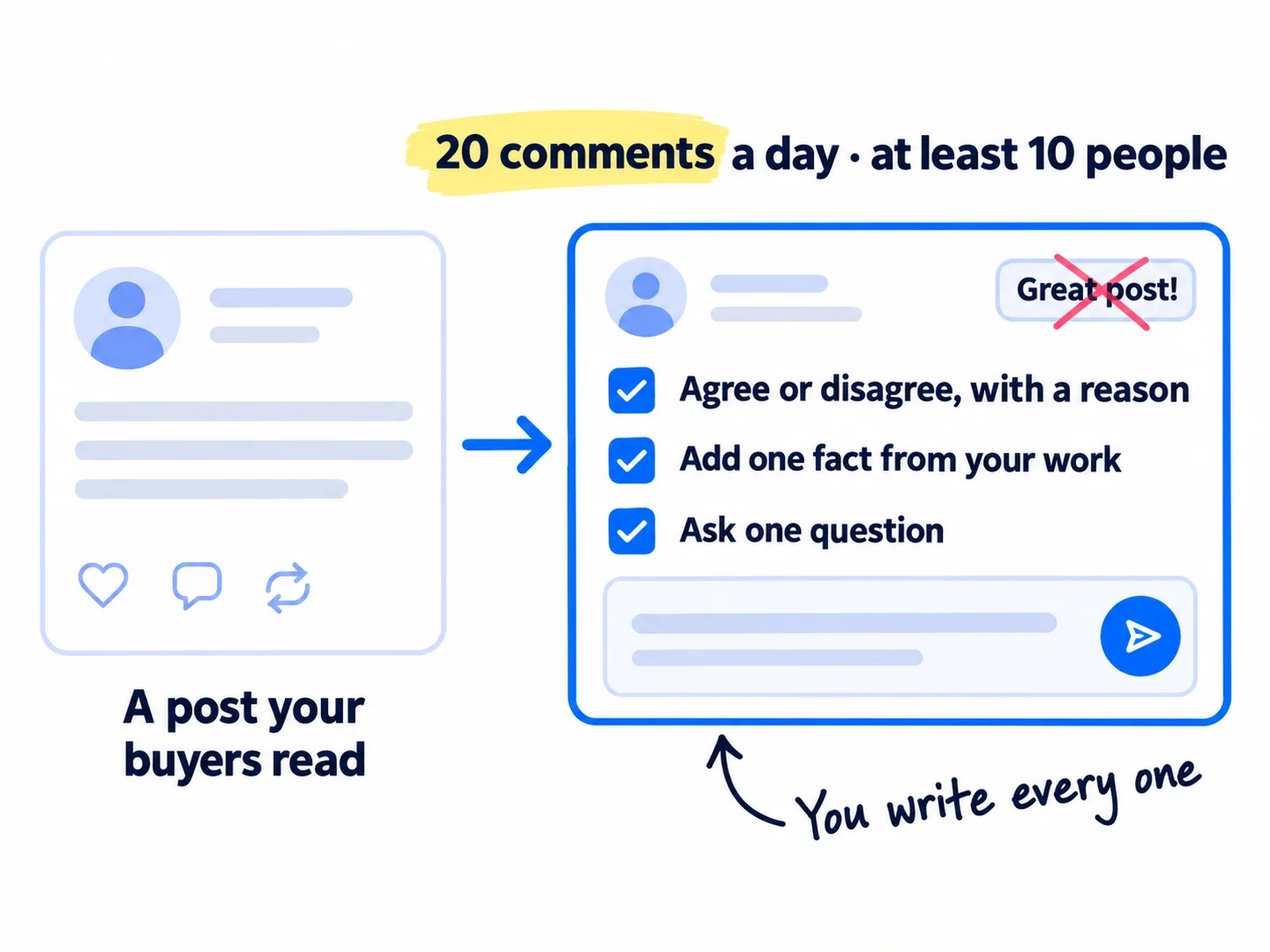
Leave 20 thoughtful comments a day on posts by your buyers and by the people they follow, across at least 10 different people's posts. A good comment puts your name and headline in front of the exact people you want, on posts they already chose to read.
First, make a list of 60 people: 30 buyers who post, such as the decision-makers at companies like your customers, and 30 people your buyers follow, like the writers, consultants and tool makers in their field. Find them by searching LinkedIn for your topic and noting who writes the posts that come up. Follow each one, so their posts show up in your feed, and open their profiles every morning to find their newest posts. Keep the list in your sheet and add to it every week.
Then write 20 comments a day, early in each post's life. A good comment is 2 to 4 sentences: agree or disagree with a reason, add one fact or example from your work, and ask one question. It should still be worth reading if the post were deleted. Answer people who reply to your comment, the same as on your own posts. This is also how you find online communities where buyers talk, outside LinkedIn.
Write every comment yourself. AI can help you find posts and remind you what you know about a topic, but it never writes the comment. In February 2026, LinkedIn said it would hide comments posted by scripts and browser plugins without a person checking them, may show them only to the commenter's own connections, and may restrict accounts that keep doing it.
[Agree or disagree with one point, and say why in one line.][One fact, number or example from your own work.][One question back to the writer or the readers.]
- Tool: LinkedIn search and Follow, and your Google Sheet for the 60 names.
- Time: about 1 hour a day, 3 minutes a comment.
- You will have: 140 comments a week, 560 after 4 weeks.
- It worked if: after 560 comments, you get at least 20 profile visits a week from people with your buyers' job titles, and at least 5 replies a day to your comments.
- Common mistake: "Great post!", "So true!" or a comment written by AI. Nobody clicks on the name behind them. The other mistake is commenting only on famous people's posts, where your comment is number 400.
See it done: Bugmoth's comment on an agency owner's post
Asked in LinkedIn, under a post by an agency owner
“Our worst week this month: 3 days lost to client bug reports we couldn't reproduce.”
The reply
Same here before we changed one thing: no bug gets looked at until the client fills a 4-field form (page, what they clicked, what they expected, screenshot). It cut our back-and-forth emails per bug from 6 to about 2. Do your clients report bugs by email, or in a shared doc?
Why it works: It adds a real number and a fix, and the question invites the writer to reply.
5. Message everyone who reacts, up to 100 personal messages a day
Every day, send a short personal message to every person who reacted to, commented on or shared your posts, replied to your comments, followed you or accepted your connection request. Then fill the rest of your 100 messages a day with people who fit your buyer. Posts and comments get you noticed. Messages turn that into conversations.
![On the left, icons for people who reacted, commented, followed or accepted your request, feeding a stack of message cards labelled '100 personal messages a day'. The top card says 'Hi [name], thanks for your comment on [post]. How do you handle [the problem] today?' An arrow leads to a 15-minute call.](/academy/illustrations/how-to-grow-on-linkedin-as-a-founder/06-step-5.webp)
Messages are where posts turn into customers. In September 2026, one founder read 290 founders' revenue posts. Among those making over $10,000 a month, as many got their first customers from LinkedIn and other direct messages as from cold email. One wrote: "I manually messaged hundreds of people on LinkedIn. Each reply became a potential demo."
Work down this list, in this order, until you reach 100:
- Everyone who reacted, commented, shared or replied today.
- Everyone who followed you or accepted your connection request.
- Profile viewers you can see. A free account shows only your 3 most recent viewers, so check it every day.
- Your existing first-degree connections who fit your buyer.
- New people who fit your buyer, from your lead list, by email.
In each message, say one true thing about what they did, then ask one question about the problem. Do not pitch. If they answer and the problem is real for them, offer a short call. Follow up twice, 3 days apart, with one new line each time, and stop the moment someone says no. Log every message in your sheet, or a CRM once the sheet gets slow.
AI makes 100 possible. Paste 10 names at a time into ChatGPT or Claude, each with what they did (their comment, their post, their job), and the template below. Read each draft, make the first line true, and send it yourself, one at a time. That is about a minute a message.
Respect LinkedIn's limits. LinkedIn limits how many connection requests you can send each week. It does not publish the number; most users report about 100 a week. If you hit it, you are usually blocked for a week. A free account can also add a personal note to only 5 connection requests a month. So send about 15 connection requests a day, mostly without a note, to people who fit your buyer, and message them when they accept. Send the rest of your 100 by email, from a warmed-up domain if you email more than about 50 strangers a day. LinkedIn outreach covers messages to strangers in more detail.
Hi [first name],Thanks for [your comment on my post about X / the follow / connecting]. [One true line about them: their post, their company, what they said.]Quick question: how do you deal with [the problem] at [their company] today?[Only if they answer and it fits:] I'm building [product] for exactly this. Happy to show you in 15 minutes if it's useful.[Your name]
If you run a SaaS: when someone says the problem is real, offer to set up their free trial with them on a 15-minute call. People who start with you are more likely to stay.
If you run an agency: offer one small, free thing that shows your work, such as a 5-point review of their last 10 posts or their homepage. Then book a call about the result. There is more on winning agency clients on LinkedIn.
- Tool: LinkedIn messages, Gmail, your Google Sheet, and ChatGPT or Claude to draft.
- Time: about 1 hour 40 minutes a day for 100 messages, plus the calls they book.
- You will have: 700 messages a week, 2,800 after 4 weeks, each logged with who it went to and why.
- It worked if: you get at least 3 conversations from every 100 messages, and by week 2 at least 1 call or demo from every 100. Below 2 conversations per 100, a low reply rate, rewrite the first line so it is more about them.
- Common mistake: a sales pitch in the first message, or the same text pasted to everyone. The other mistake is sending 10 messages, hearing nothing, and deciding LinkedIn does not work. Messages to people who already reacted are warm messages, the easiest you will ever send.
See it done: Bugmoth's message to someone who commented
To: Priya, who runs a 6-person web studio and commented on the post
Hi Priya,
Thanks for your comment on my "the site is broken" post. The phone video idea for Safari bugs was a good one.
Quick question: how do your clients send you bugs today? Email, a form, something else?
Sam
Why it works: It thanks her for something specific and asks about her problem, so it reads like a conversation, not a pitch.
6. Count conversations every Sunday and keep the topics that start them
Every Sunday, fill in one row of a sheet and note which post or comment started each conversation. After 56 posts, drop the topics that started nothing and give their slots to the ones that worked.
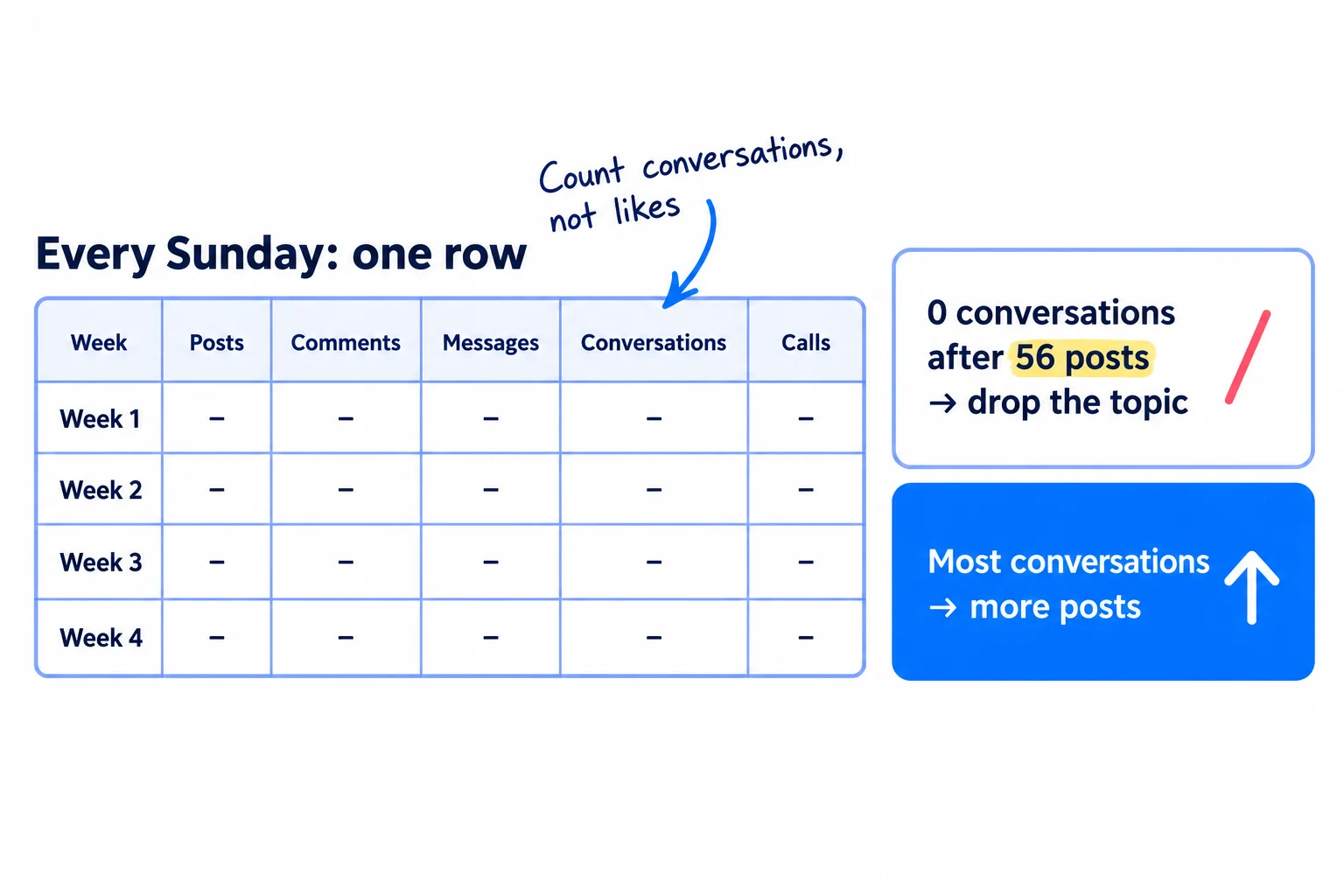
Likes and followers tell you little. Count what leads to customers: conversations, calls and new customers, and where each one started. Ask every new customer and signup "Where did you hear about us?", and tag every link you send in messages with UTM parameters, so your site shows LinkedIn as the source.
Open "View analytics" on each post to see impressions, profile viewers from that post and followers gained. Then fill in one row:
Week | Posts | Comments | Messages | Profile viewers from posts | Conversations | Calls | New customers
Conversations by topic: [topic 1] | [topic 2] | [topic 3] | comments | other
The rules, after 56 posts, 560 comments and 2,800 messages:
- A topic or kind of post that started 0 conversations: stop it, and give its slots to the topic that started the most.
- If your views per post in week 4 are less than half of week 1, and conversations did not go up, keep posting 2 a day but switch half of them to a new format: a carousel, a short video or a plain text story.
- If you have 0 conversations in total, the problem is the person you are talking to. Go back to your buyer sentence and your headline before you post more.
When a conversation turns into a customer, ask them for a testimonial and make it a post, with their permission.
Once a month, do a wider marketing review and decide whether to add a second channel, such as Reddit or X. Leave LinkedIn ads until you know which post topic brings customers.
- Tool: Google Sheets and LinkedIn's free post analytics.
- Time: 30 minutes each Sunday.
- You will have: one row per week, and a short list of topics that start conversations.
- It worked if: you can name the post, comment or message behind every call you had.
- Common mistake: judging after one week, or by follower count. 1,000 followers who never talk to you are worth less than 10 buyers who do.
See it done: Bugmoth after 4 weeks on LinkedIn
The Sunday sheet, weeks 1 to 4
| Week | Posts | Comments | Messages | Profile viewers from posts | Conversations | Calls | New signups |
|---|---|---|---|---|---|---|---|
| 1 | 14 | 140 | 700 | 41 | 17 | 3 | 1 |
| 2 | 14 | 140 | 700 | 66 | 22 | 5 | 3 |
| 3 | 14 | 140 | 700 | 88 | 24 | 6 | 4 |
| 4 | 14 | 140 | 700 | 104 | 27 | 7 | 5 |
The decision: posts about vague client bug reports started 41 of the 90 conversations. Posts about pricing for agencies started 2. So the founders drop pricing and post about bug reports twice as often.
Why it works: They decide by counting conversations by topic, not likes, so the next 4 weeks go to what started talks.
Where Scout7 helps
Scout7 speeds up steps 3 and 4.
Step 3. Scout7 makes image posts with captions in your voice and builds LinkedIn carousels from an article. It connects to LinkedIn, including your personal profile, and schedules your posts in one calendar. You approve every post, and you still add your own true detail. Nothing goes live without your approval.
Step 4. Join Conversations searches social platforms for live discussions about your problem, groups them by the kind of reply that fits, and drafts a reply in your voice. You read each thread yourself, and on LinkedIn you rewrite every comment in your own words before you post it.
Your LinkedIn checklist for the next 4 weeks
0 of 17 done
Work through this list with an AI assistant
It drafts the work and keeps track of what is done.
Frequently asked questions
- How often should a founder post on LinkedIn?
Twice a day, from your own profile, for 4 weeks. Buffer's study of over 2 million posts found more posts brought more engagement per post, with no penalty. Some 2026 reports, and LinkedIn's own marketing blog, suggest 2 to 4 posts a week. If views per post halve after 56 posts, keep posting twice a day and change the format of half your posts.
- Should I post from my personal profile or my company page?
Your personal profile. People follow people, a new company page has almost no followers, and 2026 studies found AI answers quote posts by people more than company pages. Keep the company page up to date and share your best posts there, but write everything on your profile first.
- Do LinkedIn engagement pods still work?
No, and they can hurt you. LinkedIn's rules say not to agree ahead of time to like or reshare each other's posts. In February 2026, LinkedIn also said it would hide comments posted by scripts or plugins without a person checking them, and may restrict accounts that keep doing it. Twenty real comments a day on your buyers' posts do the job pods promise.
- Can I use AI to write my LinkedIn posts?
Use it to draft, then rewrite in your own words and add one true detail. In July 2026 LinkedIn began testing a "Seems like AI slop" report option and removed its own AI post writer. Posts with a real number, quote or story from your week still get replies. Write every comment yourself.
- Do I need LinkedIn Premium or Sales Navigator?
No. Everything in this guide works on a free account: posting, scheduling, document posts, post analytics and messages to your connections. The free account's limits are the personal note on only 5 connection requests a month and seeing only your 3 most recent profile viewers. Work around both with messages to people who react, and with email.
Sources
- 1.Engineering the next generation of LinkedIn's Feed — LinkedIn Engineering, 12 March 2026
- 2.Professional Community Policies — LinkedIn, checked 2 October 2026
- 3.LinkedIn outlines more measures to combat engagement pods — Social Media Today, 16 February 2026
- 4.LinkedIn adds a button to report AI-generated 'slop' — TechCrunch, 30 July 2026
- 5.LinkedIn offers the option to report AI slop — Social Media Today, July 2026
- 6.How to leverage LinkedIn for AI visibility in 2026 — LinkedIn Marketing Blog, 12 March 2026
- 7.Report looks at how LinkedIn is dominating B2B queries in AI chatbots — Social Media Today (Meltwater data), 21 May 2026
- 8.How often should you post on LinkedIn? Data from 2 million+ posts — Buffer, 28 August 2025
- 9.How often to post on social media in 2026 — Buffer, 13 January 2026
- 10.State of Social Media Engagement 2026 — Buffer, 5 March 2026
- 11.Richard van der Blom: The 2026 LinkedIn Algorithm Report — Creator Science, 2 June 2026
- 12.Invitation limit reached — LinkedIn Help, checked 2 October 2026
- 13.LinkedIn connection request limits — PhantomBuster, updated 8 July 2026
- 14.Who's viewed your profile: Basic and Premium features — LinkedIn Help, checked 2 October 2026
- 15.Analytics for LinkedIn members — LinkedIn Help, checked 2 October 2026
- 16.Schedule posts — LinkedIn Help, checked 2 October 2026
- 17.Upload and share documents on LinkedIn — LinkedIn Help, checked 2 October 2026
- 18.Manage featured samples of your work on your LinkedIn profile — LinkedIn Help, checked 2 October 2026
- 19.I went through 290 founders' MRR posts. The ones past $10k got their first customers a different way — Indie Hackers, 30 September 2026
- 20.I built a SaaS in 10 days. 3 weeks live. 0 paying customers. Here's the data. — Indie Hackers, 9 May 2026
Next article to read
Related guides
- LinkedIn post ideas for B2B companiesB2BGet LinkedIn post ideas for your B2B company from your own work: collect 50 buyer questions and 30 photos from your quotes, calls and jobs, turn them into 100 ideas across 10 kinds of post, post 2 a day from your own profile with one proof in each, and count conversations by kind every Sunday.
- How to get your first 1,000 followersGet your first 1,000 followers who could buy from you: pick one app where you can find 20 of your buyers, post twice a day, leave 30 comments a day on posts they read, ask everyone who knows you to follow, make one collab post a week, and count every Sunday how many new followers fit your buyer.
- How to get agency clients on LinkedInAgencyComing soon
- How to repurpose content across platformsRepurpose content across platforms without copy-pasting: list 30 questions your buyers ask, answer one a day in a 10-minute video or one-page article, turn it into 2 posts for each of your 2 or 3 channels with one 9:16 video, upload clean files and reply within an hour, and remake your 3 best pieces every Sunday.
Guides that link here
- How to get customers online for free
- How to announce a new business on social media
- How to plan a content calendar
- How to repurpose content across platforms
- How to get booked as a podcast guest
- How to get your first 1,000 followers
- How to write a LinkedIn profile that brings in clients
- Social media post ideas for SaaS companiesSaaS
- LinkedIn post ideas for B2B companiesB2B
- How to get on the "best of" lists AI tools cite
- How to get your brand mentioned by ChatGPT
- How to get your company recommended by ChatGPT as a supplierB2B
- How to build a free tool that brings in leadsSaaS
- How to make short-form videos for your business
- How to use AI for content creation
- How to write a case study
- How to get clients for a consulting business without referralsB2B
- How to get traffic to a new website for free
- How to get your first client as a marketing agencyAgency
- How to build a waitlist before you launch
- How to launch a B2B productB2B
- How to launch on Product HuntSaaS
- How to submit your SaaS to directoriesSaaS
- How to choose marketing channels for an agencyAgency
- How to create an ideal customer profile
- How to fit marketing into your week as a solo founder
- How to market your B2B businessB2B
- How to get backlinks for a new website
- How to get backlinks from news websites
- How to get your website indexed on Google
- How to make an article rank higher on Google
- How to set up a Google Business Profile
- How to write a blog post that ranks on Google
- How to build in public on XSaaS
- How to promote on Reddit without getting banned
- Instagram post ideas for a marketing agencyAgency
Cite this page
Dinesh Bypilla (2026). How to grow on LinkedIn as a founder. Scout7 Academy. https://scout7.ai/academy/social-media/how-to-grow-on-linkedin-as-a-founder
Written by Dinesh Bypilla, Agentic systems engineer at Scout7. Reviewed by Murali Sid. Last checked 2 October 2026.
Quote any part of this guide with a link back to this page. © 2026 Scout7.
Markdown version of this page: https://scout7.ai/academy/social-media/how-to-grow-on-linkedin-as-a-founder.md