



How to make short-form videos for your business
Make short-form videos for your business with a phone and free apps: write 14 scripts a week from your buyers' questions, film them in one sitting, post 2 vertical videos a day on each app, reply to every comment the same day, and count the messages and sales they bring every Sunday.
ByDinesh BypillaReviewed byMurali SidLast checked 19 min read
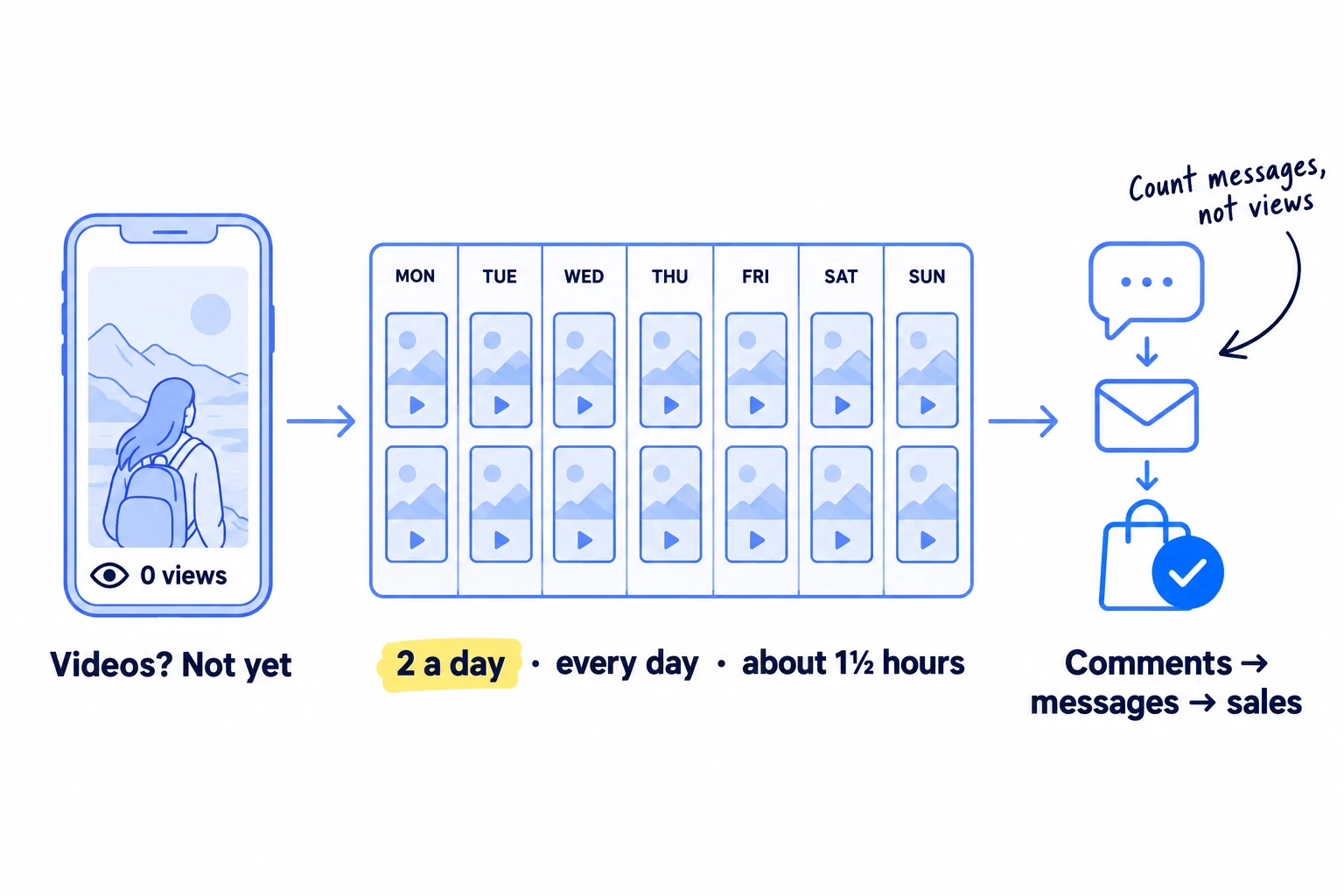
You know short videos are how small businesses get seen now, but you have a phone, no team and a few videos with a couple of hundred views. Here is how to make short-form videos for your business that bring messages, visits and sales: one script a video, one filming session a week, and 2 posts a day on each app. Most founders post 5 videos, see no sales and stop; with AI writing the first draft of every script, you can post 14 a week on each app, and 56 videos will tell you what 5 never could.
Do these three things
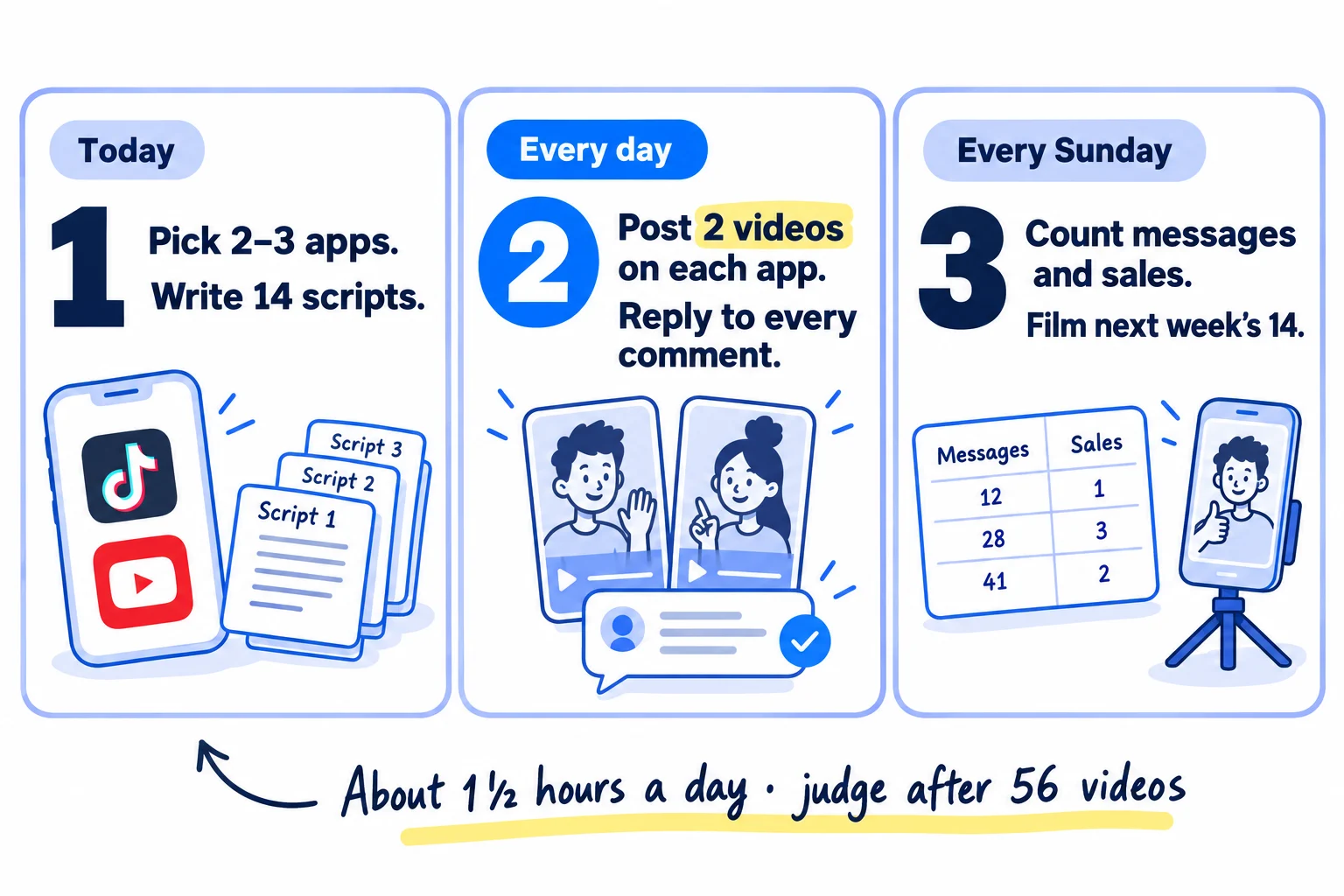
About 1½ hours a day, plus about 3½ hours on Sunday. Expect a few hundred views a video at first, and judge each app after 56 videos.
Show the three actions in fullHide the full list
- Today: set up business accounts on the 2 or 3 apps where your buyers watch short videos. Then write your first 14 scripts, each one answering a question a buyer has asked you. AI drafts each script; you add the one true detail.
- Every day: post 2 short vertical videos on each of those apps, and reply to every comment and message the same day.
- Every Sunday: count which videos brought messages, visits and sales. Then write and film next week's 14 in one sitting, starting with new versions of your 3 best.
Get help doing these
ChatGPT or Claude reads this guide and works through it with you.
1. Pick the apps your buyers watch and set up business accounts
Pick 2 or 3 apps where your buyers already watch short videos, and set up a free business account on each one. You will post the same 2 videos a day on all of them, so each extra app costs you minutes, not new videos.
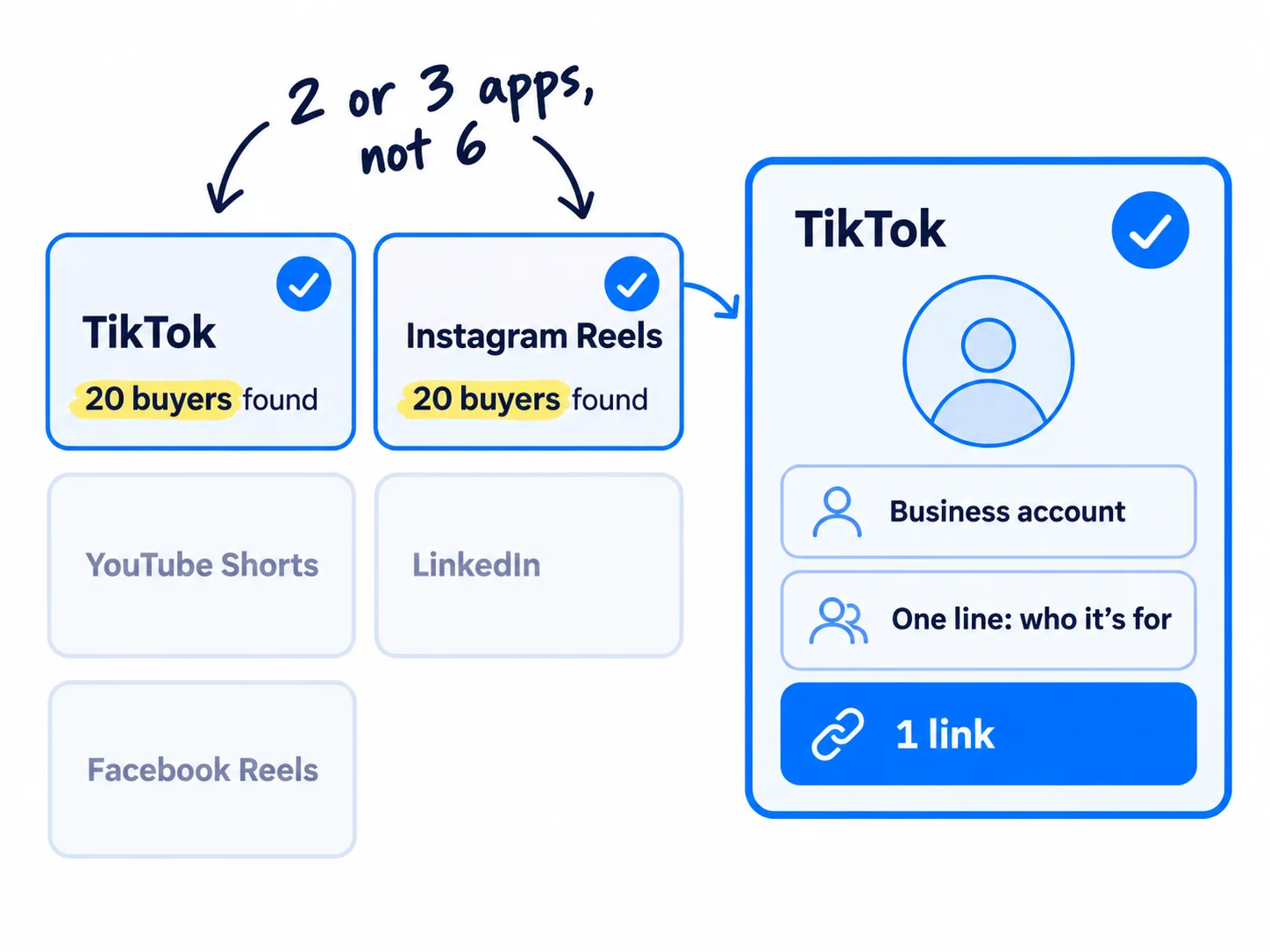
Use this rule: an app counts if you can find 20 of your buyers who posted, commented or followed a business like yours there in the last month. Search each app for the words your buyers use for the problem, and open the profiles of the people commenting. If you cannot find 20 in 15 minutes, skip that app. The same rule picks your marketing channels in general.
If you run a D2C store: start with TikTok and Instagram Reels. Add YouTube Shorts as a third. If you sell on TikTok Shop, set it up first, so each video can show the product.
If you run a SaaS: start with YouTube Shorts and TikTok if your buyers are individual users. If you sell to teams, put LinkedIn first. Choosing channels for a SaaS works the same way.
If you run a B2B company or an agency: start with LinkedIn, posted from your own profile, and add Instagram Reels. Your buyers watch LinkedIn at work. The same rule picks channels for a B2B company and channels for an agency.
Then set up each account:
- 1
TikTok: switch to a business account
Open Settings and privacy, then Account, then "Switch to Business Account". It is free and gives you analytics and scheduling. It also means you can only use TikTok's Commercial Music Library, about 1 million songs cleared for business use. TikTok says businesses may not use its general music library for commercial posts, so this is the library you should use anyway.
- 2
Instagram: switch to a professional account
Open Settings and activity, then "Account type and tools", then "Switch to professional account". Since July 2025, public posts from professional accounts can appear in Google results. Check that "Allow public photos and videos to appear in search engine results" is on.
- 3
YouTube and LinkedIn: use what you have
YouTube needs only a channel; any square or vertical video up to 3 minutes becomes a Short. On LinkedIn, post from your own profile: a new company page has almost no followers.
On every profile, write one line that says who you help and with what, from your value proposition. Add one link: your shop, your signup page or a booking page. Tag it with UTM parameters (for example ?utm_source=tiktok), so you can see which app sent each visit.
- Tool: the apps themselves. All free.
- Time: 45 minutes.
- You will have: a business account on 2 or 3 apps, each with a one-line bio and one tagged link.
- It worked if: you found 20 real buyers on each app you kept.
- Common mistake: picking the app you like, or all six at once. Pick the 2 or 3 where you found buyers, and post there every day.
2. Write 14 short video scripts a week from questions your buyers ask
Write 14 scripts every week, and make each one answer one question a real buyer asked. A script is 3 parts: the first line names the problem in the buyer's words, the middle gives one useful point, and the end asks for one thing.
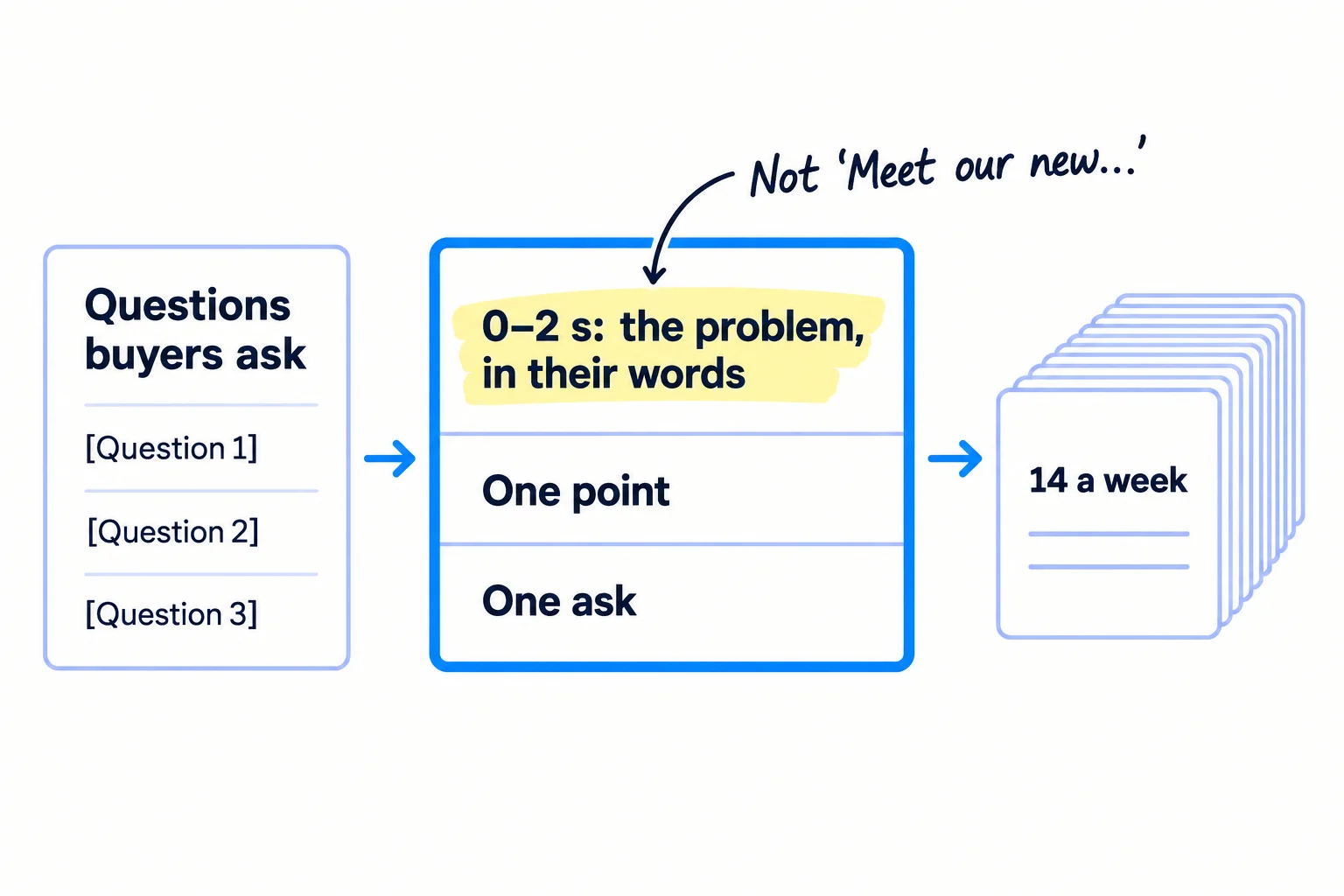
Start with a list of 30 questions. Take them from your customer interviews, emails, reviews, DMs and sales calls. Add questions you find in the places your buyers talk online and in the comments under your competitors' videos. Keep each question in the buyer's own words.
Then turn each question into one of 5 kinds of video. All 5 work for a new account with no followers:
- Answer a question. "Do I need X to do Y?" answered in 30 seconds.
- Show it working. Your product doing the one job, start to finish. A short product demo.
- Before and after. The problem, then the result, with nothing faked.
- How it is made or done. The part of your work buyers never see.
- A mistake buyers make. "Stop doing X. Do Y instead," and why.
If you are just opening, make your first video the announcement of your new business, filmed the same way.
Write 14 different ideas, not one idea in 14 versions. YouTube said in July 2025 that mass-produced and repetitive videos are not eligible for its Partner Program, and Instagram said in April 2026 that accounts that mostly post unoriginal content are left out of recommendations. Different questions keep every video original.
ChatGPT or Claude can draft all 14 in a few minutes. Give it your questions and this template. Then read each draft out loud, fix anything that is not true, and add one detail only you know: a number, a name, a thing a customer said. That takes about 4 minutes a script.
First 2 seconds (say it and show it as text): [The problem, in the buyer's words. Name who it is for.]Middle: [One point that helps, even if they never buy. One example or one thing to look at.]End: [One ask: "Comment [word] and I'll send you [the thing]", or "The link is in my profile", or "Send this to someone who has this problem".]
Here are questions my buyers ask: [paste 14 questions]. My business: [one line, who it helps and with what]. Write one short video script for each question, using this template: [paste the script template]. Keep every script under 120 words, in plain words, with no hype. Use the buyer's words in the first line. Do not invent facts, numbers or results: leave a [gap] where I must add a real detail.
Keep it between 20 and 60 seconds: as long as the one point needs. Longer can work too. Buffer found in March 2025 that TikTok videos over a minute got 63.8% more watch time than 30-to-60-second ones. Start short while you practise, and let a few videos run longer once you can keep people watching.
- Tool: ChatGPT or Claude (free plans are enough) and a Google Doc.
- Time: 1 hour, every Sunday, for 14 scripts.
- You will have: 14 scripts in one doc, each with a first line, one point and one ask.
- It worked if: each script reads out loud in 20 to 60 seconds, and its first line names the problem, not your brand.
- Common mistake: opening with "Meet our new…" or "Hi guys, today I want to…". People decide to swipe in the first 2 seconds. Say the problem first. If you run out of questions, borrow post ideas for a SaaS, a B2B company, a D2C brand or an agency and turn each into a script.
See it done: Ferns & Rinse's first line
Ferns & Rinse is a made-up plant-based haircare brand with its own Shopify store. It sells one shampoo and one conditioner at $28 each, or both for $49.
Before
Meet our new plant-based shampoo!
After
If your scalp itches 2 days after you wash, read the back of your shampoo.
Why it works: The new first line names a problem the buyer feels and gives them something to check, before the brand is mentioned.
3. Film a week of short-form videos on your phone in one sitting
Film all 14 videos in one sitting, on your phone, held upright. Filming in one go is how 2 videos a day takes 2 hours a week instead of 2 hours a day.
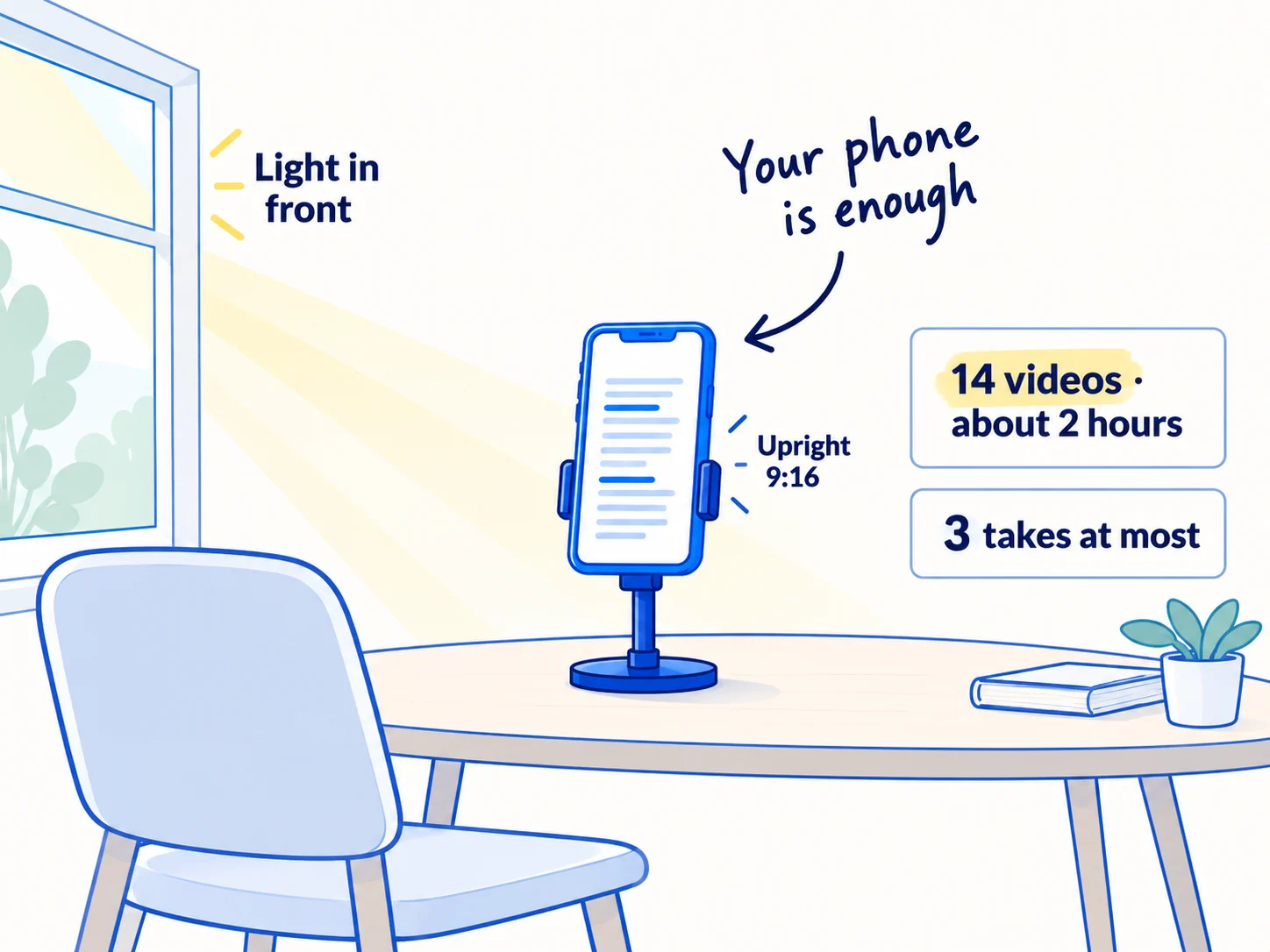
Set up once, then film every script back to back:
- Hold the phone upright, in 9:16, at eye level, on a stack of books or a small phone stand.
- Face a window, so the light is on your face, not behind you.
- Use the teleprompter in Instagram's free Edits app. It scrolls your script next to the front camera, so you can read it and still look at the lens.
- Find a quiet room with soft things in it (a sofa, curtains) to cut the echo. A clip-on microphone helps but is not needed to start.
- Say the first line in the first second. Do not say hello first.
- Stop at 3 takes. The third is good enough. Most people watching will see it once, for a few seconds.
You do not have to show your face. Film your hands using the product, your screen, or the work, and speak over it.
If you run a SaaS: record your screen doing the one job from the script, with your voice over it. Zoom in on the click that matters. Your phone or your computer's own screen recorder is enough.
If you run a D2C store: film the product in your hands, being used, in real light. Show the before and after on a real person who agreed to it. A customer saying on camera that it worked is also a testimonial. Ask customers to send you their own clips too: that is user-generated content.
If you run a B2B company: film the work buyers never see: the machine, the sample, the check before an order ships, a 30-second answer to the question every new client asks.
If you run an agency: record your screen fixing one real problem from a prospect's account, with their permission or with the names hidden. It shows your skill before you have case studies.
- Tool: your phone, and Edits for the teleprompter. Both free.
- Time: about 2 hours, every Sunday, for 14 videos.
- You will have: 14 raw clips, one per script.
- It worked if: you can hear every word with the phone at half volume, and the first word comes in the first second.
- Common mistake: waiting for a better camera, a studio or a "perfect" video. A clear phone video posted today teaches you more than a polished one posted next month.
4. Edit each video in 10 minutes and add captions
Edit each clip in about 10 minutes: cut the pauses, add captions, put the first line on screen as text, and export it with no watermark. Use Edits, Instagram's free editing app for iPhone and Android.
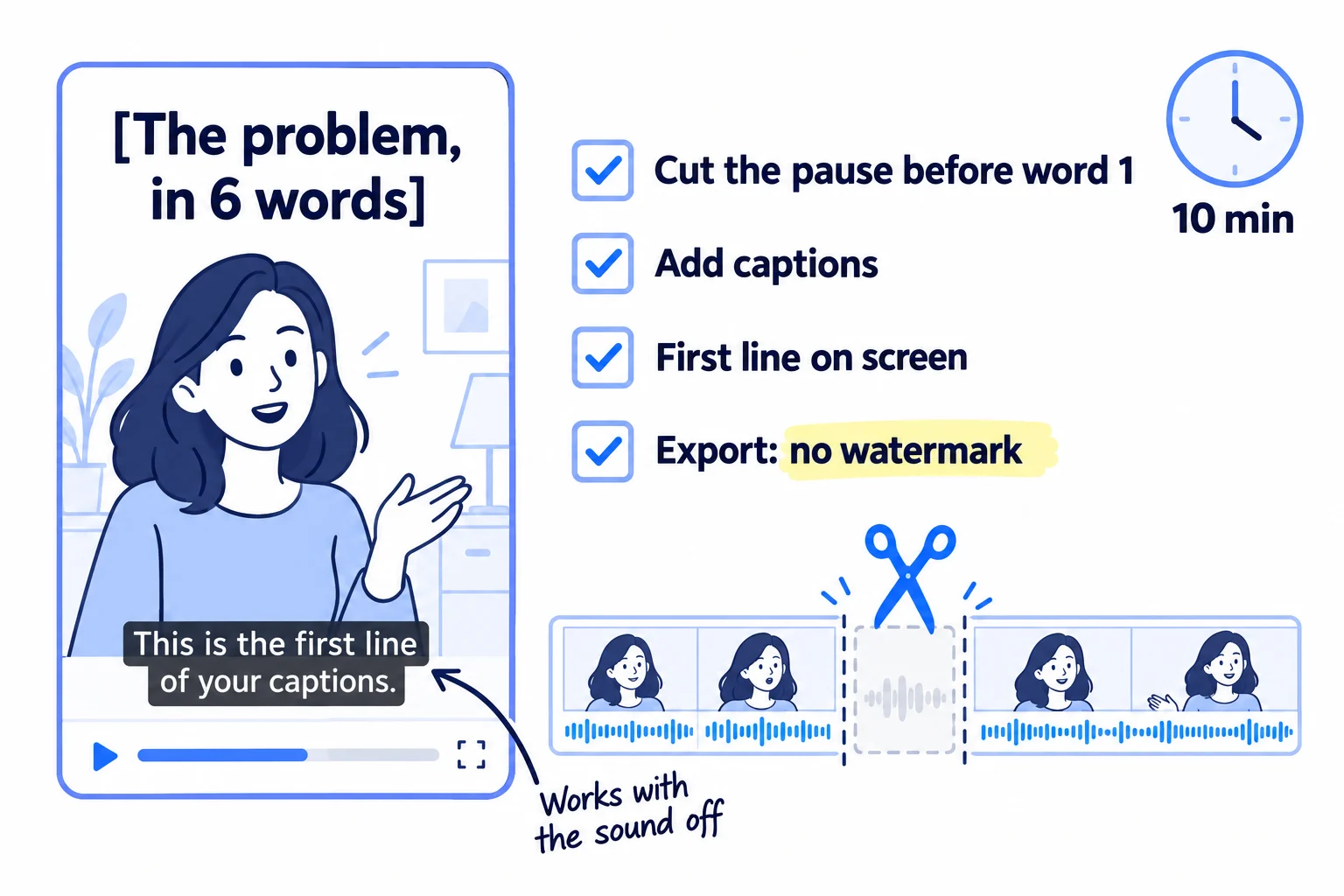
In Edits, for each clip:
- Cut the silence before your first word and any long pause. The first frame should already be you talking or the product moving.
- Add captions with the auto-captions tool, then read them and fix any wrong words. Captions mean the video works with the sound off.
- Put your first line on screen as large text for the first 2 to 3 seconds, in 4 to 6 words.
- Export at 1080 × 1920 with no watermark. Edits adds none. Keep this clean file: it is the one you upload everywhere.
Follow three rules while you edit:
- Music. On TikTok, use only the Commercial Music Library. On YouTube, a Short over 1 minute with any copyright claim is blocked in every country, so use no music you do not own in longer Shorts. Your voice and no music is fine.
- No other app's watermark. Never upload a file with a TikTok logo to Instagram or YouTube. Instagram shows watermarked Reels less, and since April 2026 it keeps accounts that mostly repost from recommendations.
- AI labels. If a video shows a realistic person, voice or scene made by AI, turn on the app's AI label before posting. YouTube, Meta and TikTok all ask for this. Scripts, captions and AI clean-up of your own voice do not need a label.
Edits also shows each Reel's skip rate, the share of people who swiped away early. Watch it: a high skip rate means your first 2 seconds need work. If you make a long video or repurpose a podcast or article, cut 3 to 5 clips from it the same way. A podcast you were a guest on can give you a week of clips.
- Tool: Edits, by Instagram. Free.
- Time: about 10 minutes a video, 20 minutes a day.
- You will have: 2 finished vertical videos a day, with captions and on-screen text, ready to post.
- It worked if: every caption is spelled right, and over 4 weeks your average skip rate goes down.
- Common mistake: using a trending song on a business account, or posting the TikTok download with its logo to Instagram. Both cut your reach.
5. Post 2 videos a day on each app and reply to every comment
Upload the same clean file to each of your apps, 2 a day, every day. Then reply to every comment and message the same day. The replies are where views turn into customers.
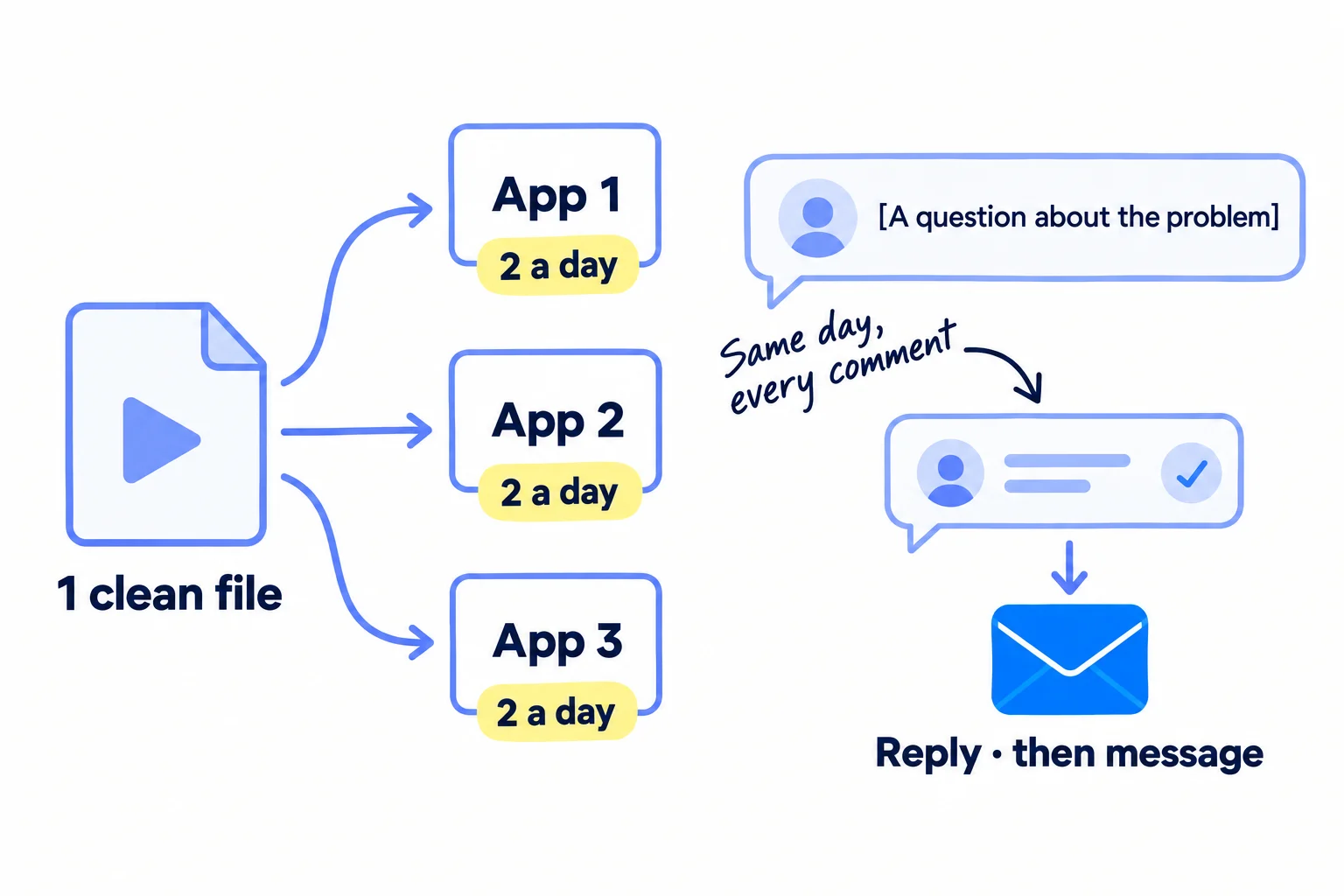
Write a short caption with the words your buyers search, in the first line. Many people search inside TikTok, Instagram and YouTube, not only on Google. Add 3 to 5 hashtags that name the topic. On Instagram, 5 is the limit since December 2025.
[The problem or question, in the buyer's words.] [One line on what the video shows.][The ask from the script, again: comment a word, send it to someone, or the link in the profile.]#[topic] #[problem] #[who it's for]
Upload each file to each app yourself, not by sharing from one app to another. You can schedule a week at a time for free: Meta Business Suite for Instagram and Facebook Reels (up to 29 days ahead), TikTok Studio on the web (up to 10 days ahead), and YouTube Studio for Shorts. Post at 2 different times each day, for example 8 am and 7 pm in your buyers' time zone. This is the same daily rhythm as your content calendar.
Then reply. Check each app once at lunch and once in the evening:
- Reply to every comment, in your own words, within the same day. A short, real answer is enough.
- When someone asks a question or says they have the problem, answer it in the comment, then send them a direct message that offers help, not a sale.
- Pin your best comment, the one that answers the most common question, under each video.
Hi [name], thanks for asking about [their question]. Short answer: [one or two lines that help].If it's useful, I can [send you X / show you how Y works / answer any other questions]. No pressure either way.
If you run a D2C store: if you sell on TikTok Shop, tag the product in the video so people can buy without leaving the app. Getting TikTok Shop affiliates and creators to post about you comes later, once you know which videos sell.
If you run a B2B company, a SaaS or an agency: on LinkedIn, upload the video in the post itself, not as a YouTube link, and write 3 or 4 lines of text above it. Someone who comments is a warm lead: connect, then message them like you would after a good conversation.
Expect a few hundred views a video at first. In 2026, accounts under 5,000 followers averaged about 625 views per Reel and 350 per TikTok, and TikTok views per post fell about 31% in a year as more people posted. Buffer's study of 11.4 million TikToks found that people who posted 11 or more times a week got 34% more views per post than people who posted once. Their typical video got the same 500 or so views; they simply had more chances at one that spread. That is why the target is 2 a day.
- Tool: the apps, Meta Business Suite, TikTok Studio and YouTube Studio. All free.
- Time: about 30 minutes a day to upload and schedule, and 30 minutes a day to reply.
- You will have: 14 videos a week on each app, and every comment and message answered.
- It worked if: by 28 videos on an app (2 weeks), at least one person has asked a question or said they have the problem. If nobody has, your videos are not reaching buyers: go back to the questions in step 2.
- Common mistake: posting and walking away, or selling in every reply. The other mistake is chasing followers before you have a reason for them to follow.
See it done: Ferns & Rinse's reply to a comment
Asked in the comments under their TikTok video
“Does it work on curly hair?”
The reply
Yes. Two of our first customers have tight curls, and they use it every 3 days rather than every day. Use less than you think, about a coin-sized amount. I'll message you the routine they use.
Why it works: It answers the question honestly in the comment, then offers help in a message instead of pushing a sale.
6. Count what your videos brought every Sunday and remake the best
Every Sunday, fill in one row for each app: how many videos, the typical views, shares, messages, visits and sales. Then decide what to keep, and remake your 3 best videos with new first lines.
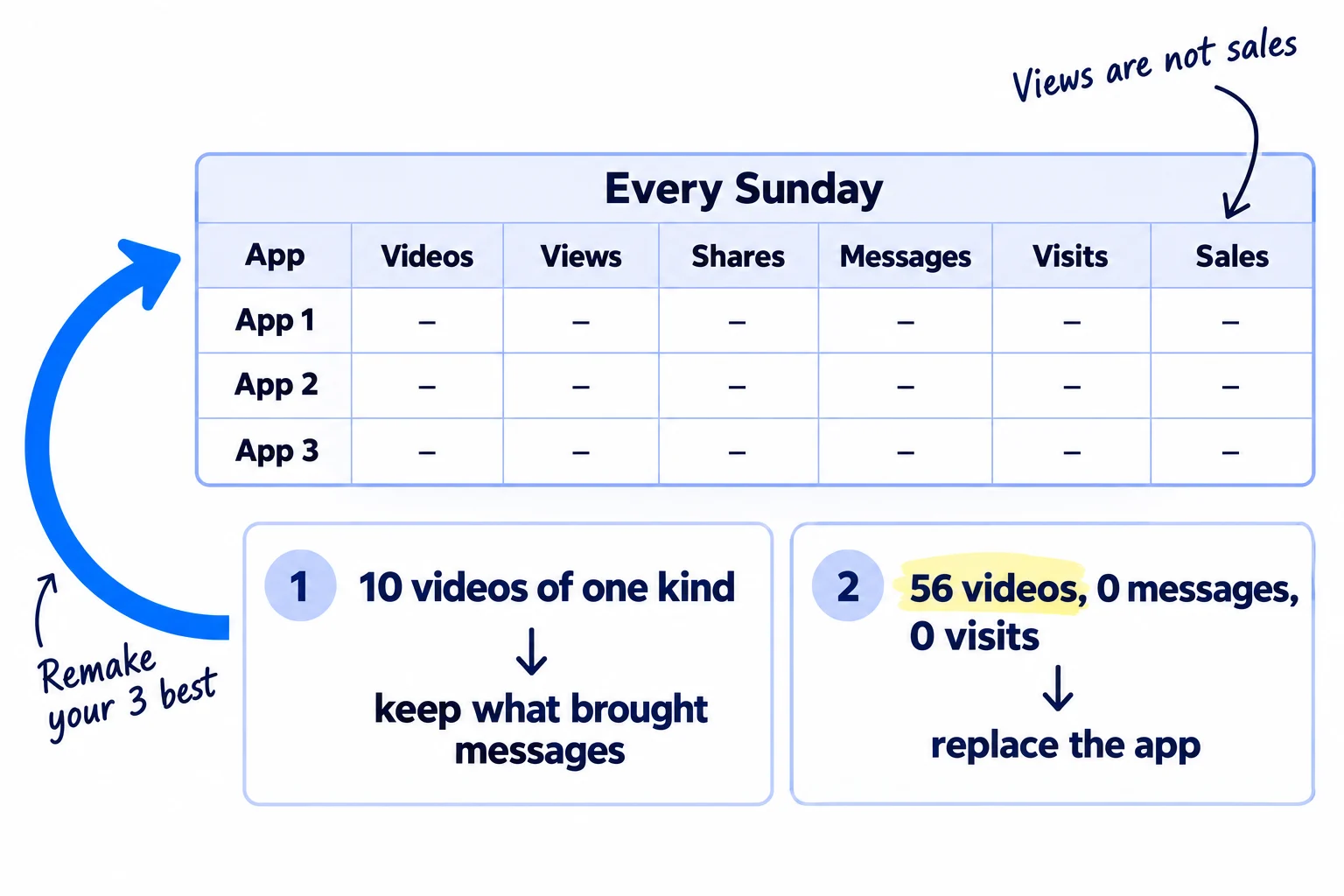
First, add one question where people buy, sign up or book: "Where did you hear about us?" This is self-reported attribution, and for video it is often the only way to know. Some people see a video, then search for your name days later, so no tagged link records it. Your tagged links show the rest.
Week | App | Videos | Typical views | Shares | Messages | Visits (from the tagged link) | Sales, signups or enquiries that said "video"
Use each app's own insights for views, shares and watch time. On Instagram, sends (shares by message) matter a little more than likes for reaching people who do not follow you: Instagram's Adam Mosseri said in January 2025 that watch time, likes and sends are the top 3 signals.
Then decide by the number of videos, not by the week:
- After 10 videos of one kind (for example, 10 "a mistake buyers make" videos), keep the kinds that brought messages or shares. Make more of those next week.
- After 56 videos on one app (4 weeks at 2 a day), stop an app that brought 0 messages and 0 visits. Replace it with the next app on your list, and keep the volume at 2 a day. Do not cut the number of videos.
- Every Sunday, take your 3 best videos of the week and make new versions with a different first line. The idea already works; the first line decides how many people stay to see it.
A video that brings messages again and again can become an ad later. Once you have about 10 sales or signups and know which video brought them, read how to make ad creatives and how much to spend on ads. Before that, ads pay to show a message you have not tested. If videos bring visits but no sales, the problem is the page, not the video: fix the store that gets traffic but no sales, or rewrite the landing page the link goes to.
- Tool: Google Sheets, and each app's insights.
- Time: 30 minutes, every Sunday.
- You will have: one row per app per week, and a short list of the kinds of video that bring buyers.
- It worked if: you can name the video and the app behind every message, visit and sale.
- Common mistake: counting views and followers and calling it done. 10,000 views from the wrong people are worth less than 1 message from the right one. Once a month, add these numbers to your marketing review.
See it done: Ferns & Rinse after 4 weeks
Weeks 1 to 4, all apps
| App | Videos | Typical views | Shares | Messages | Store visits | Orders that said "video" |
|---|---|---|---|---|---|---|
| TikTok | 56 | 270 | 41 | 6 | 48 | 1 |
| Instagram Reels | 56 | 470 | 88 | 15 | 83 | 3 |
| YouTube Shorts | 56 | 130 | 9 | 0 | 0 | 0 |
The decision: Instagram and TikTok stay. YouTube Shorts brought 0 messages and 0 visits after 56 videos, so the same files go to Facebook Reels instead. The 3 "read the back of your shampoo" videos got the most shares, so next week has 4 more like them.
Why it works: They decide by messages, visits and orders per app, not by views, and they keep the volume when they drop an app.
When one app clearly works, go deeper there: grow on Instagram, or start a YouTube channel for longer videos that answer the same questions. Turn your best customer story into a case study and a video.
Where Scout7 helps
Scout7 can do much of steps 2, 3 and 4, and part of step 5.
Steps 2 to 4. Scout7's Video Studio writes the script, splits it into scenes, and films each scene with a cast and voice you choose: your own likeness or another person, with a voice you record, pick or upload. It can be on camera or visuals only, in portrait (9:16) or landscape, and it adds captions in a style you choose. You direct each scene, reshoot what misses and approve the cut. It can also make a video from a finished article. If a video uses an AI version of you or a voice you did not record, turn on the app's AI label (step 4).
Step 2. Scout7's audience research reads public social conversations in your category and gives pain points and quotes in buyers' own words, for your list of questions. It does not replace talking to your customers.
Step 5. Scout7 schedules to LinkedIn, X, Instagram, Facebook, Threads and Reddit, and shows the week in one calendar. Nothing is posted without your approval.
Your short-form video checklist for the next 4 weeks
0 of 11 done
Work through this list with an AI assistant
It drafts the work and keeps track of what is done.
Frequently asked questions
- Do I have to show my face in short-form videos?
No. Film your hands using the product, your screen doing the job, or the work being done, and speak over it. Your voice helps people trust you. If you use an AI presenter or an AI voice that sounds like a real person, turn on the app's AI label. Once you are used to filming, try 10 videos with your face and compare the messages they bring.
- Can I post the same video on TikTok, Reels and YouTube Shorts?
Yes, if it is your own video. Upload the same clean file to each app yourself. Never post the TikTok download with its logo: Instagram shows watermarked Reels less. What Instagram and YouTube act against is reposting other people's videos or many near-copies of one video, not your own video on 3 apps. The same goes when you repurpose an article or a podcast into clips.
- How long should a short-form video be?
As long as the one point needs, usually 20 to 60 seconds. Start there while you practise. Longer can work: Buffer found TikTok videos over a minute got more watch time. YouTube counts square or vertical videos up to 3 minutes as Shorts, but a Short over 1 minute with any copyright claim on its music is blocked, so keep longer ones music-free.
- Can I make short-form videos with AI?
Yes, for most of the work. AI can draft scripts, captions and ideas, and some tools make the whole video. You still add the true details, check every claim and approve each video. Label any realistic AI person, voice or scene. Do not make many near-identical videos: YouTube and Instagram limit mass-produced and unoriginal content. AI for content works best as the first draft, not the final video.
- How many views do I need before short videos bring sales?
There is no set number. Small accounts typically get a few hundred views a video. Sales come from the few people who comment or message, so count those. If you have posted 56 videos on an app and nobody has asked a question, change who the videos are for, not how they look. Build an email list from interested viewers.
Sources
- 1.Study shows 2-5 weekly TikToks deliver biggest view increase (Buffer, 11.4 million posts) — Search Engine Journal, 17 October 2025
- 2.Metricool's 2026 TikTok study — Metricool, 12 May 2026
- 3.TikTok vs. Reels vs. Shorts: engagement data — Socialinsider, checked 2 October 2026
- 4.Data shows that longer clips are gaining traction on TikTok (Buffer, 1.1 million videos) — Social Media Today, 17 March 2025
- 5.Instagram's recommendation algorithm will penalize unoriginal photo and carousel posts — Engadget, 30 April 2026
- 6.Instagram ranking explained — Instagram, checked 2 October 2026
- 7.Instagram shares algorithm insights to inform strategy — Social Media Today, 22 January 2025
- 8.Instagram implements new limits on hashtag use — Social Media Today, 18 December 2025
- 9.Introducing Edits: a streamlined video creation app — Meta, updated 17 December 2025
- 10.Edits: Video Editor — Apple App Store, checked 2 October 2026
- 11.Meta's Edits app is getting an AI assistant and a desktop version — TechCrunch, 11 June 2026
- 12.Understand three-minute YouTube Shorts — YouTube Help, checked 2 October 2026
- 13.Disclosing use of GenAI content — YouTube Help, checked 2 October 2026
- 14.YouTube clarifies changes to monetization rules around inauthentic content — Social Media Today, July 2025
- 15.About the Commercial Music Library — TikTok Ads Help Center, updated July 2025
- 16.Video Scheduler: plan TikTok videos in advance — TikTok for Business, checked 2 October 2026
- 17.Making it easier to create videos on Facebook — Meta, 17 June 2025
- 18.Instagram content becomes searchable on Google starting July 10 — PPC Land, checked 2 October 2026
- 19.Short-form video: creating impactful content quickly — Benchmark Email, 12 May 2026
Next article to read
How to get your first 1,000 followersOnce you post videos each week, this shows how to turn views into followers.Read it nextRelated guides
- How to start a YouTube channel for businessStart a YouTube channel for your business with no audience: set it up under your business name and verify it today, publish one video a day that answers a question your buyers type into YouTube, cut 2 Shorts from each, send every video to the people who asked, and check every Sunday which videos search brings viewers to.
- How to repurpose content across platformsRepurpose content across platforms without copy-pasting: list 30 questions your buyers ask, answer one a day in a 10-minute video or one-page article, turn it into 2 posts for each of your 2 or 3 channels with one 9:16 video, upload clean files and reply within an hour, and remake your 3 best pieces every Sunday.
- How to promote your business on InstagramD2CPromote your business on Instagram so it brings orders, not just likes: set up a business profile that links to one product and tag your products today, then post 1 Reel and 1 carousel, leave 20 comments and send 100 personal messages a day to shoppers and small creators, and count orders from Instagram every Sunday.
- How to sell on TikTok ShopD2CSell on TikTok Shop as a new brand with no followers: check each order still leaves 20% after the fee and a creator's cut, open the shop and list your products with a white-background photo and a plain title, post 2 shoppable videos and invite 100 creators a day, and count orders by source every Sunday.
Guides that link here
- How to repurpose content across platforms
- How to start a YouTube channel for business
- How to use AI for content creation
- How to promote your business on InstagramD2C
- How to get your first 1,000 followers
- How to sell on TikTok ShopD2C
- Instagram post ideas for a marketing agencyAgency
- How to get your brand mentioned by ChatGPT
- How to get your products recommended by ChatGPTD2C
- How to show up in Google AI Overviews
- How to get booked as a podcast guest
- How to plan a content calendar
- How to write a case study
- How to get customers online for free
- How to get traffic to a new website for free
- How to get your first sale on EtsyD2C
- How to get your first sales on ShopifyD2C
- How to announce a new business on social media
- How to build a waitlist before you launch
- How to launch a B2B productB2B
- How to launch a D2C brandD2C
- How to launch a product on AmazonD2C
- How to launch on Product HuntSaaS
- How to submit your SaaS to directoriesSaaS
- How much to spend on marketing as an ecommerce brandD2C
- How to choose marketing channels for an ecommerce brandD2C
- How to fit marketing into your week as a solo founder
- How to market a D2C brandD2C
- How to do SEO for a Shopify storeD2C
- How to list your products on Google Shopping for freeD2C
- How to make an article rank higher on Google
- How to rank on Google Maps
- How to build in public on XSaaS
- How to grow on LinkedIn as a founder
- Instagram post ideas for D2C brandsD2C
- LinkedIn post ideas for B2B companiesB2B
- Social media post ideas for SaaS companiesSaaS
Cite this page
Dinesh Bypilla (2026). How to make short-form videos for your business. Scout7 Academy. https://scout7.ai/academy/content-marketing/how-to-make-short-form-videos-for-your-business
Written by Dinesh Bypilla, Agentic systems engineer at Scout7. Reviewed by Murali Sid. Last checked 2 October 2026.
Quote any part of this guide with a link back to this page. © 2026 Scout7.
Markdown version of this page: https://scout7.ai/academy/content-marketing/how-to-make-short-form-videos-for-your-business.md