



How to announce a new business on social media
Announce a new business on social media so it brings customers, not just likes: set up your profile and page on the 2 channels where your buyers are, post one announcement with a clear ask, send 100 personal messages and 2 posts a channel a day for 14 days, and count conversations and customers by source every Sunday.
ByDinesh BypillaReviewed byMurali SidLast checked 19 min read
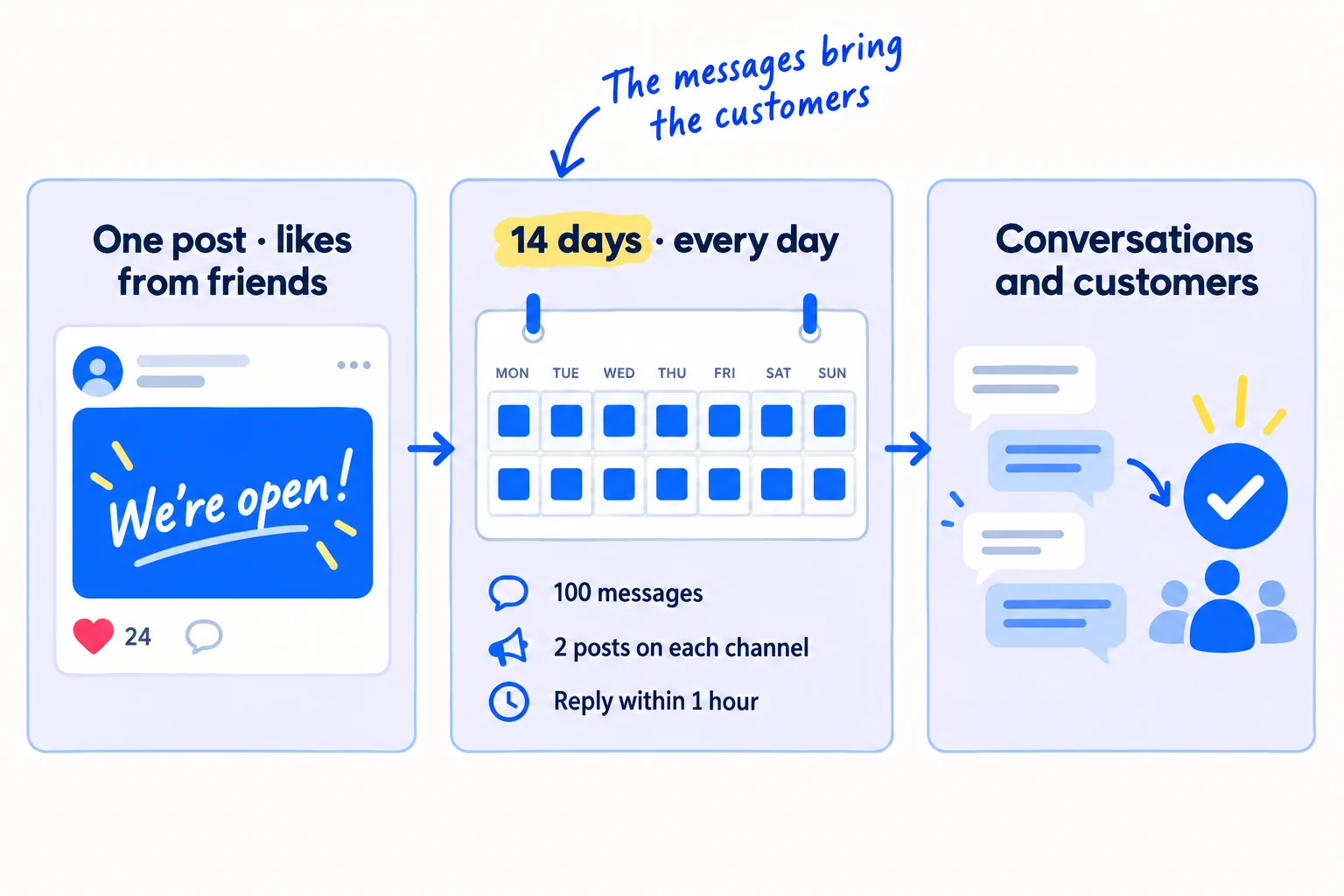
You have started a business, or opened quietly a few months ago, and now you want to announce your new business on social media. Most founders post one "We're open!", get likes from friends and no customers, and decide social media does not work for them. Here is how to make the announcement bring conversations and customers: one clear announcement on the 2 channels where your buyers are, then 14 days of personal messages and daily posts that carry it to the right people.
Do these three things
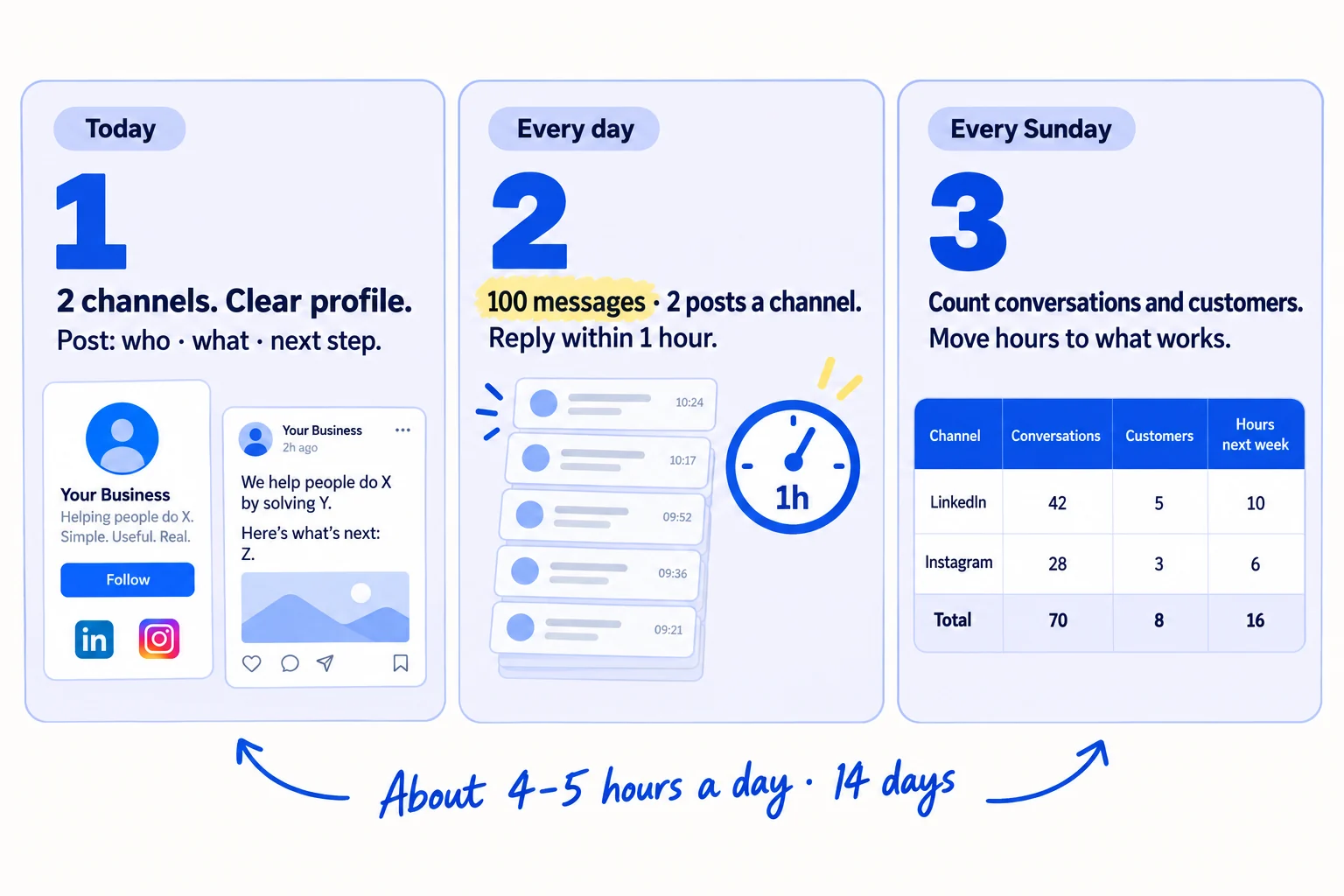
About 4 to 5 hours a day, every day, for 14 days: 1,400 messages and 56 posts. Judge it by conversations and customers, not likes.
Show the three actions in fullHide the full list
- Today: set up your profile and business page on the 2 channels where your buyers are, then post one announcement that says who it is for, what it does and one thing to do next.
- Every day for 14 days: send 100 personal messages about it, to people you know first and then to people who fit, post twice on each channel, and reply to every comment within an hour. AI drafts; you add one true line.
- Every Sunday: count conversations and customers by where each one came from, and move your hours to what brought the most.
Get help doing these
ChatGPT or Claude reads this guide and works through it with you.
1. Set up your profile and business page on the 2 channels where your buyers are
Pick the 2 social channels where your buyers already spend time, and rewrite your own profile and your business page on each so a stranger can tell in 5 seconds what you sell and who it is for. Do this before you post anything.
![Two profile cards side by side. Left, crossed out: 'Founder | Dreamer | Coffee'. Right, ticked: 'I help [kind of customer] get [result]' with a link line '[one page to buy, book or try]'. Above them two channel tiles labelled 'Channel 1' and 'Channel 2'. Label: 'Your profile first, then the page'.](/academy/illustrations/how-to-announce-a-new-business-on-social-media/step-1-set-up-your-profile-and-business-page-on-the-2-c.webp)
Pick 2 channels, not 6. At 2 posts a day each, 2 channels is 4 posts a day, which one person can keep up. Six channels would be 12. Use the channel list from how to choose marketing channels if you already made one. If not, use this rule:
If you run a B2B business or an agency: LinkedIn from your own profile, plus your LinkedIn Page. Add Instagram only if your buyers post there, like food brands or shops.
If you run a D2C store: Instagram, plus TikTok or Facebook, whichever your buyers use more. Your shoppers look at the product in short videos.
If you run a SaaS: LinkedIn or X, whichever your users post on, plus the communities where they ask for help.
Post from your own profile first. Your friends, past colleagues and clients follow you, not a page that is one day old with 0 followers. That is why founders grow on LinkedIn, build in public on X and promote on Instagram from their own names. Your business page is where people check you are real, and you share each post to it.
Set up each one:
-
Your own profile. Change the headline to what you do and for whom: "I help [kind of customer] get [result]". On LinkedIn, use the guide to a LinkedIn profile that brings in clients. Put one link in it: a landing page where a stranger can buy, book a call or try your product. If that page does not say the same thing, fix the headline on your homepage first.
-
Your new job on LinkedIn. Add your business as your current position. Keep "Share with network" on when you save. LinkedIn then tells your network about the job change, in their feed, as a notification or by email, within about 2 hours. It is a free first announcement. Do it on the same day you post (step 3).
-
Your LinkedIn Page. You need a profile with your real name and a confirmed email. Fill in every field: logo, cover image, a one-line tagline in the same words as your headline, website and location. LinkedIn says complete Pages get 30% more views a week.
-
Instagram. Switch to a free professional account, so you get Insights. Write the bio as the same one line, and add your link.
-
Facebook. Create a Page with the same line and link, if Facebook is one of your 2.
-
Tool: LinkedIn, Instagram, Facebook, X or TikTok. All free.
-
Time: about 2 hours.
-
You will have: 2 profiles and 2 business pages that say what you sell, to whom, and where to go next.
-
It worked if: you show your profile to 3 people who have never heard of your business, and all 3 can say what you sell and who it is for in 5 seconds.
-
Common mistake: announcing only from a brand-new business page with no followers. The other mistake is a headline like "Founder | Dreamer | Coffee", which tells a buyer nothing.
2. Write your new business announcement post and a 30-second video
Write one announcement post in five parts: the problem in your buyers' words, what you started and for whom, why you, your first offer, and one thing to do next. Then record the same thing as a 30-second portrait video.
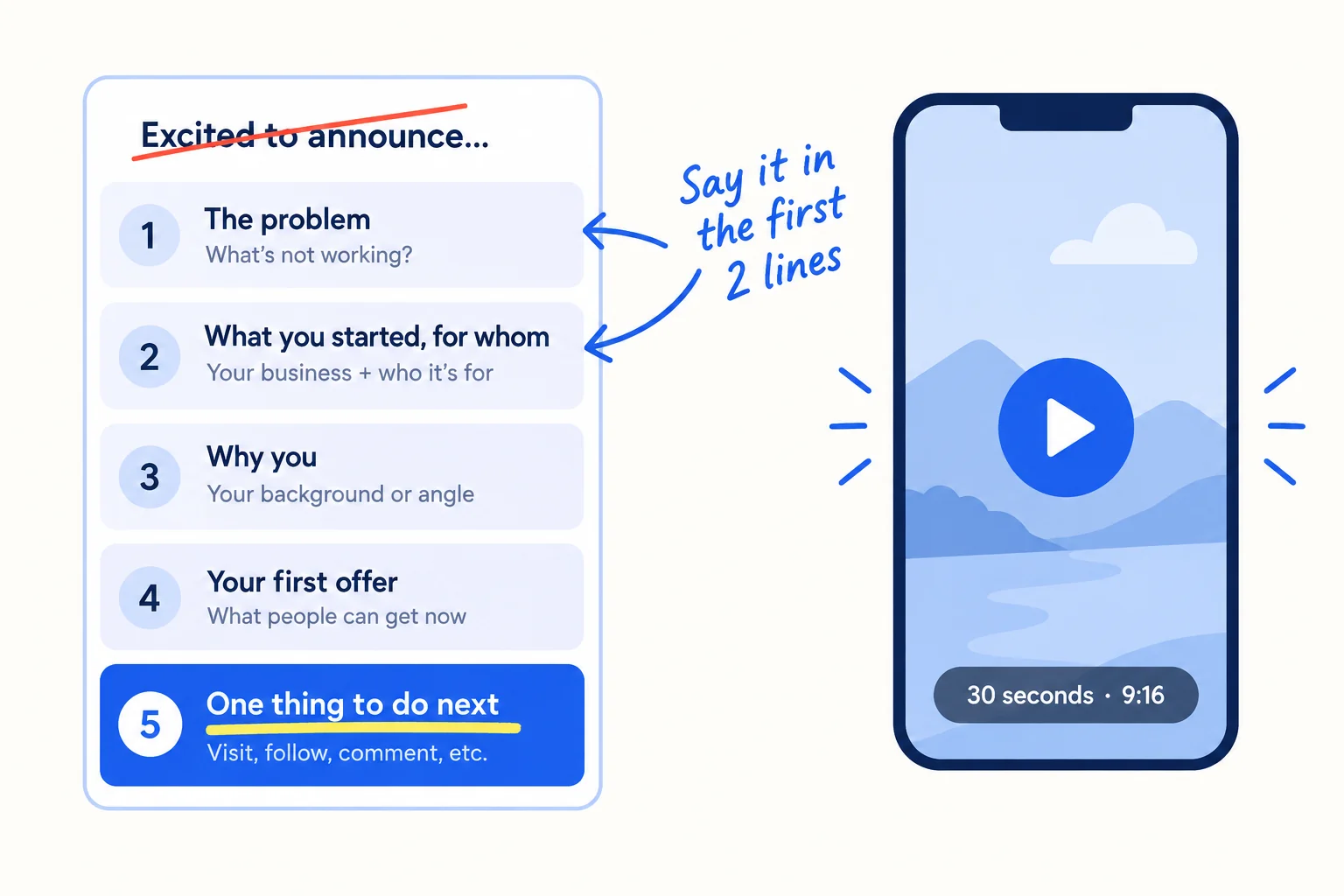
People scroll past a post that opens with "Excited to announce" and a logo. They stop for a problem they have. So the first two lines say the problem and what you do about it. Use your buyers' own words from your customer interviews or your value proposition.
End with one clear ask, the same for everyone who reads it. The ask changes by business:
If you run a B2B business: "Reply 'sample' and I'll send one" or "Who do you know who [has the problem]?"
If you run an agency: "Reply 'review' and I'll look at your [thing you fix] for free this week."
If you run a D2C store: "Send this to one friend who [has the problem]", and a code for the first week's orders.
If you run a SaaS: "Try it here, no signup: [link]", on a page people can use without an account.
Let AI draft. Paste the template, your one-line value proposition and 5 phrases your buyers use into ChatGPT or Claude, and ask for 10 versions. Pick the one that sounds most like you, then rewrite it in your own words. On Instagram, use 5 hashtags at most: since December 2025, Instagram limits each post and Reel to 5. Pick ones your buyers search, not "#newbusiness".
[The problem, in one line, in your buyers' words.]I've started [business name] to fix that. We [what you do, in one line] for [kind of customer].Why me: [one true line: what you did before, or why you care].For the first [number] customers: [your first offer, with the real price or what is free].[One ask: "Reply 'X' and I'll…", "Who do you know who…?", or "Try it here: [link]".]
Then make the video. Hold your phone upright (9:16) and say the same five parts in 30 to 45 seconds, showing the product or your work while you talk. A short video needs no studio: light from a window and on-screen captions are enough. Instagram says the most important things it predicts for a Reel are whether people will send it to someone, watch it to the end and like it. So the ask in the video is the same: "Send this to one person who needs it."
- Tool: ChatGPT or Claude to draft, and your phone for the video, with the captions feature in the app you post to.
- Time: about 1.5 hours.
- You will have: one announcement post and one 30-second portrait video, both ending in the same ask.
- It worked if: 3 people read only the first 2 lines and can say what you sell and who it is for.
- Common mistake: a post about you ("After 12 years, I'm taking the leap…") with no problem, no offer and no ask. People congratulate you and move on.
See it done: Carvelian's announcement post
Carvelian Packaging is a made-up maker of custom printed boxes for small food and drink brands. One founder sells through calls, samples and quotes.
Before
Excited to announce the launch of Carvelian Packaging! 🚀 After 11 years in print, I'm taking the leap. Innovative packaging solutions for forward-thinking brands. #newbusiness #packaging #entrepreneur
After
Small food brands tell me the same thing: big printers want 10,000 boxes, so they use plain boxes with stickers. I've started Carvelian Packaging to fix that. We print custom boxes for small food and drink brands, from 500. Why me: I ran press jobs at a print firm for 11 years. For the first 10 brands: a free printed sample box of your own design. Reply 'sample' and I'll send one, or tell me who you know with a plain-box problem.
Why it works: The first line is the buyer's problem, the post says who it is for, and it ends with one small ask anyone can answer.
3. Post the announcement and reply to every comment within an hour
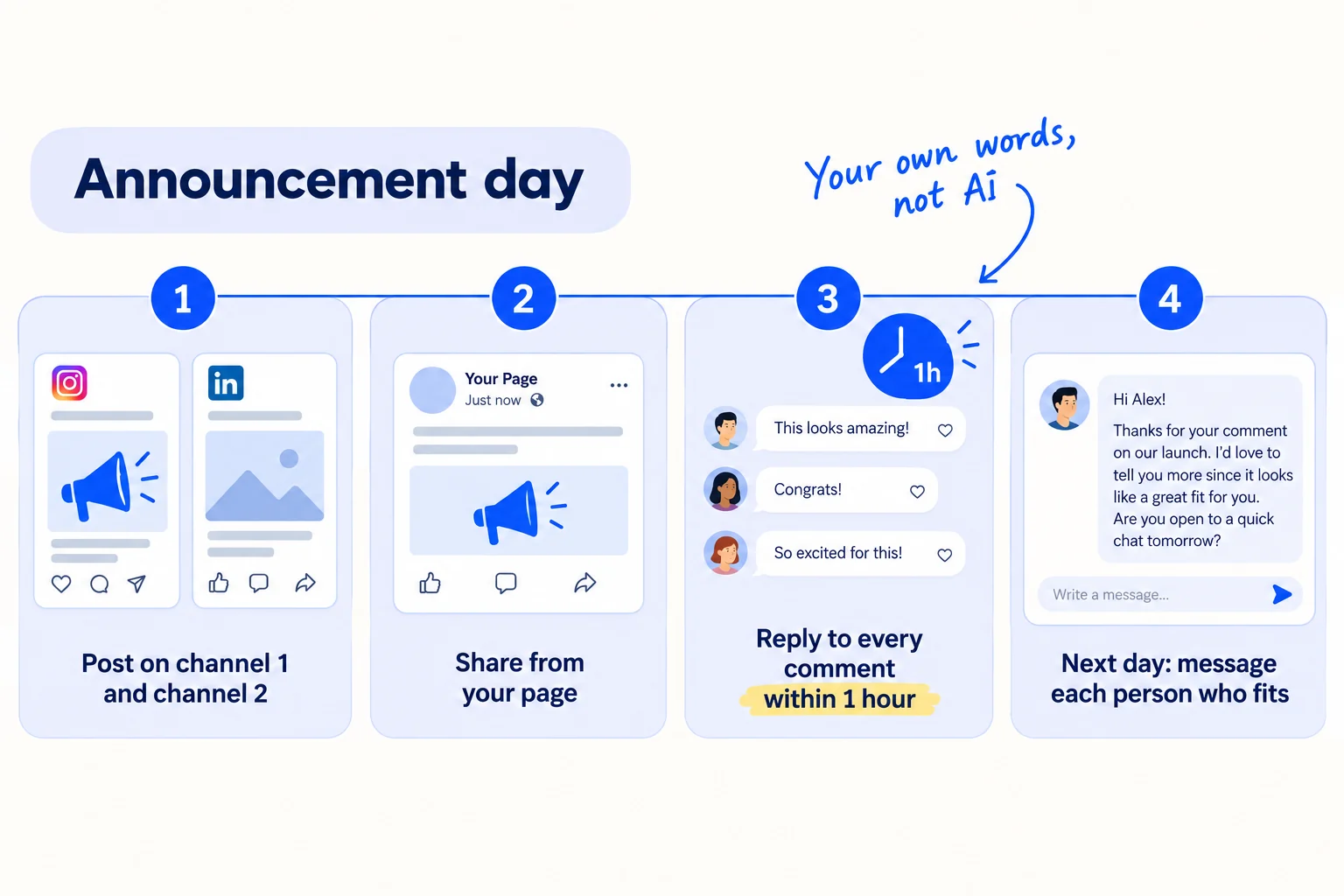
Post your announcement from your own profile on both channels on the same day, share it from your business page, and reply to every comment within an hour, in your own words. Add your new job on LinkedIn the same day.
Do this in order:
- Post on both channels from your own profile: the text with the video on LinkedIn or X, and the video as a Reel or TikTok with the text as its caption. Tag the link in each post with a UTM parameter, so you can count visits by channel in step 6.
- Share it from your business page. On Instagram, tap the three dots on the post and pin it to the top of your profile; you can pin up to 3.
- Add a partner, if you have one. On Instagram, tap "Tag people", then "Invite collaborator", and pick your co-founder, your first client or a supplier who agreed. The post then shows on their profile too. LinkedIn has started testing the same kind of shared post since June 2026; use it if your account has it.
- Add your new job on LinkedIn with "Share with network" on (step 1).
- Reply to every comment within an hour, for the rest of the day. Thank them in one line, then answer the question or ask one back: "Thanks, Sara! Do you know anyone who [has the problem]?" A question gets a second reply. Write every reply yourself. In February 2026, LinkedIn said it would push comments posted by automation tools out of the main view.
- The next day, send a message to each person who commented and fits your buyer. Say thanks and make the offer. That is where a comment turns into a conversation.
Do not ask a group to like or share your post at a set time. LinkedIn's rules say "don't agree with others ahead of time to like or re-share each other's content". Ask people one by one to read it and say what they think (step 4). That is allowed, and it brings real comments.
- Tool: LinkedIn, Instagram, X or TikTok, and your business pages.
- Time: about 3 hours on the day, most of it replies. Day 1 takes most of a day with steps 1 and 2.
- You will have: the announcement live on 2 channels and shared from your page, your job updated, and every comment answered.
- It worked if: no comment waited more than an hour, and at least 3 people who fit your buyer commented or messaged you.
- Common mistake: pasting AI replies, or answering only "Thank you! 🙏". Both end the conversation. The other mistake is asking your friends to "like it in the first hour".
See it done: Carvelian's reply to a comment
Asked in LinkedIn, on Carvelian's announcement post
“Congrats Dan! What's the smallest order you'd take? We only sell about 300 jars a month.”
The reply
Thanks, Leah! 500 is our smallest run, and many brands your size order 500 and use them over two months. What do you ship the jars in today? If you want, I'll send you a free sample box in your own design, so you can see it next to the plain one.
Why it works: It answers the real question with a number, then asks one back, so the conversation keeps going.
4. Message 100 people a day to tell them about your new business
Send 100 personal messages a day for 14 days: first to everyone you know, then to people who fit your buyer. Each message is one to one, links your announcement, and asks for one small thing.
![A tall stack of message cards labelled '100 a day for 14 days'. The front card reads 'I've just started [business]. Do you know one person who [has the problem]?'. Two sources feed the stack: 'People you know' first, then 'People who fit'. A crossed-out bubble reads 'Please like and share!'.](/academy/illustrations/how-to-announce-a-new-business-on-social-media/step-4-message-100-people-a-day-to-tell-them-about-your.webp)
Your post reaches a slice of your followers, on one day. A message reaches one person who can buy, introduce you or tell a friend, and it asks them to do it. So most of your hours go here.
Day 1: write down 300 people you know. Go through your phone contacts, email, LinkedIn connections, WhatsApp, past colleagues, past clients and suppliers. Put them in a sheet with a column for "what I'll ask". It takes about an hour.
Message them one by one, 100 a day. Never a group chat or a broadcast list: a message sent to many people at once reads as an advert. Link the announcement post, and ask for one thing:
- Someone who could buy: make the offer from your post.
- Everyone else: "Do you know one person who [has the problem]?" An introduction from a friend is worth more than a like.
If you already have a waitlist or an email list, write to each person on it on day 1 too.
When your 300 run out, message people who fit. Build a lead list of 100 new names a day: people who match who your business is for. Open with one true line about them and use the cold email rules. Follow up twice with anyone who does not answer, 3 days apart.
Spread the 100 across channels. LinkedIn limits how many connection invitations you can send each week and does not say the number, so on LinkedIn message people you are already connected to. Send the rest by email, WhatsApp and Instagram messages. If you email more than about 50 strangers a day, use a second, warmed-up domain.
Invite people to follow your page. On your LinkedIn Page, open the admin view and click "Invite to follow". LinkedIn gives each Page a number of invitation credits every month and is lowering them for free Pages in 2026, so check your balance and invite the people most likely to buy first. You get a credit back when someone accepts. On Facebook, open your Page, click "Options", then "Invite Friends".
Ask friends to say they know you. If friends, family or anyone who works with you posts about your business, they should say so ("my friend Dan just started…"). The US Federal Trade Commission says friends and relatives who praise a business should tell readers they know the owner. It also keeps their post honest, which is what makes people trust it.
Let AI draft. Paste 10 names at a time into ChatGPT or Claude, each with one thing you know about the person, plus the template. Read each draft, make the first line true, and send. That is about a minute a message.
Hi [first name],[One true line: something you shared, or something they did recently.]I've just started [business name]. We [what you do, in one line] for [kind of customer]. Here's the post: [link]Do you know one person who [has the problem]? A name is all I need, and I'll mention you sent me.[If they could buy: "Or, if it's useful for you, [your first offer]."]Thanks,
[Your name]
- Tool: your email, WhatsApp, LinkedIn and Instagram messages, ChatGPT or Claude to draft, and a Google Sheet with one row per person.
- Time: about 2 hours a day, and 45 minutes a day to add 100 new names once your 300 run out.
- You will have: 1,400 messages sent in 14 days, and a sheet of replies, introductions and conversations.
- It worked if: at least 20 of every 100 people you know reply, and at least 3 of every 100 people who fit agree to a chat or ask for your offer. Below that, make the ask smaller, like one name instead of a call, then send the next 100.
- Common mistake: "Please like and share my post!" It asks for a favour that brings no customers. The other mistake is messaging only the 20 people you are closest to, then stopping.
See it done: Carvelian's message to an old colleague
To: Jo, a sales manager at the print firm where Dan used to work
Hi Jo,
Hope the new press is behaving better than the old one did.
I've just started Carvelian Packaging. We print custom boxes for small food and drink brands, from 500 boxes. Here's the post: [link]
You must turn away small brands every week because the order is too small. Could you send one of them my way? A name is all I need, and I'll say you sent me.
Thanks, Dan
Why it works: It is short, it is about her, and it asks for one name, which is easy to say yes to.
5. Post twice a day on each channel for 14 days
Keep announcing. Post twice a day on each of your 2 channels for 14 days, 56 posts in all, each one showing a different side of the new business. Spend another hour a day giving 20 useful replies to your buyers' posts and questions.
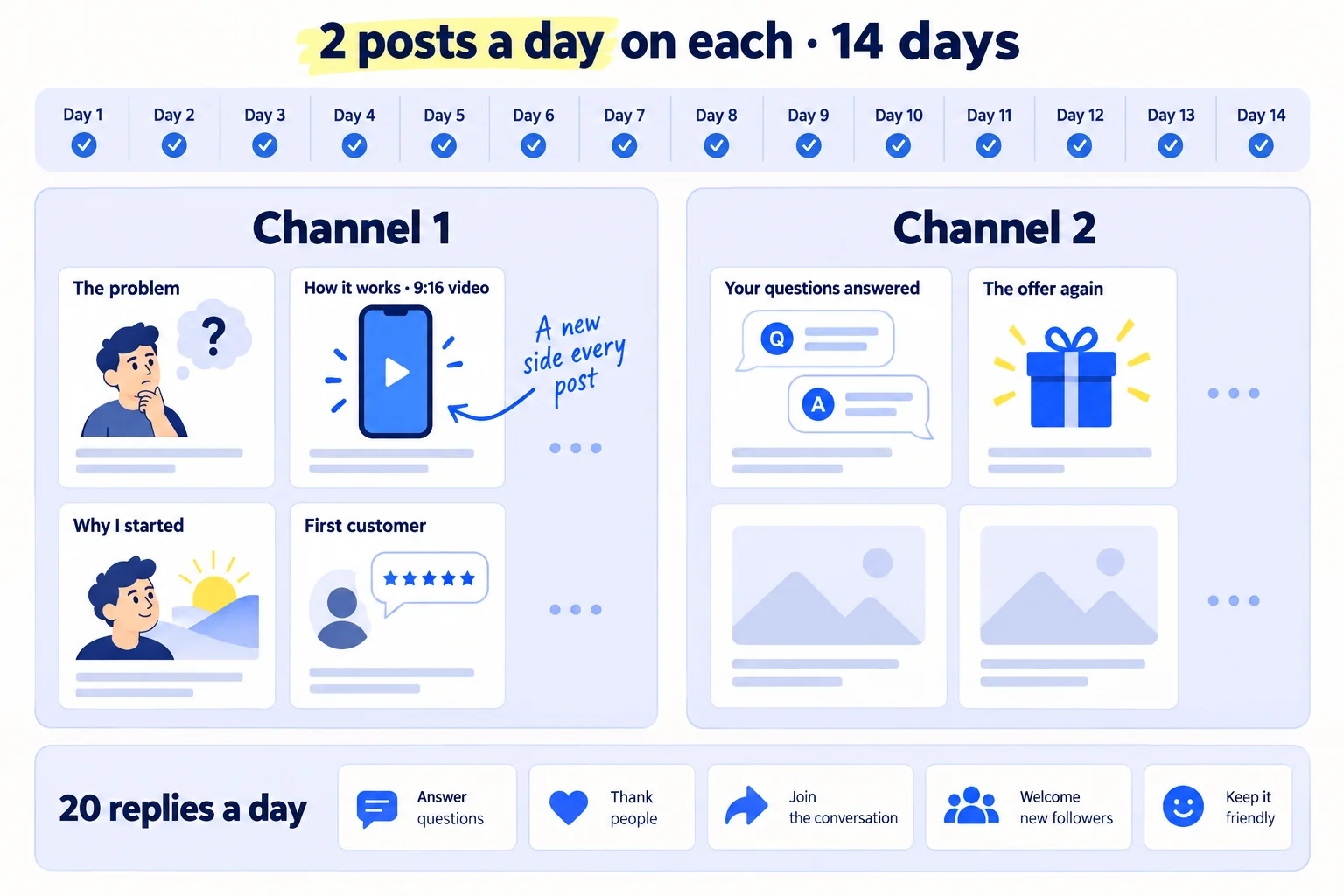
One post reaches a slice of your followers on one day. Buffer's 2026 data shows reach per post goes up, not down, as you post more: Instagram accounts posting 10 or more times a week got about 24% more reach per post than those posting once or twice. So post more, and make each post new.
Rotate these kinds of post, and use the post-idea lists for SaaS, B2B, D2C or agencies when you run dry:
- The problem, told as one buyer's story (with their permission, or with no name).
- How it works, as a 9:16 video: the product or the work, from start to result.
- Why you started it, in 3 sentences.
- The first customer, with their words and what changed. It is your first social proof, and later a testimonial.
- Answers to questions people asked in comments and messages this week: price, delivery, who it is not for.
- Behind the scenes: making it, packing it, a call you learned from.
- The offer again, with the ask from your announcement, twice a week.
On LinkedIn, try some as carousels: in Buffer's 2026 study they got about three times the engagement of video or single images. On Instagram, Reels reached about a third more people than carousels. Rewrite each post for each channel instead of pasting the same text; repurposing means changing the shape, not copying.
Write in batches. Every Sunday, give ChatGPT or Claude your notes, the questions people asked and the replies you got that week, and ask for 30 first drafts. Keep the 28 that say something true, and rewrite them in your voice. Put them in a content calendar so each day is already decided. AI does the drafting; you add the true detail.
Then give 20 replies a day across 5 places where your buyers post: their LinkedIn posts, Facebook groups, subreddits or forums. Read each place's rules on self-promotion first. Answer the question as if your business did not exist; mention it only if someone asks. Spreading 20 replies over 5 places keeps you inside each one's rules. If a local paper or a trade newsletter writes about businesses like yours, pitch them the story of why you started, once, in week 2.
- Tool: your 2 channels, ChatGPT or Claude to draft, your phone for video, and Google Sheets or a free calendar for the plan.
- Time: about 1 hour 45 minutes a day: 45 minutes for 4 posts, 1 hour for 20 replies. Plus 1 hour each Sunday to write the week.
- You will have: 56 posts and 280 replies in 14 days, and a set of videos and answers you can use again.
- It worked if: by day 14, your posts and replies started at least 1 conversation (a message, a call or an order) for every 10 posts.
- Common mistake: posting the same "We're open!" post again, or only countdowns and logos. Each post needs a reason for a buyer to stop.
6. Count what the announcement brought every Sunday
Every Sunday, fill in one sheet: for each source, how many messages or posts went out, how many replies, how many conversations and how many customers. After 14 days, move your hours to what brought the most.
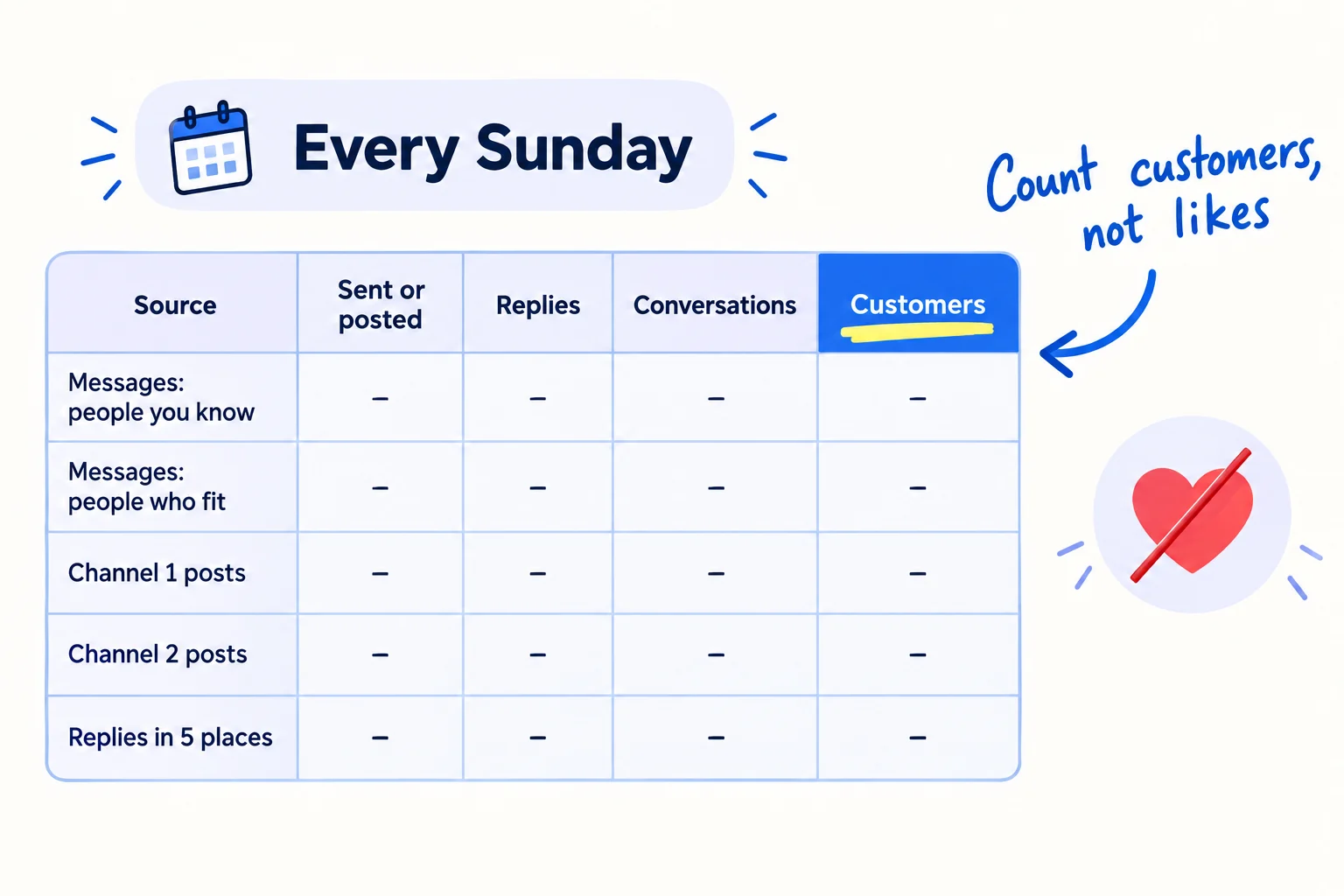
Likes and new followers tell you who saw it. Conversations and customers tell you whether the announcement worked. To know where each one came from:
- Ask. Add "Where did you hear about us?" to your order form, booking form or first call. That is self-reported attribution. It catches what links miss, such as a friend telling a friend.
- Tag your links. Use a different UTM link in the post on each channel, in your bio and in your messages, so visits show by source.
- Log every conversation in your message sheet as it happens, with where it started.
After 14 days, 1,400 messages and 56 posts, decide with this rule:
- A channel with 0 conversations from its 28 posts: stop posting there daily. Give its hours to messages or to the other channel.
- Messages to people you know brought the most: keep going until you have messaged everyone, then move to people who fit, as in getting your first B2B clients or getting customers online for free.
- Posts get comments but no messages: make the ask in each post smaller and clearer.
After day 14, the announcement is over, and the daily work is your routine. Keep 2 posts a day on the channel that works and grow your followers from there. Keep 100 messages a day. If you launch software, the same list is the start of a Product Hunt launch. If you are launching a B2B product or a D2C brand, use this announcement as its first 14 days.
- Tool: Google Sheets, a free UTM link builder, and your order or booking form.
- Time: 30 minutes each Sunday.
- You will have: a sheet that shows conversations and customers by source, and next week's hours written down.
- It worked if: you can say where every conversation and every customer came from.
- Common mistake: judging the announcement by likes and followers, then stopping the messages because the post "did not go viral".
See it done: Carvelian after 14 days
The Sunday sheet, days 1 to 14
| Source | Sent or posted | Replies | Conversations | Samples or quotes | Orders |
|---|---|---|---|---|---|
| Messages: people he knows | 300 | 74 | 11 | 4 | 1 |
| Messages: brands who fit | 1,100 | 61 | 34 | 6 | 0 |
| LinkedIn posts | 28 | 46 | 3 | 1 | 0 |
| Instagram posts | 28 | 12 | 0 | 0 | 0 |
| Replies in 5 places | 280 | 19 | 2 | 0 | 0 |
The decision: Instagram brought 0 conversations from 28 posts, so Dan moves its 25 minutes a day to LinkedIn posts and messages, and keeps 100 messages a day.
Why it works: The founder counts conversations and orders by source, so he can see the messages did the work and one channel brought nothing.
Where Scout7 helps
Scout7 speeds up steps 2 and 5.
Steps 2 and 5. Scout7 makes image posts with captions in your voice, and short portrait (9:16) videos from a script you direct. It schedules them to LinkedIn, X, Instagram, Facebook, Threads and Reddit, and shows the 14 days in one calendar. You approve each post and each video. Nothing goes live without your approval.
Step 5's replies. Join Conversations searches social platforms for live discussions about your problem, groups them by the kind of reply that fits, and drafts a reply in your voice. You read each thread and approve or rewrite every reply. Replies to comments on your own announcement (step 3) stay in your own words.
Your new business announcement checklist for the next 14 days
0 of 13 done
Work through this list with an AI assistant
It drafts the work and keeps track of what is done.
Frequently asked questions
- What should I write in a new business announcement?
Five things, in this order: the problem in your buyers' words, what you started and for whom, why you, your first offer, and one thing to do next, such as "reply 'sample'". Put the problem and what you do in the first two lines. Leave out "excited to announce". The template in step 2 works in a message to friends too.
- Should I announce from my personal profile or a business page?
Both, but post from your personal profile first. The people who know you follow you, not a page created this week. Share the post from your business page and pin it there, so people who check you find it. On LinkedIn, also add the business as your new job with "Share with network" on, so your connections are told about it.
- Is it too late to announce my business if I opened months ago?
No. Most people you know have not heard yet, and nobody minds a late announcement that is clear. Write it the same way, add one line on what has happened so far, such as your first customer, and run the same 14 days. A few months of real work gives you proof to put in the posts.
- Should I pay to boost my announcement post?
Not at first. A boost shows the post to strangers who do not know you, and a new business has no reviews yet to win them over. Spend the 14 days on messages and posts, count what brings customers, then test a small, capped ad budget on the message that worked best.
- I have a shop or office people visit. What else should I do?
Set up a Google Business Profile. You can add an opening date up to a year ahead, and your profile shows on Google 90 days before it, with posts to announce the opening. After you open, Google shows a "Recently opened" tag for 90 days. Ask your first customers for Google reviews too.
Sources
- 1.Share profile updates with your network — LinkedIn Help, checked 29 September 2026
- 2.Create a LinkedIn Page best practices — LinkedIn Help, checked 29 September 2026
- 3.Invite connections to follow your LinkedIn Page — LinkedIn Help, checked 29 September 2026
- 4.Invitation limits for your LinkedIn Page — LinkedIn Help, checked 29 September 2026
- 5.Professional Community Policies — LinkedIn, checked 29 September 2026
- 6.LinkedIn outlines measures to combat engagement pods — Social Media Today, 16 February 2026, checked 29 September 2026
- 7.LinkedIn adds collaborative posts — Social Media Today, 22 June 2026, checked 29 September 2026
- 8.Instagram implements new limits on hashtag use — Social Media Today, 18 December 2025, checked 29 September 2026
- 9.Instagram ranking explained — Instagram, 31 May 2023, checked 29 September 2026
- 10.Instagram collab post: how to grow your reach and visibility — Hootsuite, 29 April 2025, checked 29 September 2026
- 11.Invite friends to follow a Page or profile on Facebook — Facebook Help Center, checked 29 September 2026
- 12.FTC's Endorsement Guides: what people are asking — US Federal Trade Commission, checked 29 September 2026
- 13.Add a business opening date — Google Business Profile Help, checked 29 September 2026
- 14.How often to post on social media in 2026 — Buffer, 13 January 2026, checked 29 September 2026
- 15.The state of social media engagement in 2026 — Buffer, 5 March 2026, checked 29 September 2026
Next article to read
Related guides
- How to build a waitlist before you launchBuild a waitlist before you launch: set a launch date no more than 4 weeks away, put up one page with an email field and one question about the problem, fill it with 100 personal invites, 20 answers and 2 posts a day, write back to everyone who joins within 24 hours, and email the list first on launch day.
- How to grow on LinkedIn as a founderComing soon
- How to pitch journalistsComing soon
- How to launch a B2B productB2BLaunch your B2B product when you do all the selling: write a founding offer for your first 10 customers, invite 100 named buyers a day to a 30-minute live demo 3 weeks away, post twice and answer 20 questions a day, write to everyone the day after, and count conversations by source every Sunday.
Guides that link here
Cite this page
Dinesh Bypilla (2026). How to announce a new business on social media. Scout7 Academy. https://scout7.ai/academy/launch/how-to-announce-a-new-business-on-social-media
Written by Dinesh Bypilla, Agentic systems engineer at Scout7. Reviewed by Murali Sid. Last checked 29 September 2026.
Quote any part of this guide with a link back to this page. © 2026 Scout7.
Markdown version of this page: https://scout7.ai/academy/launch/how-to-announce-a-new-business-on-social-media.md