



How long does SEO take to work?
Find out how long SEO takes to work for a new site: check in 20 minutes that buyers search for what you sell, get your site onto Google today, publish 1 page a day for searches people make just before they buy, and judge it at week 2, month 1, month 3 and month 6 against a number for each, with a count every Sunday.
ByDinesh BypillaReviewed byMurali SidLast checked 19 min read
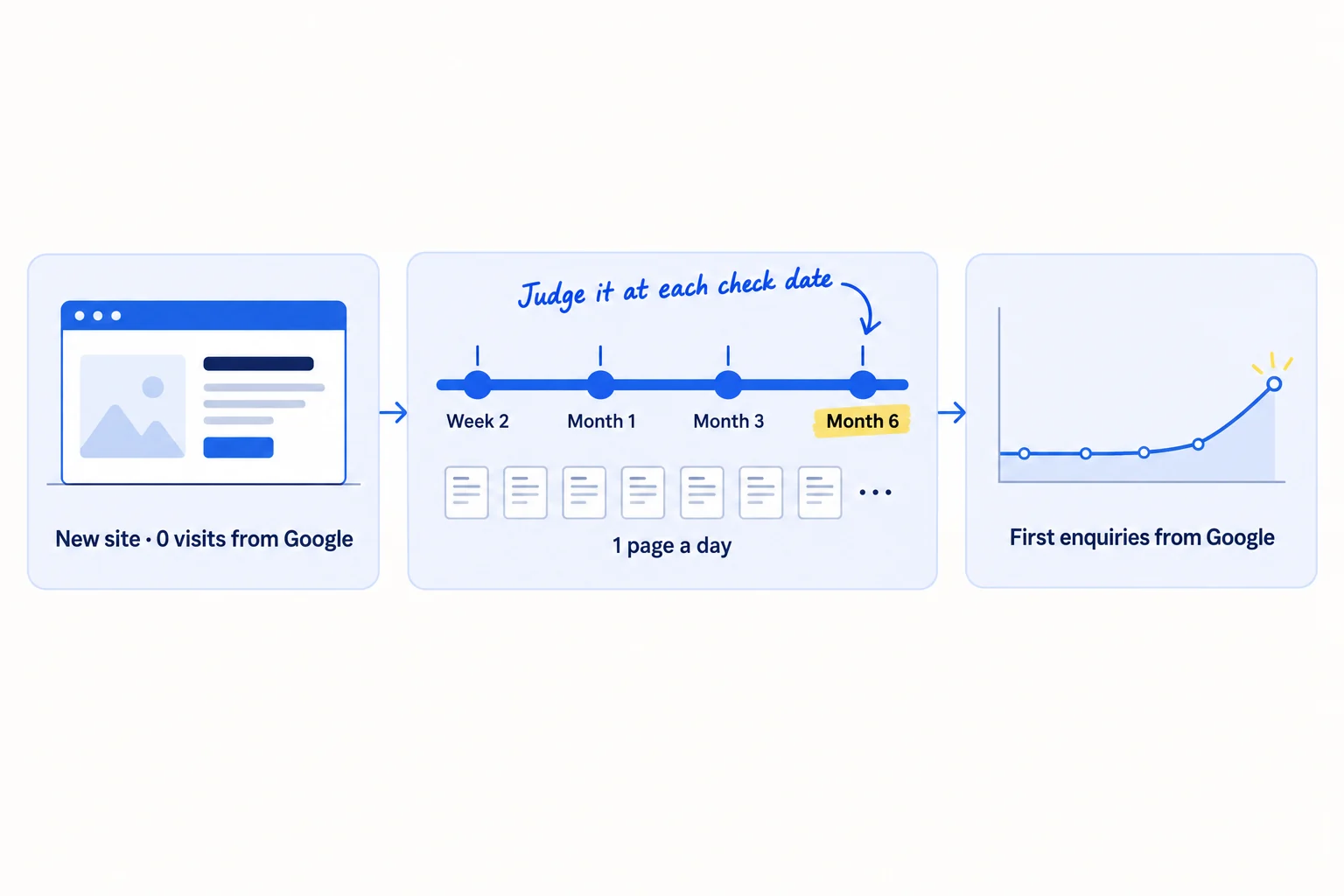
You have no customers yet, and everyone says SEO takes 6 to 12 months, so you wonder if it is worth starting at all. Here is how long SEO takes to work for a new site: new pages get onto Google in days to weeks, the first clicks usually come around month 3, and the first enquiries around month 6, if you publish enough of the right pages. If you publish a few general posts and wait, month 6 comes and nothing has happened.
Do these three things
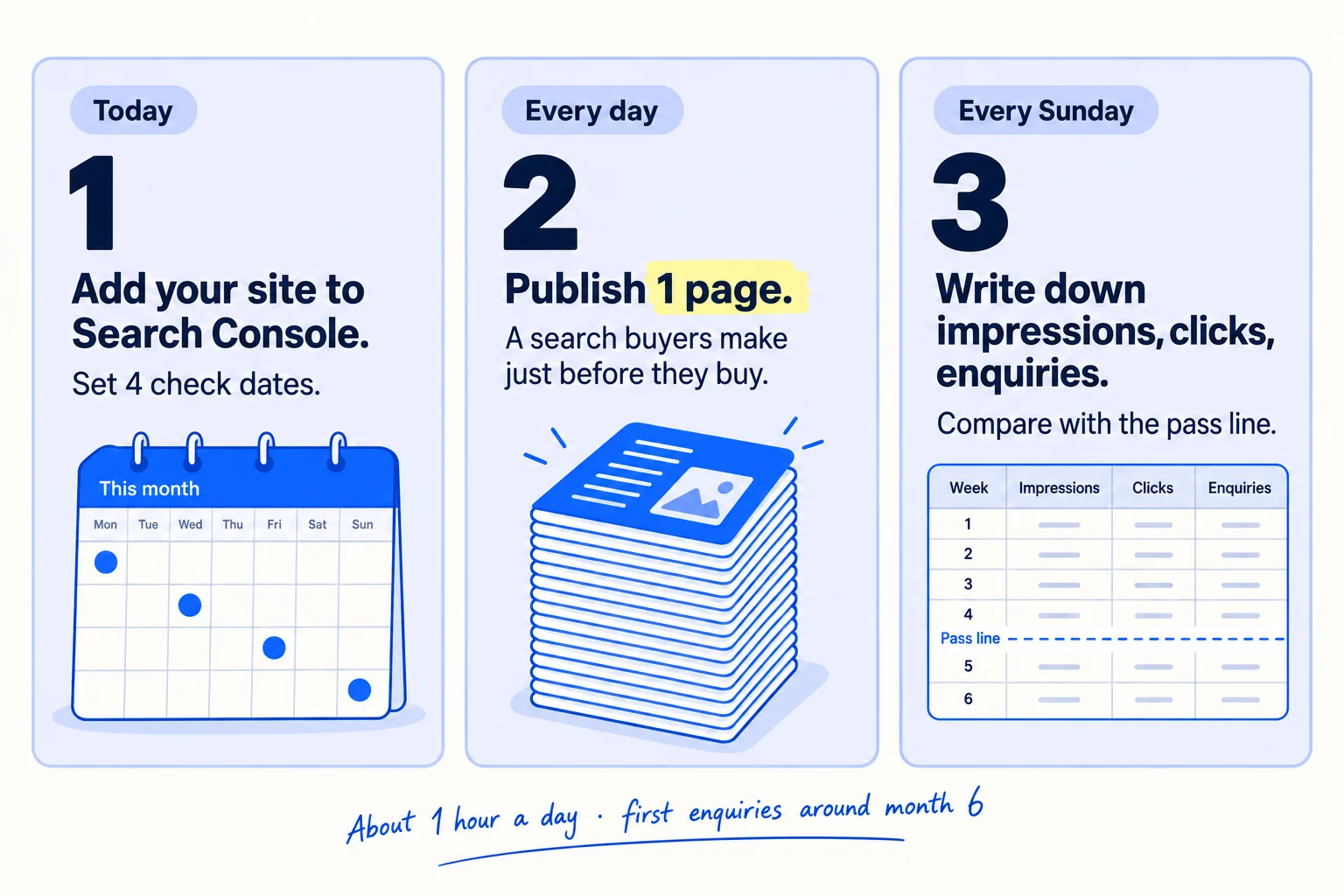
About 1 hour a day for search, next to your daily messages. Expect the first clicks around month 3 and the first enquiries around month 6, after 90 to 180 pages. Nobody can promise a ranking.
Show the three actions in fullHide the full list
- Today: add your site to Google Search Console, submit your sitemap, and put four check dates in your calendar: week 2, month 1, month 3 and month 6.
- Every day: publish 1 page that answers a search your buyer types just before they buy, found with a quick keywords check. AI drafts it; you add one thing only you know.
- Every Sunday: write down this week's non-brand impressions, clicks and enquiries from Google, and compare them with the number this guide sets for your next check date. That is how you measure SEO before it brings sales.
Get help doing these
ChatGPT or Claude reads this guide and works through it with you.
1. Check if people search for what you sell before you start SEO
Before you spend a month on SEO, spend 20 minutes checking that your buyers type what you sell into Google. If at least 5 of 10 buyer phrases show up in Google's suggestions, start SEO today. If fewer do, still do the minimum in this guide, but put most of your hours into finding customers directly.
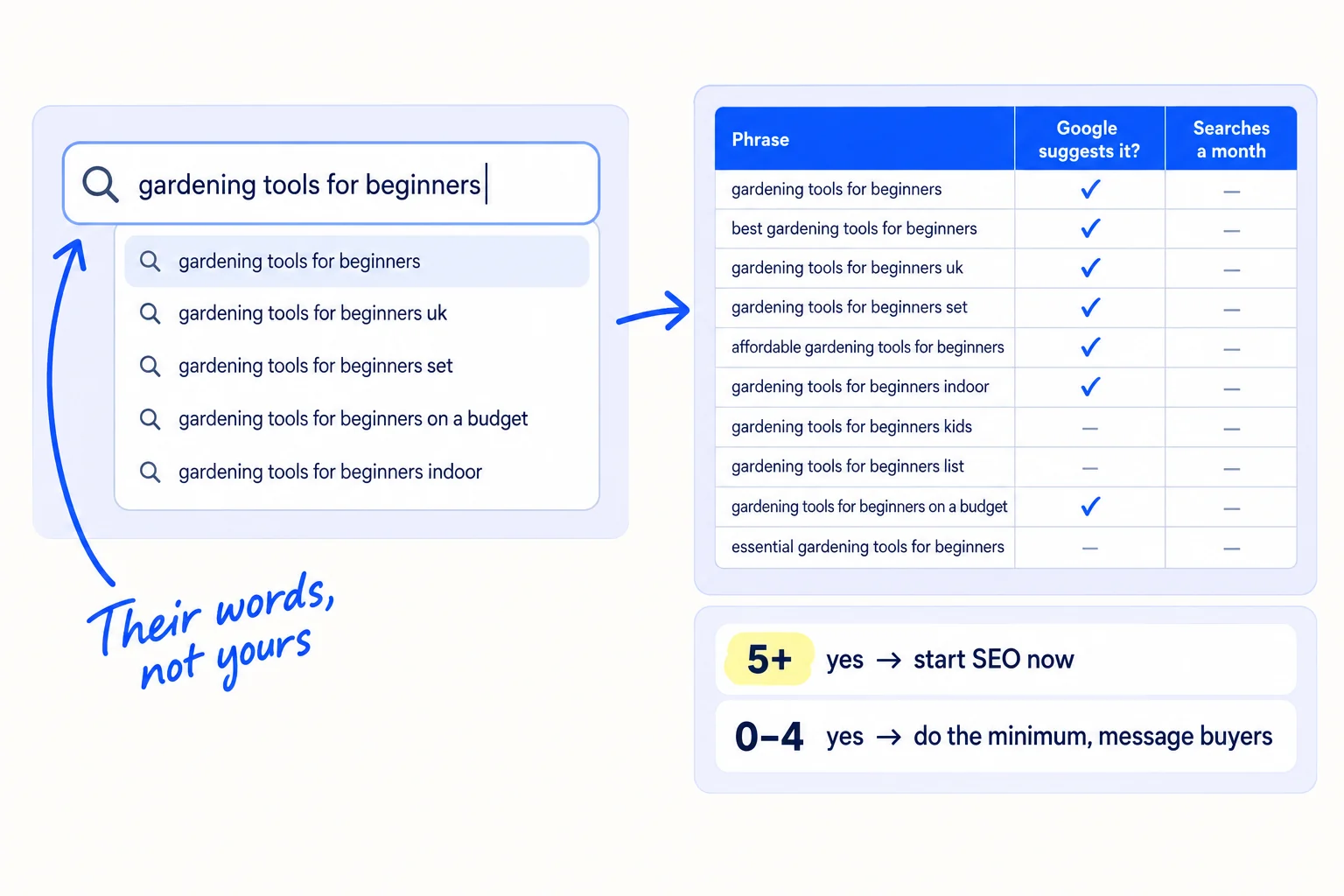
Write 10 phrases your buyer would type when they need you, in their words, not yours. Use what customers have said to you, what they wrote in emails, and the words your ideal customer uses. Mix these kinds:
- What you sell, for whom: "[what you sell] for [kind of buyer]".
- The tool or supplier they use now: "[competitor] alternative".
- The buying question: "[what you sell] price", "[what you sell] minimum order", "how long does [what you sell] take".
Type each one slowly into Google and note if Google suggests it. Then paste all 10 into the free Ahrefs Keyword Generator. You do not need an account to search, and it shows about how many people search each phrase a month. Write both in a sheet. This is a quick check, not full keyword research; that guide shows how to build the full list.
Phrase | Google suggests it? (yes / no) | Searches a month (Ahrefs) | Kind: what you sell / alternative / buying question
[what you sell] for [kind of buyer] | | |
[competitor] alternative | | |
[what you sell] price | | |
… up to 10
Yes count: __ of 10. 5 or more: start SEO today. 0 to 4: do steps 2 and 3 at 1 page a day on the "yes" phrases only, and give the other hours to step 4.
A phrase with 20 or 50 searches a month is worth a page. Small searches have fewer pages fighting for them, and a 2025 Ahrefs study found it takes longer to rank for big searches than small ones. If you run a business that meets customers in person, add "near me" and your city to three of the phrases.
If you run a D2C store: use the product type and the need, such as "[product type] for [need]", not your brand name. Nobody searches for a brand they have not heard of yet.
If you run an agency: use "[service] for [kind of client]", such as the words your clients used when they first wrote to you. "Marketing agency" on its own is too wide to rank for.
- Tool: Google, the free Ahrefs Keyword Generator, and Google Sheets.
- Time: 20 minutes.
- You will have: a sheet of 10 phrases with a yes or no, a monthly search number, and a decision.
- It worked if: you have a yes count and know which rule applies. 5 or more yes: go on with all the steps.
- Common mistake: checking only your own product name, or only one big phrase like "packaging" or "CRM". The first has no searches yet; the second is years away for a new site.
See it done: Carvelian's 10-phrase check
Carvelian Packaging is a made-up maker of custom printed boxes for small food and drink brands. One founder sells through calls, samples and quotes.
The search check
| Phrase | Google suggests it? | Searches a month |
|---|---|---|
| custom printed boxes for food | yes | 90 |
| custom coffee boxes with logo | yes | 70 |
| custom bakery boxes small order | yes | 40 |
| food safe printed boxes | yes | 50 |
| custom tea boxes wholesale | yes | 30 |
| custom printed boxes minimum order | yes | 30 |
| how long do custom boxes take to make | yes | 20 |
| printed boxes for drink brands | no | 0 |
| eco friendly food packaging supplier small brands | no | 0 |
| short run food packaging printing | no | 10 |
7 of 10 are yes, so they start SEO today.
Why it works: Most of the phrases are what a buyer types when they are ready to order, and 7 of 10 are real searches.
2. Add your site to Google Search Console today
SEO cannot start working until Google knows your pages exist, so set up Search Console today. Google says crawling "can take anywhere from a few days to a few weeks", so every day you wait adds a day to the timeline.
- 1
Add your site to Search Console
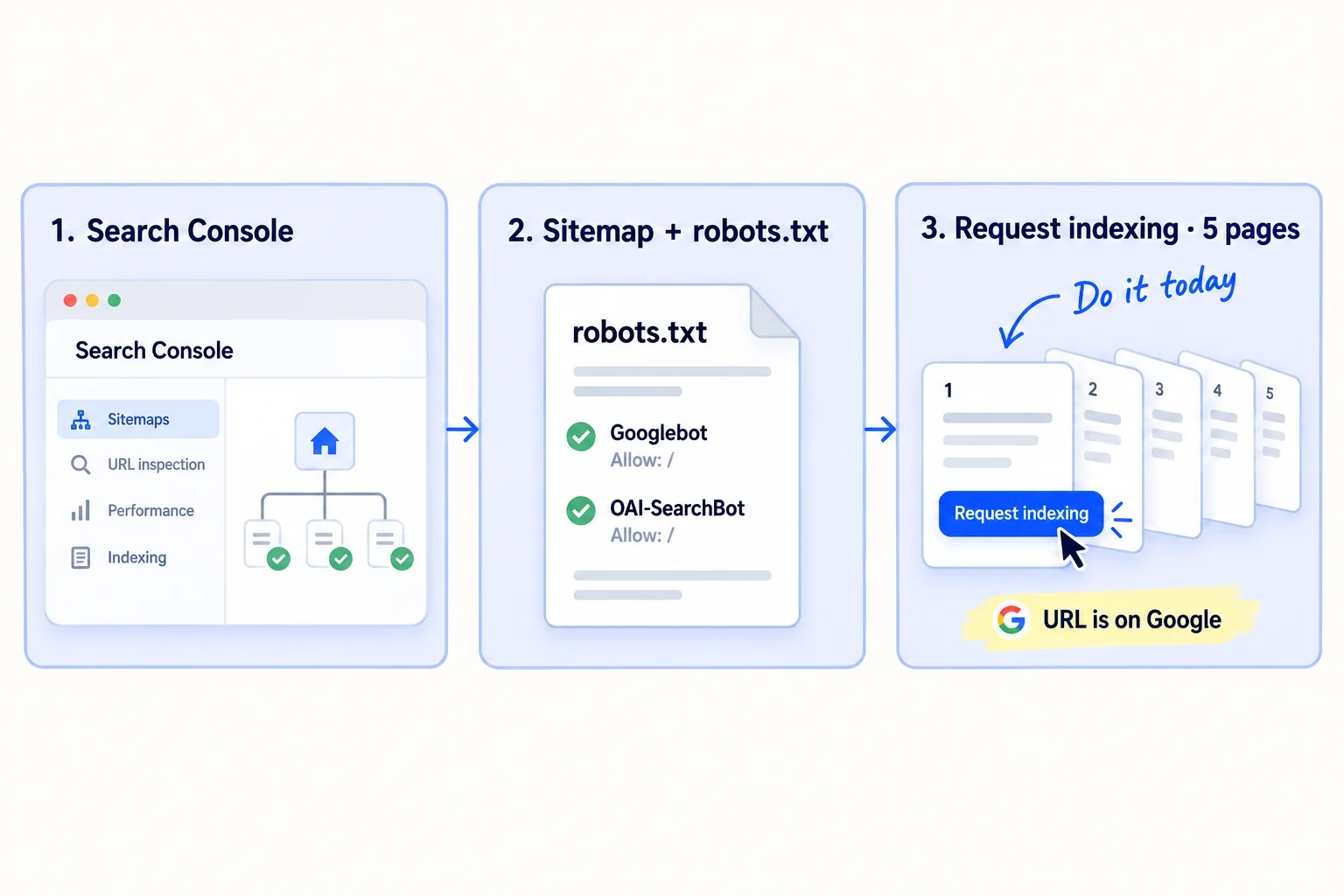
Open Google Search Console, click "+ Add property", choose Domain, and add the line Google gives you to your domain's DNS settings. Then open Sitemaps and submit your sitemap, the file that lists every page. Most site builders make it for you at yoursite.com/sitemap.xml. Search Console is free.
- 2
Check robots.txt
Open yoursite.com/robots.txt. If you see "User-agent: *" or "User-agent: OAI-SearchBot" followed by "Disallow: /", delete those lines. OpenAI says sites that block OAI-SearchBot "will not be shown in ChatGPT search answers". Also turn off any "hide from search engines" setting in your site builder. The other checks are on the technical SEO checklist.
- 3
Ask Google to index your main pages
Paste your home page into URL Inspection at the top of Search Console and click "Request indexing". Do the same for your 4 most important pages: what you sell, pricing, about and contact. There is a daily limit on these requests, so keep them for new and important pages.
The same step also gets you ready for AI answers. Google says there are "no additional requirements" to appear in AI Overviews or AI Mode: a page only needs to be indexed and shown in Google Search. You do not need any special AI file.
If you run a D2C store on Shopify: Shopify makes your sitemap for you at yourstore.com/sitemap.xml. Remove the store password as soon as you can take orders: while it is on, Shopify hides "all of your online store's pages" from search engines, so Google cannot list it. Then set up SEO for your Shopify store.
If you run a B2B company or an agency that meets clients in person: also set up a Google Business Profile today. It is free, and it lets you show up in Google Maps results near you. Google only allows it for a business with a place customers can visit, or one that travels to customers.
- Tool: Google Search Console. Free.
- Time: 30 minutes.
- You will have: your site in Search Console, a sitemap submitted, and 5 pages sent for indexing.
- It worked if: within 2 weeks, URL Inspection shows your home page as "URL is on Google". If it does not, open the Page indexing report and fix what it lists.
- Common mistake: a "Disallow: /", a "noindex" setting or a store password left on from when the site was being built. Any one of them keeps your whole site out of Google.
3. Publish one page a day for the searches buyers make just before they buy
Publish one page every day, and start with the searches people make just before they buy. These pages get fewer searches, but the people who find them are ready to talk to you. That is what makes SEO bring enquiries at month 6 and not only visitors.
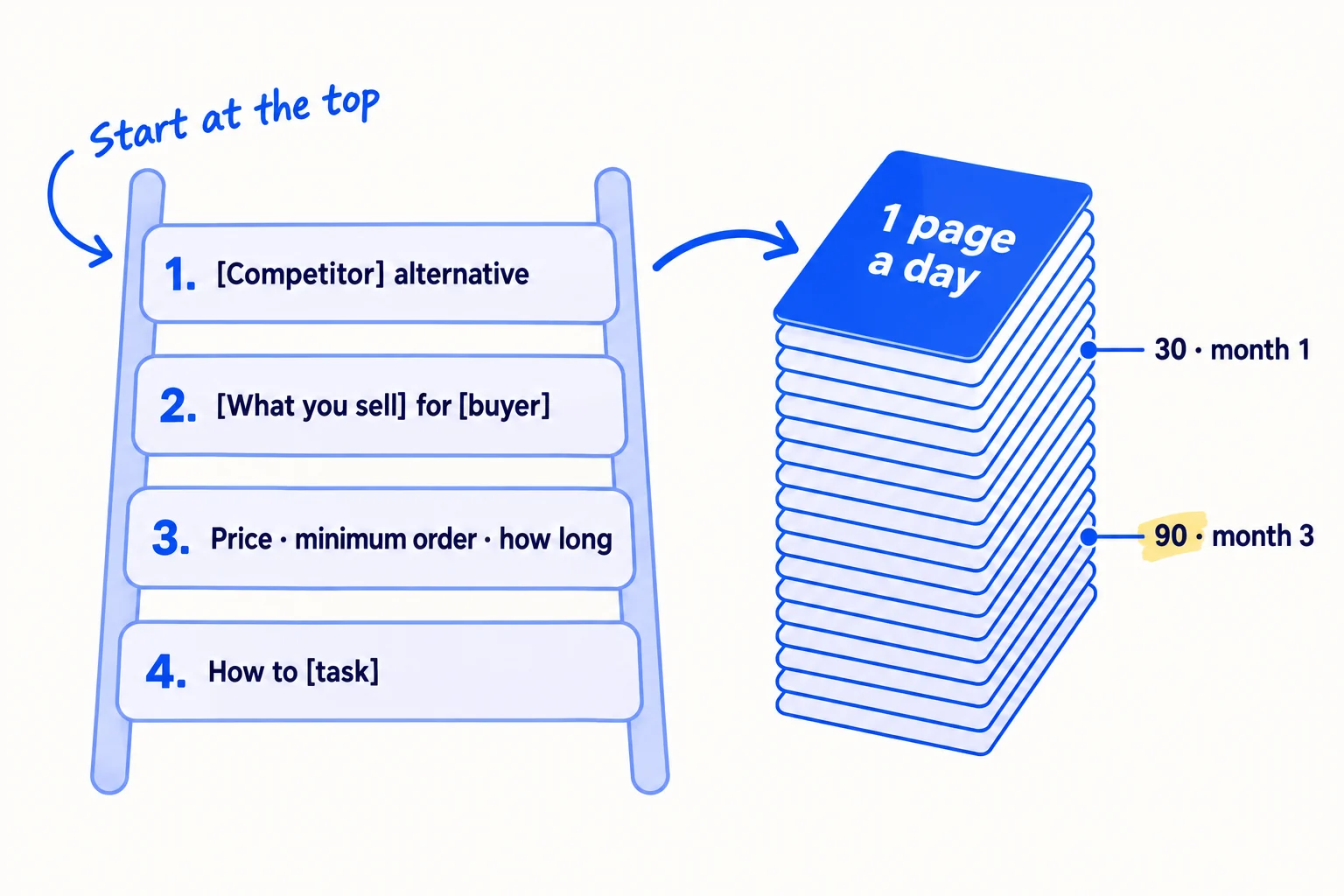
The number of good pages you publish sets how long SEO takes. A founder who publishes 8 pages in 3 months is still waiting at month 6. At 1 page a day, you have 30 pages at month 1 and 90 at month 3, and 90 chances for Google to show one of them.
Work down your "yes" phrases from step 1, then add more with the keyword method, in this order:
- Alternative and comparison pages: "[competitor] alternative" and "[competitor] vs [competitor]". See how to write comparison and alternative pages that stay fair.
- What you sell, for a kind of buyer: one page for each kind of buyer or use, in their words.
- Buying questions: price, minimum order, how long it takes, what is included. Answer them with real numbers.
- How-to questions your buyer asks. These bring the most readers and the fewest buyers, so they come last.
Why this order matters now: since AI Overviews, general "what is" and "how to" searches often get answered on Google's page. In a February 2026 Ahrefs study, the top result got 58% fewer clicks when an AI Overview was shown. In August 2026, one founder wrote pages on general questions and got 4 times more impressions in two weeks, but 0 signups. Their 6 signups that month came from launch sites and community posts.
Let AI do the drafting. Give ChatGPT or Claude the phrase, your notes and what customers asked you, and ask for a first draft with the answer in the first two lines. Then spend your time on what only you can add: a real price, a photo of your work, a number from your own customers, a step you tested. Google's spam rules count many pages made to rank that do not help the reader as spam, whoever wrote them. A page that answers one real question with something only you know is not that. Guides on using AI for content and writing a post that ranks cover the writing itself.
Title: [the phrase, as people type it]: [the short answer]First two lines: [answer the question fully, with a number if there is one].[What it costs / how long it takes / who it is for, with real numbers from your business.][One thing only you know: a photo, a customer's words, a result, a step you tested.][2–4 common follow-up questions, each answered in 2–3 lines.][One line: what to do next, such as "Ask for a quote" or "Try it free", with a link.][Links to 2–3 of your other pages on close topics.]
After you publish, paste the page into URL Inspection and click "Request indexing". Plan the next 7 pages every Sunday in a simple content calendar, so each day starts with the phrase already chosen.
If you run a D2C store: your product and collection pages are your first pages. Put the product type and the need in the title and the first line, and add size, material and delivery time. Then add one buying-question page a day. See how to write product descriptions that sell.
If you run a B2B company: one case study page per client, named by the buyer's kind of business, often answers a buyer search too.
- Tool: your site editor, and ChatGPT or Claude to draft.
- Time: about 1 hour a page: 10 minutes for the AI draft, 50 minutes to check it and add your own proof.
- You will have: 30 pages at month 1, 90 at month 3 and 180 at month 6, each answering one phrase.
- It worked if: every page answers a phrase from your sheet in its first two lines, has one thing only you know, and was sent for indexing.
- Common mistake: general posts about your industry, such as "5 trends in packaging". Few buyers search them, and AI Overviews answer most of them. The other mistake is pasting AI drafts with nothing of your own in them.
See it done: Carvelian's first page title
Before
Our Packaging Solutions
After
Custom printed boxes for food brands: from 250 boxes, ready in 3 weeks
Why it works: The new title is the exact phrase buyers type, and it answers their two biggest questions at once.
4. Keep getting customers another way while search catches up
SEO is slow at the start, so keep your other daily work going and use every new page there too. Ahrefs puts it plainly: "For most companies, SEO is a channel for scaling growth, not achieving product/market fit." Your first customers will most likely come from people you talk to.
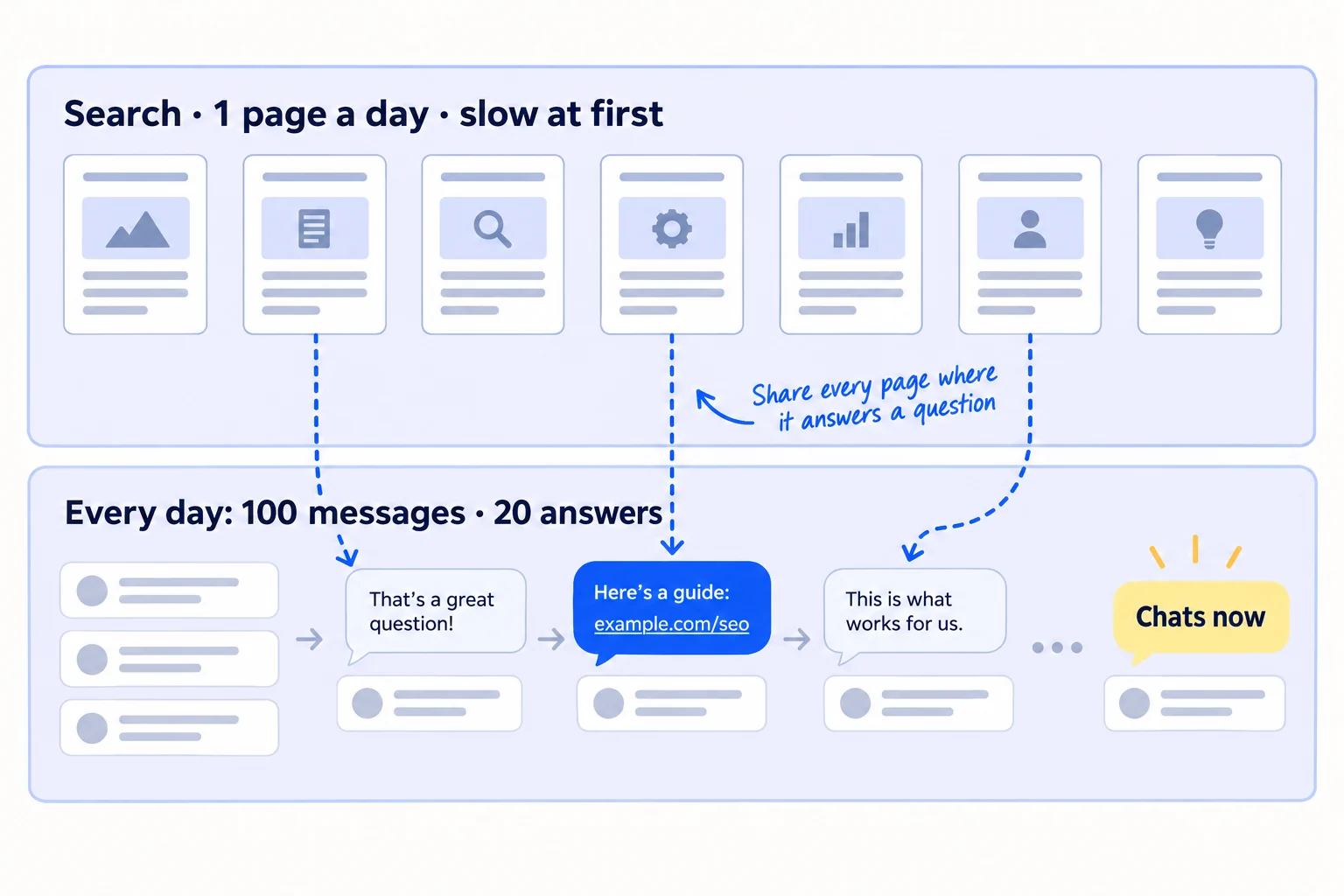
Keep sending 100 personal messages a day to people who fit, and giving 20 answers a day in places where your buyers ask for help. AI drafts each message and finds the questions; you add one true line about the person and write each answer yourself. The full daily routine is in how to get traffic to a new website for free.
Then make your pages work from day one. When someone asks a question your new page answers, answer it fully in the thread, and add the link only where the place's rules allow it. On Reddit, read how to post without getting banned first. Each page gets its first readers this way, long before Google sends any.
[Answer their exact question in the first 2–3 lines, with the numbers.][One or two things to watch out for.][Only where the rules allow links:] I wrote up the full answer, with prices and examples, here: [link to your page]. Disclosure: it's my company's site.
If you run an agency: your clients ask the same "how long" question. Show them this timeline before you start, and read how to explain SEO timelines to clients.
- Tool: email or LinkedIn, the communities you picked, and ChatGPT or Claude to draft.
- Time: about 3 hours a day for messages and answers, next to the 1 hour for the page.
- You will have: chats from messages this week, and every new page shared at least once.
- It worked if: you get at least 3 chats from every 100 messages, and each page has had readers before Google sends any.
- Common mistake: stopping outreach to "wait for SEO". Months 1 to 3 then bring nothing at all. If you want paid visits sooner, read about Google Ads once 10 people have paid you.
5. Check your SEO at 2 weeks, 1 month, 3 months and 6 months
Judge SEO by how many pages you have published and one number at each check date, not by how you feel. Every Sunday, fill one row of a sheet from Search Console. At each check date, compare with the pass line below.
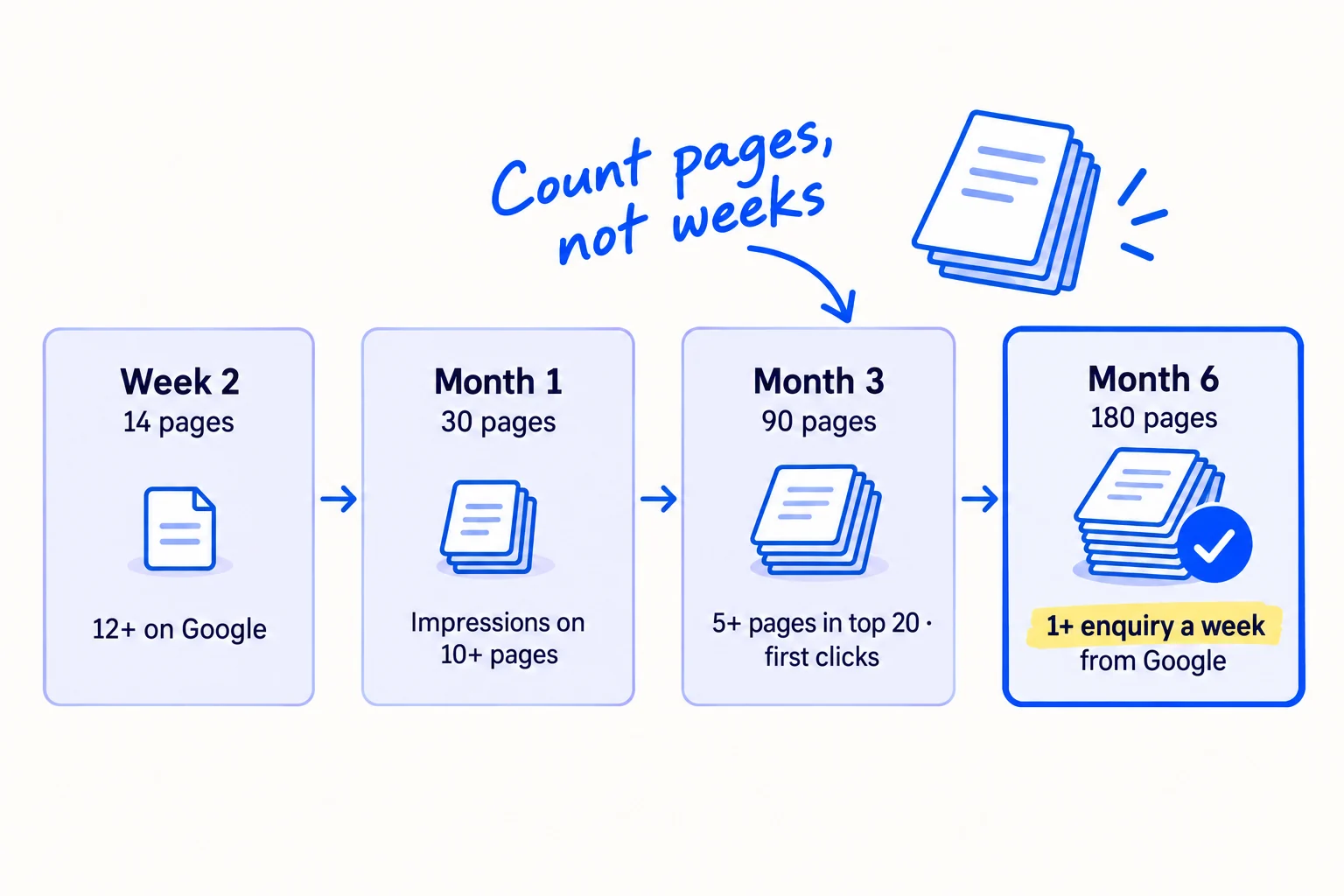
These pass lines are this guide's decision rules, not promises. Google's own advice is to "wait a few weeks" before judging a change. A 2025 Ahrefs study found that 4 in 10 pages that reached Google's top 10 got there within their first month, and it says to update a page that has not moved after about 6 months. Most SEO agencies quote 3 to 6 months for the first leads, which fits the month-6 check.
| At this check date | With about this many pages | You pass if | If you miss it |
|---|---|---|---|
| Week 2 | 14 | At least 12 pages show "URL is on Google" in URL Inspection | Fix indexing before you publish more |
| Month 1 | 30 | At least 10 pages have impressions from searches without your brand name | Your pages answer searches nobody makes. Redo the step 1 check and pick new phrases |
| Month 3 | 90 | At least 5 pages have an average position under 20, and some searches without your brand name bring clicks | Go back to buyer searches (step 3), update the close pages and start getting backlinks |
| Month 6 | 180 | At least 1 enquiry, signup or order a week says it came from Google | If impressions grow but nobody buys, fix the pages' next step and write more buyer pages. If impressions are flat, stop new pages, update your best 20, and move the hours to step 4 |
To see this in Search Console, open Performance, then Search results. Click the "Daily" drop-down on the chart and choose Weekly, so single days do not fool you. Then remove searches that include your brand name: use the Branded queries filter if you see it (Google only shows it once a site has enough searches), or add a Query filter that leaves out your brand name. Open the Pages tab to count pages with impressions and their average position. Impressions are how often Google showed your page; clicks are how often someone chose it.
Clicks alone will make you think SEO is failing. When an AI Overview answers the search, many people never click. So also add "Where did you find us?" to your contact form, signup form or checkout. It is self-reported attribution, and it catches people who read your page, then searched your name later. Ask ChatGPT your buyer's question once a month too, and write down who it names.
Week | Pages live | Pages on Google | Non-brand impressions | Non-brand clicks | Pages in top 20 | Enquiries / signups / orders from Google
Next check date: [week 2 / month 1 / month 3 / month 6] | Pass line: [from the table] | On track? yes / no
Google changes how it ranks pages several times a year. In 2026 it ran two big core updates, in March and May, each over about 12 days, and a spam update that started on 24 September 2026 may take up to two weeks. Google lists each one on its Search Status Dashboard. If your positions jump or drop during one, wait until it ends and judge on the weekly view.
If you run a B2B company: buyers often read your page, then email or call days later. Ask every new enquiry "Where did you find us?" and write the answer down, or search will look like it brought nothing. How to track which channel brought each deal shows how.
- Tool: Google Search Console, Google Sheets, and a "Where did you find us?" question on your form.
- Time: 20 minutes each Sunday.
- You will have: one row a week, and a clear pass or miss at each check date.
- It worked if: at each check date you can say "pass" or "miss" from one number, and you know what you will change.
- Common mistake: counting searches for your own brand name as SEO results, or judging by one day's clicks. Brand searches come from your other work, not from your pages.
See it done: Carvelian at the month-3 check
Month 3, after 90 pages
| Pages live | Pages on Google | Non-brand impressions (week) | Non-brand clicks (week) | Pages in top 20 | Enquiries from Google (so far) |
|---|---|---|---|---|---|
| 90 | 83 | 1,140 | 12 | 7 | 1 |
The decision: 7 pages are in the top 20, so they pass month 3. The one enquiry came from the minimum-order page, so they write 10 more buying-question pages and update the 3 closest pages next week.
Why it works: They judge by the pass line and by where each enquiry came from, not by total clicks.
6. Update the pages that are close to page one
From month 3, the fastest gains come from pages already near the top. Every Sunday, pick the 3 pages with the most impressions at an average position between 8 and 20, and update them that week, in place of 3 new pages.
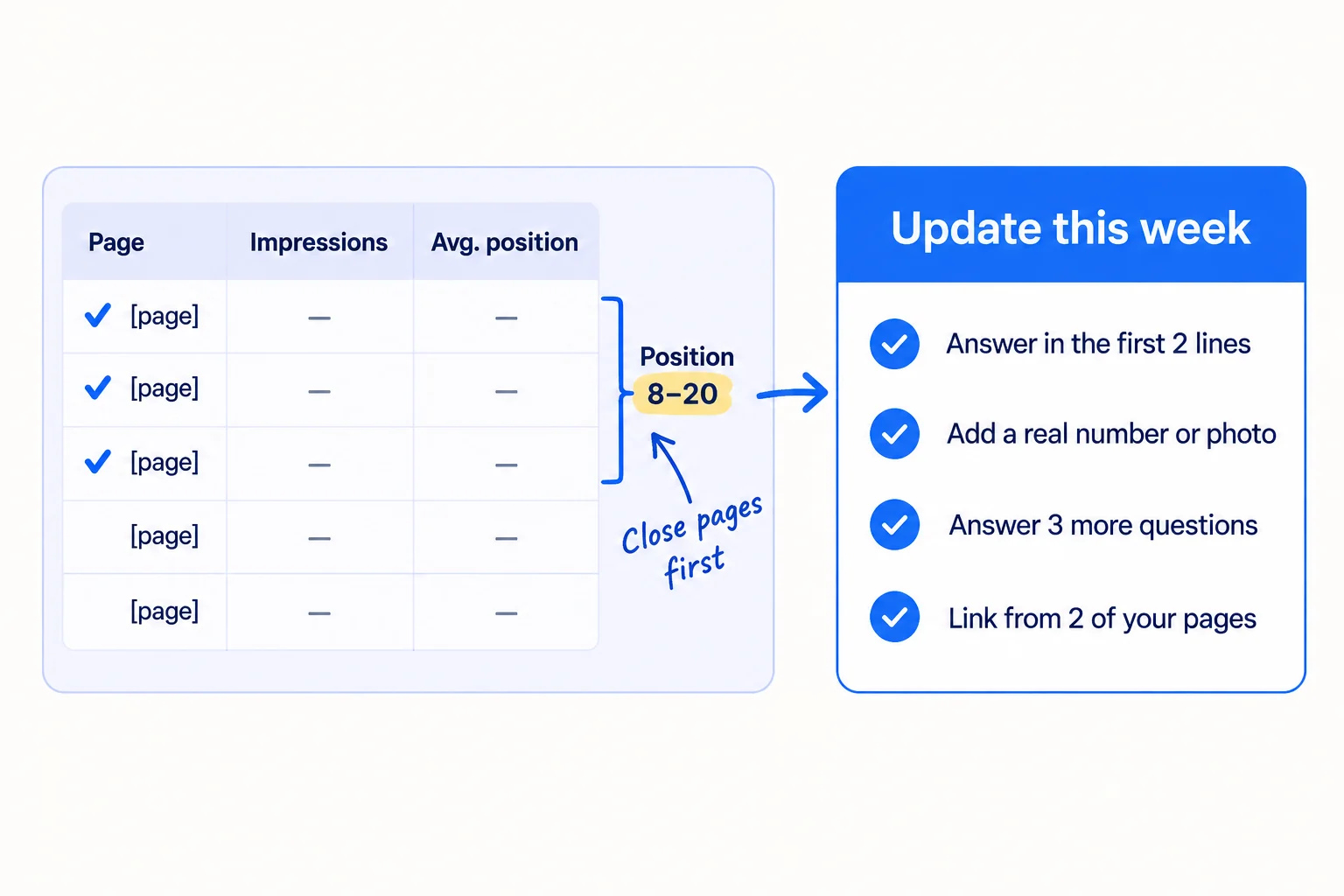
In Search Console's Performance report, open the Pages tab, sort by impressions, and look at the average position column. A page at position 8 to 20 is already on page one or two for something. Click it, then open the Queries tab to see which searches show it. Those searches tell you what to add.
Searches that show this page: [from the Queries tab]
The title and first two lines answer the top search.
Add one real number, photo or customer quote.
Answer the 3 follow-up questions people ask about it.
Add links to this page from 2 of your other pages, using its search words.
Click "Request indexing" in URL Inspection.
Leave an updated page alone for 4 weeks before you judge it. Google says some changes take effect in hours and others take months. If a page has had no impressions at all after about 6 months, rewrite it for a different phrase or merge it into a stronger page. This is the same work as making an article rank higher, and pages that load fast keep their visitors once they arrive.
If you run a SaaS: check that the pages with clicks lead somewhere. If people land but do not try it, fix the page before the signup before you write more.
- Tool: Google Search Console and your site editor.
- Time: about 1 hour a page, in place of that day's new page.
- You will have: 3 updated pages a week from month 3.
- It worked if: within 4 weeks, at least 2 of the 3 updated pages move up in average position or gain impressions.
- Common mistake: rewriting the same page every week, so Google never settles on it. The other mistake is only ever writing new pages while 20 pages sit at position 12.
Where Scout7 helps
Scout7 does parts of steps 1, 3, 5 and 6.
Step 1. Keyword intelligence researches thousands of terms and gives each one its monthly searches, difficulty, trend, and who leads on Google and in AI answers today. The topic opportunity map plots topics by difficulty against demand, so you can see which ones a new site can win. You still choose the terms that match what you sell.
Step 3. Content Co-Pilot asks you research-backed questions about the page, then drafts the article with sections, FAQs and structured data. You answer its questions, edit the draft and approve it; nothing is published without your approval. It can host the blog under your own domain at /content, with the sitemap and robots.txt made for you.
Steps 5 and 6. Once you connect your own Google Search Console, Scout7 shows real impressions, clicks and positions next to its site audit, so the Sunday numbers and the close pages are in one place.
Your SEO checklist for the next 6 months
0 of 14 done
Work through this list with an AI assistant
It drafts the work and keeps track of what is done.
Frequently asked questions
- Can SEO work in 1 month?
Getting onto Google can: pages are usually indexed within days to a few weeks. Enquiries usually cannot. Most new sites see first clicks around month 3 and first enquiries around month 6, and only if they publish enough pages on searches buyers make. In the first month, check the pass lines in step 5 and keep your personal messages going.
- Is SEO worth it for a small business with no customers yet?
Yes, if your buyers search for what you sell. Do the 20-minute check in step 1. If 5 of 10 buyer phrases show up in Google's suggestions, start today, because every month you wait adds a month. If not, do the setup and a few pages, and get your first customers by talking to buyers.
- How long does it take a new website to rank on Google?
A new page can show up for small, specific searches within weeks. Big, general searches take years: a 2025 Ahrefs study found that 72.9% of pages in Google's top 10 are more than 3 years old. So start with small searches buyers make just before they buy, and judge progress by impressions and position first.
- Can I pay someone to make SEO work faster?
You can pay for more pages and better pages, which helps. You cannot buy a ranking. Google says "No one can guarantee a #1 ranking on Google", so walk away from anyone who promises one. Read how to hire an agency without getting burned before you sign.
- Does AI search change how long SEO takes?
The timeline is the same, but clicks are fewer. Google uses the same indexed pages for AI Overviews, and an Ahrefs study in 2026 found the top result gets 58% fewer clicks when an AI Overview shows. So count impressions and enquiries, not only clicks, and check what ChatGPT says too: see how to get your brand mentioned by ChatGPT.
Sources
- 1.SEO Starter Guide: How long until I see impact in search results? — Google Search Central, updated 10 December 2025, checked 29 September 2026
- 2.Ask Google to recrawl your URLs — Google Search Central, updated 10 December 2025, checked 29 September 2026
- 3.Do you need an SEO? — Google Search Central, updated 5 June 2026, checked 29 September 2026
- 4.AI features and your website — Google Search Central, updated 10 December 2025, checked 29 September 2026
- 5.Spam policies for Google web search — Google Search Central, updated 28 August 2026, checked 29 September 2026
- 6.Performance report (Search results) — Google Search Console Help, checked 29 September 2026
- 7.Introducing weekly and monthly views in Search Console — Google Search Central Blog, 10 December 2025
- 8.Introducing the branded queries filter in Search Console — Google Search Central Blog, 20 November 2025, updated 11 March 2026
- 9.Overview of OpenAI crawlers — OpenAI, checked 29 September 2026
- 10.Password page — Shopify Help Center, checked 29 September 2026
- 11.Guidelines for representing your business on Google — Google Business Profile Help, checked 29 September 2026
- 12.How Long Does It Take to Rank in Google? And How Old Are Top Ranking Pages? — Ahrefs (Patrick Stox), 15 May 2025
- 13.AI Overviews reduce clicks (update) — Ahrefs (Ryan Law), 4 February 2026
- 14.Study confirms Google AI Overviews cut organic clicks 38% — Search Engine Journal, 27 April 2026
- 15.SEO 3x'd my traffic. Signups dropped to zero. — Indie Hackers, 24 August 2026
- 16.SEO for busy founders — Ahrefs (Ryan Law), 27 November 2024
- 17.How Long Does SEO Take to Work in 2026? — SEO.com, updated 31 July 2026
- 18.Google Search Status Dashboard: ranking incident history — Google, checked 29 September 2026
- 19.Google September 2026 spam update is rolling out — Search Engine Roundtable, 24 September 2026
- 20.Free Keyword Generator — Ahrefs, checked 29 September 2026
Next article to read
How to find keywords for SEOOnce you know the timeline, pick the searches worth starting on this week.Read it nextRelated guides
- How to measure SEO successComing soon
- How to get your website indexed on GoogleComing soon
- How to explain SEO timelines to clientsAgencyComing soon
- How to get traffic to a new website for freeGet traffic to a new website for free: let Google, Bing and ChatGPT read your site today, write down 100 questions your buyers ask, then publish 1 page, give 20 answers in 5 communities and post 2 times on 2 channels every day, and count visits by source every Sunday.
Guides that link here
- How to get traffic to a new website for free
- How to find keywords for SEO
- How to get clients for a consulting business without referralsB2B
- How much to spend on marketing as a B2B companyB2B
- How much to spend on marketing as a SaaS startupSaaS
- How to choose marketing channels for a B2B companyB2B
- How to choose marketing channels for a SaaS startupSaaS
- How to choose marketing channels for an agencyAgency
- How to choose marketing channels for an ecommerce brandD2C
- How to fit marketing into your week as a solo founder
- How to market a SaaS productSaaS
- How to market your product as a technical founderSaaS
Cite this page
Dinesh Bypilla (2026). How long does SEO take to work?. Scout7 Academy. https://scout7.ai/academy/seo/how-long-does-seo-take-to-work
Written by Dinesh Bypilla, Agentic systems engineer at Scout7. Reviewed by Murali Sid. Last checked 29 September 2026.
Quote any part of this guide with a link back to this page. © 2026 Scout7.
Markdown version of this page: https://scout7.ai/academy/seo/how-long-does-seo-take-to-work.md