



How to make an article rank higher on Google
Make an article rank higher on Google: list the articles Search Console already shows at position 8 to 20, update 1 a day in about an hour with a title that answers the search, what the top 3 results miss, proof only you have and 3 internal links, and compare each one's numbers 4 weeks later every Sunday.
ByDinesh BypillaReviewed byMurali SidLast checked 21 min read
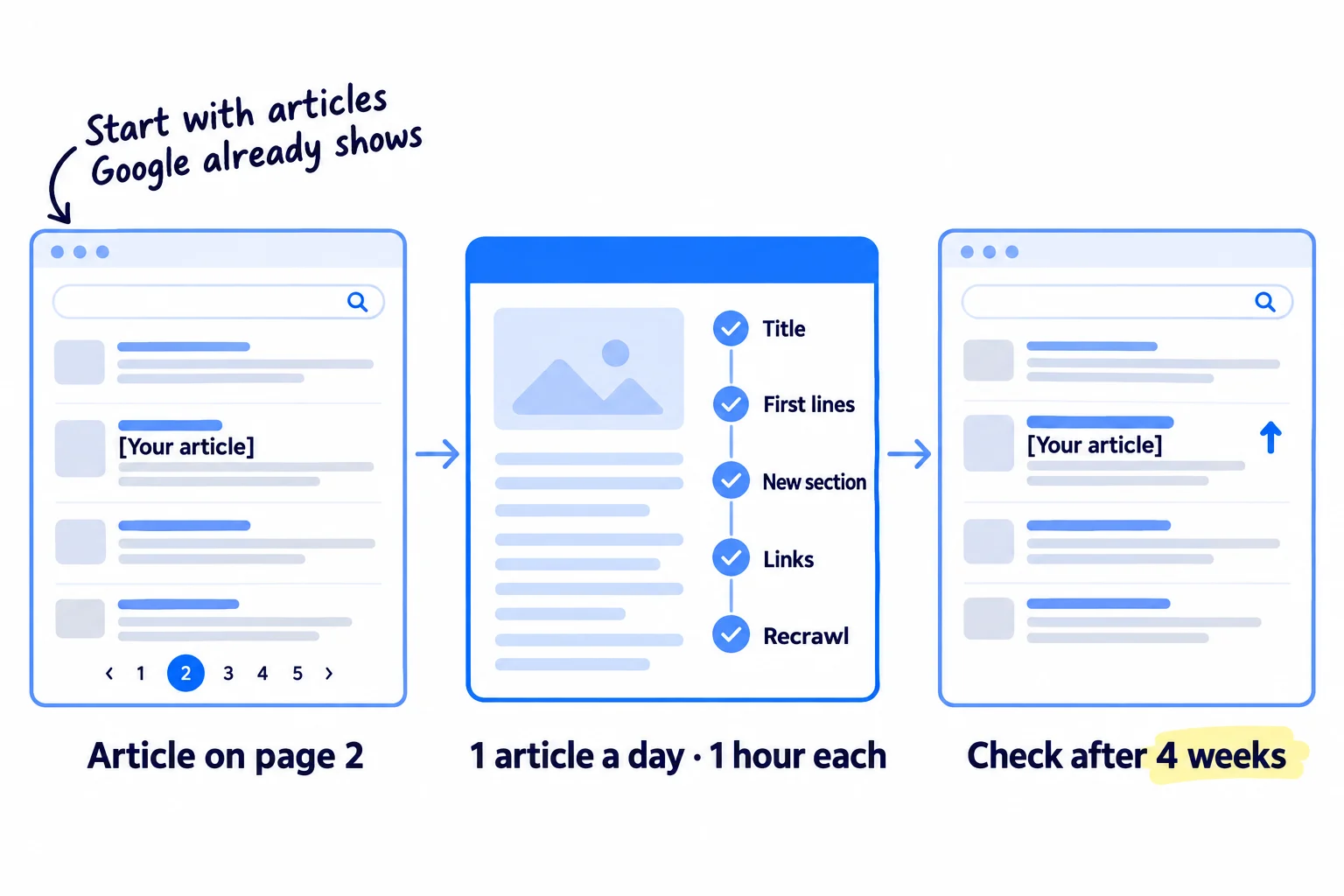
You wrote an article months ago, and it sits on page 2 of Google or nowhere, so it brings almost no visits. Here is how to make an article rank higher on Google: start with the articles Google already shows, fix each one in about an hour so it answers the search better than the pages above it, and judge every change by its numbers 4 weeks later. If you leave it, the article stays where it is, and writing new posts on the same topic usually makes it worse.
Do these three things
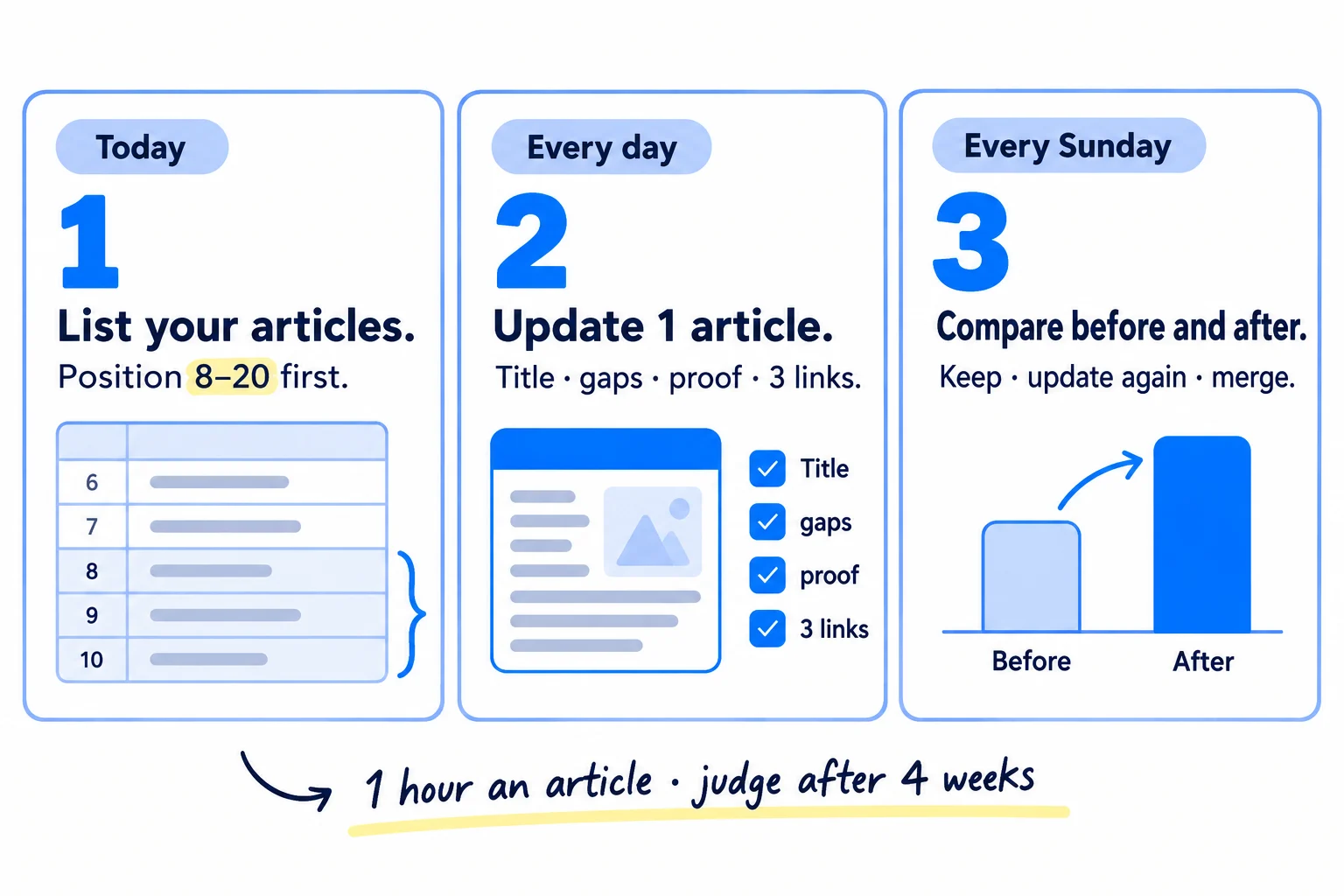
About 45 minutes today, then about 1 hour for each article. Judge each update after 4 weeks and the whole method after 20 updates. Nobody can promise a ranking.
Show the three actions in fullHide the full list
- Today: open the Pages tab in Google Search Console and list every article with impressions, its average position and the searches it shows for. Put the articles at position 8 to 20 at the top.
- Every day: update 1 article from the top of your list: answer its main search in the title and first two lines, add what the top 3 results miss and one thing only you know, link to it from 3 of your pages, and ask Google to recrawl it. AI drafts the new parts; you add the proof.
- Every Sunday: compare each article you updated 4 or more weeks ago with its numbers from before, and keep it, update it again, or merge it. That is how you measure SEO one page at a time.
Get help doing these
ChatGPT or Claude reads this guide and works through it with you.
1. Find your articles that are close to page one in Search Console
Start with the articles Google already shows near the top, because they need the least work to move up. In Google Search Console, list every article with impressions, its average position and its top searches, and put the ones at position 8 to 20 first.
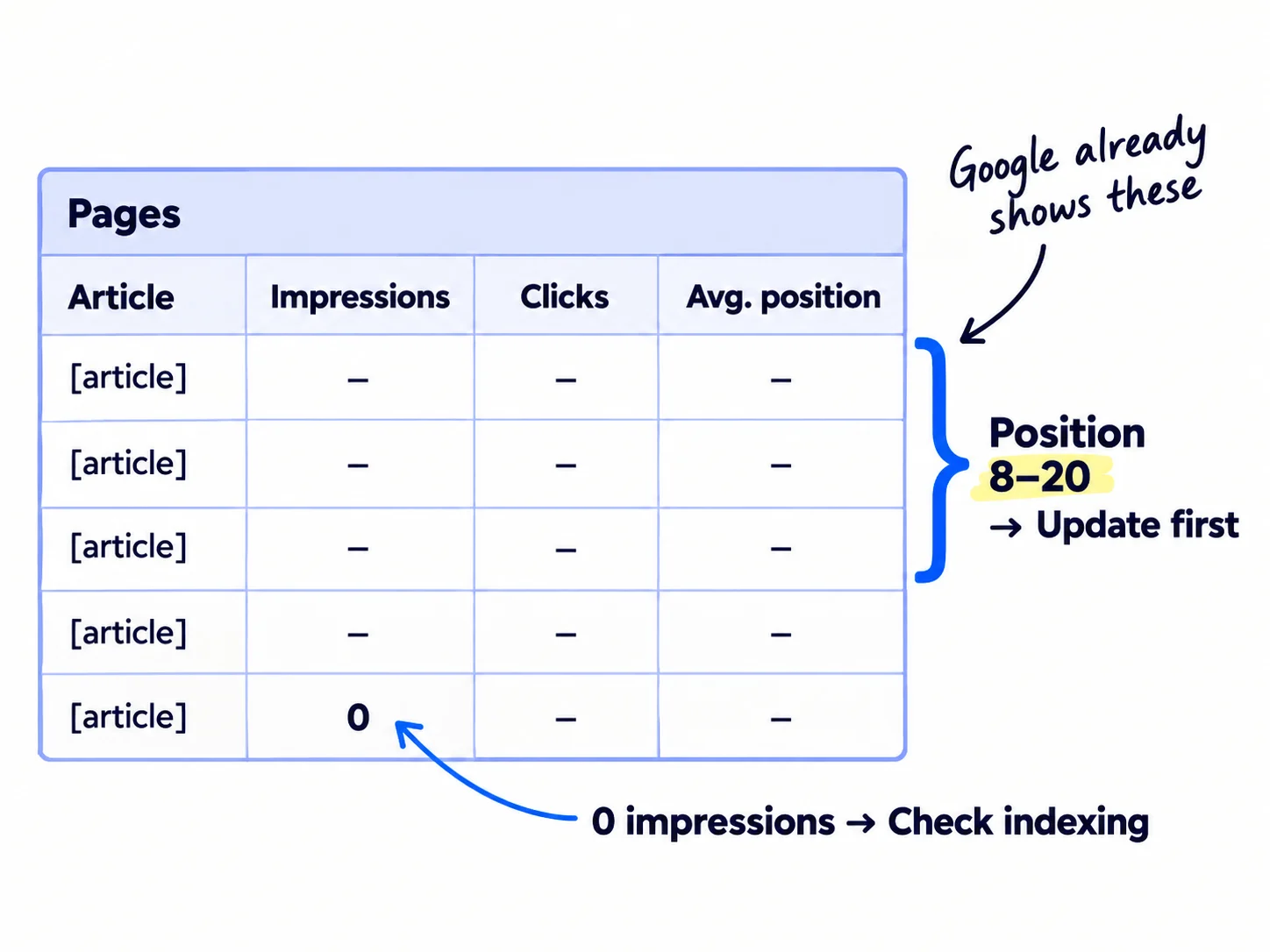
Open Search Console, then Performance, then Search results. Set the date to the last 3 months. Click the "Average position" heading above the chart so the table shows it. Open the Pages tab and sort by impressions. Impressions are how often Google showed your page; clicks are how often someone chose it. Search Console counts impressions in Google's AI Overviews and AI Mode too.
Then click each article and open the Queries tab. Write down its top 5 searches and their positions. These are the words Google already connects to your article, so they tell you what to fix. Write the numbers down now, before you change anything. You need them in step 7.
Sort each article into one of these rows:
| If the article shows | Do this |
|---|---|
| Average position 8 to 20 | Top of the list. Update the one with the most impressions first. |
| Position under 8 with 100+ impressions, but fewer than 2 clicks per 100 | Next on the list. Its title is not earning the click, so step 3 matters most. |
| Position 21 to 50 | After the rows above. Add its best searches as headings (step 4). |
| Two of your articles showing for the same search | Step 6: merge them. |
| No impressions after 4 weeks live | Open URL Inspection. If it says the page is not on Google, fix indexing and run the technical SEO checks first. |
| No impressions after about 6 months, and it is on Google | Rewrite it for a different search, or merge it into a stronger article (step 6). |
The "2 clicks per 100" line is this guide's rule, not a Google number. Pages on page one get fewer clicks than they used to: an Ahrefs study in February 2026 found the top result got 58% fewer clicks when an AI Overview was shown.
Article link | Main search (top query) | Impressions, last 3 months | Clicks | Average position | Top 5 searches with positions | Row (8–20 / low clicks / 21–50 / merge / not on Google) | Date updated | Impressions, clicks and position 4 weeks later | Decision
If you run an agency: make this list for every client's site on day one. The "before" numbers become the first line of your monthly client report.
- Tool: Google Search Console and Google Sheets. Both free. If your site is not in Search Console yet, add it first; you need a few weeks of data.
- Time: 45 minutes. After that, about 1 hour a day, which is easier if you block it before other work.
- You will have: a list of your articles in the order you will update them, with each one's numbers from before.
- It worked if: you have at least 5 rows with impressions. With fewer, update what you have, then go back to publishing 1 new page a day and refill the list every Sunday.
- Common mistake: starting with the article you like most, or the one with the biggest search. Start where Google already shows you.
See it done: Bugmoth's update list
Bugmoth is a made-up bug-reporting tool for small web teams. It costs $19 a month per team, with a 14-day trial.
Articles with impressions, last 3 months
| Article | Impressions | Clicks | Avg. position | Row |
|---|---|---|---|---|
| How to collect bug reports from clients | 1,840 | 11 | 14.2 | 8–20: update first |
| Bug report template for web agencies | 960 | 9 | 18.7 | 8–20: update second |
| Bugmoth vs spreadsheets | 210 | 3 | 6.1 | low clicks: title |
| Why client feedback matters | 95 | 0 | 43.0 | 21–50: later |
Why it works: The article Google already shows at position 14 goes first, not the one the founders like best.
2. Search the main query and list what the top 3 results have that yours does not
Search your article's main query on Google and write down what the top 3 results give the reader that your article does not. That list is what your update adds. It takes about 10 minutes.
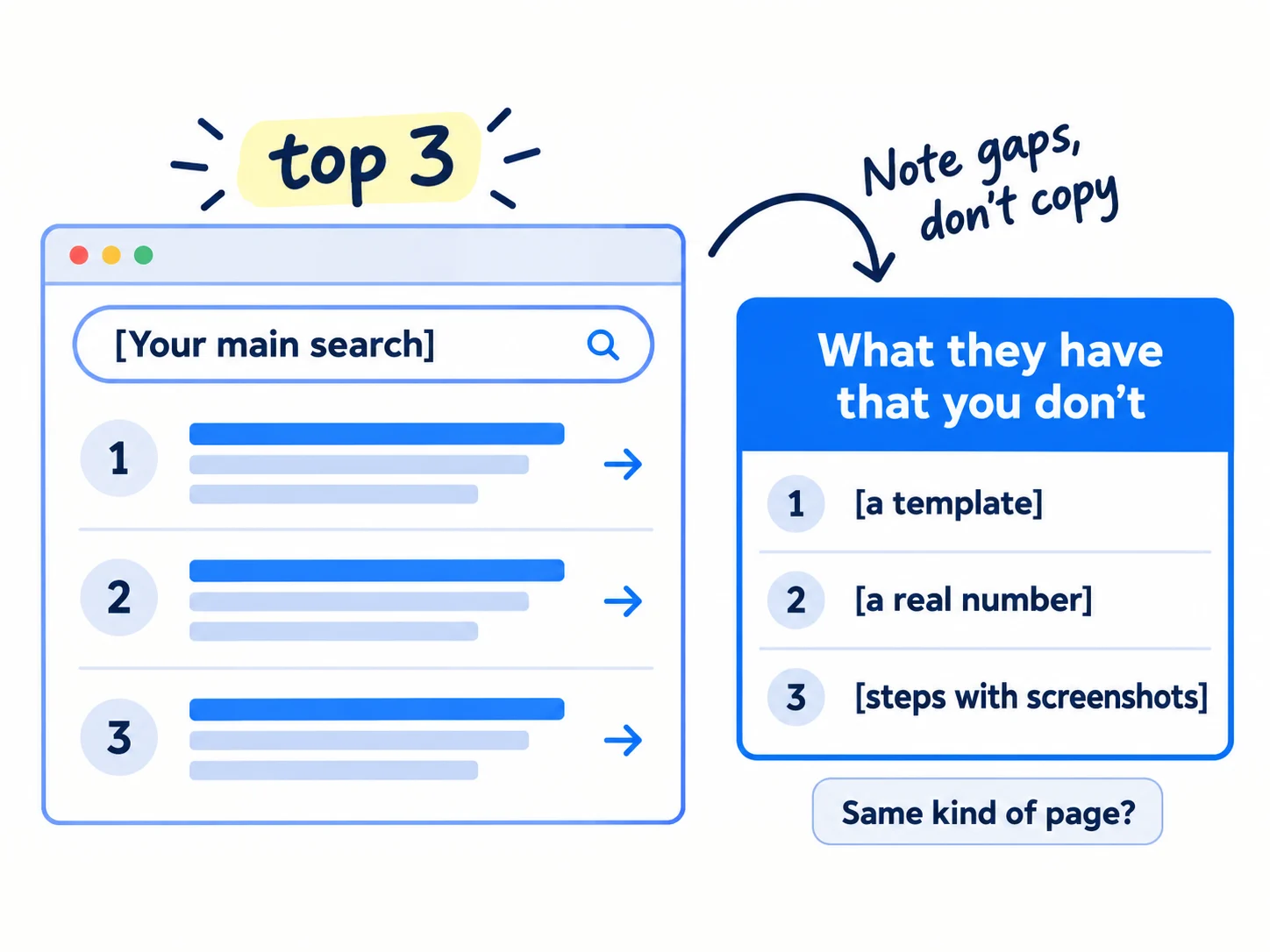
Open a private browser window so your past searches do not change what you see, and search the main query in the country where your buyers live. The pages above you are often the same competitors you found in your competitor analysis. For each of the top 3 results, note:
- What kind of page it is: a how-to guide, a list, a product page, a template, a comparison or a tool. This is the search intent. If all 3 are a different kind from yours, your article will not rank for this search however good it is. Change it into that kind of page, or pick another search from its Queries tab.
- What it covers that you do not: a step, a template, a price, a table, a screenshot, a question it answers.
- What is in the AI Overview, if one shows. The points it lists are what people expect to find.
Then give ChatGPT or Claude your article and the top 3 results' main points, and ask: "List what these pages answer that my article does not. Only list things a reader searching this would want." Cross out anything you would not want as a reader. AI is fast at spotting gaps. It does not know which gaps matter to your buyer, so you decide.
Also write down what all 3 miss. That is the part only you can add in step 4: your numbers, your screens, what your customers told you in interviews.
If you run a D2C store: if the top results are product or collection pages, a blog post will not win that search. Put the search words on the right product page or collection page, and link the article to it. Products can also show for free in Google Shopping listings.
If you run a SaaS: if the top results are "[tool] alternative" or "[A] vs [B]" pages, write a proper comparison page and link your article to it.
- Tool: Google in a private window, and ChatGPT or Claude.
- Time: 10 minutes an article.
- You will have: the kind of page that ranks, 3 to 5 gaps, and one thing the top 3 all miss.
- It worked if: every gap on your list is something a searcher wants, and your article is the same kind of page as the top 3.
- Common mistake: copying the top result's headings. Google's own questions for site owners ask whether a page avoids "simply copying or rewriting those sources". Add what is missing, in your own words.
3. Rewrite the title and first two lines to answer the search
Rewrite the title, the main heading and the first two lines so they answer the article's main search in the words people type. Google builds the blue title link mostly from your page title and main heading, and the grey text under it mostly from the page itself.
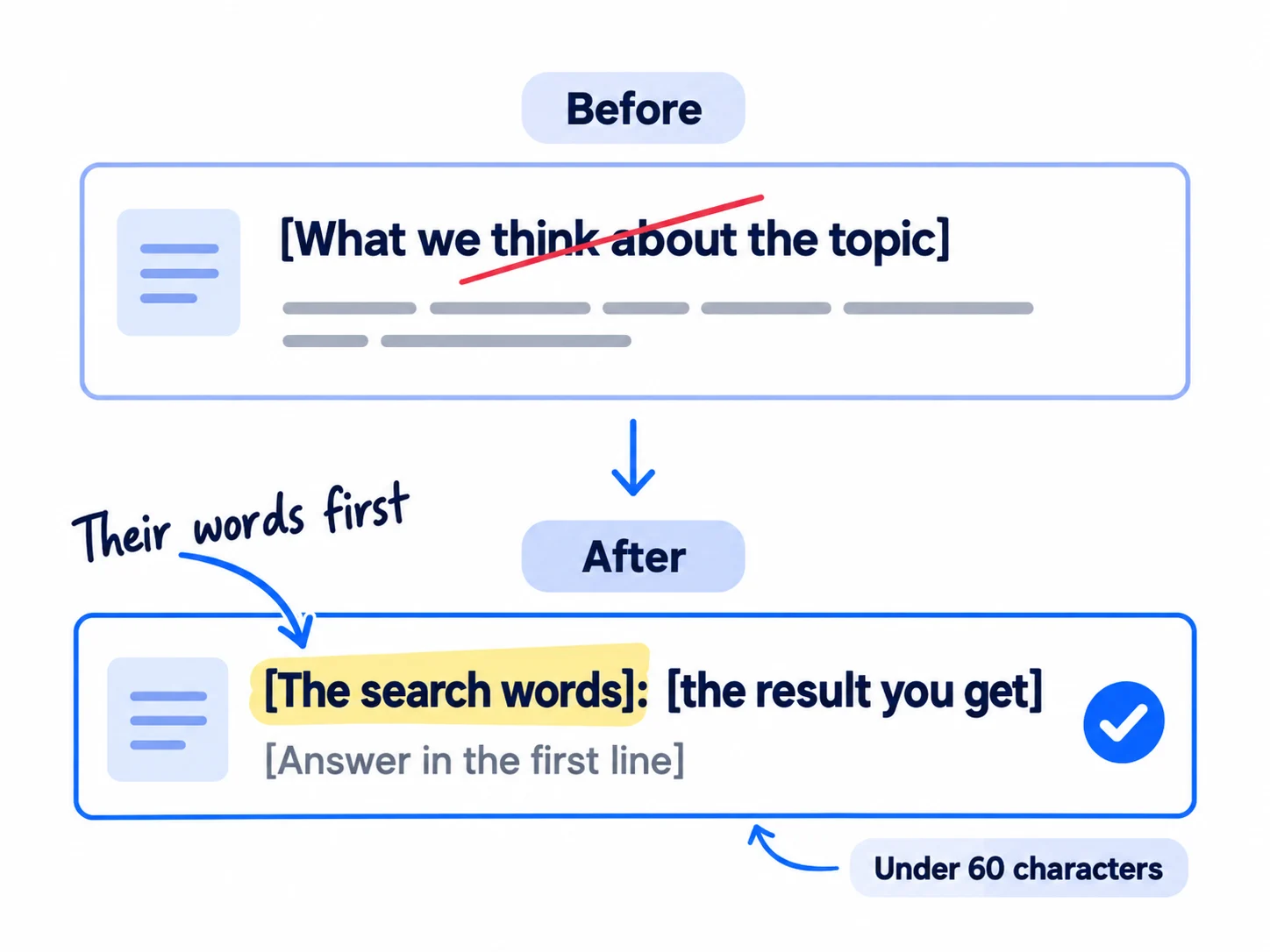
Google says to keep titles "descriptive and concise" and to avoid "keyword stuffing". It builds the title link from the page title, the main heading, other headings and the words other pages use to link to you. It builds the snippet "primarily" from the page content, and "sometimes" uses the meta description. So write all four:
- Page title: the main search, as people type it, then the result the reader gets. Keep it under about 60 characters so it is not cut off.
- Main heading (H1): the same promise as the title. It can be a little longer.
- First two lines: answer the search fully, with a number if there is one. People skim, and AI Overviews quote the lines that answer.
- Meta description: one or two sentences that say what the page gives and who it is for.
Ask ChatGPT or Claude for 5 title options from the main search and your gap list, then pick one and edit it. Put the one main search in it, not all 5 searches from the Queries tab. The other searches become headings in step 4.
Page title: [main search, as people type it]: [the result, with a number if you have one]
Main heading: [the same promise, in a full sentence]
First two lines: [the answer in one sentence]. [Who it is for, or the number that proves it.]
Meta description: [what the page gives] for [who]. [One detail that makes it worth the click: a template, a price, a step count.]
If you run a B2B company: put the detail buyers check first into the title: a lead time, a minimum order or a price range. Buyers pick the result that answers their real question.
- Tool: your site editor, and ChatGPT or Claude for options.
- Time: 10 minutes.
- You will have: a new title, main heading, first two lines and meta description.
- It worked if: the title holds the main search word for word and a clear result, and a friend who reads only the first two lines can answer the question.
- Common mistake: a clever title or your brand name first. People choose the result that repeats what they typed, so a plain title gets more clicks.
See it done: Bugmoth's new title
Before
Why Client Feedback Matters for Web Teams
After
How to collect bug reports from clients: 5 steps + template
Why it works: The new title uses the exact words people search and promises something they can use today.
4. Add what the top results miss and one thing only you know
Add every gap from step 2, then one thing no other page has: a real number, a screenshot, a customer's words or a step you tested. Google asks whether a page gives "original information, reporting, research, or analysis", and the one thing only you know is how your article answers yes.
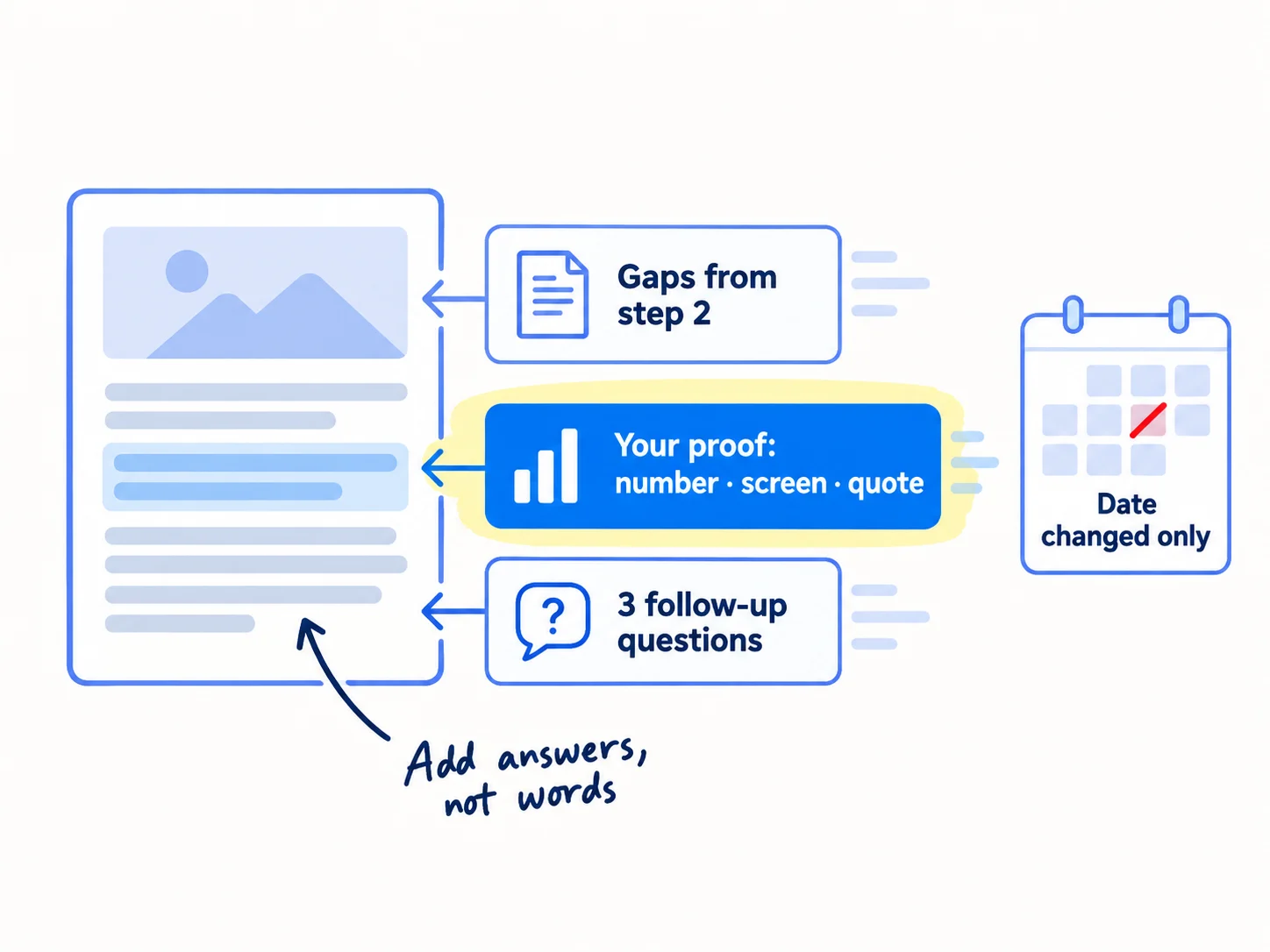
Work through the article in this order:
- Add each gap from step 2 as its own section, with a heading in the words people search. Give ChatGPT or Claude the gap, your notes and what customers asked you, and ask for a short first draft. Edit every line.
- Add your proof. A price, a result from a customer, a screenshot of the real steps, a photo of the product in use, a line from a testimonial. If you ran the test, say what happened.
- Answer 3 follow-up searches from the article's Queries tab, especially any at position 11 to 30. Give each a heading and a 2 to 3 line answer. This matches the rule in finding keywords.
- Fix what is out of date: old prices, old screenshots, dead links, tools that changed, statistics older than 2 years. Delete sections that no longer help the reader.
- End with one next step: a clear call to action, such as "Try it free" or "Ask for a quote", with a link.
Why fresh facts matter now: an Ahrefs study of 17 million AI citations, published in December 2025, found that pages cited by AI tools are 25.7% fresher than pages in Google's normal results. So real updates help you get quoted in AI answers too.
Three things not to do. Do not change the date unless the article really changed: Google asks site owners whether they are "changing the date of pages to make them seem fresh when the content has not substantially changed". Do not pad it: Google says it has no preferred word count. And do not add FAQ schema markup to win the FAQ box in results: Google stopped showing FAQ rich results on 7 May 2026. Questions and answers on the page still help readers. Pasting AI text with nothing of your own in it is the other trap. Google counts pages made only to rank as spam, whoever wrote them.
When the changes are real, show "Updated [date]" at the top of the article. If the article is slow to open on a phone, make it load faster too.
Main search: [from the Queries tab]
Kind of page that ranks: [how-to / list / template / comparison / product]
Gaps from the top 3 (add each as a section):
[gap]
[gap]
[gap]
What all 3 miss, that only I know: [number / screenshot / customer quote / test result]
Follow-up searches to answer as headings: [query 1], [query 2], [query 3]
Out of date, to fix or delete: [prices, screens, links, stats]
Next step at the end: [Try it free / Ask for a quote / Shop the product]
If you run a SaaS: show the steps being done in your product, with a screenshot or a 20-second clip for each. A reader who sees it work is more likely to try it. If people read but do not sign up, fix the page before the signup.
If you run a B2B company: add real price ranges, lead times and a short case study from a client like the reader. These are the facts buyers search for and competitors leave out, and they turn readers into enquiries.
- Tool: your site editor, and ChatGPT or Claude to draft the new sections.
- Time: 30 minutes: 5 for the AI drafts, 25 to edit them and add your proof.
- You will have: an article that covers every gap, answers 3 more searches and holds one thing no other page has.
- It worked if: every gap from step 2 has a section, there is at least one real number, screen or quote, and nothing on the page is out of date.
- Common mistake: adding words, not answers. A longer article that says the same things does not rank higher.
5. Link to the article from 3 of your own pages and ask Google to recrawl it
Add a link to the updated article from 3 of your other pages, using its search words as the link text, then ask Google to look at it again. Links from your own pages tell Google which article matters for that search.
![Three page cards on the left, each with one link line pointing to one article card on the right. The link text on each reads '[the search words]'. Under the article, a button reads 'Request indexing'.](/academy/illustrations/how-to-make-an-article-rank-higher-on-google/06-step-5.webp)
- 1
Find 3 pages to link from
Search Google for
site:yourdomain.com "main search words". The pages that come up already talk about the topic. Pick 3 that get visits or that sit close in topic, such as a related article, a feature or service page, or your homepage if the topic is central. - 2
Add the links
In each page, turn a phrase in a sentence into the link. Google says good link text is "descriptive, reasonably concise, and relevant", and names "click here" and "read more" as bad examples. Google also says "every page you care about should have a link from at least one other page on your site". Then add a link from the updated article to 1 or 2 of your related pages.
- 3
Ask Google to recrawl it
Paste the article's link into URL Inspection at the top of Search Console and click "Request indexing". Once is enough: Google says asking again "won't get it crawled any faster". Crawling can take a few days to a few weeks. Write today's date in your update list.
Then share the article once where it answers a real question: a reply in a community where your buyers ask for help, or a post on the channel you already use, such as LinkedIn, where the rules allow links. Its new sections can also become short posts of their own. On Reddit, read how to post without getting banned first. This brings the updated article its first readers before Google moves it.
Links from other sites help too, but they are their own job. If the top 3 results all have far more sites linking to them and you have done steps 2 to 4, move on to getting backlinks and links from news sites.
- Tool: Google, your site editor, and Search Console's URL Inspection. Free.
- Time: 10 minutes.
- You will have: 3 new links to the article with its search words, 1 or 2 links out from it, a recrawl request, and the date written down.
- It worked if: within 2 weeks, URL Inspection shows a crawl date after your update.
- Common mistake: linking with "read more" or "this article", or requesting indexing every day. Neither helps.
6. Merge articles that compete for the same search
If two of your articles show up for the same main search, merge them into one stronger article. Two pages that answer the same question split Google's attention, and often neither ranks.
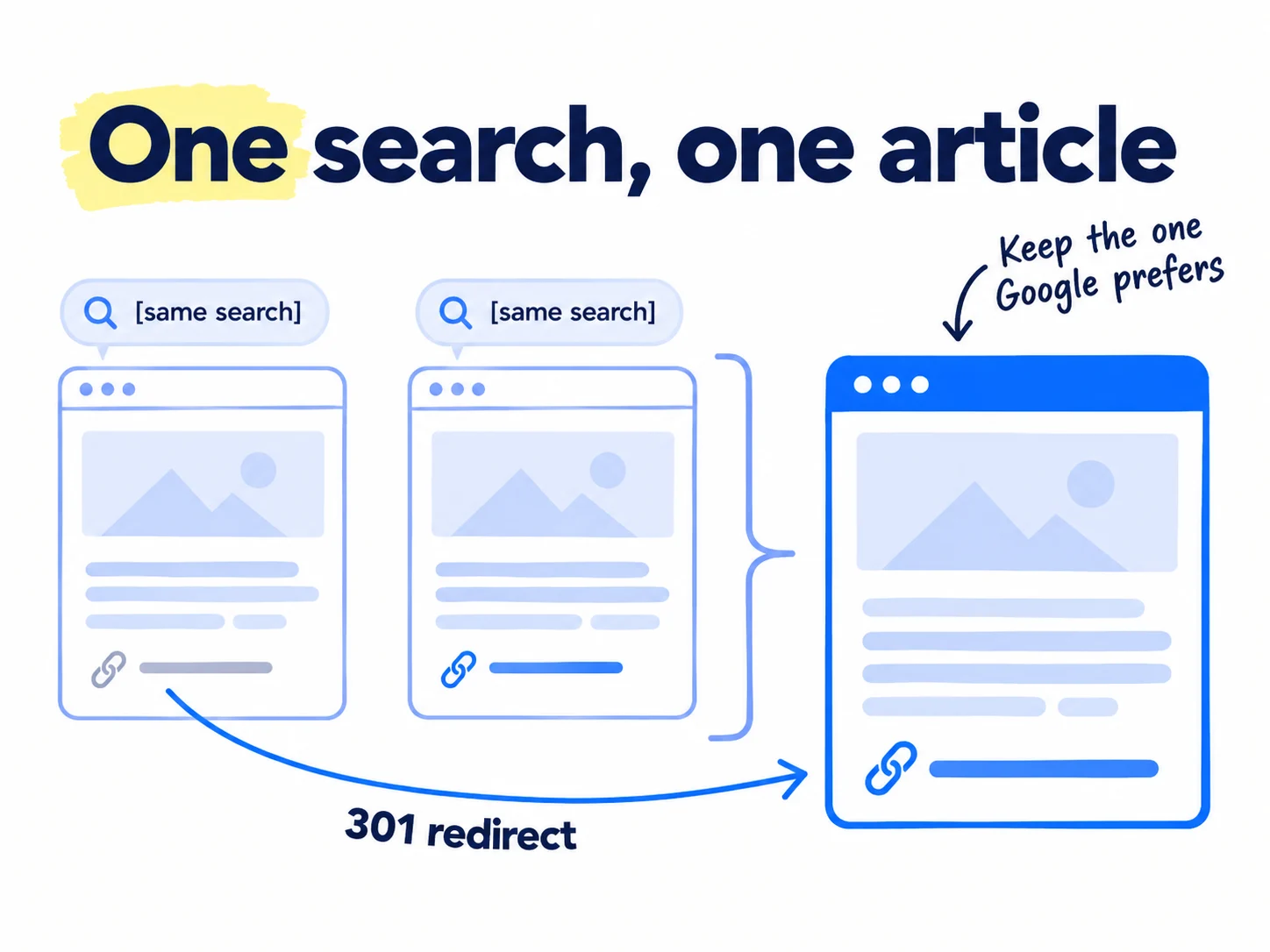
Find them in Search Console: open Performance, then the Queries tab, click the search, and open the Pages tab. If two of your articles show, you have a pair. Do the same for any article with no impressions after about 6 months on Google.
Then:
- Keep the stronger one: the one with more impressions, a better position or more sites linking to it.
- Move the useful parts of the weaker one into it, in the step 4 way.
- Redirect the weaker link to the kept one with a permanent 301 redirect. Google says the redirect is "a signal that the redirect target should be canonical", so it treats the kept article as the one to show. Most site builders have a redirects setting.
- Change your own links that pointed to the weaker article so they point to the kept one.
If the two articles answer different questions that only look alike, keep both. Make each one's title and first lines clearly about its own question, and link one to the other, as in the keyword guide. A canonical tag is for copies of the same page, not for two different articles.
- Tool: Search Console, your site editor, and its redirects setting.
- Time: about 30 minutes for each pair.
- You will have: one article for each search, and a redirect from every old link.
- It worked if: the old link opens the kept article, and within 4 weeks only the kept article shows for that search in the Queries tab.
- Common mistake: deleting the weaker article with no redirect. Its old links and visitors then land on an error page.
7. Check each updated article after 4 weeks
Every Sunday, compare each article you updated 4 or more weeks ago with its numbers from before, and decide what happens next. Google says to "wait a few weeks" before judging a change, so do not judge it sooner.
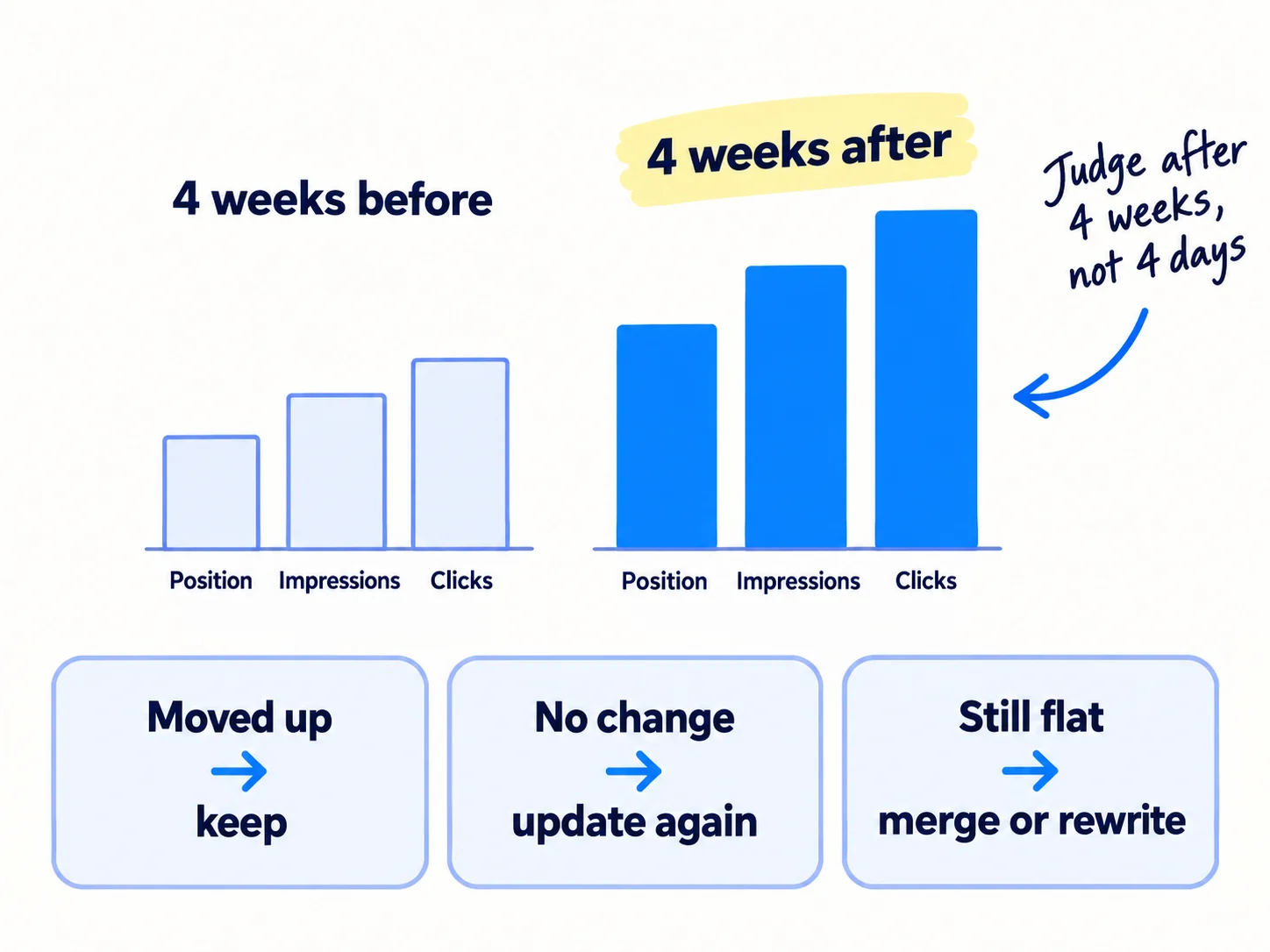
In Search Console, open Performance, then Search results. Click "+ Add filter", choose Pages, choose "URLs containing" and paste the article's link. Then open the date filter, choose "Compare", pick the 4 weeks after the update against the 4 weeks before, and click Apply. Write down impressions, clicks and average position for both.
| After 4 weeks | Do this |
|---|---|
| Average position moved up, or impressions grew | Keep it. Leave it alone for at least 3 months. |
| On page one, but still under 2 clicks per 100 impressions | Rewrite the title and first two lines again (step 3). |
| No real change | Update it once more with a different gap from step 2, then wait another 4 weeks. |
| Still flat after 2 updates, or about 6 months with no impressions | Rewrite it for a different search from its Queries tab, or merge it (step 6). |
Positions also move for reasons that are not yours. Google ran core updates in March and May 2026, and a spam update that began on 24 September 2026 may take up to two weeks. If an update ran during your 4 weeks, wait a full week after it ends, then compare. Google says small moves, such as position 2 to 4, need no action.
Clicks alone will fool you, so check two more things. The Generative AI performance report in Search Console, open to all sites since 31 August 2026, shows how often your pages appeared in AI Overviews and AI Mode. It shows impressions, not clicks, and a site with few AI impressions may not see it yet. And count signups, enquiries or orders from the article: add a "Where did you find us?" question to your form, which is self-reported attribution, and tag the links you share with UTM parameters. If you have not yet, set up conversion tracking so each signup, enquiry or order is counted.
Judge the method, not one article, after 20 updates. If at least 2 of every 3 updated articles moved up, keep going at 1 a day. When your list is empty, go back to 1 new page a day and keep 3 update days a week, as in how long SEO takes to work.
If you run an agency: show the before-and-after row for each updated article in your monthly client report. It shows the work in numbers while you explain SEO timelines.
If you run a D2C store: if an updated article brings visits but no orders, the problem is after the click. Read how to fix a store with traffic but no sales.
If you run a B2B company: buyers often read an article, then email days later. Ask every new enquiry where they found you, or the article will look like it brought nothing. How to track which channel brought each deal shows how.
- Tool: Google Search Console and your update list.
- Time: 20 minutes every Sunday.
- You will have: a before-and-after row and a decision for every article updated 4 or more weeks ago.
- It worked if: after 20 updates, at least 2 of every 3 updated articles moved up in average position or gained impressions.
- Common mistake: judging after 3 days, or changing the same article every week, so Google never settles on one version.
See it done: Bugmoth's 4-week check
How to collect bug reports from clients
| Impressions | Clicks | Avg. position | Signups from Google | |
|---|---|---|---|---|
| 4 weeks before | 610 | 4 | 14.2 | 0 |
| 4 weeks after | 890 | 19 | 8.6 | 1 |
The decision: it moved up, so they keep it and leave it alone. Next Sunday they check the template article they updated a week later.
Why it works: They judge by position and impressions from before and after, and count the signup, not by one day's clicks.
Where Scout7 helps
Scout7 does parts of steps 1, 2, 5 and 7.
Steps 1 and 7. In the Scout7 app, connect your own Google Search Console and Scout7 shows real impressions, clicks and positions next to its search and AI audit. The audit also gives a page-level fix list and a short list of priority fixes. You decide which fixes are worth your time, and you make the changes on your own site.
Step 2. Keyword intelligence shows, for each search, where your site ranks and who leads on Google and in AI answers today. AI question coverage shows the questions buyers ask AI assistants in your category and who answers them. You judge which gaps matter.
Step 5. For articles you write and host with Content Co-Pilot, Scout7 cites real sources and interlinks every article into a connected set. You still add links from the rest of your site, and nothing is published without your approval.
Your checklist to make your articles rank higher
0 of 9 done
Work through this list with an AI assistant
It drafts the work and keeps track of what is done.
Frequently asked questions
- How long does it take for an updated article to rank higher?
Google usually recrawls a page within a few days to a few weeks, and some changes take months to show. Wait 4 weeks after your update, then compare the 4 weeks before and after in Search Console. Articles already at position 8 to 20 tend to move soonest. Nobody can promise a ranking.
- Should I change the date when I update an article?
Only when the article really changed: new sections, new facts, fixed steps. Then show "Updated [date]" at the top. Google asks site owners whether they are changing dates "to make them seem fresh when the content has not substantially changed", so a new date on the same text does not help.
- Should I delete old blog posts that get no traffic?
Check first. If the article is not on Google, fix indexing. If it is on Google with no impressions after about 6 months, rewrite it for a search people make, or merge it into a close article with a 301 redirect. Delete only when nothing in it helps a reader and no page links to it.
- Does a longer article rank higher on Google?
No. Google says it has no preferred word count. An article ranks higher when it answers the search better than the pages above it: the right kind of page, the answer in the first two lines, the steps others miss, and proof only you have. How to write a blog post that ranks covers the writing.
- Do I need backlinks to make an article rank higher?
Sometimes. Do steps 2 to 5 first: they cost nothing. If the article still does not move and the top 3 results have far more sites linking to them, you need backlinks. Start with how to get backlinks for a new website. Never buy links: Google treats paid links meant to move rankings as spam.
Sources
- 1.Performance report (Search results) — Google Search Console Help, checked 30 September 2026
- 2.Performance report (Search results): Advanced filtering and comparison — Google Search Console Help, checked 30 September 2026
- 3.Introducing Search Generative AI performance reports in Search Console — Google Search Central Blog, 3 June 2026, rolled out to all sites 31 August 2026, checked 30 September 2026
- 4.Generative AI performance report (Search) — Google Search Console Help, checked 30 September 2026
- 5.Influencing your title links in search results — Google Search Central, updated 10 December 2025, checked 30 September 2026
- 6.Control your snippets in search results — Google Search Central, updated 20 April 2026, checked 30 September 2026
- 7.Creating helpful, reliable, people-first content — Google Search Central, updated 10 December 2025, checked 30 September 2026
- 8.SEO Starter Guide — Google Search Central, updated 10 December 2025, checked 30 September 2026
- 9.Link best practices for Google — Google Search Central, updated 10 December 2025, checked 30 September 2026
- 10.Ask Google to recrawl your URLs — Google Search Central, updated 10 December 2025, checked 30 September 2026
- 11.Redirects and Google Search — Google Search Central, updated 14 April 2026, checked 30 September 2026
- 12.Google Search's core updates — Google Search Central, updated 10 December 2025, checked 30 September 2026
- 13.Spam policies for Google web search — Google Search Central, updated 28 August 2026, checked 30 September 2026
- 14.Latest Google Search documentation updates: deprecating the FAQ rich result — Google Search Central, 8 May 2026, checked 30 September 2026
- 15.AI features and your website — Google Search Central, updated 10 December 2025, checked 30 September 2026
- 16.Update: AI Overviews Reduce Clicks by 58% — Ahrefs (Ryan Law), 4 February 2026
- 17.Fresh content: why publish dates make or break rankings and AI visibility — Ahrefs (Mateusz Makosiewicz), 22 December 2025
- 18.Republishing Content for SEO & AI: How to Update Posts (Not Just Change Dates) — Ahrefs (Louise Linehan), 30 October 2025
- 19.How Long Does It Take to Rank in Google? And How Old Are Top Ranking Pages? — Ahrefs (Patrick Stox), 15 May 2025
- 20.1,062 search impressions. 1 click. — Indie Hackers, 19 May 2026
- 21.Google Rolls Out September 2026 Spam Update Globally — Search Engine Journal, 24 September 2026
Next article to read
How to get backlinks for a new websiteOnce the page is as good as it can be, earn links that tell Google to trust it.Read it nextRelated guides
- How to write a blog post that ranks on GoogleWrite a blog post that ranks on Google: read the top 5 results for your keyword, add one thing only you know, let AI draft from your notes, check every fact, link it from 3 of your pages, publish 1 a day, and count posts with impressions every Sunday.
- How to use Google Search ConsoleUse Google Search Console on a new site: add it as a Domain property and submit your sitemap today, request indexing for each day's new page, and every Sunday write down non-brand impressions and clicks, pick 3 pages to improve and 5 new searches to write for, and check for problems.
- How to show up in Google AI OverviewsShow up in Google AI Overviews: check in Search Console that Google can show your pages, list 100 buyer questions and see which get an AI Overview and who it links to, answer 1 a day in the first two lines of a page with proof only you have, give 20 answers a day where those AI Overviews link, and check the Generative AI report every Sunday.
- How to measure SEO successMeasure SEO success on a new site with free tools: write down the result that counts (signups, enquiries or orders from Google), track it as a key event in Google Analytics, ask every buyer where they found you, fill one Sunday scorecard row for seen, visited, acted and bought, fix the first number below its line, and work out what one customer from Google costs you each month.
Guides that link here
- How to find keywords for SEO
- How to write a blog post that ranks on Google
- How to get backlinks for a new website
- How to use Google Search Console
- How to show up in Google AI Overviews
- How to add llms.txt and schema markup
- How to get your brand mentioned by ChatGPT
- How to use AI for content creation
- How to get traffic to a new website for free
- How long does SEO take to work?
- How to do SEO for a Shopify storeD2C
- How to get backlinks from news websites
- How to get your website indexed on Google
- How to measure SEO success
- How to write competitor comparison and alternative pages
- Technical SEO checklist for a new website
Cite this page
Dinesh Bypilla (2026). How to make an article rank higher on Google. Scout7 Academy. https://scout7.ai/academy/seo/how-to-make-an-article-rank-higher-on-google
Written by Dinesh Bypilla, Agentic systems engineer at Scout7. Reviewed by Murali Sid. Last checked 30 September 2026.
Quote any part of this guide with a link back to this page. © 2026 Scout7.
Markdown version of this page: https://scout7.ai/academy/seo/how-to-make-an-article-rank-higher-on-google.md