



How to get your website indexed on Google
Get your website indexed on Google: add it to Search Console, turn off anything that hides it, submit your sitemap and request indexing for your 5 main pages today, then link and request every new page each day and fix the pages that are not indexed every Sunday.
ByDinesh BypillaReviewed byMurali SidLast checked 20 min read
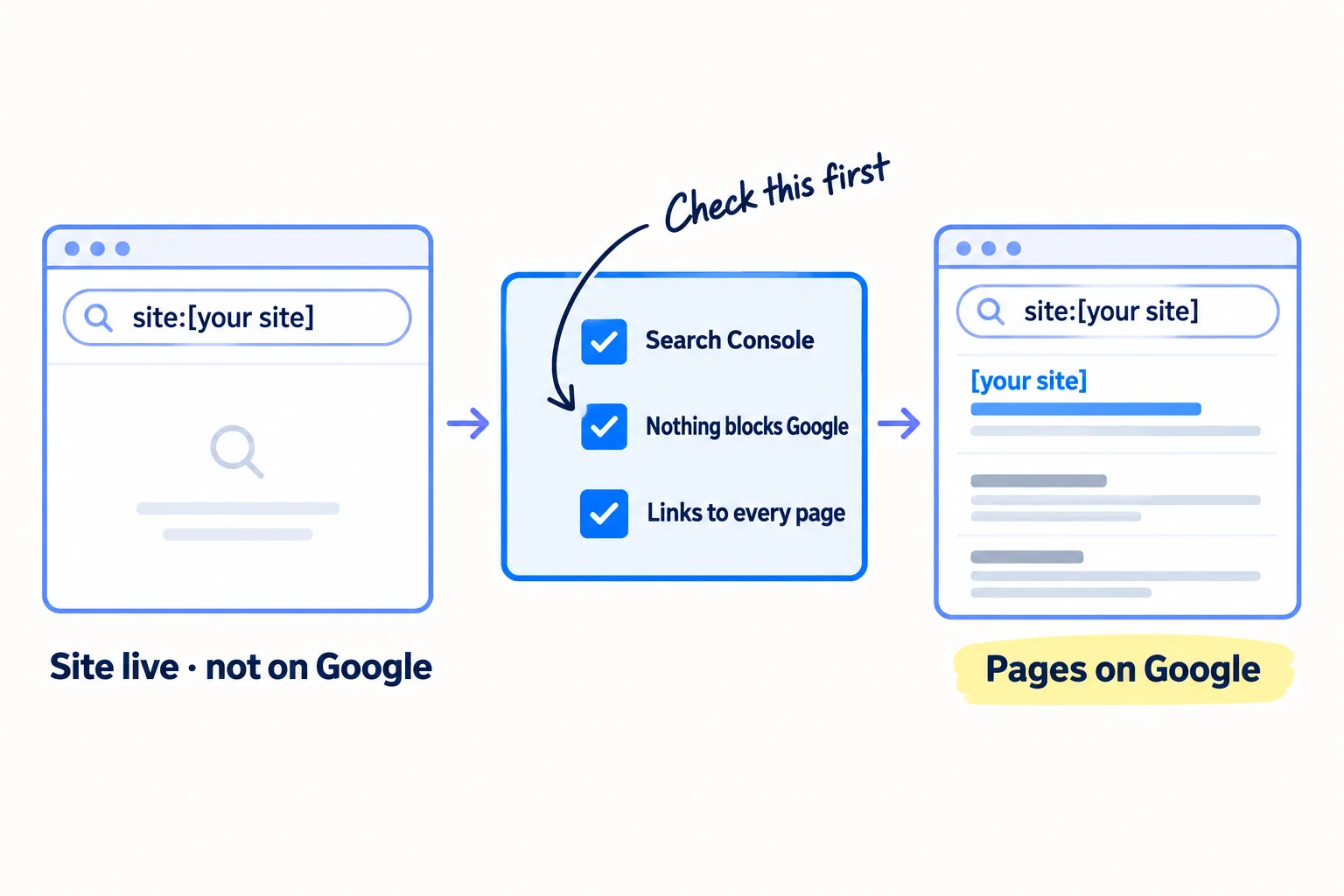
Your site is live, but when you search for it on Google, nothing comes up, or only your home page. Here is how to get your website indexed on Google: tell Google your site exists, remove whatever stops Google reading it, and give every page links Google can follow. If you skip this, one setting left on from building your site can keep every page off Google, and every page you write is wasted.
Do these three things
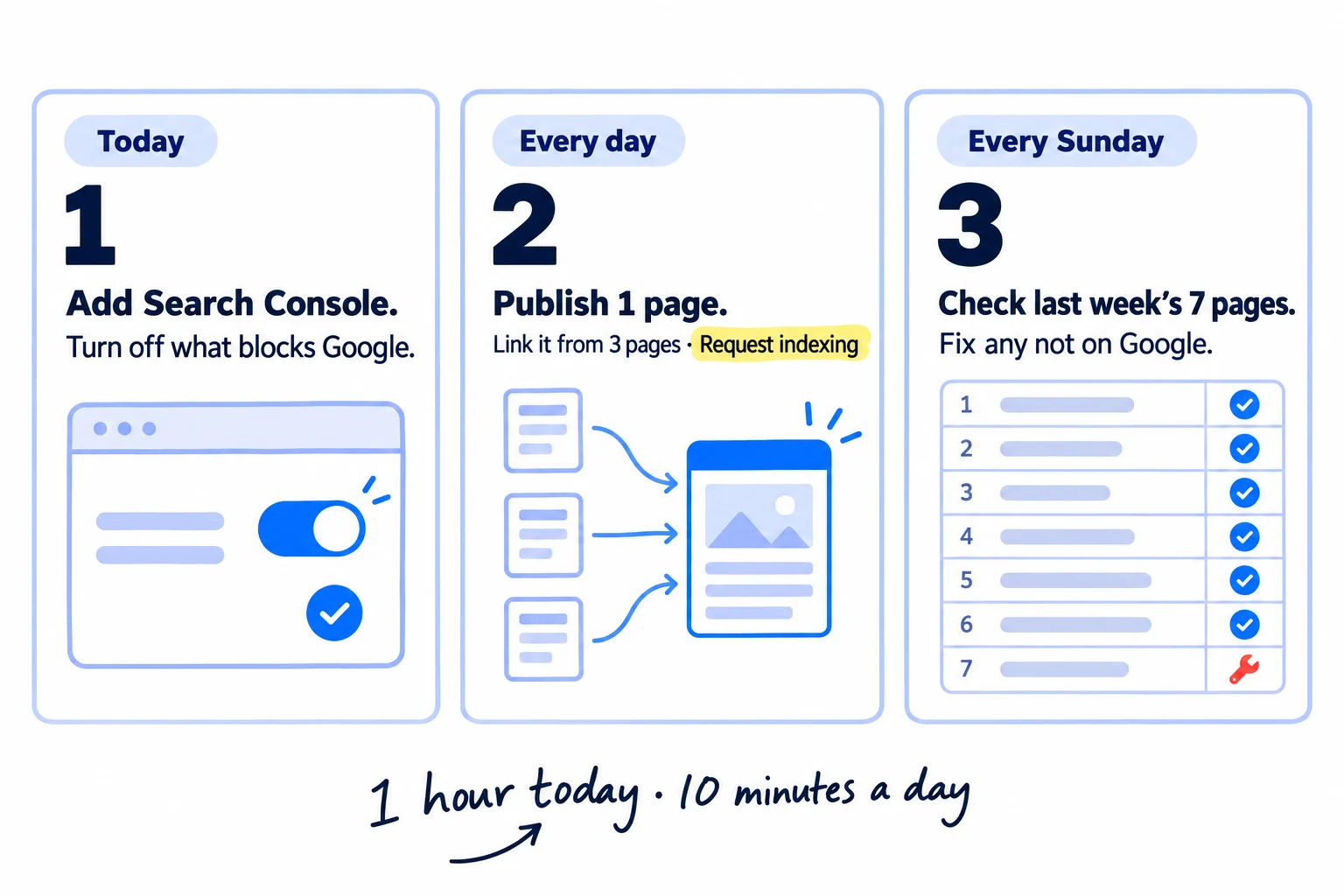
About 1 hour today, then 10 minutes a day on top of your daily page. Google says crawling takes a few days to a few weeks, so judge it at week 2: your home page and 12 of your first 14 new pages should be on Google.
Show the three actions in fullHide the full list
- Today: add your site to Google Search Console, turn off anything that hides it from Google, submit your sitemap, and ask Google to index your 5 main pages.
- Every day: publish 1 new page, found with your keyword list, link to it from 3 of your pages that Google already has, and click "Request indexing" for it.
- Every Sunday: check last week's 7 new pages in URL Inspection, and fix every one that is not "on Google" using the reason Search Console gives.
Get help doing these
ChatGPT or Claude reads this guide and works through it with you.
1. Add your website to Google Search Console
To get your website indexed on Google, first add it to Google Search Console, Google's free tool that shows which of your pages are in Google's index and lets you ask it to add more. Google finds most sites on its own, but without Search Console you cannot see what it found or why a page is missing.
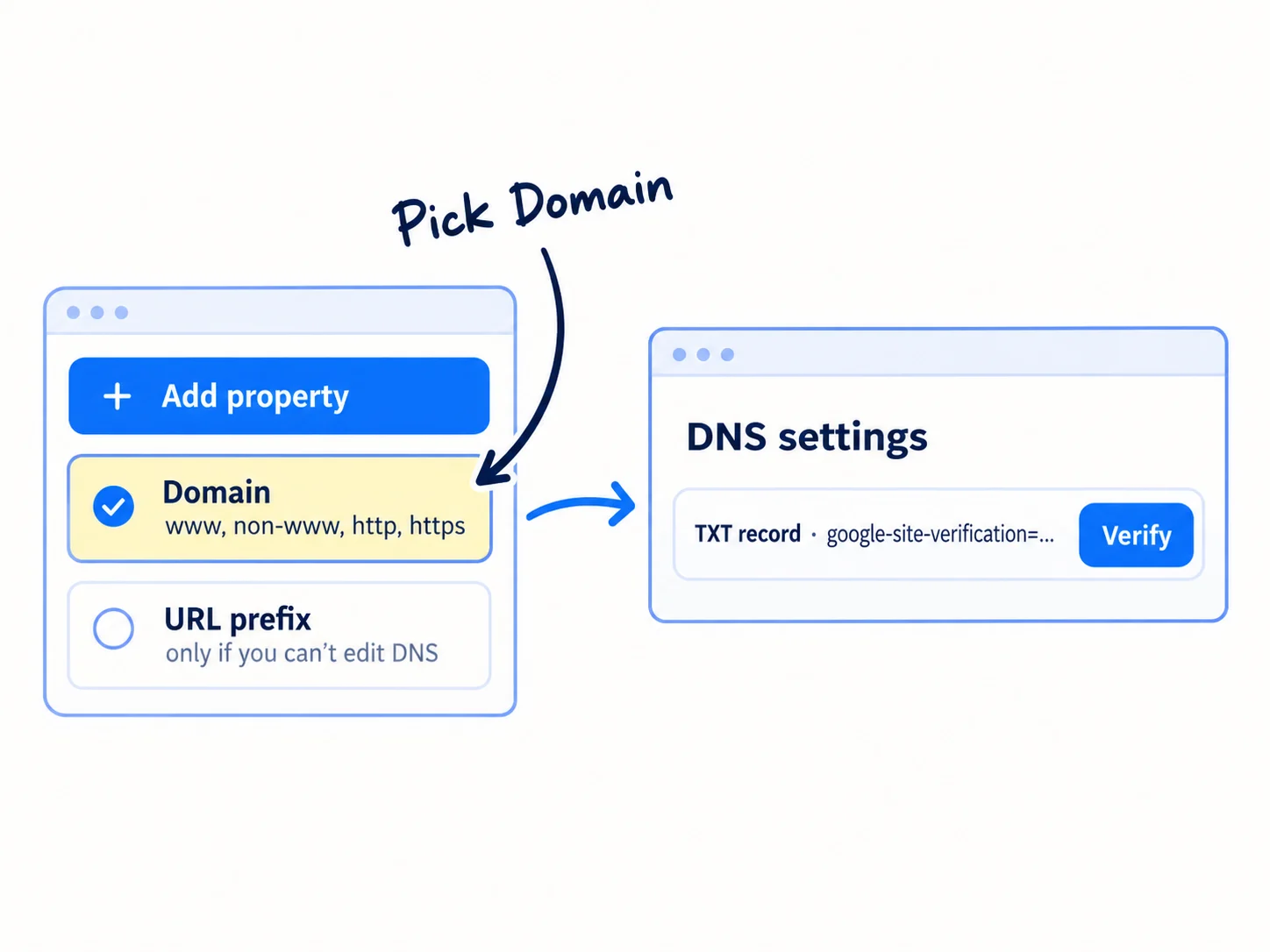
- Open Search Console and sign in with the Google account you will keep using for the business, not a personal one you might lose.
- Click "+ Add property" and choose Domain. Type your domain on its own, such as yourdomain.com, with no https and no www.
- Google shows you a TXT record, a line of text that proves you own the domain. Copy it into the DNS settings where you bought your domain, then click Verify. If it fails, wait an hour and click Verify again.
A Domain property covers every version of your address: www and non-www, http and https. Google's John Mueller said in July 2026 that a Domain property makes these versions "a little bit easier" to read in the reports. If you cannot edit your DNS, choose URL prefix instead, type your address exactly as it opens in your browser, and use the HTML tag method.
Some site builders do this for you. On Wix, open the SEO Setup Checklist and click "Connect to Google"; it needs a Premium plan and your own domain, and it also submits your sitemap. On Squarespace, go to Settings, then Connected Accounts, then Google Search Console.
While you are signed in, take 2 more minutes to open Bing Webmaster Tools, which is also free, and import your site from Google Search Console. Bing then gets your sitemap too, and its AI Performance report shows when Microsoft Copilot cites your pages, one way to track AI mentions. What the rest of Search Console does is in the full guide to using Google Search Console.
- Tool: Google Search Console and Bing Webmaster Tools. Both free.
- Time: 15 minutes, plus any wait for your DNS.
- You will have: your site verified in Search Console as a Domain property, and imported into Bing.
- It worked if: you can paste your home page into the search bar at the top of Search Console and get a result, not an error that you do not own the property.
- Common mistake: adding only the www address as a URL prefix. Search Console then shows nothing for the other versions of your address, and you think Google has nothing.
2. Remove anything that stops Google from indexing your site
If your site is missing from Google, first look for a setting left on from when the site was built, because one setting can hide every page. One live test in Search Console shows you every blocker at once.
![A live test result with four rows, all ticked: 'Crawl allowed? Yes', 'Page fetch: Successful', 'Indexing allowed? Yes', and a screenshot showing '[Your headline]'. Beside it, four switches that can hide a site, each crossed out: 'Hide from search engines', 'Disallow: /', 'noindex', 'Are you a bot?'.](/academy/illustrations/how-to-get-your-website-indexed-on-google/03-step-2.webp)
Paste your home page into the search bar at the top of Search Console. This is URL Inspection. Click "Test live URL", wait for the result, then read these four things:
| What to read | What you want to see | If you see something else |
|---|---|---|
| Crawl allowed? | Yes | Your robots.txt file blocks Google. Fix it below. |
| Page fetch | Successful | Your host or its bot protection turns Google away. Fix it below. |
| Indexing allowed? | Yes | A noindex tag or a "hide from search" setting is on. Fix it below. |
| View tested page, then Screenshot | Your headline and your words | Your page needs JavaScript before any text shows. See the SaaS note below. |
Then fix what the test found:
- The "hide from search" switch. On WordPress, go to Settings, then Reading, and untick "Discourage search engines from indexing this site". On Wix, go to SEO & GEO, then Tools and settings, then SEO Settings, and turn on "Let search engines index your site". On Squarespace, go to Settings, then Crawlers, and untick "Block Search engine crawlers". Any one of these hides every page you have.
- robots.txt. Open yourdomain.com/robots.txt in your browser. If you see "Disallow: /" under "User-agent: *", "User-agent: Googlebot" or "User-agent: OAI-SearchBot", delete that line. OpenAI says sites that block OAI-SearchBot "will not be shown in ChatGPT search answers". Blocking private areas such as /admin or /app is fine.
- noindex. Open your page, view its source, and search for "noindex". Google's words: "If you want this page to be indexed, you must remove the tag or HTTP header." Do not also block that page in robots.txt: Google has to read the page to see the tag is gone.
- Bot protection. In July 2026, Mueller warned that bot protection on some hosts and CDNs can show Google an error, or an "Are you a bot or not?" page, which "basically just ruins your SEO". If Page fetch fails, or the screenshot shows a bot check, turn off the rule that challenges bots, or ask your host to let Googlebot through.
Run the same live test on your 4 other main pages: what you sell, pricing, about and contact. The full list of deeper checks, such as speed, redirects and mobile, is in the technical SEO checklist.
User-agent: *
Disallow: /admin/
Disallow: /app/Sitemap: https://yourdomain.com/sitemap.xml(Keep only the Disallow lines for private areas you really have. Never "Disallow: /" on its own.)
If you run a D2C store on Shopify: a store with a password is hidden: Shopify says "all of your online store's pages are hidden from visitors and search engines". Go to Online Store, click Private, choose Public, then Update (the first time it says "Launch store"). Do it as soon as you can take your first orders. Shopify also says "Search engines don't index trial stores", so pick a plan before you expect Google to list you. The rest is in SEO for a Shopify store.
If you run a SaaS: if you built your site with an AI app builder or as a React app, the screenshot is the test that matters. Google says server-side rendering or pre-rendering "is still a great idea" because "not all bots can run JavaScript". Lovable switched new apps to server-side rendering on 13 May 2026; other builders differ, so check yours. Your login and app pages can stay noindex; your marketing pages cannot. If the screenshot is empty, switch your marketing pages to server-side rendering or pre-rendering before you publish anything else; for a technical founder, this comes before any new feature.
If you run an agency: run this test on every client site in your first week, before you promise any SEO results. It is also an easy way to sell SEO work to web design clients. A "Discourage search engines" box left ticked from the build keeps a whole WordPress site off Google, and fixing it on day one is a first win to show in your first client report.
- Tool: URL Inspection in Search Console, your site builder's settings, and your robots.txt file.
- Time: 30 minutes.
- You will have: a live test on your 5 main pages with no blockers.
- It worked if: all 5 pages show "Crawl allowed? Yes", "Page fetch: Successful", "Indexing allowed? Yes", and your own words in the screenshot.
- Common mistake: a "Disallow: /", a noindex tag or a store password left on after launch. Any one of them keeps your whole site off Google, however good the pages are.
See it done: Bugmoth's live test on 5 pages
Bugmoth is a made-up bug-reporting tool for small web teams. It costs $19 a month per team, with a 14-day trial.
Test live URL, 5 main pages
| Page | Crawl allowed? | Page fetch | Indexing allowed? | Screenshot shows the words? |
|---|---|---|---|---|
| Home | Yes | Successful | Yes | Yes |
| Features | Yes | Successful | Yes | Yes |
| Pricing | Yes | Successful | No: "noindex" | Yes |
| About | Yes | Successful | Yes | Yes |
| Contact | Yes | Successful | Yes | Yes |
They removed the tag from the pricing template and ran the test again: "Indexing allowed? Yes".
Why it works: One test on each main page found the one blocker, a noindex tag the app template added to the pricing page.
3. Submit your sitemap and request indexing for your main pages
Submit your sitemap so Google gets a list of every page, then ask Google to index your 5 main pages one by one. The sitemap covers the whole site; the requests put your most important pages first.
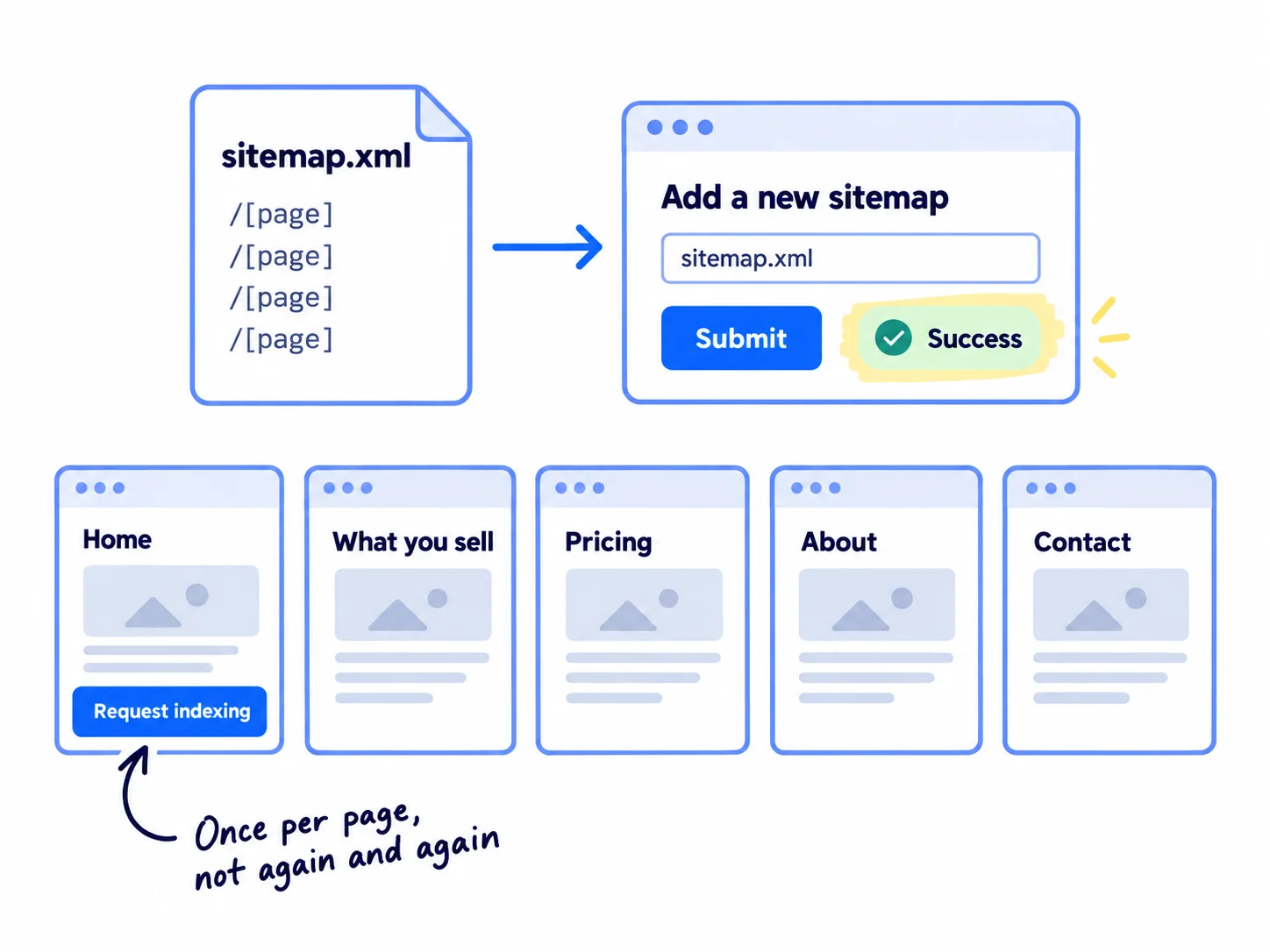
The sitemap. Open yourdomain.com/sitemap.xml in your browser. Most site builders make it for you, and you should see a list of your page addresses. In Search Console, open the Sitemaps report, paste the address into "Add a new sitemap" and click Submit. Also add a "Sitemap:" line to your robots.txt (the template in step 2), which Google also reads. Google calls a sitemap "merely a hint", so it helps Google find pages but does not make it index them.
The requests. Paste each of your 5 main pages into URL Inspection and click "Request indexing": home, what you sell, pricing, about and contact. You must be an owner or full user of the property. Google says there is a daily limit on these requests, and "requesting a recrawl multiple times for the same URL won't get it crawled any faster." It also says "Crawling can take anywhere from a few days to a few weeks."
You may read that you should "ping" Google with your sitemap. Google turned that off at the end of 2023, so pings now do nothing. Submitting in Search Console and the robots.txt line are the two ways that work.
- Tool: Google Search Console. Free.
- Time: 15 minutes.
- You will have: a submitted sitemap and 5 indexing requests.
- It worked if: the Sitemaps report shows "Success" and a "Discovered pages" number close to how many pages you have. Within 2 weeks, URL Inspection shows your home page as "URL is on Google".
- Common mistake: clicking "Request indexing" on the same page every day. It uses up your daily limit and does not help.
4. Link to every page from your own site and from outside it
Google's crawler finds most pages by following links, so every page you want on Google needs a link from at least one other page on your site, and your site needs a few links from other sites. Google's words: "Every page you care about should have a link from at least one other page on your site."
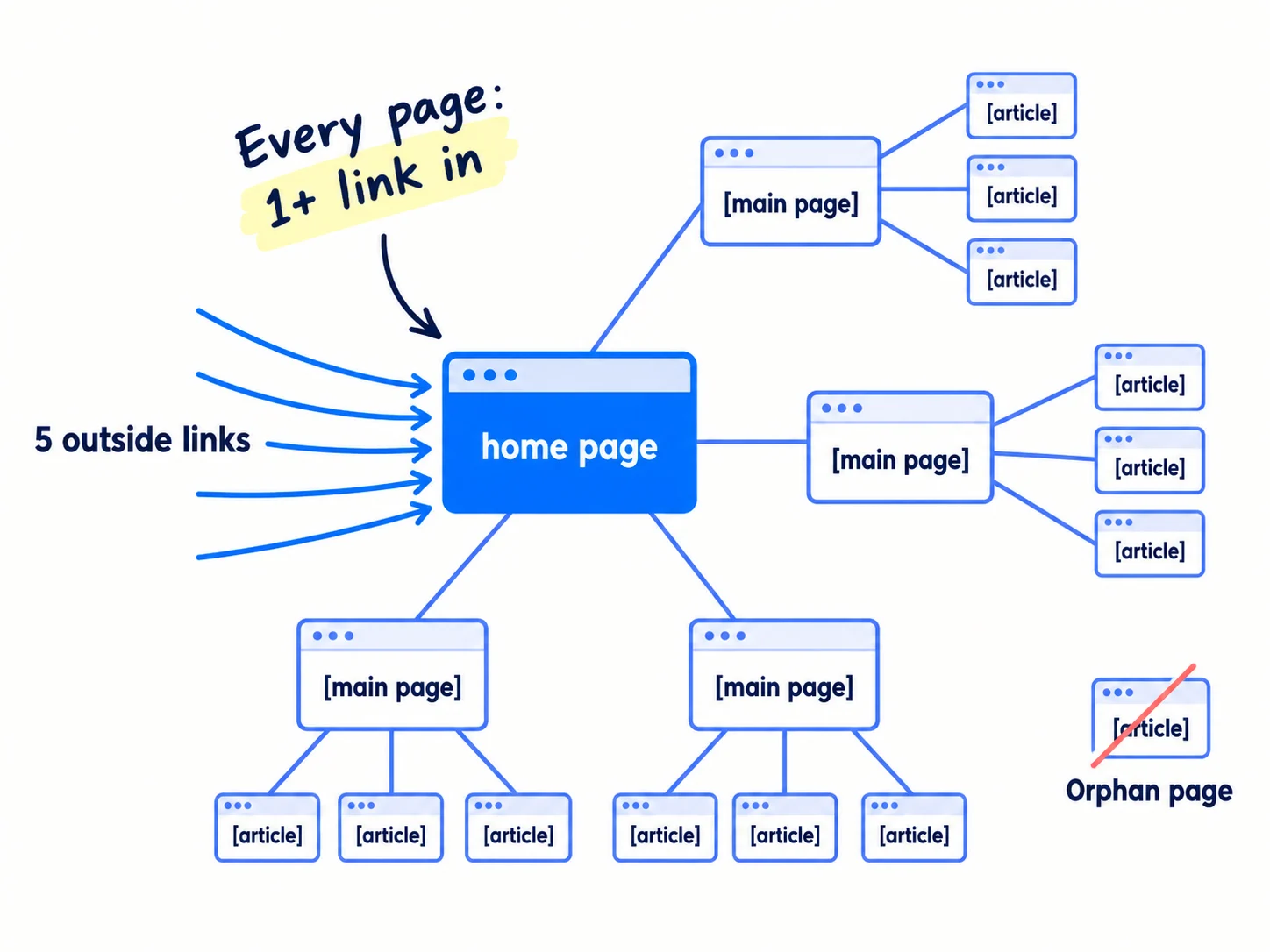
Inside your site. Copy every page address from your sitemap into a sheet. For each page, write which of your pages link to it. Then fix the gaps:
- Your home page links to every main page, in the menu or the footer.
- Every article or product page gets links from at least 3 related pages. Put the link on words that say what the page is about, which is its anchor text, not "click here".
- Use normal links. Google reads links written as a link in the page's code. A page you can only reach through a search box or a button that runs code has no link Google can follow.
Let AI do the matching. Paste your page list into ChatGPT or Claude and ask which 3 pages should link to each page, and with which words. You check each suggestion and add the links yourself.
Outside your site. Add 5 first links from places you already control: your LinkedIn company page, your X bio, your founder profile on a site such as Indie Hackers or Product Hunt, your GitHub page if you have one, and a Google Business Profile if customers visit you, which also puts you on Google Maps. In July 2026, one founder had hundreds of pages sitting unindexed for 6 weeks. They linked every page from 2 to 3 others, added their first profile links and resubmitted their sitemap, and about 800 more pages were indexed that week. They say they cannot tell which change did it, so do all of them. Backlinks that help you rank, not only get found, are in getting backlinks for a new website, and SaaS directories add a few more.
Page | Links in from (your pages) | How many | Outside links | On Google? (URL Inspection)
/ (home) | menu, footer | all | LinkedIn, X, [profile] | yes / no
/[main page] | home menu, /[page], /[page] | 3 | | yes / no
/[article] | /[page], /[page], /[page] | 3 | | yes / no
Rule: every row has 1 or more links in. Every article and product page has 3.
- Tool: Google Sheets, your site editor, and ChatGPT or Claude to suggest links.
- Time: 1 hour once, for a site of up to about 50 pages.
- You will have: a sheet where every page has at least 1 link in, and 5 outside links to your site.
- It worked if: no row in the sheet has 0 links in, and all 5 outside links are live and point to your site.
- Common mistake: pages that are only in the sitemap, with no link from any other page. Google knows they exist but has no reason to visit them soon.
See it done: Bugmoth's link sheet
Links in, before and after
| Page | Links in before | Links in after | Added from |
|---|---|---|---|
| /bug-reporting-for-web-agencies | 1 | 3 | home, /features, /pricing |
| /alternatives/[competitor] | 0 | 3 | /features, /pricing, /blog/client-bug-reports |
| /blog/client-bug-reports | 1 | 3 | /features, /bug-reporting-for-web-agencies, footer |
Why it works: The comparison page had no link from any other page, so it got three links from pages Google already had.
5. Send every new page to Google the day you publish it
Every day you publish a new page, link to it from 3 of your older pages and ask Google to index it, so Google has two ways to find it on day one. This takes 10 minutes on top of writing the page, and fits in the daily marketing block you already have.
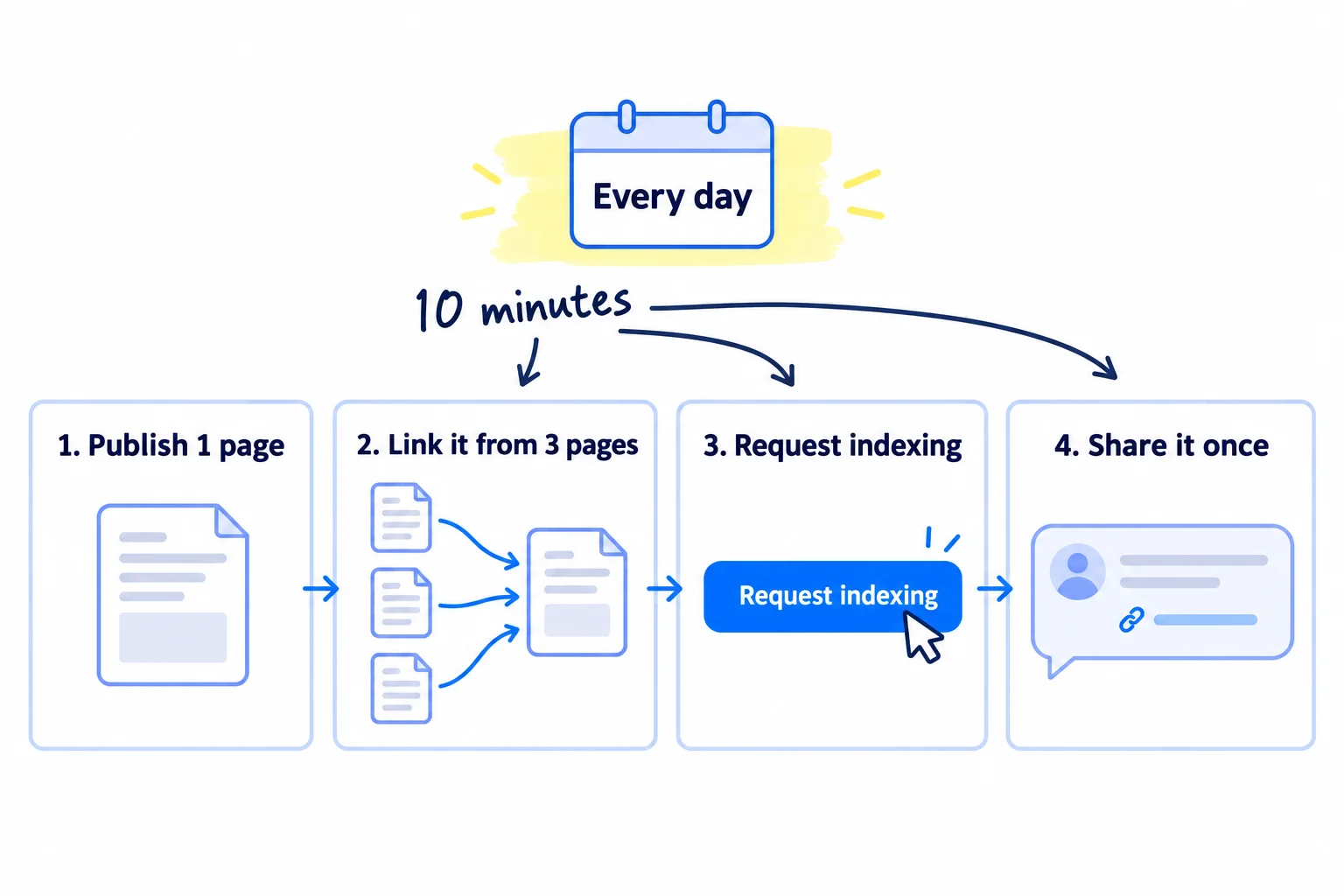
Aim for 1 page a day, each answering one search your buyer makes, such as an alternative page for a tool they compare you with. The keyword list gives you the topic, writing a blog post that ranks covers the writing, and how long SEO takes explains why 1 a day. Let AI draft each page; you add one thing only you know, such as a real price, a photo of your work, or a number from your own customers. That is what using AI for content looks like when Google still wants to index it.
When a page is live, do these four things:
- Link to it from 3 older pages that URL Inspection already shows as "URL is on Google". Add a row to your link sheet.
- Request indexing for it in URL Inspection.
- Check it is in your sitemap. Most builders add new pages on their own; look once, then trust it.
- Share it once where it answers a real question, the way you get traffic to a new website: in one of your 20 daily answers in the places your buyers ask for help, or in a post. On Reddit, read how to post without getting banned first. Each share is also a link Google can follow.
Google limits "Request indexing" to a daily number it does not publish. At 1 page a day you will not reach it. If you publish or update many pages in one day, request only the most important ones; the sitemap and your internal links carry the rest.
Quality decides how much Google indexes. In July 2026, Mueller said that when Google's systems "are seriously worried about the quality of a website", they "reduce the number of pages that they index". He named AI pages where readers think "Anyone could have written this", and added: "That's not to say that all AI-generated content is bad." Google's spam rules also count many pages made only to rank as spam. One useful page a day is not that; 50 look-alike pages in a day is.
If you run a D2C store: each new product goes into a collection and gets a link from your home page or a related product. Then add it to free Google Shopping listings, which is a separate way for shoppers to find it. Write each product page in your own words, as in product descriptions that sell. When a new store's pages stayed out in May 2026, the Shopify Community replies said the same: unique descriptions and links from home to collections to products.
If you run a B2B company: a case study page for each client, named by the client's kind of business, is a page only you can write. Link it from the page for the service it shows.
- Tool: your site editor, Google Search Console, and ChatGPT or Claude to draft.
- Time: 10 minutes a page on top of writing it.
- You will have: 7 new pages a week, each with 3 links in, an indexing request and one share. Plan the next 7 every Sunday in a content calendar.
- It worked if: at week 2, your home page and at least 12 of your first 14 new pages show "URL is on Google".
- Common mistake: publishing a batch of near-identical AI pages, such as one page per city with only the city name changed. Pages made only to rank count as spam under Google's rules, and Mueller said quality doubts make Google index less of the whole site.
6. Fix pages Google has discovered or crawled but not indexed
Every Sunday, check the pages you published last week in URL Inspection, and for each one that says "URL is not on Google", do what its reason says in the table below. Give a page 2 weeks after its request before you treat "not on Google" as a problem.
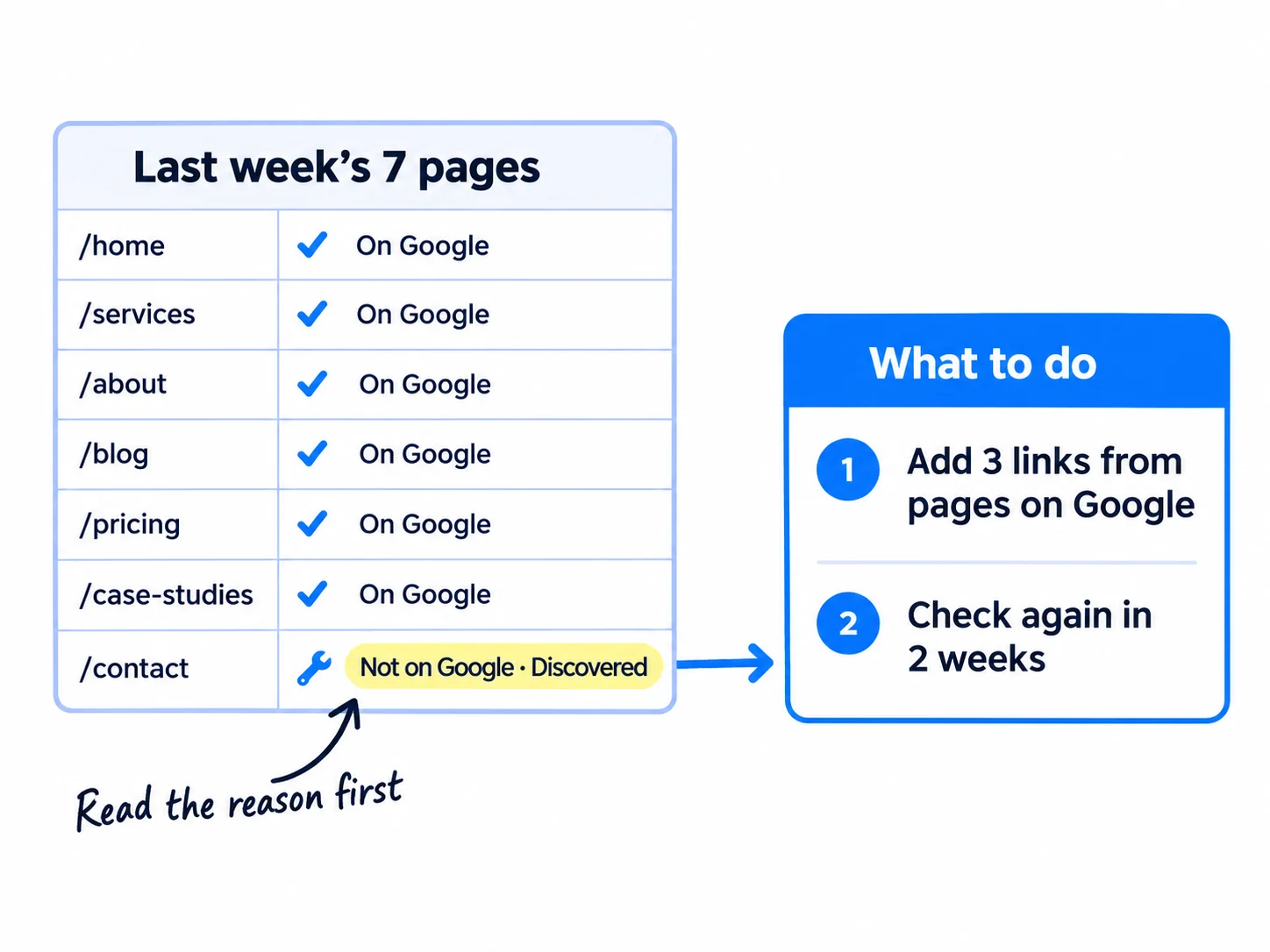
For each page, URL Inspection shows the reason under Page indexing. To see all your pages at once, open the Page indexing report, choose "All submitted pages" in the filter above the chart, and read the "Why pages aren't indexed" table. Google says a site with fewer than 500 pages probably does not need this report; URL Inspection on each new page is enough.
| If the reason is | It means | Do this |
|---|---|---|
| Discovered - currently not indexed | Google knows the page exists but has not visited it yet | Add 3 links to it from pages that are on Google, then check again in 2 weeks |
| Crawled - currently not indexed | Google read the page and left it out for now | Do not request again: Google says there is "no need to resubmit". Make the page better (below), then request once |
| URL marked 'noindex' | A tag tells Google to leave the page out | Remove the tag if you want the page on Google (step 2) |
| URL blocked by robots.txt | Your robots.txt stops Google reading the page | Remove the rule (step 2) |
| Duplicate without user-selected canonical | Google sees the page as a copy of another page | Make the page clearly different, or point it to the main version with a canonical link |
| Alternate page with proper canonical tag, or Page with redirect | It works as it should | Nothing. Google: "There is nothing you need to do" |
| Not found (404) | The page does not exist | If it moved, add a 301 redirect to the new address. If you deleted it, leave it |
| Soft 404 | The page shows a "not found" message but tells Google it is fine | Add the real content, or make it return a real 404 |
| Server error (5xx) or Blocked due to access forbidden (403) | Your server or its bot protection turned Google away | Fix it with your host (step 2), then click "Validate Fix" |
Making a page better for "Crawled - currently not indexed": answer the page's one question in its first two lines, add something only you know, and merge it into a stronger page if two of your pages say the same thing. How to do that well is in making an article rank higher.
Use "Validate Fix" only for real technical fixes, such as a server error or a blocked page. Google says validation "typically takes up to about two weeks". Mueller said that when the sample passes, Google will "in most cases" recrawl the other pages faster.
Do not try to index every address. Google says "You should not expect all URLs on your site to be indexed, only the canonical pages." Google's Martin Splitt added in July 2026 that the share of pages indexed "doesn't matter". What matters is that every page you care about is on Google. The report can also run late: in June 2026 its data was 18 days old. For a single page, trust URL Inspection.
If most of your pages are "Discovered" or "Crawled", and step 2 found nothing, the problem is quality, not settings. Stop adding new pages for a week, rewrite your 10 best pages with the steps above, and link to them from your home page. Then go back to 1 page a day.
Week of: [date]
Page | Published | Indexing requested | Status in URL Inspection | Reason (if not on Google) | What I changed
/[page] | [date] | yes | URL is on Google | |
/[page] | [date] | yes | URL is not on Google | Discovered - currently not indexed | Added links from /[page], /[page], /[page]
Pages on Google: __ of __. Pages older than 2 weeks and still not on Google: __.
- Tool: URL Inspection and the Page indexing report in Search Console, and Google Sheets.
- Time: 20 minutes every Sunday.
- You will have: one row per page, with its status and the change for each page that is not on Google.
- It worked if: every page older than 2 weeks is either "URL is on Google" or has a reason and a change written down.
- Common mistake: treating every grey row as an error to fix. Redirects, 404s for deleted pages and pages you meant to hide are working as they should.
See it done: Bugmoth's Sunday check, week 2
Week 2, 14 pages published
| Pages published | On Google | Discovered | Crawled, not indexed | Change |
|---|---|---|---|---|
| 14 | 12 | 1 | 1 | Discovered page: 3 links added. Crawled page: merged into the stronger page on the same question |
12 of 14 are on Google, so they pass the week-2 check and keep publishing 1 page a day.
Why it works: They fixed only the two pages that needed it, and each fix matches its reason.
Where Scout7 helps
Scout7 does parts of steps 2, 3, 5 and 6.
Step 2. Scout7's search and AI audit crawls your site and gives you a list of page-level issues, sorted by how serious they are. It also checks your robots.txt, llms.txt and structured data. You still make the fixes on your own site: it does not edit a site it does not host.
Steps 3 and 5. If you write your articles in Content Co-Pilot, Scout7 can host the blog under your own domain at /content, and it makes the sitemap.xml and robots.txt for it, so crawlers read the blog as part of your site. You point your CDN to it once. You approve every article; nothing is published without your approval.
Step 6. Once you connect your own Google Search Console, Scout7 shows real impressions, clicks and positions next to its audit, so you can see which of your indexed pages Google shows people.
Your indexing checklist for the next 2 weeks
0 of 12 done
Work through this list with an AI assistant
It drafts the work and keeps track of what is done.
Frequently asked questions
- How long does it take Google to index a new website?
Google says crawling "can take anywhere from a few days to a few weeks". For a public store, Shopify says Google indexes it "within 48 to 72 hours after you add or update information". If your home page is not on Google after 2 weeks, rerun the live test in step 2, then check your links (step 4). Getting visitors from search takes longer.
- Why is my website not showing up on Google?
First check if Google has the page: paste it into URL Inspection. Google's Mueller calls a "site:" search "an artificial type of query"; Search Console is "the source of truth". If the page is on Google but nobody sees it, it is indexed but not ranking, which you measure with impressions. Then work on keywords and better pages.
- Should I pay for an indexing tool?
No. Google's Indexing API "can only be used" for job posting and livestream pages, and abuse "may result in access being revoked", so a tool that pushes any page through it breaks Google's rules. "Request indexing" in Search Console is free. Links and better pages help, so spend the money on backlinks, and walk away from anyone who promises a result.
- Does Google need to index every page on my site?
No. Google says to expect only your main version of each page to be indexed, not every address. Redirects, deleted pages, login pages and copies of other pages should stay out. Check that every page you want people to find is on Google, and ignore the share of pages indexed.
- How do I get my website into ChatGPT search?
Let OpenAI's search crawler in: OpenAI says sites that block OAI-SearchBot "will not be shown in ChatGPT search answers", and a robots.txt change can take about 24 hours to count. Google says there are "no additional requirements" for AI Overviews beyond being indexed, so this guide covers that too. The rest is in how to get your brand mentioned by ChatGPT and llms.txt and schema markup.
Sources
- 1.Ask Google to recrawl your URLs — Google Search Central, updated 10 December 2025, checked 30 September 2026
- 2.Get your website on Google — Google Search Central, updated 10 December 2025, checked 30 September 2026
- 3.Add a website property to Search Console — Google Search Console Help, checked 30 September 2026
- 4.URL Inspection tool — Google Search Console Help, checked 30 September 2026
- 5.Page indexing report — Google Search Console Help, checked 30 September 2026
- 6.Sitemaps report — Google Search Console Help, checked 30 September 2026
- 7.Build and submit a sitemap — Google Search Central, updated 8 July 2026, checked 30 September 2026
- 8.Sitemaps ping endpoint is going away — Google Search Central Blog, June 2023
- 9.Block Search indexing with noindex — Google Search Central, updated 10 December 2025, checked 30 September 2026
- 10.Link best practices for Google — Google Search Central, updated 10 December 2025, checked 30 September 2026
- 11.Understand JavaScript SEO basics — Google Search Central, updated 4 March 2026, checked 30 September 2026
- 12.Indexing API quickstart — Google Search Central, updated 16 July 2026, checked 30 September 2026
- 13.AI features and your website — Google Search Central, updated 10 December 2025, checked 30 September 2026
- 14.Spam policies for Google web search — Google Search Central, updated 28 August 2026, checked 30 September 2026
- 15.Search Off the Record, episode 112: How to read the Indexing Report (transcript) — Google Search Relations, 16 July 2026
- 16.Overview of OpenAI crawlers — OpenAI, checked 30 September 2026
- 17.Password page — Shopify Help Center, checked 30 September 2026
- 18.Frequently asked questions about SEO — Shopify Help Center, checked 30 September 2026
- 19.Settings Reading screen — WordPress.org, checked 30 September 2026
- 20.Managing search engine indexing for your site — Wix Help Center, checked 30 September 2026
- 21.Connecting your site to Google in the Wix SEO Setup Checklist — Wix Help Center, checked 30 September 2026
- 22.Hiding your site from search results — Squarespace Help Center, checked 30 September 2026
- 23.Verifying your site with Google Search Console — Squarespace Help Center, checked 30 September 2026
- 24.Optimize your app for SEO and AI search — Lovable Documentation, checked 30 September 2026
- 25.Introducing AI Performance in Bing Webmaster Tools (public preview) — Bing Webmaster Blog, 10 February 2026
- 26.Search Console Page Indexing report delayed 2 weeks — TechWyse, 29 June 2026
- 27.I did 5 things at once and 800 pages got indexed in a week — Indie Hackers, 28 July 2026
Next article to read
How to use Google Search ConsoleOnce Google knows your site, use Search Console to see what it shows people.Read it nextRelated guides
- Technical SEO checklist for a new websiteRun the technical SEO checks that matter for a new website in one afternoon: turn off every setting that hides it, check Google sees your words, one secure address, your sitemap in Google and Bing and a free crawl with 0 errors, then test each new page the day you publish it and the whole site every Sunday.
- How to get backlinks for a new websiteGet backlinks for a new website with no budget or press contacts: take the 20 links you can get from your profiles, partners and directories today, list 100 sites that link to your competitors, publish one page worth linking to, send 100 personal pitches a day offering a guest article, a broken-link fix or a page for their list, and count new linking sites every Sunday.
- How to add llms.txt and schema markupAdd llms.txt and schema markup in about an hour: check what your site builder already made, put Organization markup on your home page and the right markup on each kind of page, publish a short llms.txt, test each new page's markup the day you publish it, and fix errors every Sunday, knowing Google ignores llms.txt for its AI answers.
- How to make a website for your businessComing soon
Guides that link here
- How to get traffic to a new website for free
- How long does SEO take to work?
- How to use Google Search Console
- Technical SEO checklist for a new website
- How to set up a Google Business Profile
- How to add llms.txt and schema markup
- How to get your brand mentioned by ChatGPT
- How to get your company recommended by ChatGPT as a supplierB2B
- How to show up in Google AI Overviews
- How to track AI traffic and ChatGPT mentions
- How to build a free tool that brings in leadsSaaS
- How to plan a content calendar
- How to repurpose content across platforms
- How to use AI for content creation
- How to write a case study
- How to market a SaaS productSaaS
- How to market your product as a technical founderSaaS
- How to do SEO for a Shopify storeD2C
- How to find keywords for SEO
- How to get backlinks for a new website
- How to get backlinks from news websites
- How to list your products on Google Shopping for freeD2C
- How to make an article rank higher on Google
- How to measure SEO success
- How to rank on Google Maps
- How to write a blog post that ranks on Google
- How to write competitor comparison and alternative pages
Cite this page
Dinesh Bypilla (2026). How to get your website indexed on Google. Scout7 Academy. https://scout7.ai/academy/seo/how-to-get-your-website-indexed-on-google
Written by Dinesh Bypilla, Agentic systems engineer at Scout7. Reviewed by Murali Sid. Last checked 30 September 2026.
Quote any part of this guide with a link back to this page. © 2026 Scout7.
Markdown version of this page: https://scout7.ai/academy/seo/how-to-get-your-website-indexed-on-google.md