



How to launch a B2B product
Launch your B2B product when you do all the selling: write a founding offer for your first 10 customers, invite 100 named buyers a day to a 30-minute live demo 3 weeks away, post twice and answer 20 questions a day, write to everyone the day after, and count conversations by source every Sunday.
ByDinesh BypillaReviewed byMurali SidLast checked 26 min read
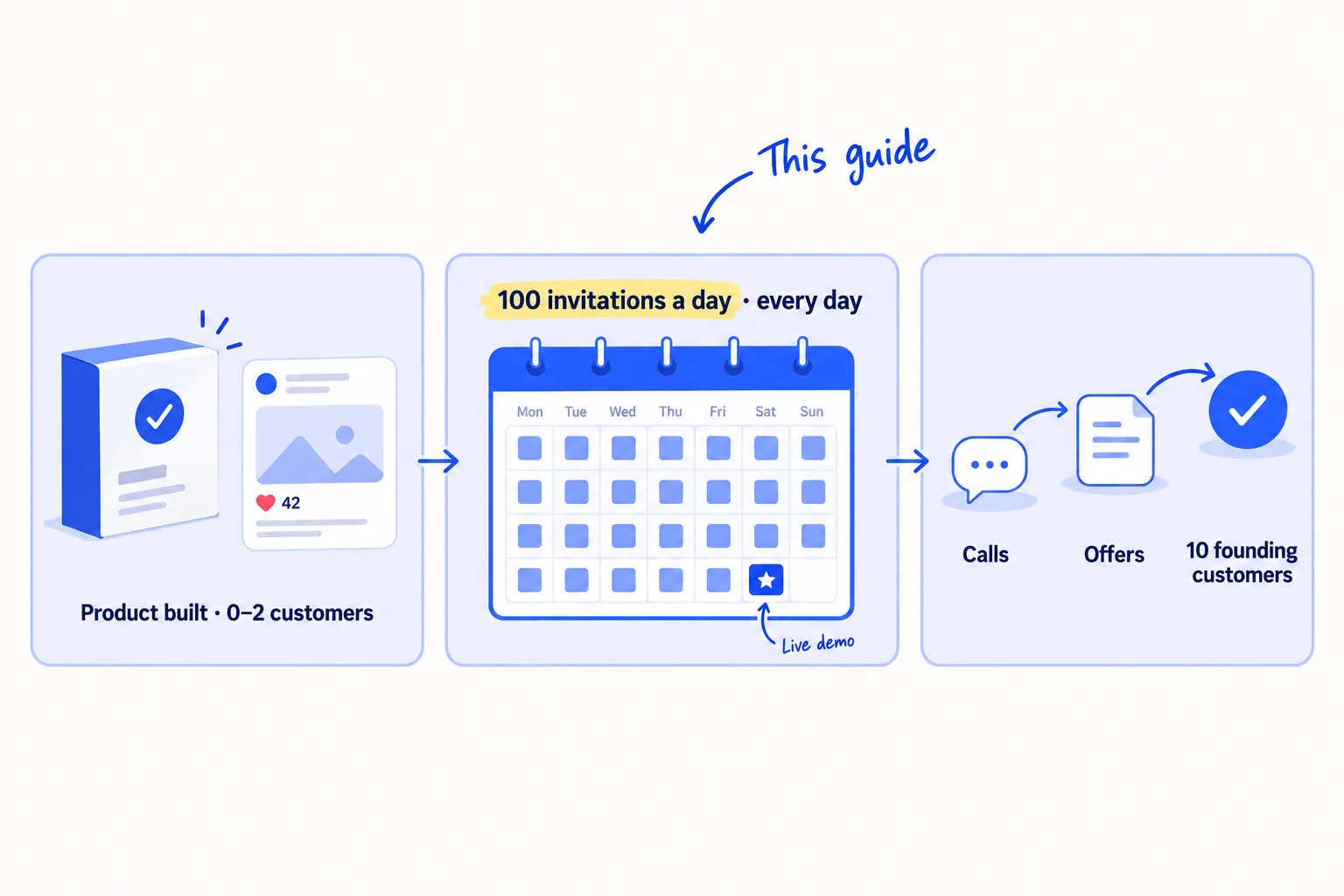
You have built your B2B product, you have no audience, and a launch post will get a few likes from friends. Here is how to launch a B2B product when you do all the selling yourself: offer your first 10 customers a founding deal, then invite 100 named buyers a day to a live demo on a fixed date 3 weeks away. Most business buyers choose a favourite supplier before they talk to anyone, so a launch that waits for buyers to find you brings almost nothing.
Do these three things
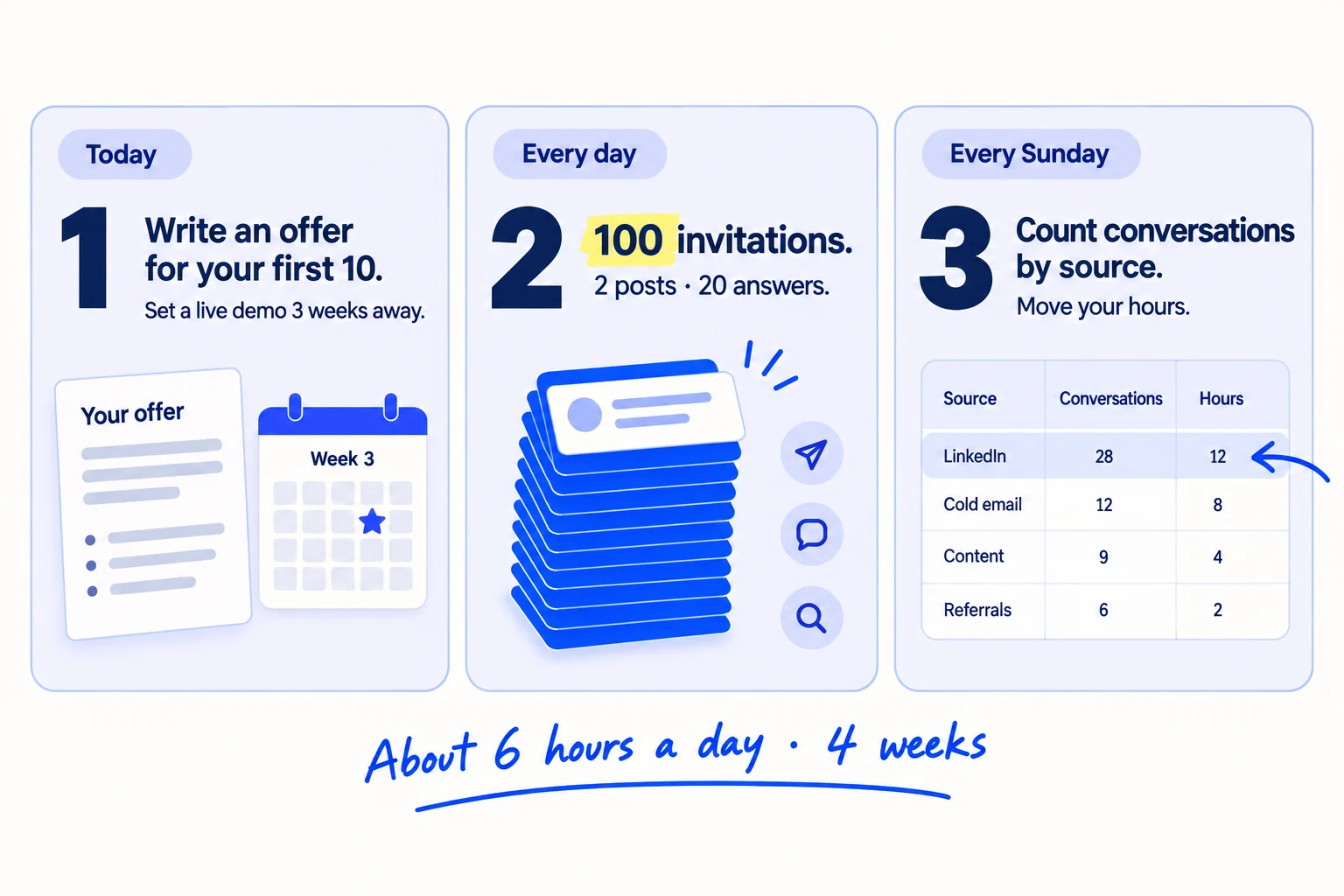
About 6 hours a day, every day, for 4 weeks: 3 before launch day and 1 after. Judge it after 2,800 invitations.
Show the three actions in fullHide the full list
- Today: write a founding-customer offer for your first 10 customers, and set a date 3 weeks away for a 30-minute live demo.
- Every day: add 100 named buyers to your list and send 100 personal invitations to the live demo, following up 3 times. Post twice on LinkedIn from your own profile, and answer 20 questions where your buyers ask them.
- Every Sunday: count invitations, yeses, conversations and founding customers by where each one came from. After 2,800 invitations, give your hours to the source that brought the most conversations.
Get help doing these
ChatGPT or Claude reads this guide and works through it with you.
1. Write a founding-customer offer for your first 10 customers
Write a one-page offer for your first 10 customers: what your product does, who it is for, and what they get for going first. Buyers want something proven. With no customers, you cannot show proof, so you give the first 10 a reason to be the proof.
![A one-page offer card headed Founding offer, with four lines: For [kind of company], What you get, What we ask, Open until [date]. A badge on it says 10 places.](/academy/illustrations/how-to-launch-a-b2b-product/step-1-write-a-founding-customer-offer-for-your-first-1.webp)
Start from one sentence on who buys from you and the moment they need you. If you already have one or two clients, ask them why they bought and use their words. Then turn that sentence into a value proposition a stranger understands in one read.
The offer has four parts:
- A small first order with an end date. A buyer who has never heard of you can say yes to something small far more easily than to a year-long contract.
- A founding price. For example, half your normal price for the first year. Charge something. A buyer who pays uses what they bought and tells you the truth about it. A free pilot with no end date often never ends and never turns into a sale.
- What you ask back. A 15-minute feedback call, and a written result you can share with their name on it. This becomes your first testimonial and your first case study.
- A limit. 10 places, and a closing date 14 days after launch day.
If you make or wholesale a product: the first order is a short first run at the founding price, with a free sample before they order.
If you sell a service: the first order is a fixed-price first project with a clear finish, not an open-ended retainer.
If you sell sales-led software: the first order is a 60-day paid pilot that you set up for them yourself, with the founding price held if they stay.
Set your normal price first, so the founding price is a real discount, and work out your floor price so the founding price never loses you money.
For [kind of company] who [the moment they need you].[Your product] [does what, in one line], so [the result they get].Founding offer for the first 10 [companies / brands / firms]:
[The small first order], ready in [time].
[The founding price], held for [12 months].
[One extra: a free sample / set-up done for you / a first check].
What we ask: a 15-minute call after [the first order] and a short written result we can share.Open until [date], or until the 10 places are taken.
- Tool: a Google Doc.
- Time: 1 hour.
- You will have: a one-page offer you can paste into every message, post and page in the next steps.
- It worked if: 3 people who fit your sentence read it and can each tell you, in one sentence, what it does and what they get. If one of them cannot, rewrite the first line before you invite anyone.
- Common mistake: "Now launching! Contact us to learn more." It says nothing about who it is for or why they should reply this month.
See it done: Carvelian's founding offer
Carvelian Packaging is a made-up maker of custom printed boxes for small food and drink brands. One founder sells through calls, samples and quotes.
Before
Now launching: custom packaging for every business. Contact us for a quote.
After
For small food and drink brands that just got into shops: your own printed gift box, in a short run, with no 5,000-box minimum. Founding offer for the first 10 brands: a free printed sample box, the founding price on every reorder for 12 months, and in return a photo of the box on the shelf we can share. Open until 14 days after launch.
Why it works: It names who it is for and the problem, then gives a small first step with a limit and a date, so a food brand can say yes without a meeting.
2. Add 100 named buyers to your launch list every day
Add 100 new rows to your launch list every day: a company that fits your sentence, one fact about why, and the name of the person who buys. You will send 100 invitations a day, so you need 100 new names a day. Over the 3 weeks before launch day that is about 2,100 names.
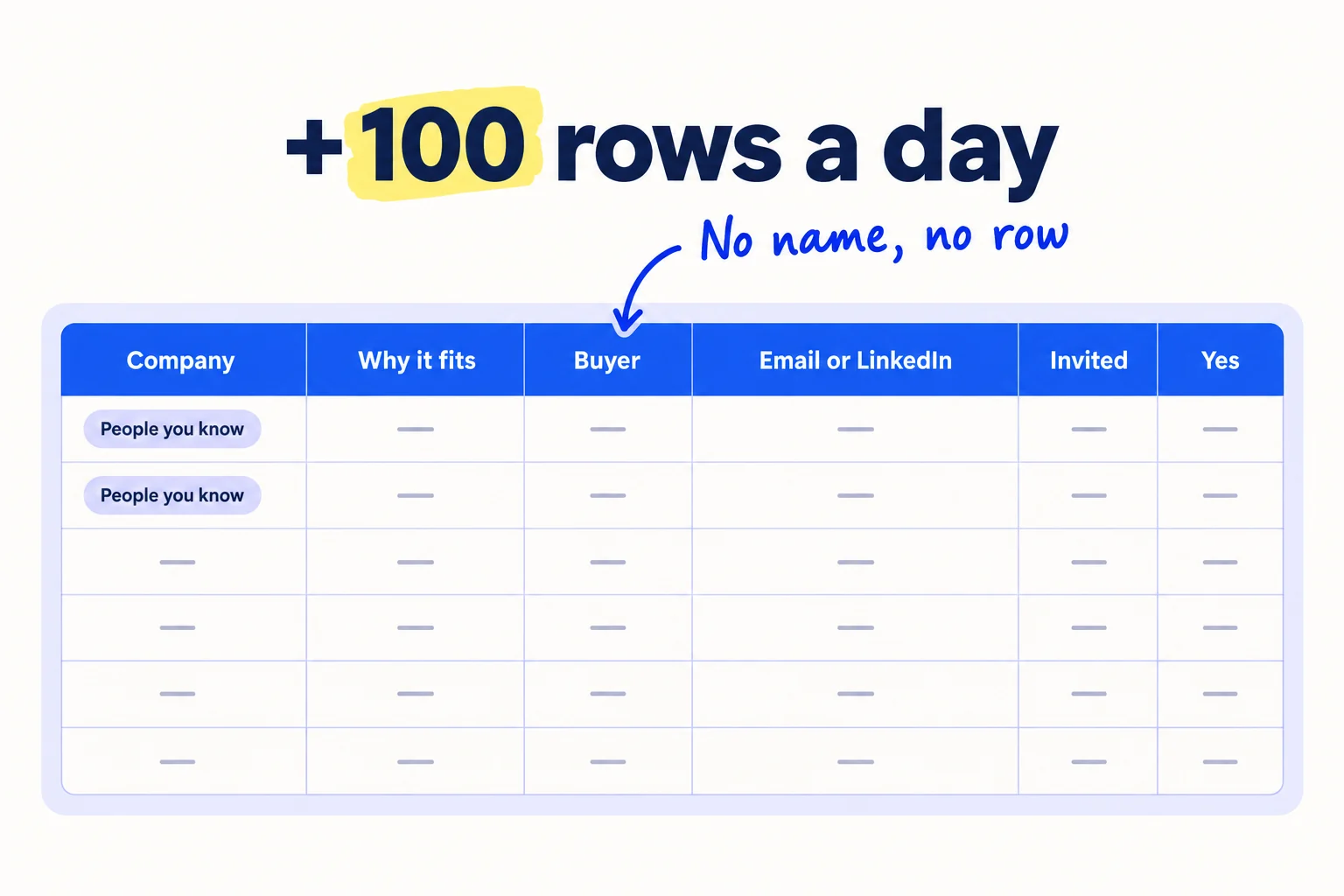
Put the people you already know at the top: past colleagues, suppliers, old clients and friends in your buyers' industry. This is warm outreach, and they answer far more often than strangers. Go through your email contacts, your LinkedIn connections and your phone, and add every one who could buy or knows someone who could.
Then add strangers who fit. This is your lead list. Look where your buyers already show up: LinkedIn search for the job title, Google for the kind of company plus a region, the exhibitor list of their next trade show, and the member list of their trade association. For each company, find the decision maker and their work email. Where to look for each kind of business is in the daily list routine for first B2B clients.
Let AI suggest companies. Give ChatGPT or Claude your sentence and a region, and ask for 30 companies with their websites. Open each website yourself before a row goes in. Some will be wrong, closed or too big.
Company | Website | Why it fits (one fact) | Buyer name | Role | Email | LinkedIn | Phone | Source | Invited on | Follow-ups sent | Yes to demo | Came live | Next step
- Tool: Google Sheets, LinkedIn search, Google, and Hunter to find emails. Hunter's free plan gives 50 credits a month. At 100 names a day you will need more: Starter is $49 a month, or $34 a month billed yearly, for 2,000 credits.
- Time: about 1 hour 30 minutes a day, with AI suggesting companies and you checking each one.
- You will have: 100 new named buyers a day, and about 2,100 by launch day.
- It worked if: every row has a person's name and a way to reach them, and 9 in 10 rows fit your sentence exactly.
- Common mistake: buying a list of 5,000 contacts. You cannot write one true line about each of them, and email to a bought list lands in spam.
3. Put up a launch page with a 2-minute demo and one button
Put up one page that says who your product is for, shows it working in a 2-minute video, states the founding offer, and has one button. Every invitation and every post will send people here, so it must be live before the first invitation goes out.
![A web page in a browser window. The top says [What it does] for [who it is for]. Under it: a 2-minute video, the founding offer with 10 places, a price range, and one button: Book a 20-minute call.](/academy/illustrations/how-to-launch-a-b2b-product/step-3-put-up-a-launch-page-with-a-2-minute-demo-and-on.webp)
Buyers look you up before they reply to a stranger. Many now ask an AI chatbot first: in G2's March 2026 survey of 1,076 software buyers, 51% said they start their research in an AI chatbot more often than in Google, up from 29% in April 2025. So write the page so anyone who reads it, or an AI tool that reads it, can say what the product is, who it is for and roughly what it costs. Later, work on being named when buyers ask ChatGPT for a supplier.
Build the page in this order. The landing page guide goes deeper on each part.
Headline: [What it does] for [who it is for].
Line under it: [The problem, in your buyers' words]. [What changes when they use it.]
Video: a 2-minute demo. Show the one job it does, start to finish. No slides.
The founding offer: [paste from step 1], with the places left and the closing date.
Price: from [amount], or [the price range].
Live demo: [date and time, with time zone]. Reply to any of my messages to join.
One button: Book a 20-minute call.
Record the video with Loom. Its free plan allows 25 videos of up to 5 minutes each. Record the screen or the product on camera, talk as you would on a call, and cut it to 2 minutes. Show one job, start to finish: the problem, the product doing the job, and the result.
For the button, use a free Cal.com booking page for a 20-minute call. The free plan allows unlimited event types and meetings for one person.
If you make or wholesale a product: make the button "Request a free sample" and ask for the company name, the buyer's name and a delivery address. Film the video with your phone, holding the product.
Put the page on your own site. If your homepage says something vaguer, change its top too, the same day: fix your homepage copy and the next step on your B2B website. If you have no website yet, a free Google Sites page works on a sites.google.com address. Your own domain on Google Sites needs a paid Google Workspace plan.
Change your LinkedIn headline to your one sentence in short form, "[What it does] for [who it is for]", so people who check you after an invitation see the same thing.
- Tool: your website editor (or Google Sites), Loom's free plan, Cal.com's free plan.
- Time: about 3 hours, once.
- You will have: a live page with the headline, the video, the offer, the price and one button.
- It worked if: you show the page to 3 people who fit for 5 seconds, and each can say what it does and who it is for. Then book a test call on your phone to check the button works.
- Common mistake: a long list of features, no price, and three buttons ("Learn more", "Contact us", "Sign up"). Give one next step.
4. Pick a launch date 3 weeks away and invite 100 people a day to a live demo
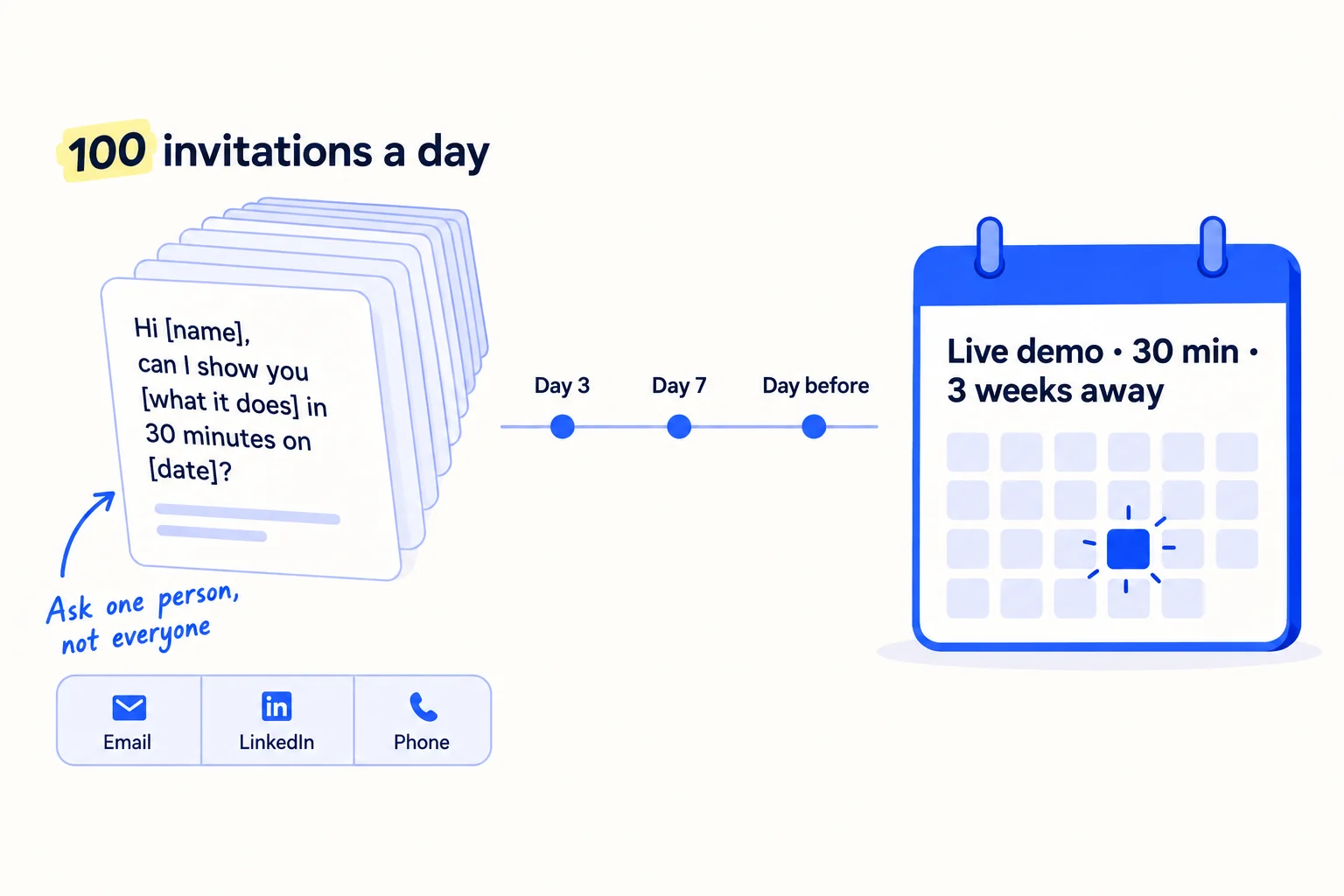
Set your launch day 3 weeks from today, on a Tuesday or Wednesday, and hold a 30-minute live demo on it. Then send 100 personal invitations every day until that day, each asking one person to join. A live demo on a fixed date gives every message a reason to reply this week, and gives you a reason to write to everyone again.
Set it up today. Create one Google Calendar event for launch day with a Google Meet link. Google Meet on a free Google account holds up to 100 people for up to 60 minutes, which is enough for a 30-minute demo. When you add guests, open Guest permissions and untick "See guest list", so no buyer sees the others' emails. Tuesday and Wednesday brought the most attendees in Goldcast's study of 19,531 business webinars from 2024. Pick an hour when your buyers are at work.
Then create a LinkedIn event for the same demo. On LinkedIn, click Home, then Events in the left pane, then Create an Event. Choose Online, then "External event link", and paste the Meet link. You cannot change the organizer, type or format after you post it, so check them first. You can invite up to 1,000 of your first-degree connections a week to an event. Invite only those who fit your sentence. These one-click invitations are extra: they do not count toward your 100 personal messages.
Send 100 personal invitations a day. Start with the people you know on day 1. Then move down the list to strangers. Each message has one true line about the person, one line about what you have built, and one question: will you join the live demo? Let AI do the drafting: paste 10 rows from your list and the template below into ChatGPT or Claude, and ask for one message per person, under 80 words. Read each one, fix the first line so it is true and about them, and send it. That is about a minute a message. When someone says yes, add them as a guest to the calendar event the same day.
Follow up 3 times in the same thread: on day 3, on day 7, and on the day before the demo. If a follow-up would fall after launch day, send the step 7 message instead. In Instantly's benchmark of cold email sent in 2025, 42% of all replies came from follow-ups. Stop the moment someone says no, and mark it in your sheet. If few people reply, rewrite the first line before you change anything else.
Spread the 100 across channels. Each channel has a limit. Keep the target and spread it:
| Channel | Its limit | How many of your 100 |
|---|---|---|
| Email to people you know, from your normal address | none beyond normal use | as many as you have, first |
| Email to strangers, from a second domain with SPF, DKIM and DMARC on | a new mailbox starts at 5 to 10 a day and rises to 25 over 4 to 6 weeks | 15 to 75, as the mailboxes warm up |
| LinkedIn messages to connections who fit | a free account can add a note to only 3 connection requests a month | send requests with no note to buyers, and message them once they accept |
| Phone calls to the smallest companies | your time | the rest; each call counts as one invitation |
If you have never sent cold email, set up the second domain today, before anything else, with SPF, DKIM and DMARC turned on, and start warming it up. In the US, the CAN-SPAM Act makes no exception for business email: every email to a stranger needs your postal address and a clear way to say no, and you must honour a "no" within 10 business days.
Subject: [their company] + [what you built]Hi [first name],[One true line about them: something they launched, sell or said.]I've built [your product]. It [does what] for [who it is for], so [the result].I'm showing it live for 30 minutes on [day, date, time, time zone]. Can I send you the link?[Your name], [company], [phone]
[Postal address]
Not for you? Reply "no" and I won't write again.
Day 3: Hi [first name], bringing this back up. The live demo is on [date]. Happy to send the link.Day 7: [One short, useful point about their problem.] If [date] doesn't suit, I can show you on a 20-minute call instead: [booking link].Day before: Tomorrow at [time] I'm showing [your product] live for 30 minutes. Reply "yes" and I'll send the link, or I'll stop here.
If you know the person well: skip the pitch. "I've built [product] and I'm showing it live on [date]. Would you come, and do you know one [kind of company] who should?" One introduction from a friend is worth many cold emails.
- Tool: Google Calendar and Google Meet (free), LinkedIn Events (free), Gmail from your main address and your second domain, your phone, and ChatGPT or Claude to draft.
- Time: about 2 hours a day for 100 invitations, plus about 1 hour for follow-ups.
- You will have: 700 invitations a week, about 2,100 by launch day, each logged with its follow-up dates.
- It worked if: at least 3 people say yes to the demo, or ask for a call, for every 100 you invite, after all follow-ups. Under 1 in 100 after 1,000 invitations means the offer or the list is wrong: go back to step 1, then send the next 1,000.
- Common mistake: one launch post with a sign-up link, and no personal messages. The other is stopping after 50 invitations because no one answered yet.
Three days before launch day, count the yeses. If fewer than 30 people have said yes, move the demo one week later and keep inviting. Tell everyone who said yes the new date.
See it done: Carvelian's invitation
To: Maria, founder of a small jam and chutney brand
Subject: Quarrybrook + a printed box for your jars
Hi Maria,
I saw Quarrybrook Preserves' chutneys went into two new delis this month. Congratulations.
I've started Carvelian Packaging. We print gift boxes for small food brands in short runs, with no 5,000-box minimum.
I'm showing how it works live for 30 minutes on Tuesday the 21st at 11am Eastern, with sample boxes on camera. Can I send you the link?
Dan, Carvelian Packaging, [phone] [Postal address] Not for you? Reply "no" and I won't write again.
Why it works: The first line is about her brand, the offer is one small thing, and it asks a yes-or-no question she can answer in a second.
5. Post twice a day on LinkedIn and answer 20 questions a day
Post twice a day on LinkedIn from your own profile, and answer 20 questions a day where your buyers ask for help. Buyers who get your invitation will look you up. When they do, they should find a founder who shows the problem, the product and the launch date every day, not an empty profile.
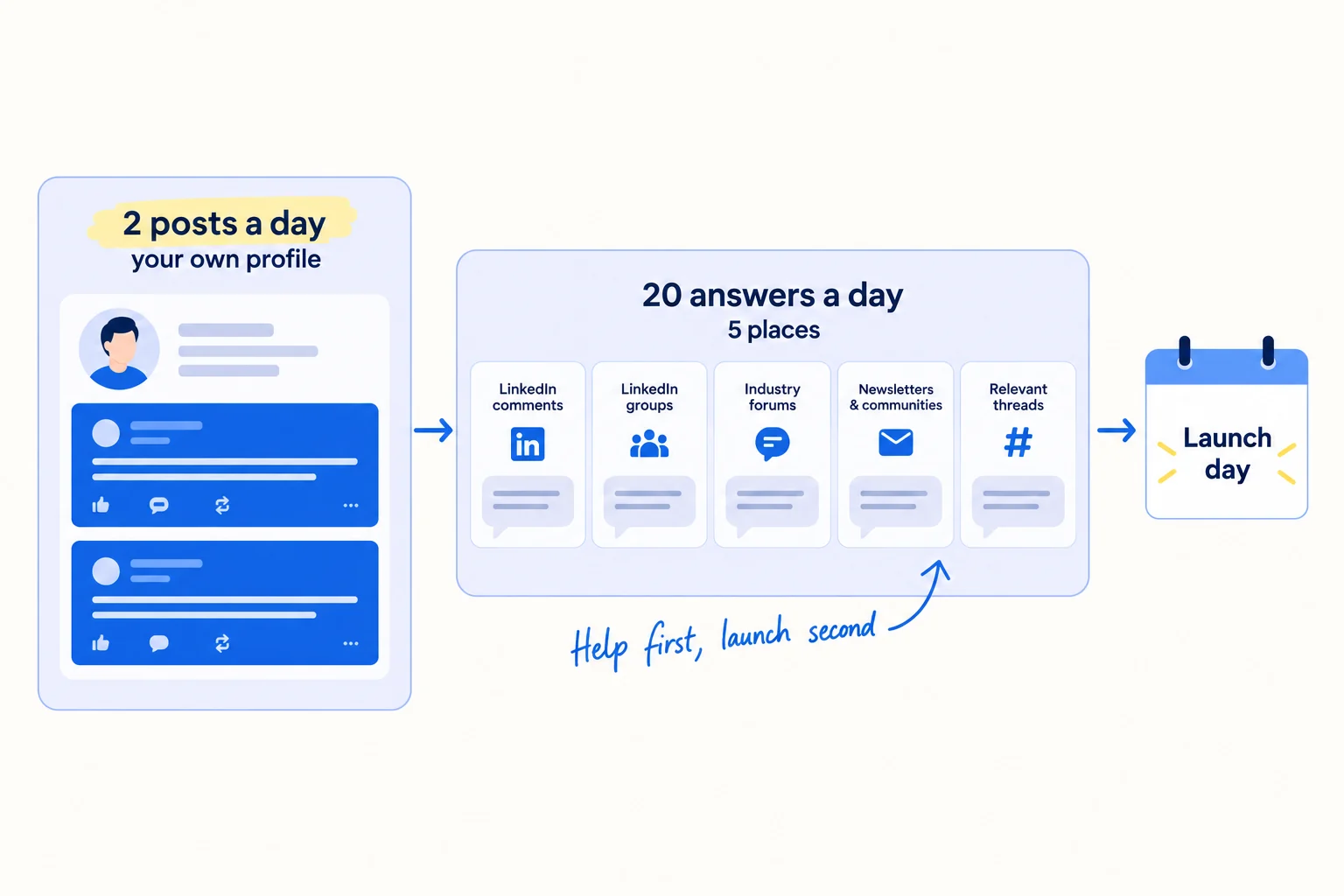
Posts. Post from your own profile, not only from a company page. A new company page has almost no followers, while your own profile already reaches your connections. Use the 3 weeks to build up to launch day. Each post makes one point, in your buyers' words:
| When | What to post |
|---|---|
| Weeks 1 and 2 | The problem you fix, as a short story from a real buyer or your own work. What buyers do today instead, and what it costs them. One small tip they can use without you. Why you built the product. |
| Week 3 | A 30-second clip of the product doing the job. The founding offer, with places left. The live demo date. |
| Launch day | The announcement (step 6). |
| Launch week | What people asked at the demo, and your answers. The first founding customer, with their permission. |
Let AI draft from your notes: give ChatGPT or Claude your step 1 sentence, one real thing that happened today, and the week's theme, and ask for two posts under 150 words. You change every line that does not sound like you, and add one true detail. When you run out of topics, pick from these LinkedIn post ideas. Short videos help here: a 30-second clip filmed on your phone shows the product better than a paragraph.
Answers. Every day, answer 20 questions from people who have the problem your product fixes, across at least 5 places: comments on your buyers' LinkedIn posts, LinkedIn groups, industry forums, subreddits that allow it, and the online communities where your buyers talk. Answer the question fully. Do not paste your link. People who find the answer useful will open your profile, and your profile shows the launch.
If your buyers are in a trade with few online communities: answer in the comments under posts by the trade magazines and associations your buyers follow, and under your buyers' own posts. 20 a day is still the target.
- Tool: LinkedIn, and ChatGPT or Claude to draft.
- Time: about 40 minutes a day for 2 posts, and about 1 hour for 20 answers.
- You will have: 42 posts and about 420 answers by launch day.
- It worked if: by the end of week 2, at least one person a week says yes to the demo or asks for a call after seeing a post or an answer. Ask each new yes where they heard of you.
- Common mistake: 3 weeks of "Something big is coming!" posts. They say nothing about the buyer's problem, so buyers scroll past them.
6. Run launch day: the live demo, the announcement and a note to trade magazines
On launch day, post the announcement, run the 30-minute live demo, start a short launch note to everyone on your list who has not answered, and send a new-product note to the trade magazines your buyers read. It is one busy day, and every part of it is about getting the next conversation.
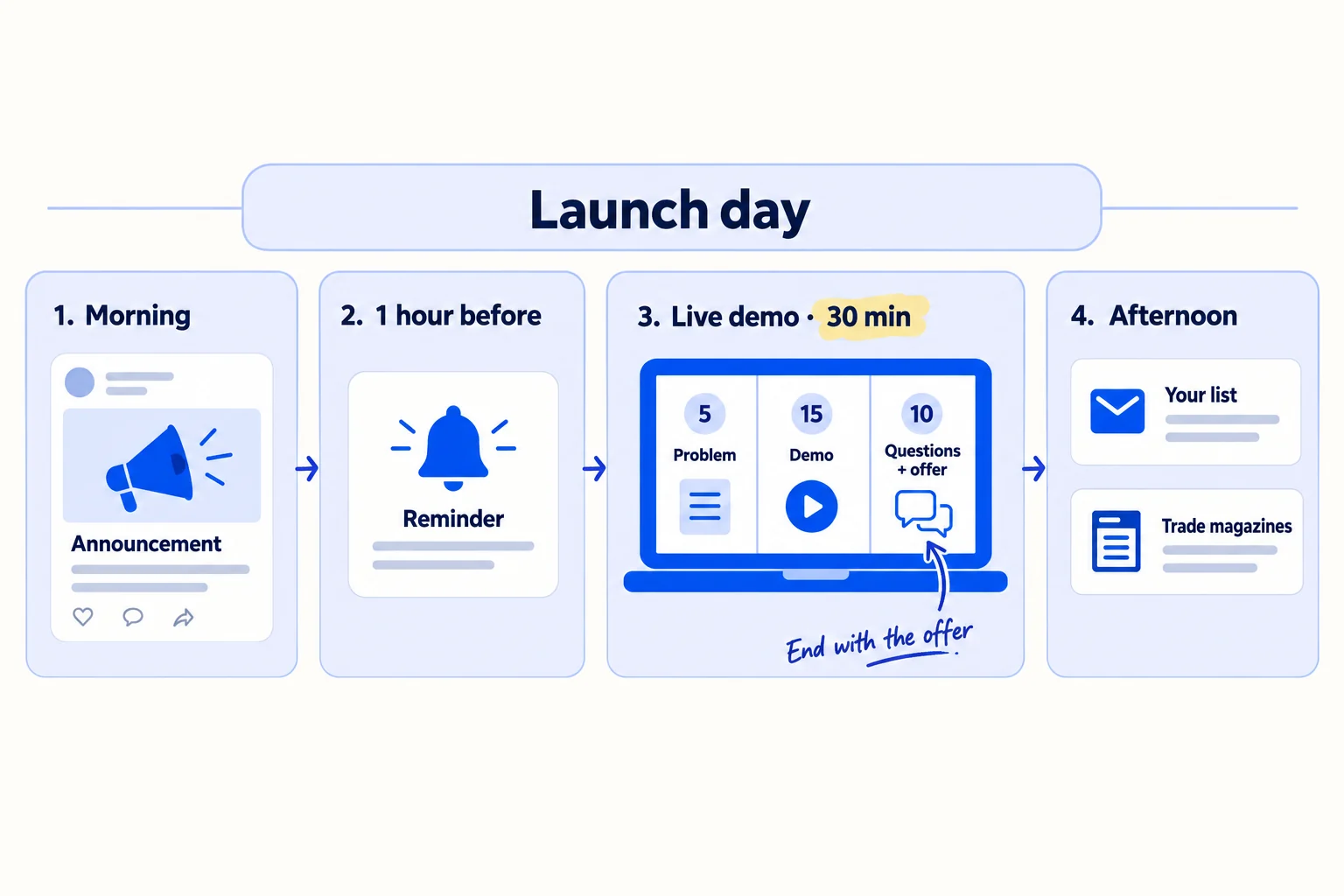
Morning: post the announcement. From your own profile, write what you built, who it is for, the problem in one line, the founding offer with the places left, and the demo time. Add the 2-minute video. Share it from your company page too. The same shape works for announcing a new business on social media.
One hour before: remind everyone who said yes. A short note with the time and the link. Only about 1 in 3 people who sign up for a business webinar come live, in Goldcast's 2024 data, so the reminder matters.
The demo: 30 minutes, three parts. A live demo is not a slide deck.
- 5 minutes: the problem. Say what your buyers do today and what it costs them, in their words.
- 15 minutes: the product doing one job, start to finish, on real data or a real sample.
- 10 minutes: questions, then the offer. Answer every question. Then read the founding offer, say how many places are left, and ask: "Reply 'call' in the chat, or book 20 minutes at [link]."
Write down every question people ask. They become next week's posts, your FAQ and the lines in your sales demos.
If you make or wholesale a product: show the product on camera, open it, use it, and offer to post a free sample to everyone who came, the same week.
Afternoon: start the launch note to your list. Everyone you invited who has not answered or said no gets one short note in place of their next follow-up: you launched today, here is the 2-minute video, and this many founding places are left. Send it one by one, within each mailbox's daily limit, so it goes out over launch week.
Afternoon: send a new-product note to 10 trade magazines and newsletters. Many trade magazines run a free new-products section. Quality Magazine, for example, has a form for it, and Modern Machine Shop asks for 300 words or less about one product, with contact details and a high-resolution photo. Find the new-products editor of each title your buyers read, and send the note below. Do not pay for a newswire release (EIN Presswire charges $149 for one): the new-products note reaches the editors your buyers read, for free. If you have a real story, such as a founding customer's result, pitch it to a journalist one by one.
Subject: New product for [their readers]: [product name]Hi [first name],For your new-products section: [company] has launched [product name], [what it does] for [their readers].
The problem it fixes: [one line].
What is new: [the one thing others do not do].
Available from: [date]. Price: from [amount].
A high-resolution photo and a 2-minute video are here: [link]. I can answer any question today.[Your name], [company], [phone], [website], [postal address]
If you also sell self-serve software that people can try without a call: add a Product Hunt launch in launch week. For a sales-led product, the buyers you need are on your list, not on Product Hunt.
- Tool: Google Meet, LinkedIn, Gmail, and your phone.
- Time: the whole day: 30 minutes for the post, 30 minutes for the demo, about 2 hours for the first launch notes, and 1 hour for the trade press.
- You will have: the demo done, the announcement live, the launch notes started, and 10 new-product notes sent.
- It worked if: about 1 in 3 people who said yes came live, and at least 1 in 10 of those who came asked for a call or a sample by the end of the day.
- Common mistake: a 45-minute talk about your company with slides and no offer at the end. People came to see the product work.
7. Message everyone within a day and send a written offer the same day as every call
The day after launch, message every person who came to the demo and everyone who said yes but did not come. Offer a 20-minute call. When someone books, run the call and send a written founding offer the same day. Buyers who wait a week for your offer often go quiet.
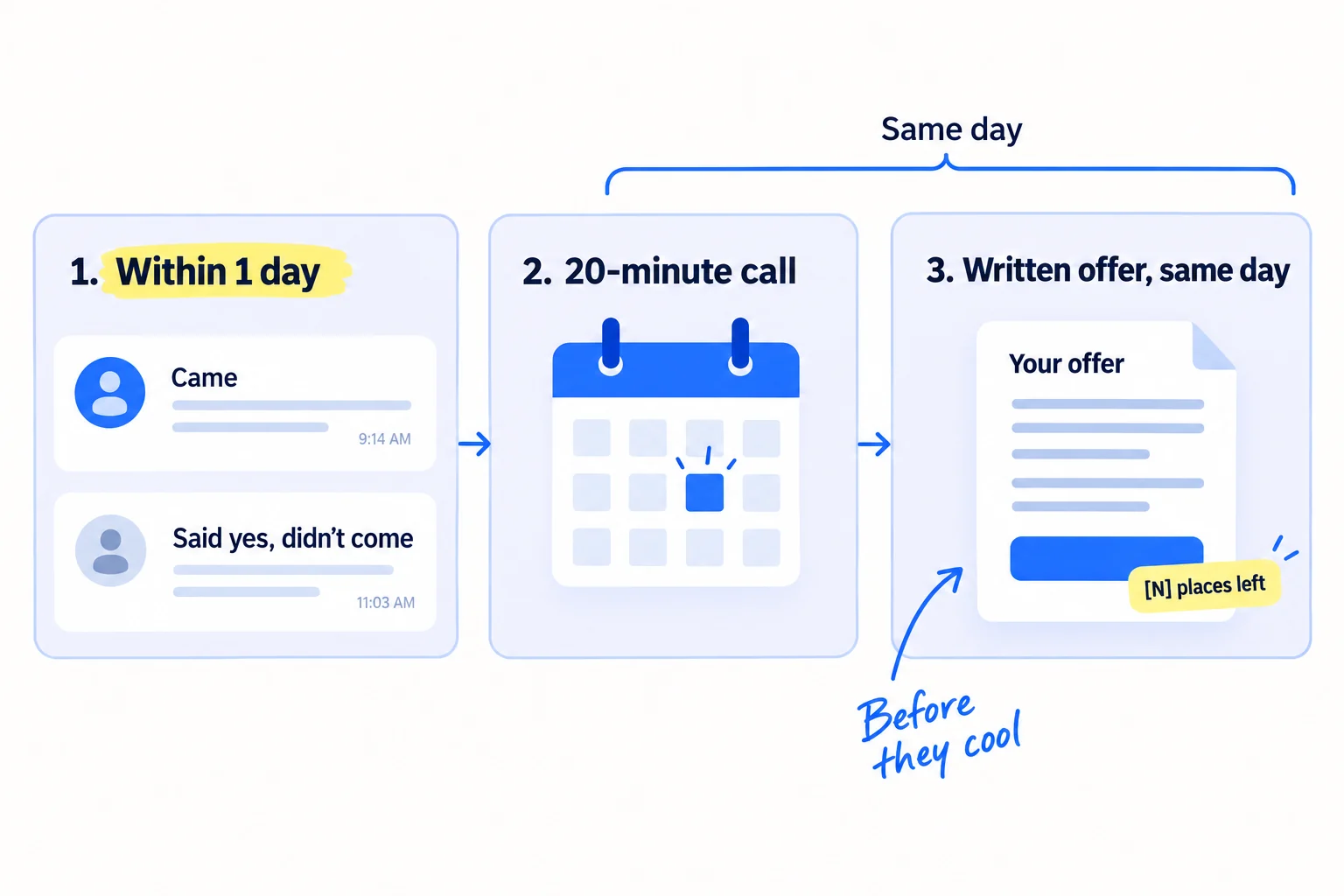
Use the notes from the demo. In each message, name the question they asked, or the part they reacted to, and link the 2-minute video for anyone who missed it. Ask for one thing: a 20-minute call.
Subject: [their company] + yesterday's demoHi [first name],[Thanks for coming. You asked about X: the short answer is Y.] or [Sorry we missed you. Here is the 2-minute version: link.][N] of the 10 founding places are left, until [closing date]. Would a 20-minute call this week help you decide if it fits [their company]? [booking link][Your name], [phone]
Run each call as a discovery call: ask what happens today, what it costs them, who else decides, and when they need it. If several people must agree, sell to them as a group. Then send the written offer the same day: a one-page proposal, in their words, with the founding price, the first order and the date it ends, sent with a short same-day quote email.
Follow up on every open offer on day 3, day 7 and day 14. When the 10 founding places are taken, or the closing date passes, close the offer and quote your normal price from then on. Tell everyone still deciding, one day before it closes.
Keep sending 100 invitations a day in launch week too. They now invite people to a 20-minute call, with the founding places left as the reason to reply.
- Tool: Gmail, Cal.com's free plan, Google Docs, and your step 2 sheet. A CRM can wait until the sheet gets slow.
- Time: about 2 hours a day in launch week: messages, calls, and 15 minutes per written offer.
- You will have: every person who came or said yes contacted within 1 day, and every call ending with a written offer and a date.
- It worked if: at least 1 in 3 calls leads to a written offer sent the same day. After launch week, count how many offers turned into founding customers.
- Common mistake: waiting for people who came to the demo to write to you first. Write to them.
See it done: Carvelian's day-after message
To: Maria, who came to the live demo
Subject: Quarrybrook + yesterday's demo
Hi Maria,
Thanks for coming yesterday. You asked if the boxes fit a 340g jar: yes, and I can post you a printed sample in that size this week.
8 of the 10 founding places are left, until the 4th. Would a 20-minute call on Thursday help you decide? [booking link]
Dan, [phone]
Why it works: It answers the exact question she asked, says how many places are left, and asks for one small step with a date.
8. Count invitations, conversations and founding customers every Sunday
Every Sunday, fill in one row in a sheet: invitations sent, yeses, people who came live, conversations, written offers and founding customers, with where each conversation came from. After 2,800 invitations (4 weeks at 100 a day), stop what brought nothing and give its hours to what worked.
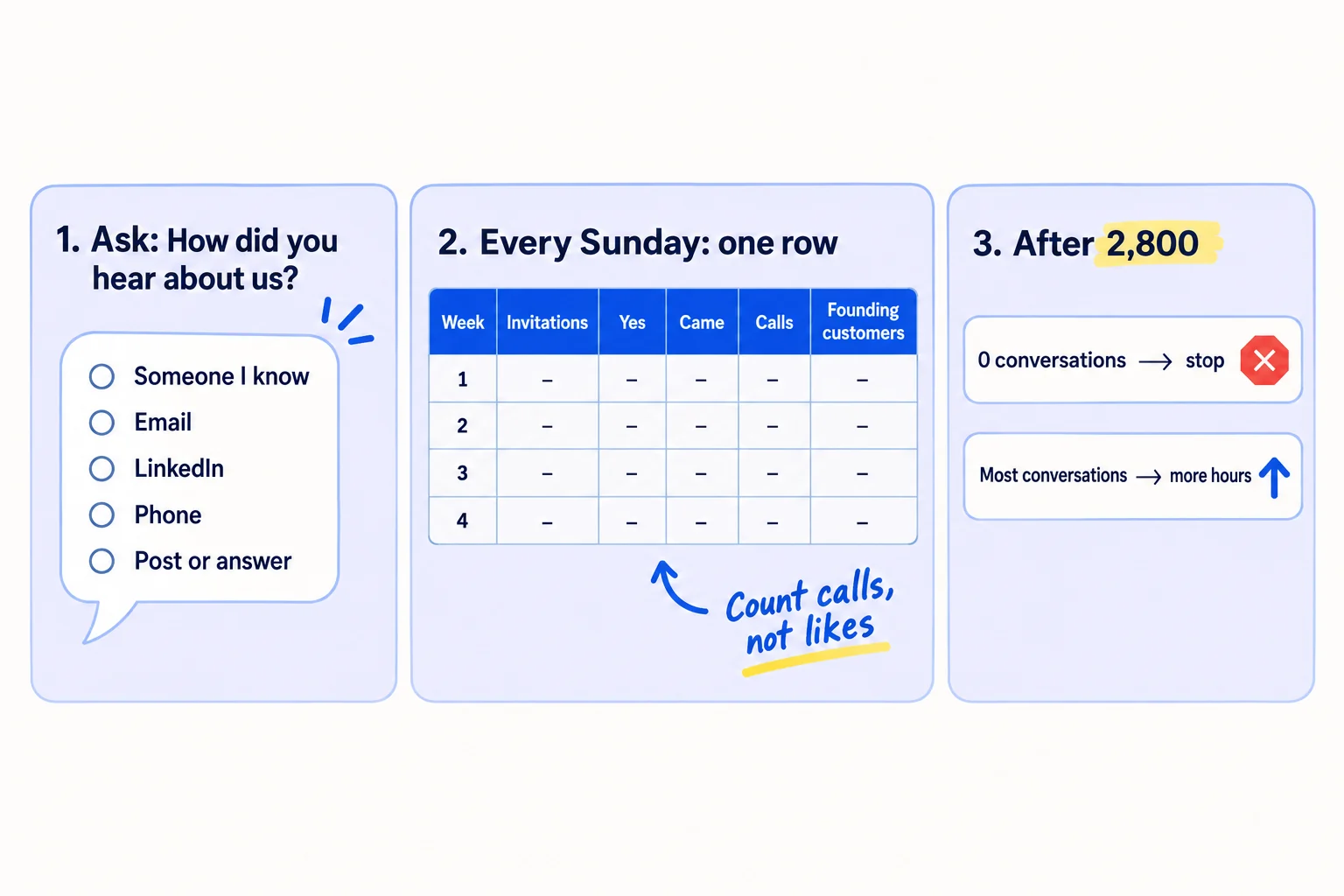
Ask "How did you hear about us?" at the start of every call. This is self-reported attribution. Without it, you are guessing. Tag the link in each post with UTM parameters too, so your site's visits show where they came from.
Week | Invitations sent | Yes to demo | Came live | Conversations: people you know | Conversations: email | Conversations: LinkedIn | Conversations: phone | Conversations: posts and answers | Written offers | Founding customers
After 2,800 invitations, look at each source:
- A source with 0 conversations: stop it, and move its hours to the source with the most.
- Fewer than 1 conversation per 100 invitations overall: change the offer or the list, not the channel. If you have sent 2,800 and still have no conversations, find out why no one is buying before you send more.
- All 10 founding places taken: close the offer, raise to your normal price, and ask each founding customer for their written result when their first order ends. It becomes your first case study.
Then keep going. The launch was the first 4 weeks of the same daily work: carry on with 100 personal messages a day as a 12-week routine. Your sales pipeline is the open offers in your sheet. Leave LinkedIn ads until at least 5 orders have come from your messages, and set any budget from what one client is worth. Once a month, step back for a marketing review, and choose the next channel to add.
- Tool: Google Sheets.
- Time: 20 minutes every Sunday.
- You will have: one row a week, and a clear answer on where your conversations and founding customers came from.
- It worked if: you can name the source of every conversation and every founding customer.
- Common mistake: judging the launch by the likes on the announcement post, or deciding after 1 week.
See it done: Carvelian after 2,800 invitations
The Sunday sheet, weeks 1 to 4
| Week | Invitations | Yes to demo | Came live | Conversations: people you know | Conversations: email | Conversations: LinkedIn | Conversations: phone | Conversations: posts and answers | Written offers | Founding customers |
|---|---|---|---|---|---|---|---|---|---|---|
| 1 | 700 | 19 | – | 6 | 1 | 1 | 2 | 0 | 2 | 0 |
| 2 | 700 | 22 | – | 3 | 3 | 1 | 2 | 1 | 3 | 1 |
| 3 (launch) | 700 | 25 | 23 | 2 | 5 | 2 | 2 | 1 | 6 | 1 |
| 4 | 700 | – | – | 1 | 6 | 1 | 3 | 2 | 7 | 2 |
The decision: 2,800 invitations brought 66 yeses, 23 people live and 45 conversations, about 1.6 per 100. 4 of the 10 founding places are taken. Email is rising as the mailboxes warm, so the founder keeps it at 75 a day. Posts and answers brought 4, so he keeps them. He carries on at 100 messages a day, now offering calls and samples.
Why it works: The founder decides by counting conversations and founding customers by source, not likes on the launch post.
Where Scout7 helps
Scout7 speeds up step 5: the two posts and the 20 answers a day.
Posts. Scout7 makes image posts with captions in your voice, and short videos from a script you direct, in portrait (9:16) or landscape. It schedules them to LinkedIn, including your personal profile, and to X, Instagram, Facebook, Threads and Reddit, and shows the 3 weeks up to launch day in one calendar. You add your launch date as an event, and later posts are planned around it. You approve each post and each video. Nothing goes live without your approval.
Answers. Join Conversations searches social platforms for live discussions about the problem you fix, groups them by the kind of reply that fits, and drafts a reply in your voice. You read each thread and approve or rewrite every reply.
Your B2B product launch checklist for the next 4 weeks
0 of 16 done
Work through this list with an AI assistant
It drafts the work and keeps track of what is done.
Frequently asked questions
- How long before launch should I start?
3 weeks is enough for one founder with no audience, if you send 100 invitations a day from today. Big companies plan for 6 to 9 months because many teams must agree. You only need a founding offer, a list, a launch page and a date. Starting later than today costs you names on the list, not polish.
- Should I launch a B2B product on Product Hunt?
Only if people can sign up and try it without talking to you. Then add a Product Hunt launch in launch week, next to your invitations. If buyers need a call, a quote or a sample first, the people who can buy are on your list, not on Product Hunt. Spend the day on your live demo and your follow-ups.
- Should I send a press release for a B2B product launch?
Skip the paid newswire. Send a short new-product note, under 300 words with a good photo, to the new-products editors of the 10 trade magazines and newsletters your buyers read. Many run these sections free. If you have a real story, such as a founding customer's result, pitch a journalist with it one by one.
- Should I give the product free to my first customers?
Give a founding price, not a free product. A small paid first order with an end date gets used and gets honest feedback. A free pilot with no end date often runs for months and never turns into a sale. Offer something free that costs you little instead: a sample, a set-up call or a first check.
- What if only a few people come to the live demo?
That is normal: in 2024 data, only about 1 in 3 people who signed up for a business webinar came live. Run it anyway, for whoever comes, and write to everyone who said yes the next day with the 2-minute video and a call link. The founding offers get made on those day-after calls.
Sources
- 1.New G2 Research: Half of B2B Software Buyers Now Start Their Research With AI Chatbots — G2, via PR Newswire, April 2026, checked 29 September 2026
- 2.The Timeline for Influencing B2B Buyers Is Shrinking: Insights From 6sense's 2025 Buyer Experience Report — 6sense, 12 November 2025, checked 29 September 2026
- 3.LinkedIn offers guidance on B2B product launches — Social Media Today, 26 May 2026, checked 29 September 2026
- 4.The 2025 B2B Webinar Benchmark Report — Goldcast, data from 2024, checked 29 September 2026
- 5.Cold Email Benchmark Report 2026 — Instantly, data from 2025, checked 29 September 2026
- 6.Google Meet — Google Workspace, checked 29 September 2026
- 7.Share events from your Google Calendar — Google Calendar Help, checked 29 September 2026
- 8.Create or edit a LinkedIn Event — LinkedIn Help, checked 29 September 2026
- 9.Invitation limits for your LinkedIn Event — LinkedIn Help, checked 29 September 2026
- 10.Personalize invitations to connect — LinkedIn Help, checked 29 September 2026
- 11.Email sender guidelines — Google Workspace Admin Help, checked 29 September 2026
- 12.CAN-SPAM Act: A Compliance Guide for Business — Federal Trade Commission, checked 29 September 2026
- 13.Pricing — Loom, checked 29 September 2026
- 14.Pricing — Cal.com, checked 29 September 2026
- 15.Pricing — Hunter, checked 29 September 2026
- 16.Use a custom domain for your site — Google Sites Help, checked 29 September 2026
- 17.Quality Product Submissions — Quality Magazine, checked 29 September 2026
- 18.Modern Machine Shop Editorial Submission Guidelines — Modern Machine Shop, updated 6 January 2021, checked 29 September 2026
- 19.Pricing — EIN Presswire, checked 29 September 2026
- 20.How do solo founders get their first pilot users for a complex B2B product? — Hacker News, 9 December 2025
Next article to read
How to get your first B2B clientsB2BAfter launch week, keep sending 100 personal messages a day as a 12-week routine.Read it nextRelated guides
- How to market your B2B businessB2BMarket your B2B business when you do all the selling: a 12-week routine for one founder, with who to contact, what to send, what to fix on your website, and what to count every Friday.
- How to host a webinarComing soon
- How to pitch journalistsComing soon
- How to announce a new business on social mediaAnnounce a new business on social media so it brings customers, not just likes: set up your profile and page on the 2 channels where your buyers are, post one announcement with a clear ask, send 100 personal messages and 2 posts a channel a day for 14 days, and count conversations and customers by source every Sunday.
Guides that link here
Cite this page
Dinesh Bypilla (2026). How to launch a B2B product. Scout7 Academy. https://scout7.ai/academy/launch/how-to-launch-a-b2b-product
Written by Dinesh Bypilla, Agentic systems engineer at Scout7. Reviewed by Murali Sid. Last checked 29 September 2026.
Quote any part of this guide with a link back to this page. © 2026 Scout7.
Markdown version of this page: https://scout7.ai/academy/launch/how-to-launch-a-b2b-product.md