



How to use AI for content creation
Use AI for content creation without sounding like everyone else: write a voice and facts file once, give AI 10 minutes of your own material every day, publish 1 page and 2 posts on each of 2 channels after a 6-line check, label realistic AI video, and count what each piece brought every Sunday.
ByDinesh BypillaReviewed byMurali SidLast checked 18 min read
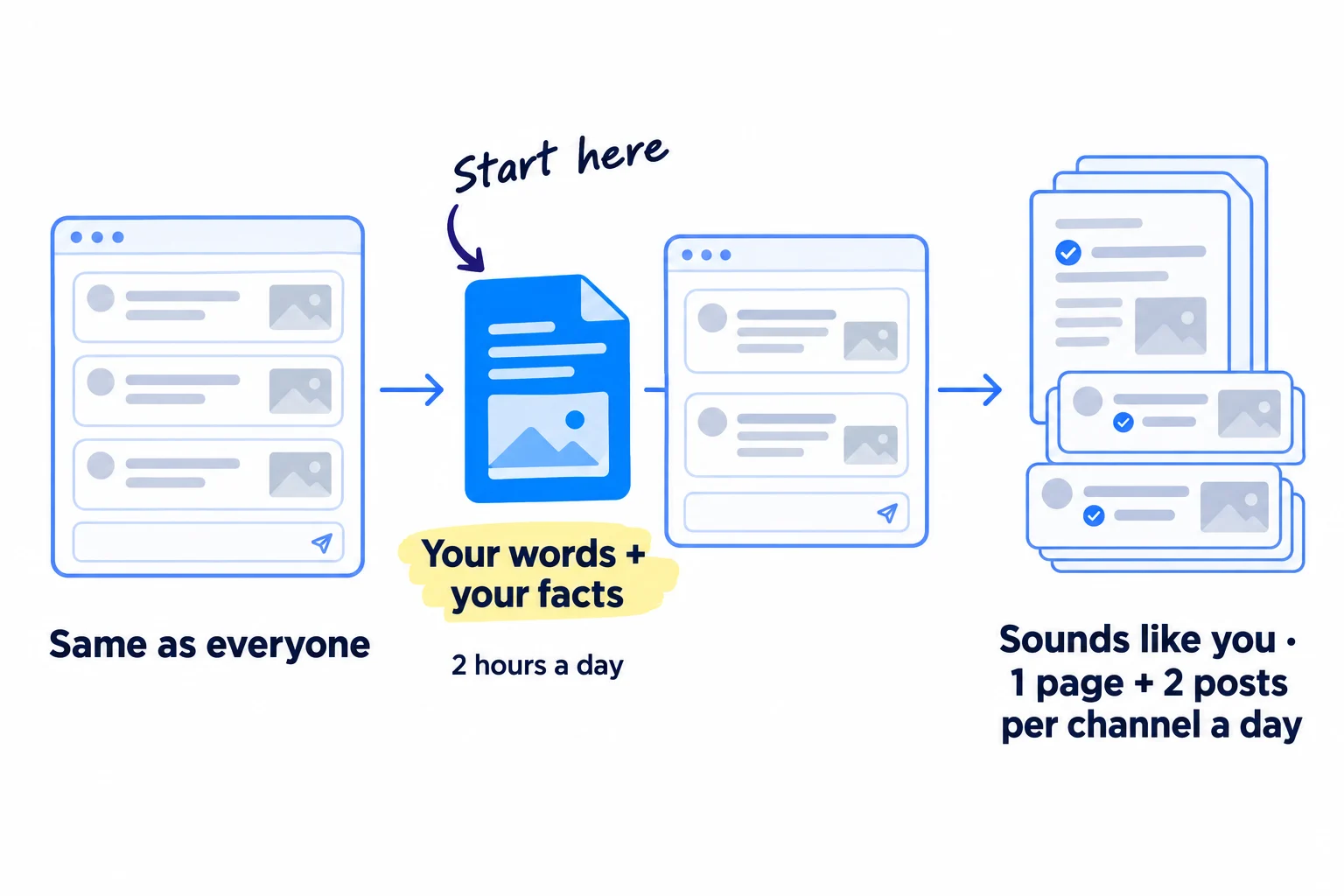
You can get ChatGPT or Claude to write a post in a minute, but if you just ask, it sounds like everyone else's, and nobody comments. Here is how to use AI for content creation so it sounds like you: give it your words and your facts once, feed it something true from your own week every day, and check every piece before it goes out. Since May 2026, LinkedIn limits the reach of posts that read like AI with nothing of yours in them, so the generic way now costs you readers too.
Do these three things
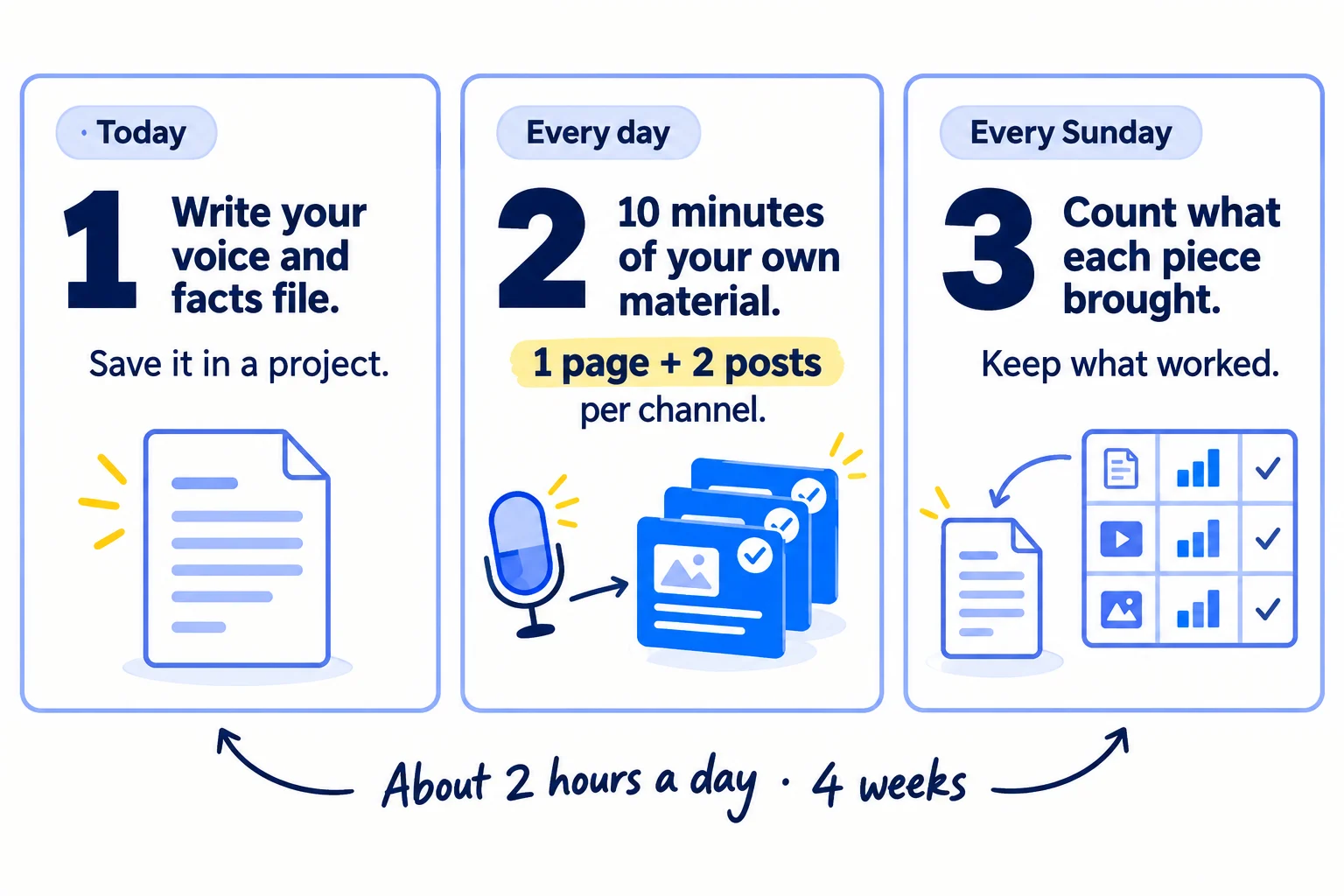
About 2 hours a day, every day, for 4 weeks. Judge it after 28 pages and 112 posts, not after the first 10.
Show the three actions in fullHide the full list
- Today: write a one-page voice and facts file: who you sell to, the words you use, 20 true facts and the phrases you never use. Save it in a free ChatGPT or Claude project, so every draft starts from your words, not the AI's.
- Every day: give AI 10 minutes of raw material only you have, such as a customer call or a question a buyer asked. Turn it into 1 page that answers a search and 2 posts on each of your 2 channels. Add one true detail to each piece and check every fact before it goes out.
- Every Sunday: count the comments, visits and enquiries each piece brought, using UTM links. Keep the kinds of post that worked, drop the weakest, and add your best lines to the file.
Get help doing these
ChatGPT or Claude reads this guide and works through it with you.
1. Write a voice and facts file and save it in a ChatGPT or Claude project
Write one page that tells the AI who you are for, how you talk and what is true about your business, and save it as a project's instructions in ChatGPT or Claude. AI sounds generic when it knows nothing about you. This page is how it learns, once, instead of in every prompt.
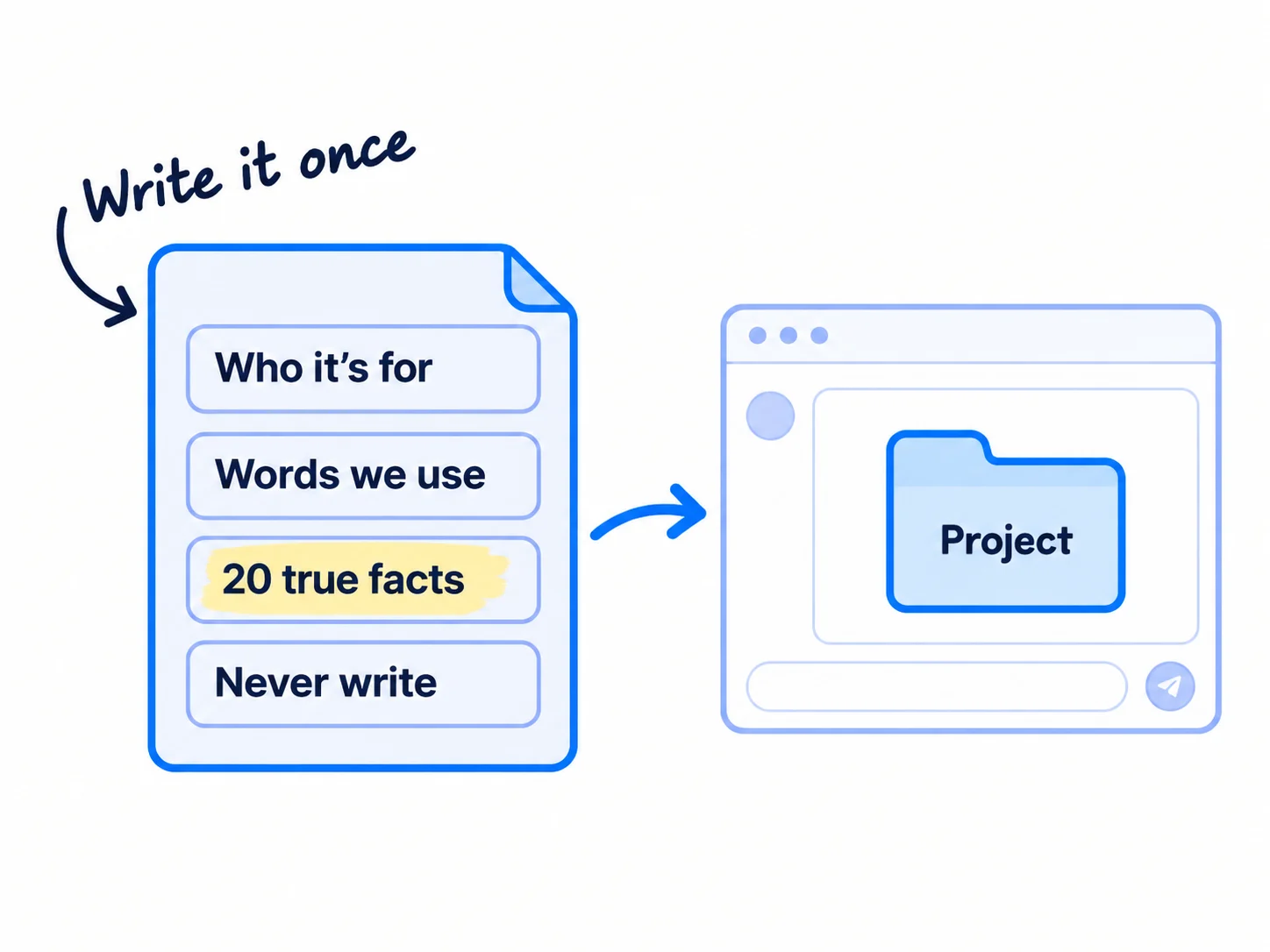
Fill in the template below. Take the first line from your ideal customer profile and your value proposition if you have them. For "Words we use", copy phrases your buyers said to you in calls, emails and reviews, word for word. For the facts, write only things you can prove: prices, numbers from your product or your work, what customers told you, how long things take. AI will use these instead of making numbers up.
Then open ChatGPT or Claude and create a project. Both have projects on the free plan: Claude allows up to 5, ChatGPT allows up to 5 files in each. Paste the file into the project's instructions and upload anything else useful, like your homepage text and 3 posts you wrote yourself that people liked. Start on the free plan. If you hit the free limit every day, pay $20 a month for one of them, not both.
Who we are for: [kind of buyer], [size], who [the moment the problem hurts].
What we sell: [product or service], [price], [what the buyer gets].How we write:
Short sentences. Plain words. "You", not "users".
Words our buyers use: [5–10 phrases, copied from calls, emails, reviews].
We always: [say a number where we have one / end with one question / name the real tool].
True facts we can use (never invent others):
[a number from our product or work]
[what a customer told us, with their permission]
[a price, a time, a result we can show]
... up to 20.
Never write: "in today's fast-paced world", "let's dive in", "game-changer", "unlock", "elevate", [words you hate].
Never invent: numbers, customer quotes, reviews, names, results. If a fact is missing, write [FACT NEEDED].
- Tool: a Google Doc, and ChatGPT or Claude on the free plan.
- Time: 1 hour.
- You will have: a project in ChatGPT or Claude that every draft starts from.
- It worked if: you ask for the same post twice, once inside the project and once outside it, and the project version uses at least 2 of your facts and none of your "never write" words. If you cannot tell the two apart, add 10 more facts and 5 more buyer phrases.
- Common mistake: a one-line prompt like "write a LinkedIn post about onboarding". With nothing of yours in it, AI gives you the average post on the internet.
If you run an agency: make one project per client, never one for all of them, and keep each client's voice separate. Ask the client to correct their file before you write anything, and agree who approves each piece. Make a separate project for your own agency's marketing too.
See it done: Part of Quillfox's voice and facts file
Quillfox is a made-up one-person agency. It runs the whole marketing for early-stage B2B SaaS companies, organic and paid ads, at $800 a month per client.
Quillfox's file, first lines
| Part | What it says |
|---|---|
| Who we are for | Founders of B2B SaaS companies with 2 to 15 people who still do their own marketing |
| Words our buyers use | "first 100 users", "demo calls", "I don't have time to post" |
| True facts | 2 SaaS clients at $800 a month each, both found online. No case studies yet: never claim results for clients. |
| Never write | "unlock growth", "in today's fast-paced world", "let's dive in", rocket emojis |
Why it works: Every fact is one they can prove, and the file says out loud that they have no case studies yet, so the AI never invents one.
2. Collect 10 minutes of raw material every day that only you have
Every day, spend 10 minutes saving something true from your own work: a question a buyer asked, a number, a mistake you fixed, a photo. This is what makes your content different. Google's own guide says a first-hand account gives "a unique perspective", while a summary "simply restates information already available elsewhere".
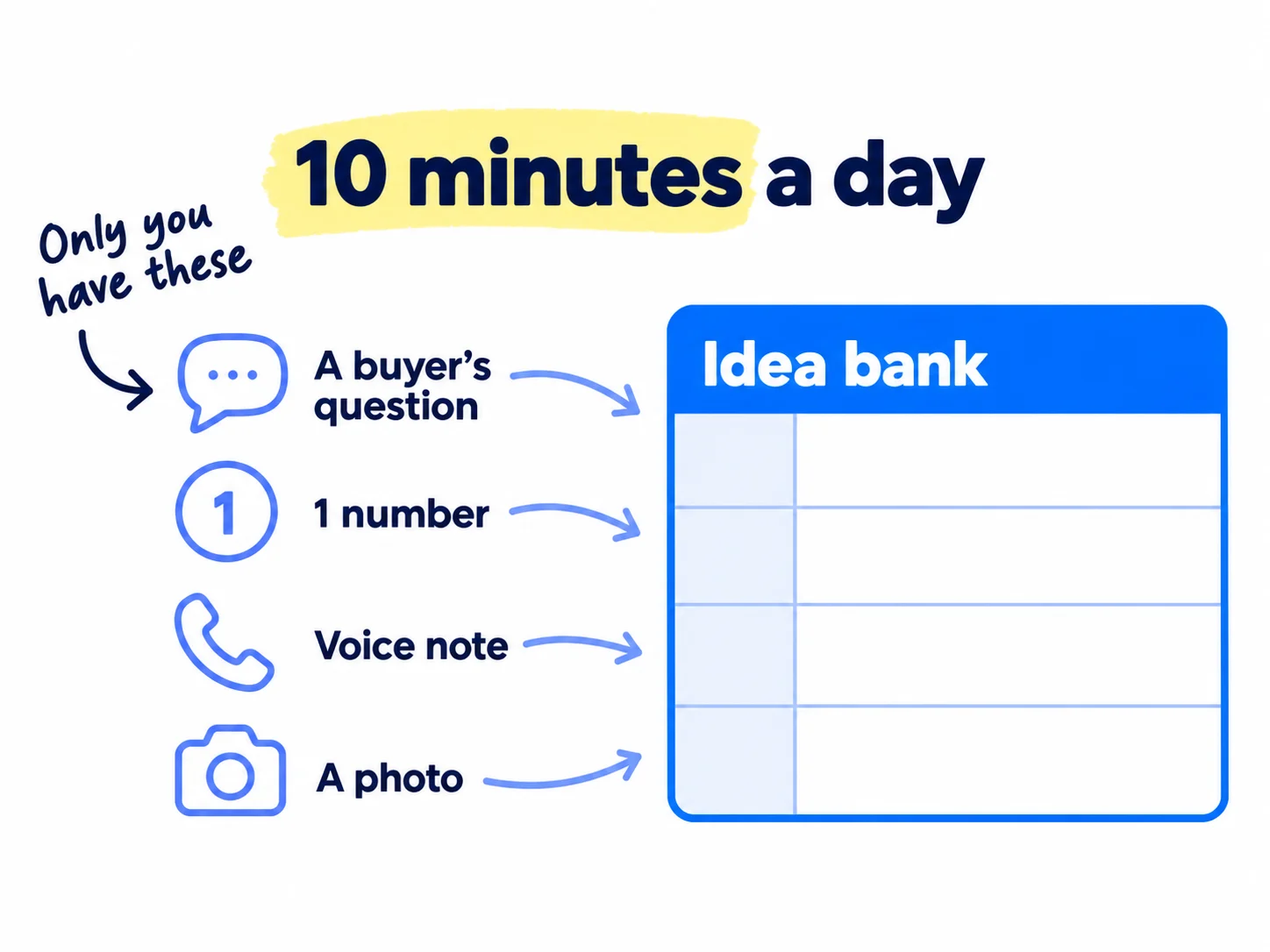
Keep a Google Sheet called "Idea bank" with three columns: the date, what happened, and the one line that matters. Before you start step 3, put 20 items in it. Go back through your last month: calls, support emails, customer interviews, comments, and the questions people asked in online communities. After that, add at least 3 new items every day.
The fastest way is to talk. After a call, open a Google Doc, click Tools, then Voice typing, and say what the buyer asked and what you told them, for 2 minutes. It is free in Chrome, Edge and Safari. Paste the text into the sheet. If you run a SaaS, add every support question, every bug a user found and every change you shipped. Feedback from your first users is the best material you will ever have.
If you run a B2B company: the best items are the questions buyers ask on discovery calls and in quote requests: lead times, minimum orders, prices, what went wrong with their last supplier. Write each one down the same day.
If you run a D2C store: take 3 photos of your product in real use every day, and save every customer message and review. Ask before you quote anyone by name. Customer photos and videos are user-generated content, and they beat anything AI can draw.
- Tool: Google Sheets and Google Docs voice typing. Both free.
- Time: 1 hour once to fill the first 20, then 10 minutes a day.
- You will have: an idea bank with 20 items before day 1, and at least 3 new items every day.
- It worked if: the bank never runs out, and every draft you make in step 3 starts from one item in it.
- Common mistake: asking AI "give me 30 content ideas for my business". You get the same list every competitor gets. Google calls this commodity content, and its example is "7 Tips for First-Time Homebuyers".
3. Let AI draft 1 page and 2 posts a day on each of your 2 channels
Every day, take one item from your idea bank and ask your project for 5 drafts: 1 page for your website and 2 posts for each of your 2 channels. With the file and the item in front of it, AI drafts all 5 in about 20 minutes, which is what makes this number possible for one person.
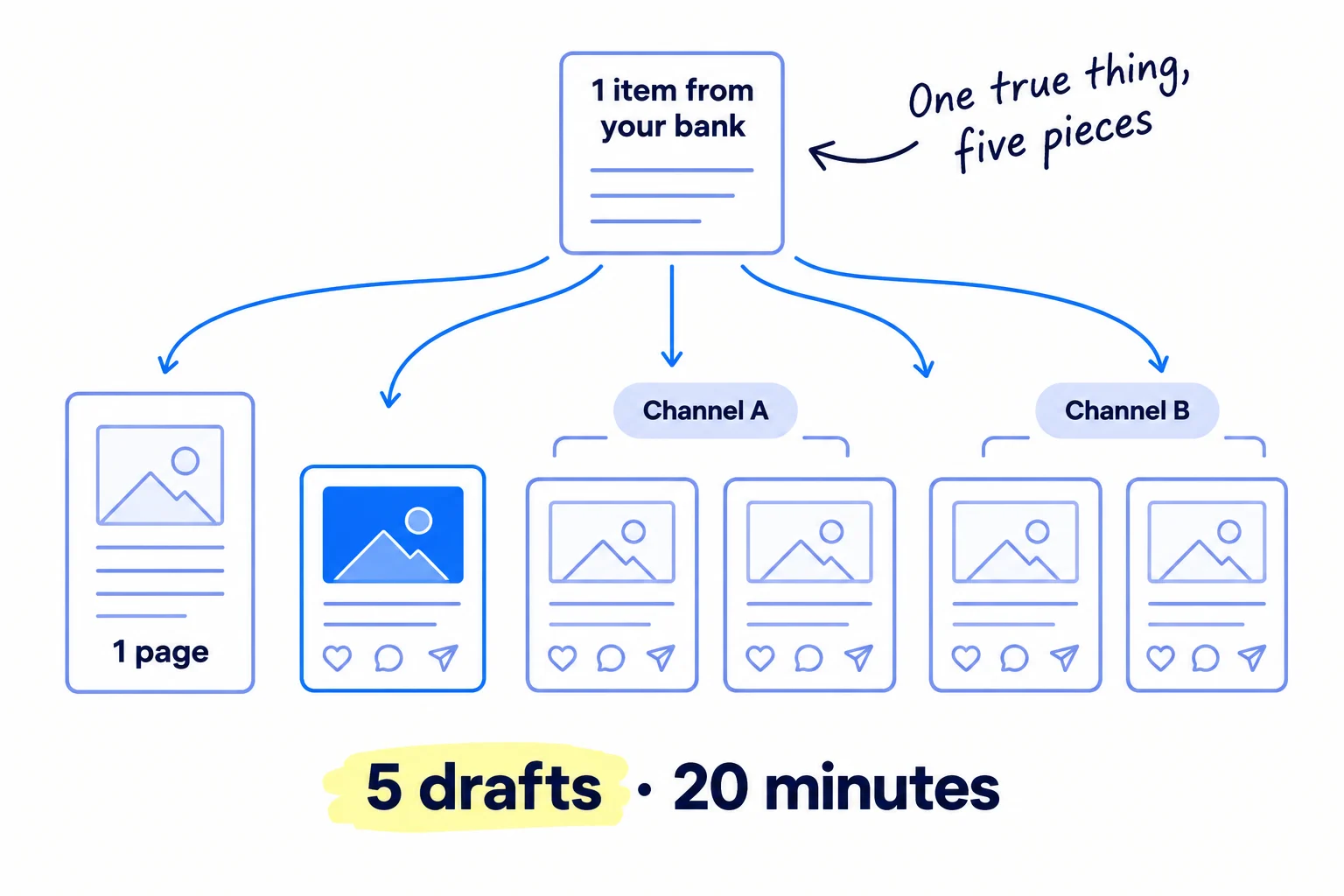
First, pick your 2 channels: the 2 places where you can name the most buyers who post or comment. If you are not sure, use the channel guide for your business: SaaS, B2B, ecommerce or agency. Most founders selling to businesses start with LinkedIn; most stores start with Instagram and short videos. Pages go on your own site's blog, each one answering a search people really make.
Two posts a day on each channel sounds like a lot. Two posts a week is what most people do, and after a month they have 8 posts and no idea what works. At 2 a day you have 56 posts per channel in 4 weeks, which is enough to see which kind gets buyers talking. AI drafts; you add the one true detail in step 4. Spread the posts over the day, and plan the week ahead in a content calendar once you are past week 1.
Paste this into your project, with the day's item:
Today's item from my idea bank: [paste the item: what happened, and the one line that matters].Using my voice and facts file, write:
One web page that answers this search: "[the question a buyer types]". Answer it in the first two lines. Use only facts from my file or from today's item. Mark anything you are not sure of as [FACT NEEDED].
Two posts for [channel A], each under [150] words, each starting with a different line from today's item.
Two posts for [channel B], in the format that channel uses: [a short video script for 9:16 / a text post / a carousel outline].
No hashtags unless I ask. End each post with one question a buyer would want to answer.
One item can feed both channels in different shapes. A call becomes a page, a story post, a short tips post and a video script. When you want to turn one strong piece into a week of posts, repurpose it the same way.
- Tool: your ChatGPT or Claude project.
- Time: about 20 minutes a day for all 5 drafts.
- You will have: 5 drafts every day, each built on something real.
- It worked if: you have 5 drafts within 30 minutes of opening the project, and every one names something from today's item.
- Common mistake: publishing what AI wrote without editing, at high volume. Google's spam policy calls "using generative AI tools … to generate many pages without adding value for users" scaled content abuse. One page a day that answers a real question with something only you know is not that. The other mistake is posting where your readers are other founders, not buyers. One founder posted more than 50 times on Indie Hackers in 2026 and made $0, because the readers were builders, not buyers.
4. Edit every draft so it sounds like you, and check every fact
Before anything goes out, run each draft through the 6-line check below and add one true detail that only you could know. A post takes about 10 minutes to edit and a page about 40. This is the part AI cannot do for you, and it is why people stop scrolling.
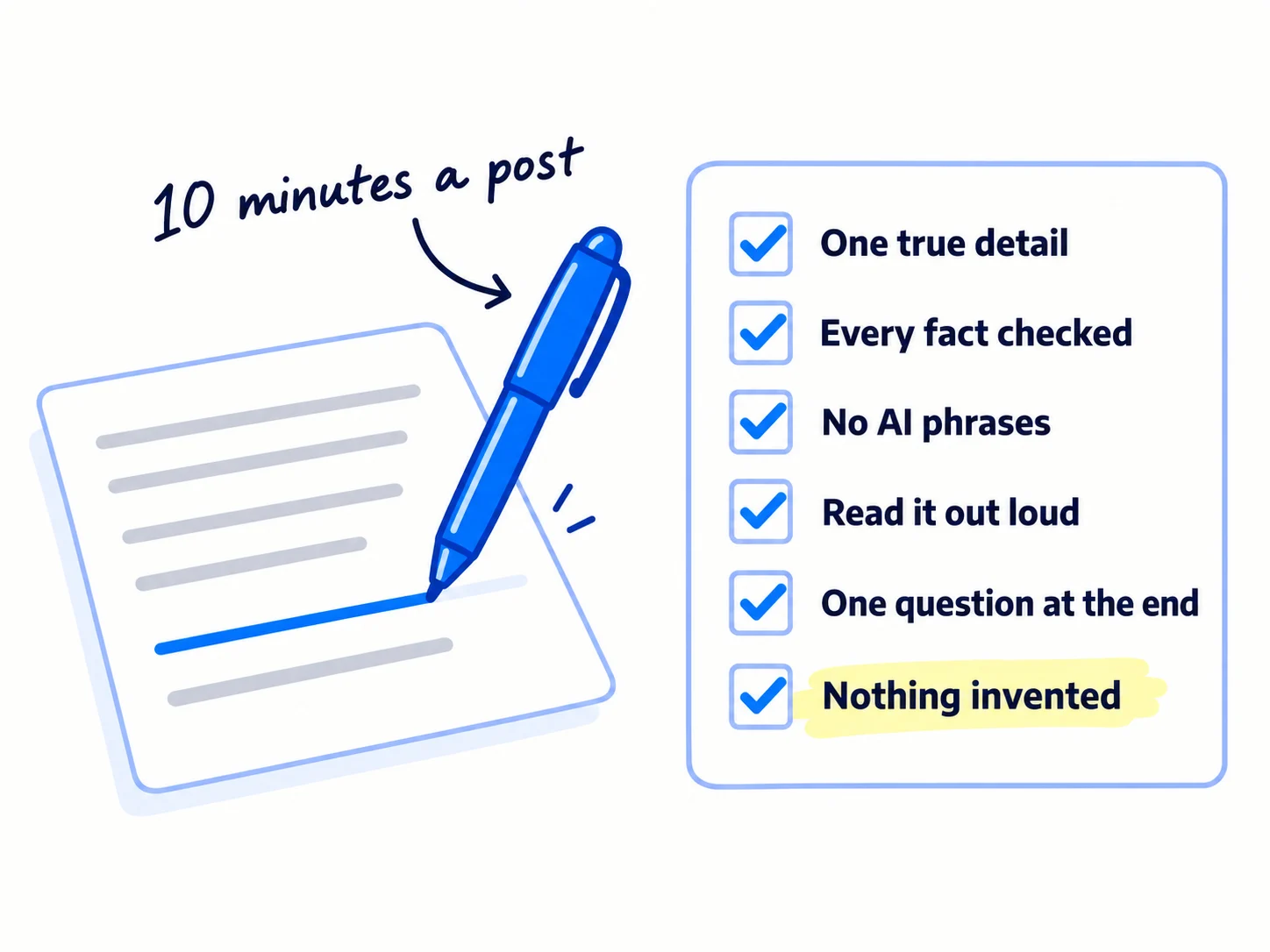
One true detail only I could know: a number, a name (with permission), what happened.
Every fact checked against my file or a source I opened today. Every [FACT NEEDED] filled or cut.
No phrase from my "never write" list, and no sentence I would not say out loud.
Read out loud once. Anything I stumble on, I rewrite.
It ends with one question or one next step, not three.
Nothing invented: no made-up quote, review, customer, result or statistic.
Line 2 matters because AI states wrong facts in a confident voice. Google's guidance, updated 1 October 2026, says "It is critical to manually factcheck and review all AI-generated content for accuracy and trustworthiness before publishing." Line 6 is also the law in the US: since October 2024, the FTC's rule on reviews bans fake reviews and testimonials, including AI-generated ones, and in December 2025 it sent its first warning letters. Real testimonials come from real customers.
Then publish. Pages go on your blog; ask Google to index each one the day it goes live. Posts go out at the times you planned. Put a UTM link on anything that points to your site, so step 6 can count it.
Reply to every comment yourself, in your own words. LinkedIn said on 20 May 2026: "It's ok to use AI to help you write, but your posts and comments need to represent your voice and your perspectives." It now limits the reach of posts that seem AI-made with no clear view, and is restricting AI-written comments. Since 30 July 2026, members can also mark a post "Seems like AI slop". On Reddit, many subreddits remove AI-written posts, so read each one's rules and write your answers yourself, the way the Reddit guide shows.
- Tool: your project (ask it "point out every claim in this draft that needs a source"), and the 6-line check.
- Time: about 40 minutes for the page and 10 minutes for each post: about 1 hour 20 minutes a day.
- You will have: 1 page and 4 posts live every day, each with something true of yours in it.
- It worked if: every piece passes all 6 lines, and by the end of week 2, comments say specific things ("we had this exact problem") instead of only "great post".
- Common mistake: letting AI fill a gap with a number that sounds right. If you cannot find the source in 2 minutes, cut the sentence.
If you run a D2C store: let AI draft your product descriptions and captions, but every size, material, ingredient and delivery time comes from you. Google's guidance says AI-made product data in a store must be labelled as AI-generated, so write those facts yourself.
See it done: Quillfox's LinkedIn post, before and after the edit
What the AI draft said
In today's fast-paced SaaS world, content marketing is more important than ever. Here are 5 tips to unlock growth for your startup.
What they posted
Both of our clients asked us the same thing in their first week: why does our blog get readers but no demo calls? Neither blog told a reader what to do next. Here is the one line we added to the end of every post.
Why it works: The edited opening is something that really happened to them, so nobody else on LinkedIn could have written it.
5. Make images and short videos with AI, and label anything realistic
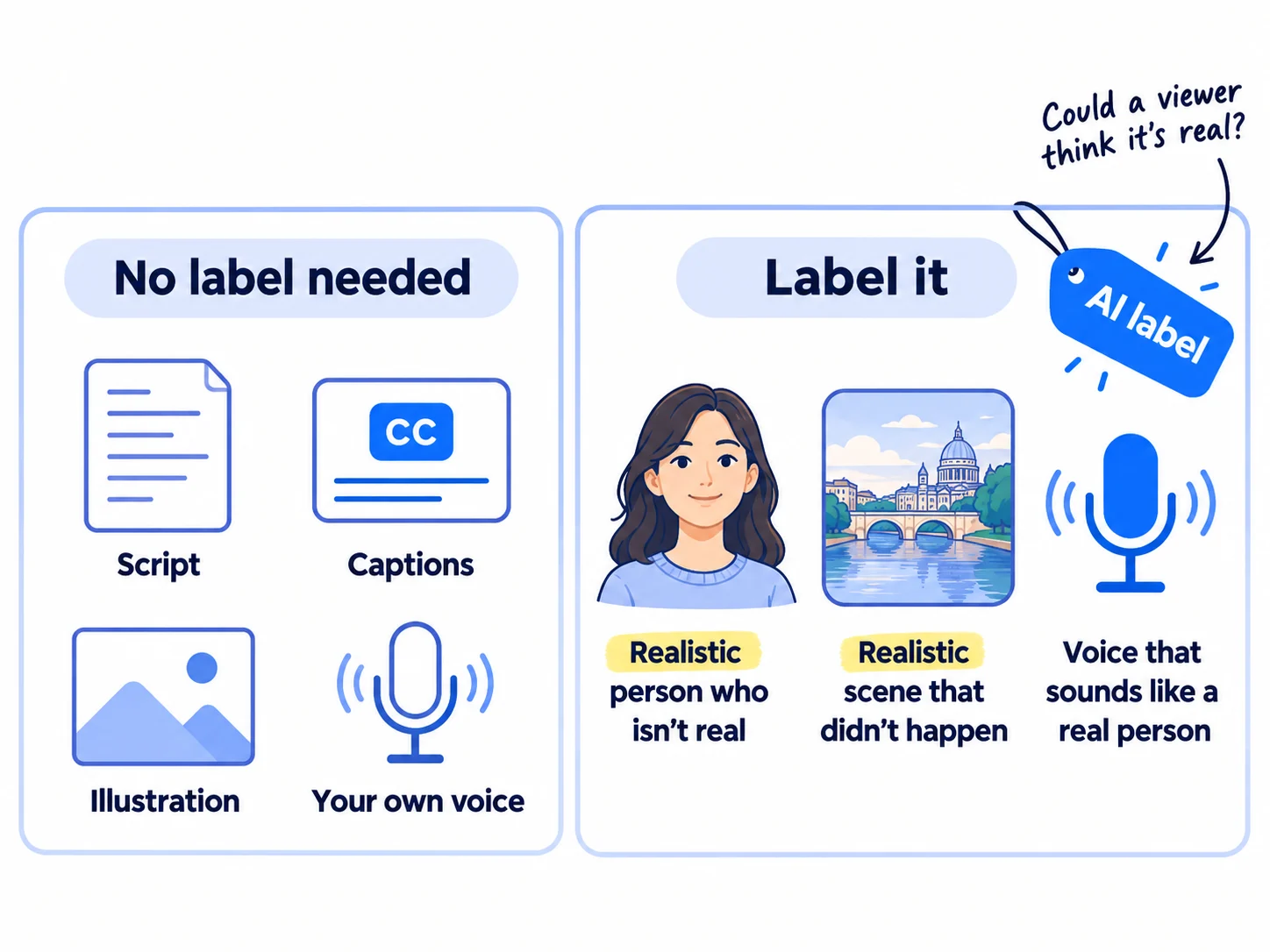
Use AI to write video scripts, on-screen text and simple images, then record the videos yourself on your phone. Label any video or audio made with AI that could pass for real. On every major platform, a script written with AI needs no label, but a realistic AI person, scene or voice does.
If one of your channels is video, your 2 posts a day there are short videos. Ask your project for a 30-second script from the day's item, with the first line written on screen. Record it yourself in portrait (9:16), add captions, and post. That takes about 20 minutes a video. The short-form video guide covers filming, and the YouTube guide covers longer videos.
Check every image and video against the platform rules before it goes out:
- YouTube: when you upload, find "AI use" in the Attributes section and choose Yes if the video makes a real person seem to say or do something they did not, changes footage of a real place or event, or shows a realistic scene that did not happen. Scripts, thumbnails and cloning your own voice for a voice-over need no label.
- Instagram, Facebook and Threads: Meta requires its AI label on posts with a photorealistic video or realistic-sounding audio that was made or changed with AI, and may penalise accounts that skip it. Turn on the AI label when you post. Meta also adds "AI info" itself when it finds AI markers in a file.
- TikTok: its 2026 rules require a clear label when AI or editing is used to show realistic people or scenes.
Never use AI to make a customer, a review screenshot, a "before and after" or a product photo that looks real. It is the fake review problem from step 4 in picture form. Use AI for diagrams, simple illustrations and ad creative backgrounds, and real photos for anything a buyer will trust.
If you run a D2C store: use real photos for every product image. If you ever use an AI-made image in Google's free Shopping listings, Google requires it to keep the file's AI metadata, so do not strip it. The simplest rule is the one in the Google Shopping guide: photograph the real product.
- Tool: your phone, your project for scripts, and each platform's own upload screen.
- Time: about 20 minutes a video; 1 minute to check the label rule.
- You will have: videos and images live every day, each labelled where the rules ask.
- It worked if: 0 posts removed or flagged, and every realistic AI clip carries its label.
- Common mistake: an AI-made "happy customer" holding your product. If a viewer could think it is real, it needs a label, and it still is not a real customer.
6. Every Sunday, count what each piece brought and update your file
Every Sunday, write down what the week's pages and posts brought: comments from buyers, visits to your site, and enquiries, signups or orders. Keep making the kinds of post that brought people, drop the weakest kind, and add the lines people answered to your voice file.
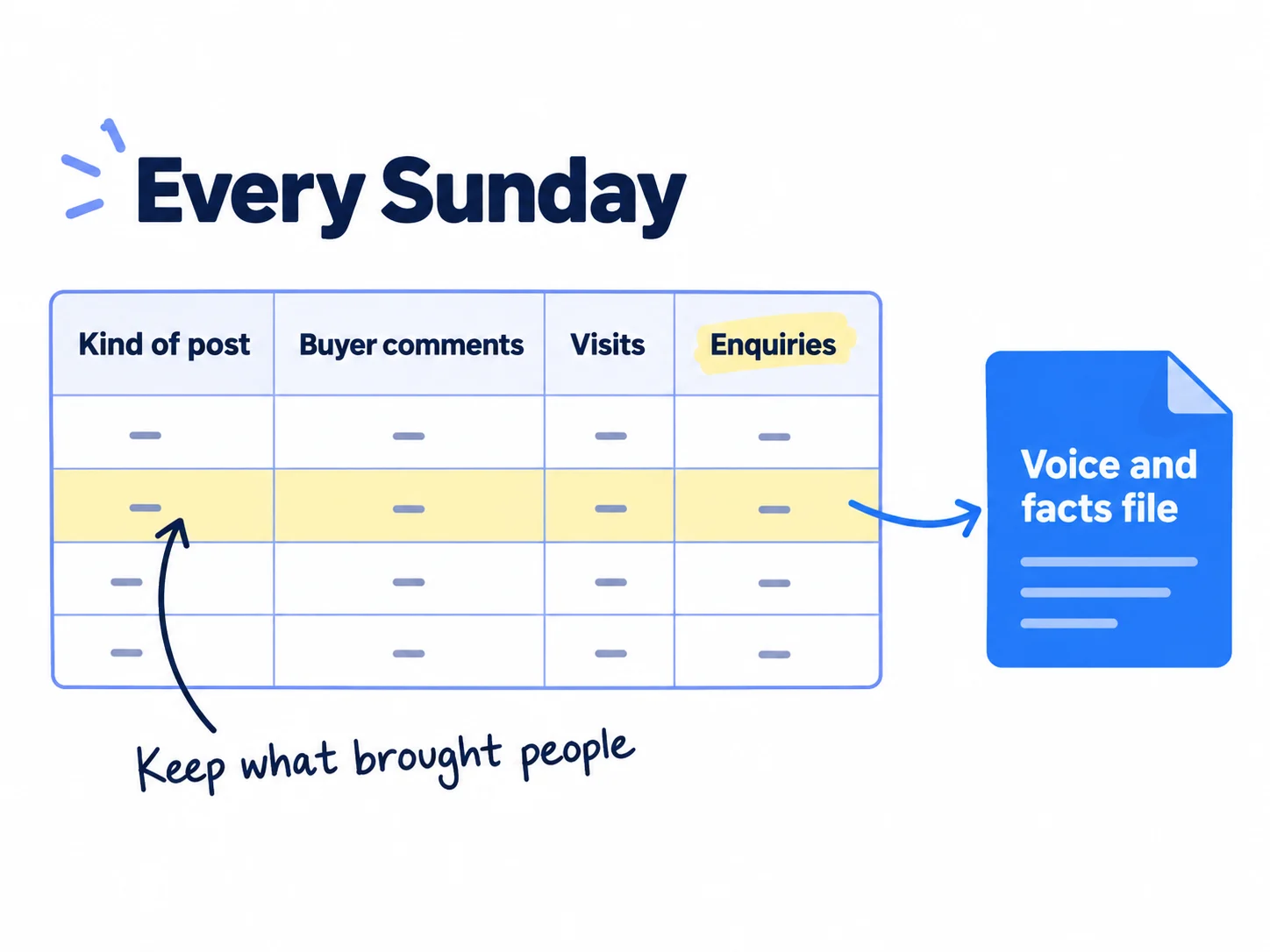
Add "Where did you hear about us?" to your signup, order or contact form. This is self-reported attribution, and at this size it tells you more than any dashboard. Then fill in one row each Sunday:
Week | Pages published | Posts per channel | Buyer comments | Visits from posts and pages | Enquiries, signups or orders | Where each one came from
Best kind of post this week: [story / tips / question / video]. Weakest: [ ].
Lines people answered: [copy them into the voice file]
Count only comments from people who could buy, not from other founders or friends. Pages are slower: check in Google Search Console how many have any impressions, and judge them at month 3, not week 4. A page that gets impressions but few clicks can be made to rank higher later.
After 112 posts (4 weeks at 2 a day on each channel), decide. If a channel brought 0 buyer comments and 0 visits, move its posts to the other channel or to a new one. If one kind of post brought most of the enquiries, make half of each day's posts that kind. Your aim is the channel that brought each deal, not likes. Once a month, step back for a marketing review.
- Tool: Google Sheets, Search Console, and each platform's free analytics.
- Time: 30 minutes each Sunday.
- You will have: one row a week, and a voice file that gets better every week.
- It worked if: you can name the piece that brought each enquiry, signup or order. If after 28 pages and 112 posts nothing has brought a single visit, go back to step 3 and check your channels are where your buyers are.
- Common mistake: counting likes and followers, or judging after 10 posts. Ten posts tell you nothing; 112 do.
Where Scout7 helps
Scout7 does parts of steps 1, 3, 4 and 5.
Step 1. When you sign up with your website, Scout7 reads it and builds a brand profile: positioning, audience, voice and guardrails, held as facts you can edit. Every post, article and video it makes reads from that profile, so you correct the facts once instead of in each prompt.
Step 3. Content Co-Pilot proposes topics or takes yours, then asks research-backed shaping questions before it drafts. Your answers are where your first-hand detail goes in. It writes the article with images, sources, FAQs and structured data, and can turn it into a LinkedIn carousel or a video. Image Studio makes image posts with captions in your brand voice.
Step 4. Scout7 schedules posts to LinkedIn, X, Instagram, Facebook, Threads and Reddit from one calendar. Nothing is published until you approve it, so the 6-line check still happens before every piece goes out.
Step 5. Video Studio writes the script, splits it into scenes you direct, films each one with the cast and voice you choose, in portrait or landscape, and adds captions. You approve the final cut. It works inside Claude and ChatGPT too, so you can run it from the assistant you already use.
Your AI content checklist for the next 4 weeks
0 of 12 done
Work through this list with an AI assistant
It drafts the work and keeps track of what is done.
Frequently asked questions
- Does Google penalize AI-generated content?
No, not for being made with AI. Google's guidance says AI can help with research and structure, but making many pages that add nothing for readers is scaled content abuse. A July 2026 Ahrefs study of 331,000 pages found pages with little or some AI got 2 to 3 times the impressions of mostly-AI pages. Add something only you know, and check every fact.
- Does LinkedIn limit the reach of AI-written posts?
It limits posts that seem AI-made and have no clear view of yours. In May 2026, LinkedIn said using AI to help you write is fine, but posts and comments must show your voice and perspective. Since July 2026, members can mark a post "Seems like AI slop". Start every post from something true that happened to you, and write your comments yourself.
- Do I have to label AI content on social media?
Only when it looks real. YouTube, Meta and TikTok ask you to label realistic AI video, audio, people or scenes. On YouTube, choose Yes under "AI use" when you upload. A script, captions or an illustration made with AI needs no label. Never use AI to make a customer, review or product photo that looks real.
- Is ChatGPT or Claude better for content creation?
Either works, and both have free plans with projects, where you save your voice and facts file. Pick the one you already use, so your file and drafts stay in one place. If you hit the free limit every day, pay $20 a month for one of them. The file and your raw material matter more than the tool, and the same project helps with the rest of your marketing.
- How do I make AI content sound like me and not like AI?
Give it your words before you ask: a file with phrases your buyers use, 20 true facts and the phrases you never use. Start each draft from something that happened to you that day. Then edit: add one true detail, read it out loud, and cut anything you would not say. Posts that get buyers talking usually start with a real moment.
Sources
- 1.Google Search's guidance on using generative AI content on your website — Google Search Central, updated 1 October 2026
- 2.Spam policies for Google web search: scaled content abuse — Google Search Central, updated 28 August 2026
- 3.Optimizing for generative AI features on Google Search — Google Search Central, updated 10 July 2026
- 4.Google doesn't punish AI content; it punishes bad content (331k pages studied) — Ahrefs, 27 July 2026
- 5.LinkedIn wants to limit the reach of AI-generated content — Social Media Today, 21 May 2026
- 6.LinkedIn adds button on every post to report “Seems like AI slop” — Futurism, 30 July 2026
- 7.Disclosing use of GenAI content — YouTube Help, checked 2 October 2026
- 8.Labeling AI-generated images on Facebook, Instagram and Threads — Meta, updated 1 April 2025, checked 2 October 2026
- 9.Community Guidelines: Integrity and authenticity (edited media and AI-generated content) — TikTok, 2026 H2 update, checked 2 October 2026
- 10.Federal Trade Commission announces final rule banning fake reviews and testimonials — Federal Trade Commission, 14 August 2024, checked 2 October 2026
- 11.A warning letter (or ten) for businesses: comply with the FTC's Consumer Review Rule — Federal Trade Commission, December 2025
- 12.Plans and pricing — Anthropic, checked 2 October 2026
- 13.What are projects? — Claude Help Center, checked 2 October 2026
- 14.Projects in ChatGPT are now available to Free users — OpenAI, September 2025, checked 2 October 2026
- 15.Type and edit with your voice — Google Docs Editors Help, checked 2 October 2026
- 16.50 Indie Hackers posts: the honest metrics from a massive content experiment — Indie Hackers, 1 April 2026
- 17.What's the point of AI generated comments? — Indie Hackers, 6 January 2026
Next article to read
Related guides
- How to plan a content calendarPlan a content calendar that brings buyers, not just likes: collect 100 questions your buyers ask, fill 4 weeks in one Google Sheet with 1 article and 2 posts a day on each of 2 channels, write and schedule next week's 28 posts every Sunday, reply to every comment, and count what each question brought every Sunday.
- How to repurpose content across platformsRepurpose content across platforms without copy-pasting: list 30 questions your buyers ask, answer one a day in a 10-minute video or one-page article, turn it into 2 posts for each of your 2 or 3 channels with one 9:16 video, upload clean files and reply within an hour, and remake your 3 best pieces every Sunday.
- How to make short-form videos for your businessMake short-form videos for your business with a phone and free apps: write 14 scripts a week from your buyers' questions, film them in one sitting, post 2 vertical videos a day on each app, reply to every comment the same day, and count the messages and sales they bring every Sunday.
- How to keep client brand voices separate when using AIAgencyComing soon
Guides that link here
- How to write a blog post that ranks on Google
- How to plan a content calendar
- How to repurpose content across platforms
- How to start a YouTube channel for business
- How to add llms.txt and schema markup
- How to get your brand mentioned by ChatGPT
- How to get your company recommended by ChatGPT as a supplierB2B
- How to get your products recommended by ChatGPTD2C
- How to show up in Google AI Overviews
- How to build a free tool that brings in leadsSaaS
- How to get booked as a podcast guest
- How to make short-form videos for your business
- How to write a case study
- How to get customers online for free
- How to get traffic to a new website for free
- How to get your first client as a marketing agencyAgency
- How to get your first sale on EtsyD2C
- How to get your first sales on ShopifyD2C
- How to announce a new business on social media
- How to build a waitlist before you launch
- How to launch a D2C brandD2C
- How to launch a product on AmazonD2C
- How to launch on Product HuntSaaS
- How to submit your SaaS to directoriesSaaS
- How to market a SaaS productSaaS
- How to market your product as a technical founderSaaS
- How to price digital marketing servicesAgency
- How long does SEO take to work?
- How to do SEO for a Shopify storeD2C
- How to find keywords for SEO
- How to get backlinks for a new website
- How to get backlinks from news websites
- How to get your website indexed on Google
- How to make an article rank higher on Google
- How to measure SEO success
- How to use Google Search Console
- How to write competitor comparison and alternative pages
- Technical SEO checklist for a new website
- How to build in public on XSaaS
- How to get your first 1,000 followers
- How to grow on LinkedIn as a founder
- How to promote on Reddit without getting banned
- How to promote your business in Facebook groups
- How to promote your business on InstagramD2C
- How to sell on TikTok ShopD2C
- How to write a LinkedIn profile that brings in clients
- Instagram post ideas for a marketing agencyAgency
- Instagram post ideas for D2C brandsD2C
- LinkedIn post ideas for B2B companiesB2B
- Social media post ideas for SaaS companiesSaaS
Cite this page
Dinesh Bypilla (2026). How to use AI for content creation. Scout7 Academy. https://scout7.ai/academy/content-marketing/how-to-use-ai-for-content-creation
Written by Dinesh Bypilla, Agentic systems engineer at Scout7. Reviewed by Murali Sid. Last checked 2 October 2026.
Quote any part of this guide with a link back to this page. © 2026 Scout7.
Markdown version of this page: https://scout7.ai/academy/content-marketing/how-to-use-ai-for-content-creation.md