



How to track AI traffic and ChatGPT mentions
Track AI traffic and ChatGPT mentions on a small site: add one AI row to Google Analytics, Bing's free AI citation report and an AI answer to your "where did you hear about us" question today, ask your buyers' 20 questions in ChatGPT, Perplexity and Google AI Mode every day, and count visits, signups and mentions every Sunday.
ByDinesh BypillaReviewed byMurali SidLast checked 18 min read
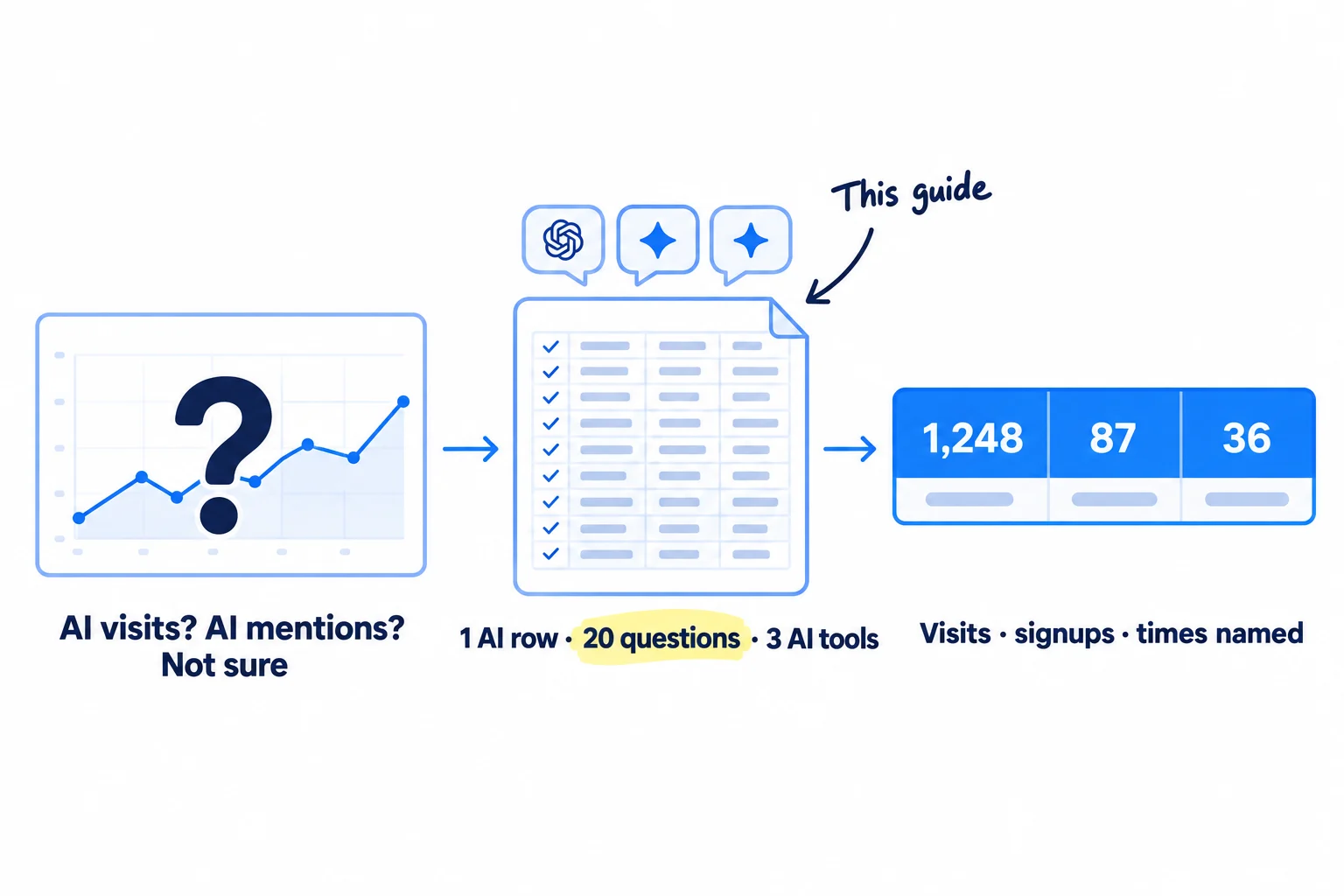
You keep hearing that buyers now ask ChatGPT instead of Google, but your analytics show nothing called AI, and when you ask ChatGPT about your business it gives a different answer every time. Here is how to track AI traffic and ChatGPT mentions with free tools, so you know if AI sends you visitors, signups and sales, and how often it names you. Without it, you will either ignore AI answers or spend weeks on AI search work with no way to tell if it did anything.
Do these three things
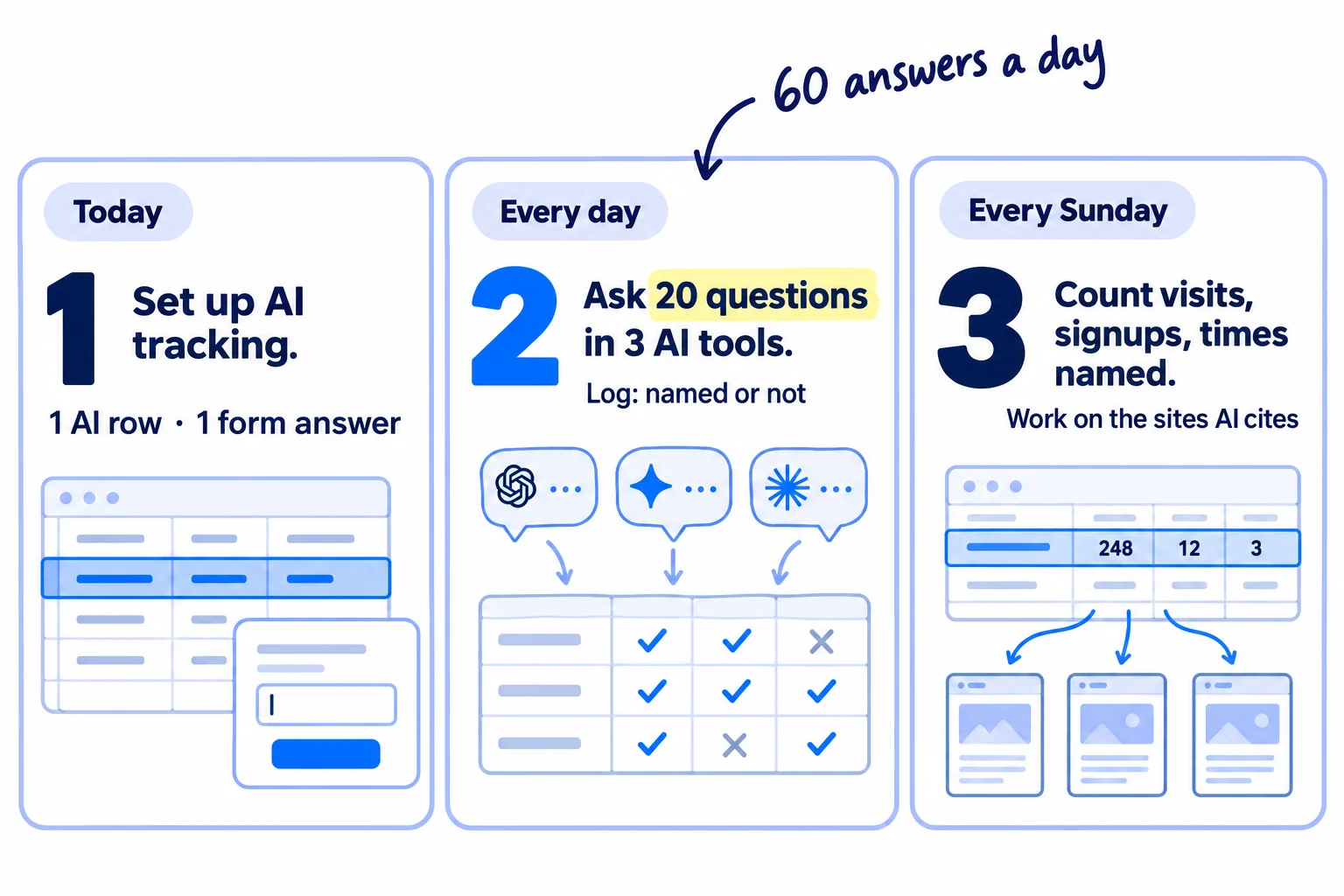
About 1 hour 30 minutes today, then about 1 hour a day and 30 minutes on Sunday. Judge it after 1,680 answers, which is 4 weeks at 60 a day.
Show the three actions in fullHide the full list
- Today: set up AI tracking: an "AI chat" row in Google Analytics that counts visits from ChatGPT and other AI tools, Bing's free AI citation report, and a "ChatGPT or another AI tool" answer on your "Where did you hear about us?" question.
- Every day: ask your buyers' 20 questions in ChatGPT, Perplexity and Google AI Mode, each in a fresh chat, and log whether you were named and which sites the answer cited. That is 60 answers a day.
- Every Sunday: count AI visits, signups that said AI, and how many answers named you. Give next week's work to the sites AI cites most, using the guide on getting on the lists AI tools cite.
Get help doing these
ChatGPT or Claude reads this guide and works through it with you.
1. Track AI traffic in GA4 with one AI chat channel
To track AI traffic in GA4, open Reports, then Acquisition, then Traffic acquisition, and look for the "AI Assistant" row, then add your own "AI chat" channel that also catches the visits that row misses. It takes 20 minutes and counts every visit from ChatGPT, Perplexity, Gemini, Claude and Copilot in one row, past visits included.
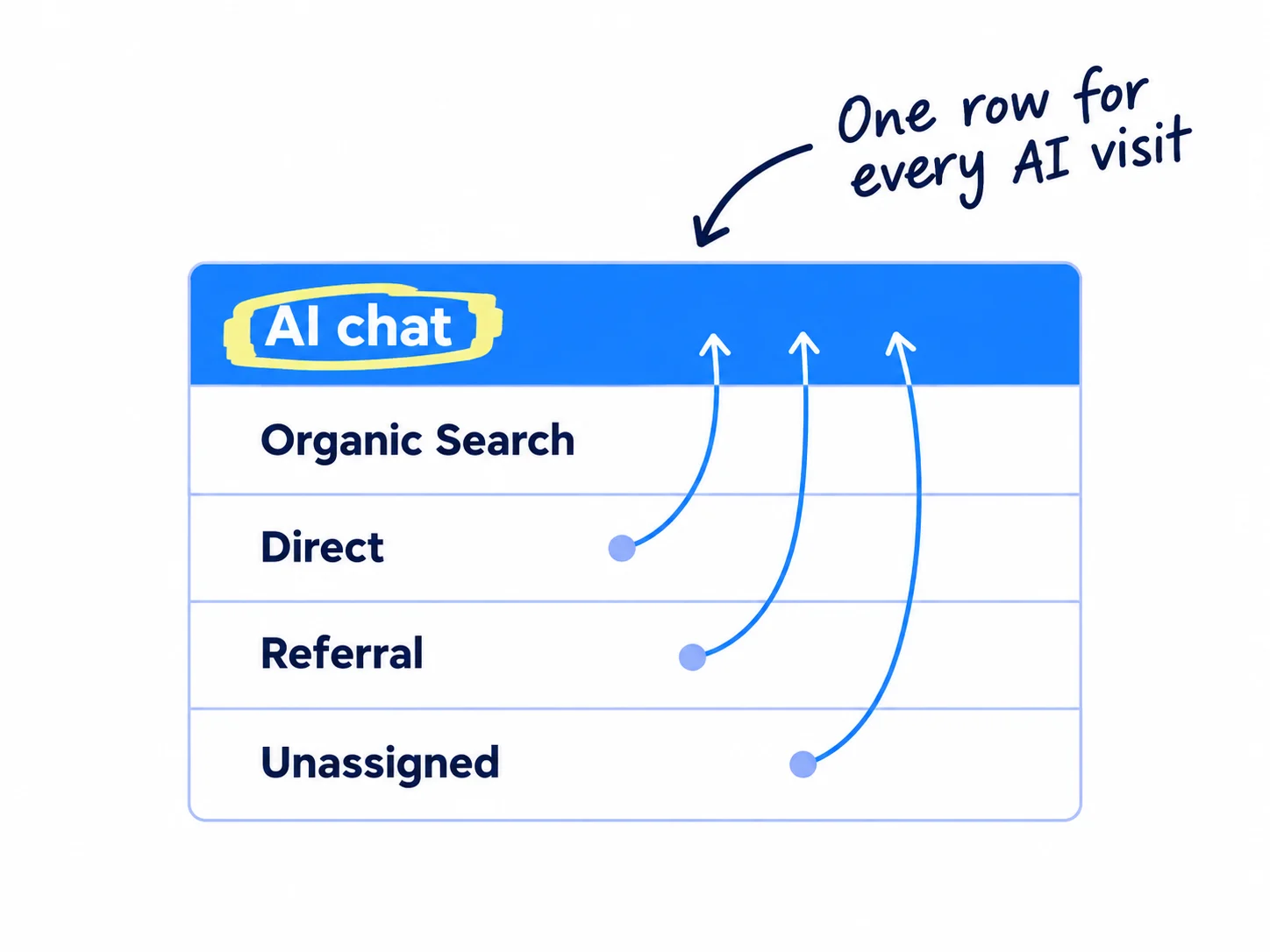
Since 13 May 2026, Google Analytics has an AI Assistant channel. It catches visits whose referrer, the page a visitor came from, is a known AI tool. Google's help page names ChatGPT, Gemini, Deepseek, Copilot and Grok. It does not catch Google's own AI Overviews or AI Mode, which count as Organic Search. It does not count visits from before 13 May 2026. Guides disagree on whether it catches Perplexity and Claude.
It also misses visits with no referrer. ChatGPT adds utm_source=chatgpt.com to the links in its answers, a tag like the UTM parameters you add to your own links. Many clicks from the ChatGPT app arrive with that tag but no referrer. In one count of 2,619 AI visits in April 2026, about 1 in 3 came that way, and those visits can end up in Direct or Unassigned. So build one channel that looks at the source, not the referrer:
- In Google Analytics, open Admin, then Data display, then Channel groups.
- Click Create new channel group. It starts as a copy of the default group. Name it "With AI chat".
- Add a new channel called "AI chat". Set the condition to Source, matches regex, and paste this:
.*(chatgpt|openai|perplexity|claude|gemini|copilot|deepseek|grok|meta.ai|mistral).* - Click Reorder and drag "AI chat" to the top, above Referral and everything else. Click Apply, then save the group. Google matches each visit to the first channel it fits, so order matters.
- Open Reports, Acquisition, Traffic acquisition, and change the table's first column to your "With AI chat" group. Google applies custom groups to past data too.
Then check it. Change the first column to Session source, type "chatgpt" in the table's search box, and compare that count with the "AI chat" row. If you have not marked your signup, enquiry or purchase as a key event yet, do it now with the conversion tracking guide. Without it, you can see AI visits but not whether any of them turned into a signup or sale.
Be honest about the size. Across sites measured in April 2026, AI tools sent 0.7% of all visits, and about 3 in 4 of those came from ChatGPT. At 300 visits a month, that is about 2 AI visits a month. That is why steps 2 and 5 matter more than this row at first.
- Tool: Google Analytics 4. Free. A standard property can have 2 custom channel groups.
- Time: 20 minutes.
- You will have: one "AI chat" row that counts every AI visit and the signups or sales that came from them, back to the day you added Google Analytics.
- It worked if: the "AI chat" row shows in Traffic acquisition (0 is fine on a new site), and its count is at least as high as the AI Assistant row and the "chatgpt" source search.
- Common mistake: reading only the Referral rows, or only the AI Assistant row. Both miss visits that carry the ChatGPT tag with no referrer, and the AI Assistant row starts on 13 May 2026.
If you run a D2C store on Shopify: do the same in Google Analytics, and also check your orders. Shopify says orders from AI channels show in your admin "with channel or referrer attribution". Open each new order and note any that came from ChatGPT, Gemini, Copilot or another AI tool. When a shopper buys a product they found in ChatGPT, Shopify sends them to your own store checkout, so the order is in your admin. Getting your products into ChatGPT has its own guide. The rest of your Shopify setup does not change.
If you run an agency: build the channel group in each client's own property, not a copy you own, and add the "AI chat" row to your monthly client report. It answers "are we getting anything from ChatGPT?" with a number.
2. Ask every new customer if they found you through ChatGPT or another AI tool
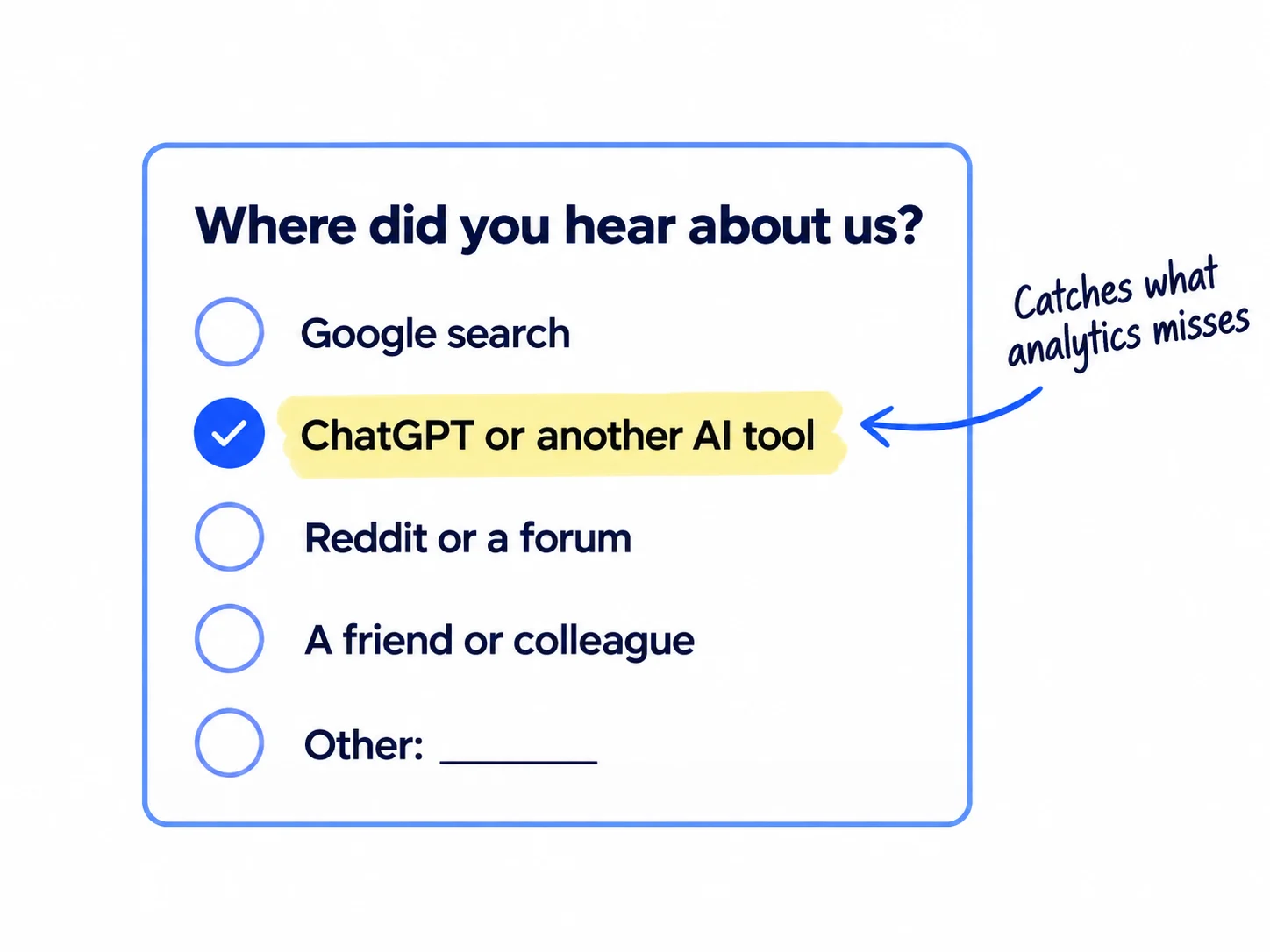
Add one required question to your signup, enquiry or checkout form, "Where did you hear about us?", with "ChatGPT or another AI tool" as one of the answers. This catches the AI visits analytics cannot see: someone reads your name in ChatGPT on their phone, then types your address or searches your name days later.
One small marketplace found in September 2026 that its admin screen showed most ChatGPT signups as "unknown", because it only read the referrer. Asking people is called self-reported attribution. It is the only way to count someone who heard about you in an AI answer and came back later.
Use a list of fixed answers, not only a text box. People skip text boxes, and "google" in a text box could mean Google search or Google's AI. Keep "Other" with a text box for the rest. Put the answers in this order so AI is near the top:
Where did you hear about us?
Google search
ChatGPT or another AI tool
Reddit or a forum
LinkedIn, X or another social site
A friend or colleague
Other: [text box]
Add one line in your CRM or sheet for each answer, next to the source from Google Analytics. When the two disagree, trust the person.
- Tool: your signup form, enquiry form or checkout. Free.
- Time: 15 minutes.
- You will have: a source, in the person's own words, for every new signup, enquiry or order.
- It worked if: at least 9 of your next 10 signups, enquiries or orders have an answer.
- Common mistake: a long form. One required question is fine. Five extra questions lose you signups, which hurts more than a missing source.
If you run a B2B company: add the question to your enquiry form, and ask it out loud on every first call: "How did you find us? Did you ask ChatGPT or another AI tool?" Write the answer down during the discovery call. If they say yes, ask what they typed. That question goes straight into your list in step 4.
If you run a D2C store: ask it as one question on the order confirmation page or in a post-purchase survey, not before payment, so it never slows checkout.
If you run an agency: ask your own leads on the first call, and ask your clients to add the question to their forms.
See it done: Bugmoth's signup question
Bugmoth is a made-up bug-reporting tool for small web teams. It costs $19 a month per team, with a 14-day trial.
Before
How did you find us? (optional text box)
After
Where did you hear about us? (required) Google search · ChatGPT or another AI tool · Reddit or a forum · LinkedIn, X or another social site · A friend or colleague · Other
Why it works: A fixed answer for AI means a person who read about Bugmoth in ChatGPT is counted, even if they typed the address by hand.
3. Turn on the free AI citation reports in Bing and Google
Bing Webmaster Tools and Google Search Console each have a free report that counts how often AI answers show your pages. Turn on both today. They take 10 minutes if you already use Google Search Console.
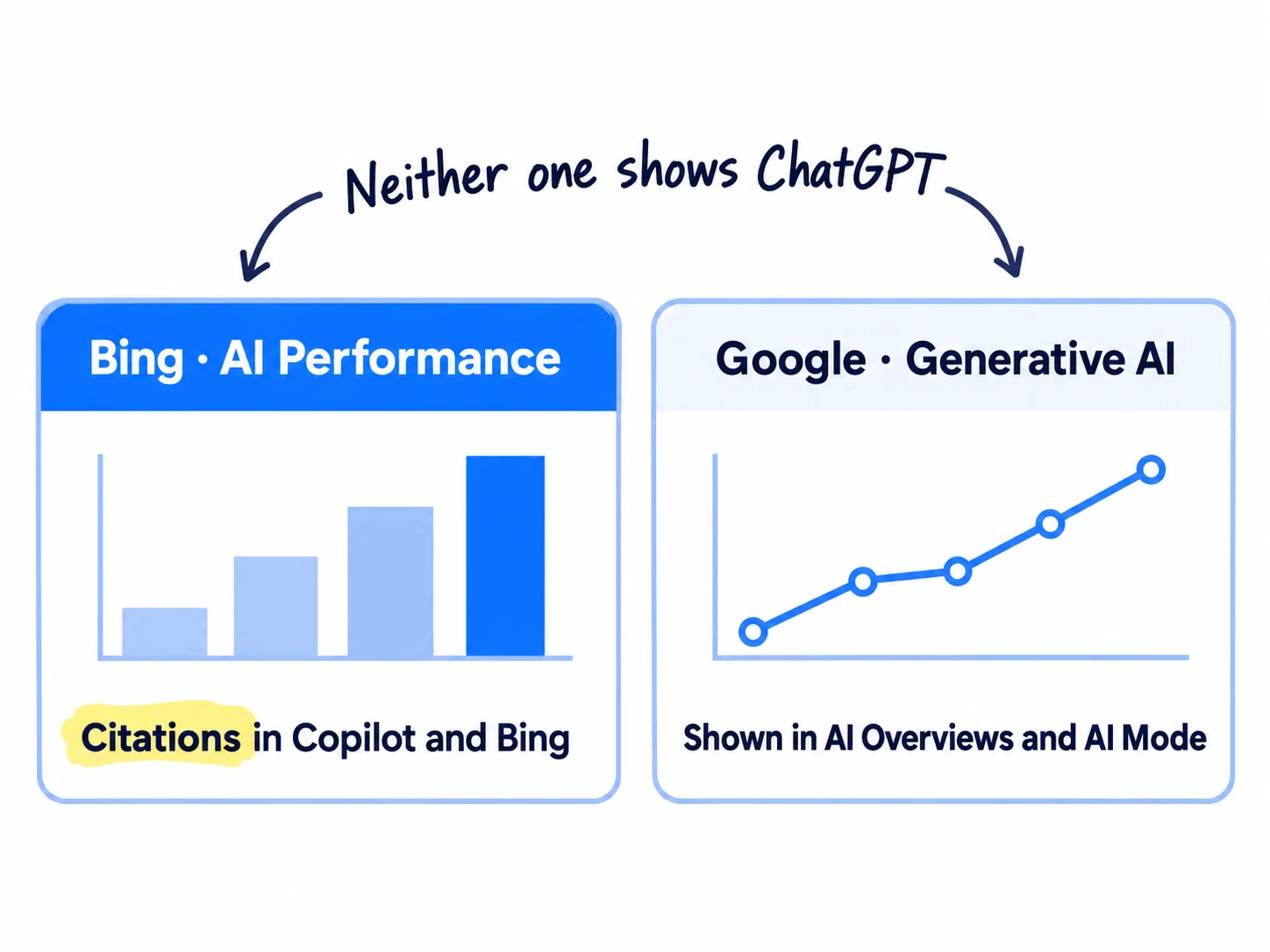
Bing. Sign in to Bing Webmaster Tools and import your site from Search Console, which skips the check that you own it. Then open the AI Performance report. Since February 2026 it shows how often your pages are cited in Microsoft Copilot and in Bing's AI summaries: total citations, the pages cited and the "grounding queries", the phrases the AI used to find your page. Since June 2026 it also shows Citation Share, your share of all citations for one of those phrases. It is a free preview. It does not count clicks, and it does not cover ChatGPT.
Google. In Search Console, open the Generative AI report. It counts how often your pages were shown in AI Overviews and AI Mode, as impressions only. The Search Console guide shows where it is, and measuring SEO covers what to do with Google's numbers. Here you only copy one number into your Sunday row.
If either report says "no data", your pages have not been cited yet. That is normal for a new site. Before you worry, check that your robots.txt does not block OAI-SearchBot or Bingbot, and that your pages are indexed on Google. The llms.txt and schema guide covers the rest of what AI crawlers read.
- Tool: Bing Webmaster Tools and Google Search Console. Both free.
- Time: 10 minutes.
- You will have: two reports that count AI citations, one for Copilot and Bing, one for Google's AI answers.
- It worked if: both reports open for your site, even if they show 0.
- Common mistake: thinking these show ChatGPT. They do not. ChatGPT has no report like this, which is why step 5 asks the questions yourself.
4. Write the 20 questions your buyers ask AI
Write 20 questions a buyer would type into ChatGPT before they find you: 18 about the problem or the kind of product, with no brand name in them, and 2 about you. These are the questions you will check every day, so they decide what you learn.
![A list card titled '20 questions'. 18 rows read like '[best kind of product] for [who]' and '[how do I fix the problem]', with no brand name. 2 rows read 'What is [your brand]?' and '[your brand] vs [competitor]'.](/academy/illustrations/how-to-track-ai-traffic-and-chatgpt-mentions/05-step-4.webp)
Take the questions from what buyers really say:
- Your customer chats and calls. The exact words people used when they described the problem in your customer interviews.
- Google suggestions. Type the start of your keywords into Google and copy the suggestions that sound like a question to an assistant.
- Forums. Thread titles from the communities where your buyers talk.
- ChatGPT itself. Paste your 10 best questions and ask: "Rewrite each of these the way a busy owner would type it into ChatGPT. Keep each under 15 words. Do not add a brand name." Keep the ones that sound real.
Mix three kinds: "best [kind of product] for [who]", "how do I [fix the problem]", and "[a competitor] alternatives". The last kind is where buyers compare, and it is the same list your comparison pages answer. Your 2 brand questions are "What is [your brand]?" and "[your brand] vs [your biggest competitor]". They show whether AI says true things about you.
Then run one free check. Enter your biggest competitor's name in the Ahrefs free AI visibility checker. It needs no signup and shows the top 5 domains and pages that ChatGPT, Gemini, Perplexity, Copilot and AI Overviews cite alongside that brand. Write those 5 domains down. They are often the first places to work on, and the competitor analysis you already have tells you which rival to pick.
- Tool: a Google Sheet, Google, and ChatGPT or Claude to rewrite the questions. Free.
- Time: 45 minutes.
- You will have: a sheet tab with 20 questions, and 5 domains AI cites in your category.
- It worked if: you have 20 questions, 18 of them without your name, and a buyer who read the list would say "yes, I'd ask that".
- Common mistake: checking only "What is [your brand]?". A new brand is rarely named for its own category at first, and only the questions without your name show whether AI recommends you to people who have never heard of you.
If you run a B2B company: add questions the way a buyer looks for a supplier: "[product] manufacturer for [kind of business] in [country]", "who makes [product] in small runs". The supplier guide uses the same list.
See it done: 5 of Bugmoth's 20 questions
Questions to check every day
| # | Question | Kind |
|---|---|---|
| 1 | What's the best bug reporting tool for a small web agency? | Best tool for who |
| 2 | How can clients report website bugs with a screenshot? | Fix the problem |
| 3 | Easiest way to collect website feedback from clients | Fix the problem |
| 4 | Cheap alternatives to Jira for a 5-person web team | Alternatives |
| 19 | What is Bugmoth? | About you |
Why it works: Most questions have no brand name, so they show whether AI suggests Bugmoth to someone who has never heard of it.
5. Track ChatGPT mentions by asking your 20 questions in 3 AI tools every day
To track brand mentions in ChatGPT, ask your 20 questions in ChatGPT, Perplexity and Google AI Mode every day, each in a fresh chat, and log whether each answer named you. That is 60 answers a day. Count how often you are named across many answers, never your place in one answer.
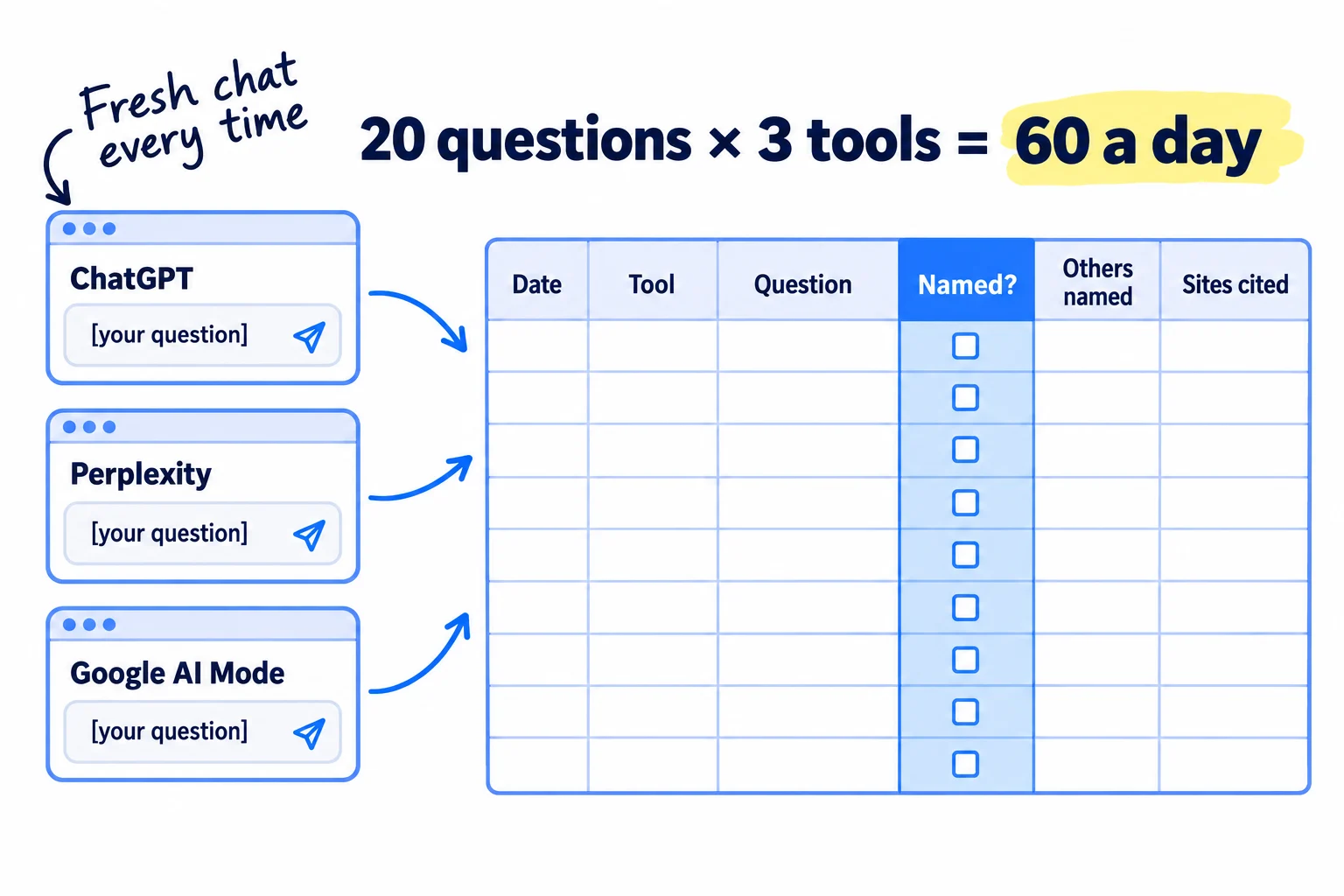
AI answers change almost every time. In a January 2026 study by SparkToro, 600 people asked ChatGPT, Claude and Google's AI the same 12 questions 2,961 times. The same list of brands came back in fewer than 1 in 100 answers, and the same order in fewer than 1 in 1,000. One answer tells you nothing. The researchers suggest 60 to 100 runs of each question. 60 answers a day gives you 1,680 in 4 weeks, and every question gets 28 runs in each tool.
Make each check clean, or AI will tell you what it remembers about you:
- ChatGPT: start a temporary chat with the temporary chat icon at the top, and turn personalisation off when it asks. Your own chats and memories then do not change the answer. Or use ChatGPT signed out in a private window.
- Perplexity: use it signed out, in a private window.
- Google AI Mode: open a private window, search your question, and click the AI Mode tab. Signed out, Google cannot personalise it to you.
If you already run the Sunday check from the guide on getting mentioned by ChatGPT, this daily log replaces it: the same 20 questions, asked more often and in more tools.
For each answer, add one row to a sheet: date, tool, question, named (yes or no), how many other brands were named, the sites the answer cited, and anything wrong it said about you. If a card is marked "Sponsored", it is an ad, not an answer. Do not count it.
Speed it up. Keep the sheet and the three tools open side by side, paste the question into all three, and log each row in about a minute. AI cannot do this part for you: an assistant asking itself is not a clean check. If one hour a day is too much, pay for the volume instead of cutting it. Otterly.AI's Lite plan, $29 a month, asks 15 questions every day in ChatGPT, AI Overviews, Perplexity and Copilot, and logs the answers. Put your 15 non-brand questions in it and keep the other 5 by hand.
- Tool: ChatGPT, Perplexity, Google AI Mode and a Google Sheet. All free. Otterly.AI Lite at $29 a month only if you cannot give it an hour.
- Time: about 1 hour a day.
- You will have: 60 logged answers a day, and 1,680 after 4 weeks.
- It worked if: the sheet has 60 new rows today, each with "named" filled in and the cited sites copied.
- Common mistake: asking your own signed-in ChatGPT once, seeing your brand, and stopping. It may only name you because it remembers your chats. The other mistake is quitting after 3 days of "no". A new brand often sees 0 for weeks.
See it done: Three rows from Bugmoth's log
Day 6, question 1
| Tool | Named? | Others named | Sites cited | Wrong facts |
|---|---|---|---|---|
| ChatGPT | No | 5 | g2.com, a "best bug trackers" list, reddit.com | None |
| Perplexity | Yes | 4 | reddit.com, Bugmoth's help page | None |
| Google AI Mode | No | 3 | youtube.com, a "best bug trackers" list | None |
Why it works: Each row records the same few facts, so after 1,680 rows Bugmoth can count how often each tool names it and which sites they all cite.
6. Count AI visits and mentions every Sunday, then move next week's work
Every Sunday, fill in one row with this week's AI visits, AI signups or sales, the people who said "ChatGPT or another AI tool", and how many of your 420 answers named you. Then use the rules below to pick next week's 3 jobs.
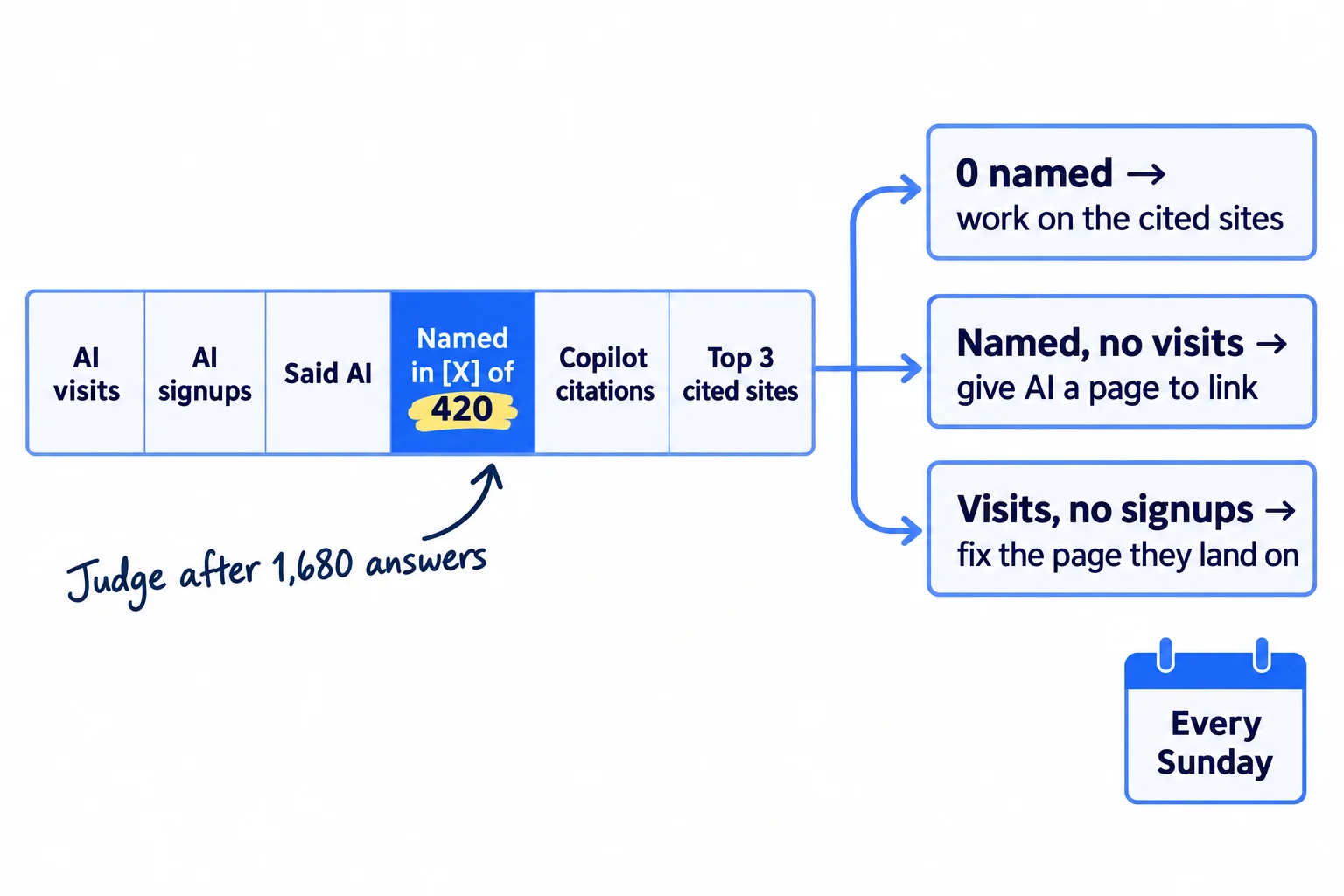
Copy the numbers from Google Analytics (step 1), your form answers (step 2), Bing and Search Console (step 3) and your log (step 5). Split "named" by tool, because ChatGPT, Perplexity and Google AI Mode often disagree.
Week | AI visits (AI chat row) | AI signups, enquiries or orders | People who said "ChatGPT or another AI tool" | Named in ChatGPT, of 140 | Named in Perplexity, of 140 | Named in Google AI Mode, of 140 | Copilot citations (Bing) | Google AI impressions | Top 3 sites cited | Wrong facts AI said about you
Then pick next week's jobs with these rules:
- Named in 0 of 420: you are not yet in AI's picture of your category. Spend next week getting mentioned by ChatGPT, starting with the 3 sites cited most in your log. Most are review sites, forum threads and "best of" lists: get onto those lists, and answer the threads the way the Reddit guide says.
- Named, but 0 AI visits: AI names you but gives no reason to click. Publish 1 page a day that answers one of your 18 questions in full, so the answer has a page of yours to cite.
- AI visits, but no signups: the page they land on loses them. In Google Analytics, check the landing page for the "AI chat" row, then fix it with the guide for a SaaS site with traffic but no signups, a store with traffic but no sales or a B2B site with no enquiries.
- AI said something wrong about you: fix that fact on your own homepage and pricing page the same day, in plain words, and ask the cited site to update it.
- Shown in Google AI, not in ChatGPT: keep your Google work, and use the AI Overviews guide for what is different there.
Judge it after 1,680 answers, which is 4 weeks at 60 a day. Before that, the counts are too small: going from 0 to 2 named in a week can be chance. Once a month, carry the row into your monthly marketing review, next to your other channels. AI work is slow, like SEO: expect months, not days.
- Tool: the same Google Sheet.
- Time: 30 minutes every Sunday.
- You will have: one row a week, and 3 jobs for next week written down.
- It worked if: every box in the row has a number, even 0, and each of next week's 3 jobs names a site, a page or a question.
- Common mistake: judging on visits alone. At 300 visits a month you may see 2 AI visits, while the log shows AI naming you more each week. Count both.
If you run an agency: keep one sheet tab per client and put the row in their monthly report. "Named in 0 of 420 in week 1, 12 of 420 in week 8" is the honest proof clients ask for, and it is the core of selling AI visibility as a service.
See it done: Bugmoth's Sunday row in week 4
Week 4
| AI visits | AI signups | Said AI | Named: ChatGPT | Named: Perplexity | Named: AI Mode | Copilot citations | Top 3 cited sites | Wrong facts |
|---|---|---|---|---|---|---|---|---|
| 2 | 0 | 1 | 0 of 140 | 9 of 140 | 0 of 140 | 0 | reddit.com thread, g2.com, a "best bug trackers" list | AI Mode said $29 a month; it is $19 |
Next week: fix the price line on the pricing page, answer the Reddit thread, and ask the "best bug trackers" list to review Bugmoth.
Why it works: It shows AI naming Bugmoth only on Perplexity and getting its price wrong, so next week's jobs are clear even with just 2 visits.
Where Scout7 helps
Scout7 speeds up steps 4 and 5.
Step 4. Scout7's AI question coverage collects the questions real buyers ask AI assistants in your category, and shows who is answering them today on Google and in AI answers. That gives you a first list of your 20 questions, and the brands and sites already named for each one. You still pick the questions that match what you sell.
Step 5. Scout7's search and AI audit scores how present your site is in AI answers, next to site health and Google search presence, with a short list of fixes. Use it as a second check next to your daily log. You decide which fixes are worth doing.
Your AI traffic and mentions checklist for the next 4 weeks
0 of 12 done
Work through this list with an AI assistant
It drafts the work and keeps track of what is done.
Frequently asked questions
- Does ChatGPT traffic show up in Google Analytics?
Yes, but not always in one place. Since 13 May 2026, many ChatGPT visits show in the AI Assistant row. Others carry the tag utm_source=chatgpt.com and show under that source, sometimes in Unassigned or Direct. Build the "AI chat" channel in step 1 and they all land in one row. Mark signups as key events to see which ones turned into customers.
- Why does my ChatGPT traffic show as direct?
Clicks from the ChatGPT phone and desktop apps often arrive with no referrer, so Google Analytics cannot see where they came from. If the link kept ChatGPT's tag, search Session source for "chatgpt" to find it. If it did not, only the person can tell you, so add "ChatGPT or another AI tool" to your where did you hear about us question.
- Can I see how many times ChatGPT mentioned my brand?
Not from ChatGPT. It has no report for site owners. Bing Webmaster Tools counts citations in Copilot, and Search Console counts impressions in Google's AI answers. For ChatGPT, ask your buyers' questions in fresh chats and count how many answers name you. A paid tool does the same thing automatically. It does not see more than you would.
- How do I track AI Overview traffic?
You cannot split it out in Google Analytics: clicks from AI Overviews and AI Mode count as Organic Search. Search Console's Generative AI report shows how often your pages were shown there, as impressions only. The Search Console guide shows where to find it, and the AI Overviews guide covers how to get shown.
- Do I need a paid AI visibility tool?
Not to start. Google Analytics, Bing Webmaster Tools, Search Console and a sheet are free, and an hour a day by hand covers 60 answers. Pay only when you cannot give that hour: Otterly.AI's Lite plan is $29 a month for 15 questions checked daily. Tools that give you an "AI ranking position" are not worth paying for, because the order of names changes in almost every answer.
Sources
- 1.What's new in Google Analytics: AI Assistant channel (13 May 2026) — Google Analytics Help, checked 1 October 2026
- 2.[GA4] Default channel group — Google Analytics Help, checked 1 October 2026
- 3.[GA4] Custom channel groups — Google Analytics Help, checked 1 October 2026
- 4.GA4 now has an AI Assistant channel. Here's the catch. — AIVO, 17 June 2026
- 5.Why ChatGPT traffic shows as direct in GA4 — Clickport, data from April 2026, checked 1 October 2026
- 6.Traffic from ChatGPT now brings a quarter of our sign-ups: how we track it — DEV Community, 28 September 2026
- 7.Introducing AI Performance in Bing Webmaster Tools (public preview) — Microsoft Bing, February 2026
- 8.New AI visibility insights in Bing Webmaster Tools: Intents, Topics, Citation Share, Compare — Microsoft Bing, 16 June 2026
- 9.AIs are highly inconsistent when recommending brands or products — SparkToro, 28 January 2026
- 10.Temporary chat in ChatGPT — OpenAI Help Center, checked 1 October 2026
- 11.Ads in ChatGPT — OpenAI Help Center, checked 1 October 2026
- 12.AI Mode is now available in more languages and locations — Google, checked 1 October 2026
- 13.Agentic storefronts: customer experience — Shopify Help Center, checked 1 October 2026
- 14.Free AI Visibility Checker — Ahrefs, checked 1 October 2026
- 15.OtterlyAI pricing — Otterly.AI, checked 1 October 2026
Next article to read
How to get your brand mentioned by ChatGPTOnce you know how often AI names you, do the work that gets you named more.Read it nextRelated guides
- How to run a monthly marketing reviewComing soon
- How to measure SEO successMeasure SEO success on a new site with free tools: write down the result that counts (signups, enquiries or orders from Google), track it as a key event in Google Analytics, ask every buyer where they found you, fill one Sunday scorecard row for seen, visited, acted and bought, fix the first number below its line, and work out what one customer from Google costs you each month.
- How to use UTM parametersComing soon
- How to set up conversion trackingComing soon
Guides that link here
- How to do a competitor analysis
- How to measure SEO success
- How to get your brand mentioned by ChatGPT
- How to show up in Google AI Overviews
- How to get on the "best of" lists AI tools cite
- How to add llms.txt and schema markup
- How to get your company recommended by ChatGPT as a supplierB2B
- How to get your products recommended by ChatGPTD2C
- How to build a free tool that brings in leadsSaaS
- How to get traffic to a new website for free
- How to get your first sales on ShopifyD2C
- How to submit your SaaS to directoriesSaaS
- How to market a SaaS productSaaS
- How to market your product as a technical founderSaaS
- How to write a value proposition
- How long does SEO take to work?
- How to do SEO for a Shopify storeD2C
- How to find keywords for SEO
- How to get backlinks for a new website
- How to get backlinks from news websites
- How to get your website indexed on Google
- How to set up a Google Business Profile
- How to use Google Search Console
- How to write a blog post that ranks on Google
- How to write competitor comparison and alternative pages
- Technical SEO checklist for a new website
- How to promote your business on InstagramD2C
Cite this page
Dinesh Bypilla (2026). How to track AI traffic and ChatGPT mentions. Scout7 Academy. https://scout7.ai/academy/ai-search/how-to-track-ai-traffic-and-chatgpt-mentions
Written by Dinesh Bypilla, Agentic systems engineer at Scout7. Reviewed by Murali Sid. Last checked 1 October 2026.
Quote any part of this guide with a link back to this page. © 2026 Scout7.
Markdown version of this page: https://scout7.ai/academy/ai-search/how-to-track-ai-traffic-and-chatgpt-mentions.md