



How to plan a content calendar
Plan a content calendar that brings buyers, not just likes: collect 100 questions your buyers ask, fill 4 weeks in one Google Sheet with 1 article and 2 posts a day on each of 2 channels, write and schedule next week's 28 posts every Sunday, reply to every comment, and count what each question brought every Sunday.
ByDinesh BypillaReviewed byMurali SidLast checked 17 min read
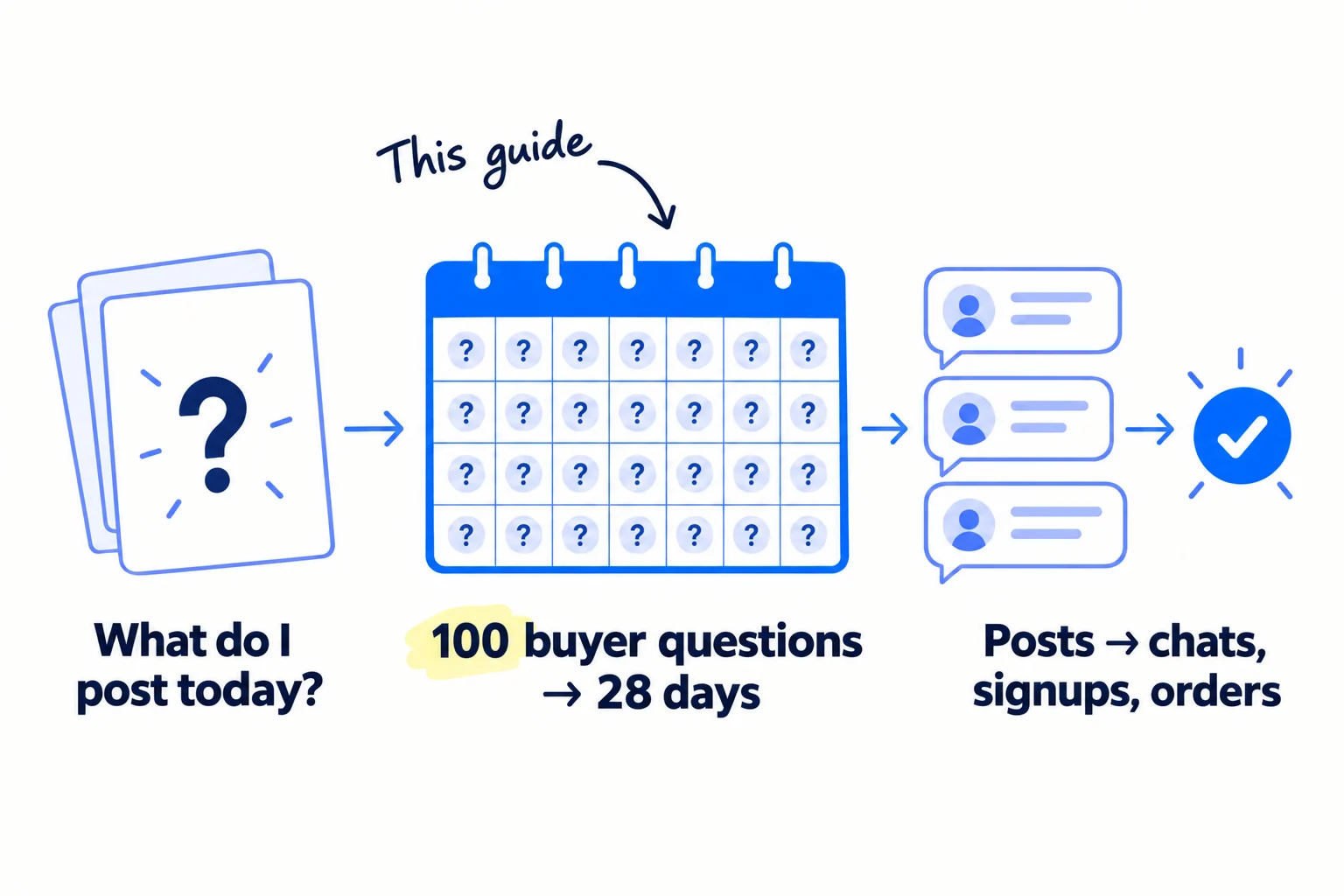
You know you should post every day, but most mornings you open the app with nothing to say, post a little, get a few likes and no customers, and stop. To plan a content calendar that works, start from the questions your buyers already ask, then fill 4 weeks in one Google Sheet: 1 article and 2 posts a day on each of 2 channels. With AI drafting, that is about 2 hours a day plus a few hours on Sunday, and you never start from a blank page again.
Do these three things
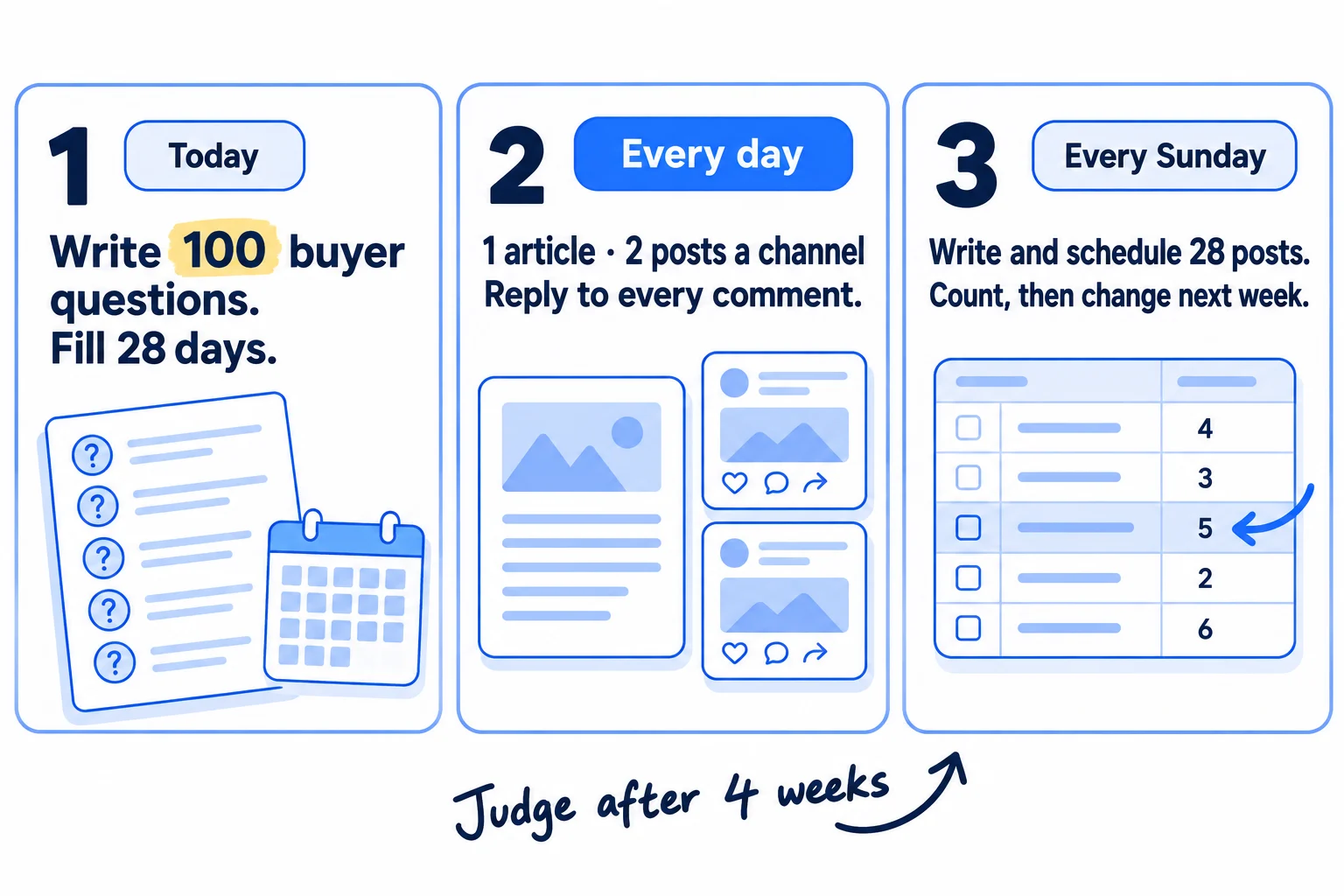
About 2 hours a day, plus about 3 hours on Sunday. Judge it after 4 weeks: 28 articles and 112 posts, not after the first few.
Show the three actions in fullHide the full list
- Today: write 100 questions your buyers ask in one Google Sheet, and give each of the next 28 days one question, one article, and 2 posts on each of your 2 channels.
- Every day: publish that day's article and check its 4 posts went out, reply to every comment within the day, and add 5 new buyer questions. AI drafts; you add one thing only you know.
- Every Sunday: write and schedule next week's 28 posts in one sitting, count which posts brought visits, chats and sales by where they came from, and give next week's rows to those questions.
Get help doing these
ChatGPT or Claude reads this guide and works through it with you.
1. Pick the goal and the 2 channels your content calendar is for
Write down the one result your content must bring, and pick the 2 social channels where your buyers already are, plus your own website for the articles. A calendar with no goal fills up with posts that get likes from other founders and bring no buyers.
![A goal card reading 'Goal: [chats / signups / orders / enquiries]'. Below it, two channel cards, each with a list of 20 names, and a third card for 'Your website'. A channel with fewer than 20 names is crossed out.](/academy/illustrations/how-to-plan-a-content-calendar/02-step-1.webp)
The goal is the thing you count, not likes or followers: chats booked if you sell B2B or run an agency, signups if you run a SaaS, orders if you run a store. Every row of the calendar will end with a next step toward it.
The channels. A channel counts only if you can name 20 buyers who posted or commented there in the last month. Open the platform, search for the problem your product fixes in your buyers' words, and write the names in a sheet. This is the same list as your ideal customer profile, seen through where they read. If a channel gives you fewer than 20 names in 30 minutes, drop it and try the next. Two channels is the floor, not the cap: add a third when the first two have run at 2 posts a day for 4 weeks.
If you run a SaaS: start with LinkedIn if you sell to teams, or X if your buyers are developers.
If you run a B2B business: start with your own LinkedIn profile, not a company page. Buyers reply to people.
If you run a D2C store: use Instagram and TikTok, and make your 2 posts a day short videos, filmed in 9:16. Your "articles" are buying-question pages on your store's blog.
If you run an agency: LinkedIn first, plus the place your clients' buyers read. Your calendar is also the thing you sell, so treat it as a sample of your work.
- Tool: Google Sheets. Free.
- Time: 30 minutes per channel.
- You will have: one line with your goal, 2 channels, and 20 named buyers on each.
- It worked if: both channels have 20 real names from the last month.
- Common mistake: picking the place where other founders hang out. One founder posted on Reddit every day for 3 months with zero customers, because "r/SaaS is full of other builders, not buyers" (Indie Hackers, June 2026).
2. Collect 100 questions your buyers ask
Write 100 questions your buyers ask, in their own words, into one sheet, with where you found each one. These are your topics. A calendar built from real questions never runs out, and every post is about a problem a buyer has.
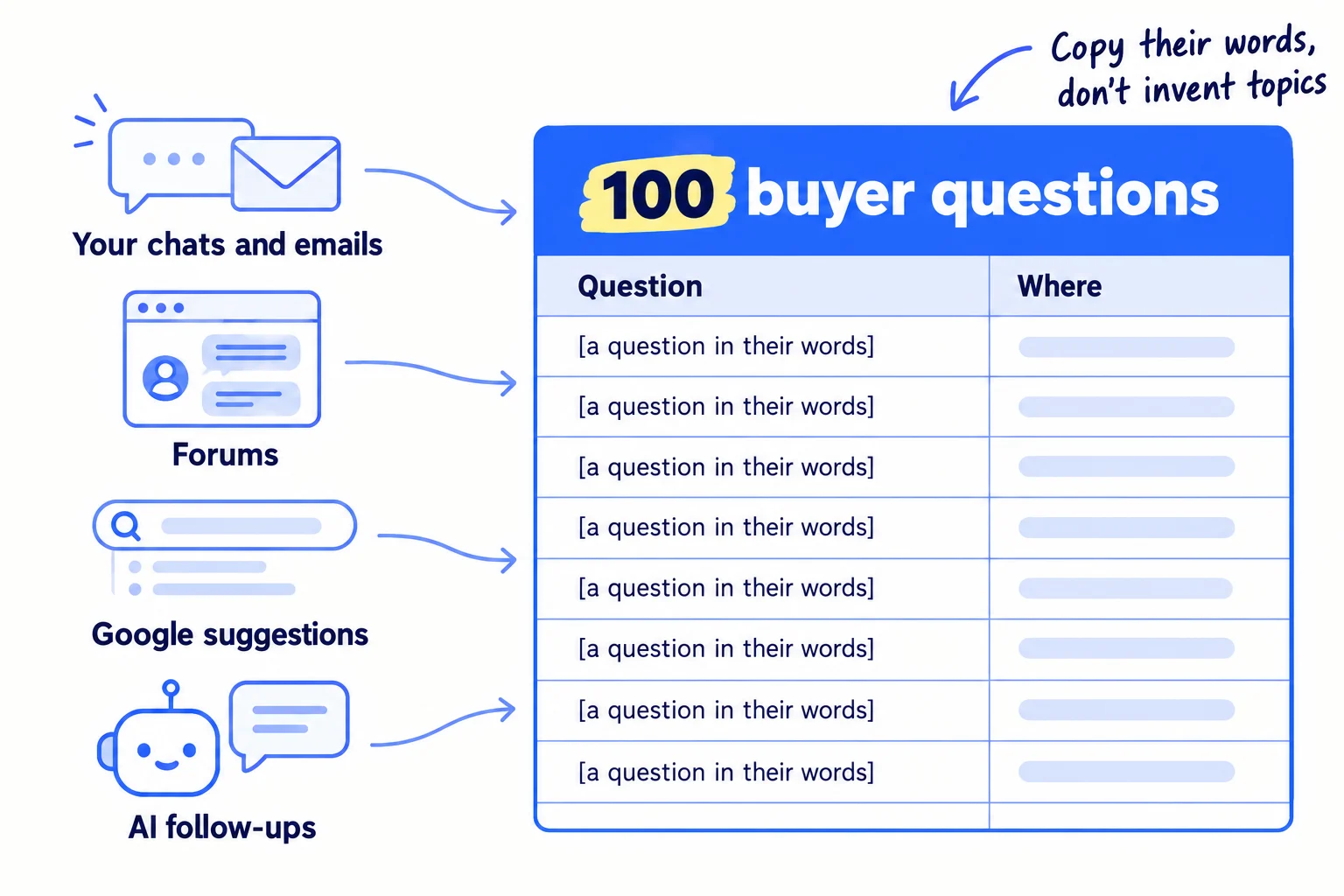
Go in this order, because the first sources are the most real:
- Your own chats, emails and calls. Every question a buyer or customer asked you. If you have had few, run a few customer interviews this week and write down what they ask.
- The places from step 1. Search the problem in the communities where your buyers talk, sort by New, and copy the questions word for word.
- Google suggestions. Type the start of your buyer's problem into Google and copy what it suggests. The same list also feeds your keyword research.
- AI follow-ups. Ask ChatGPT or Claude one of your buyer's questions and copy the follow-up questions it suggests. These are what people ask AI answers next.
Paste the whole list into ChatGPT or Claude and ask it to remove duplicates and group the questions into 4 to 6 groups. Check each question yourself: if no buyer asked it, delete it. For pages, check people search for it too.
Question (in their words) | Where it came from | Date | Group
- Tool: Google Sheets, Google search, and ChatGPT or Claude. All free to start.
- Time: about 2 hours.
- You will have: 100 rows, each a real question with its source.
- It worked if: you have 100 rows, and at least 20 came from buyers you spoke with or read in a forum.
- Common mistake: writing topics instead of questions ("5 tips for productivity"). A planned list of topics nobody asked about is the list that never gets posted. One business planned 48 topics and published 9; from weekly notes of real client questions, it published 34 (Lilach Bullock, checked 2 October 2026).
See it done: 6 of Quillfox's 100 questions
Quillfox is a made-up one-person agency. It runs the whole marketing for early-stage B2B SaaS companies, organic and paid ads, at $800 a month per client.
Quillfox's question sheet, first rows
| Question | Where it came from |
|---|---|
| How many LinkedIn posts a week does a SaaS founder need? | A client call |
| Should I hire an agency or a freelancer for my SaaS marketing? | Google suggestion |
| Why does my SaaS get traffic but no trials? | A founder forum |
| What should a SaaS homepage say above the fold? | A client email |
| How long until SEO brings signups? | ChatGPT follow-up |
| What do I post when I have no customers yet? | A founder forum |
Why it works: Each one is a question a real buyer typed or said, so every post answers something someone already wants to know.
3. Build a 4-week content calendar in Google Sheets
Make one row for each of the next 28 days, and give every row one question, one article, 2 posts for each channel and one next step. Four weeks is enough: you will change next week's rows every Sunday from what you learn.
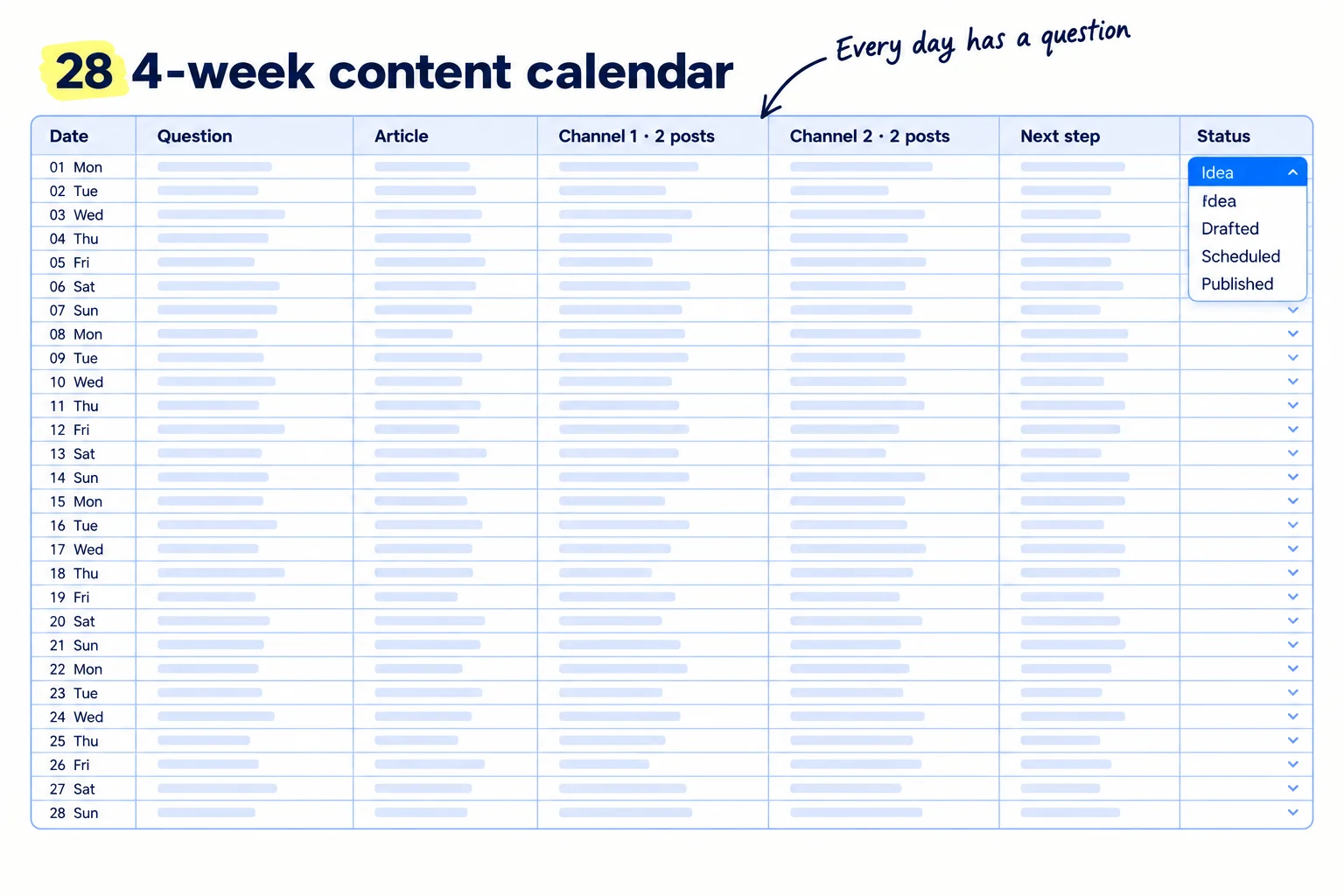
Open a new Google Sheet and add these columns:
Date | Question | Article title | Channel 1: post 1 | Channel 1: post 2 | Channel 2: post 1 | Channel 2: post 2 | Format | Next step | Link | Status | What it brought
Then fill it:
- Give each day one question from step 2. Take one from each group in turn, so a week covers every group. One question feeds one article and all 4 posts that day: the article answers it in full, and each post answers one part of it. That is how you repurpose content without writing 5 separate things.
- Write the article title as the question, the way buyers type it.
- Pick a format for each post by platform. In Buffer's 2026 study of 52 million posts, LinkedIn carousels got about 3 times the engagement of video and images; on Instagram, carousels got the most engagement and Reels the most reach; on X, text posts did best (Buffer, March 2026).
- Write the next step for each row: "reply 'guide' and I'll send it", "book a 15-minute call", "try it free", "shop the set", or "join the newsletter". Each one leads to a page that matches the post, so check your homepage says the same thing. This is your call to action. Mix them: most posts ask for a reply or a comment, and about 1 in 4 asks for the goal from step 1.
- Add the key dates in your 4 weeks: launches, events, holidays your buyers care about. Give each its own row.
- Make Status a dropdown. Select the Status column, click Insert, then Dropdown, add "Idea", "Drafted", "Scheduled" and "Published", then click Done.
If you run a D2C store: Black Friday is 27 November 2026 and Cyber Monday is 30 November. Put both in the sheet now, and plan gift guide pitches and your sale posts in the rows before them.
If you run an agency: keep one sheet per client, with the same columns. Add an "Approved by" column, so nothing goes out before the client approves it.
- Tool: Google Sheets. Free. A Notion, Canva or Excel template works too, but the columns matter more than the app.
- Time: about 1 hour.
- You will have: 28 rows, every one with a question, an article title, 4 post lines and a next step.
- It worked if: you can point at any day in the next 4 weeks and say what goes out on each channel.
- Common mistake: planning a year, or a calendar with pretty colours and empty cells. You do not have a year of data. Plan 4 weeks, fill every cell, and change it on Sunday.
See it done: The first 3 rows of Quillfox's calendar
Quillfox's calendar, days 1 to 3
| Date | Question | LinkedIn (2 posts) | X (2 posts) | Next step |
|---|---|---|---|---|
| Day 1 | How many LinkedIn posts a week does a SaaS founder need? | Carousel: the numbers; text: what I post for clients | 2 text posts: one number each | Reply "plan" for the template |
| Day 2 | Why does my SaaS get traffic but no trials? | Carousel: 5 homepage checks; text: one fix I made | 2 text posts: one check each | Book a 15-minute review |
| Day 3 | What do I post when I have no customers yet? | Text: 10 post ideas; carousel: the first week | 2 text posts: one idea each | Reply "ideas" for the list |
Why it works: One question feeds the article and all 4 posts, and every row ends with a next step toward a call.
4. Write and schedule next week's posts every Sunday
Every Sunday, write all 28 of next week's posts in one sitting and schedule them, so the posts go out every day without you opening the app each morning. Writing each post on the day is how most people stop after two weeks.
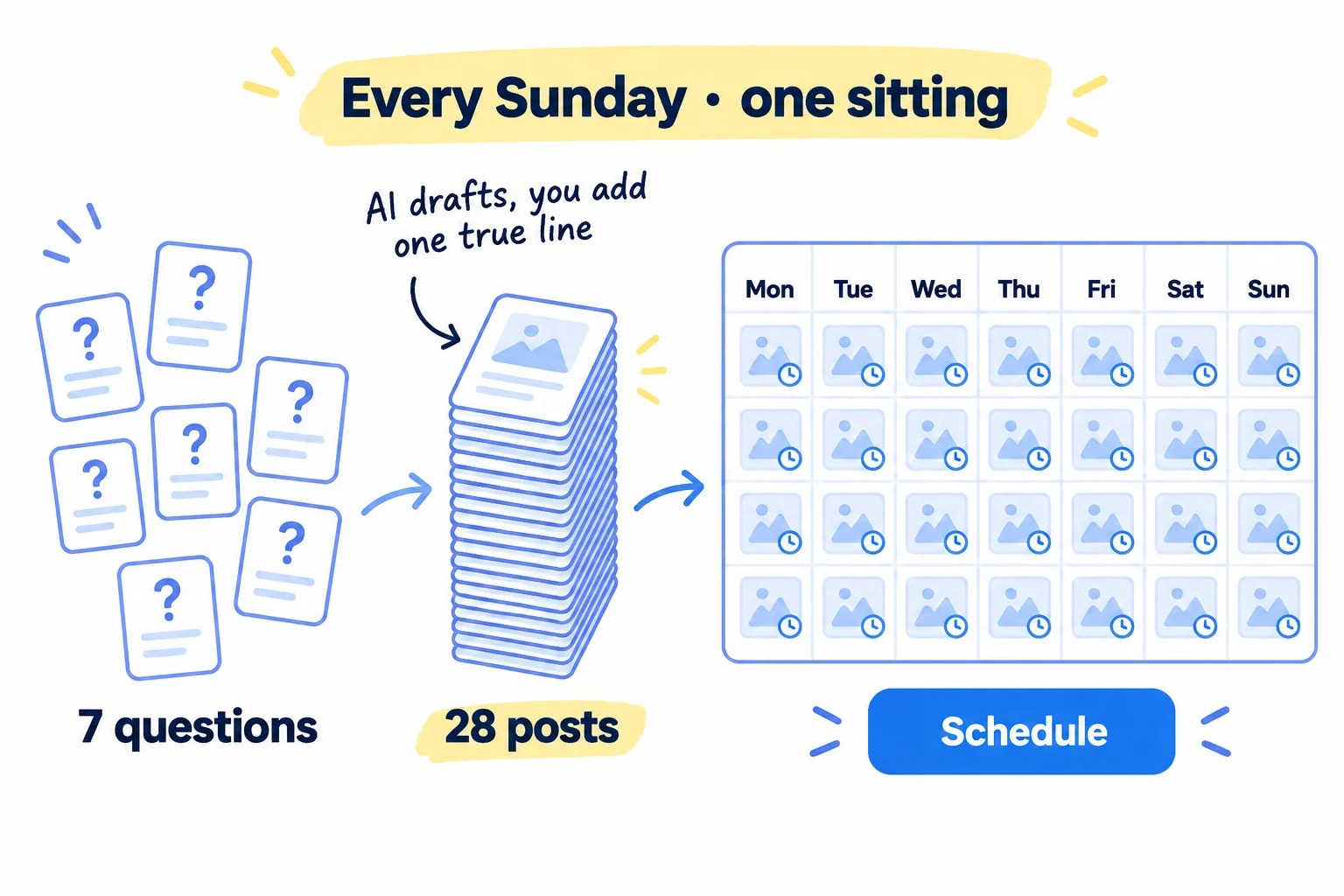
This is the default volume: 2 posts a day on each channel, every day. It fits in the Sunday slot of a solo founder's week. It is more than most guides ask, and the data backs it. In Buffer's study of over 2 million LinkedIn posts, accounts posting 11 or more times a week got about 17,000 more impressions per post than accounts posting once a week, and 3 times the engagement, with no sign of a penalty for posting more (Buffer, August 2025).
AI makes 28 posts in one sitting possible. For each of the week's 7 questions, give ChatGPT or Claude your notes and ask for 4 posts. Then make each one yours: add one true line only you could write, such as a number from your work, a thing a customer said, or a mistake you made. That takes about 5 minutes a post. Write each post so it is useful even if nobody clicks: the answer goes in the post, not behind a link. When a question runs dry, borrow a format from lists of LinkedIn post ideas, SaaS post ideas, Instagram post ideas or agency post ideas.
Here are my notes on this question my buyers ask: [question]. My notes: [what you know, a number, a customer story].
Write 4 posts: 2 for [channel 1] and 2 for [channel 2]. Each answers one part of the question in plain words. Post 1 on [channel 1] is a carousel outline of 6 slides. End each post with: [next step from the sheet].
Do not invent numbers, customers or results. Mark every place where I should add a true detail with [ADD].
Then schedule them:
- LinkedIn: click Start a post, write it, click the clock icon, pick the date and time, click Next, then Schedule. You can schedule from 10 minutes to 3 months ahead. Events, jobs and services cannot be scheduled (LinkedIn Help).
- Facebook and Instagram: use the Planner in Meta Business Suite. It is free.
- Several channels in one place: Buffer's free plan covers 3 channels but holds only 10 scheduled posts per channel. At 2 a day, that is 5 days. Schedule twice a week, on Sunday and Thursday, or pay $5 a month per channel for unlimited posts (Buffer pricing).
If you run a D2C store: film all 14 short videos for each channel on Sunday, in one place, in 9:16. If you have the time, the same clips can start a YouTube channel.
- Tool: ChatGPT or Claude to draft; LinkedIn's scheduler, Meta Business Suite or Buffer to schedule.
- Time: about 2 hours 30 minutes every Sunday.
- You will have: 28 posts scheduled for the week, and every row's Status set to "Scheduled".
- It worked if: all 28 show as scheduled before Monday morning.
- Common mistake: posting AI drafts as they come. They sound like everyone else's, and readers scroll past. The one true line is the part that gets a reply.
See it done: One of Quillfox's LinkedIn posts, before and after
AI draft
Consistency is key on LinkedIn. Posting regularly helps founders build trust and grow their audience over time.
Posted
One of my SaaS clients went from 1 post a week to 2 a day. Same founder, same topics. In 4 weeks, 3 people booked a call from his posts. Here is the plan he used. Reply 'plan' and I'll send it.
Why it works: The edit adds a real number from a real client, which no AI draft could know.
5. Publish every day and reply to every comment
Every day, publish that day's article, check its 4 posts went out, reply to every comment the same day, and add 5 new questions to your sheet. Comments are where a post turns into a chat, and a chat is where it turns into a customer.
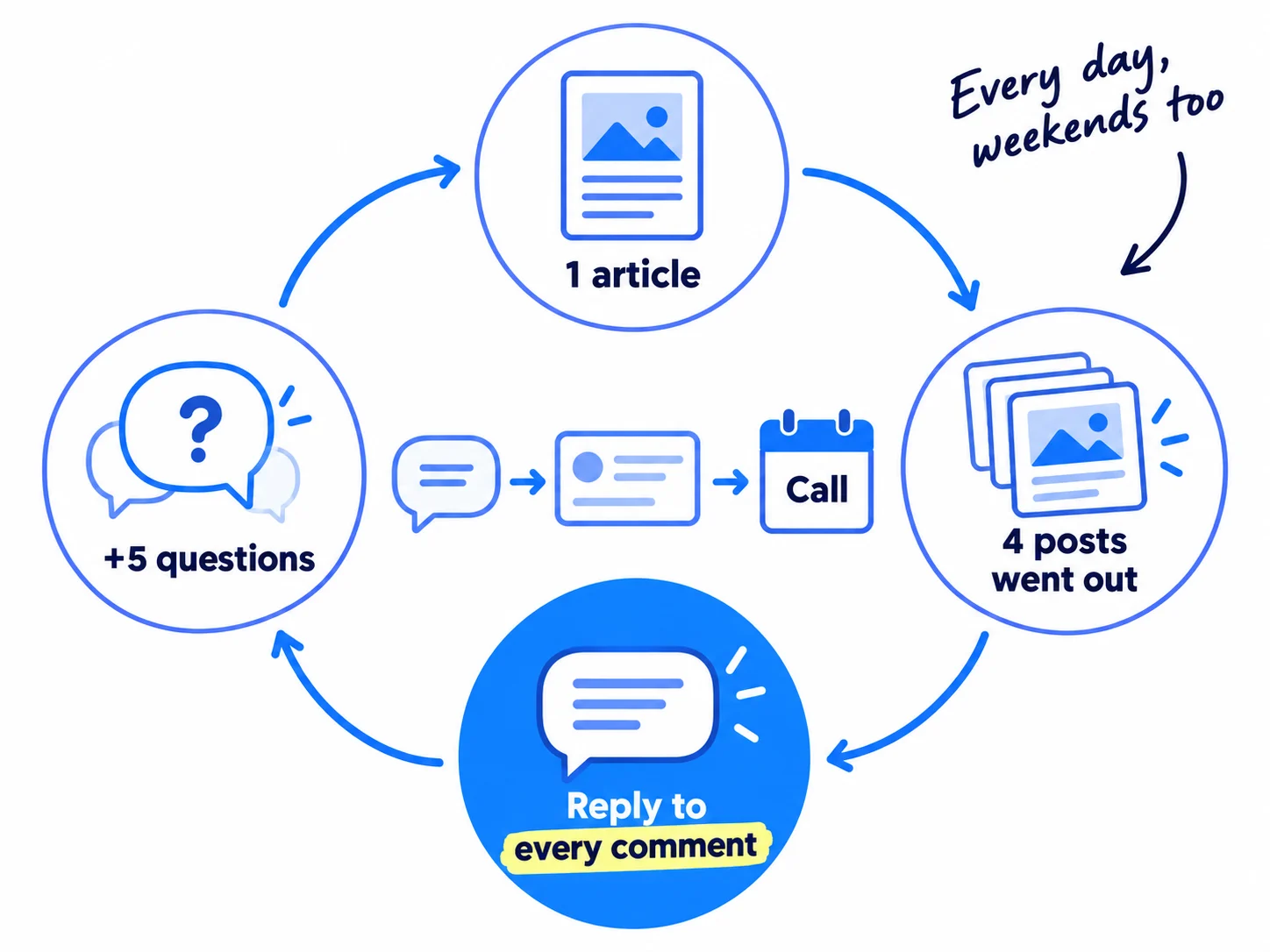
The article. Give ChatGPT or Claude the question, your notes and what buyers said, and ask for a first draft. Then add what only you have: a screenshot, a number from your own work, a step you tested. Google's spam rules treat many pages made to rank without helping the reader as spam, whoever wrote them. A page that answers one real question with your own proof is not that. Use the full method for writing a blog post that ranks. After you publish, open Search Console and request indexing for the new page.
The comments. Reply to every comment within the day, in full sentences. When someone asks a follow-up, answer it, then offer the next step from the row. When a comment asks a new question, add it to your question sheet. That is where the 5 new questions a day come from, along with your chats and the forums.
If your posts get no comments at all, go to where the conversation is. Give 20 answers a day across at least 5 communities, and leave useful comments on your buyers' posts. Read each community's rules on self-promotion first, and spread the answers so no one place gets more than a few. It brings people back to your posts, and it is how a new account gets its first followers.
- Tool: your website or blog, Google Search Console, and ChatGPT or Claude. All free to start.
- Time: about 1 hour for the article, 30 minutes for comments, 10 minutes for new questions. About 1 hour 45 minutes a day.
- You will have: 7 articles and 28 posts live each week, and 35 new questions.
- It worked if: every day's row says "Published", and no comment is more than a day old without a reply.
- Common mistake: skipping weekends. Your buyers read on Saturday and Sunday too, and a calendar with gaps becomes a calendar you stop using.
6. Count what your posts brought every Sunday and change next week's rows
Every Sunday, write down what each question brought: visits, chats, signups or orders. Then give next week's rows to the questions and formats that brought the most. Likes tell you a post was seen. Chats and sales tell you it worked.
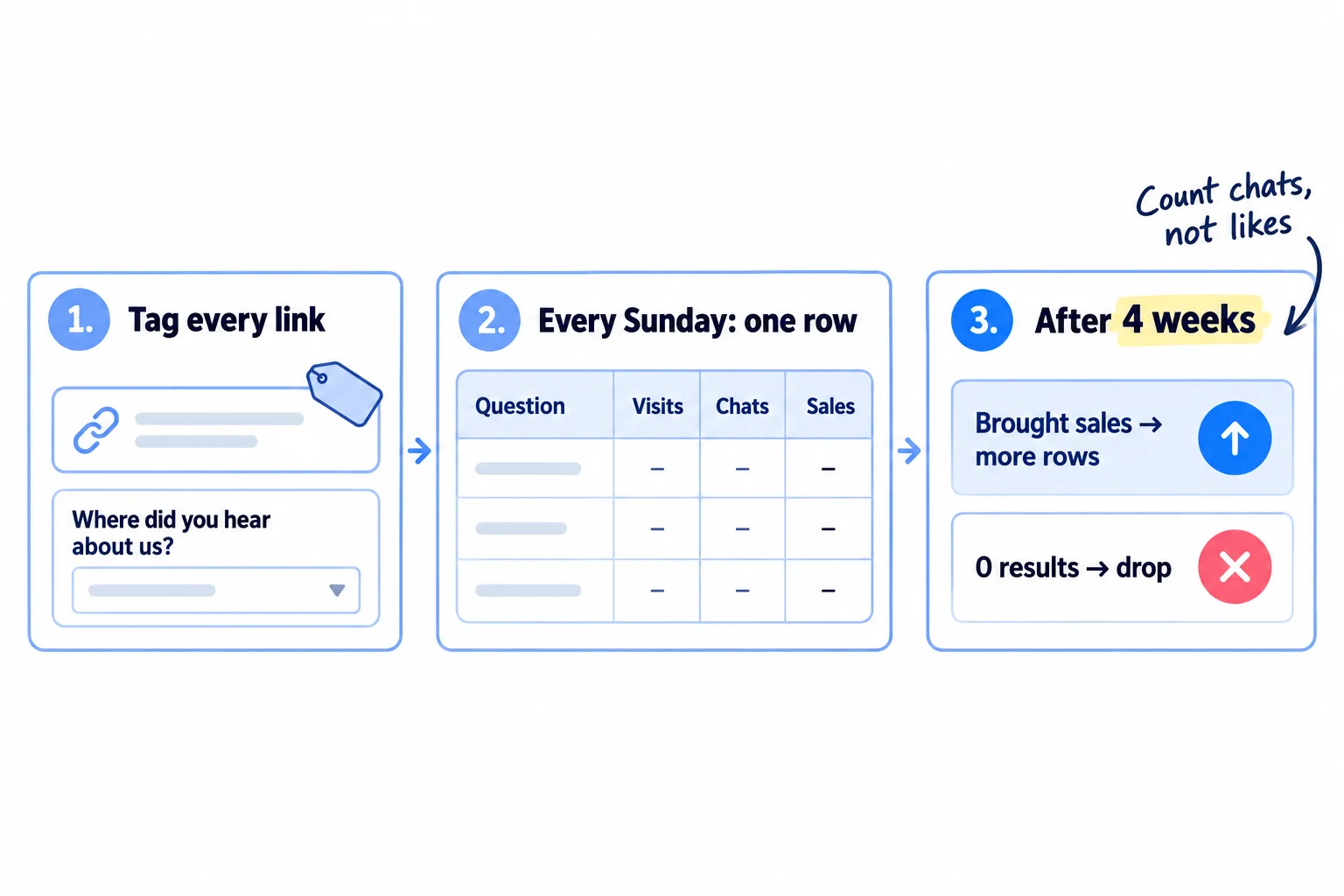
Set this up once. Tag every link you post with UTM parameters, so your analytics shows which channel and which question sent each visit. Add "Where did you hear about us?" to your signup form, checkout or contact form. This is self-reported attribution, and it catches what links miss, like a person who read 10 posts and then typed your name into Google.
Each Sunday, fill in one row per question from the past week:
Question | Channel | Format | Impressions | Comments | Visits | Chats or calls | Signups or orders
After 4 weeks (28 articles and 112 posts), decide:
- A question that brought a chat, signup or order gets 3 more rows next month, from different angles.
- A format with 0 comments on a channel after 28 posts is dropped on that channel. Use one that worked.
- A channel with 0 chats and 0 sales after 56 posts: check the 20 names from step 1 still read it, then swap it for the next channel.
- Articles are judged on search at month 3, not week 4. Keep publishing.
Once a month, look at the whole picture in a marketing review.
- Tool: Google Sheets, and each platform's own analytics.
- Time: about 30 minutes every Sunday.
- You will have: one row per question per week, and next week's rows changed to match.
- It worked if: you can name which questions brought your chats, signups or orders.
- Common mistake: judging by likes and followers, or judging after one week. A week is 7 articles and 28 posts. Wait for 4 weeks before you drop anything except a broken link.
See it done: Quillfox after 4 weeks
Quillfox's top questions after 28 articles and 112 posts
| Question | Impressions | Comments | Calls booked |
|---|---|---|---|
| Why does my SaaS get traffic but no trials? | 4,100 | 22 | 2 |
| How many LinkedIn posts a week does a SaaS founder need? | 9,800 | 41 | 0 |
| What should a SaaS homepage say above the fold? | 2,600 | 14 | 1 |
The decision: the homepage and trial questions get 3 more rows each next month. The LinkedIn question got the most likes but no calls, so it keeps its one row.
Why it works: Quillfox moves rows by calls booked, not by likes, so the post with the most likes does not get more rows.
Where Scout7 helps
Scout7 speeds up steps 2, 3, 4 and 5.
Steps 2 and 3. Content Co-Pilot proposes topics from gaps in your search and AI audit, or takes a question of yours, researches it and returns different angles for you to choose from. The Brand Calendar shows your week or month in one view, suggests key dates that matter for your business and country, which you switch on or off, and takes your own events, so later content is planned around them.
Step 4. Image Studio makes an image post with a caption in your voice, and Content Co-Pilot turns an article into a LinkedIn carousel. Video Studio makes short videos in portrait (9:16) or landscape, from a script or from an article. Scout7 schedules posts to LinkedIn, X, Instagram, Facebook, Threads and Reddit. You approve every post; nothing goes live without your approval.
Step 5. Content Co-Pilot asks you research-backed questions, then drafts the full article with sources, FAQs and images. You answer the questions, edit the draft and approve it. Scout7 publishes to the blog it hosts for you, not into your own site's editor.
The Organic Loop runs steps 3 to 5 as one cycle: it plans, creates and schedules a round of posts, videos, articles and carousels, and you approve what goes out.
Your content calendar checklist for the next 4 weeks
0 of 11 done
Work through this list with an AI assistant
It drafts the work and keeps track of what is done.
Frequently asked questions
- How often should a small business post on social media?
Post 2 times a day on each channel you use, every day. Buffer's data from millions of posts shows reach per post rising as accounts post more, with the biggest gains at 11 or more posts a week on LinkedIn. Write the week's posts with AI in one Sunday sitting. If two channels is too much, keep 2 a day on one, not less on both.
- What should a content calendar include?
For each day: the date, the buyer question it answers, the article title, the posts for each channel, the format, the next step you ask for, the link with UTM tags, a status and what it brought. The question and the next step matter most. Without them, a calendar is a list of posts that get likes and no buyers.
- Should I use a Notion, Canva or Excel content calendar template?
Use whichever you already open every day. The app does not matter; the columns do. A free Google Sheet with the columns in step 3 does the job, and it is easy to share with an AI assistant or, if you run an agency, with a client. Paid planning tools are worth it only when you manage several brands.
- How far ahead should I plan my content calendar?
Plan the topics 4 weeks ahead and write the posts 1 week ahead, every Sunday. Planning a year ahead does not work when you have no data yet: by week 4 your counts will tell you which questions bring buyers, and you will want to change the rows. Key dates, like launches or Black Friday, go in as soon as you know them.
- What do I post when I run out of ideas?
Go back to your question sheet. You add 5 new questions a day from comments, chats and forums, so it grows faster than you use it. If it is thin, ask 10 customers or past buyers what they asked before they bought. A case study or a podcast appearance also gives a week of posts.
Sources
- 1.How Often Should You Post on LinkedIn? Data From 2 Million+ Posts — Buffer, 28 August 2025
- 2.How Often to Post on Social Media in 2026 — Buffer, 13 January 2026
- 3.The State of Social Media Engagement in 2026: 52M+ Posts Analyzed — Buffer, 5 March 2026
- 4.Buffer pricing — Buffer, checked 2 October 2026
- 5.Schedule posts on LinkedIn — LinkedIn Help, checked 2 October 2026
- 6.How Meta Business Suite works — Meta Business Help Center, checked 2 October 2026
- 7.Create an in-cell dropdown list — Google Docs Editors Help, checked 2 October 2026
- 8.Spam policies for Google web search: scaled content abuse — Google Search Central, updated 28 August 2026
- 9.How often should you really post? — Adobe Express, 6 August 2025
- 10.How to Build a Content Calendar for 2026 — Lilach Bullock, checked 2 October 2026
- 11.I posted daily on Reddit for 3 months. Zero customers. Here's what I missed. — Indie Hackers, 14 June 2026
- 12.2 weeks later: still no paying users. Here's what I've learned. — Indie Hackers, 27 April 2026
Next article to read
How to repurpose content across platformsOnce the calendar is set, this turns each piece into posts for every channel.Read it nextRelated guides
- How to find keywords for SEOFind keywords for SEO when every tool says 0: collect 300 phrases your buyers type from Google suggestions, forums and a free tool, keep the 100 a new site can win with one page each, add 5 new ones every day, and add Search Console's real queries every Sunday.
- How to use AI for content creationUse AI for content creation without sounding like everyone else: write a voice and facts file once, give AI 10 minutes of your own material every day, publish 1 page and 2 posts on each of 2 channels after a 6-line check, label realistic AI video, and count what each piece brought every Sunday.
- How to fit marketing into your week as a solo founderFit marketing into your week as a solo founder: find 5 hours a day by cutting product work first, do the marketing block before you build every day, then write next week's posts and count what worked every Sunday.
- How to grow on LinkedIn as a founderGrow on LinkedIn as a founder in 4 weeks: rewrite your headline for your buyer, post twice a day from your own profile, leave 20 comments and send 100 personal messages a day, and count conversations by topic every Sunday.
Guides that link here
- How to fit marketing into your week as a solo founder
- How to repurpose content across platforms
- How to start a YouTube channel for business
- How to use AI for content creation
- Social media post ideas for SaaS companiesSaaS
- LinkedIn post ideas for B2B companiesB2B
- Instagram post ideas for D2C brandsD2C
- How to add llms.txt and schema markup
- How to get booked as a podcast guest
- How to make short-form videos for your business
- How to write a case study
- How to get clients for a consulting business without referralsB2B
- How to get your first sale on EtsyD2C
- How to announce a new business on social media
- How to launch a product on AmazonD2C
- How to price digital marketing servicesAgency
- How long does SEO take to work?
- How to do SEO for a Shopify storeD2C
- How to find keywords for SEO
- How to get backlinks for a new website
- How to get your website indexed on Google
- How to use Google Search Console
- How to write a blog post that ranks on Google
- How to write competitor comparison and alternative pages
- Technical SEO checklist for a new website
- How to build in public on XSaaS
- How to get your first 1,000 followers
- How to grow on LinkedIn as a founder
- How to promote on Reddit without getting banned
- How to promote your business in Facebook groups
- How to promote your business on InstagramD2C
- How to sell on TikTok ShopD2C
- Instagram post ideas for a marketing agencyAgency
Cite this page
Dinesh Bypilla (2026). How to plan a content calendar. Scout7 Academy. https://scout7.ai/academy/content-marketing/how-to-plan-a-content-calendar
Written by Dinesh Bypilla, Agentic systems engineer at Scout7. Reviewed by Murali Sid. Last checked 2 October 2026.
Quote any part of this guide with a link back to this page. © 2026 Scout7.
Markdown version of this page: https://scout7.ai/academy/content-marketing/how-to-plan-a-content-calendar.md