



How to run Facebook ads for clients
Run Facebook ads for clients from a one-person agency: check each client is ready, agree in writing a test limit of 10 times what one result is worth over 14 days, get partner access to the ad account the client owns and pays for, test tracking with one real result, turn off losing ads every day, and send a five-line report every Sunday that raises 20% or stops.
ByDinesh BypillaReviewed byMurali SidLast checked 28 min read
A client asked you to run their Facebook ads, or you want to add ads to what you sell. Most first tries at running Facebook ads for clients go the same way: you log in with the client's password, spend whatever they said, send a screenshot of reach and clicks, and three weeks later they ask why the phone has not rung. This guide shows how to agree the numbers before you spend, get access to an account the client owns, run one locked 14-day test on Facebook and Instagram, and report results from the client's own records.
Do these three things
About 3 hours to set up each client, then about 45 minutes a day per client and 20 minutes per client every Sunday. Judge each test when it has spent its whole limit, not after 3 days.
Show the three actions in fullHide the full list
- Today: agree in writing with your client the most they can pay for one sale or lead, a test limit of 10 times that, and a stop line. Then get partner access to the ad account they own and pay for.
- Every day: check each client's ads against the sales or leads in the client's own records. Turn off any ad that has spent 3 times the number with no result. Make 4 new ad versions per client and send them for approval. AI drafts the words; you cut the images and clips.
- Every Sunday: send each client a five-line report from their own records. When a test has spent its limit, run the next one 20% bigger if each result cost at or under the number. If not, stop and fix the page first.
Get help doing these
ChatGPT or Claude reads this guide and works through it with you.
1. Check the client is ready for ads and agree the test numbers in writing
Before you take on a client's Facebook ads, check that strangers already buy from them without ads, then write down four numbers with the client: the most they can pay for one result, the test limit, the daily budget and the stop line. If the client is not ready, their ad budget is $0 for now, and you say so.
An ad sends more strangers to your client's page, and the client pays for each one. If strangers who find them for free do not buy, paid strangers will not buy either. So check what already happened without ads. Use the gate for the kind of business your client runs. These are the same gates as in how much to spend on ads:
| If your client runs… | They are ready when… |
|---|---|
| an online store | they have 10 reviews, 1 order for every 100 visits from strangers (a conversion rate of 1%), and one video people shared without being paid |
| a software product people sign up for | at least 10 customers pay them, and they know where those customers came from |
| a local service or a business-to-business company | at least 5 sales came from free work, such as outreach, referrals or a Google listing |
If any answer is no, tell the client that ads would spend their money on a message that has not sold yet. Offer the free work instead, such as posts on their own channels and the routine in how to get customers online for free. A no with a reason costs you one month of ad work; a $500 test that brings nothing can cost you the client.
If every answer is yes, fill in the test numbers with the client on a call. The number that matters is the most they can pay for one result: one order, one signup or one enquiry. It comes from what one customer leaves after costs, their break-even customer acquisition cost, divided by how many results it takes to win one customer.
Client: [name]  ·  Platform: Facebook and Instagram (Meta)
What counts as a result: [an order / a trial signup / an enquiry that answers the phone]
Where we count results: [store orders / signup list / the lead sheet you fill in]
Most per customer: $[what one customer leaves after costs; for software, the monthly price × 6 until you know how long customers stay]
Results it takes to win one customer: [number, from your own records]
Most per result: $[most per customer ÷ results per customer]
Test limit (most per result × 10): $[limit], paid by you directly to Meta
Days: 14, from [start date] to [end date]
Daily budget (limit ÷ 14): $[limit ÷ 14]
Stop line for one ad (most per result × 3): $[X × 3]
Click check: 100 clicks × $0.60 = $60. Is the limit bigger? [yes / no]
Ads go live only after you approve each one in writing.
After the test: next test 20% bigger if each result cost at or under the most per result. If not, we stop and fix the page first.
We do not promise a number of sales, leads or a return on ad spend.
Put the block into your scope of work, so the stop rule is agreed before anyone feels the loss. Ask ChatGPT or Claude to fill the sums from the numbers the client gives you, then check each number against an invoice or a count.
Then run three checks:
- Clicks. A test that buys fewer than 100 clicks tells you almost nothing. LocaliQ's 2026 benchmarks put a Facebook traffic ad click at $0.60 on average. If the limit buys fewer than 100 clicks, keep the ad budget at $0.
- Leads. For a client who wants enquiries, compare the most per result with LocaliQ's 2026 average cost per Facebook lead: $27.39 across industries, $42.95 for home improvement, $61.56 for dentists, $13.74 for real estate. If the client's number is under half of their industry's average, keep the ad budget at $0 and work on their price or their landing page first.
- Special Ad Category. If the client sells housing, jobs, or financial products and services (loans, credit cards, insurance, banking, investing), every ad must be declared in that category in the US, Canada and parts of Europe. Meta then removes age, gender, postcode and lookalike targeting and exclusions, and any area you pick must reach at least 15 miles out from its centre. An ad that should be declared and is not breaks Meta's rules, even if its words are harmless. Political and social issue ads need their own authorisation and are not a first test.
Last, count your own hours. Each ad client takes about 3 hours to set up, then about 45 minutes a day and 20 minutes every Sunday. Five ad clients is about 4 hours a day. Charge a flat monthly fee for those hours with the sum in how to price digital marketing services, and keep the ad spend off your invoice, as in how to package your agency services.
- Tool: Google Sheets, Google Docs, and ChatGPT or Claude to fill the sums.
- Time: 45 minutes per client, most of it on a call with them.
- You will have: a signed block of test terms with real numbers in every line.
- It worked if: every number comes from the client's records or an invoice, none says "about", and the client has signed it.
- Common mistake: promising a return on ad spend or a number of leads to win the work. You cannot control the result, and the client will hold you to it. The other mistake is taking the money of a client who fails the gate because they asked.
See it done: Quillfox's test numbers for a software client
Quillfox is a made-up one-person agency. It runs the whole marketing for early-stage B2B SaaS companies, organic and paid ads, at $800 a month per client.
Ads test terms: a $49-a-month booking tool for small gyms
| Line | Amount |
|---|---|
| Gate: paying customers | 14, all from the founder's outreach, so yes |
| What counts as a result | a trial signup |
| Most per customer ($49 × 6 months) | $294 |
| Trials it takes to win one customer | 8 |
| Most per trial ($294 ÷ 8) | $36.75 |
| Test limit (× 10) | $368 |
| Daily budget ($368 ÷ 14) | about $26 |
| Stop line for one ad (× 3) | $110 |
| Click check: 100 clicks at $0.64 | $64, so the limit passes |
Why it works: Every number comes from the client's own records, so Jess and the founder both know when to stop before a dollar is spent.
2. Get access to your client's Facebook ad account as a partner
Get access as a partner in the client's own business portfolio, the place in Meta Business Suite that holds their Page, Instagram account and ad account. The client keeps ownership and pays Meta with their own card. You never need their password.
This matters more than any setting. An ad account made inside your portfolio stays there for good: when the client leaves, the history stays with you, and an unpaid bill is yours. A client's own account means they can remove you in one click, which is why they trust you to start.
First, make your own business portfolio if you do not have one. Go to business.facebook.com, click Create account, then Create a business portfolio, and enter your agency's name, your name and your business email. Turn on two-factor authentication on your own Facebook login. Copy your business portfolio ID from Settings, under Business portfolio info. Then use one of two ways in:
- 1
The client gives you access (usually quickest)
The client goes to business.facebook.com/settings and picks their business portfolio. Under Users, they click Partners, then Add, then Give a partner access to your assets. They enter your business portfolio ID, choose their ad account, Facebook Page and Instagram account, and set the access for each. Then they click Assign assets. Only someone with full control of their portfolio can do this, and Meta sometimes asks a second person with full control to approve it.
- 2
You request access
In your own Settings, open Users, then Partners, then Add, and choose Request assets as a partner or agency (some accounts still say Ask a partner to assign you their assets). Enter the client's email and their business portfolio ID, then pick the assets and access you need. If Meta asks about using the client's credit line, choose No. The client approves the request under Partners.
- 3
Ask only for what the work needs
Ask for partial access that lets you manage ads on the ad account, create ads with the Page and the Instagram account, and use the dataset (the pixel). Do not ask for full control of their portfolio or for finance roles. Asking for less is how you show the client you can be trusted.
- 4
The client adds their own card
The client opens their ad account's Billing & payments and adds their own card. Every charge goes from them to Meta, never through you.
If the client has no business portfolio, they make one first with the same Create a business portfolio steps, then add their Page and Instagram account to it. Ask them to add a second person they trust with full control, so the account is not lost if one login is locked. When the work ends, the client removes you under Partners, with Options, then Remove from business portfolio. Name it in your proposal and put it in your onboarding, so access is asked for on day one, not chased for a week.
Hi [name], to set up your ads I need access to your ad account, Page and Instagram as a partner. You keep ownership and pay Meta from your own card, and you can remove me at any time.
Go to business.facebook.com/settings and choose your business.
Click Users, then Partners, then Add, then "Give a partner access to your assets".
Enter my business ID: [your business portfolio ID]
Choose your ad account, Facebook Page and Instagram account. Give me access to manage ads and create content. I do not need full control.
Click Assign assets.
If you would rather I send a request for you to approve, reply "request" and I'll send it today. It takes about 10 minutes either way.
- Tool: Meta Business Suite (free).
- Time: 20 minutes for you, about 10 minutes for the client.
- You will have: the client's ad account, Page and Instagram account listed under Partners in your portfolio, with the client's card on the ad account.
- It worked if: you can open the client's ad account in Ads Manager from your own login, and Billing & payments shows the client's card, not yours.
- Common mistake: logging in with the client's password, or making a new ad account for them inside your portfolio "to save time". Meta can lock a login used from a new place, and the account is in the wrong place for good.
See it done: Quillfox's access message
To: the founder of the gym booking tool
Subject: Access for your ads, 10 minutes
Hi Sam, before I build anything I need partner access to your ad account, Page and Instagram. You keep ownership, Meta charges your own card, and you can remove me in one click under Partners.
Settings → Users → Partners → Add → "Give a partner access to your assets", then my business ID: [ID]. Tick the ad account, the Page and Instagram, with access to manage ads and create content. No full control needed.
Once it's done I'll set up tracking tomorrow, and nothing runs until you've approved each ad.
Jess
Why it works: It says what the client keeps before it asks for anything, and it fits on one phone screen.
3. Set up tracking and test one real result before you spend anything
Before the client spends $1, make one real result happen, an order, a signup or an enquiry, and check that Meta records it exactly once and that the client's own records show it came from Facebook. Which way you track depends on the result.
Everything you set up here belongs to the client: the dataset (Meta's name for the pixel and its data) sits in their business portfolio, not yours. Pick the path for their result:
- An online store. Connect it with the store's own Meta app. For Shopify, follow steps 2 and 3 of Meta ads for a Shopify store: Shopify's free Facebook & Instagram app, data sharing at Maximum, one pixel only, and one real test order.
- A form or a signup on the client's website. In the client's Events Manager, connect their website to their dataset with both the pixel and the Conversions API, so Meta still gets the result when a browser blocks tracking. Fire a Lead event on the thank-you page of an enquiry form, or a Complete registration event when a trial starts. This is the short version of setting up conversion tracking.
- A form inside Facebook and Instagram (an instant form). Use it for a client whose website has no working form. Choose the Higher intent form type, which adds a review screen before people send it, and ask 1 or 2 questions that the client needs to qualify a lead. Connect the form to a Google Sheet or the client's CRM, so every lead reaches them within minutes.
Then test one result:
- Add UTM parameters, short tags that tell the client's records where a visit came from, to one link: [their page]?utm_source=facebook&utm_medium=paid_social&utm_campaign=test
- In Chrome, add Meta Ads Data Advisor, Meta's free extension that used to be called Meta Pixel Helper. Open the link and make one real result: buy, sign up or send the form.
- In Events Manager, open the client's dataset. Within about 20 minutes you should see one event, with both Browser and Server under Connection method.
- Check the client's records: the order, the signup or the lead sheet shows the result with utm_source=facebook.
- For an instant form, open Meta's Lead Ads Testing Tool at developers.facebook.com/tools/lead-ads-testing, pick the Page and the form, click Create lead, and check the test lead reached the sheet or CRM. Test leads cost nothing.
- Delete or refund the test result.
In Ads Manager, open the client's Payment settings and check, under Business info, that the ad account uses the client's time zone and currency. Changing either later closes the ad account and makes a new one, so fix it before the first campaign.
- Tool: Meta Events Manager, Meta Ads Data Advisor and the Lead Ads Testing Tool (all free), and the client's store, signup list or lead sheet.
- Time: about 1 hour per client.
- You will have: proof that one result reaches Meta once, and that the client's records know it came from Facebook.
- It worked if: Events Manager shows 1 event, not 2, from browser and server, and the client's records show the facebook tag.
- Common mistake: launching first and fixing tracking "later". Meta's system learns who to show ads to from these events, so every dollar spent before they work is spent blind. The other mistake is two pixels: an old one from a past freelancer counts each result twice.
4. Make 10 ad versions from the client's customers' words, then 4 more every day
Turn what the client's real customers said into 10 ad creatives, and send them to the client to approve. Launch the best 3 and keep 7 as spares. Then make 4 new versions for each client every day, so a fresh, approved ad is ready whenever one fails.
Meta's system now picks, person by person, which ad each person sees, so different ads reach different buyers and copies of one ad do not. The words that sell are already in the client's hands: reviews, testimonials, notes from sales calls, support emails and DMs. Ask the client for 20 of them in your onboarding. Give them to ChatGPT or Claude with the client's value proposition, and ask for 10 first lines, each from a different reason to buy. Check what rivals run in Meta's free Ad Library, as in a competitor analysis. How to make ad creatives covers finding the reasons.
Ad name: [client]-[angle]-[image or video]-[number], for example gym-noshow-video-1
First line or first 2 seconds: [a customer's own words]
Promise: [one result, in plain words, from the value proposition]
Proof: [one true fact: a review, a number of customers, a guarantee]
Button: [Sign up / Learn more / Shop now / Get quote]
Approved by: [client name, date]
Make each image in 4:5 for the feed and each short video in 9:16 for Reels and Stories, with captions. Use the client's own photos, product and staff: user-generated content from their customers works too. Since 1 June 2026, Meta shows an "AI info" label in "About this ad" when it detects an ad made with AI tools, so let AI draft the words and never invent a customer. Before you upload, open Advantage+ creative enhancements on each ad and turn off any change the client has not approved, such as added music or rewritten text.
Every day, make 4 new versions per client, 2 images and 2 videos, from a new reason to buy. AI drafts the lines in minutes; you cut each version from the client's clips in a free editor, about 30 minutes per client. Send them in one batch through your client approval routine. If posting is in your package, post the 2 videos free on the client's Facebook Page and Instagram as Reels: that is 2 posts a day on each. The ones people stop for become the next spares. Meta's advice is that too many ads at once means each one shows less, so keep 3 live and the rest in the bank, and spread the volume over the days. Testing Facebook ad creatives covers testing more once budgets grow.
With three or more clients, keep one folder and one voice sheet per client, so no line from one client lands in another's ad. Keeping client brand voices separate shows how.
- Tool: ChatGPT or Claude to draft, Canva or CapCut (free plans) to cut images and videos, and a shared approval sheet.
- Time: 2 hours for the first 10, then about 30 minutes per client per day.
- You will have: 3 approved ads ready to launch, 7 approved spares, and 28 new versions a week per client.
- It worked if: every ad opens with a customer's own words or the product in use, and every live ad has the client's written approval.
- Common mistake: writing ads in your own voice, or reusing a line that worked for another client. The client's customers did not say it, so it reads like an ad, and the client may never approve it.
See it done: Quillfox's first 3 ads for the gym booking tool
3 live, 7 spares
| Ad name | Format | First line or first 2 seconds |
|---|---|---|
| gym-noshow-video-1 | 9:16 video, the founder at a front desk | "Half my 6 a.m. class didn't show, and I'd turned people away." |
| gym-texts-image-1 | 4:5 image, a phone full of booking texts | "I was taking bookings by text at 11 p.m." |
| gym-payday-video-1 | 9:16 video, a member booking in 10 seconds | "Members book and pay in one tap. I stopped chasing." |
| 7 spares | 4 images, 3 videos | from "Instead of a spreadsheet" and "What our first gyms said" |
Why it works: Each ad starts from something a gym owner actually said on a sales call, and each one gives a different reason to buy.
5. Launch one campaign in the client's ad account with a lifetime budget
In the client's ad account, make one campaign with one ad set, the 3 approved ads, a lifetime budget equal to the test limit and an end date 14 days away. Then set an account spending limit, so the account cannot spend more than the test, whatever happens.
Since 2025, Advantage+ is on by default when you choose the Sales or Leads objective: Meta picks the audience, the placements and how the budget moves. You no longer choose between manual and Advantage+ first. That is fine for a small test. If the client sells to a job title at other companies, LinkedIn ads reach those people more directly, and if buyers search for what they sell, Google Ads may come first. Your job is to set the few things that matter:
- 1
Campaign
In Ads Manager, switch to the client's ad account. Click Create. Choose Sales for a store, with Purchase as the result. Choose Leads for enquiries and trial signups, with the conversion location set to Website (and the Lead or Complete registration event from step 3) or to Instant forms. If step 1 found a Special Ad Category, declare it here. Name the campaign with the client first, such as gym-test1-oct. Use the campaign budget and choose Lifetime budget. Enter the test limit.
- 2
Ad set
Set the start date to tomorrow and the end date 14 days later. Leave Advantage+ audience on and set only the location: the countries the client sells to, or the area a local client serves, plus the minimum age if the client must have one. Location, minimum age, language and excluded audiences are the limits Meta keeps to; anything else is only a suggestion. Leave placements on Advantage+.
- 3
Ads
Add the 3 approved ads, using the client's Facebook Page and Instagram account. Send website ads to one landing page about the offer, not the home page. Under Tracking, paste the URL parameters below, so each result in the client's records shows which ad brought it.
- 4
Account spending limit
In the client's Payment settings, set an account spending limit equal to the test limit. When the account reaches it, every ad pauses, and the limit does not reset by itself. Tell the client you set it.
utm_source=facebook&utm_medium=paid_social&utm_campaign={{campaign.name}}&utm_content={{ad.name}}Ads Manager shows the lowest daily amount Meta accepts for the ad set and warns "Budget is too low" when you are under it; the minimum counts per day even on a lifetime budget. If the test limit fails it, go back to step 1 instead of stretching the money. Meta reviews new ads before they run, usually within 24 hours, so launch the day before the start date. Leave retargeting ads for later: a small client's site has too few visitors to fill them.
If this is your first client on ads, ask them to watch you build it on a call. If the client's ads reach people in the UK, France, Italy, Spain, Austria or Türkiye, tell them now: since 1 July 2026, Meta adds a location fee of 2% to 5% on top of the spend. It shows on the invoice and in Billing & payments, not in Ads Manager.
- Tool: Meta Ads Manager, in the client's ad account (free; the client pays only for the ads).
- Time: 45 minutes.
- You will have: one campaign with one ad set and 3 approved ads, which cannot spend more than the test limit.
- It worked if: the campaign shows a lifetime budget equal to the limit, an end date 14 days after the start, the right result event, the client's location, and an account spending limit in Payment settings.
- Common mistake: boosting a post or choosing Traffic because it looks cheaper. Meta then finds people who click, not people who buy or enquire. The other mistake is three ad sets at $5 a day each: none spends enough to show anything.
6. Check each client's ads and leads every day and turn off the ones past the stop line
Every day, at the same time, write down each ad's spend from Ads Manager and its results from the client's own records. Turn off any ad that has spent 3 times the most per result with no result, and put an approved spare in its place.
Results come from the client's records, read by the utm_content tag, which is the ad's name. For a store, open each order's conversion details. For signups, filter the signup list by utm_source=facebook. For enquiries, use a lead sheet the client fills in every day: one row per lead, with three columns, answered, booked and won, the same way you track which channel brought each deal. A form fill that never answers the phone is not a result, and only the client knows which leads answered. Ask them to follow up every lead by phone the same day, because a lead called a day later has often forgotten the ad. Then:
- Turn off any ad that has spent 3 times the most per result with 0 results in the client's records. Put in the best approved spare from step 4.
- Leave everything else alone. Do not change the budget, the audience or the dates during the 14 days. Meta says changes like pausing an ad set or changing its audience can restart its learning.
- Expect "Learning limited". Meta shows it when an ad set is unlikely to get about 50 results in a week. A small test cannot, and Meta says this is not a penalty, so judge the test on the client's records.
Meta's own count will not match the client's records. Since March 2026, Meta counts only link clicks as clicks for attribution, and it also credits results from people who only saw an ad. Use Meta for spend, CPM, cost per click and click-through rate; use the client's records for results. Ask the client to add "How did you hear about us?" to their form or first call. This is self-reported attribution, and it catches people who saw an ad and came back later by typing the name.
- Tool: Meta Ads Manager, the client's records or lead sheet, and Google Sheets.
- Time: 15 minutes per client per day.
- You will have: one row per ad for each day of the test, and an up-to-date lead sheet.
- It worked if: no ad is still running past the stop line with 0 results in the client's records, and every lead has a note on whether it answered.
- Common mistake: reporting Meta's lead count as the result. If 30 form fills turn into 2 calls, the client will notice before you do. The other mistake is raising the budget on day 3 because one sale came in.
7. Every Sunday, send each client a Facebook ads report and raise 20% or stop
Every Sunday, send each client five lines: what was spent, the results in their own records, the cost per result, the most per result you agreed, and the decision. When a test has spent its whole limit, run the next one 20% bigger if each result cost at or under the number, or stop if it cost more.
Clients do not open dashboards. They read a short email that answers "is this working, and what next?". Take spend from Ads Manager and results from their records, and paste both into ChatGPT or Claude to fill the report. Check every number yourself before it goes.
Subject: Your Facebook ads, week [n]
Spent: $[amount] of the $[test limit] test (Ads Manager). [Plus a location fee on your invoice, if any.]
Results in your records: [number] [orders / trials / leads that answered], [number] of them booked or paid.
Cost per result: $[spent ÷ results]. Meta counted [number]; we go by your records.
Most per result we agreed: $[number].
Decision: [keep the test running to its end date / next test $[limit × 1.2] from [date] / stop and fix the page]. Reply "yes" and I'll set it up.
When a test has spent its whole limit:
- Cost per result at or under the number: duplicate the campaign with a lifetime budget 20% higher and a new 14-day end date, raise the account spending limit by the same amount, keep the ads that brought results and add the best spares.
- Cost per result over the number: stop. Tell the client plainly, and find where people drop out with why ads get clicks but no sales: the offer, the page or the follow-up. Fix one thing before a new test.
- No results at all: go back to step 3 and test one result again. If tracking works, the offer or the page is the problem.
Once a month, roll the four Sunday reports into the monthly client report, with what the ads brought in sales, not only in leads. For a store, compare its return with the break-even ROAS, and use the same monthly review to decide whether ads keep their place next to the client's free work. Honest stops keep clients longer than good-looking dashboards, which is most of reducing client churn. When a client's test pays back, ask if you may share their numbers. One real result is the start of a case study, and it is what most agencies without case studies are missing when they send cold emails, post on LinkedIn, bid on Upwork or look for clients online.
- Tool: Google Sheets, email, and ChatGPT or Claude to fill the report.
- Time: 20 minutes per client every Sunday.
- You will have: one report sent to each client every week, and a raise or stop decision for every test that has spent its limit.
- It worked if: every result in the report can be found in the client's records, and the client replied to the decision.
- Common mistake: sending reach, impressions and Meta's ROAS instead of results in the client's records. The client cannot tell from those whether to keep paying you.
See it done: Quillfox's report when the first test ended
To: Sam, founder of the gym booking tool
Subject: Your Facebook ads, week 2: test finished
- Spent: $368 of the $368 test.
- Results in your records: 11 trial signups with the facebook tag. 1 has paid so far; the other 10 are still in their trial.
- Cost per trial: $33.45. Meta counted 14; we go by your signup list.
- Most per trial we agreed: $36.75.
- Decision: next test $442 (20% more), about $31.60 a day, from Tuesday, with the 2 ads that brought trials and 2 new spares. Reply "yes" and I'll set it up.
Why it works: It counts trials in the client's own signup list, says Meta's bigger number out loud, and raises by 20% because each trial cost less than the agreed $36.75.
Where Scout7 helps
Scout7 speeds up steps 4, 5 and 6, and keeps each client separate. Ad campaigns run in the Scout7 app, not from a chat with Claude or ChatGPT yet.
Each client in its own workspace. Scout7 gives each brand its own workspace, with its own brand profile, connections and calendar, so one client's voice and accounts never mix with another's, the same rule as in managing several clients' social accounts.
Step 4. Scout7's Video Studio writes a script, films it scene by scene with the cast and voice you choose, and adds captions, in portrait 9:16. Image Studio makes image posts with captions in the client's voice. You direct the scenes, reshoot what misses and send each one to the client to approve.
Steps 2 and 5. Scout7 connects a Meta ad account, and you can choose among several ad accounts under one login. It drafts the campaign with an audience, an estimated reach and a budget you set, builds the creatives and ad sets, and walks the campaign through creative review, targeting and budget, including whether the budget is daily or lifetime. Choose lifetime and enter the test limit. You review every creative and approve the spend; nothing launches without your approval. The account spending limit and the URL parameters are still set in Meta.
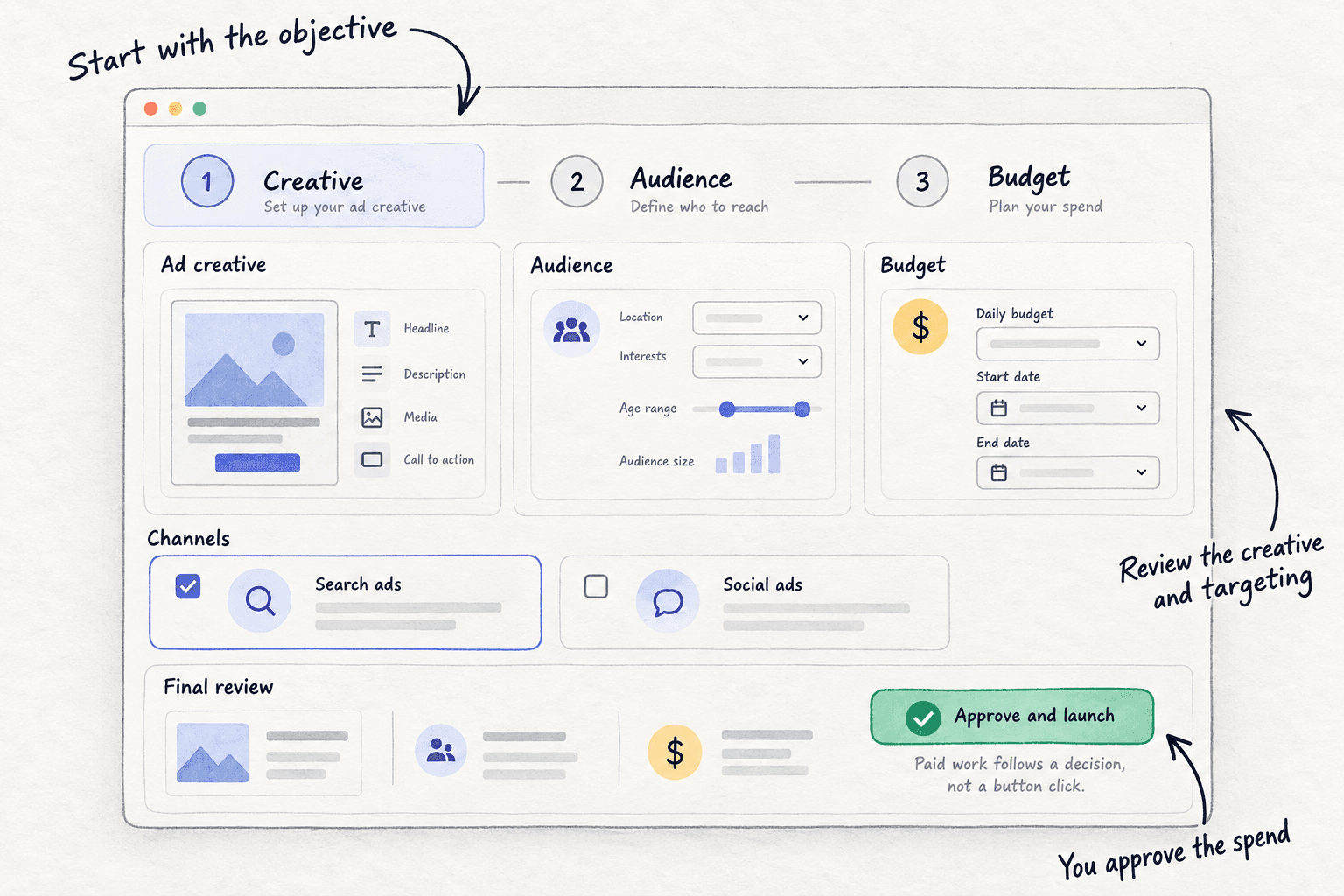
Step 6. Campaign monitoring reports live spend, impressions, clicks and click-through rate for each campaign, and every 12 hours proposes actions, such as which creative to stop. You approve or reject each one. Results still come from the client's records, so keep the daily row.
Your checklist for running a client's first Facebook ads test
0 of 11 done
Work through this list with an AI assistant
It drafts the work and keeps track of what is done.
Frequently asked questions
- Should the agency or the client own the Facebook ad account?
The client. The ad account, Page, Instagram account and pixel sit in the client's own business portfolio, the client's card pays Meta, and you get partner access. An ad account made inside your portfolio stays there for good, so if the client leaves, the history and any unpaid bill stay with you.
- How much should a client spend on Facebook ads?
Start with 10 times the most they can pay for one result, spent over 14 days. If a trial is worth $36.75 to them, test with about $368, roughly $26 a day, and stop any ad that spends $110 with no trial. Raise by 20% only when their own records show each result cost less. How much to spend on ads has the full method.
- Should I charge clients a percentage of ad spend?
Charge a flat monthly fee priced from your hours instead, and let the client pay Meta directly. A flat fee stays the same whether they spend more or less, so your advice on budget stays honest. If a client insists on a percentage, use your flat fee as the minimum. Pricing digital marketing services shows the sum.
- Should I use instant forms or send people to the client's website?
Send people to the website when it has a working form or signup and fast tracking, because visiting the page filters out casual clicks. Use an instant form when the site has no working form, and choose the Higher intent type with one or two qualifying questions. Either way, judge it by leads that answer the phone, in the client's lead sheet.
- Can I guarantee results from Facebook ads?
No, and do not try. You control the setup, the ads and when to stop, not what people buy. Promise the process instead: a fixed test limit, a stop line agreed in writing, daily checks, and a weekly report from the client's own records. That is what clients can hold you to, and what keeps them when a test does not pay.
Sources
- 1.Give a partner access to business assets in your business portfolio — Meta Business Help Center, checked 14 October 2026
- 2.How to give access to a Meta business portfolio (2026) — Leadsie, 9 October 2026
- 3.How to request access to a Meta business portfolio (agency guide) — Leadsie, 2 October 2026
- 4.Explaining special ad category — PPC Land, 11 October 2026
- 5.Facebook Advertising Benchmarks for 2026 — LocaliQ, updated 23 September 2026
- 6.2026 Meta and Facebook updates and news — SocialBee, updated 12 October 2026
- 7.Advantage+ will now be default for Sales, App, and Leads campaigns — Embryo, checked 14 October 2026
- 8.Expanding GenAI Transparency for Meta's Ads Products — Meta Newsroom, updated 1 June 2026
- 9.Meta Europe location fees, July 2026: advertiser guide — Digital Applied, 3 July 2026
- 10.Budget is too low — Meta Business Help Center, checked 14 October 2026
- 11.Budgets — Meta for Developers, checked 14 October 2026
- 12.About lifetime budgets — Meta Business Help Centre, checked 14 October 2026
- 13.Update an account spending limit — Meta Business Help Centre, checked 14 October 2026
- 14.Change the time zone for your ad account — Meta Business Help Centre, checked 14 October 2026
- 15.Meta Ads Data Advisor (formerly Meta Pixel Helper) — Meta for Developers, checked 14 October 2026
- 16.Facebook Lead Ads Testing Tool — AdsUploader, checked 14 October 2026
- 17.A guide to instant forms — Jon Loomer Digital, checked 14 October 2026
- 18.How to run Facebook ads for clients — AdManage.ai, 29 December 2025
- 19.Facebook ads for agencies — Clicks Geek, 19 March 2026
Next article to read
How to write a monthly client reportAgencyReport ad results in a way clients understand.Read it nextRelated guides
- How much to spend on adsSet your first ad budget from what one sale leaves you: a yes-or-no check by business type, a test limit of 10 times that number over 14 days locked in Google, Meta or LinkedIn, a daily stop line at 3 times, and a Sunday rule to raise 20% or stop.
- How to run Meta ads for a Shopify storeD2CRun Meta ads for a Shopify store on a small budget: check you are ready, connect the store with Shopify's free Facebook & Instagram app and a test order, launch one Sales campaign locked to 10 times what an order leaves over 14 days, turn off losing ads daily, and raise 20% or stop every Sunday on Shopify's orders.
- How to set up conversion trackingSet up conversion tracking in an afternoon: pick the one action that makes you money, count it as a key event in free Google Analytics 4, test it with a real conversion, save where every customer came from, and add Google, Meta or LinkedIn tags only before you spend on ads.
- How to onboard a new marketing clientAgencyOnboard a new marketing client when it is just you: send one welcome email the day they sign, get access to every account without a password, fill in a 15-question form from their website, run a 45-minute kickoff, write down the starting number, and get the first work approved by day 7.
Guides that link here
- How to write a monthly client reportAgency
- How to find clients online as a freelance marketerAgency
- How to get agency clients on LinkedInAgency
- How to get clients on UpworkAgency
- How to hire your first contractorAgency
- How to keep client brand voices separate when using AIAgency
- How to manage multiple client social media accountsAgency
- How to onboard a new marketing clientAgency
- How to package your agency servicesAgency
- How to price social media managementAgency
- How to scale a digital marketing agencyAgency
- How to set up client approvalsAgency
- How to write a cold email for a marketing agencyAgency
- How to write a scope of work that stops scope creepAgency
- How to price digital marketing servicesAgency
- How to set up conversion tracking
- How much to spend on ads
- How to make ad creatives
- How to set up retargeting ads
- Instagram post ideas for a marketing agencyAgency
Cite this page
Dinesh Bypilla (2026). How to run Facebook ads for clients. Scout7 Academy. https://scout7.ai/academy/marketing-agency/how-to-run-facebook-ads-for-clients
Written by Dinesh Bypilla, Agentic systems engineer at Scout7. Reviewed by Murali Sid. Last checked 14 October 2026.
Quote any part of this guide with a link back to this page. © 2026 Scout7.
Markdown version of this page: https://scout7.ai/academy/marketing-agency/how-to-run-facebook-ads-for-clients.md