



How to test Facebook ad creatives
Test Facebook ad creatives on a small budget: give each new ad one stop line of 3 times what an order leaves, up to half your 14-day round, run 2 at a time in Meta's creative testing tool inside the campaign that sells, make 4 new ads a day and post the best free, and every Sunday keep only those Shopify shows selling at or under break-even.
ByDinesh BypillaReviewed byMurali SidLast checked 21 min read
Your first Meta ads test for your store brought a few orders, and you have a pile of new ads you want to try. When you add them to the campaign, Meta keeps spending on the ad that already sells, the new ones get a few dollars each, and you never learn whether they work. This guide shows how to test Facebook ad creatives on a small budget: give each new ad the same fair amount of money, judge it on the orders Shopify shows, and keep only the ads that sell.
Do these three things
About 2 hours today, then about 1 hour 15 minutes a day and 30 minutes every Sunday. Judge your testing after 10 new ads have each spent their stop line, not after one round.
Show the three actions in fullHide the full list
- Today: set your test money: one stop line, 3 times your break-even cost, for each new ad, and never more than half of your round's limit. Then pick 2 new ad creatives from your best free posts: one new version of the ad that sells, and one new idea.
- Every day: make 4 new ads, and post 2 of them free on Instagram and 2 on Facebook. Write down each ad's spend and its orders in Shopify. Leave the test ads alone until the test ends.
- Every Sunday: fill in each ad's row. When the 14-day round ends, keep each new ad that sold at or under your break-even cost, turn off the rest, and start the next round with 2 new ads, as in your Sunday ad review.
Get help doing these
ChatGPT or Claude reads this guide and works through it with you.
1. Check you have an ad that sells and set your testing budget
Test new ads once your first Meta test has found at least one ad that brings orders at or under your break-even cost. Then set your test money: one stop line for each new ad, taken from the round's limit, never more than half of it.
If you have not run Meta ads yet, start with how to run Meta ads for a Shopify store. It checks your store is ready, connects Shopify to Meta, and runs the first 14-day test with 3 ads. That first test is your first creative test. This guide is for what comes after: the ads that sold keep running, and new ads take turns to prove themselves.
You are ready when all of this is true:
- Your store passed the three tests in how to market a D2C brand: 10 reviews, 1 order per 100 visits from strangers (a conversion rate of 1%), and one video people shared.
- Your last 14-day test spent its whole limit, and Shopify showed each order cost at or under your break-even cost. So your next round is 20% bigger, as in how much to spend on ads.
- At least one ad has orders in Shopify, found by its ad name in the order's UTM parameters. That is your "ad that sells".
If the last test cost more than your break-even cost per order, do not test more ads yet. Stop, and find where shoppers drop out with why ads get clicks but no sales. A new ad cannot fix a product page that does not sell, a store that looks untrusted or carts people leave. Fixing the store comes first.
Now set the money. Your stop line is 3 times what one order leaves you: the point where an ad with no orders gets turned off. Give every new ad exactly one stop line. When its money is spent, it has either sold or it is off, so every new ad gets the same fair chance.
Break-even cost per order: $[X]
Stop line for one ad (X × 3): $[X × 3]
This round's limit (last limit × 1.2): $[limit]
Half the round's limit: $[limit ÷ 2]
New ads this round: how many stop lines fit in half the limit, at least 2 and at most 5 = [number]
Test money (stop line × new ads): $[test money]
Money left for the ads that sell (limit − test money): $[rest]
Meta suggests putting no more than 20% of a budget into a creative test, so the test does not slow the ads that already sell. At a small store's budget, 20% buys less than one stop line, so no new ad would get a fair test. That is why this guide lets the test take up to half. The round's limit stays locked, so you never spend more in total. If half the limit is less than 2 stop lines, run the next round with the ads that sell, and keep making and posting new ads for free until the limit grows. To grow it faster, raise what each order leaves: a higher price or a bigger order. The money itself comes from your ecommerce marketing budget, never from stock or rent.
- Tool: Shopify, your Sunday sheet from the last test, and Google Sheets.
- Time: 20 minutes.
- You will have: your test money, the number of new ads it covers, and the money left for the ads that sell.
- It worked if: each new ad has one full stop line, and the test money is at or under half the round's limit.
- Common mistake: copying a testing budget from a bigger brand, such as "$50 a day for each new ad". That is more than your whole round. The other mistake is giving new ads whatever is left over, which is often nothing.
See it done: Ferns & Rinse's test money for round 2
Ferns & Rinse is a made-up plant-based haircare brand with its own Shopify store. It sells one shampoo and one conditioner at $28 each, or both for $49.
Round 2, 14 days
| Line | Amount |
|---|---|
| Break-even cost per order | $22.73 |
| Stop line for one ad (× 3) | $68 |
| Round 1: $227 spent, 11 orders in Shopify | $20.64 per order, so raise 20% |
| Round 2 limit | $272 |
| Half the limit | $136 |
| New ads (2 stop lines fit in $136) | 2 |
| Test money (2 × $68) | $136 |
| Left for the ads that sell | $136 |
Why it works: Each new ad gets exactly one $68 stop line, and the ads that already sell keep half the money.
2. Pick 2 new ads that are different ideas from your best free posts
Choose the new ads for this round from the posts people already stopped for. Make one a new version of the ad that sells, with one thing changed, and make the other a new idea: a different reason to buy or a different kind of ad.
Meta's system picks, person by person, which ad each person sees. An ad with a different idea can reach a different kind of buyer, while two colour versions of one ad reach the same people. So test ideas, not small changes. In Motion's 2026 creative benchmarks, only 5 to 8 of every 100 ads became winners, and ad accounts spending under $10,000 a month found almost none, partly because they made fewer than 3 new ads a week. That is why you make many ads and pay to test only the best.
Pick the 2 ads this way:
- The new version. Take the ad that sells and change one thing: the first line or first 2 seconds, the person on screen, or the kind of ad (a quote image instead of a video). Ask ChatGPT or Claude for 10 new first lines from your buyers' own words, and keep the one that sounds most like a buyer. Your best lines are often in testimonials and reviews. Because only one thing changed, you will know what made the difference.
- The new idea. Open your sheet of free posts from how to make ad creatives and take the post with the most reactions per 1,000 views whose angle is not in the campaign yet. An angle is one reason to buy for your ideal customer, like a small value proposition. To see which angles other brands keep paying for, search them in Meta's free Ad Library, as in a competitor analysis.
Make both in Meta's sizes: 4:5 for images in the feed and 9:16 for videos in Reels, with nothing in the areas the app's buttons cover. Film your real product; user-generated content from real customers, or from small creators who agreed in writing, counts as social proof. A new kind of ad can come from one you already have, the way you repurpose content: a strong video becomes a quote image. Let AI draft words and backgrounds, never a "customer" who does not exist: since 1 June 2026 Meta adds an "AI info" label to ads it detects were made with AI tools.
Name each ad so you can find its orders in Shopify later, in the same form as your first test: angle, kind, number. Your URL parameters already send each ad's name to Shopify as utm_content.
New version: [angle]-[kind]-[number], for example label-video-2
What changed from the ad that sells: [first line / person / kind of ad], and nothing else
New idea: [angle]-[kind]-1
Where it came from: free post on [date], [reactions per 1,000 views], the median was [number]
First line or first 2 seconds: [a buyer's own words]
- Tool: your free-post sheet, ChatGPT or Claude, your phone, and Canva Free or CapCut.
- Time: 40 minutes, using posts you already made.
- You will have: 2 named ads in the right sizes, each with a line saying why it was chosen.
- It worked if: the new version differs from the ad that sells in exactly one named thing, and the new idea has an angle the campaign does not have yet.
- Common mistake: testing 2 copies of the same ad in different colours or with a new button. They reach the same buyers, so the test tells you nothing.
See it done: Ferns & Rinse's 2 new ads for round 2
New ads, round 2
| Ad name | Kind | First line | Why this one |
|---|---|---|---|
| label-video-2 | 9:16 video, new version of label-video-1 | "I counted 23 words I couldn't say. This one has 9." | Same video; only the first line changed |
| insteadof-quote-1 | 4:5 quote image, new idea | "I only use clean skincare now. Why not my shampoo?" | Top free post this week: 31 reactions per 1,000 views, median 15 |
Why it works: One ad changes a single thing on the ad that sells, and the other brings a reason to buy the campaign does not have yet.
3. Set up Meta's creative testing tool inside the campaign that sells
Use Meta's Creative Testing tool to add the new ads to the ad set that already sells, with their own test budget. During the test, Meta splits that budget evenly between the new ads, so the ad that sells cannot take their money.
Meta launched the Creative Testing tool in 2025. It sits inside an ad's edit screen. During the test, Meta gives each test ad an even share of the test budget, and the people who see one test ad do not see the others. When the test ends, Meta stops forcing the split and spends on whatever brings purchases, and what it learned stays in the ad set. Meta's help page says the test shows no confidence level, so you judge it yourself, on Shopify's orders.
First, duplicate last round's campaign with a lifetime budget 20% higher and a new 14-day end date, and raise the account spending limit to match, as in how to run Meta ads for a Shopify store. Turn off the ads that did not sell. Then set up the test:
- 1
Open the ad that sells
In Meta Ads Manager, open the new campaign, then its ad set, and click Edit on the ad that sells. Scroll down to the Creative testing section and click Set up test. The tool needs the Highest volume bid strategy, which is the default. If your ad set uses a cost per result goal or a ROAS goal, the tool will not show.
- 2
Choose the number of ads and the budget
Choose 2 test ads, or the number from step 1. Meta allows 2 to 5, and some accounts allow more. Enter your test money from step 1 as the test budget. If Ads Manager asks for a daily amount, divide your test money by 14.
- 3
Set the length and the success metric
Set the test length to 14 days, the same as the round. Tests can run up to 30 days. Under the success metric, choose Cost per result, with Purchase as the result.
- 4
Change each test ad
Meta makes the test ads as copies of the ad you are editing, and that ad is not part of the test. Replace the creative and the first line in each copy with your new ads from step 2, and give each copy its new name. Check the URL parameters are still there, so Shopify gets the ad's name.
- 5
Check the enhancements and publish
Open Advantage+ creative enhancements on each test ad and turn off any change you did not choose, such as added music or rewritten text. Copying an ad can switch them back on. Then publish. Meta reviews new ads, usually within 24 hours.
If you do not see Creative testing, split the round into two campaigns instead. Keep the ads that sell in one campaign with a lifetime budget of the money left for them. Put the new ads in a second Sales campaign, built the same way, with a lifetime budget equal to your test money. Set the account spending limit to the round's whole limit. In the second campaign, Meta may still spend more on one new ad than the other. Your daily stop line in step 4 handles that: when one ad reaches it with no order, it goes off, and the other gets the rest.
Results show in Experiments, or under the campaign in Ads Manager. Before the test starts, check in Events Manager that purchases still arrive, as set up in conversion tracking. Leave the attribution setting as it is: you judge the test on Shopify's orders. Leave retargeting ads for later, when you have more visitors to show them to.
- Tool: Meta Ads Manager (free; you pay only for the ads).
- Time: 40 minutes.
- You will have: one round that cannot spend more than its limit, with your 2 new ads in a test of their own.
- It worked if: the test shows in Experiments with your test money, 14 days and Cost per result, each test ad has its new name and URL parameters, and the account spending limit equals the round's limit.
- Common mistake: adding new ads to the ad set with no test budget. Meta keeps spending on the ad that already sells, and a new ad can sit at $3 for two weeks. A $3 result tells you nothing about the ad.
4. Check each ad's spend and Shopify orders every day
Every day, at the same time, write each ad's spend from Ads Manager and its orders from Shopify in one row. Turn off any ad outside the test that passes your stop line with no order. Leave the test ads alone: their budget is one stop line each, so it stops on its own.
The daily check is the same as in how to run Meta ads for a Shopify store: open each new order in Shopify, click View conversion details under Conversion summary, and read the ad's name in utm_content. Shopify can take up to 48 hours to show it, so check yesterday's orders again. Then:
- Ads outside the test: turn off any ad that has spent 3 times your break-even cost this round with no order in Shopify. Put in your best spare, as in your first test.
- Test ads: do not turn them off, change them or add money. Each one stops at its own stop line, and turning one off early ends its fair chance.
- Two more columns: write down each ad's link click-through rate and, for videos, 3-second video plays divided by impressions: the share of people who watched the first 3 seconds. Meta has no ready column for that; add it as a custom column or work it out in your sheet. These numbers tell you which first lines and pictures people stop for. They help you make the next ads. They never decide whether an ad stays: only orders do.
Then make the ads for later rounds. Every day, make 4 new ads, 2 images and 2 short videos, each from a different angle or kind, as in how to make ad creatives. AI drafts the words in a few minutes; you film the product and make each claim true. Post 2 of them free as Reels on Instagram and 2 on Facebook, using Instagram post ideas for D2C brands when you run short. After 48 hours, log each post's views and reactions. The best become next round's new ads. Put the week's 28 in your content calendar, so each day's angle is decided before you start.
That is 28 new ads a week, and only 2 or 3 of them get paid money each round. Meta limits how much you can usefully run at once: when too many ads run together, each one is shown less often, and a Page whose biggest month is under $100,000 can have at most 250 ads running or in review. So the free posts do the first round of testing for you, and the paid test only gets the best. Spread the volume over the free posts; do not make fewer ads.
- Tool: Meta Ads Manager, your Shopify orders, Google Sheets, your phone and a free editor.
- Time: 15 minutes for the check, and about 1 hour to make 4 ads and post them.
- You will have: one row per ad for each day, and 4 new ads in your bank.
- It worked if: no ad outside the test is running past the stop line with 0 orders, the test ads are untouched, and today's 4 ads are made and 2 posted on each channel.
- Common mistake: turning off a test ad on day 3 because the other one sold first. Orders come in bunches, and at this budget one order more or less is luck. Let both spend their stop line.
5. Every Sunday, judge the test on Shopify orders and plan the next round
Every Sunday, add the week's spend and Shopify orders for each ad to your sheet. When the 14-day round has spent its limit, keep each new ad that sold at or under your break-even cost, turn off the rest, and start the next round with 2 new ads.
On the Sunday after the round ends, judge each new ad on its own row:
- Cost per order at or under your break-even cost: keep it. It moves into the next round as an ad that sells.
- Orders, but each cost more than your break-even cost: give it one more round as an ad that sells. If it is still over after that, turn it off.
- No orders after its stop line: turn it off. Write one line on why you think it lost, using its click-through rate and 3-second views, so the next ads avoid it.
Then judge the whole round with the Sunday rule from how much to spend on ads: total spend divided by total orders in Shopify. If each order cost at or under your break-even cost, run the next round 20% bigger. If not, stop and fix the store first. The round's cost includes the test ads that lost. That is the price of finding the next ad that sells, and the stop rule still applies to it.
Round | Ad name | In test? | What changed or which angle | Spent | Orders in Shopify | Cost per order | Link CTR | 3-second views | Decision
Plan the next round from what won. If the new version sold, the change worked: make next round's new version from the same kind of change. If the new idea sold, it becomes an ad that sells, and your next new version is a version of it. If both lost, keep the first line and kind of ad that people watched most, and try a new angle from your 5. Paste the week's rows into ChatGPT or Claude and ask it to fill the sheet and apply the rules; check every sum against Shopify. Do not answer a losing round with a discount ad: it can teach buyers to wait for sales.
Judge your testing after 10 new ads have each spent their stop line, about 5 rounds at 2 a round. Expect most of them to lose. If 10 new ads in a row bring no order, the ads are not the problem: check the page with why ads get clicks but no sales, the price with break-even ROAS, and the offer with why no one is buying. A strict A/B test needs far more orders than a new store has, which is why this guide judges each ad on its own stop line instead. Once a month, add the totals to your monthly marketing review.
- Tool: Google Sheets, Shopify and Meta Ads Manager.
- Time: 30 minutes every Sunday.
- You will have: a keep or off decision for every new ad, a raise or stop decision for the round, and next round's 2 new ads chosen.
- It worked if: every order you count for an ad is an order you can find in Shopify with that ad's name.
- Common mistake: calling a winner on Meta's purchase count or on clicks. Meta counts purchases its own way and can credit the same order to more than one ad. An ad with cheap clicks and no orders in Shopify is still losing money.
See it done: Ferns & Rinse after round 2
Round 2, 14 days, $272
| Ad | Spent | Orders in Shopify | Cost per order | Decision |
|---|---|---|---|---|
| label-video-1 and softday2-image-1 (ads that sell) | $136 | 8 | $17.00 | keep |
| label-video-2 (new version, new first line) | $68 | 5 | $13.60 | keep: the new first line worked |
| insteadof-quote-1 (new idea) | $68 | 0 | none | off |
| Round | $272 | 13 | $20.92, under $22.73 | next round $326 |
Next round: half of $326 is $163, which fits 2 stop lines of $68. So round 3 tests a new first line on softday2-image-1 and a new idea, "the worry", as a video.
Why it works: They judge each new ad on Shopify's orders, keep the one that sold under $22.73, and the round still passes with the losing test ad counted.
When rounds keep passing, the extra money can go to more new ads per round, up to 5, or to a second channel: compare Google Shopping and Performance Max on the same break-even number. Once you have 50 orders a month, set up Klaviyo flows and work on repeat purchases, so buyers from ads come back without another ad.
Where Scout7 helps
Scout7 speeds up steps 2, 3 and 4. Campaigns run in the Scout7 app, not from a chat with Claude or ChatGPT yet.
Steps 2 and 4. Scout7's Video Studio writes a script, films it scene by scene with the cast and voice you choose, and adds captions, in portrait 9:16. Image Studio makes image posts with captions in your brand's voice, and you can regenerate part of an image or edit the caption. Scheduling posts your approved free posts to Instagram and Facebook from one calendar. You direct the scenes and approve every post. Use your real product in every one.
Step 3. Scout7 connects your Meta ad account, builds the creatives and ad sets, and walks the campaign through creative review, targeting and budget, including whether the budget is daily or lifetime. You review every creative and approve the spend. Nothing launches without your approval. The creative test itself and the account spending limit are set in Meta Ads Manager.
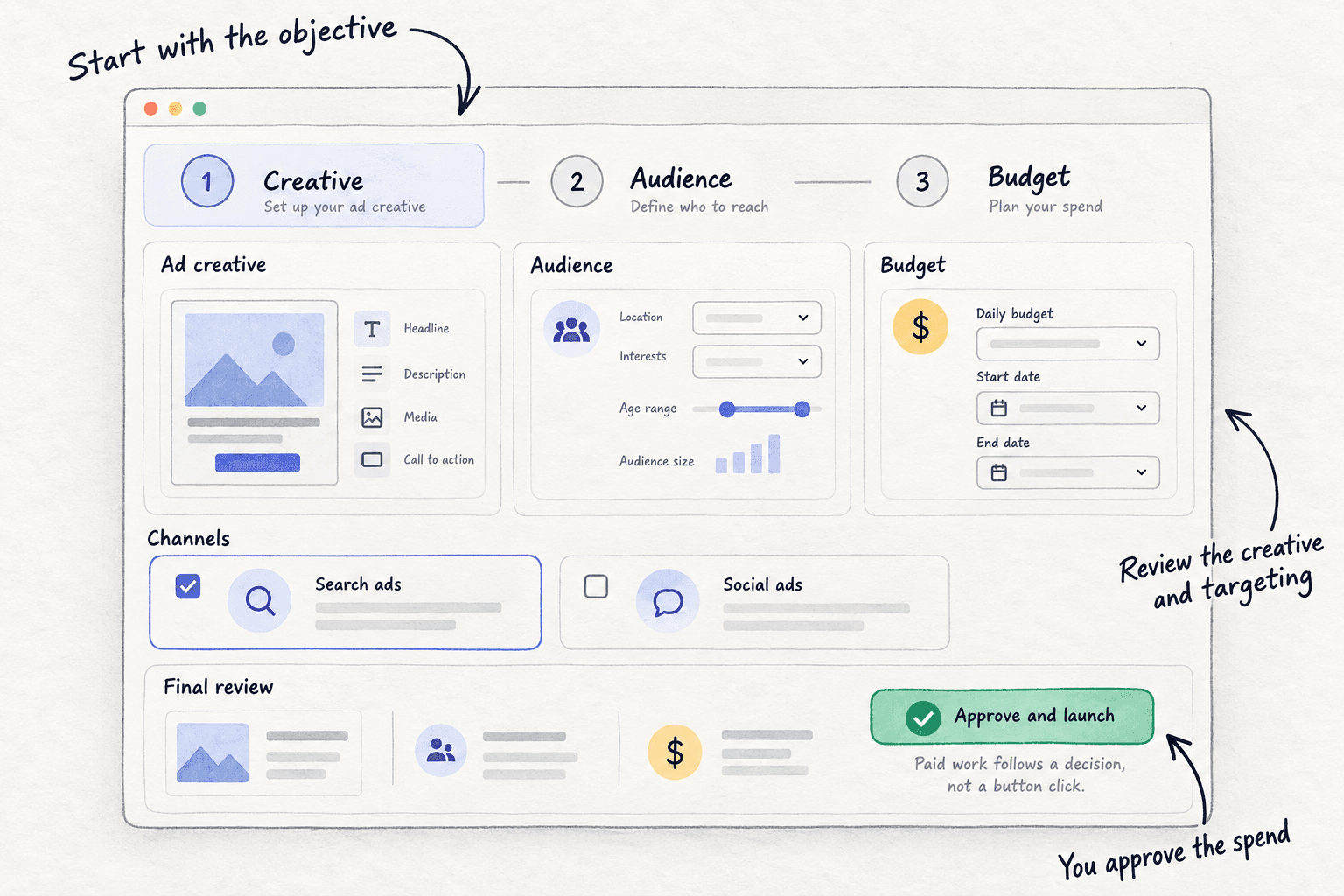
Step 4. Campaign monitoring reports live spend, impressions, clicks and click-through rate for each campaign, and every 12 hours proposes actions, such as which creative to stop. You approve or reject each one. Orders still come from Shopify, so keep your daily row, and leave the test ads alone until the test ends.
Your Facebook ad creative testing checklist for each 14-day round
0 of 9 done
Work through this list with an AI assistant
It drafts the work and keeps track of what is done.
Frequently asked questions
- How much should I spend to test a Facebook ad creative?
Give each new ad one stop line: 3 times what one order leaves you. If an order leaves $23, each new ad gets about $68. When that is spent, the ad has either sold or it goes off. Keep all test money at or under half your round's limit, so the ads that sell keep running. How much to spend on ads sets the round's limit.
- How long should I run a Facebook ad creative test?
Run it as long as the round: 14 days, until its test money is spent. Do not judge after 2 or 3 days; orders come in bunches, and one more or less is luck at a small budget. Meta's Creative Testing tool lets a test run up to 30 days.
- Should I test new ads in a new ad set or in the one that already sells?
In the one that already sells, using Meta's Creative Testing tool, so what Meta learned stays there and the test ads still get an even share. Moving a winner to another ad set often makes it perform differently. If your account does not show the tool, run the new ads in a second campaign with its own lifetime budget.
- How many ads should I test at once?
Test as many as your money can give a full stop line, at least 2 and at most 5; for most new stores that is 2 a round. Meta says that when too many ads run at once, each one is shown less often. Make 4 new ads a day anyway, and let free posts pick which ones get the paid test.
- Which number tells me an ad creative won?
Orders in Shopify, found by the ad's name in the order's UTM tags, divided into what the ad spent. If each order cost at or under your break-even cost, it won. Click-through rate and 3-second views help you make the next ads, but an ad with cheap clicks and no orders still loses money.
Sources
- 1.Set up a creative test in Meta Ads Manager — Meta Business Help Center, checked 10 October 2026
- 2.Make creative testing part of your process — Jon Loomer, 6 January 2026
- 3.How to evaluate creative performance in Meta ads (and what to test) — Search Engine Journal, 12 November 2025
- 4.AI creative testing tools, mapped by job and pricing model (quoting Meta's creative test help page) — AdTestBench, checked 25 September 2026
- 5.How many ad creatives do you need? (quoting Meta's 'About managing ad volume' and 'Ad limits per Page') — Novoads, 1 August 2026
- 6.Meta drops 250-ad Page cap in some accounts as 286 ads keep running — PPC Land, 23 September 2026
- 7.Meta ads in 2026: how many creatives do you actually need to launch? — Motion, March 2026
- 8.Expanding GenAI Transparency for Meta's Ads Products — Meta Newsroom, updated 1 June 2026
- 9.Meta's Advantage+ settings: why they keep reappearing — JumpFly, 6 August 2026
- 10.Conversion summary — Shopify Help Center, checked 10 October 2026
- 11.How to best test new Facebook ads? — Shopify Community, checked 10 October 2026
Next article to read
How to fix ads that get clicks but no salesD2COnce clicks come but orders do not, this finds where buyers drop off.Read it nextRelated guides
- How to make ad creativesMake ad creatives on a small budget: write 5 angles from your buyers' own words, make 4 new ads a day with free tools in each platform's sizes, post 2 free to see what people react to, and cut the bottom half every Sunday.
- How to run Meta ads for a Shopify storeD2CRun Meta ads for a Shopify store on a small budget: check you are ready, connect the store with Shopify's free Facebook & Instagram app and a test order, launch one Sales campaign locked to 10 times what an order leaves over 14 days, turn off losing ads daily, and raise 20% or stop every Sunday on Shopify's orders.
- How much to spend on adsSet your first ad budget from what one sale leaves you: a yes-or-no check by business type, a test limit of 10 times that number over 14 days locked in Google, Meta or LinkedIn, a daily stop line at 3 times, and a Sunday rule to raise 20% or stop.
- How to calculate break-even ROASD2CCalculate your break-even ROAS from what one order really leaves you after product, packing, shipping, fees and returns, then check every ad against Shopify's orders each day and move your budget every Sunday by a simple cut, keep or add-20% rule.
Guides that link here
- How to get UGC for your brandD2C
- How to run Meta ads for a Shopify storeD2C
- How to make ad creatives
- How much to spend on marketing as an ecommerce brandD2C
- How to calculate break-even ROASD2C
- Amazon PPC for beginnersD2C
- How much to spend on ads
- How to fix ads that get clicks but no salesD2C
- How to set up retargeting ads
- How to find micro-influencers for your brandD2C
- How to promote your business on InstagramD2C
- Instagram post ideas for D2C brandsD2C
- How to A/B test a landing page
Cite this page
Dinesh Bypilla (2026). How to test Facebook ad creatives. Scout7 Academy. https://scout7.ai/academy/paid-ads/how-to-test-facebook-ad-creatives
Written by Dinesh Bypilla, Agentic systems engineer at Scout7. Reviewed by Murali Sid. Last checked 10 October 2026.
Quote any part of this guide with a link back to this page. © 2026 Scout7.
Markdown version of this page: https://scout7.ai/academy/paid-ads/how-to-test-facebook-ad-creatives.md