



How to run Google Ads for SaaS
Run Google Ads for your SaaS on a small budget: check you have 10 paying customers and a click price your trial can pay for, track signups, launch one Search campaign on 20 exact-match phrases with a locked 14-day budget, add negative keywords every day, and raise 20% or stop every Sunday on the signups in your own list.
ByDinesh BypillaReviewed byMurali SidLast checked 22 min read
You have a SaaS with a free trial, a few signups and maybe one or two paying users, and you want to know how to run Google Ads for SaaS without losing the money. The usual first try is $200 on Google's default settings: the ads show for loosely related searches, the clicks cost more than your plan, and the signups never come or never pay. This guide shows the check to run before you spend, the exact settings to change, and how to judge a small, locked test on the signups in your own list.
Do these three things
About 4 hours to set up, then about 1 hour 15 minutes a day and 30 minutes every Sunday. Judge each test when it has spent its whole budget, and judge paying users when the trial is over.
Show the three actions in fullHide the full list
- Today: work out the most you can pay per click, from what one signup is worth. Check it against Keyword Planner's low bid for 20 exact phrases people type when they want a tool like yours. If 10 people have paid you and at least 5 phrases fit, set up signup tracking and launch one Search campaign with a locked 14-day budget. If not, keep ads at $0.
- Every day: open the search terms report and add every search that is not a buyer as a negative keyword. Pause any keyword that has spent 3 times your number with no signup in your own list. Publish 1 page that matches one keyword group; AI drafts it, you add what only you know. While ads are at $0, send 100 personal messages a day instead.
- Every Sunday: count the signups and paying users from Google in your own signup list, not Google's number. When the 14-day budget is spent, run the next test 20% bigger if each signup cost at or under your number. If not, stop and fix the page.
Get help doing these
ChatGPT or Claude reads this guide and works through it with you.
1. Check if Google Ads is worth it for your SaaS yet
Google Ads is worth it for your SaaS when two things are true: at least 10 people have paid you, and the most you can pay for one click is above what Google charges for the phrases your buyers type. If either is false, your Google Ads budget is $0 for now.
The first check is 10 paying customers. With 10, you know which sentence, which kind of team and which place brought them. Before that, an ad sends strangers to a message you have not tested. This is the same rule as in how much to spend on marketing as a SaaS startup and how much to spend on ads.
The second check is the click price. Work out these numbers in a Google Sheet:
Most per paying customer: $[price a month] × 6 = $[A]
Signups it takes to get 1 paying customer (from your own list): [B]
Most per signup: $[A] ÷ [B] = $[your number]
Signups per 100 visits (from your analytics, last 30 days): [C]
Most per click: $[your number] × [C] ÷ 100 = $[most per click]
Six months is the stand-in for how long a customer stays, until you know. "Your number" is the most you can pay for one signup, your break-even customer acquisition cost per signup; every rule later in this guide uses it. Your conversion rate comes from Google Analytics or your own logs: signups divided by visits, times 100. Leave out visits from people you know.
Then compare the most per click with the real cost per click. In LocaliQ's 2026 benchmarks, a click on a search ad cost $5.42 on average, and $5.87 for business services. Step 2 checks the price of your own phrases. If your most per click is a small part of that, expect few phrases to fit in step 2. Then the fix is your price, the share of trials that pay or your homepage, not the ads.
If your SaaS sells through a demo call: your result is a booked demo, not a signup. Use the profit on a usual first year as "most per paying customer", divide by the demos it takes to win one, and use demos per 100 visits in place of signups.
If either check fails, keep ads at $0 and put the hours into the free work that gets you to 10 paying customers: 100 personal messages a day, 20 answers where your buyers ask for help and 1 page that answers a real search. ChatGPT or Claude drafts each message in about a minute; you add one line that is true about the person. The routine is in how to get your first 100 SaaS users. Still do step 2: the keyword list is free, and it tells you which pages to write.
- Tool: Google Sheets and Google Analytics 4 (both free).
- Time: 20 minutes.
- You will have: a yes or no for 10 paying customers, your number, and your most per click.
- It worked if: every line holds a real number from your signup list, your billing tool or your analytics, and none says "about".
- Common mistake: using the price of the plan as the most you can pay. A $19 plan where 1 signup in 12 pays can pay about $9.50 per signup, not $19, and only a few cents per click.
See it done: Bugmoth's check
Bugmoth is a made-up bug-reporting tool for small web teams. It costs $19 a month per team, with a 14-day trial.
Can Google Ads pay for itself yet?
| Line | Number |
|---|---|
| Paying teams | 2 (needs 10) |
| Most per paying team | $19 × 6 = $114 |
| Signups per paying team | 12 |
| Most per signup (their number) | $114 ÷ 12 = $9.50 |
| Signups per 100 visits | 3 |
| Most per click | $9.50 × 3 ÷ 100 = $0.29 |
| Keyword Planner low bid on their 20 phrases (step 2) | $0.90 to $2.60 |
| Decision | ads at $0; 100 messages a day; the phrases become pages |
Why it works: The sums show that a click would have to cost under 29 cents, so the ad budget stays at $0 and the hours go to messages.
2. Pick 20 exact-match keywords that show someone wants a tool like yours
Find 20 search phrases people type when they are ready to try a tool like yours, check what each click costs in Google's free Keyword Planner, and keep the ones whose low bid is at or under your most per click. You will use them as exact-match keywords, so your ad shows only for those searches and ones with the same meaning.
A keyword is the phrase you bid on. Pick phrases from three kinds of search, because these are the people who want a tool now, not people learning about the topic:
- "[competitor] alternative" for each tool your buyers compare you with. Your competitor analysis has the list.
- "[the job] software" or "[the job] tool", in your buyer's words: what they want done, from your customer interviews.
- The problem, the way buyers type it when it hurts: "[the thing] keeps [going wrong]".
Then check the price and the number of searches:
- 1
Open Keyword Planner
In Google Ads, open Tools, then Keyword planner. It is free, but Google asks you to finish setting up the account, with billing, before you can use it. You do not need a campaign.
- 2
Get ideas
Choose "Discover new keywords". Enter 3 to 5 of your phrases, or your competitors' websites. Set the location to the countries where your paying customers are.
- 3
Read the bids
For each phrase, note the average monthly searches and the "Top of page bid (low range)". Google says the low range is about what the cheapest fifth of advertisers paid in the last 30 days; the "high range" is about what the top fifth paid.
- 4
Keep the ones that fit
Keep a phrase if its low bid is at or under your most per click and it has at least 10 searches a month. Write each one in square brackets, like [your phrase]. That is exact match.
Ask ChatGPT or Claude for 50 phrases across the three kinds, using your competitors' names and your buyers' words. Check each one in Keyword Planner and in Google's own suggestions, as in how to find keywords for SEO. Keep 20. If fewer than 5 fit your most per click, the answer from step 1 is $0 for now.
Group the 20 into 3 or 4 ad groups, one per kind of search, so each group gets its own ad and its own page in step 4. Leave out three kinds of phrase: anything with "free" in it if you have no free plan, "what is [topic]" searches from people learning, and your own product name. You already show for your name in the normal search results; add it only if you search your name and see a competitor's ad above your site.
Why exact match: Google's default is broad match, which shows your ad on searches Google judges related, including ones without your words. On a small test, that spends the money on searches you did not choose.
- Tool: Google Keyword Planner (free with a Google Ads account), Google Sheets, and ChatGPT or Claude to draft.
- Time: 1 hour.
- You will have: 20 exact-match phrases in 3 or 4 groups, each with its searches and low bid.
- It worked if: at least 5 phrases have a low bid at or under your most per click, and every phrase is something a buyer types, not a learner.
- Common mistake: picking the phrases with the most searches, such as "[your category]" on its own. They are the most expensive, and most of the people typing them are not ready to try a tool.
See it done: Bugmoth's keyword groups
6 of Bugmoth's 20 phrases, in 3 of its groups
| Group | Phrase | Low bid | Fits $0.29? |
|---|---|---|---|
| Alternatives | [bugherd alternative] | $1.40 | no |
| Alternatives | [marker io alternative] | $1.10 | no |
| The job | [website feedback tool] | $2.60 | no |
| The job | [client bug reporting tool] | $0.90 | no |
| The problem | [clients report bugs by email] | $0.95 | no |
| The problem | [how to collect website feedback from clients] | $1.20 | no |
So these phrases become Bugmoth's next pages, one a day, instead of ads.
Why it works: Every phrase is typed by someone looking for a tool, and the list shows why ads wait: even the cheapest click costs 3 times what Bugmoth can pay.
3. Set up conversion tracking for signups before you spend $1
Create a signup conversion in Google Ads that fires on the page people see right after they sign up, make one test signup, and check it shows. Then save where each signup came from in your own database.
Google needs to see each signup so it can report which keyword brought it. Google also asks for at least one conversion goal before it lets you create a Search campaign. Your own list needs the source too, for attribution, because you judge the test on it, not on Google's count.
- 1
Create the conversion
In Google Ads, open Goals, then Summary, and select "+ Create conversion action". Next to "Conversions on a website", select "Edit data sources", enter your domain and select Scan. Pick the category closest to a signup. Choose "Automatically without code", pick "URL is" and enter the page people land on right after they sign up, such as your welcome page.
- 2
Install the Google tag
If the scan found no Google tag, select "Set up" on the Google tag and add it to every page of your site. Turn on enhanced conversions when it asks.
- 3
Make a test signup and check it
Use Google Tag Assistant, which the conversion table links to, and sign up once with a new email. Google says the result shows in your account after about 30 minutes. A status of "Unverified" means Google has not seen the tag fire yet.
- 4
Tag the ad links
Later, in the campaign's Settings, find the Tracking template column and add a Final URL suffix: utm_source=google&utm_medium=cpc&utm_campaign=search-test-1. These are UTM parameters.
- 5
Save the source on every signup
Store the UTM values, and Google's gclid if it is in the address, with each new account in your database. Add "Where did you hear about us?" to your signup form too. That is self-reported attribution.
Conversion tracking has the longer version, including Google Analytics 4. Count only signups as the main goal. A page view or a pricing visit as a goal makes Google buy clicks that never sign up.
- Tool: Google Ads conversion tracking, the Google tag and Tag Assistant (all free).
- Time: 1 hour.
- You will have: a signup conversion that a real test signup has passed through, and a source saved on every new account.
- It worked if: the conversion's status in Goals, then Summary, is no longer "Unverified", and the test account in your database shows its source.
- Common mistake: counting a button click or a visit to the signup page as the conversion. People click and leave, so Google reports signups you never got.
4. Write two search ads and one matching page for each keyword group
For each keyword group, write two responsive search ads, each with 15 headlines and 4 descriptions, and send them to one page that answers that exact search with a signup button. Then publish 1 more matching page every day.
In a responsive search ad, you give Google up to 15 headlines of 30 characters each and up to 4 descriptions of 90 characters each, and Google mixes them. Google recommends at least 2 of these ads per ad group, so write 2 with different headlines.
Give ChatGPT or Claude the group's phrases, your value proposition and 10 lines your users said to you. Ask for 60 headlines under 30 characters and 16 descriptions under 90. Keep the 30 and the 8 that sound most like your buyers, and split them across the 2 ads. How to make ad creatives has the method for finding those words.
Headlines (15, each under 30 characters):
1–3: the searched phrase, or close to it, in 3 ways
4–7: what the user gets, and how fast
8–10: one true fact: [number of teams], [setup time], [free trial length]
11–13: who it is for: [kind of team, size]
14–15: the next step: "Start your free trial", "Try it free for [X] days"
Descriptions (4, each under 90 characters):
1: the problem in the buyer's words, then what changes
2: how it works in one sentence
3: the proof
4: what happens after they click
Final URL: the page for this group, not your homepage
Two rules. Do not pin headlines: Google says pinning is not recommended for most advertisers. And do not put a competitor's name in your ad text. Google allows competitor names as keywords, but it can restrict them in ads from a direct competitor once the owner complains.
The page. Each group gets its own landing page: the first line answers the search, then what the user gets, a screenshot, one proof and one "Start free trial" button. For an alternative search, write an honest alternatives page. How to write competitor comparison and alternative pages has the layout.
Then keep going: publish 1 new page every day, one for each phrase or group still without one. AI drafts it in minutes; you add a real screenshot, a number from your product and a step you tested, about 1 hour a page. Each page also has a chance to show up for free in search once Google indexes it. Google treats many pages made only to rank as spam, so each page answers one real search with something only you know.
- Tool: ChatGPT or Claude to draft, your website, and Google Ads.
- Time: about 1 hour 30 minutes for the first ads and pages, then about 1 hour a day for the new page.
- You will have: 2 search ads and 1 matching page for each group, and 1 new page a day after that.
- It worked if: Google rates each ad's Ad strength "Good" or "Excellent", and a stranger can read the top of each page and say what to do next in 5 seconds.
- Common mistake: sending every ad to the homepage. Someone who searched "[competitor] alternative" lands on a page that never mentions the competitor, and leaves.
See it done: Bugmoth's first headline for the job group
First draft
Bugmoth: modern bug tracking
For the search [client bug reporting tool], 25 characters
Client Bug Reporting Tool
Why it works: The new headline uses the words the person just typed, so they can see at once that the ad answers their search.
5. Launch one Search campaign with a locked 14-day budget
Create one Search campaign with a campaign total budget of 10 times your number, a start date tomorrow and an end date 14 days later. Change five default settings before it starts: search partners, Display, location, bidding and AI Max.
Your test limit is 10 times your number, spent over 14 days. How much to spend on ads explains each rule and the two checks the limit must pass. Use money you can lose without it hurting the business.
- 1
Start the campaign
In Google Ads, open Campaigns and click the plus icon. Choose Leads, then the Search campaign type, and keep only your signup conversion as the goal. Name it "Search test 1".
- 2
Bidding
Choose Clicks as the focus, which uses Maximize clicks, and set a maximum cost per click bid limit equal to your most per click from step 1. Google then never bids more than that for one click. Smart bidding for conversions needs many signups a month to learn, and a small test cannot give it that many.
- 3
Networks
Untick "Include Google search partners" and leave "Display Network" unticked. The first is ticked by default. Your test should run on Google search only, where you can see each search.
- 4
Locations and languages
Pick the countries where your paying customers are. Under Location options, choose "Presence", not the default "Presence or Interest", so only people in those places see the ad. Pick the language your page is in.
- 5
Keywords, ads and negatives
Make one ad group per keyword group from step 2, with the phrases in square brackets, and add the 2 ads from step 4. Add the starter negative keywords from step 6, each with a minus sign in front.
- 6
Budget
Under Budget, select "Campaign total budget", enter your test limit, set the start date to tomorrow and the end date 14 days later. Google says it will never charge more than the total budget. The budget type cannot be changed once the start date is set.
- 7
Turn AI Max off
New Search campaigns have AI Max selected by default. It lets Google match your ads to searches beyond your keywords and rewrite your text. Since September 2026, Google also switches it on in older campaigns that used broad matching. Before the start date, open Campaigns, the Settings tab, tick this campaign, select AI Max, turn it off and Save. Google says AI Max works with bidding for conversions, which this test does not use.
Then publish. Google usually reviews ads within one business day. If an ad is "Disapproved", fix the reason it gives and save again.
- Tool: Google Ads.
- Time: 45 minutes.
- You will have: one Search campaign with 3 or 4 ad groups, exact-match keywords, a starter negative list and a locked total budget.
- It worked if: the campaign's Settings show "Campaign total budget" equal to your limit, end date 14 days after the start, search partners off, location "Presence" and AI Max off.
- Common mistake: keeping Google's suggested daily budget with no end date. It keeps spending until you remember it, and one day can cost up to 2 times the daily budget.
6. Check search terms every day and add negative keywords
Every day, open the search terms report, add every search that is not a buyer as a negative keyword, and pause any keyword that has spent 3 times your number with no signup in your own list. A negative keyword is a word that stops your ad from showing on any search that contains it.
Open Campaigns, then Insights and reports, then Search terms. It lists the searches that showed your ad. Even exact match shows ads for searches Google judges to mean the same, so check every row:
- A buyer's search: leave it.
- Not a buyer: tick it and add it as a negative keyword. Typical ones for software are "login", "jobs", "careers", "salary", "free", "download", "course", "tutorial", "open source" and "template". Google says negatives do not cover close variants, so add both "job" and "jobs", and any word that means the same.
- A keyword past the stop line: pause any keyword that has spent 3 times your number and brought 0 signups in your own list. Leave every other setting alone during the 14 days.
Before launch, put a starter list into the campaign. Open the "Queries" tab in Google Search Console for your site: any search there that is not a buyer goes on the list. Add the typical words above too, unless one of them is what you sell.
Also check one column a week: in Campaigns, then Keywords, add the Quality Score columns. If a keyword's "Landing page experience" says "Below average", rewrite the top of that page so it answers the search, using step 4, and test the new version against the old one.
- Tool: Google Ads search terms report, Google Search Console and your signup list.
- Time: 15 minutes a day.
- You will have: a negative keyword list that grows every day, and one row per keyword in your sheet.
- It worked if: no search from the last day that is not a buyer is still without a negative, and no keyword past the stop line with 0 signups is still running.
- Common mistake: judging by clicks or click-through rate. A keyword with cheap clicks and no signups is still losing money.
See it done: Bugmoth's starter negative list
From Bugmoth's Search Console queries
| Search that found Bugmoth | Negative keyword added |
|---|---|
| bugherd login | login |
| qa tester jobs remote | job, jobs |
| free bug tracker open source | free, open source |
| what is a bug report | what is |
| bug report template word | template |
Why it works: Each word came from a real search in Search Console that was not a buyer, so the ads never pay for it.
7. Every Sunday, count signups and paying users in your own records, then raise or stop
Every Sunday, write one row for the test: what it spent, the signups your own list shows from Google, and how many of them are using the product and paying. When the total budget is spent, raise the next test by 20% if each signup cost at or under your number, or stop.
Week | Spent | Clicks | Signups in your list (source: google) | Signups Google claims | Cost per signup (spent ÷ your signups) | Your number | Signups who used the product | Paying after the trial | Decision
Judge the test when it has spent its whole budget, not after 3 days. Then use the rules from how much to spend on ads:
- Cost per signup at or under your number: run the next test with a budget 20% higher, keeping the keywords and ads that brought signups.
- Cost per signup over your number: stop. Find where people drop off with why ads get clicks but no sales, fix the page, and move the money back into the free work from step 1.
- No signups at all: check step 3 first. If a test signup still shows, the page or the phrases are wrong.
Then wait for the trial. When the free trial of the last signup from the test has ended, count how many paid. Each paying user from Google should have cost no more than your most per paying customer from step 1. Check too that people from ads use the product about as often as your other signups. If they sign up and never use it, the ad promised something the product does not do, and why no one is buying helps you find what.
If your SaaS sells through a demo call: judge the test on booked demos. Check which turned into customers at week 12, after your demos, in your sales sheet.
Paste the week's numbers into ChatGPT or Claude and ask it to fill the sheet and apply the rules; check its sums against your list. Once a month, look at all your channels together in a marketing review, and work out your cost per customer and payback. Leave retargeting for later: at a few hundred visits a month there are too few people to show it to. If your buyers are better found by job title than by search, test LinkedIn ads with the same number.
- Tool: Google Sheets, your signup list and your billing tool.
- Time: 30 minutes every Sunday.
- You will have: one row a week, a raise-or-stop decision for each spent test, and a count of paying users once the trial ends.
- It worked if: every signup you count from Google is an account you can find in your own database with the source "google".
- Common mistake: raising the budget because Google's Conversions column looks good. Google counts the signup it saw; your list and your billing tool show who stayed and paid.
Where Scout7 helps
Scout7 speeds up three of the seven steps: 2, 5 and 6. Its campaign work runs in the Scout7 app, not over MCP yet.
Step 2. Scout7's keyword intelligence researches thousands of keywords and narrows them to target terms, with monthly searches, difficulty, trend, and who leads on Google and in AI answers for each. You choose the terms that match what you sell. The bids still come from Keyword Planner.
Step 5. Scout7 connects your Google Ads account, talks through the campaign with you, and drafts it with an audience, an estimated reach and a budget. It builds the ads and ad groups, and walks the campaign through creative review, targeting and budget, including whether the budget is daily or lifetime. Choose lifetime and enter your test limit. You review every ad and approve the spend; nothing launches without your approval. After it launches, open the campaign in Google Ads and check the settings from step 5.
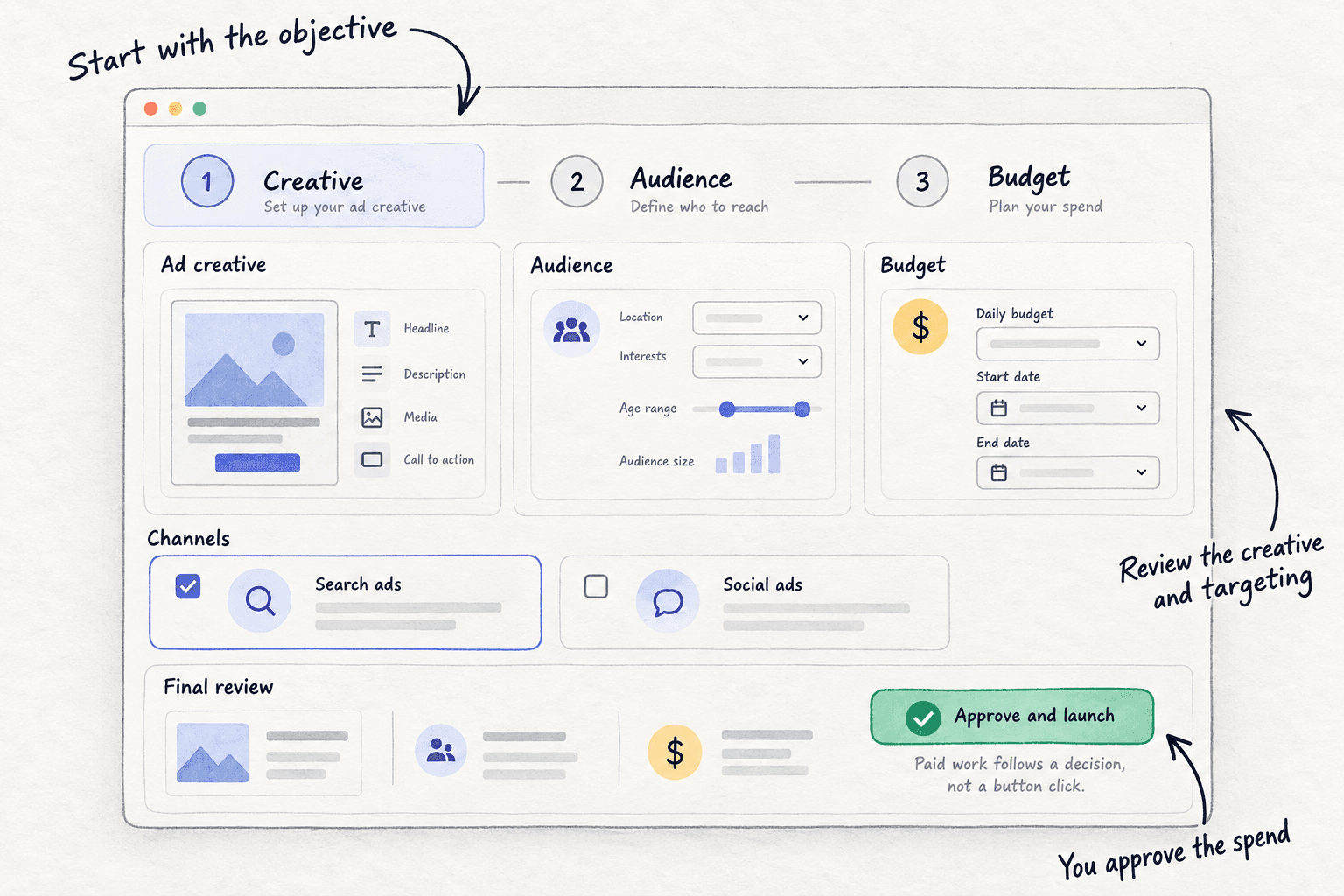
Step 6. Campaign monitoring reports live spend, impressions, clicks and click-through rate for each campaign, and every 12 hours reviews performance and proposes actions: which ad to stop, which campaign to cut, where more budget would earn more. You approve or reject each one. Signups still come from your own list, so keep the daily row in step 6.
Your Google Ads checklist for your SaaS
0 of 13 done
Work through this list with an AI assistant
It drafts the work and keeps track of what is done.
Frequently asked questions
- Is Google Ads worth it for SaaS?
It is worth it once two things are true: 10 people have paid you, and the most you can pay per click is above Keyword Planner's low bid for at least 5 buyer phrases. Before that, a click usually costs more than a signup is worth, so put the hours into getting your first users for free.
- How much should a SaaS spend on Google Ads?
Start with one test of 10 times what one signup is worth to you, spent over 14 days, with a campaign total budget so Google never charges more. A $19 plan where 1 signup in 12 pays gives about $9.50 a signup, so a $95 test. Raise by 20% only when each signup costs at or under that number. How much to spend on ads has the full rules.
- Should I bid on competitor names in Google Ads?
Yes, as keywords: "[competitor] alternative" searches come from people ready to switch, and Google does not restrict trademarks as keywords. Keep the competitor's name out of your ad text, because Google can restrict it there after a complaint. Send the click to an honest alternatives page.
- Why do my Google Ads get clicks but no signups?
Check three things in order. Does a test signup show in Google Ads and in your own list? Do the search terms show buyers, or job seekers and people wanting something free? Does the page answer the search, with one clear signup button? Most often it is broad searches and the homepage. Fix the page before you spend more.
- Should I use Performance Max or AI Max for a SaaS?
Not for your first tests. Both let Google choose which searches show your ad, and Google says AI Max works with bidding for conversions, which needs more signups a month than a small test brings. Start with exact-match Search and AI Max off. Once tests pay back, try AI Max as a separate test, judged on your own signups.
Sources
- 1.Create a Search campaign — Google Ads Help, checked 10 October 2026
- 2.Optimize Google Ads with AI Max for Search campaigns — Google Ads Help, checked 10 October 2026
- 3.About AI Max for Search campaigns — Google Ads Help, checked 10 October 2026
- 4.We're upgrading Dynamic Search Ads to AI Max — Google, updated 11 June 2026
- 5.About campaign total budgets — Google Ads Help, checked 10 October 2026
- 6.Campaign total budgets FAQs — Google Ads Help, checked 10 October 2026
- 7.About overdelivery and your average daily budget — Google Ads Help, checked 10 October 2026
- 8.About Maximize clicks bidding — Google Ads Help, checked 10 October 2026
- 9.About advanced location options — Google Ads Help, checked 10 October 2026
- 10.Use Keyword Planner — Google Ads Help, checked 10 October 2026
- 11.About Keyword Planner forecasts — Google Ads Help, checked 10 October 2026
- 12.About keyword matching options — Google Ads Help, checked 10 October 2026
- 13.About negative keywords — Google Ads Help, checked 10 October 2026
- 14.About the search terms report — Google Ads Help, checked 10 October 2026
- 15.About responsive search ads — Google Ads Help, checked 10 October 2026
- 16.Trademarks — Google Advertising Policies Help, checked 10 October 2026
- 17.Set up your web conversions — Google Ads Help, checked 10 October 2026
- 18.Use Tag Assistant to troubleshoot your unverified or inactive conversion actions — Google Ads Help, checked 10 October 2026
- 19.Add a Final URL suffix — Google Ads Help, checked 10 October 2026
- 20.About Quality Score for Search campaigns — Google Ads Help, checked 10 October 2026
- 21.Search Advertising Benchmarks for 2026 — LocaliQ, updated 1 June 2026
Next article to read
How to set up conversion trackingTrack signups from each ad, so you stop paying for clicks that never convert.Read it nextRelated guides
- How much to spend on adsSet your first ad budget from what one sale leaves you: a yes-or-no check by business type, a test limit of 10 times that number over 14 days locked in Google, Meta or LinkedIn, a daily stop line at 3 times, and a Sunday rule to raise 20% or stop.
- How to run LinkedIn ads for B2BRun LinkedIn ads for your B2B company on a small budget: check you have 5 orders from free channels, set one locked 14-day test at 10 times what a qualified enquiry is worth, target exact job titles with Audience Expansion and the Audience Network off, call every lead the same day, and raise 20% or stop each Sunday.
- How to fix a SaaS website with traffic but no signupsSaaSFix a SaaS website with traffic but no signups: take out your own visits and bots, find where buyers stop in a free funnel, cut signup to one step with no card, put a signup button on every page with visits, watch 20 recordings a day, and change one thing after every 300 buyer visits.
- How to write competitor comparison and alternative pagesWrite competitor comparison and alternative pages that buyers trust: list 30 pages from your rivals' Google suggestions, copy their prices from their own sites with dates, publish 1 page a day with the verdict first and 6 fair-comparison checks, and update prices every Sunday.
Guides that link here
- How to set up conversion tracking
- How to fix a SaaS launch that got zero signupsSaaS
- How to get your first 100 SaaS usersSaaS
- How much to spend on marketing as a B2B companyB2B
- How much to spend on marketing as a SaaS startupSaaS
- How to choose marketing channels for a SaaS startupSaaS
- How to market a SaaS productSaaS
- How to market your product as a technical founderSaaS
- How to price a SaaS productSaaS
- How to price digital marketing servicesAgency
- How to calculate CAC and payback period
- How to use UTM parameters
- How much to spend on ads
- How to make ad creatives
- How to run LinkedIn ads for B2B
- How to set up retargeting ads
- How long does SEO take to work?
- How to A/B test a landing page
- How to fix a SaaS website with traffic but no signupsSaaS
- How to write a landing page that converts
Cite this page
Dinesh Bypilla (2026). How to run Google Ads for SaaS. Scout7 Academy. https://scout7.ai/academy/paid-ads/how-to-run-google-ads-for-saas
Written by Dinesh Bypilla, Agentic systems engineer at Scout7. Reviewed by Murali Sid. Last checked 10 October 2026.
Quote any part of this guide with a link back to this page. © 2026 Scout7.
Markdown version of this page: https://scout7.ai/academy/paid-ads/how-to-run-google-ads-for-saas.md