



How to run LinkedIn ads for B2B
Run LinkedIn ads for your B2B company on a small budget: check you have 5 orders from free channels, set one locked 14-day test at 10 times what a qualified enquiry is worth, target exact job titles with Audience Expansion and the Audience Network off, call every lead the same day, and raise 20% or stop each Sunday.
ByDinesh BypillaReviewed byMurali SidLast checked 21 min read
You sell to businesses, your buyers are on LinkedIn, and you have heard that LinkedIn ads for B2B are how companies like yours get leads. Then you see clicks at about $13 each and read about form fills from people who never answer the phone. Here is how to run LinkedIn ads for B2B on a small budget: one locked test, the three default settings turned off, and every lead called the same day, so you learn what a real enquiry costs before you spend more.
Do these three things
About 4 hours to set up, then 30 minutes a day on the ads and leads and 30 minutes every Sunday. Judge the test only when it has spent its whole limit.
Show the three actions in fullHide the full list
- Today: check you have at least 5 orders from free channels, then work out what one qualified enquiry is worth to you. Set one LinkedIn test at 10 times that number, and at least $140, as a lifetime budget over 14 days, with Audience Expansion and the LinkedIn Audience Network turned off.
- Every day: call or message every new lead the same day and log it in your sales sheet. Turn off any ad that has spent 3 times your number with no qualified enquiry. Keep sending 100 personal messages; AI drafts each one and you add one true line.
- Every Sunday: count qualified enquiries and booked calls in your own sheet, not LinkedIn's lead count. When the test has spent its limit, raise the next one by 20% if each qualified enquiry cost at or under your number. If not, stop and put the money back into the free work.
Get help doing these
ChatGPT or Claude reads this guide and works through it with you.
1. Check LinkedIn ads are right for you and set your test numbers
LinkedIn ads are right for you once your free channels have already won orders, and once your test budget can buy at least 100 clicks. Check both today, before you open Campaign Manager. If either answer is no, your LinkedIn budget is $0 for now.
The gate. An ad shows your message to strangers. If your message has not yet won orders from people you reached for free, an ad only makes that test more expensive. This is the same rule as in how much to spend on marketing as a B2B company: at least 5 orders from free channels, such as outreach, samples and introductions. Until then, put the hours into 100 personal messages a day.
Your number. This is the most you can pay for one qualified enquiry: a real buyer who answers you, fits who you sell to and asks for a quote, a sample or a call. Work it out from your profit on one order, not the price. Give your invoices and your quote list to ChatGPT or Claude and ask it to fill this in. Check every number against a real invoice.
Profit on a usual first order: $[A]
Qualified enquiries it takes to win one order (from your quote list): [B]
Your number, the most per qualified enquiry: $[A ÷ B]
Test limit (× 10): $[number × 10]. If this is under $140, stop here: LinkedIn needs $10 a day for 14 days.
Daily budget (limit ÷ 14): $[limit ÷ 14]
Stop line for each ad (× 3): $[number × 3]
Click check: 100 clicks × $13 = $1,300. Is your limit bigger? [yes / no]
Why $13: in ZenABM's February 2026 study of 211 B2B advertisers, a click on a LinkedIn single image ad cost a median of $13.23. 100 clicks is the least that tells you anything. If your limit cannot buy 100 clicks, LinkedIn cannot give you an answer at your numbers yet. Do not stretch the limit. Raise your price or your order size first, or test Google search ads if buyers search for what you sell. The full method, with the reasons for 10 times and 3 times, is in how much to spend on ads.
If you run an agency: your gate is 5 clients from outreach and introductions, and your number comes from one month of a client's fee. Run the test over 30 days instead of 14, at LinkedIn's suggested $25 a day, because calls book more slowly. This matches your agency budget. Free LinkedIn work for agency clients comes first.
If you run a SaaS: your gate is 10 paying customers, and your number is per signup. A self-serve plan at $19 a month usually gives a limit under $140, so LinkedIn is out; test Google instead, as in the SaaS budget guide. If you sell through sales calls at a higher price, follow the B2B rule above.
If you run a D2C store: LinkedIn ads are for selling to businesses. Use Meta ads instead.
- Tool: Google Sheets and ChatGPT or Claude.
- Time: 30 minutes.
- You will have: five numbers written down: your number, the test limit, the daily budget, the stop line and the click check.
- It worked if: the limit is at least $140 and at least 100 times $13, and you could lose all of it without missing a bill.
- Common mistake: using the order value instead of the profit, or "trying LinkedIn" at $10 a day for a week. That buys about 5 clicks a day and no answer.
See it done: Carvelian's LinkedIn test numbers
Carvelian Packaging is a made-up maker of custom printed boxes for small food and drink brands. One founder sells through calls, samples and quotes.
Now that 5 orders have come from free channels
| Line | Number |
|---|---|
| Profit on a usual $3,000 first order | $1,000 |
| Quotes it took to win one order (3 wins from 20 quotes) | about 7 |
| His number: most per qualified enquiry | $143 |
| Test limit (× 10) | $1,430 |
| Daily budget (÷ 14) | about $102 |
| Stop line for each ad (× 3) | $429 |
| Click check: 100 × $13 | $1,300, so the limit passes |
Why it works: Every number comes from his own invoices and quotes, so he knows when to stop an ad before he spends anything.
2. Set up your LinkedIn Page, Campaign Manager and tracking
Before you spend $1, you need a LinkedIn Page, a Campaign Manager ad account with a card, and tracking that shows every enquiry in your own sheet with LinkedIn as the source. Then send one test enquiry and check it arrives.
- Make a LinkedIn Page for your company if you do not have one. It is free, and LinkedIn needs it for Sponsored Content, the ads that show in the feed. Fill in the description with the same words as your LinkedIn profile.
- Open Campaign Manager, create an ad account linked to your Page, and add a credit card. You need a Page role of super admin or content admin to run ads from the Page.
- Add the LinkedIn Insight Tag to every page of your website. If you have visitors in the EU, the UK or Switzerland, add a cookie banner that asks first, as in setting up retargeting. Then, in Campaign Manager, go to Measure, then Conversion tracking, click "Create conversion" and choose "Insight Tag conversion". Use the page people see after they send your enquiry form. Conversion tracking has the steps for each website builder. The status says "Unverified" until someone visits that page.
- Tag the link in every ad with UTM parameters, such as
utm_source=linkedin&utm_medium=paid. - Add "Where did you hear about us?" to your enquiry form, and ask it on every first call. This is self-reported attribution, and it catches buyers who saw the ad and came back later.
- Send one test enquiry through the tagged link, then check it shows in your sheet with LinkedIn as the source.
Most of your leads will come through LinkedIn's own form (step 5), so the website tracking is the backup for people who click through to your landing page. If your site brings no enquiries at all today, fix that first with how to get more leads from a B2B website.
- Tool: LinkedIn (free Page), Campaign Manager (free to open; you pay for the ads), Google Analytics 4 (free) and your enquiry form.
- Time: 1 hour.
- You will have: a Page, an ad account with a card, and tracking that a real test enquiry has passed through.
- It worked if: the conversion no longer says "Unverified", and the test enquiry is in your sheet with LinkedIn as its source.
- Common mistake: launching first and adding tracking "later". Every dollar spent before tracking works is a dollar you cannot judge.
3. Pick your audience by exact job title, company size and location
Target the exact job titles your customers hold, at companies the size of your customers, in places you can serve. Then turn off the two settings LinkedIn switches on for you: Audience Expansion and the LinkedIn Audience Network.
Write the audience from your customers. Look at the people who bought from you and the people who asked for quotes. Copy their real job titles, their company size and their industry from LinkedIn into your sheet. This is your ideal customer profile turned into LinkedIn settings. If you have not yet asked customers who decides to buy, ask on your next customer interview.
In Campaign Manager, when you set up the ad set (LinkedIn's name since October 2025 for what used to be called a campaign):
- Location: only the countries, states or cities you can serve.
- Job titles: the 5 to 15 exact titles your buyers hold, such as "Founder", "Owner" or "Head of Operations". Leave out job function and the "Senior" seniority level. In a 2026 audit of 56 B2B accounts, GrowthSpree found that job functions and seniority caused over half of the wasted spend, because "Senior" is mostly people who are not the decision-maker.
- Company size: the sizes of your customers, such as 2 to 10 and 11 to 50 employees.
- Industry: only if your customers are in a few industries.
- Untick "Enable Audience Expansion" in the Audience section. LinkedIn turns it on by default, and it shows your ads to people who only look like your audience.
- Untick "LinkedIn Audience Network" under Placements. LinkedIn turns it on by default for new single image, carousel, document and video ad sets, and it shows your ads on other apps and websites instead of LinkedIn.
Check the size. Campaign Manager shows a forecast of how many members fit. The hard minimum is 300. LinkedIn suggests 50,000 or more for steady delivery, but your real buyers may be fewer, and a small test can run on fewer. If an ad set spends less than half its daily budget for 3 days in a row, add the next job title or location you also sell to. Never widen it with Audience Expansion.
If you already have a list of 300 or more target companies, you can upload it as a company list instead. LinkedIn needs at least 300 rows, and it can take up to 48 hours to build. A shorter list belongs in account-based marketing by email, LinkedIn and phone, not in ads. Build the list with a free B2B lead list.
- Tool: LinkedIn Campaign Manager and your customer list.
- Time: 45 minutes.
- You will have: one saved audience with location, job titles, company size and industry, a forecast of at least 300, and both default settings off.
- It worked if: every job title on the list is one a real customer or quote request holds, and both boxes are unticked.
- Common mistake: targeting by job function and seniority because it makes a bigger audience. You pay for clicks from people who cannot say yes.
See it done: Carvelian's audience
Ad set audience
| Setting | What Dan chose |
|---|---|
| Location | the 3 states he delivers samples to |
| Job titles | Founder, Co-Founder, Owner, Head of Operations, Brand Manager |
| Company size | 2 to 10, 11 to 50 employees |
| Industry | Food and Beverage Manufacturing, Beverage Manufacturing |
| Audience Expansion | off |
| LinkedIn Audience Network | off |
| Forecast | about 21,000 members, above 300, so he runs it |
Why it works: Every line comes from the people who already bought or asked for a quote, so the clicks come from people who can order.
4. Write 10 ads from words that already got replies, and pick 3
Your ads should use the words that already won replies in your outreach, with one offer real buyers have asked for. Ask AI for 10 versions, pick the 3 that sound most like your buyers, and keep the other 7 as spares.
- Collect the words. Copy the first lines of your LinkedIn messages and emails that got the most replies, and 10 phrases buyers used on calls, from your value proposition work and your cold emails.
- Pick one offer. Use the thing buyers already said yes to in outreach: a free sample, a quote in 24 hours, a 15-minute review of their setup. This is your lead magnet. Strangers on LinkedIn rarely book a demo from one ad.
- Draft 10 versions with ChatGPT or Claude, using the template below. Keep the first part under 150 characters and the headline under 70, so LinkedIn does not cut them off.
- Add one image per ad, your ad creative, square at 1200 × 1200 pixels: a real photo of your product, your work or your face. How to make ad creatives covers sizes and free tools.
- Pick 3 that sound most like your ideal customer. Look at your competitors' ads in LinkedIn's free Ad Library first, as part of a quick competitor analysis, so yours do not say the same thing.
Intro text (under 150 characters): [Their moment, in a buyer's own words]? [What you do about it, and how fast]. [The offer].
Headline (under 70 characters): [The offer, plainly]
Proof, if it fits: [one true fact: a customer, a number of orders, a guarantee]
Button: [the button in Campaign Manager's list that is closest to your offer]
Add a true line of proof where you have one: a short testimonial or a result from a case study.
- Tool: ChatGPT or Claude to draft, your phone or Canva's free plan for the image, Google Sheets for the 10 versions.
- Time: 1 hour.
- You will have: 10 ad versions in your sheet, 3 marked to launch and 7 as spares.
- It worked if: each of the 3 names the buyer or their moment in the first line, offers one thing a buyer has asked for, and fits 150 and 70 characters.
- Common mistake: writing about your company ("We are a leading provider of…"). Nobody stops for that. The other mistake is a "book a demo" offer to people who have never heard of you.
See it done: Carvelian's first line
Before
Carvelian Packaging offers high-quality custom printed packaging solutions for growing brands.
After
Just won your first shop listing? Get shelf-ready printed boxes in 4 to 6 weeks. We send you a printed sample first, free.
Why it works: It names the moment his buyers are in and offers the sample that already won replies in outreach.
5. Launch one Lead generation campaign with a form that filters, and a locked budget
Launch one campaign with the Lead generation objective, a LinkedIn Lead Gen Form with one question that filters out people who will not buy, manual bidding, and a lifetime budget equal to your test limit with an end date 14 days away.
Build the form first. In Campaign Manager, go to Content & Assets, then Lead generation forms, then Create form. A Lead Gen Form opens inside LinkedIn and fills in the person's details from their profile, so it takes two taps. That is why it brings more leads than a website form, and also why many of them are not serious. One question fixes most of that.
Form name: [Offer] · [month]
Offer headline: [The offer, plainly, from your ad]
Details: [One line on what happens next: "[Your name] will call you within a day to ask about [the need]."]
Fields (prefilled): First name, Last name, Work email, Company name, Job title
Custom question: [What do you need, and by when?]
Privacy policy URL: [your privacy page; LinkedIn needs one to approve the form]
Confirmation message: [Thanks, [first name]. Pick a time for a 15-minute call below, or I will call you within a day.]
Confirmation link: [your booking page, so serious buyers book a call straight away]
Keep it to about 5 fields and 1 question. LinkedIn allows up to 12, but every extra field means fewer people finish it.
Then set up the campaign.
- Click Create, then choose the objective Lead generation.
- Pick your saved audience from step 3. Check again that Audience Expansion and the LinkedIn Audience Network are both off.
- Choose Single image as the ad format, and attach your form.
- Under bidding, choose Manual bidding instead of the default Maximum delivery, and use the bid Campaign Manager recommends. Maximum delivery charges for every 1,000 views (CPM). With manual bidding you can pay per click (cost per click) where LinkedIn offers it, so you pay only when someone acts.
- Set a lifetime budget equal to your test limit, and an end date 14 days away (30 for agencies). LinkedIn says total spend will never go over a lifetime budget. A daily budget can spend double on one day.
- Add your 3 ads, each with its UTM-tagged link, and launch.
- Tool: LinkedIn Campaign Manager.
- Time: 1 hour.
- You will have: one live campaign with 3 ads, one form with a filtering question, and a budget that cannot go over your limit.
- It worked if: the campaign shows your limit as its lifetime budget and an end date 14 days away, manual bidding, and both default settings off.
- Common mistake: keeping the default Maximum delivery and a daily budget with no end date. It spends every day until you remember to stop it.
6. Call every lead the same day and turn off ads past the stop line
Every day, copy each new lead into your sheet and call or message them that same day. Mark who is a qualified enquiry. Then compare each ad's spend with its qualified enquiries, and turn off any ad that has reached the stop line with none.
Every lead, the same day. Someone who filled in a form an hour ago still remembers you. A week later they do not. For each new lead in Campaign Manager:
- Copy the name, company, title and answer into your sales sheet.
- Call them, or send a short personal message on LinkedIn and by email. AI drafts it from their answer in about a minute; you add one line that is true about their company.
- If they do not answer, follow up up to 3 times over the next 7 days.
- Mark each lead: qualified (they answered, they fit, and they asked for a quote, a sample or a call), not a fit, or no answer.
- Book every qualified enquiry into a discovery call. Leads who are not ready yet go into your email follow-up.
Hi [first name], thanks for asking about [the offer]. You said [their answer to your question]. [One true line about their company.] I can [the next step: send a sample / quote by tomorrow / show you in 15 minutes]. Would [day] at [time] work for a quick call?
[Your name]
Check each ad, at the same time every day. Turn off any ad that has spent 3 times your number with 0 qualified enquiries, and put a spare from step 4 in its place. Leave the others alone: do not change the audience or the budget during the 14 days.
Keep the free work going. Ads add to your outreach; they do not replace it. Keep sending 100 personal messages a day across email, LinkedIn messages and calls, and post twice a day from your own profile, as in growing on LinkedIn as a founder. Use post ideas for B2B companies when you run dry. LinkedIn limits how many connection requests you can send each week, so spread the rest over email and phone instead of sending fewer.
- Tool: Campaign Manager, Google Sheets (or your CRM), your phone and email, ChatGPT or Claude to draft.
- Time: 30 minutes a day for the ads and leads, plus the calls you book.
- You will have: one row per lead with a status, and one row per ad per day with spend and qualified enquiries.
- It worked if: every lead has a status within a day of arriving, and no ad past the stop line with 0 qualified enquiries is still running.
- Common mistake: emailing a brochure and waiting, or counting form fills as enquiries. A lead who never answers is not an enquiry.
See it done: Dan's message to a new lead
To: Priya, founder of a 6-person cold-brew brand
Hi Priya, thanks for asking about the free sample box. You said you need boxes for your first grocery order in 5 weeks. Congratulations on the listing. I can post a printed sample of your box this week so you can see it on a shelf. Would Thursday at 10 work for a 15-minute call to get the size right? Dan
Why it works: It answers what she wrote in the form and offers the sample she asked for, with a time, sent the same afternoon.
7. Every Sunday, count qualified enquiries in your sheet, then raise 20% or stop
Every Sunday, write one row for the test: what LinkedIn says it spent, the leads it reports, and the qualified enquiries and booked calls in your own sheet. When the test has spent its whole limit, raise the next test by 20% if each qualified enquiry cost at or under your number, or stop.
Week | Spent | Clicks | Leads LinkedIn shows | Qualified enquiries in your sheet | Calls booked | Cost per qualified enquiry (spent ÷ qualified) | Your number | Decision
Judge the test only when it has spent its whole limit, not after a few days. Then:
- Cost per qualified enquiry at or under your number: run the next test with a lifetime budget 20% higher, keeping the ads that brought qualified enquiries and adding your best spares. Keep raising by 20% a test while the cost stays at or under your number.
- Over your number: stop. Move the money back into samples, outreach and the free work. Find where it broke with why ads get clicks but no sales: the audience, the offer or the form. Fix one thing before a new test.
- No qualified enquiries at all: check step 2 first. If tracking works, read why no one is buying before you spend again.
Check orders at week 12. B2B orders take weeks, so enquiries are your first signal. At week 12, count which enquiries from LinkedIn turned into orders, and put LinkedIn next to your other channels in your channel sheet. Keep LinkedIn in your sales pipeline only if each order it brought cost no more than the profit on one order from step 1. That cost is your customer acquisition cost for LinkedIn.
Once your website list passes 1,000 visitors in 30 days, retargeting can show ads again to people who clicked but did not enquire. Once a month, do a wider marketing review.
- Tool: Google Sheets, with ChatGPT or Claude to fill it from your numbers. Check its sums.
- Time: 30 minutes every Sunday.
- You will have: one row a week, and a raise or stop decision for every test that has spent its limit.
- It worked if: every qualified enquiry you count is a named person in your sheet who answered you.
- Common mistake: raising the budget because LinkedIn shows a low cost per lead or a good click-through rate. Count the people who answered.
See it done: Carvelian after the $1,430 test
Test 1, 14 days
| Spent | Clicks | Leads LinkedIn shows | Qualified in his sheet | Calls booked | Cost per qualified | His number |
|---|---|---|---|---|---|---|
| $1,430 | 108 | 13 | 8 | 5 | $179 | $143 |
The decision: $179 is over $143, so he stops and moves the money back into sample boxes. 6 of the 8 came from the ad about first shop listings, so his next test will use only that angle, once he has checked at week 12 how many of the 5 calls became orders.
Why it works: He judges by qualified enquiries in his sheet, not LinkedIn's 13 leads, so he stops at $179 each instead of raising.
Where Scout7 helps
Scout7 speeds up steps 3, 5 and 6. It runs in the Scout7 app, not over MCP yet.
Step 3 and 5. Scout7 connects your LinkedIn ad account (and Google, Meta or Reddit), talks through the campaign with you, researches the targeting, and drafts a campaign with an audience, an estimated reach and a daily budget. It builds the creatives and ad sets and walks the campaign through creative review, targeting and budget, including whether the budget is daily or lifetime. Choose lifetime and enter your limit from step 1. You review every creative and approve the spend. Nothing launches without your approval.
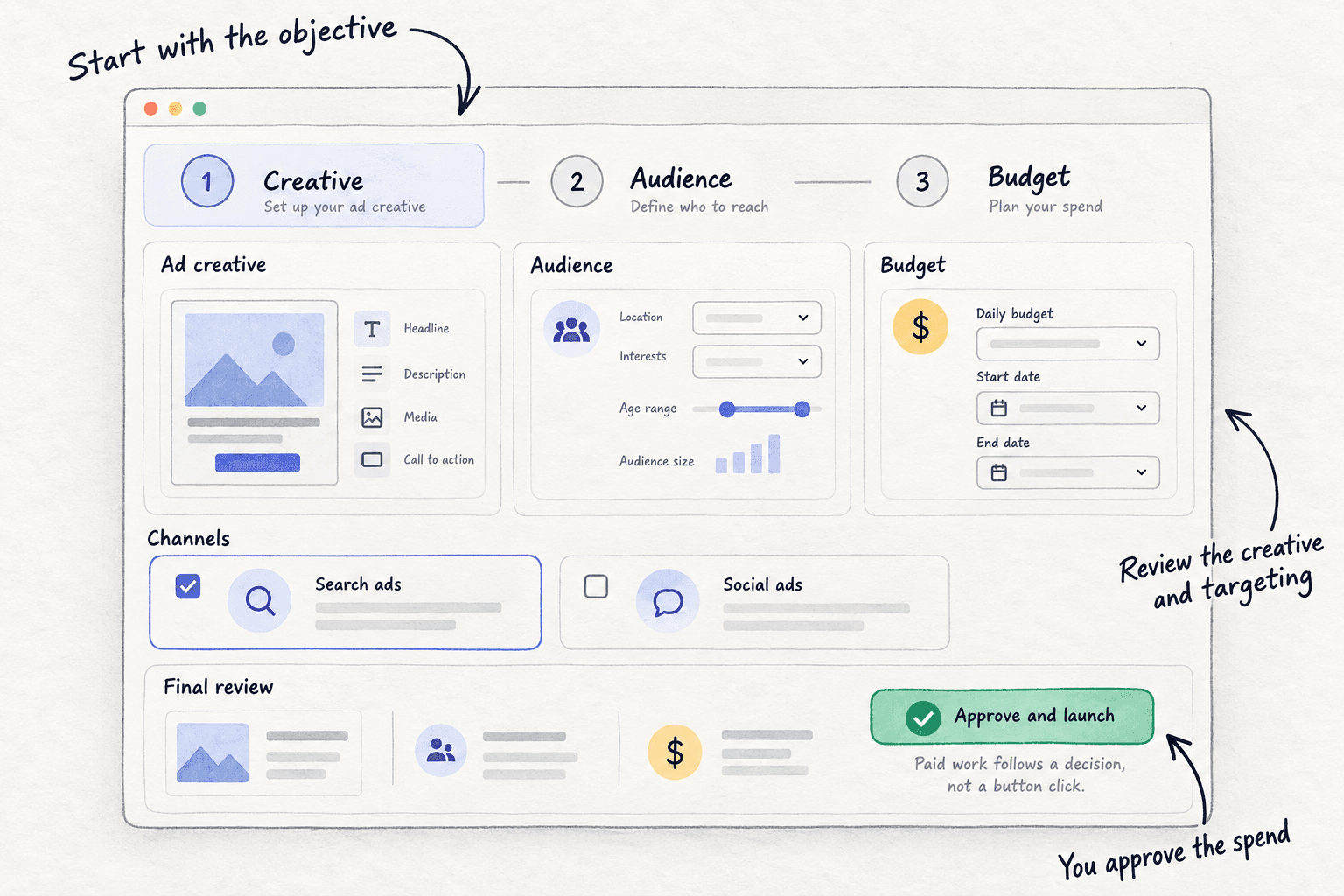
Step 6. Campaign monitoring reports live spend, impressions, clicks and click-through rate for each campaign, and every 12 hours proposes actions: which creative to stop, which campaign to cut. You approve or reject each one. Qualified enquiries still come from your own sheet, so keep calling every lead and keep the daily row.
Your first LinkedIn ads test checklist
0 of 16 done
Work through this list with an AI assistant
It drafts the work and keeps track of what is done.
Frequently asked questions
- Are LinkedIn ads worth it for a small B2B company?
Only once your free channels have won 5 orders and one order leaves you enough profit to pay for 100 clicks at about $13. In Dreamdata's 2026 report, LinkedIn returned $1.21 for every $1 spent, on average across thousands of B2B companies. That is an average, not a promise for yours. Your own Sunday sheet is the answer that counts.
- Why are LinkedIn ads so expensive?
You pay to reach people by job title and company, and many B2B advertisers bid for the same people. ZenABM's 2026 data put the median click on a single image ad at $13.23. Narrow, exact job titles and manual bidding keep you paying for clicks from people who can buy, which matters more than a cheaper click.
- Should I use Lead Gen Forms or send people to my website?
Start with a Lead Gen Form. It fills in from the person's profile, so more people finish it: about 10% in ZenABM's 2026 data. That also brings people who are not serious, so add one question, call every lead the same day, and count only qualified enquiries. If your B2B website already turns visitors into enquiries, test it next.
- What are Thought Leader Ads, and should I use them?
They let your company pay to show a post from your own profile, a customer or an expert, once that person approves it. LinkedIn allows them only for brand awareness, engagement and video views, not lead forms. ZenABM's 2026 data found clicks far cheaper, at a $2.29 median. Try one after your first test, using your best post from growing on LinkedIn.
- What is the minimum budget for LinkedIn ads?
LinkedIn needs at least $10 a day, and at least $100 as a lifetime budget for a new campaign, then $10 for each day it runs, so $140 for 14 days. It suggests $25 a day to new advertisers. Your real minimum is the money that buys 100 clicks, about $1,300, set out in how much to spend on ads.
Sources
- 1.Making the most of your budget — LinkedIn Marketing Solutions, checked 10 October 2026
- 2.Campaign and ad set budgets — LinkedIn Help, checked 10 October 2026
- 3.What you need to get started — LinkedIn Marketing Solutions, checked 10 October 2026
- 4.Set up Conversion Tracking for Insight Tag conversions — LinkedIn Help, checked 10 October 2026
- 5.Audience size — LinkedIn Help, checked 10 October 2026
- 6.Use audience expansion in your ad set — LinkedIn Help, checked 10 October 2026
- 7.Enable or disable LinkedIn Audience Network for your Sponsored Content ad set — LinkedIn Help, checked 10 October 2026
- 8.Company list targeting in Campaign Manager — LinkedIn Help, checked 10 October 2026
- 9.Campaign and ad set bidding strategies — LinkedIn Help, checked 10 October 2026
- 10.Create Lead Gen Forms in Campaign Manager — LinkedIn Help, checked 10 October 2026
- 11.Single image ads specifications — LinkedIn Help, checked 10 October 2026
- 12.Thought Leader Ads — LinkedIn Marketing Solutions, checked 10 October 2026
- 13.LinkedIn updates advertising campaign naming conventions — Social Media Today, 30 September 2025
- 14.LinkedIn Ads Benchmarks 2026 — ZenABM, 16 February 2026
- 15.The State of Wasted LinkedIn Ads Spend in B2B SaaS — GrowthSpree, June 2026, updated July 2026
- 16.LinkedIn Ads hit 121% ROAS as B2B buyer journeys stretch to 272 days (Dreamdata LinkedIn Ads Benchmarks Report 2026) — PPC Land, 10 March 2026
Next article to read
How to set up retargeting adsShow ads again to people who visited from LinkedIn but did not book a call.Read it nextRelated guides
- How to do account-based marketingB2BDo account-based marketing with no budget: pick 100 companies that look like your 2 clients, name 3 to 6 people at each, send 100 personal touches a day by email, LinkedIn and phone with one package a day to your 20 top accounts, and score every company every Sunday.
- How to make ad creativesMake ad creatives on a small budget: write 5 angles from your buyers' own words, make 4 new ads a day with free tools in each platform's sizes, post 2 free to see what people react to, and cut the bottom half every Sunday.
- How much to spend on adsSet your first ad budget from what one sale leaves you: a yes-or-no check by business type, a test limit of 10 times that number over 14 days locked in Google, Meta or LinkedIn, a daily stop line at 3 times, and a Sunday rule to raise 20% or stop.
- How to track which channel brought each dealB2BComing soon
Guides that link here
- How much to spend on marketing as a B2B companyB2B
- How to do account-based marketingB2B
- How to run Google Ads for SaaS
- How to set up retargeting ads
- How to create a B2B lead list for free
- How to do LinkedIn outreach
- How to get clients for a consulting business without referralsB2B
- How to get your first B2B clientsB2B
- How to launch a B2B productB2B
- How much to spend on marketing as a SaaS startupSaaS
- How to choose marketing channels for a B2B companyB2B
- How to choose marketing channels for an agencyAgency
- How to do a competitor analysis
- How to market your B2B businessB2B
- How to price digital marketing servicesAgency
- How to calculate CAC and payback period
- How to set up conversion tracking
- How to use UTM parameters
- How much to spend on ads
- How to make ad creatives
- How to grow on LinkedIn as a founder
- How to write a LinkedIn profile that brings in clients
- LinkedIn post ideas for B2B companiesB2B
- How to get more leads from a B2B websiteB2B
- How to write a landing page that converts
Cite this page
Dinesh Bypilla (2026). How to run LinkedIn ads for B2B. Scout7 Academy. https://scout7.ai/academy/paid-ads/how-to-run-linkedin-ads-for-b2b
Written by Dinesh Bypilla, Agentic systems engineer at Scout7. Reviewed by Murali Sid. Last checked 10 October 2026.
Quote any part of this guide with a link back to this page. © 2026 Scout7.
Markdown version of this page: https://scout7.ai/academy/paid-ads/how-to-run-linkedin-ads-for-b2b.md