



How to set up retargeting ads
Set up retargeting ads when your site gets only a few hundred visitors: install the Meta pixel, Google tag and LinkedIn Insight Tag and make 30-day visitor lists today, fill them with 100 messages, 2 posts on each of 2 channels and 20 answers a day, launch one capped campaign only once a list passes 1,000 people, and check list size and sales every Sunday.
ByDinesh BypillaReviewed byMurali SidLast checked 21 min read
Most people who visit your site leave without buying, and you have heard that retargeting ads bring them back cheaply. But with a few hundred visitors a month, the list of people to show those ads to is tiny, and a retargeting campaign either does not run or shows the same handful of people the same ad again and again. Here is how to set up retargeting ads so the list starts filling today, what to do while it is small, and when one capped campaign is worth paying for.
Do these three things
About 2 hours today, then the free work you already do and 30 minutes every Sunday. With a few hundred visitors a month, expect weeks of building before any audience is big enough to pay for.
Show the three actions in fullHide the full list
- Today: install the Meta pixel, the Google tag and, if you sell to businesses, the LinkedIn Insight Tag. Make a "visited in the last 30 days" audience in each, even while your ad budget is $0.
- Every day: fill those audiences with free visits: 100 personal messages, 2 posts on each of 2 channels and 20 answers where your buyers ask for help, each with a link to your site. While a retargeting campaign runs, turn off any ad that has spent 3 times your number with no sale.
- Every Sunday: write down each audience's size. Launch one capped retargeting campaign only once an audience passes 1,000 people and you pass the ads check. Judge it on sales in your own records, then raise 20% or stop.
Get help doing these
ChatGPT or Claude reads this guide and works through it with you.
1. Count your website visitors to see if retargeting can work yet
Retargeting ads can only reach people who already visited your site, so first count how many different people visited in the last 30 days. If it is under 1,000, set up the tags and audiences in step 2 today, but do not pay for a separate retargeting campaign yet.
Open Google Analytics 4 or Shopify Analytics, set the dates to the last 30 days, and write down the number of different people, not page views. GA4 calls them active users. If most of those visits came from one Reddit comment or one post, write that down too: it tells you where step 3 should send more people. Then compare the number with what each platform needs before it shows a single ad:
| Platform | The least it needs before your retargeting ads can run |
|---|---|
| Google Ads | 100 active visitors in the last 30 days, for Display, Search and YouTube |
| 300 visitors it can match to LinkedIn members, which can take longer than your 30-day window | |
| Meta (Facebook and Instagram) | no number published; its developer guide says only that an audience must reach "a certain size" |
Those are the smallest lists the platforms accept, not lists that pay. Our rule is 1,000 people in the 30-day list before you spend money on a separate retargeting campaign. Below that, the platform either cannot spend your budget or shows the same few people your ad many times a day. Not every visitor is matched either: LinkedIn only counts visitors it can find on LinkedIn.
You also need to pass the ads check in how much to spend on ads: proof that strangers buy without ads, sales you can count, and money you can lose. For a SaaS that means 10 paying customers first. Retargeting does not skip that check. It shows ads to people who already saw your page and left, so if the page does not sell, more visits to it will not either. Find out why no one is buying before you pay to bring them back.
With a few hundred visitors a month, be honest with yourself: your Google list may just pass 100, your LinkedIn list may take months to reach 300, and none of them will reach 1,000 soon. That is fine. Steps 2 and 3 still pay off, because the list only fills from the day it exists, and your cheapest way to reach past visitors is already free: an email list and a reply to every person who wrote to you.
- Tool: Google Analytics 4 or Shopify Analytics, and Google Sheets.
- Time: 15 minutes.
- You will have: one number, different visitors in the last 30 days, and a yes or no for the ads check.
- It worked if: the number comes from your analytics, not a guess, and you know which of the three platforms your list could reach.
- Common mistake: turning on retargeting because "it is the cheapest ad" with 200 visitors a month. Retargeting makes a list of people work harder. It does not make the list.
See it done: Bugmoth's count
Bugmoth is a made-up bug-reporting tool for small web teams. It costs $19 a month per team, with a 14-day trial.
Last 30 days
| Line | Number |
|---|---|
| Visits | 310 |
| Different people (GA4 active users) | 230 |
| Paying teams so far | 2 (the SaaS ads check needs 10) |
| Google list could pass 100 | yes |
| LinkedIn list could reach 300 soon | no |
| Decision | tags and audiences today, ads stay at $0 |
Why it works: Their real numbers show the lists are too small to pay for yet, so they build them for free instead of guessing.
2. Install the tracking tags and make your retargeting audiences today
Install each platform's tag on every page of your site, then make one audience of "everyone who visited in the last 30 days" and one of "people who already bought" to leave out. Do it today, even with ads at $0, because each list only starts filling from the day you make it.
Pick the platforms first. Install only what you will use:
If you run a D2C store: Meta and Google. Connect the Meta pixel with Shopify's free Facebook & Instagram app, with data sharing at Maximum, as in Meta ads for a Shopify store. Your hottest list is people who added to cart, and they get an abandoned cart email before any ad.
If you run a SaaS: Google first, because your first ads are Google search ads, and Meta second. Make a list of people who visited your pricing or signup page.
If you run a B2B company: LinkedIn and Google. The LinkedIn list is the one that reaches job titles, and it needs the 300 matched members from step 1, so start it today.
If you run an agency: LinkedIn and Meta for your own site. For a client, install the tags in the client's own ad accounts and business tools, so the client owns the lists. Facebook ads for clients covers the rest.
Then make the audiences. Name each one the same way, such as "visitors-30d" and "buyers-180d", so the Sunday sheet is easy to fill.
- 1
Google Ads
Add the Google tag to every page; conversion tracking has the steps. Google then makes "All visitors" and "All converters" segments for you. For a 30-day list of your own, click the Tools icon, open Shared library, then Audience manager. In Segments, click the plus button and choose Website visitors. Enter a Segment name, set the "Web page visit" action to 30 days, and under Pre-fill options choose to add visitors from the last 30 days. Click Create segment.
- 2
Meta (Facebook and Instagram)
Install the pixel, through Shopify's app on a store or through Events Manager on any other site. In Ads Manager, open Audiences, create a Custom Audience, choose Website, pick your pixel, choose "All website visitors" and set the retention to 30 days. Make a second Custom Audience of people who bought or signed up in the last 180 days, to leave out later. Then make one more from Instagram account: people who engaged with your profile or posts. Meta counts likes, comments, saves and messages on your free posts there, so this list grows without a single site visit.
- 3
LinkedIn
Add the Insight Tag to every page except pages with sensitive data, such as health or money accounts. In Campaign Manager, go to Plan, then Audiences. Click Create audience, choose Matched Audience, then Website. Name it, pick 30 days under "When did they engage?", choose Pages, and click Agree & create. Check the Status column within 24 hours. LinkedIn suggests waiting up to 90 days for a low-traffic site to build its list.
If you sell to people in the EU, the UK or Switzerland, add a cookie banner that asks before these tags run. Google's policy requires "legally valid consent" for cookies and for using personal data to personalise ads. Meta and LinkedIn tags collect the same kind of data, so the same banner covers them. Add a line about each tag to your privacy policy.
Tag every link you share in step 3 with UTM parameters, so you can see which free work filled the list.
- Tool: Google Ads, Meta Ads Manager and Events Manager, LinkedIn Campaign Manager, all free to use. You pay only when ads run.
- Time: about 1 hour 30 minutes.
- You will have: a 30-day visitor audience and a buyers audience on each platform you use, and a Meta list of Instagram engagers.
- It worked if: within 48 hours, each visitor audience shows a growing number or a "building" status, and a visit from your own phone appears in each platform's tag check.
- Common mistake: waiting to install tags until you are ready to spend. On that day your lists start at zero, and LinkedIn may need months to reach 300.
3. Fill your audience every day with free visits
Your retargeting audience grows only when new people visit, so every day send 100 personal messages, post 2 times on each of 2 channels and give 20 answers, each with a link to a page on your site that has your tags. This is the same free work that brings your first customers, and it also builds your list.
Each piece of work needs a reason to click and a page worth landing on:
- 100 personal messages a day to people who fit your buyer, each with a link to one useful page: a guide, a short demo, a price page, or a landing page about their one problem. ChatGPT or Claude drafts each one in about a minute, the way AI drafts content for posts too; you add one line that is true about the person. The full method is in how to write a cold email.
- 2 posts a day on each of 2 channels. On Instagram, a short video and a carousel, as in promoting your business on Instagram; on LinkedIn, posts from your own profile, as in growing on LinkedIn as a founder. Every like, comment, save and message on Instagram also adds that person to the Meta engagers list from step 2.
- 20 answers a day across at least 5 places your buyers ask for help. Answer the question first. Link only where the community allows it and the page answers the question.
- 1 page a day that answers a real search, if you write, so people find you without a message. Writing a blog post that ranks has the steps.
LinkedIn limits how many connection requests you can send each week, and many communities limit links. Spread the 100 messages over email, LinkedIn and direct messages instead of sending fewer. Getting traffic to a new website for free has the full routine and the limits for each place.
Judge it by volume. After 4 weeks of this, 2,800 messages and 112 posts, look at your 30-day list. If it is still under 1,000 people, your next step is more and better free work, not retargeting: find which link people clicked most in your UTM report and send more people to that page.
- Tool: ChatGPT or Claude to draft, your email, LinkedIn and social apps, and Google Sheets to log it.
- Time: about 4 hours a day, every day.
- You will have: 100 messages, 4 posts and 20 answers a day, logged, and a list that grows each week.
- It worked if: the 30-day list is bigger every Sunday than the Sunday before.
- Common mistake: posting with no link and no reason to visit, or sending every link to the home page. A page about the one problem the person has gets the click.
See it done: One of Bugmoth's 100 messages
To: Maya, owner of a 4-person web studio
Subject: client bug reports
Hi Maya, I saw your post about clients sending bugs as blurry screenshots in email. We wrote a 2-minute page on how three small studios collect bug reports with the page address and browser attached: [link]. Would it help your team?
Why it works: It helps first, and the link goes to a page about her exact problem, so a click is likely and adds her to the list.
4. Check how much your main ads already retarget
If you already run ads, check how much of their money goes to people who visited or engaged before. Meta's Sales campaigns and Google's search campaigns can already reach your past visitors without a separate retargeting campaign, and a second campaign would bid against the first for the same few people.
- 1
Meta: define your audience segments
In Meta's Advertising settings, define two groups from the audiences in step 2: Engaged audience (your website visitors and Instagram engagers) and Existing customers (your buyers). Meta describes the engaged group as people "aware of your business or interacted with your products or services, but have not made a purchase." Then, in Ads Manager, open Breakdown, then Demographics, then Audience segments. It shows spend and results for new people, engaged people and existing customers. It works on Sales campaigns, and only counts from the day you save the segments.
- 2
Google: add your visitor list as Observation
In your search campaign, open Audiences, click the pencil icon, choose your website visitor segment and add it as Observation. Google says Observation "won't change who can see your ads" and recommends it for all Search campaigns. You then see whether past visitors click and buy more often than new people. With Smart Bidding, Google uses the list as a signal too.
In tests reported by the Meta ads trainer Jon Loomer, a broad Meta Sales campaign spent about 20% to 25% of its budget on past visitors and engagers on its own, falling as that small group ran out. So on Meta, the campaign from Meta ads for a Shopify store already retargets your list. Leave it running as it is, and use the breakdown to see the split. A high CPM on the engaged row is normal: a small list costs more to reach.
If you run a B2B company: LinkedIn has no breakdown like this, and LinkedIn ads cost more per click, so check your list size before anything else. Your visitor list is used only by a campaign that targets it, which is step 5.
- Tool: Meta Ads Manager and Google Ads.
- Time: 20 minutes.
- You will have: the share of your ad spend and sales that came from people who had visited or engaged before.
- It worked if: the breakdown or the Observation report shows a row for your past visitors with its spend and results.
- Common mistake: building a separate retargeting campaign next to a Sales campaign that already reaches the same 300 people. Each one pushes up the price the other pays.
5. Launch one retargeting campaign once your audience passes 1,000 people
When one visitor list passes 1,000 people and you pass the ads check, launch one retargeting campaign on that platform. Give it a capped limit of 10 times your number over 14 days, leave out people who already bought, and show an ad that answers the worry that stopped them, not the ad they already ignored.
Use the same numbers as your other ads, from how much to spend on ads: the most you can pay for one sale, signup or enquiry is your number; the test limit is 10 times it, spent over 14 days; any ad that spends 3 times it with no sale is turned off. A small list may not spend the whole limit. That is fine: it is the list telling you its size.
The ad. These people saw your page and left, so a different picture of the same promise will not move them. Answer the reason they left. Take the "worry" and "proof" angles from how to make ad creatives: a real review, a testimonial, a 60-second demo, the delivery time, the guarantee, a one-page case study. This is social proof. Draft 10 versions with ChatGPT or Claude and launch 3, as in the budget guide. Testing Facebook ad creatives covers comparing them once you spend more. Only offer a discount you can afford every month, or you teach visitors to wait for one.
First line: [the worry, in a buyer's own words, from a review, a reply or a call]
Answer: [the true fact that answers it: a review, a number, a guarantee, a demo]
Proof: [one real customer's words, or a count you can show]
Button: [Shop now / Start free trial / Book a call], to the page they left, with UTM tags
Then set it up on the one platform whose list passed 1,000:
- 1
Meta
First, read step 4: your Sales campaign may already be doing this. If you still run a separate one, make a Sales campaign with a lifetime budget equal to your limit and an end date 14 days away, as in Meta ads for a Shopify store. In the ad set, add your visitors-30d audience and exclude your buyers audience. Meta treats the buyers exclusion as a hard rule. With Advantage+ audience on, Meta treats the visitors list only as a suggestion and can show the ad to new people too; Jon Loomer reports that switching to the original audience options keeps it to your list.
- 2
Google
Make a Display campaign, which shows your ads to past visitors on other sites and apps. Under audience segments, choose your website visitors segment, and exclude "All converters". Set a campaign total budget equal to your limit, with an end date 14 days away, if your account offers it. If not, set the daily budget to your limit ÷ 14 and pause the campaign the day spend reaches the limit.
- 3
LinkedIn
Make a campaign in Campaign Manager with your website audience as the target and a lifetime budget equal to your limit, with an end date. LinkedIn's lowest daily budget is $10, so a 14-day test needs at least $140; if your limit is lower, keep LinkedIn retargeting off. LinkedIn ads for B2B covers the ad formats.
Every day, at the same time, compare each ad's spend with the sales in your own records, and turn off any ad past the stop line with no sale. That is the only change during the 14 days.
If you run a D2C store: if your list is mostly people who added to cart, check your abandoned cart emails and Klaviyo flows send first. They cost nothing per person.
If you run a SaaS: leave out people who already signed up, not only payers. People who signed up and stopped need onboarding emails, not an ad.
If you run a B2B company: send the ad to the page that gets you enquiries, and judge on enquiries in your sales sheet. Keep emailing the leads you already have.
- Tool: Meta Ads Manager, Google Ads or LinkedIn Campaign Manager, and ChatGPT or Claude to draft.
- Time: about 1 hour 30 minutes to set up, then 15 minutes a day.
- You will have: one live retargeting campaign on one platform, capped at your limit, with buyers left out and 3 ads that answer the worry.
- It worked if: the campaign shows your limit as its total or lifetime budget, an end date 14 days after the start, your visitor list as the audience and your buyers list excluded.
- Common mistake: showing people who already bought the same ad for weeks, or splitting a 1,000-person list into 5 smaller lists. Keep one list until each part would pass 1,000 on its own.
See it done: Bugmoth's retargeting ad, ready for later
Before
Still thinking about Bugmoth? Come back and sign up today!
After
“Our clients send bugs as blurry screenshots.” Watch a 4-person studio get every report with the page address and browser attached. Button: Watch the 60-second demo
Why it works: It opens with the worry a real visitor had and answers it with a demo, instead of asking them to come back.
6. Every Sunday, check audience size and sales, then raise 20% or stop
Every Sunday, write down the size of each visitor list and, if a retargeting campaign is running, what it spent and the sales your own records show from it. When the test has spent its limit, raise the next one by 20% if each sale cost at or under your number, or stop if it cost more.
Week | Platform | List (visitors-30d) size | Engagers list size | Campaign running? | Spent | Sales in your records | Sales the platform claims | Cost per sale | Your number | Decision
Use these rules:
- List under 1,000: no campaign. Keep the daily work from step 3, and add the week's number to the sheet.
- Cost per sale at or under your number, once the limit is spent: run the next test with a limit 20% higher, keeping the ads that sold.
- Cost per sale over your number: stop. Retargeting brought people back and they still did not buy, so the page or the offer is the problem. Work through ads that get clicks but no sales, fix a store with traffic but no sales, or fix a SaaS site with traffic but no signups.
- The same people see it again and again: check the Frequency column in Ads Manager. Rising frequency with a falling click-through rate means the list is used up. Swap in a spare ad, or widen the list to 90 days.
Ad platforms count a sale when someone saw or clicked an ad within their time window, so a retargeting ad can take credit for a buyer who was coming back anyway. Count sales in your store, signup list or sales sheet, with the ad's UTM tag, and ask every new customer "Where did you hear about us?". This is self-reported attribution. Paste the week's numbers into ChatGPT or Claude to fill the sheet, and check its sums against your records. Once a month, add the totals to your marketing review and your CAC.
- Tool: Google Sheets, your ad platform and your store, signup list or sales sheet.
- Time: 30 minutes every Sunday.
- You will have: one row a week for each list and campaign, and a decision for every test that has spent its limit.
- It worked if: every sale you count from retargeting is a sale you can find in your own records with the ad's tag.
- Common mistake: raising the budget because the platform shows a high ROAS on retargeting. Past visitors were already likely to buy, so check your own sales against your break-even ROAS first.
See it done: Bugmoth's first four Sundays
30-day lists, after 2,800 messages and 112 posts
| Sunday | Google visitors-30d | Meta visitors-30d | Campaign | Decision |
|---|---|---|---|---|
| 1 | 240 | 210 | none | keep filling |
| 2 | 330 | 300 | none | keep filling |
| 3 | 450 | 410 | none | keep filling |
| 4 | 560 | 520 | none | under 1,000 and under 10 paying teams: ads stay at $0 |
Why it works: They judge by the list size after 2,800 messages, so they keep ads off and know exactly what is missing.
Where Scout7 helps
Scout7 speeds up steps 3, 5 and 6. Campaigns run in the Scout7 app, not from a chat with Claude or ChatGPT yet.
Step 3. Scout7's Image Studio makes image posts with captions in your brand's voice, and its Video Studio makes portrait (9:16) videos with captions from a cast and voice you choose. It schedules approved posts to LinkedIn, X, Instagram, Facebook, Threads and Reddit. You approve every post before it goes out.
Step 5. Scout7 connects your Google, Meta, LinkedIn or Reddit ad account, builds the creatives and ad sets, and walks the campaign through creative review, targeting and budget, including whether the budget is daily or lifetime. Choose lifetime and enter your limit. You make the visitor and buyer lists in each ad platform, as in step 2. You review every creative and approve the spend. Nothing launches without your approval.
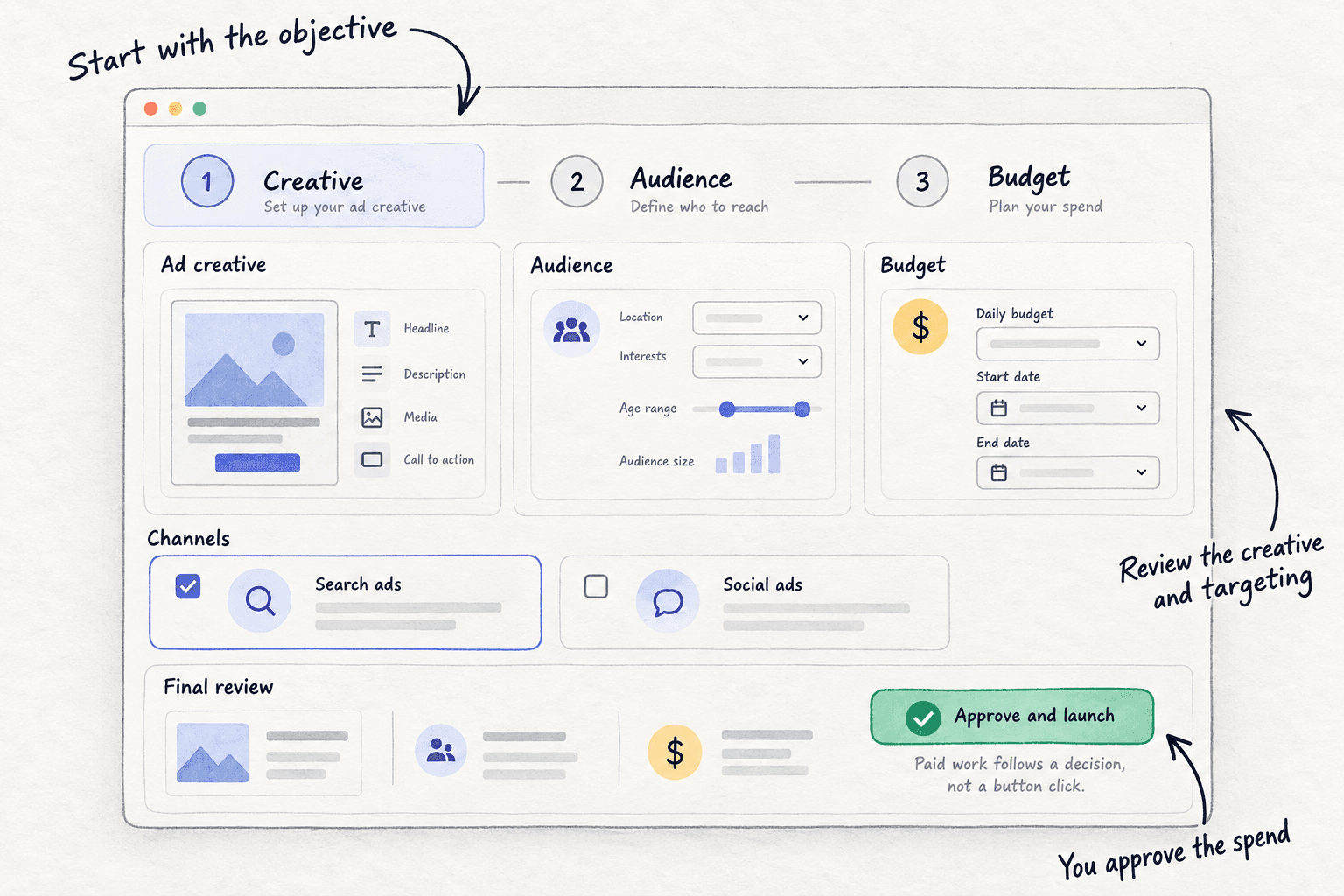
Step 6. Campaign monitoring reports live spend, impressions, clicks and click-through rate for each campaign, and every 12 hours proposes actions, such as which creative to stop. You approve or reject each one. Sales still come from your own records, so keep the Sunday sheet.
Your retargeting checklist
0 of 11 done
Work through this list with an AI assistant
It drafts the work and keeps track of what is done.
Frequently asked questions
- What is the minimum audience size for retargeting?
Google Ads needs 100 active visitors in the last 30 days for Display, Search and YouTube. LinkedIn needs 300 visitors it can match to members. Meta publishes no fixed number. Those are the least each platform will run with. Our rule is 1,000 people in the 30-day list before you pay for a separate retargeting campaign.
- Is retargeting worth it with low website traffic?
Not as a separate campaign. With a few hundred visitors a month the list is too small to pay for. Install the tags and make the lists today, because they only fill from now. Then spend your time on the free work that brings visitors, and email the people who already gave you their address.
- How long should my retargeting window be?
Start with 30 days. If the list is under 1,000, widen it to 90 days before you spend. Meta's website lists go up to 180 days, Google's up to 540, and LinkedIn suggests waiting up to 90 days for a small site's list to build. People who added to cart get an email first, not a longer window.
- What is the difference between retargeting and remarketing?
They mean the same thing: showing ads to people who visited your site or engaged with you before. Google uses "remarketing" and calls the lists "your data segments". Meta calls them custom audiences, and LinkedIn calls them Matched Audiences. The glossary entry on retargeting has the short version.
- Do I need a cookie banner for retargeting?
If you have visitors in the EU, the UK or Switzerland, yes. Google's policy requires legally valid consent for cookies and for using personal data to personalise ads, and Meta and LinkedIn tags collect the same kind of data. Ask before the tags run, keep a record of consent, and name each tag in your privacy policy.
Sources
- 1.About audience segments in Audience manager — Google Ads Help, checked 10 October 2026
- 2.About setting up your data segments — Google Ads Help, checked 10 October 2026
- 3.Create data segments with your website visitors — Google Ads Help, checked 10 October 2026
- 4.How your data segments work — Google Ads Help, checked 10 October 2026
- 5.About targeting and observation settings — Google Ads Help, checked 10 October 2026
- 6.About audience segments (website visitors on the Display Network) — Google Ads Help, checked 10 October 2026
- 7.EU user consent policy — Google, checked 10 October 2026
- 8.Google lowers audience size limits across Ads — Search Engine Land, December 2025, checked 10 October 2026
- 9.Website Custom Audiences — Meta for Developers, checked 10 October 2026
- 10.Engagement Custom Audiences — Meta for Developers, checked 10 October 2026
- 11.Advantage+ Audience — Meta for Developers, checked 10 October 2026
- 12.The Master Brief: my complete approach to Meta ads — Jon Loomer Digital, 2026, checked 10 October 2026
- 13.8 essential breakdowns to use in Meta Ads Manager — Jon Loomer Digital, checked 10 October 2026
- 14.Facebook ads retargeting: the complete 2026 guide — Linear Design, updated 4 September 2026
- 15.Get started with LinkedIn website retargeting — LinkedIn Help, checked 10 October 2026
- 16.Check the status of your website audience in Campaign Manager — LinkedIn Help, checked 10 October 2026
- 17.Making the most of your budget — LinkedIn Marketing Solutions, checked 8 October 2026
- 18.Has anyone successfully used Meta Ads to grow a Shopify app? — Shopify Community, 4 August 2026
Next article to read
How to calculate CAC and payback periodCheck what each customer costs across all your ads, retargeting included.Read it nextRelated guides
- How to run Meta ads for a Shopify storeD2CRun Meta ads for a Shopify store on a small budget: check you are ready, connect the store with Shopify's free Facebook & Instagram app and a test order, launch one Sales campaign locked to 10 times what an order leaves over 14 days, turn off losing ads daily, and raise 20% or stop every Sunday on Shopify's orders.
- How to reduce abandoned cartsD2CReduce abandoned carts on a new Shopify store: find where shoppers stop in Shopify's own report, fix the shipping surprise and the checkout on your phone today, email every person who leaves checkout yourself, and fix one step every Sunday.
- How much to spend on adsSet your first ad budget from what one sale leaves you: a yes-or-no check by business type, a test limit of 10 times that number over 14 days locked in Google, Meta or LinkedIn, a daily stop line at 3 times, and a Sunday rule to raise 20% or stop.
- How to run LinkedIn ads for B2BRun LinkedIn ads for your B2B company on a small budget: check you have 5 orders from free channels, set one locked 14-day test at 10 times what a qualified enquiry is worth, target exact job titles with Audience Expansion and the Audience Network off, call every lead the same day, and raise 20% or stop each Sunday.
Guides that link here
- How to make ad creatives
- How to run LinkedIn ads for B2B
- How to reduce abandoned cartsD2C
- How to set up Klaviyo flows for a new storeD2C
- How much to spend on marketing as a B2B companyB2B
- How much to spend on marketing as an ecommerce brandD2C
- How to set a marketing budget for your agencyAgency
- How to calculate break-even ROASD2C
- How to set up conversion tracking
- Amazon PPC for beginnersD2C
- How much to spend on ads
- How to fix ads that get clicks but no salesD2C
- How to run Google Ads for SaaS
- How to run Meta ads for a Shopify storeD2C
- How to test Facebook ad creativesD2C
- How to increase repeat purchasesD2C
- How to run a sale without training customers to waitD2C
- How to get more leads from a B2B websiteB2B
- How to improve website speed
Cite this page
Dinesh Bypilla (2026). How to set up retargeting ads. Scout7 Academy. https://scout7.ai/academy/paid-ads/how-to-set-up-retargeting-ads
Written by Dinesh Bypilla, Agentic systems engineer at Scout7. Reviewed by Murali Sid. Last checked 10 October 2026.
Quote any part of this guide with a link back to this page. © 2026 Scout7.
Markdown version of this page: https://scout7.ai/academy/paid-ads/how-to-set-up-retargeting-ads.md